The backup you keep meaning to set up
A restic backup repository on S3 is where your encrypted, deduplicated snapshots live, off the server they protect. This chapter sets one up against object storage and takes the first backup into it.
- restic keeps backups in a repository; pointing it at S3 object storage puts that repository off the server it protects.
- Everything is encrypted on your machine before upload, so the object store only ever holds ciphertext.
- Four environment variables configure the whole thing: the repository URL, two S3 credentials, and an encryption passphrase.
- Lose the RESTIC_PASSWORD and the backups are gone for good, so store it somewhere the server's failure cannot reach.
Every one of the earlier guides has, at some point, told you to take a backup and get it off the server. It is time to actually do it properly, because "properly" is where most backup setups fall down. A backup is only worth anything if it is off the machine it protects, encrypted so a leak of the backup is not a leak of your data, small enough that keeping many of them is affordable, and, above all, restorable, which so many backups quietly are not.
Rolling your own with pg_dump and a cron job and a copy to somewhere covers the basics, and for a single database it is fine. But the moment you want encryption, deduplication so you are not storing the same data a hundred times, and a real snapshot history you can restore any point from, you want a purpose-built backup tool.
This series uses restic, which does all of that from a single binary, and points it at the MinIO object storage from the last series, so your backups land encrypted in a bucket that is off your app server, versioned, and lifecycle-pruned. Everything here runs on Ubuntu 24.04 LTS. This chapter sets up the repository and takes the first backup.
Let's build.
Prerequisites
- An Ubuntu 24.04 LTS server with a shell and sudo.
- An S3-compatible object store with a bucket to hold backups. The MinIO from the object-storage guide works, and so does any S3 provider.
- The access key and secret for that bucket.
- Optionally, a PostgreSQL database if you want to capture a fresh dump alongside your files, as this chapter does.
What restic gives you
restic is worth understanding for three properties, because they are exactly the ones a homemade backup script lacks.
It is encrypted by default. Everything is encrypted on your machine before it is sent to the repository, so the storage holding your backups never sees your data in the clear. This matters enormously when the backup lives in object storage or on someone else's server: even if that storage is compromised, your backups are ciphertext.
It is deduplicated. restic splits your data into chunks and stores each unique chunk once. Back up a 1 GB database every night and, if only a little changed, each nightly backup adds only the changed chunks, not another gigabyte. You will see this dramatically in the next chapter.
It is snapshot-based. Every backup is a snapshot you can restore in full, and restic keeps the history, so "restore the state from last Tuesday" is a real command, not a hope.
Install restic and create the S3 backup repository
restic is one binary, available from the package manager:
sudo apt install restic
restic version
The important decision is the repository: where your backups are stored. restic supports many backends, and the one you want, per every earlier guide, is object storage, so the backups are off the server they protect. Point it at the MinIO bucket from the last series using four environment variables:
export RESTIC_REPOSITORY=s3:http://127.0.0.1:9000/backups/restic
export AWS_ACCESS_KEY_ID=admin
export AWS_SECRET_ACCESS_KEY=your-minio-secret
export RESTIC_PASSWORD=a-long-backup-passphrase
The RESTIC_REPOSITORY is the S3 URL of a path inside your backups bucket. The two AWS_ variables are the S3 credentials, because restic speaks S3, exactly as promised in the object-storage guide. And RESTIC_PASSWORD is the encryption passphrase, which brings us to the single most important warning in this entire series.
The one thing you must not lose
Initialise the repository:
restic init
restic prints a warning worth reading twice: if you lose the repository password, your data is irrecoverably lost. This is not a limitation, it is the whole point of encryption working. There is no reset link, no support ticket, no back door. That passphrase is the only key to your backups, and a backup you cannot decrypt is not a backup.
So store RESTIC_PASSWORD somewhere separate from the server and separate from the backups themselves: a password manager, a sealed note, your team's secrets vault. The failure mode people hit is keeping the password only on the server whose disaster the backup was supposed to survive. Do not be that story.
The first backup
With the repository ready, back something up. A realistic target is your application directory and a fresh database dump together, so one backup captures both code state and data:
pg_dump -Fc -d shopdb -f /tmp/site/shopdb.dump
restic backup /tmp/site
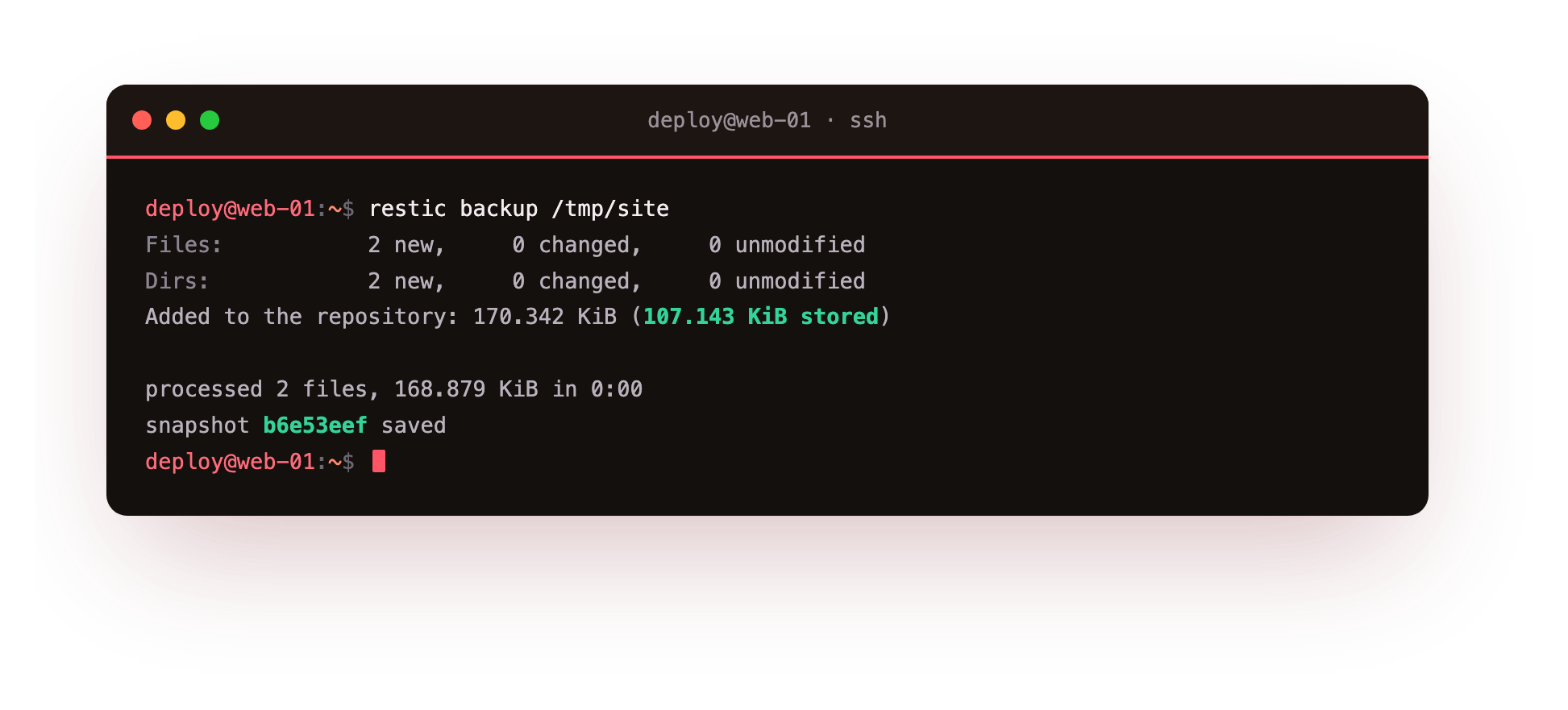
restic reads the files, chunks and encrypts them, and stores them: two files, about 169 KiB, and it reports a snapshot with a short ID like b6e53eef saved. That snapshot is now sitting encrypted in your MinIO bucket, off your app server. Notice it also reports "Added to the repository: 107 KiB stored" against 170 KiB of data, because restic compressed it on the way in. Your first proper backup is done, and it is already better than most: encrypted, off-server, and, as the next chapter proves, cheap to repeat.
Why not just pg_dump to a cron job?
It is a fair question, and the honest answer is: for one small database, pg_dump piped to a nightly mc cp into object storage is genuinely fine, and the PostgreSQL guide showed exactly that.
You reach for restic when you want more than a single file dumped: when you are backing up whole directories, when you want encryption you did not have to bolt on, when storing a month of daily backups would be expensive without deduplication, or when you want to restore a specific point in time rather than just "last night's dump."
Most real deployments cross that line quickly, the moment they have application files, uploads, and configuration to protect alongside the database. restic is the tool for when your backups grow up.
Troubleshooting the repository setup
restic init hangs or times out. The S3 endpoint in RESTIC_REPOSITORY is not reachable. Confirm the host and port are right, that the object store is running, and that this server can reach it before retrying.
restic returns "Access Denied" or a 403. The AWS_ACCESS_KEY_ID and AWS_SECRET_ACCESS_KEY are wrong, or the key has no rights on the bucket. Re-check the credentials and the bucket policy.
"The specified bucket does not exist." The bucket named in the repository URL has not been created yet. Create it in the object store, then run restic init again.
restic keeps asking for a password. RESTIC_PASSWORD is not exported in the current shell, so restic falls back to prompting. Export it in the session, or pass a --password-file.
Frequently asked questions
Do I have to use MinIO, or will any S3 work?
restic speaks the S3 API, so any S3-compatible store works: MinIO, AWS S3, Backblaze B2, or Wasabi. Only the endpoint and the credentials change; the restic commands stay identical.
Where should I keep the repository password?
Anywhere the server's failure cannot reach: a password manager, your team's secrets vault, or a sealed offline note. Never keep it only on the server the backup is meant to protect.
Can I back up more than one server to the same repository?
Yes. Each host's snapshots are labelled with its hostname, and deduplication is shared across them, so files common to several servers are stored only once.
Can whoever runs the object storage read my data?
No. restic encrypts every chunk on your machine before it is uploaded, so the storage provider only ever holds ciphertext, never your files in the clear.
What you have, and what comes next
You have an encrypted, deduplicated backup repository living in object storage that is off your application server, and your first snapshot is safely in it. The encryption key is stored somewhere the server's disaster cannot reach.
The next chapter shows the property that makes this affordable at scale: deduplication. You will take a second backup after changing almost nothing and watch restic store almost nothing, which is what lets you keep a long history of snapshots for a fraction of the storage a naive approach would need.