The reason you can afford a long history
restic deduplication is what lets you keep a long history of snapshots for almost the price of one. It stores each unique chunk of data once, so a second backup of the same directory adds only what actually changed.
- restic splits data into chunks and stores each unique chunk once, so backing up the same data again adds almost nothing.
- A new snapshot costs only the storage of what changed since the last one, so a month of history costs little more than a single backup.
- Every snapshot is a complete, independently restorable point in time, even though it was stored as just the changes.
- Tag snapshots by kind, such as nightly or uploads, so retention rules can treat different backups separately.
The classic objection to keeping many backups is storage. If each nightly backup of a 1 GB database is another gigabyte, a month of history is 30 GB, a year is hundreds, and you start deleting old backups precisely when you might need them. This is the problem deduplication solves, and it is the single feature that makes restic worth using over a folder full of dated dumps.
Because restic stores each unique chunk of data only once, a new snapshot only costs the storage of what actually changed since the last one. A month of daily backups of a mostly-static database can cost barely more than a single backup.
This chapter proves it on the live repository, on the same Ubuntu 24.04 LTS server as part one: take a second backup after changing almost nothing, and watch restic store almost nothing. Then it covers snapshots, the point-in-time records that let you restore not just "the latest" but any moment you kept.
Let's build.
Prerequisites
- The S3 restic repository from part one, already initialised on an Ubuntu 24.04 LTS server.
- The same four environment variables exported in your shell: the repository URL, the two S3 keys, and RESTIC_PASSWORD.
- At least one snapshot already taken, so there is a previous backup to deduplicate against.
Watch restic deduplication shrink new snapshots
You already took one backup. Now change something tiny, a single line added to one file, and back up the exact same directory again:
echo "one new line" >> /tmp/site/notes.txt
restic backup /tmp/site
Look at what restic added: about 1.8 KiB, roughly a kilobyte stored. The directory still contains the same 169 KiB of data, the same database dump, the same application files, and restic backed all of it up again into a new snapshot, but it only stored the one small change, because every other chunk was already in the repository from the first backup. That is deduplication. The second snapshot is a complete, independently-restorable backup of the whole directory, and it cost almost nothing.
Now extend that to reality. Your database changes a little each day: some new orders, some updated rows, but most of the data is identical from one night to the next. So each nightly snapshot adds only the day's changes, and a month of them costs a small multiple of one backup, not thirty times it. This is why you can keep a genuinely long retention window without the storage bill that would force you to throw history away.
Snapshots are your points in time
Each backup created a snapshot, and the snapshot is the unit you restore. List them:
restic snapshots
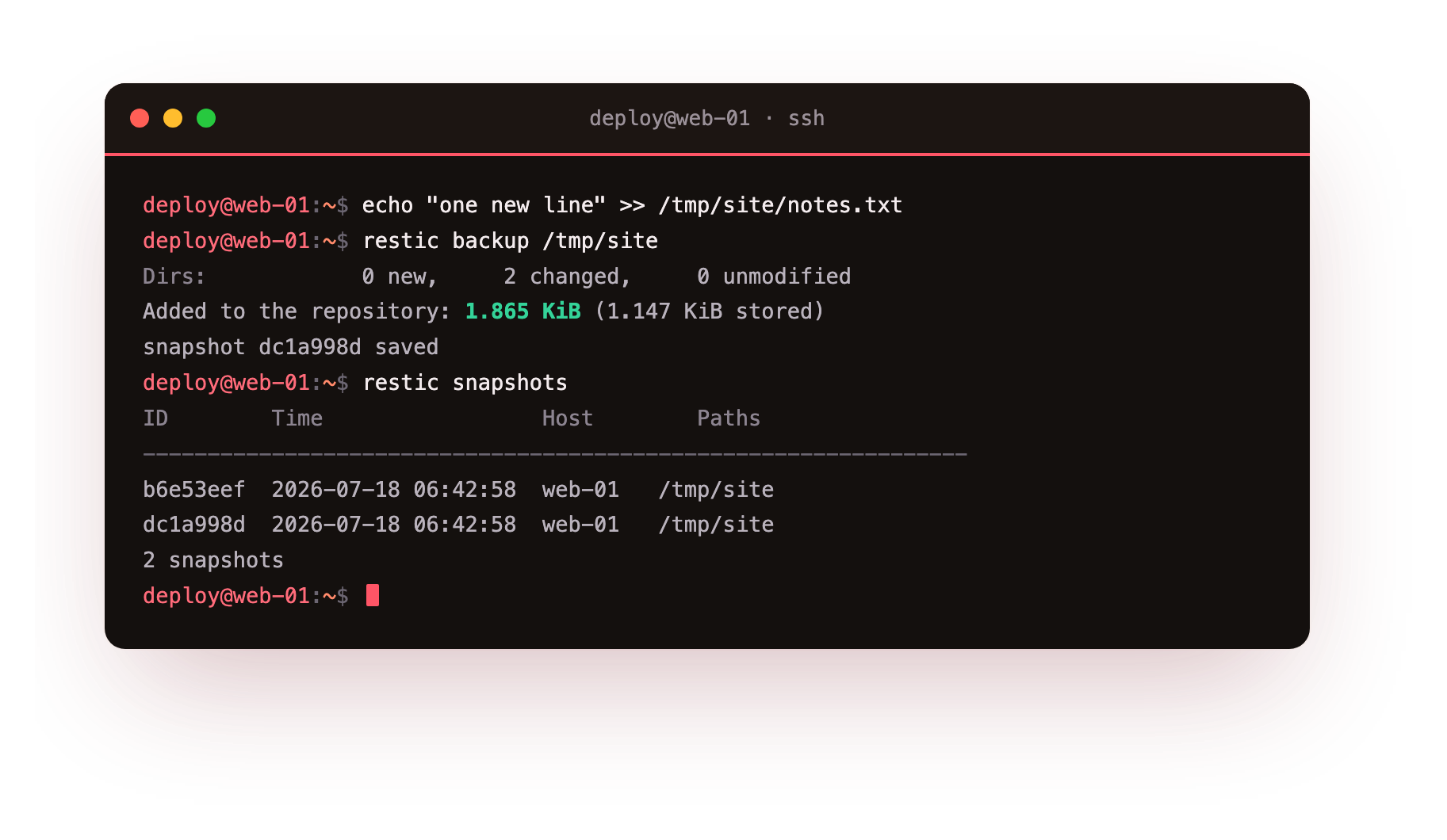
You get a table: each snapshot's short ID, its timestamp, the host it came from, and the paths it covered. Two backups, two snapshots, each a complete restorable picture of the directory at that moment.
This is the mental model that matters: a snapshot is not a diff you have to reassemble, even though deduplication stored it as one. Restoring any snapshot gives you the full state as it was, whether it is the latest or one from three weeks ago. The deduplication is an implementation detail that saves you storage; from where you stand, every snapshot is a complete backup.
The short IDs, like b6e53eef, are how you refer to a specific snapshot in later commands, and latest always means the most recent. When you have many, you can filter by host, by path, or by tag, so restic snapshots --tag daily --host web-01 narrows to exactly the ones you mean.
Tag your backups so future-you can find them
A small habit that pays off later: tag your snapshots by what they are. When your backup script runs, add a tag:
restic backup /tmp/site --tag nightly
restic backup /var/uploads --tag uploads
Tags let you keep different kinds of backup in one repository and still treat them separately, which matters most for retention. You will almost certainly want to keep nightly database backups on a different schedule than, say, weekly full-server snapshots, and tags are how the retention rules in the last chapter tell them apart. Deciding on a couple of tags now, nightly, uploads, whatever maps to your data, is the kind of five-minute decision that saves an hour later.
Checking the repository is healthy
Deduplication and encryption mean a backup repository has more moving parts than a folder of files, so restic gives you a way to verify it is sound. Occasionally, and always before you rely on a repository you have not touched in a while, run:
restic check
It verifies the repository's structure and that all the metadata is consistent, catching corruption before you discover it during a restore, which is the worst possible time. For extra assurance on critical data you can have it re-read and verify a sample of the actual data chunks. This is cheap insurance, and it is the kind of thing a well-run backup schedule does automatically, so a silently corrupting repository gets caught by a check run, not by a failed restore during an emergency.
Troubleshooting snapshots and checks
restic snapshots lists nothing, or the wrong repository. The environment variables are not set in this shell, so restic is pointing somewhere else. Re-export RESTIC_REPOSITORY, the two AWS_ keys, and RESTIC_PASSWORD.
The second backup stored far more than you expected. Something in the directory changed more than you thought, or a large file was rewritten in full. Run restic diff between the two snapshot IDs to see exactly what differed.
restic check reports errors. The repository has an integrity problem. Do not overwrite it; run restic check --read-data to gauge the extent, and restore from it while you still can if the data matters.
Frequently asked questions
How much does each extra snapshot really cost?
Only the storage for the chunks that changed since the last snapshot, plus a little metadata. For a mostly static dataset that is a few kilobytes, not another full copy of everything.
If snapshots share chunks, is deleting one safe?
Yes. restic frees a chunk only when no remaining snapshot references it, which happens during forget with prune. Removing one snapshot never damages the others.
How often should I run restic check?
Occasionally, and always before relying on a repository you have not touched in a while. A weekly automated check catches corruption long before a restore would run into it.
What are tags actually for?
Tags label snapshots by kind, so one repository can hold nightly database backups and weekly upload backups, and you can filter or set retention on each of them independently.
What you have, and the moment of truth
You now understand the property that makes restic practical: deduplication, which lets you keep a long history of complete snapshots for the storage cost of roughly one backup plus the daily changes. You have snapshots as clean points in time, tags to organise them, and a way to verify the repository is healthy.
But everything so far has been about making backups, and a backup you have never restored is exactly the trap the PostgreSQL guide warned about. The next chapter is the moment of truth: restoring a snapshot to a clean location and confirming the data comes back intact, including pulling back a single file, because the day you need a backup you will need it to actually work.