What you will build
This series turns a manual scp deploy into push to deploy on one slice: you run git push, and the slice checks out the new code, tests it, and ships it live, so the version in your browser changes the moment the push lands.
By the end you have a git hook and a runner, a test gate that blocks a bad build, secrets kept out of the repo, and zero-downtime releases with a one-command rollback. This first chapter builds the smallest version of that loop that is still real, and it starts from a bare slice with nothing installed.
- The series goal: you ship on git push, a failing test cannot reach users, and one command undoes a bad release, all on a single slice with no CI SaaS.
- On a fresh slice there is no git and no repo. Installing git and creating a bare repo is the real first step, not an assumption.
- A post-receive hook runs on the server after each push, so one git push both delivers the code and triggers the deploy.
- The hook checks the pushed commit out to the deploy directory and restarts one systemd service, and it needs only a single scoped sudoers rule to do it.
- A slice on Ubuntu 24.04 you reach over SSH with a sudo login, kept always on so a push can reach it any time.
- A small app you can launch with one command and probe for a version string, plus about half an hour.
- git on your laptop. On the slice you install it from scratch in this chapter, so assume nothing is there yet.
- No CI account and no second machine. Everything in this series lives on the one slice in front of you.
See the destination first
Here is where you are heading, shown before any theory. This is one push from your laptop to the finished setup, and its output is the whole series compressed into a single command: the slice builds the code, runs the tests, and ships a zero-downtime release, reporting the new version with no dropped requests.
git push origin main
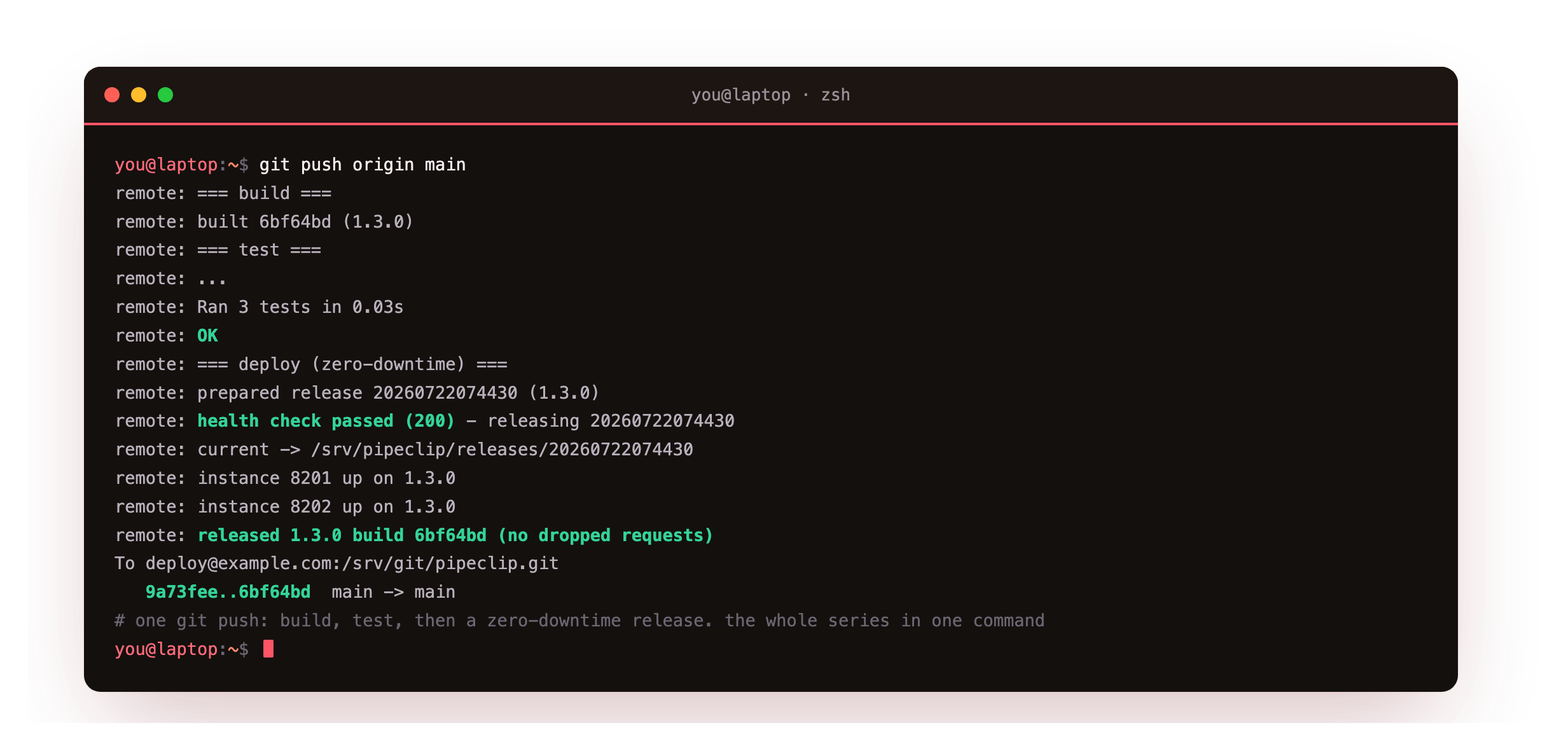
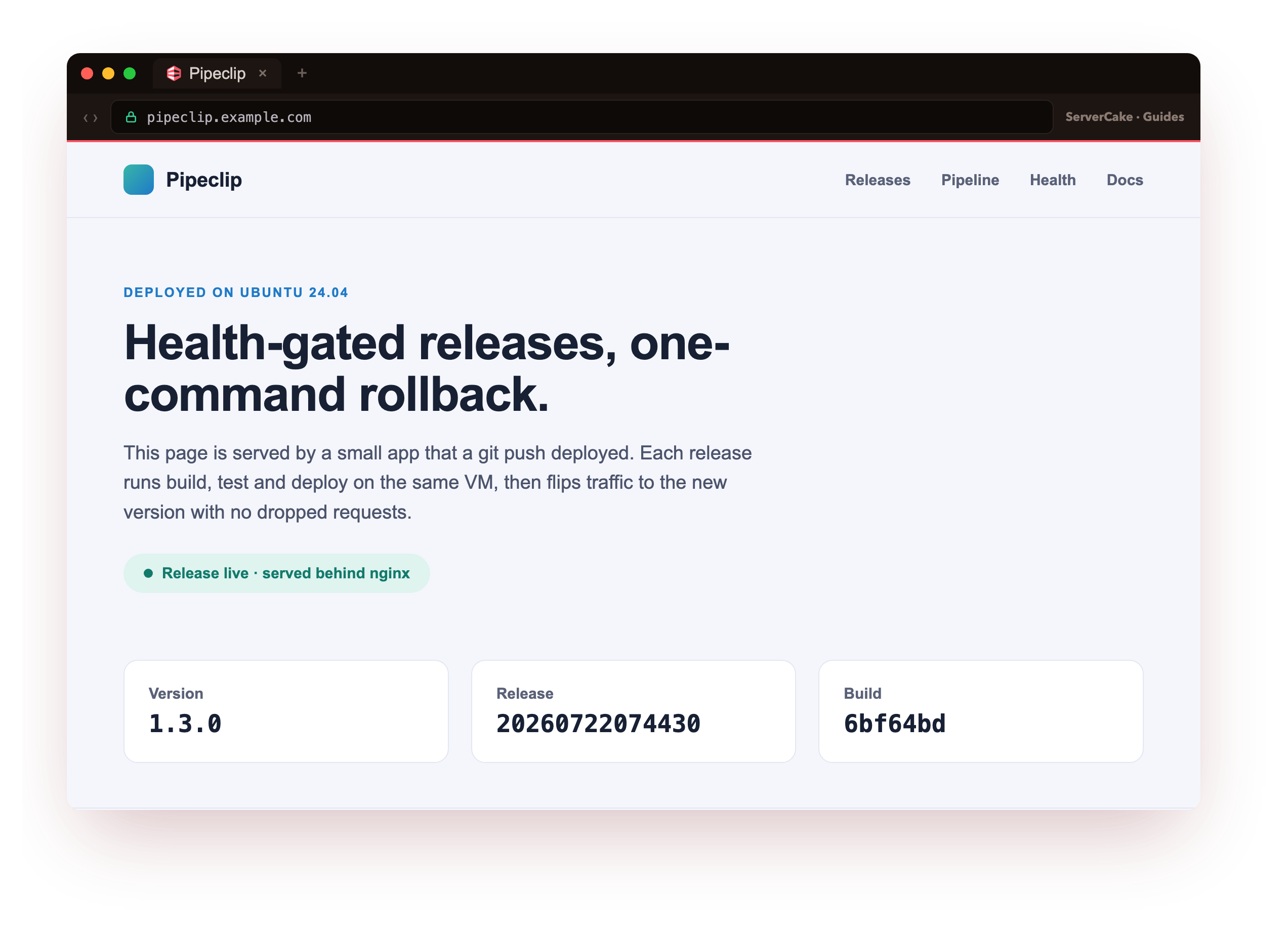
Every remote: line is the slice talking back to your terminal as the push runs. It builds, the three tests pass, a candidate is health-checked on a scratch port, the current symlink flips to the new release, both app instances come up on 1.3.0, and the push closes with released 1.3.0 build 6bf64bd (no dropped requests). That is the destination. And here is the page that push produces, served live behind nginx:
The status page reads 1.3.0, with the release timestamp and the build stamp the deploy stamped into it. You did not touch the server to make that happen; you pushed a commit. Five chapters assemble that loop, and this one lays the first stone: a plain push-to-deploy hook that gets a new version live, which the later chapters make safe and reversible.
Who this is for
This guide is for a solo developer or a small team who wants automated deploys without paying for a CI service or standing up a second box to run it. You already ship something by hand, maybe an scp and an SSH in to restart it, and you want git push to do that for you instead. You do not need to be a systems person. Every command is written out, and each step ends with a checkpoint so you can confirm it before moving on.
The one thing the whole series needs is a box with a public address that stays on, because a push has to have somewhere to land and the app has to keep answering while your laptop is asleep. That is what a slice is, and the next section starts one from nothing.
Install git and create the bare repo
On a fresh Ubuntu 24.04 slice, git itself is often not installed yet, so that is the true first step. Install it, then confirm the version rather than assuming the install finished.
sudo apt update
sudo apt install -y git
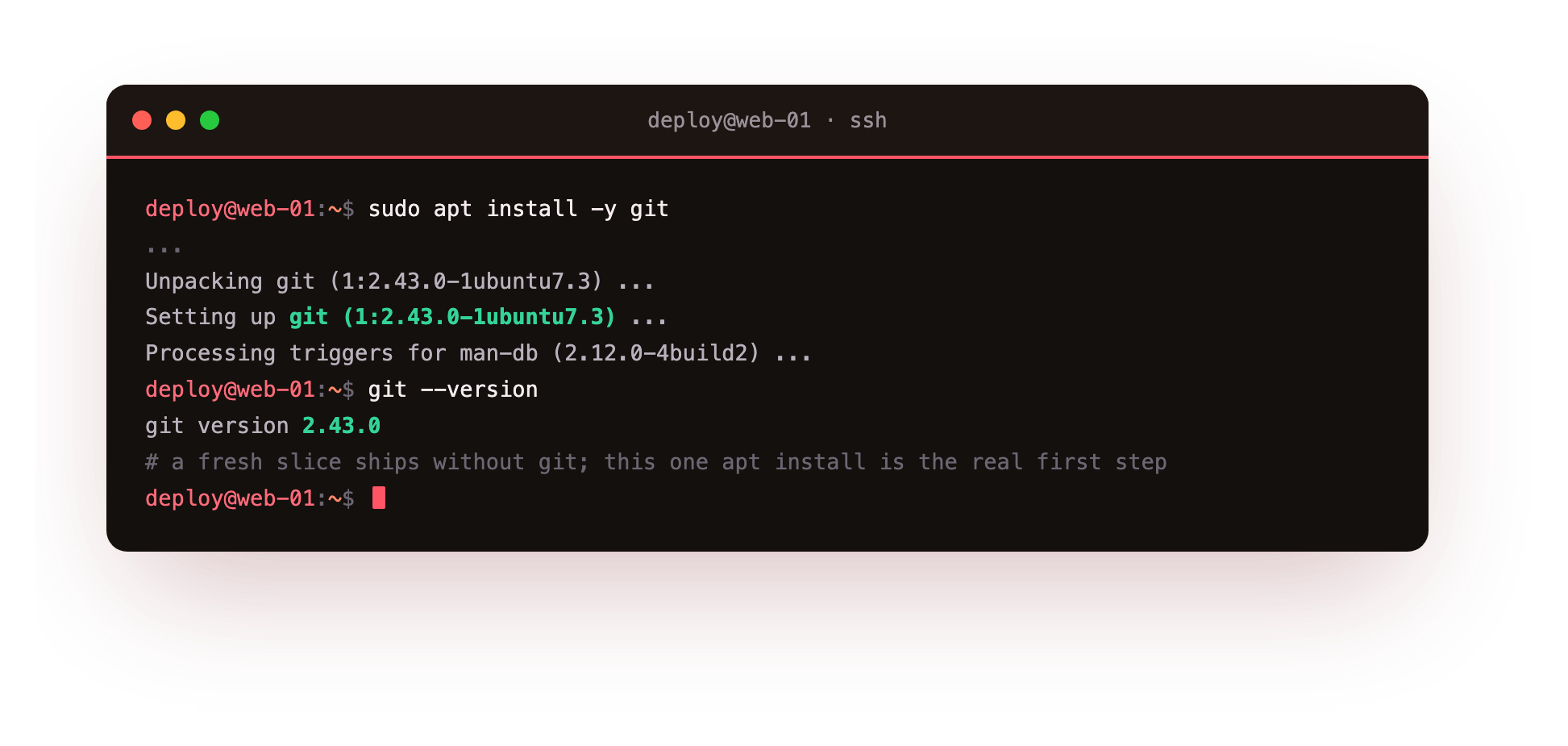
apt sets up git 2.43.0, the version Ubuntu 24.04 ships, and git --version reads it back. With git present you can make the target you push into. A bare repo stores history with no checked-out files, which is exactly what you want for a remote nobody edits directly. Create it under /srv/git, then look at the hook file git left there for you.
git init --bare -b main /srv/git/pipeclip.git
cat /srv/git/pipeclip.git/hooks/post-receive
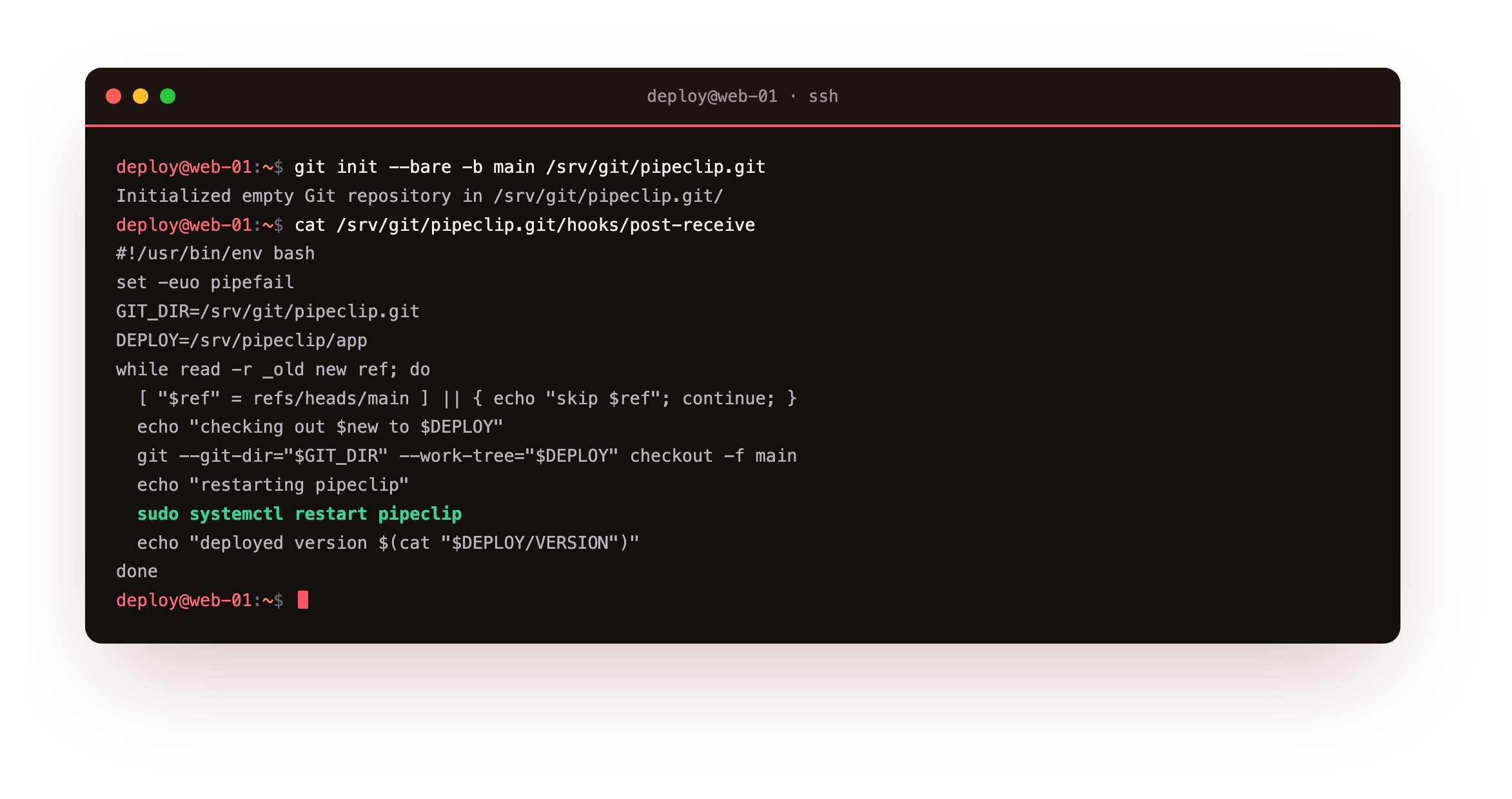
The init reports an empty repository at that path with main as the default branch. The cat shows the hook is still a sample, so no deploy happens yet. git ships several sample hooks under hooks/, and post-receive is the one that fires after a push is accepted, which is where the deploy logic belongs.
Run ls /srv/git/pipeclip.git and you should see the bare layout: HEAD, config, hooks, refs. There is no working tree and no .git subfolder, because the repo itself is the git directory. That is what makes it safe to push into.
Write the post-receive hook
Replace the sample with a script that reads each ref being updated, ignores everything except main, checks the new commit out to the deploy directory, and restarts the app. Make it executable. The full hook is below.
#!/usr/bin/env bash
set -euo pipefail
GIT_DIR=/srv/git/pipeclip.git
DEPLOY=/srv/pipeclip/app
while read -r _old new ref; do
  [ "$ref" = refs/heads/main ] || { echo "skip $ref"; continue; }
  echo "checking out $new to $DEPLOY"
  git --git-dir="$GIT_DIR" --work-tree="$DEPLOY" checkout -f main
  echo "restarting pipeclip"
  sudo systemctl restart pipeclip
  echo "deployed version $(cat "$DEPLOY/VERSION")"
done
set -euo pipefail makes the hook stop on the first error instead of half-deploying. The --work-tree flag points the checkout at the live directory while history stays in the bare repo, so the two never mix. Every echo line is streamed back to your terminal as remote: output, which turns the push into a live deploy log.
The one privileged step is sudo systemctl restart pipeclip. Rather than give the push user broad sudo, grant a single rule scoped to that one unit, with no password prompt so the hook never blocks:
deploy ALL=(root) NOPASSWD: /usr/bin/systemctl restart pipeclip
That line, added through visudo, is the whole privilege surface. The deploy user can restart pipeclip and cannot touch any other service or run any other command as root.
Run the app under systemd with nginx in front
The hook restarts a systemd service, so the app must be a unit. pipeclip runs as the pipeci user and binds to 127.0.0.1:8200, which keeps it off the public interface. Here is the unit.
[Unit]
Description=pipeclip demo app (push-to-deploy target)
After=network.target
[Service]
User=pipeci
Group=pipeci
WorkingDirectory=/srv/pipeclip/app
Environment=PORT=8200
ExecStart=/usr/bin/python3 /srv/pipeclip/app/app.py
Restart=on-failure
RestartSec=1
[Install]
WantedBy=multi-user.target
nginx owns the front and proxies to the app. It listens on 127.0.0.1:8093 in its own server block, separate from the default site, and forwards the headers the app needs to see the real request.
server {
    listen 127.0.0.1:8093;
    server_name pipeclip.example.com;

    location / {
        proxy_pass http://127.0.0.1:8200;
        proxy_set_header Host $host;
        proxy_set_header X-Forwarded-For $proxy_add_x_forwarded_for;
        proxy_set_header X-Forwarded-Proto $scheme;
    }
}
With this in place, the app answers only on loopback and nginx is the single door in. The git hook never touches nginx; it just restarts the unit behind it.
Before the first push, systemctl is-active pipeclip should read active and curl -s http://127.0.0.1:8093/version should return the starting version. If the version answers, nginx is reaching the app on loopback and the hook has something to restart.
Point the dev remote and push
On your development machine, add the bare repo as a remote, make a change, and push. Here the change bumps VERSION from 1.0.0 to 1.1.0 and edits the greeting the status page shows.
git remote add origin [email protected]:/srv/git/pipeclip.git
git commit -am "greeting refresh; bump to 1.1.0"
git push origin main
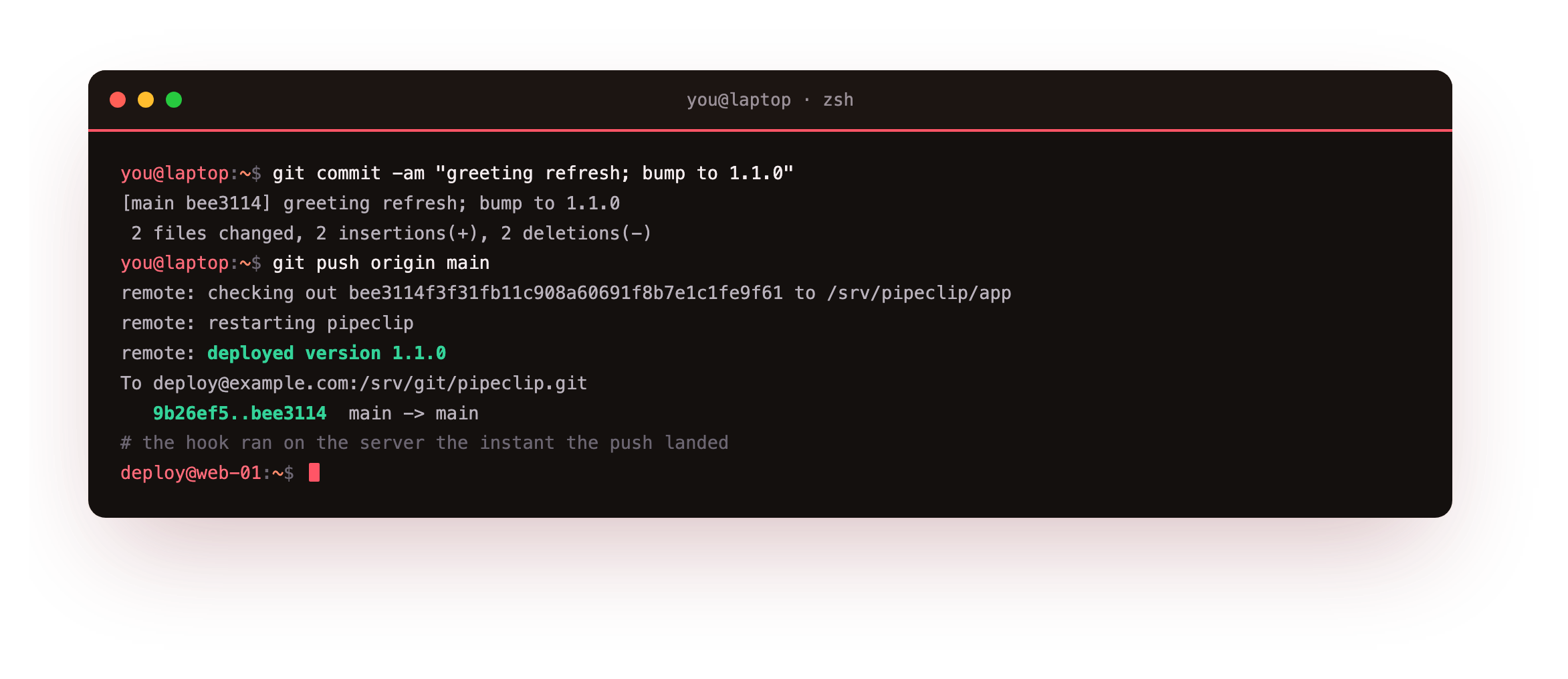
The push output is where push to deploy earns its name. git shows the objects transferring, then the hook's own lines arrive prefixed with remote:: it prints checking out the commit to /srv/pipeclip/app, then restarting pipeclip, then the deployed version 1.1.0. git closes with the ref update 9b26ef5..bee3114 main -> main. The deploy finished before the push command returned control to your shell.
See the new version live
Now the payoff. Ask the running app what version it serves, from the server side, through nginx, before and after the push, so you watch the change land.
curl http://127.0.0.1:8093/version
curl -I http://127.0.0.1:8093/
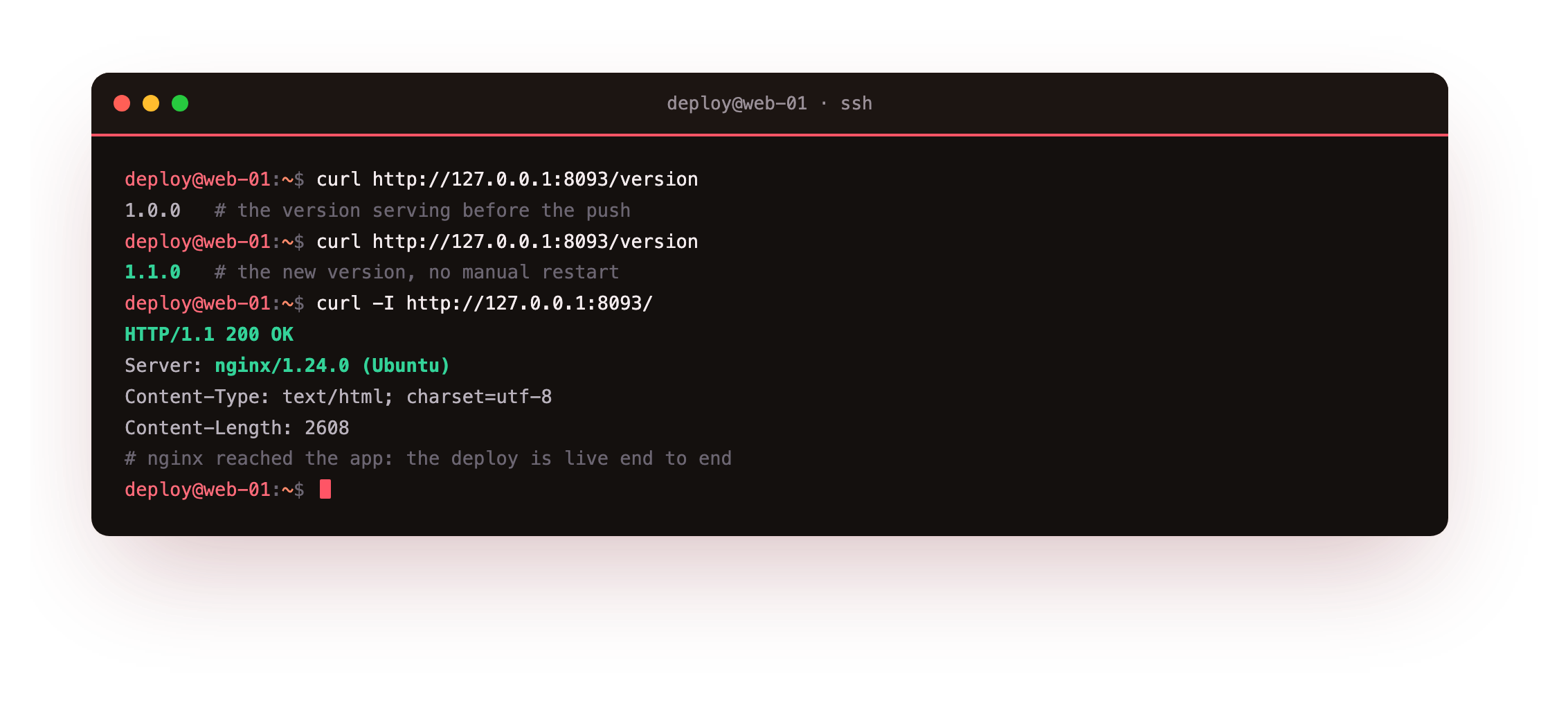
Before the push, /version returns 1.0.0. After the push, the same request returns 1.1.0, which confirms the checkout and restart both took effect. The curl -I shows HTTP/1.1 200 OK with Server: nginx/1.24.0 (Ubuntu) and a Content-Length of 2608, proving nginx reached the app and returned its status page. Open pipeclip.example.com in a browser and there it is, the new version, live: the greeting you just edited and the version you just bumped, served to anyone who visits, off a single git push.
The moment /version returns the number you pushed is your from-zero milestone: you shipped a new release by pushing a commit, with no manual copy and no SSH-in to restart. Everything after this chapter makes that same push safer, not different.
How push to deploy works
Now the idea underneath, because push to deploy rests on one deliberate split. A normal git repo has a working tree, the checked-out files you edit. A bare repo has only the history, no working tree at all. You push into the bare repo, and the hook decides separately where the code lands, checking it out into a directory you name. History lives in one place, the running files in another, and the two never fight.
That split is why the whole thing stays safe. The app binds 127.0.0.1 only, so nothing outside the host reaches it without passing nginx. The hook holds one narrow sudo rule, scoped to restarting a single unit. And because the bare repo keeps history apart from the live files, a push updates code without ever exposing the git internals to the running app.
- The app binds 127.0.0.1 only, so nothing outside the host reaches it without passing nginx.
- The hook holds one narrow sudo rule, scoped to restarting a single unit.
- The bare repo keeps history apart from the live files, so a push updates code without ever exposing the git internals to the running app.
Going further: what the hook is really doing
You do not have to take the deploy log on faith. Two details are worth understanding under the hood, because the later chapters build directly on them.
The first is how the log reaches you. git runs post-receive on the server with its stdout piped back over the connection, so every echo in the hook arrives at your terminal prefixed with remote:. That is why the push doubles as a live deploy log, and why a stage that later fails will show its error in the same window you pushed from, not in a log file you have to go find.
The second is the branch guard. The hook reads each updated ref and compares it against refs/heads/main, printing a skip line for anything else. That single comparison is what keeps a feature branch from deploying by accident, and it is also the seam the next chapters widen: you can map several branches to several deploy directories, or hand the pushed commit to a pipeline instead of checking it out raw. This chapter deploys whatever you push, working or not, which is exactly the gap part two closes.
Frequently asked questions
Why push into a bare repo instead of a normal checkout on the server?
Pushing into a repo that has a checked-out working tree can leave its index and files out of step with the branch you pushed, and git refuses some of those pushes by default. A bare repo has no working tree, so a push is unambiguous. The hook then does the checkout deliberately, into a directory you name, which separates where history lives from where the app runs.
What happens if the checkout or the restart fails during a push?
The hook starts with set -euo pipefail, so the first failing command stops the script and returns a non-zero status, which git surfaces in the push output. A failed checkout leaves the previous files in place, and a failed restart leaves systemd reporting the unit's error. You see it in the same terminal you pushed from. This chapter's deploy is not yet zero-downtime, which later chapters address.
Does the deploy user need full sudo to restart the service?
No, and it should not have it. Grant one sudoers line that permits exactly systemctl restart pipeclip for that user, with NOPASSWD so the hook does not stall on a prompt. That user then cannot restart other services or run arbitrary root commands. If an attacker ever landed on that account, the blast radius is one service restart, not the whole box.
Can I deploy a branch other than main with the same hook?
Yes. The hook reads each updated ref and compares it against refs/heads/main, skipping anything else with a printed skip line. Change that comparison to your branch name, or extend it to map several branches to several deploy directories. Pushing feature branches then does nothing on the server until they reach the branch the hook watches, which keeps unfinished work from deploying by accident.
What you have, and what comes next
You installed git on a bare Ubuntu 24.04 slice, created a bare repo, wrote a post-receive hook that checks out main and restarts the app, and stood it behind nginx on loopback. You pushed a change, watched the hook deploy it live, and saw the served version move from 1.0.0 to 1.1.0 in a browser. You also saw the destination the series builds toward: that same push, gated and made zero-downtime.
The gap is that the hook deploys whatever you push, working or not. The next chapter adds the other trigger a build system needs, an on-demand webhook, and runs the deploy through a small self-hosted runner so a machine can fire it the way a forge would.
Push to deploy needs a box with a public IP that stays on, which is what a slice is. Launch a slice and build this loop from the bare install to a push that ships.