Run a self-hosted runner on one VM
A git hook fires when someone pushes. A self-hosted runner adds the other trigger a build system needs: an on-demand HTTP call, the shape a forge like Gitea or GitHub uses when it POSTs a webhook instead of pushing over SSH. This chapter installs webhook, a small runner from the Ubuntu 24.04 archive, registers one build hook, and fires a real build and deploy with a single authenticated POST. Every command ran on a live VPS, and the outputs shown are what it returned.
- webhook by adnanh is a single Go binary that runs a command when it receives a matching, authenticated HTTP request; it is a build runner, not a CI dashboard.
- Bind the runner to 127.0.0.1 so only a local reverse proxy or an SSH tunnel can reach it, never the open internet.
- Gate every hook with a shared secret in a header, so a request without the token is rejected before any command runs.
- Run the runner as an unprivileged user with a narrow sudoers rule for the one restart it needs.
Let me be honest about scope. A full product like Woodpecker CI or Gitea Actions gives you a web UI, pipelines as config, and a stored run history. Both also need a separate forge server running somewhere.
On one VM, that is more moving parts than the job needs. webhook is the runner that installs cleanly from apt and does the real work: receive a trigger, check a secret, run a script, and return its output. Call it what it is, a webhook-driven build runner, and it fits a single box.
Prerequisites
- The git-hook deploy from part one, with the pipeclip app under
/srv/pipeclipand thepipecideploy user in place. - A build script at
/srv/pipeclip/bin/pipeline.shthat runs your build, test, and deploy stages and exits non-zero on failure. - Ubuntu 24.04 with apt access, plus sudo to add a systemd unit.
- curl on hand, since we prove each trigger by the response it returns.
Install the runner
webhook comes straight from the Ubuntu archive, so there is no third-party repo to add and no Go toolchain to set up. The install pulls a single binary to /usr/bin/webhook.
sudo apt install -y webhook
webhook -version
Reading the version back prints webhook version 2.8.0. That one file is the whole runner. No daemon of its own, no database, no agent to register against a control plane.
Define the build hook
A hook is one JSON object: what to run, what to pass it, and the rule that must pass first. This config lives at /etc/pipeclip/hooks.json and defines a single hook called deploy-pipeclip.
[
  {
    "id": "deploy-pipeclip",
    "execute-command": "/srv/pipeclip/bin/pipeline.sh",
    "command-working-directory": "/srv/pipeclip",
    "pass-arguments-to-command": [
      { "source": "string", "name": "main" }
    ],
    "include-command-output-in-response": true,
    "trigger-rule-mismatch-http-response-code": 403,
    "trigger-rule": {
      "match": {
        "type": "value",
        "value": "s3cr3t-webhook-token",
        "parameter": { "source": "header", "name": "X-Pipeclip-Token" }
      }
    }
  }
]
The hook runs pipeline.sh with the single argument main, from the working directory /srv/pipeclip. Setting include-command-output-in-response to true echoes the script's stdout back to the caller, so the HTTP response carries the build log.
The trigger-rule is the gate. The header X-Pipeclip-Token must equal the shared value, and on a mismatch webhook returns 403 and runs nothing. No token, no build.
Run it as a locked-down service
A systemd unit keeps the runner up and pins how it runs. This one runs webhook as the unprivileged pipeci user, never root, and binds it to loopback.
[Unit]
Description=pipeclip CI webhook runner (adnanh/webhook)
After=network.target
[Service]
User=pipeci
Group=pipeci
ExecStart=/usr/bin/webhook -hooks /etc/pipeclip/hooks.json -ip 127.0.0.1 -port 9099 -verbose
Restart=on-failure
[Install]
WantedBy=multi-user.target
Port 9000 is webhook's default, but it was already taken on this box, so I picked 9099, a free loopback port. Any unused high port works. The -verbose flag makes the runner log each request, which we read at the end. Restart=on-failure brings the process back if it dies. Enable and start it.
sudo systemctl daemon-reload
sudo systemctl enable --now pipeclip-webhook
Confirm it is listening on loopback only
Two checks tell you the runner is up and not exposed. Ask systemd whether the unit is active, then ask the kernel what it is listening on.
systemctl is-active pipeclip-webhook
sudo ss -tlnp | grep 9099
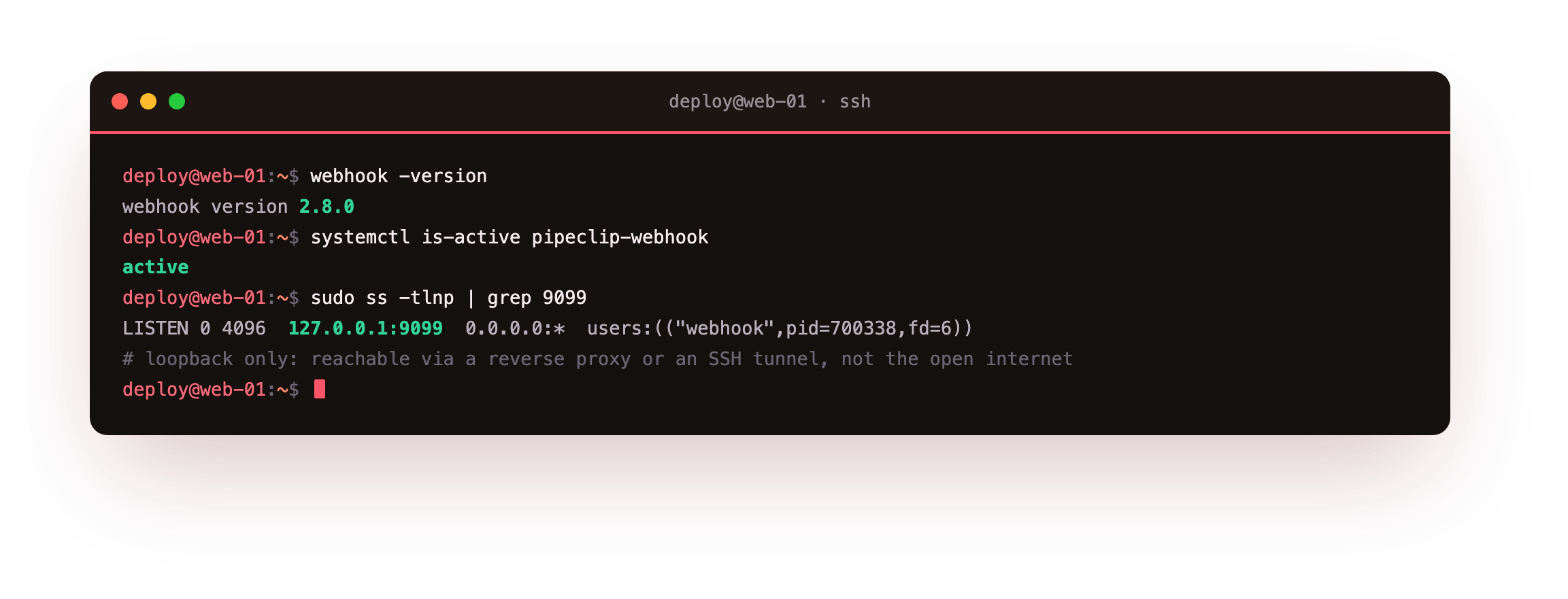
The first command returns active. The ss line shows the listener on 127.0.0.1:9099 and nothing on 0.0.0.0, so the runner is reachable only from the host itself. A request from the network cannot touch it; a local reverse proxy or an SSH tunnel is the only route in.
You should see active from the first command and a listener on 127.0.0.1:9099 with no 0.0.0.0 line from the second. If ss shows the runner on the public interface, stop and re-check the -ip 127.0.0.1 flag in the unit before you send it a single request.
Fire the build with the token
Now send the trigger a forge would send, by hand. Include the header the config checks, and POST to the hook URL.
curl -X POST -H 'X-Pipeclip-Token: s3cr3t-webhook-token' -d '{"ref":"main"}' http://127.0.0.1:9099/hooks/deploy-pipeclip
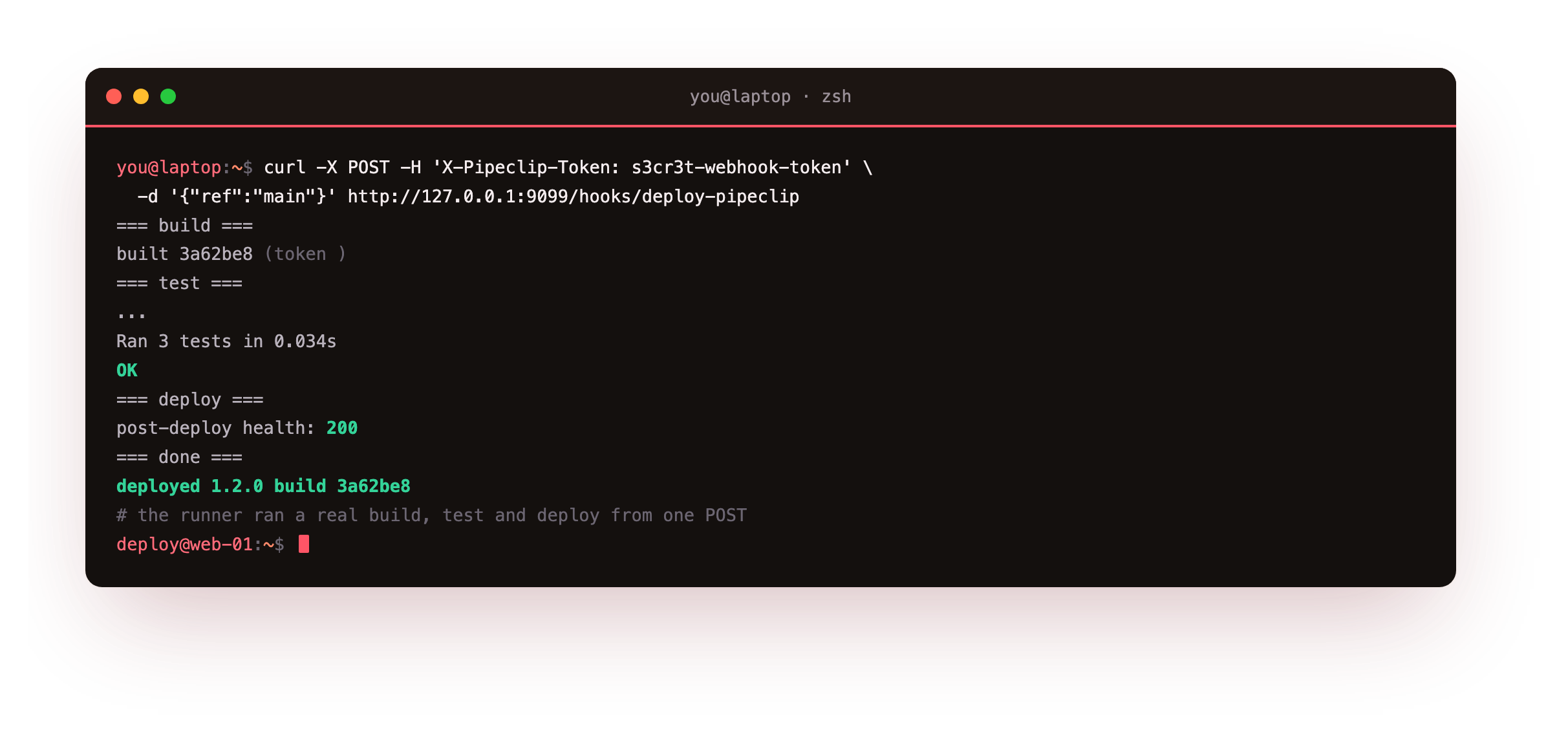
The token matches, so the hook triggers and the whole pipeline runs. Because the config echoes command output, the response carries the full log. The build stage prints the short commit 3a62be8, the test stage prints Ran 3 tests in 0.03s and OK, and the deploy stage prints post-deploy health: 200. The last line reads deployed 1.2.0 build 3a62be8. One authenticated POST ran build, test, and deploy end to end.
Reject a request with no token
The gate is only real if a missing token stops the build. Send the same POST with no header, then read the runner's log.
curl -X POST -d '{"ref":"main"}' http://127.0.0.1:9099/hooks/deploy-pipeclip
journalctl -u pipeclip-webhook
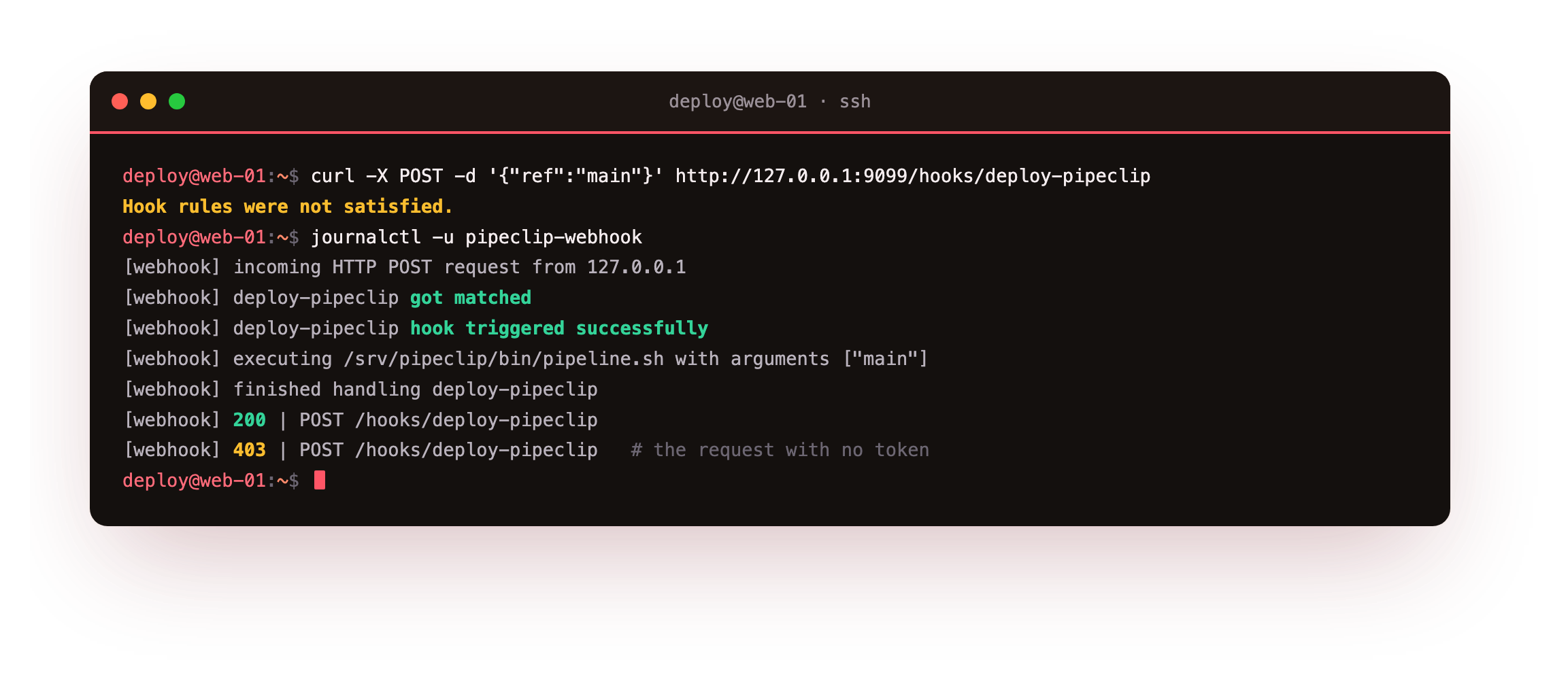
The unauthenticated POST returns HTTP 403, and nothing runs. The log explains why: the hook matched the URL, but the trigger rule was not satisfied, so no command executed.
journalctl shows the framing for both calls. The accepted one logs incoming HTTP POST request from 127.0.0.1, then deploy-pipeclip got matched, deploy-pipeclip hook triggered successfully, an executing /srv/pipeclip/bin/pipeline.sh line carrying the main argument, the command output, finished handling deploy-pipeclip, and a 200 for POST /hooks/deploy-pipeclip. The rejected one logs a 403 for the same path, with no execute line at all. Nothing ran, which is the point of the gate.
- The runner binds to 127.0.0.1, so only a local reverse proxy or an SSH tunnel reaches it, never a random host on the internet.
- Every hook is gated by a shared secret in a header, and a request without it is refused with a 403 before any command runs.
- The unit runs as
pipeci, not root, with a narrow sudoers rule for only the one service restart the pipeline needs.
Going further: give it a public door and a real secret
The runner is deliberately private, so to let a forge reach it you put nginx in front rather than exposing port 9099. A server block on your real hostname terminates TLS and proxies to 127.0.0.1:9099, which means the certificate and the public port belong to nginx while the runner stays a loopback backend. From the runner's point of view nothing changes: it still receives a POST, checks the header, and runs the hook.
The shared token in this chapter is a stand-in for the real thing. A forge like Gitea signs each webhook body with a secret and sends an HMAC in a header, and webhook can verify that signature instead of a plain value, which is stronger because the token itself never travels on the wire. The next part gives that gate teeth: a pipeline where the build and the tests decide whether the deploy stage runs at all, so a trigger with a valid token still cannot ship a broken commit.
Frequently asked questions
Is webhook a full CI system?
No, and it does not pretend to be. It has no web dashboard, no stored run history, and no pipeline-as-config graph. It receives an authenticated HTTP request, checks a rule, runs one command, and returns its output. Products like Woodpecker or Gitea Actions add those extras, but each needs a separate forge server to run. On one VM, webhook does the runner's real job with far less to operate and patch.
How would a forge like Gitea call this?
A forge sends a POST to the hook URL on every push or release, with a secret in a header or a signed body. Point Gitea's webhook at https://pipeclip.example.com/hooks/deploy-pipeclip through your reverse proxy, and set the same secret this config checks. From the runner's side, a forge call and a manual curl are identical: a matching POST that carries the right token. Nothing about the hook changes when a machine sends it instead of you.
Why bind to 127.0.0.1 rather than expose 9099 directly?
The runner has no TLS and only a header check, so it should not face the internet on its own. Binding to loopback means only processes on the host reach it. Put nginx in front to terminate TLS and forward to 127.0.0.1:9099, or reach it over an SSH tunnel for a manual trigger. The public port and the certificate belong to the proxy, and the runner stays a private backend.
Does the pipeline run as root?
No. The unit runs webhook as pipeci, an unprivileged user. If a stage needs to restart the app service, grant that single action through a narrow sudoers rule for the exact systemctl command, rather than running the whole runner as root. Then a leaked token triggers a scripted deploy of your own pipeline, not arbitrary commands with full privileges. Keep the blast radius the size of one script.
What you have, and what comes next
You have a self-hosted runner on Ubuntu 24.04 that fires a real build, test, and deploy from one authenticated POST. It binds to loopback, checks a shared secret, and runs as an unprivileged user. You watched a valid token run the pipeline and a missing token earn a 403.
The pipeline still deploys straight over the running app, with no safety net if the new version is broken. The next chapter puts a health check between build and release, so a deploy that fails its own check is rolled back before it serves a single bad request.