A zero-downtime release with a health gate
A zero-downtime release swaps the running code without dropping a request, and lets you undo it in one command. You do it with symlinked releases: each build lands in its own timestamped directory, a health check gates the switch, and a current symlink flips atomically to the new version. This chapter builds that on a live Ubuntu 24.04 VPS for the pipeclip app, on one machine, with no load balancer and no second server.
- Each build checks out into
releases/<timestamp>, and acurrentsymlink names which one is live; flipping it is a single rename, so no request reads a half-updated path. - The candidate boots on a scratch port and answers
/healthbefore the switch, so a build that fails its check never receives traffic. - Two app instances share an nginx pool, so the release restarts them one at a time while the other keeps serving.
- Old releases stay on disk, so rollback is a symlink flip back to the previous version with no rebuild.
Part four put a test gate before the restart, but the restart itself still had a gap: for a beat the one process was down. Here we close that gap. Two instances serve the same code, and the release rolls them in turn so the pool is never empty.
Nothing needs a cluster. One VM runs two copies of the app behind nginx, and the release script does the sequencing. Let's build it.
Prerequisites
- The pipeclip systemd setup and nginx front from earlier parts, on an Ubuntu 24.04 LTS box.
- A deploy home holding
bin/deploy.shandbin/rollback.sh, run as the deploy user. - The bare git repo at
/srv/git/pipeclip.gitthat stores the commits you release. - A
GET /healthroute on the app that returns 200 when the build is good.
Releases and the current symlink
pipeclip no longer lives in a single app directory. Each release checks out into its own folder named by a timestamp, and a current symlink points at whichever one is live. The systemd instances set their WorkingDirectory to /srv/pipeclip/current, so they follow the symlink wherever it points.
ls -l /srv/pipeclip/releases
ls -l /srv/pipeclip/current
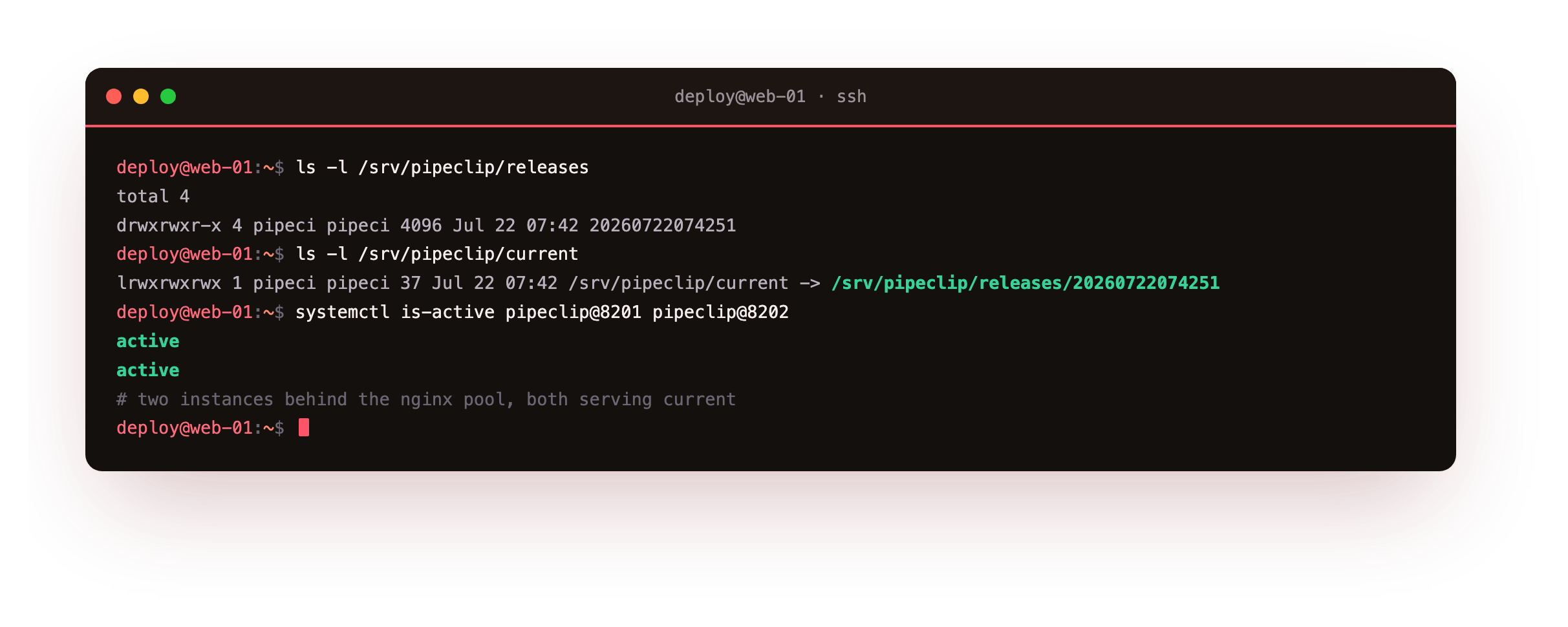
The first listing shows the timestamped release directories side by side, for example 20260722074251, each a full copy of the app at one commit. The second shows current -> /srv/pipeclip/releases/20260722074251, naming the live one. Switching versions means repointing that one link, not moving files around.
Two instances behind an nginx pool
One process is not enough for a switch with no gap, because restarting it takes it offline for a moment. So pipeclip runs as a systemd template, [email protected], started twice, as pipeclip@8201 and pipeclip@8202. Both serve /srv/pipeclip/current, each on the port in its name.
[Unit]
Description=pipeclip app instance on port %i
After=network.target
[Service]
User=pipeci
Group=pipeci
WorkingDirectory=/srv/pipeclip/current
Environment=PORT=%i
ExecStart=/usr/bin/python3 /srv/pipeclip/current/app.py --port %i
Restart=on-failure
RestartSec=1
[Install]
WantedBy=multi-user.target
The %i in the template is the instance name, which here is the port, so one unit file yields both instances. nginx puts them in an upstream pool and passes to the other server if one is mid-restart.
upstream pipeclip_pool {
    server 127.0.0.1:8201 max_fails=1 fail_timeout=2s;
    server 127.0.0.1:8202 max_fails=1 fail_timeout=2s;
}
server {
    listen 127.0.0.1:8093;
    server_name pipeclip.example.com;
    location / {
        proxy_pass http://pipeclip_pool;
        proxy_next_upstream error timeout http_502 http_503;
        proxy_connect_timeout 1s;
        proxy_set_header Host $host;
    }
}
max_fails=1 fail_timeout=2s and proxy_next_upstream tell nginx to retry the other backend on an error or a 502, so a restarting instance is skipped rather than served as a failure. The pool listens on 127.0.0.1:8093, the same door earlier chapters used.
The release script and its health gate
The release lives in bin/deploy.sh. It prepares a new release directory from a commit, boots that new code on a scratch port, and curls /health as a gate. It flips current only if the check returns 200.
TS="$(date +%Y%m%d%H%M%S)"; DEST="$REL_ROOT/$TS"
mkdir -p "$DEST"
git --git-dir="$GIT_DIR" -c advice.detachedHead=false --work-tree="$DEST" checkout -q -f "$REV"
# health gate: boot the candidate on a scratch port BEFORE flipping
python3 "$DEST/app.py" --port 8210 & cand=$!
sleep 1
code="$(curl -s -o /dev/null -w '%{http_code}' http://127.0.0.1:8210/health)"
kill "$cand"
[ "$code" = 200 ] || { echo "health check FAILED (got $code) - NOT releasing"; rm -rf "$DEST"; exit 1; }
# record the outgoing release for rollback, then switch atomically
readlink -f "$CURRENT" > "$REL_ROOT/.previous"
ln -sfn "$DEST" "$CURRENT"
# roll the instances one at a time so the pool always has a live backend
for inst in 8201 8202; do sudo systemctl restart "pipeclip@$inst"; done
The order carries the whole design. The candidate is tested on port 8210 before current moves, so a bad build is caught while the live version still serves. readlink -f "$CURRENT" records the outgoing release into .previous for rollback. ln -sfn then repoints the symlink in a single rename syscall, so no request ever reads a half-updated current. The two instances restart in turn afterward, never both at once.
Ship a release
Run the release from the deploy home. bin/deploy.sh main releases the current tip of main, which here carries version 1.3.0.
bin/deploy.sh main
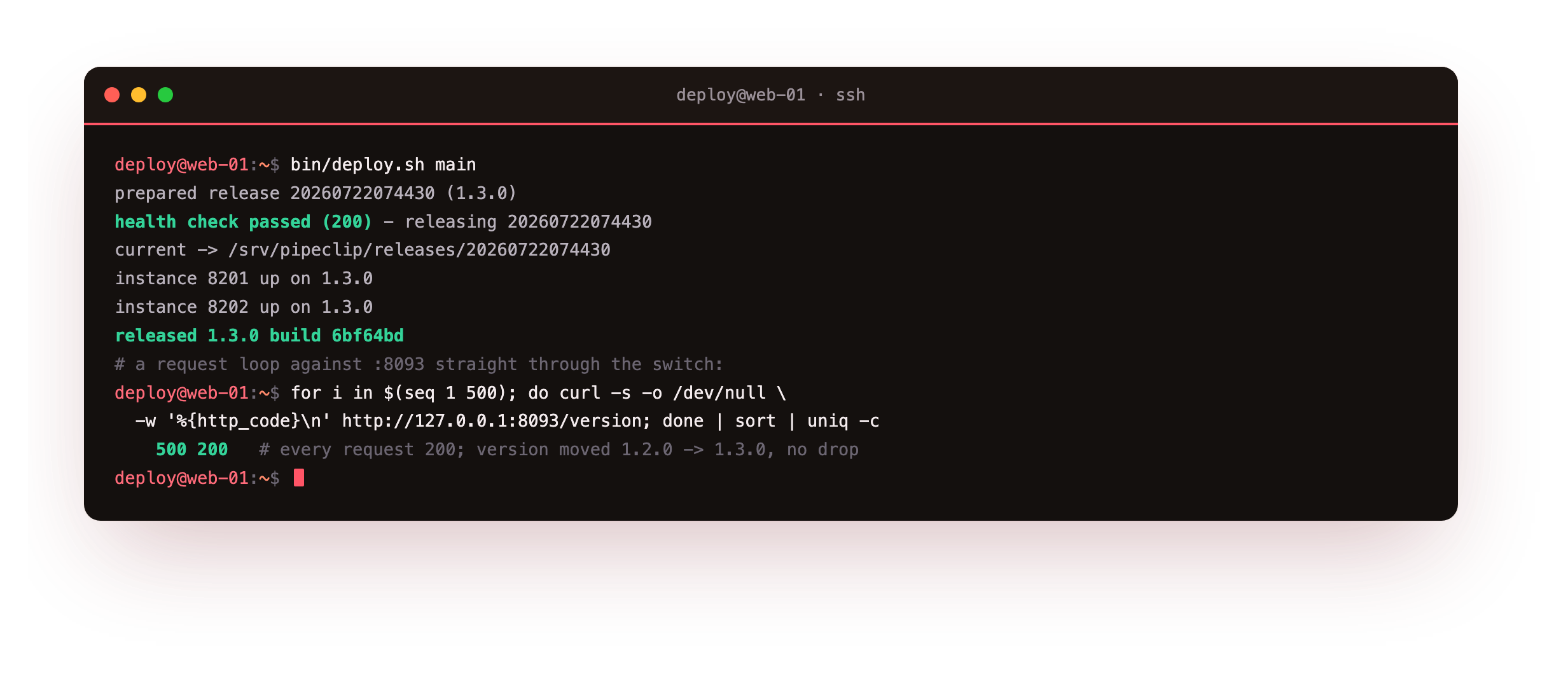
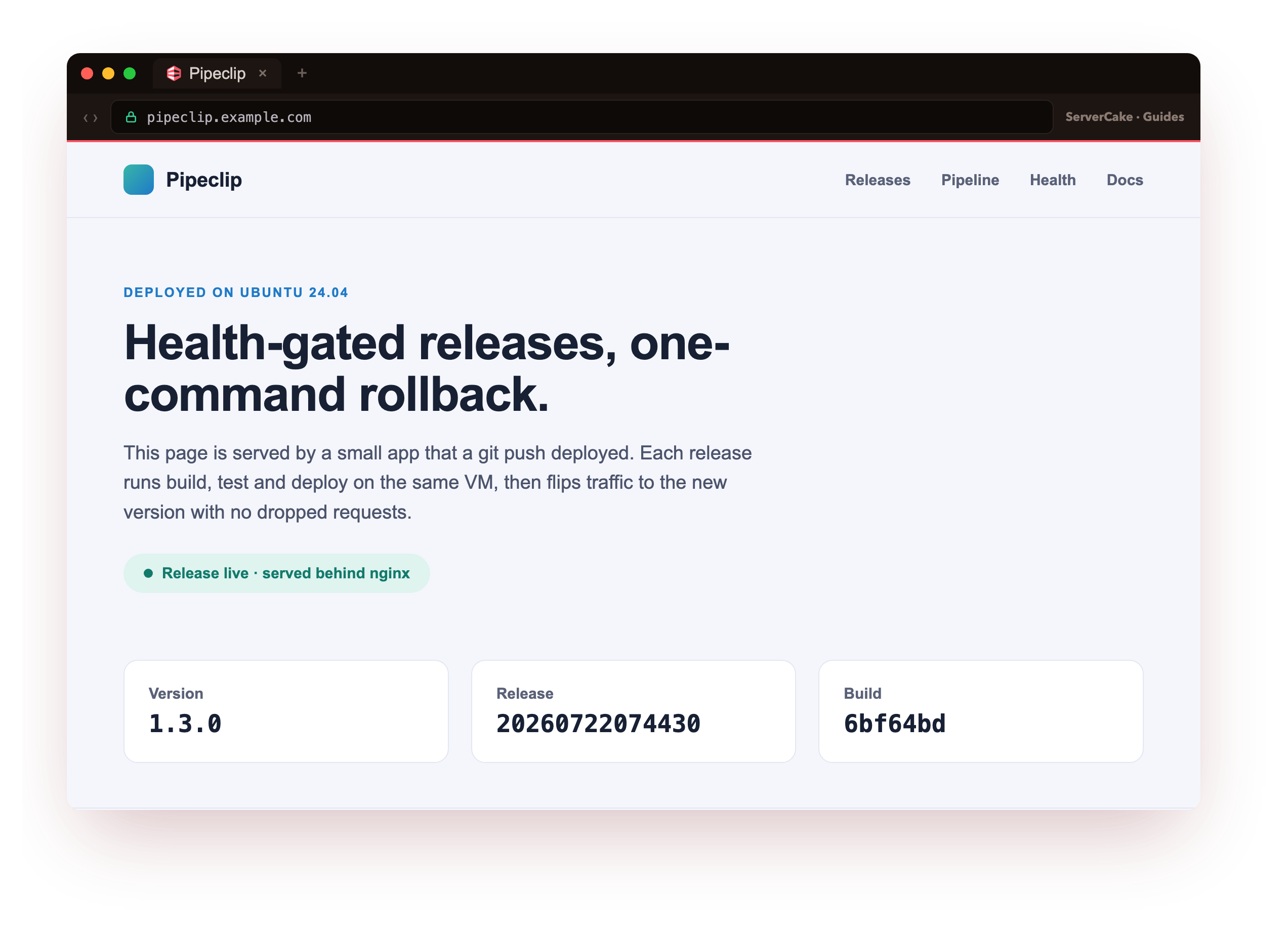
The script prints each step: it prepares release 20260722074430, reports the health check passed with 200, moves current to point at the new directory, and brings instance 8201 then 8202 up on 1.3.0. The closing line reads released 1.3.0 build 6bf64bd. Open pipeclip.example.com in a browser and here it is, the new version, live: the status page now reads 1.3.0 with this release's timestamp and build stamp, served to visitors through the nginx pool while the switch happened underneath them.
To check the no-drop claim, a loop fired 500 requests at the pool across the switch. Every one returned HTTP 200: 74 answered from 1.2.0 and 426 from 1.3.0 as the instances rolled. Zero non-200 responses over the whole switch. The version changed under load without a single dropped request.
Reject a broken release
The gate only helps if it blocks a bad build for real. bin/deploy.sh bad builds a release whose /health returns 503 on purpose.
bin/deploy.sh bad
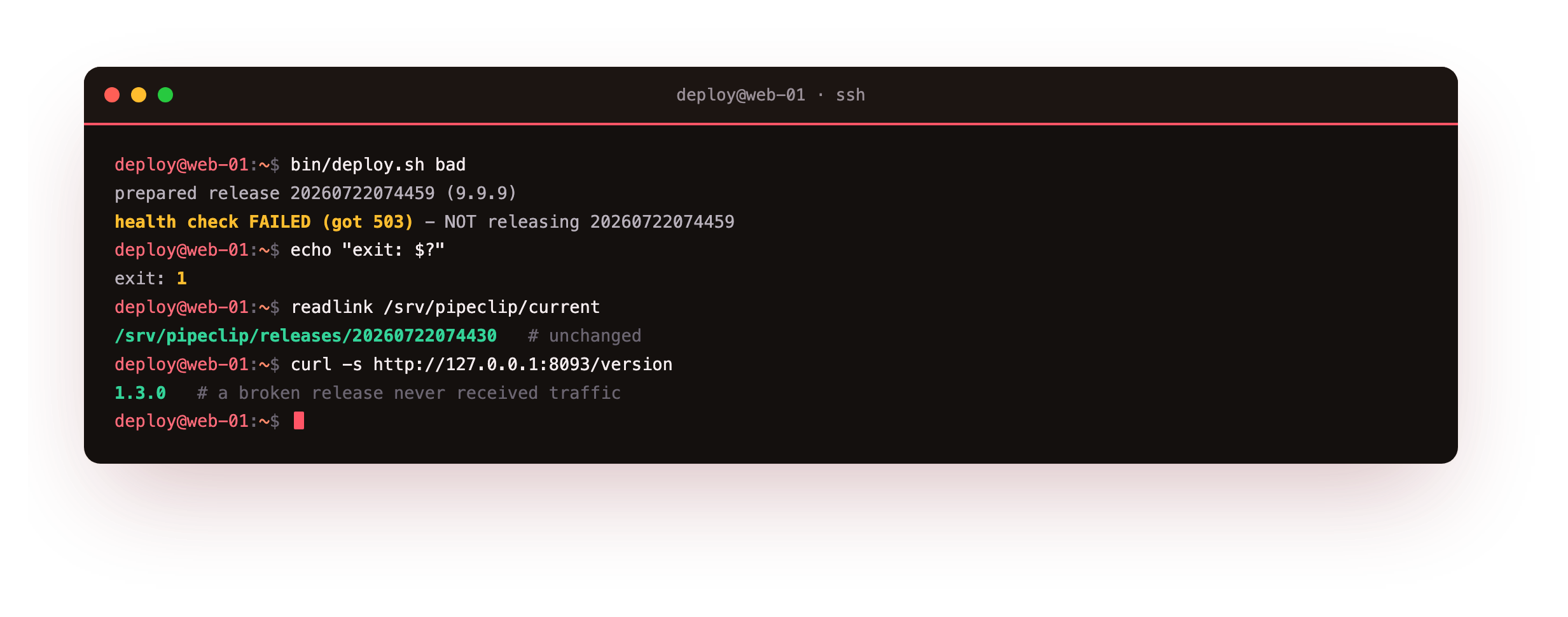
The candidate boots on the scratch port, the curl returns 503, and the script prints health check FAILED (got 503) - NOT releasing 20260722074459, then exits non-zero. current never moves. The live version stays 1.3.0 and both instances keep serving it. A release that cannot answer its own health check never reaches the pool.
Roll back in one command
When a release passes its check but still misbehaves under real traffic, you undo it. bin/rollback.sh reads the previous release recorded at flip time, repoints current at it, and rolls the instances. One command, no rebuild.
bin/rollback.sh
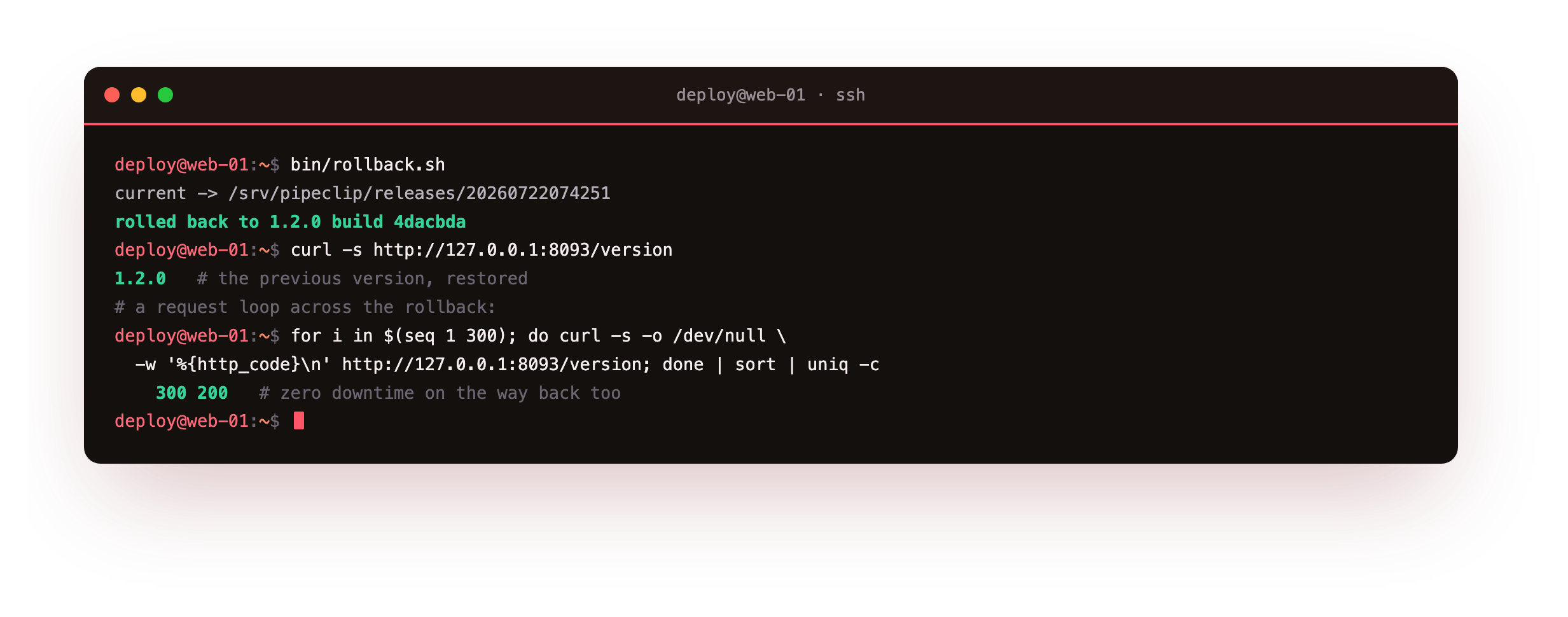
Here it prints current -> /srv/pipeclip/releases/20260722074251 and rolled back to 1.2.0 build 4dacbda. A loop of 300 requests during the rollback returned 300 HTTP 200 responses. Because the old release still sits on disk, restoring it is another symlink flip, which is why it lands at once rather than after a rebuild.
After the rollback, readlink /srv/pipeclip/current points at the previous release directory and curl -s http://127.0.0.1:8093/version returns the version you rolled back to. Both instances read active. If the version does not move back, check that the previous release is still on disk and recorded in .previous, since that file is what rollback reads.
ln -sfnreplaces the symlink in one rename, socurrentis either the old release or the new one, never something in between.- Two instances mean one can restart while the other serves, so the pool always has a live backend.
- Old releases stay on disk, so rollback repoints the link instead of rebuilding the code.
Going further: keep it tidy and tie it to the push
Two additions turn this from a demo into something you run for a year. The first is a prune step at the end of a release: keep the last handful of directories and delete the rest, so timestamped checkouts do not fill the disk. Never remove the one current points at or the one recorded in .previous, because those two are the live version and its rollback target.
The second is to wire this release script into the git hook from part one, so a push runs build, test, and this zero-downtime deploy in a single line, which is exactly the destination the first chapter showed. From there the natural extras are a message to your team on each release and rollback, and a nightly job that runs the slower checks off the push path.
The pieces are all here now: a push that ships, a gate that blocks a bad build, secrets kept out of the repo, and a release you can undo in one command, all on one slice.
Frequently asked questions
Why two instances instead of restarting one?
A single process is offline for the moment it restarts, so a request that arrives in that window fails. Two instances behind the pool let the release restart them one at a time, and nginx routes around the one that is down. On one VM this costs a little extra memory and, in return, gives you a switch with no gap on every deploy.
How many old releases should I keep on disk?
Enough to roll back through the last few, and no more. Each release is a full checkout, so they accumulate over time. A small prune step that keeps, say, the last five directories and deletes older ones holds disk use down while leaving room to roll back. Never delete the release current points at, or the one recorded in .previous, since those two are the live version and its rollback target.
What if the candidate passes /health but is still broken?
The health gate catches a build that cannot start or answer, not every logic bug. That is exactly what rollback is for. If a release looks healthy but behaves wrong once production traffic hits it, bin/rollback.sh restores the previous version in one step, because that version is still on disk. Treat the health check as the first filter and rollback as the backstop, and you cover both a dead build and a subtly wrong one.
Does this need a load balancer or a second server?
No. Everything here runs on one Ubuntu 24.04 VM. nginx on the same box is the pool in front of two local instances, and the release script does the sequencing. A second server and an external load balancer help you survive a host failure, which is a different problem from switching code without a gap. This chapter covers the code switch on a single machine.
What you have, and what comes next
You have symlinked releases on Ubuntu 24.04, a health check that gates the switch, and two instances behind an nginx pool that restart in turn. You shipped 1.3.0 under 500 requests with no failures, watched a bad build get refused before it touched the pool, and rolled back to 1.2.0 in one command.
That closes the series: pipeclip went from a push-to-deploy hook to a gated, reversible release on a single VM. From here you can add a prune step for old releases, wire the deploy into the git hook from part one, or notify the team on each release and rollback.