The one-second outage you ship every deploy
A zero downtime deploy runs two copies of your app behind nginx and restarts them one at a time. nginx keeps sending traffic to the healthy copy while the other reloads, so you ship new code without dropping a single request.
- Run two instances of your app, on ports 3000 and 3001, behind one nginx upstream pool.
- proxy_next_upstream makes nginx quietly retry a failed request against the healthy instance.
- A /health endpoint gates the deploy: never restart the next instance until this one answers.
- Restart instances one at a time so at least one is always serving and no request drops.
You have a real service now on Ubuntu 24.04: it runs under systemd, restarts on crash, speaks HTTPS. So you ship a new version, which means restarting the app so it picks up the new code. And for the second or two that the app takes to stop and start again, every request that arrives hits a dead port and fails.
On a quiet site nobody notices. On a busy one, every deploy sprays a burst of errors across your users, and the more often you deploy, the more often you hurt them. The perverse result is that teams deploy less to avoid the pain, which is exactly backwards.
The fix is a pattern as old as production itself: never take down the only copy. Run more than one instance of your app, and update them one at a time, so there is always a healthy instance serving traffic while another is restarting. nginx, already in front, absorbs the restart. This chapter runs two instances of the app behind nginx and then does the thing that proves it works: restarts one of them while hammering the site with traffic, and watches every single request still succeed.
Let's build.
Prerequisites
- The setup from the earlier chapters: your app on localhost behind nginx, running under systemd, served over HTTPS.
- A way to run a second instance on a different port, either a second systemd unit or a templated one.
- Your app able to read its listen port from an environment variable such as PORT.
- A sudo-capable user to edit the nginx config and restart the services.
Two instances, one front door
The change is small. Instead of one app on port 3000, run two: one on 3000 and one on 3001. With systemd this is just a second unit (or a templated one), each started with a different PORT in its environment. Then tell nginx that your app is not a single address but a pool of them, using an upstream block:
upstream shopapp_backend {
    server 127.0.0.1:3000;
    server 127.0.0.1:3001;
}
server {
    listen 443 ssl;
    server_name shopapp.example.com;
    # ...ssl config from the previous chapter...
    location / {
        proxy_pass http://shopapp_backend;
        proxy_next_upstream error timeout http_502 http_503;
    }
}
proxy_pass now points at the pool instead of a single port, and nginx load-balances requests across both instances. The line that makes deploys safe is proxy_next_upstream: it tells nginx that if one backend is refusing connections or returning errors, quietly retry the request against the other one. That single directive is what turns "an instance is down" from an error your users see into an event only you know about.
With both instances up, a few requests through nginx show it spreading the load:
for i in 1 2 3 4; do curl -sk https://127.0.0.1/ -H "Host: shopapp.example.com"; echo; done
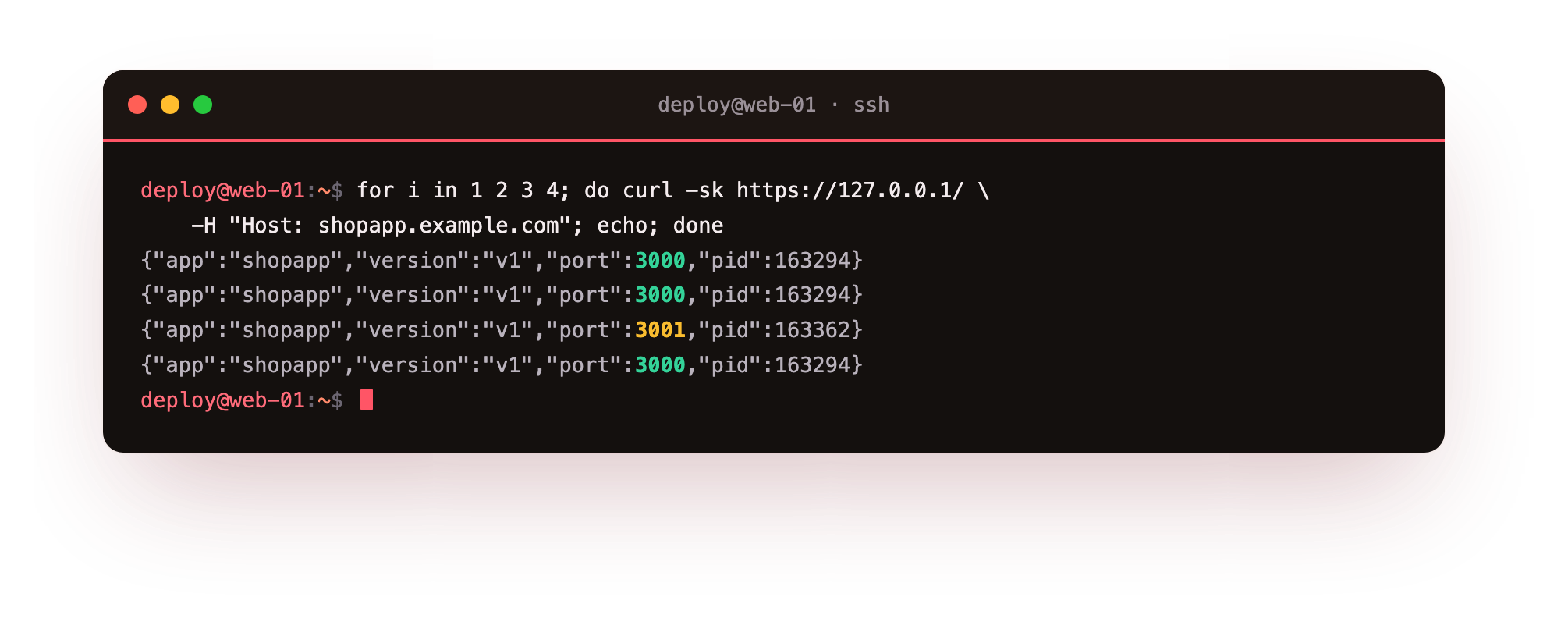
Look at the port and pid fields: the responses come from both 3000 and 3001. nginx is balancing traffic across the two instances, which means either one can disappear and the other keeps serving. That is the property we are about to exploit.
Why does your app need a health check?
Before wiring up the deploy, give your app a health endpoint, a trivial route that returns 200 only when the app is actually ready to serve:
if (req.url === '/health') { res.writeHead(200); return res.end('ok'); }
This matters because "the process has started" and "the app can serve requests" are not the same moment. A Node app might be up but still connecting to the database; a heavier app might need seconds to warm up.
Your deploy script uses this endpoint as a gate: after restarting an instance, it polls /health and does not move on to the next instance until the one it just restarted is answering. You never restart your second instance until the first is confirmed healthy, so there is always at least one good instance serving.
A zero downtime deploy with nginx, demonstrated under fire
Here is the deploy, and the whole point of the chapter. Restart the instances one at a time. While instance 1 is restarting, instance 2 serves every request; nginx, thanks to proxy_next_upstream, does not even send traffic to the instance that is down. To prove no request drops, we hammer the site with sixty rapid requests while restarting an instance mid-flight, and record the HTTP status of every one:
# fire 60 requests in a tight loop, in the background
( for i in $(seq 1 60); do curl -sk -o /dev/null -w "%{http_code} " https://127.0.0.1/ ...; done ) &
# ...and restart one instance while they are in flight
sudo systemctl restart shopapp
wait
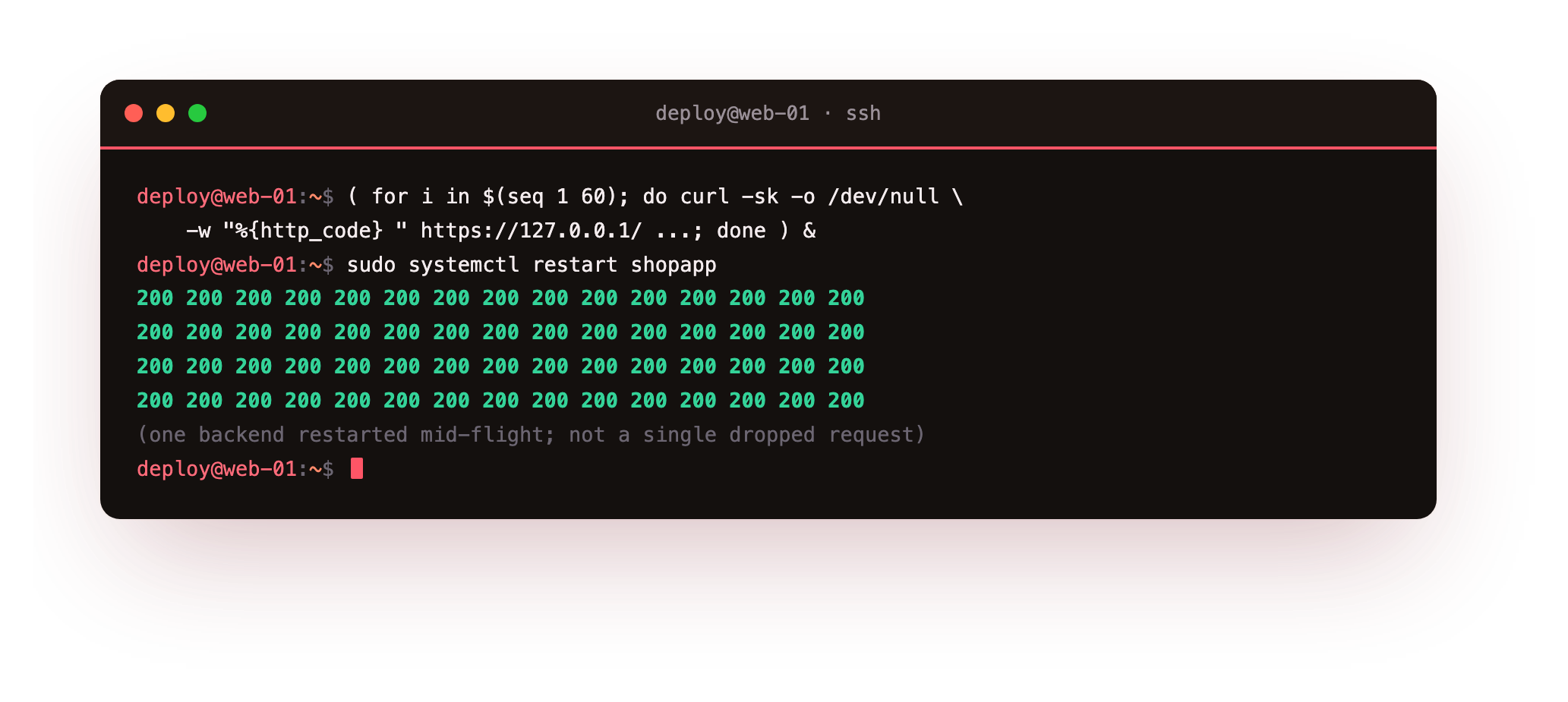
Sixty requests, sixty 200s, not a single failure, even though one of the two backends was killed and restarted right in the middle of the traffic. That is a zero-downtime deploy. Your users saw a completely healthy site while you shipped new code underneath them. Do the same to the second instance once the first is back and healthy, and the whole fleet is updated with nobody the wiser.
Wrap it in a script you can trust
Put this together into a deploy script so it is one command, the same every time, and safe to run half-asleep:
#!/usr/bin/env bash
set -euo pipefail
cd /opt/shopapp
git pull                      # get the new code
npm ci --omit=dev             # install deps reproducibly

for unit in shopapp shopapp2; do
  sudo systemctl restart "$unit"
  # wait for this instance to report healthy before touching the next
  for i in $(seq 1 20); do
    curl -sf http://127.0.0.1:"$([ "$unit" = shopapp ] && echo 3000 || echo 3001)"/health && break
    sleep 0.5
  done
done
echo "deployed, zero downtime"
The shape is the important part, not the exact lines. Get the new code, install dependencies reproducibly (npm ci, not npm install, so the deploy matches your lockfile exactly), then restart instances one at a time with a health check between each. If an instance never comes up healthy, set -euo pipefail stops the script before it takes down the second instance, so a broken deploy leaves you with one good instance still serving rather than a full outage. That is your rollback safety net for free.
Troubleshooting the rolling deploy
The second instance fails to start with EADDRINUSE. Both units are trying to bind the same port. Give each a distinct PORT (3000 and 3001) in its Environment, daemon-reload, and confirm with journalctl that each bound its own port.
Requests still fail during a restart. Either proxy_next_upstream is missing from the nginx config, or the deploy is restarting both instances at once, so nginx has no healthy backend to fall back to. Add the directive and restart instances strictly one at a time.
All traffic goes to one instance. The upstream block lists only one server, or the second instance is not actually listening. Check both ports answer with curl -sk https://127.0.0.1/ -H "Host: shopapp.example.com" before load testing.
The deploy script hangs on the health check. The /health route is missing, or the app never finishes warming up. Confirm curl http://127.0.0.1:3000/health returns ok by hand, and check the app's logs for a startup that never completes.
Frequently asked questions
Why two instances instead of just restarting one faster?
However fast a single restart is, there is still a window where the only copy is down and requests fail. A second instance removes the window entirely, because nginx always has a healthy backend to send traffic to.
Do the two instances need to share state?
Any state that must survive a restart, such as sessions, belongs in a shared store like your database or Redis, not in app memory. Once state lives outside the process, either instance can serve any request interchangeably.
Why npm ci and not npm install in the deploy?
npm ci installs exactly what your lockfile pins, so the deploy is reproducible and cannot silently pull a different dependency version. npm install can change the lockfile, which is the last thing you want happening mid-deploy.
Is two instances enough, or do I need more?
Two is enough to deploy without downtime on a single box. You add more instances, or more servers behind the load balancer, for capacity and redundancy, using exactly the same upstream pattern.
What you have built
Step back and look at the whole series. You started with an app running in a terminal, reachable on a raw port. You now have: the app bound to localhost with nginx facing the internet, running as a hardened systemd service that restarts on crash and boot, served over auto-renewing HTTPS, behind a load-balancing pool that lets you ship new code without dropping a single request. Every piece of it ran on one small VPS, and every command was tested on a live server.
That is a real, professional deployment, the kind that most teams pay a platform to hide from them. You now understand what that platform is actually doing, and you can do it yourself on a server you control. When you outgrow a single box, the same patterns scale: more instances, more servers behind the load balancer, a managed database instead of a local one. But the foundation is exactly what you have here, and most applications run happily on it for a very long time.