What your authoritative DNS server will do
An authoritative DNS server is the source of truth for a zone: it holds the records for a name and answers questions about them with the authoritative flag set, rather than repeating a copy it fetched from somewhere else.
In this chapter you build one on the slice from chapter one, using the bind9 package you already installed. You write the boxlab.space zone by hand, validate it with the two checkers BIND ships, load it into named, and finish by watching your own server answer a real query with aa. That query is the moment the naming stops being someone else's job and becomes yours.
- A zone file opens with a
$TTLdefault and anSOArecord carrying the serial and timers, then theNSrecords, then the host records people look up. named-checkconfvalidates the server config andnamed-checkzonevalidates the zone file, both beforenamedever loads them, so a typo never takes the zone offline.- The payoff is a
digthat returnsstatus: NOERRORandflags: qr aa: your server is speaking for the zone, and the answer is definitive. - Raise the
SOAserial on every edit, or a secondary server will keep serving the old records because it never notices the change.
Writing the zone file
A zone file is a plain text list of records for one domain. It opens with a $TTL default, then the SOA record that names the primary server and the administrator mailbox and sets the serial and the refresh timers. After that come the NS records that delegate the zone, the glue A records for those nameservers, and the host records themselves. Read the demo zone you will load.
cat db.boxlab.space
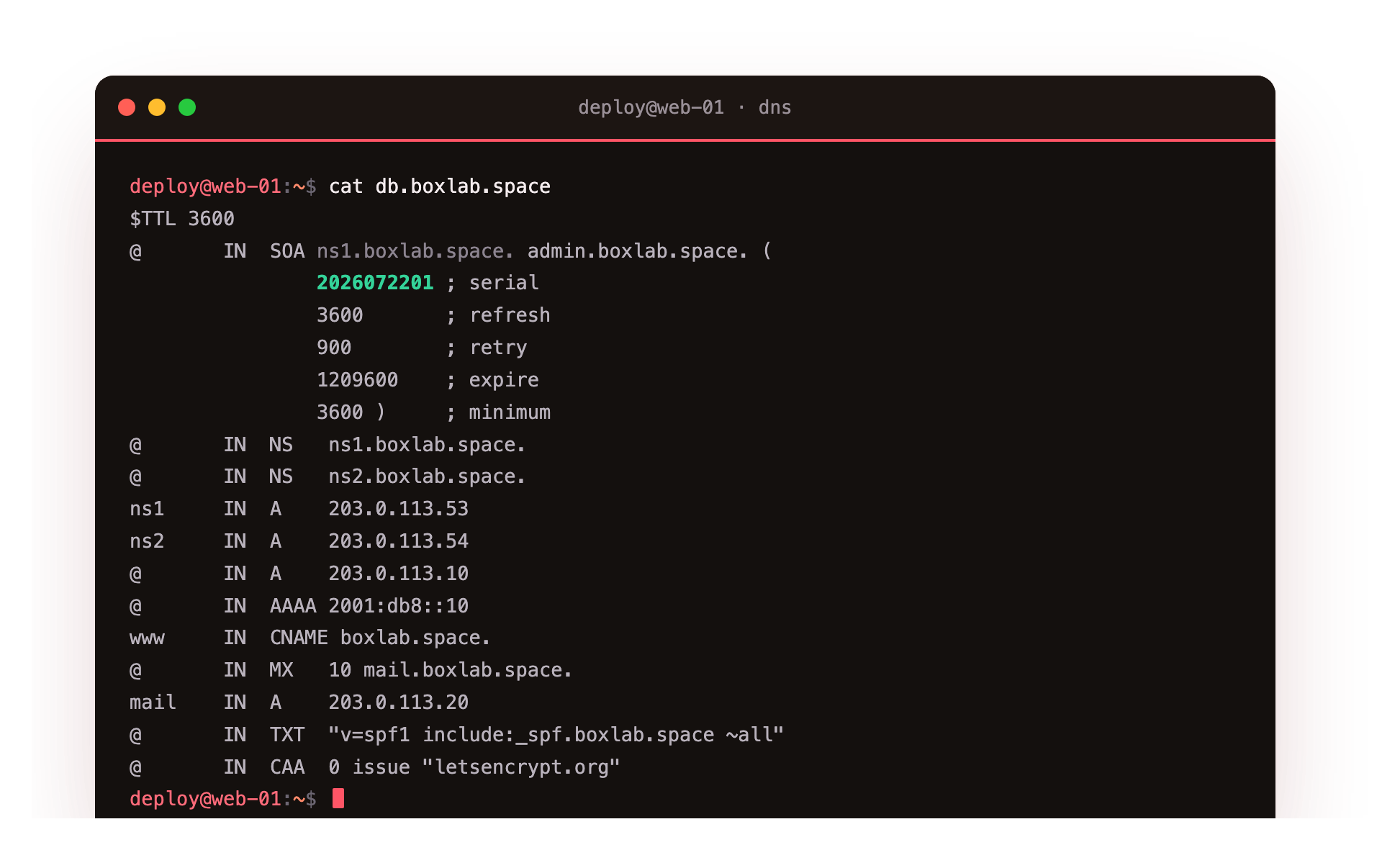
The file defines the apex A at 203.0.113.10 and an AAAA, a www alias as a CNAME, an MX for mail with its priority, a TXT holding an SPF policy, and a CAA naming the allowed certificate authority. The serial 2026072201 is a date followed by a two-digit counter, the convention that keeps serials both increasing and readable at a glance. Every time you touch a record, raise that number, and the reason why becomes clear the moment you add a second server.
Validating before you load
BIND ships two checkers, and running them turns a whole class of outages into a caught mistake. named-checkconf parses the server configuration and reports any syntax error. named-checkzone loads a zone file exactly the way named would and reports a bad record, a missing SOA, or a serial that failed to change. Check the config, then the zone, before anything goes live.
sudo named-checkzone boxlab.space db.boxlab.space
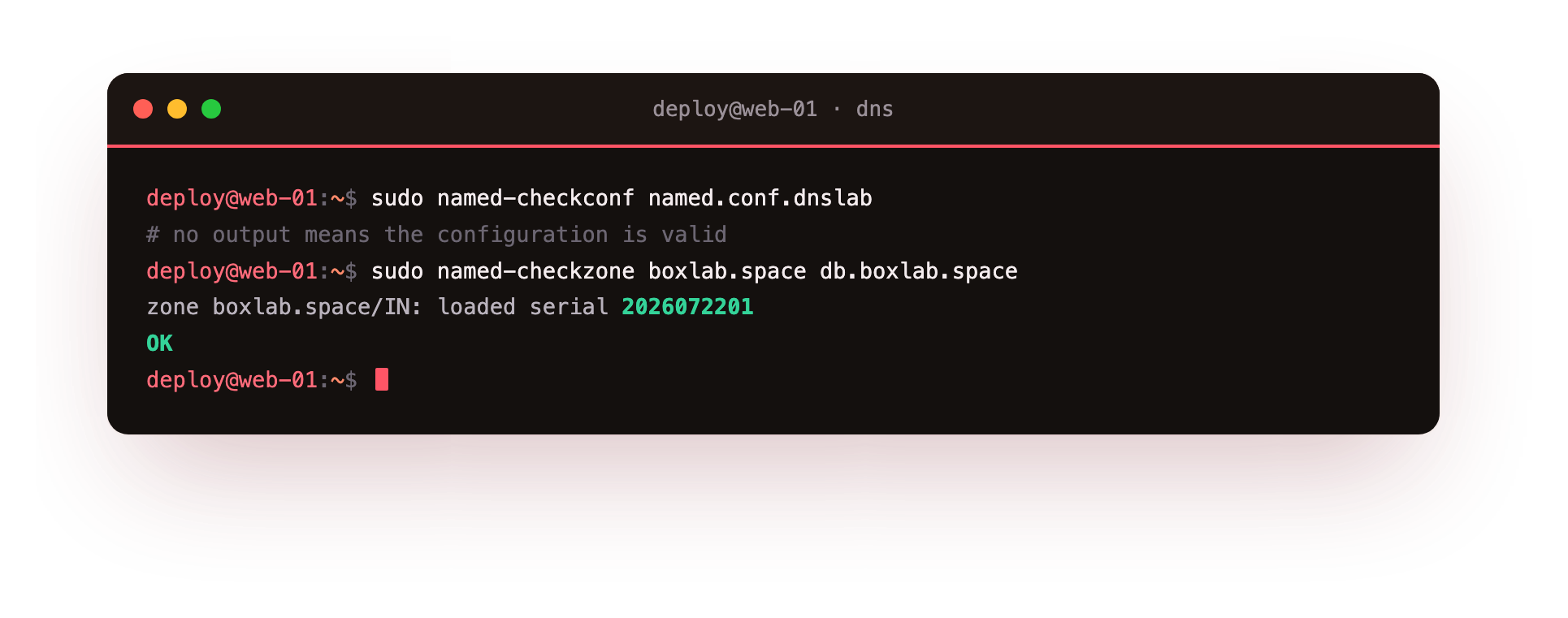
A healthy run prints loaded serial 2026072201 and OK. If a record is malformed, the checker names the file and the line, so you fix it in seconds instead of reading logs after a failed reload. Run named-checkconf the same way against your configuration file, and treat a non-zero exit from either as a hard stop in any script that reloads DNS.
Load it, and prove the answer is yours
With the checks passing, named loads the zone and listens on 127.0.0.1 port 5301. The proof that it is authoritative, and not simply a server handing back data it cached, lives in the response header. Ask it for the SOA and read the flags.
dig @127.0.0.1 -p 5301 boxlab.space SOA
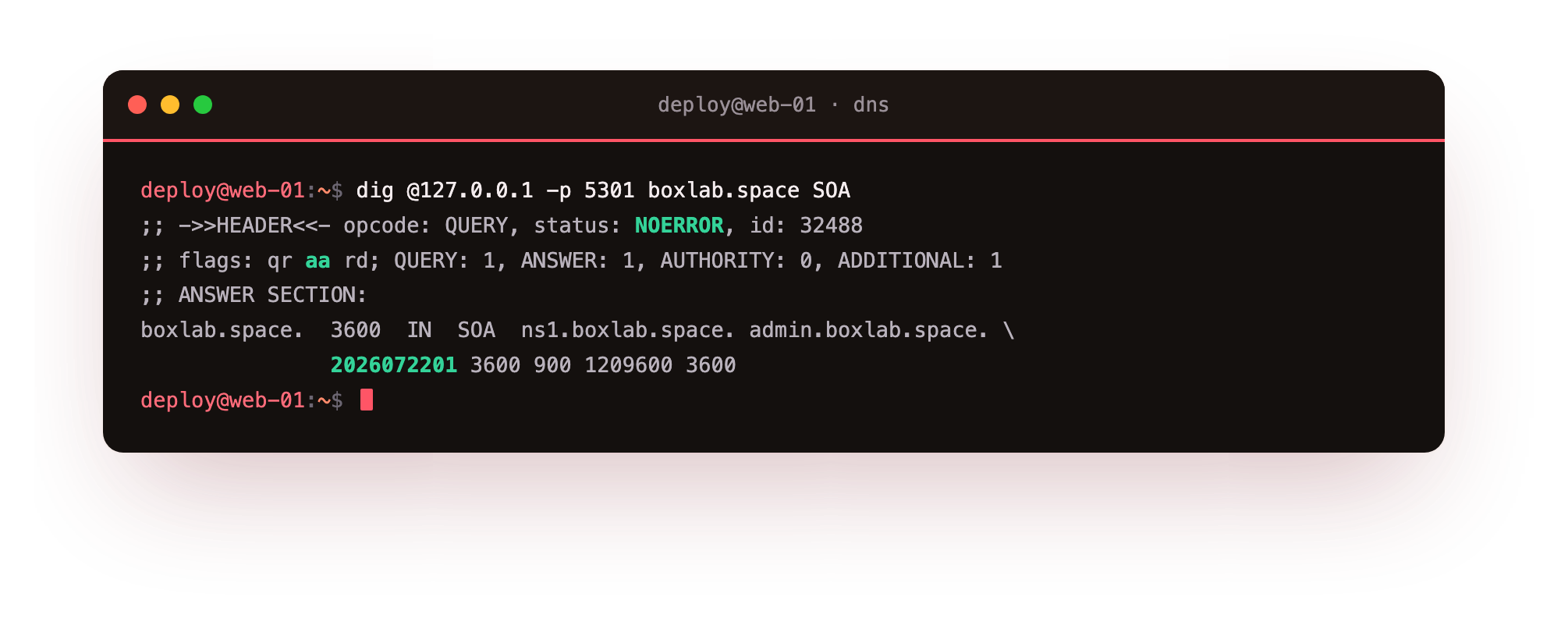
The header shows status: NOERROR and flags: qr aa rd. That aa flag is the destination this whole series pointed at: your server is the authority for boxlab.space, so its answer is the real one, not a cached echo. Query the apex A and it returns 203.0.113.10 with the same aa set. Ask it for a name in a zone it does not serve and it refuses, because an authoritative server answers only for its own zones. You now run your own DNS for this name.
Confirm the reply carries aa and the answer matches your zone file. If the aa flag is missing, named did not load the zone: check named-checkconf against your config and confirm the zone file path in it points at the file you just validated.
Going further: from one server to a resilient setup
A single authoritative server is a single point of failure, so real zones list at least two NS records. In production you run a primary that you edit and one or more secondaries that transfer the zone from it, and the SOA refresh and retry timers decide how often a secondary checks for a new serial.
This is where the serial discipline earns its keep: a secondary compares the serial it holds against the primary's and pulls a fresh copy only when the number went up. Skip the bump and the secondary serves stale records with no error to warn you.
Keep the primary's zone file under version control, let the two checkers gate every change, and give the secondaries a separate network path so one failure cannot darken the whole zone. None of that changes the shape of what you did here: an authoritative server is a validated zone file plus a daemon that loads it and answers with aa.
Frequently asked questions
What is an authoritative DNS server?
It is a server configured to hold a zone's records and answer queries for that zone with the aa flag. It is the source of truth, unlike a recursive resolver that caches answers fetched from elsewhere. Public resolvers around the world ultimately get their data from the authoritative server that owns the zone.
Why must I raise the SOA serial after editing a zone?
Secondary servers compare the serial they hold against the primary's. If it did not increase, they assume nothing changed and keep serving the old records. The date-plus-counter format, such as 2026072201, keeps serials rising and easy to read, and BIND itself refuses to load a zone whose serial went backwards.
What does named-checkzone catch that a reload would not?
It parses the zone file the same way named does, so it catches a missing SOA, a malformed record, a CNAME clashing with other data, or an unchanged serial, and it names the exact line. Running it before every reload means a stray typo can never take the live zone down.
Can I serve this zone to the internet now?
Not until you delegate it. The zone answers only on loopback here, which is deliberate. To publish it you point the registrar's NS records at a server with a public IP, open port 53 in the firewall, and put a second nameserver behind a different failure domain. Everything in this chapter is the same; only the listening address and the delegation change.
What you can do now
You can write a zone file from scratch, validate the config and the zone with BIND's own checkers before anything goes live, load it into named, and prove with one dig that your own server answers authoritatively for your zone. That is the core of running DNS, and it is now running on your slice.
An authoritative server answers the same, one record at a time, however often it is asked, which gets slow when a busy resolver hammers it. The next chapter puts a cache in front: a recursive DNS resolver with caching, where a repeat lookup comes back from memory in zero milliseconds.