What DNSSEC adds
DNSSEC signs a zone so a resolver can prove an answer is genuine and unmodified. Without it, a resolver trusts whatever the network hands back; with it, a forged record fails validation and is dropped.
In this final chapter you sign boxlab.space on Ubuntu 24.04, read the DNSKEY, RRSIG and DS records that build the chain of trust, confirm your validating resolver sets the ad flag, and then work through the failures you will actually meet: SERVFAIL, NXDOMAIN and a record that will not load. Signing is the last piece that makes the zone you own trustworthy, and the debugging toolkit is what keeps it that way.
- Signing adds a
DNSKEY(the public key), anRRSIG(a signature) on every record set, and aDSyou publish at the parent zone. - A validating resolver sets the
adflag only when the whole signature chain, fromDStoDNSKEYtoRRSIG, checks out. SERVFAILfrom a validating resolver often means a broken signature or trust anchor, not a missing record, and+cdproves which.NXDOMAINmeans the name genuinely does not exist, a different failure fromSERVFAIL, and telling them apart is the first move in any DNS debug.
Signing the zone and reading the keys
BIND's dnssec-policy signs a zone inline and manages the keys for you, so turning it on is a one-line change to the zone's config rather than a manual key ceremony. Once it is on, the zone gains a public key you can read. Ask for the DNSKEY.
dig @127.0.0.1 -p 5301 boxlab.space DNSKEY +multi
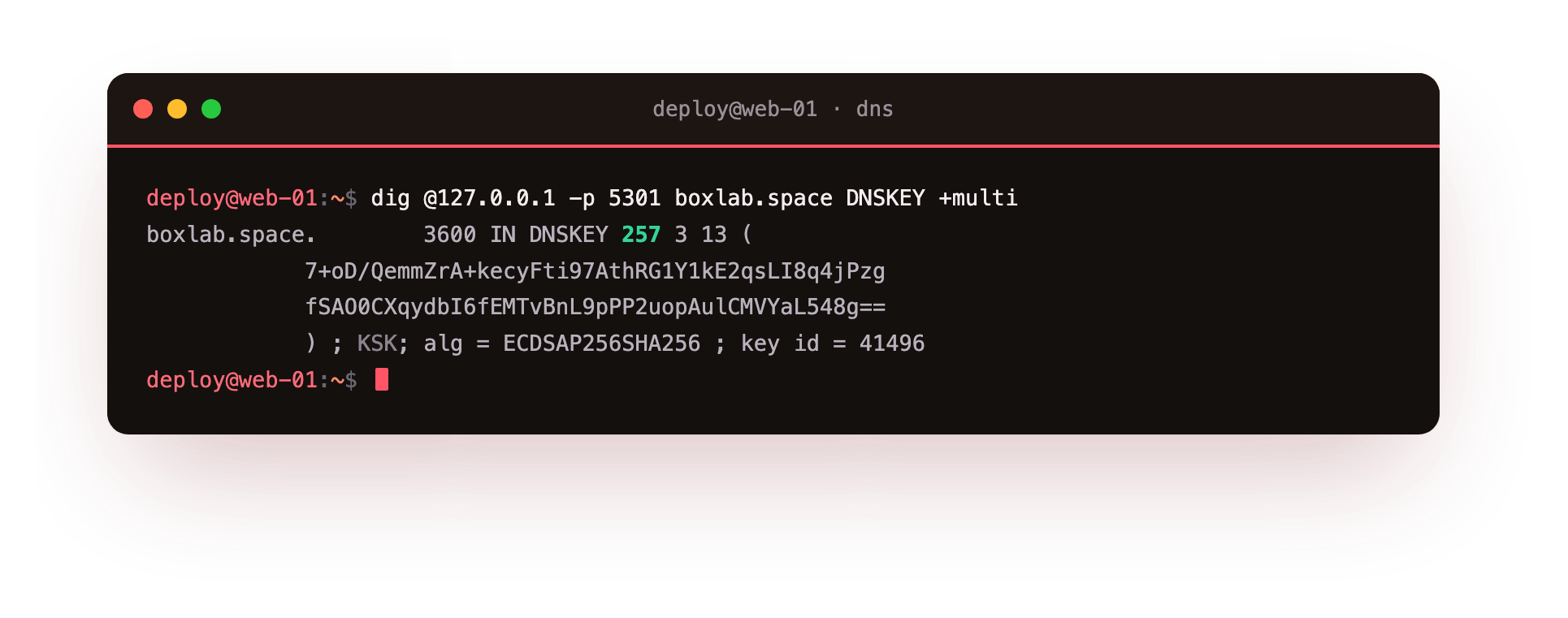
The answer shows a key with flags 257, which marks it a key-signing key, using algorithm 13, ECDSA P-256. The +multi option prints it in the readable multi-line form with the key id in a comment. This public key is half of the chain: the resolver uses it to check signatures, while the matching private key, which never leaves the server, is what produced them. On Ubuntu 24.04 with the default policy, BIND generates and rotates these keys under the zone's key directory without further work from you.
Signatures and the DS record
Every record set in a signed zone gains an RRSIG, the signature a resolver checks against the DNSKEY. Ask for the address with DNSSEC requested.
dig @127.0.0.1 -p 5301 boxlab.space A +dnssec
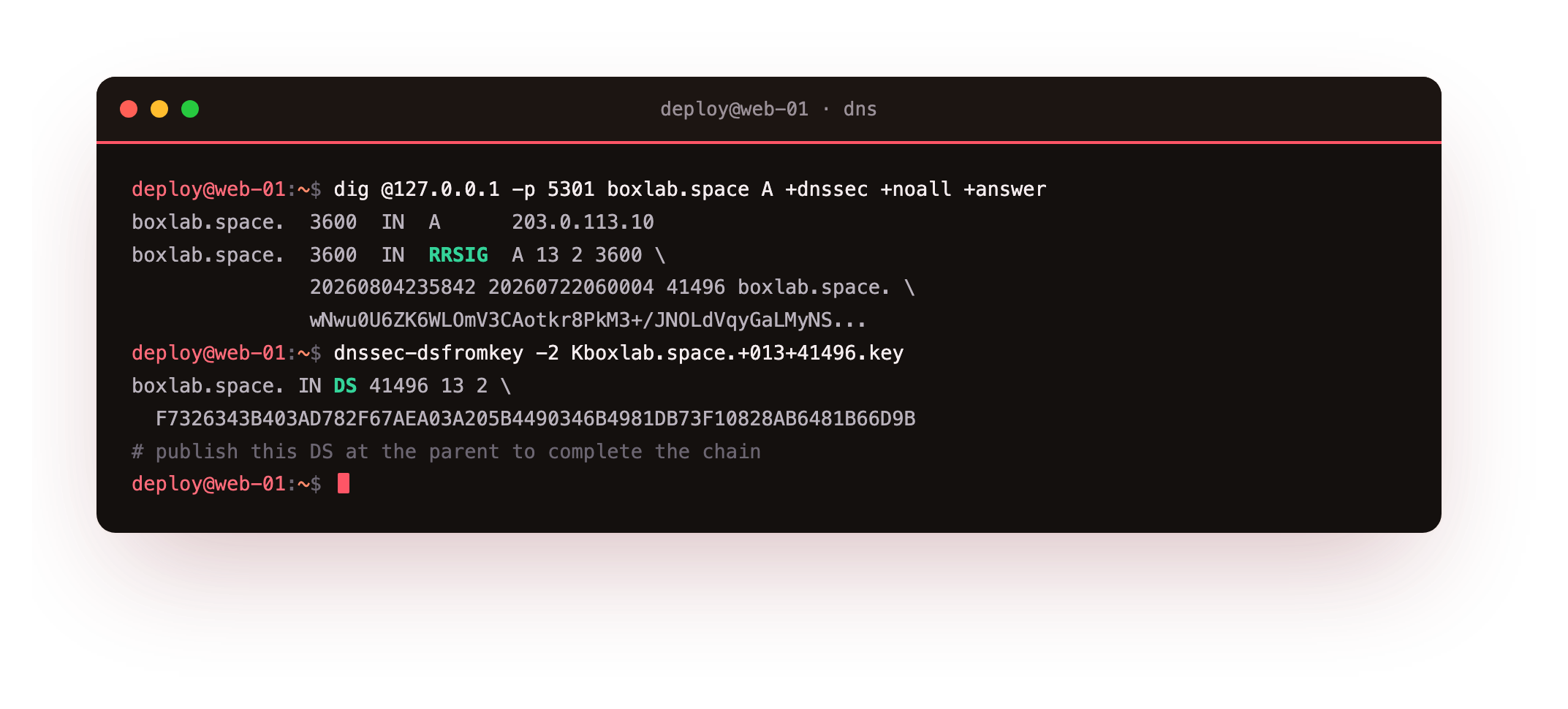
Alongside the A record you now get an RRSIG A covering it, with the algorithm, the key id, and an inception and an expiry time. The signature is what proves the address was not altered in flight.
To complete the chain you generate a DS record, a hash of the key-signing key, and publish it in the parent zone through your registrar. Deriving the DS gives a line like 41496 13 2 followed by the digest, and the parent uses that to vouch for your key, so a resolver can build trust from the root down to your zone.
Confirming validation
Signing means nothing until a resolver checks it. Your validating resolver from chapter three, holding the zone's trust anchor, verifies the chain and marks the authentic answers. Query it with DNSSEC requested.
dig @127.0.0.1 -p 5302 boxlab.space A +dnssec
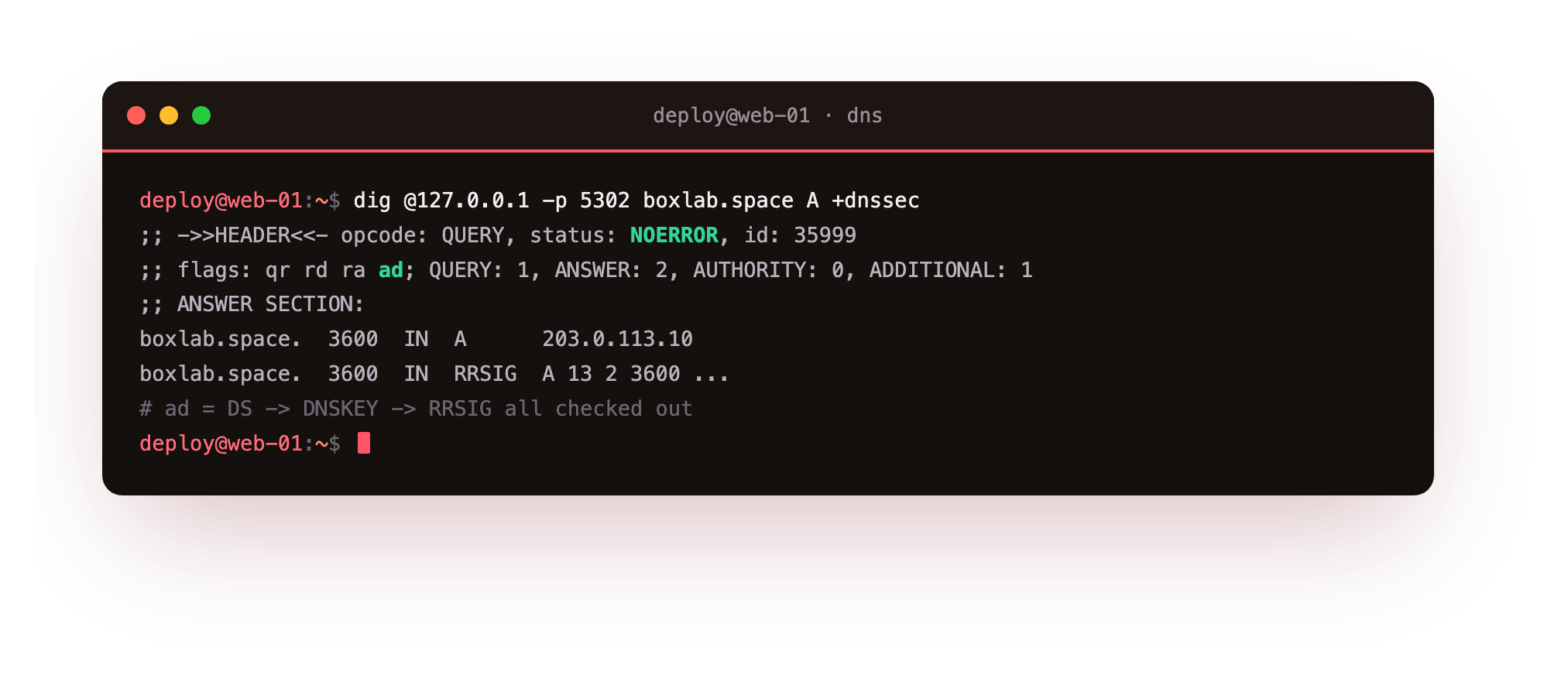
The header reads flags: qr rd ra ad. That ad, authenticated data, is the resolver telling you it followed the DS to the DNSKEY to the RRSIG and every link held. An answer without ad from a validating resolver is one you did not prove, which is the cue to start troubleshooting rather than to trust it.
Confirm the resolver reply carries ad and the authoritative reply on 5301 carries aa. If the resolver drops to SERVFAIL on a record the authoritative server answers fine, the fault is validation, not the data, which the next section pins down.
Troubleshooting: SERVFAIL, NXDOMAIN and broken records
Two failures look alike and are not. NXDOMAIN means the name genuinely does not exist. Ask for a name the zone does not hold.
dig @127.0.0.1 -p 5301 nope.boxlab.space A
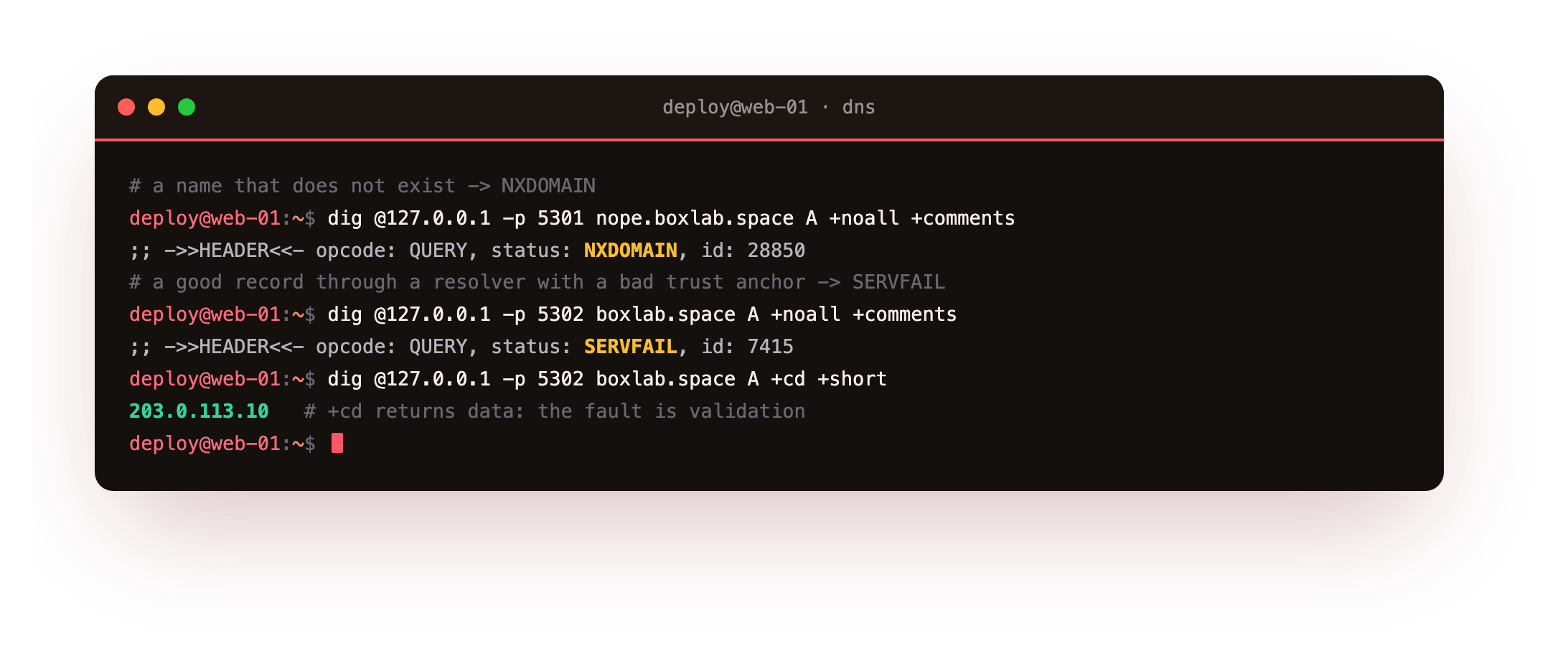
The status is NXDOMAIN with the zone's SOA in the authority section, the server saying, definitively, no such name. SERVFAIL is different: it means the resolver could not produce a trustworthy answer at all.
When a validating resolver has the wrong trust anchor, a perfectly good record still comes back SERVFAIL. Adding +cd, checking disabled, returns the data anyway, which proves the record is fine and the fault is validation. The fix is to correct the trust anchor, after which the ad flag returns. That one contrast, does +cd fix it or not, tells you whether to look at the data or at the signatures.
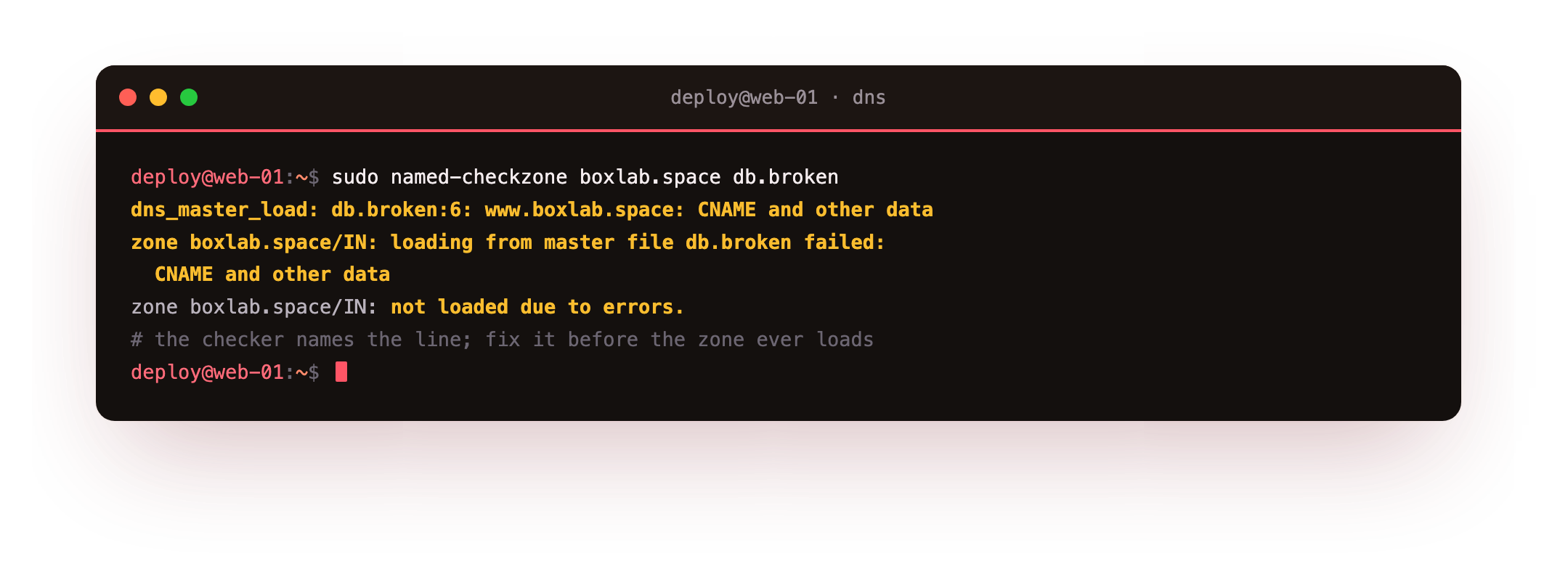
For a load-time error the checker is your friend. named-checkzone names the offending line, such as a CNAME clashing with other data, so you fix the file before it ever takes the zone down.
sudo named-checkzone boxlab.space db.broken
Frequently asked questions
What are the DNSKEY, RRSIG and DS records for?
The DNSKEY is the zone's public key. Each RRSIG is a signature over a record set, checked against that key. The DS is a hash of the key-signing key that you publish in the parent zone, so the parent vouches for your key and a resolver can build a chain of trust from the root all the way down.
Does SERVFAIL mean the record is missing?
No. SERVFAIL means the resolver could not return a trustworthy answer, often a DNSSEC validation failure or an unreachable authoritative server. A missing name returns NXDOMAIN instead. Re-querying with +cd bypasses validation: if the data appears, the record is fine and the fault is in the signature chain or the trust anchor.
How do I complete the DNSSEC chain of trust?
After signing, generate the DS record from your key-signing key and give it to your domain registrar to publish in the parent zone. Until the parent holds a matching DS, resolvers treat the zone as unsigned. Once it does, validators can build trust from the root, through the parent, to your zone.
What is the ad flag and why is it sometimes missing?
The ad flag means a validating resolver authenticated the answer with DNSSEC. It is absent when the resolver does not validate, when the zone is unsigned, or when validation fails. If a validating resolver returns data without ad, treat it as unproven and check the signatures and the trust anchor before relying on it.
What you can do now
That closes the series. You started relying on someone else's name server, and you now run your own: an authoritative BIND server answering with aa for a zone you wrote, a validating unbound resolver caching in front of it, split views serving internal and external answers from one name, and a signed zone whose every record a resolver can prove. When resolution fails you can tell NXDOMAIN from SERVFAIL, isolate a validation fault with +cd, and catch a bad record with named-checkzone before it ever loads.
The demo ran entirely on loopback so nothing you did touched public DNS. To answer for a real domain on the internet, you delegate its NS records to a slice with a public IP, open port 53, and publish the DS at your registrar, and everything you built here works the same on the day you do.