What split-horizon DNS is for
Split-horizon DNS serves a different answer for the same name depending on who is asking. Internal clients get a private address for a host, everyone else gets the public one, and some names exist only on the inside and never appear in a public answer at all.
Now that you own an authoritative zone, this is how you publish internal hostnames from it without leaking your private network to the world. In this chapter you build it with BIND9 views on Ubuntu 24.04, selecting the view by the client's source address, and you prove the two answers side by side on the same server.
- A BIND view is a named ruleset chosen by
match-clients, so the source address of a query decides which zone data the client sees. - The same name can return a private address to an internal client and a public address to an external one, from one server.
- An internal-only name returns
NXDOMAINto outside clients, so a private host never shows up in a public answer. - View order matters: the first view whose
match-clientslist matches wins, so the narrowest match has to come first.
One name, two answers
The point of split horizon is that a single name resolves differently by audience. The server defines an internal view matched to an internal client address and an external view matched to everyone else, each holding its own copy of corp.example.com. Query the same hostname as an external client, then as an internal one, and compare.
dig @127.0.0.1 -p 5301 intranet.corp.example.com A
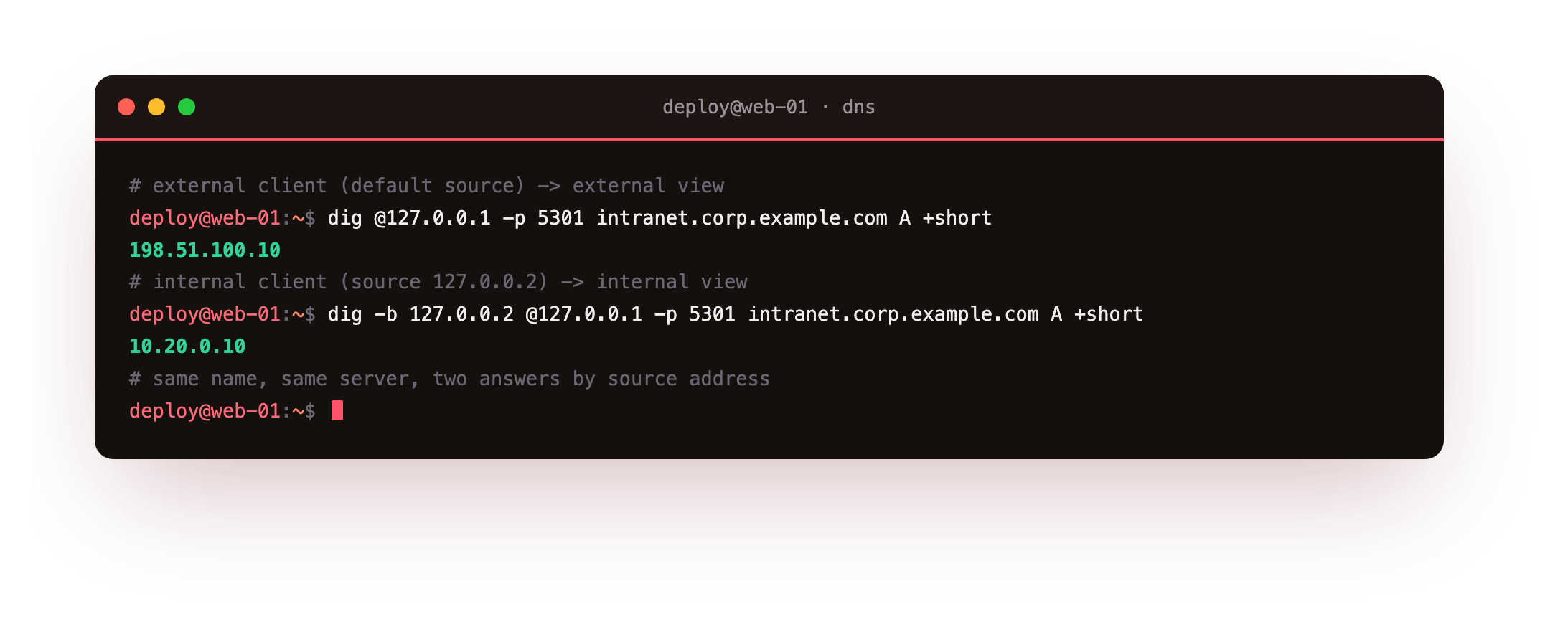
The first query comes from the default source and lands in the external view, which answers 198.51.100.10, the public address. The second uses dig -b 127.0.0.2 to send from an internal source address, so it matches the internal view and answers 10.20.0.10, a private one. Same name, same server, two answers, chosen entirely by who asked. In production you match on your real internal subnets rather than a single loopback address, but the mechanism is exactly this.
Hiding internal-only names
Split horizon is also about what outsiders cannot see. A database host that exists only inside your network should never turn up in a public answer. Put it in the internal view alone and the external view simply has no record for it. Query an internal-only name from both sides.
dig @127.0.0.1 -p 5301 db.corp.example.com A
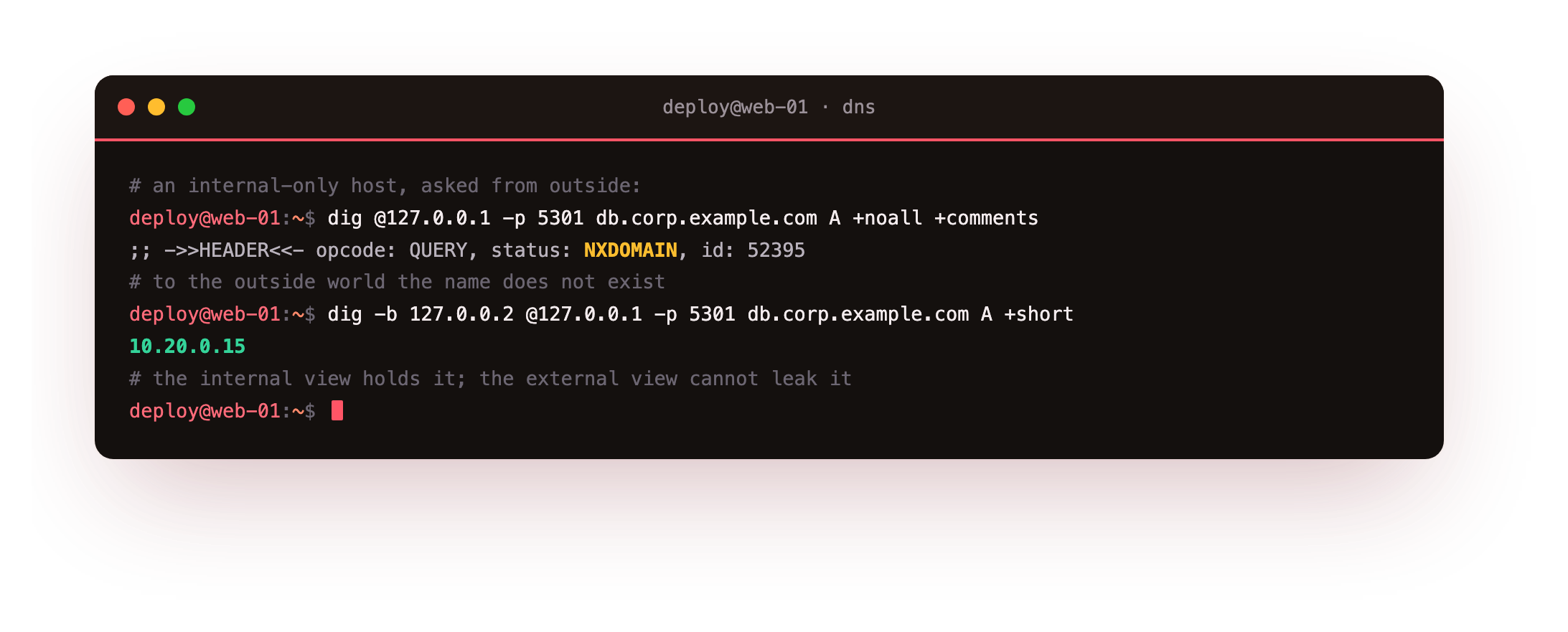
From the external source this returns status: NXDOMAIN: as far as the outside world knows, the name does not exist. Send the same query from the internal source with dig -b 127.0.0.2 and it answers 10.20.0.15. The external view cannot leak a record it does not hold, which is exactly the property you want for private infrastructure hostnames.
Confirm the external query returns NXDOMAIN and the internal one returns the private address. If the external query answers instead of refusing, the internal-only record slipped into the external zone copy: it belongs in the internal view's file alone.
The views config
Views live in the server config, not the zone files, and each view carries its own zones. Read the configuration to see how the match works.
cat named.conf.dnslab
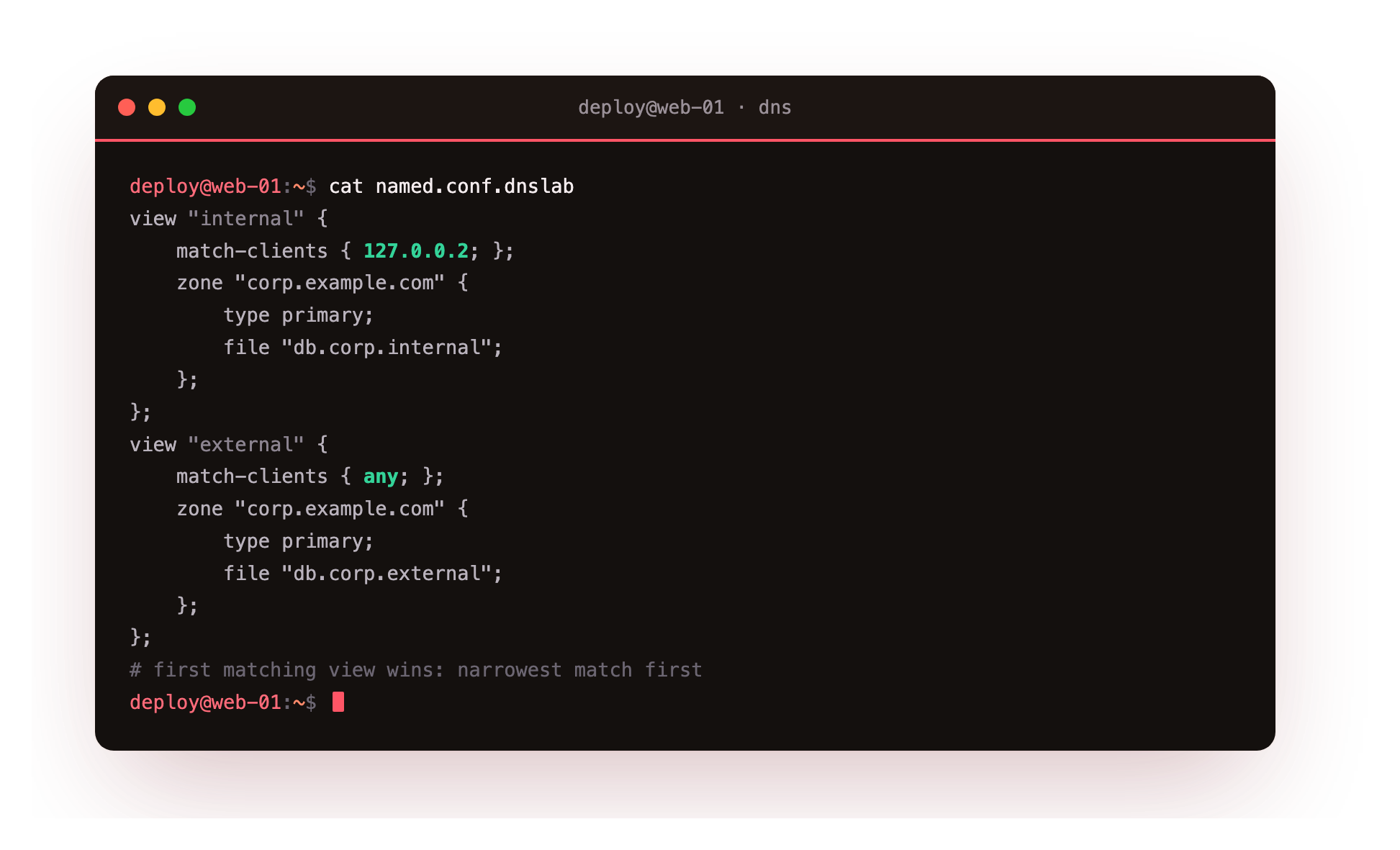
Each view block opens with match-clients, an access list of source addresses. The internal view matches the internal client address and loads the internal copy of corp.example.com; the external view matches any and loads the public copy. BIND evaluates views top down and uses the first whose match-clients matches, so the specific internal match must sit above the catch-all external one. Reverse them and every client matches any first, and the internal view is never reached.
Going further: when to reach for it, and its limits
Views solve one specific problem: the same name needing a different answer inside and outside. The common cases are an internal load balancer address that differs from the public one, staff-only hostnames that should stay out of public DNS, and steering internal clients to a nearer server.
Views are not a security boundary on their own, because a source address can be spoofed on an untrusted path, so pair them with a firewall that keeps the internal view reachable only from inside. Keep the two zone copies in step where records overlap, factor shared records into an included file if that helps, and validate both copies with named-checkzone so the two horizons never drift apart by accident. Treat the hiding as defence in depth, not the only defence.
Frequently asked questions
What is split-horizon DNS used for?
It serves a different answer for a name based on the client, so internal users reach a private address while external users get a public one. It is used for internal-only hostnames, private load balancer addresses, and steering staff to internal endpoints without those records ever appearing in public DNS.
How does BIND decide which view a client gets?
Each view has a match-clients access list of source addresses. BIND checks views in order and uses the first one whose list matches the client's source address. Put the narrowest match, such as your internal subnets, above the catch-all any view, or every client would match the first one and never reach the rest.
Is split horizon a security control?
It hides internal names from external answers, which lowers exposure, but a source address can be spoofed on an untrusted path, so it is not a boundary by itself. Combine it with firewall rules that only let trusted networks reach the internal view, and treat the hiding as one layer among several rather than the whole defence.
Do I duplicate the whole zone across views?
You keep a separate zone copy per view, but they need differ only where the answers differ. Records that are identical inside and out can be repeated in both files or factored into an included file. Keep them in sync and validate each with named-checkzone, so an edit to one horizon does not silently diverge from the other.
What you can do now
You can answer one name differently by audience using BIND views, return a private address inside and a public one outside from a single server, hide internal-only hosts from public answers with NXDOMAIN, and read the config that selects a view from the client's source address. Your zone now serves two horizons at once.
One thing is still missing: nothing yet proves an answer was not forged in transit. The final chapter signs the zone so a resolver can prove every record is genuine, and gives you the toolkit to debug it when resolution fails: DNSSEC and DNS troubleshooting.