nftables NAT rewrites where a packet goes
nftables NAT is how you change a packet's destination or source as it passes through, and logging is how you see what a rule did. The filter chain from the earlier chapters decides whether a packet may pass; NAT decides where it goes, and a log statement records the decision.
A redirect sends a port to a local service, a destination NAT points it at another address, and masquerade rewrites the source so replies find their way back behind a gateway. This chapter builds each on Ubuntu 24.04 with nftables v1.0.9, proves a redirect with a real request, and reads a labelled log line out of the kernel, still inside the demo table.
- NAT rules live in
nat-type base chains on the prerouting, output or postrouting hooks, not in a filter chain. redirect to :portbends a connection to a local port;dnat to addr:portsends it to another host.masqueradeon postrouting rewrites the source address to the outgoing interface, which is what a gateway needs.- A
log prefixstatement writes a labelled line to the kernel log, which you read withdmesgor journalctl.
Redirect a port to a local service
A redirect is the simplest NAT: it keeps the destination host the same but changes the port, sending a connection to a service listening somewhere else on the box. It belongs in a nat-type chain, and for locally generated traffic that chain hooks output. The rule matches the incoming port and hands the connection to the real one.
Here a request to port 15599 is bent to a backend listening on 18080. A plain curl to the front port lands on the backend and reads its response, which is the redirect working end to end.
curl http://127.0.0.1:15599/
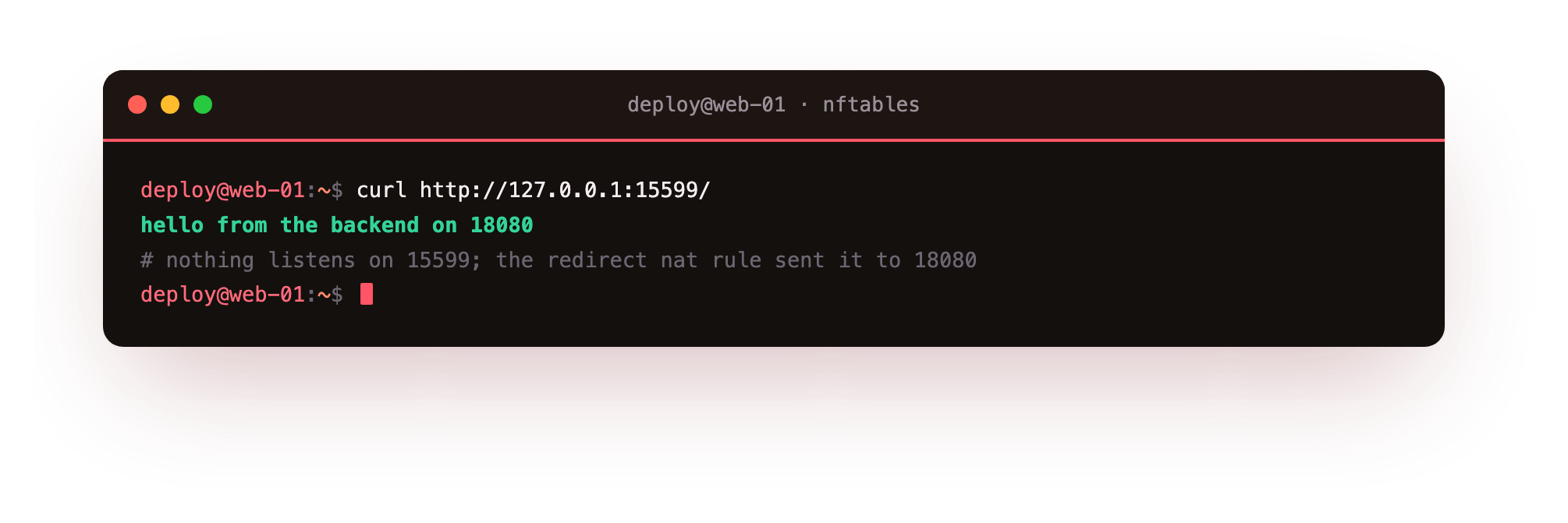
The reply comes from the backend on 18080, even though nothing listens on 15599 itself. Swap redirect to :18080 for dnat to 203.0.113.9:18080 and the same rule forwards the connection to another host instead of a local port.
With the redirect in place, run curl http://127.0.0.1:15599/ and confirm you get the backend's response even though nothing listens on 15599. If the connection is refused instead, the NAT rule is on the wrong hook: locally generated traffic is rewritten on the output hook, not prerouting.
Masquerade behind a gateway
Masquerade is source NAT for a box that routes traffic out to the internet on behalf of a private network. On the postrouting hook it rewrites the source address of forwarded packets to the gateway's own outgoing address, so replies come back to the gateway and are matched to the original client by connection tracking. It is the rule a home router or a NAT instance runs.
chain postrouting {
  type nat hook postrouting priority srcnat; policy accept;
  oifname "eth-wan" masquerade
}
The oifname names the outgoing interface, so only traffic leaving that link is rewritten. On this test the interface name is deliberately one that does not exist, so the rule loads and demonstrates the syntax without altering any real traffic on the server.
Log what a rule does
A firewall you cannot observe is hard to trust. A log statement writes a line to the kernel ring buffer, and a prefix tags it so you can grep for it later. Attach it just before a drop and every refused packet leaves a record with its interface, source, destination and port. The line lands in dmesg and in the journal under the kernel source.
sudo dmesg | grep scdemo-drop
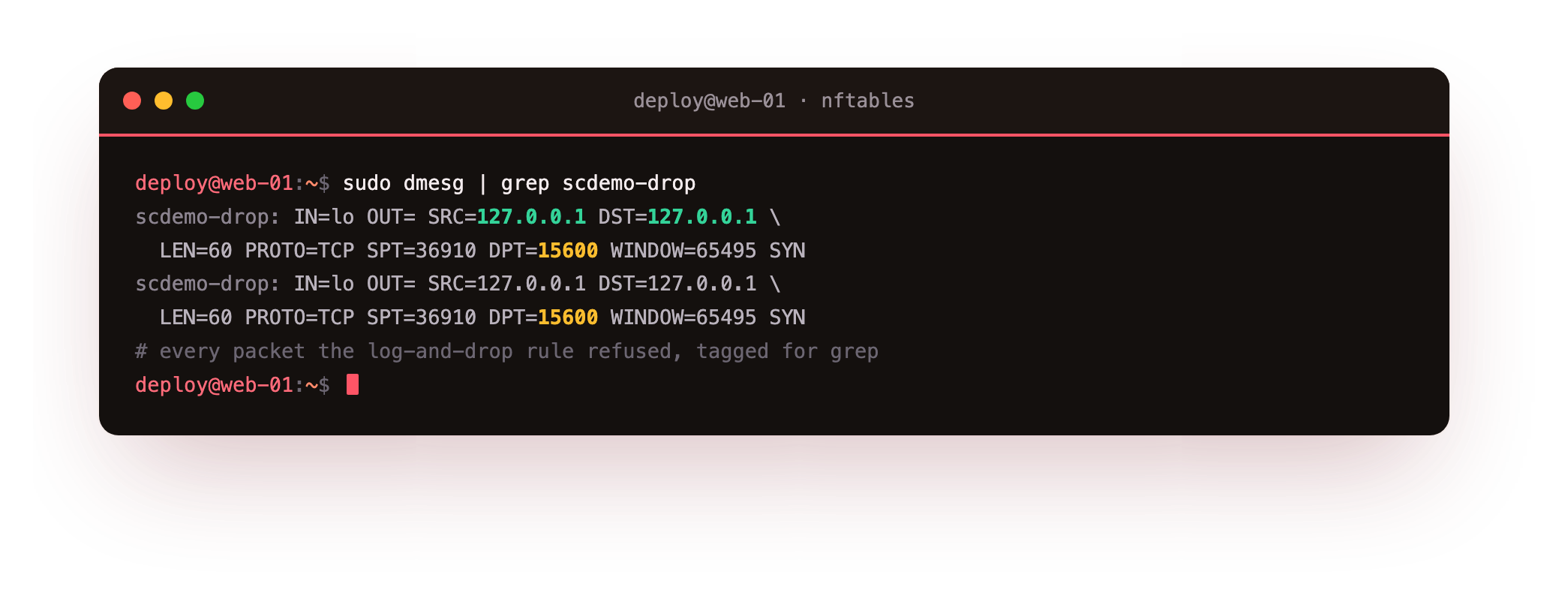
The captured line reads scdemo-drop: IN=lo ... SRC=127.0.0.1 DST=127.0.0.1 ... DPT=15600, the exact packet that hit the log-and-drop rule. Keep the prefix short and distinctive so a later grep or a log alert can find it, and set a sane limit on the log rule so a flood cannot fill the disk with identical lines.
A logged drop is one rule, not two. The log statement is non-terminal, so a packet that matches it carries on to the next statement in the same rule, which is where the drop sits. Writing log prefix "scdemo-drop: " counter drop means the kernel records the line, bumps the counter, and refuses the packet in a single pass. Reading those log lines back is often how you find a legitimate service you forgot to allow, because its refused connections show up tagged and timestamped.
Read the NAT and log rules back
As always, confirm the rules landed as written. Listing the table shows the nat chains with their hooks and the log statement on the filter chain, so you can see the redirect, the masquerade and the logging in one view.
sudo nft list table inet scdemo
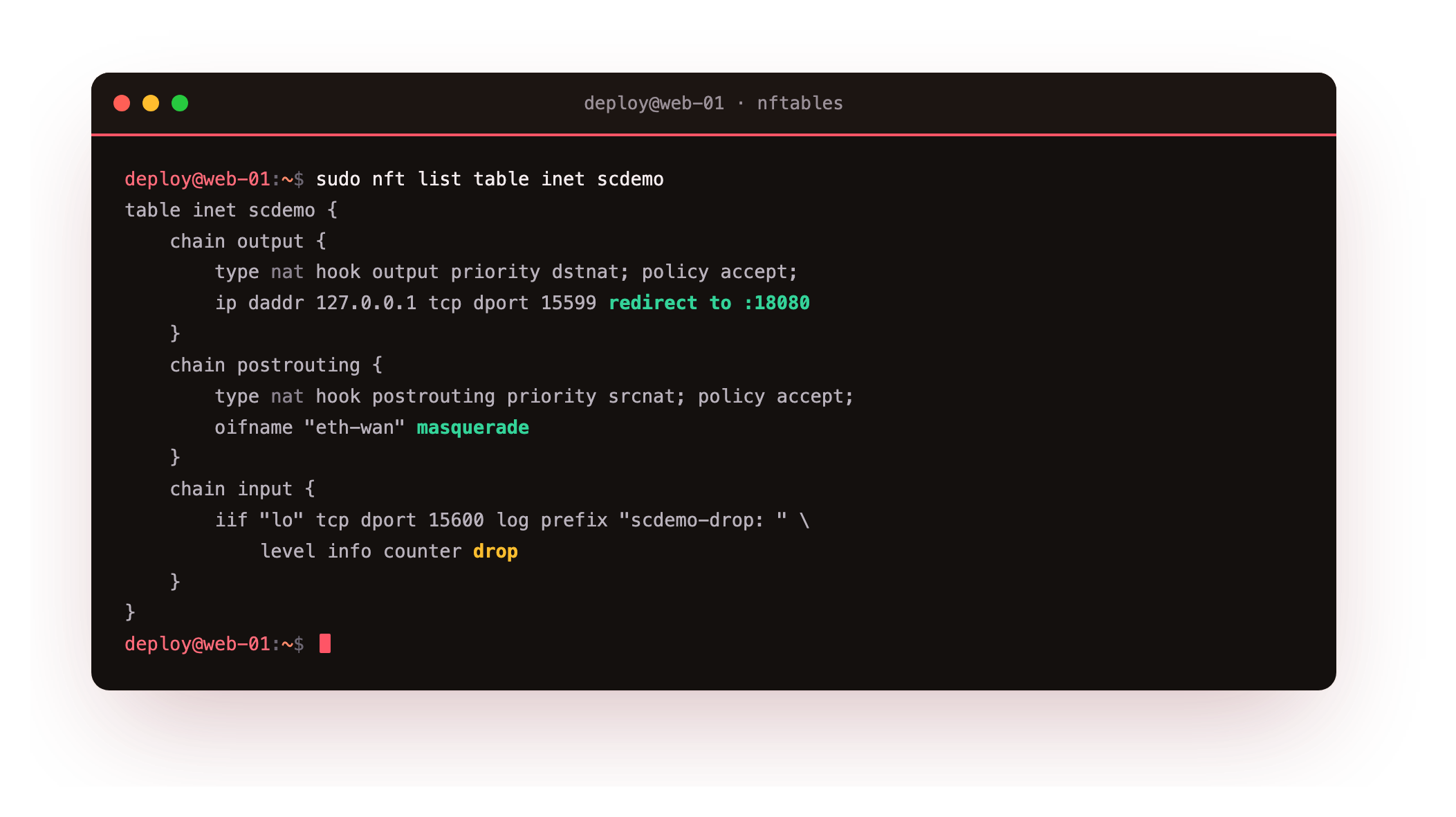
The output groups the output nat chain with its redirect, the postrouting chain with masquerade, and the input chain with the log prefix "scdemo-drop: " counter drop. Reading it back is how you verify a NAT rule is on the hook you intended before it handles live traffic.
Going further: why NAT needs its own chain type
A filter rule and a NAT rule can look similar, but they belong to different chains for a reason the kernel enforces. NAT is registered only on nat-type base chains, and it is evaluated once per connection: the first packet of a flow is rewritten, connection tracking remembers the translation, and every later packet in that flow is rewritten the same way without re-running the rule.
That is why a NAT rule in a filter chain silently does nothing, and why a heavy NAT ruleset costs little once connections are established.
The hook you choose follows the direction of the traffic. Packets arriving from outside are rewritten on prerouting, before the routing decision, so the box can send them to their new destination. Locally generated packets, like the redirect above, are rewritten on output. Source rewriting for forwarded traffic happens last, on postrouting, which is where masquerade sits. Match the hook to when in the packet's life you need the address changed, and the rest of NAT is choosing between redirect, dnat and masquerade for the job.
Frequently asked questions
What is the difference between redirect and dnat?
redirect keeps the destination host the same and only changes the port to one on the local machine. dnat can point the connection at a different address and port entirely. Use redirect for a local service and dnat to forward to another host.
Why does my NAT rule not fire?
Check the hook. NAT for traffic arriving from outside belongs on prerouting, while locally generated traffic is rewritten on the output hook. A NAT rule placed on the wrong hook, or in a filter-type chain, never matches the packet you expect.
Where do nftables log lines go?
The log statement writes to the kernel ring buffer, so the line appears in dmesg and in journalctl -k. Give each rule a distinct prefix so you can filter for it, and rate-limit the log rule to keep the volume sane.
Do I need masquerade on a single public server?
No. Masquerade is for a gateway that forwards traffic for other hosts on a private network. A standalone server that only answers for itself never forwards, so it has no source addresses to rewrite and no need for the rule.
What you can do now
Your ruleset now does more than filter. A redirect bends a port to a local service, dnat forwards to another host, and masquerade rewrites the source for a gateway, each in a nat-type chain on the right hook, and a log prefix statement leaves a labelled, greppable line for every packet you refuse, which you read straight from the kernel log. When a service you forgot to allow stops working, those tagged drops are how you find it.
Everything you have built so far lives only in kernel memory and vanishes on reboot. The last chapter closes the loop: how to persist the ruleset in /etc/nftables.conf, dry-run it with nft -c -f before it can strand you, and run the exact dead-man workflow that guarded every change in this series: persistence and testing without lock-out.