nftables sets keep the ruleset short as it grows
nftables sets, maps and rate limits are what keep a ruleset short as it grows. The base ruleset from the last chapter allows the ports you serve with a single line, but the moment you want to trust a list of admin networks, route a dozen ports by verdict, or throttle a flood, a rule-per-case chain gets long and hard to read.
Instead you group values into a named object and reference it once. A meter or limit rate then caps a flood, and a counter tells you how often a rule fired. This chapter builds all four on Ubuntu 24.04 with nftables v1.0.9, then proves the rate limit by dropping real excess traffic, all still inside the demo table so nothing here can lock you out.
- A named
setholds many addresses or ports as one object; add theintervalflag to store CIDR ranges. - A verdict
mappairs a key with a verdict, so onevmaprule can accept, drop or jump based on a port or address. limit ratewith aburstlets a set number of packets through per interval and drops the excess.- A
counterrecords packets and bytes, so you can see a rule firing instead of guessing.
A named set as an allowlist
A set is a named collection with a type, such as ipv4_addr for addresses or inet_service for ports. Add the interval flag and it can hold CIDR ranges as well as single addresses, which is what an allowlist needs. Once defined, a rule references the set with @name, and updating the members never touches the rule.
Here an admin_allow set carries a single management host and a whole documentation subnet. Reading it back shows both entries stored as one object.
sudo nft list set inet scdemo admin_allow
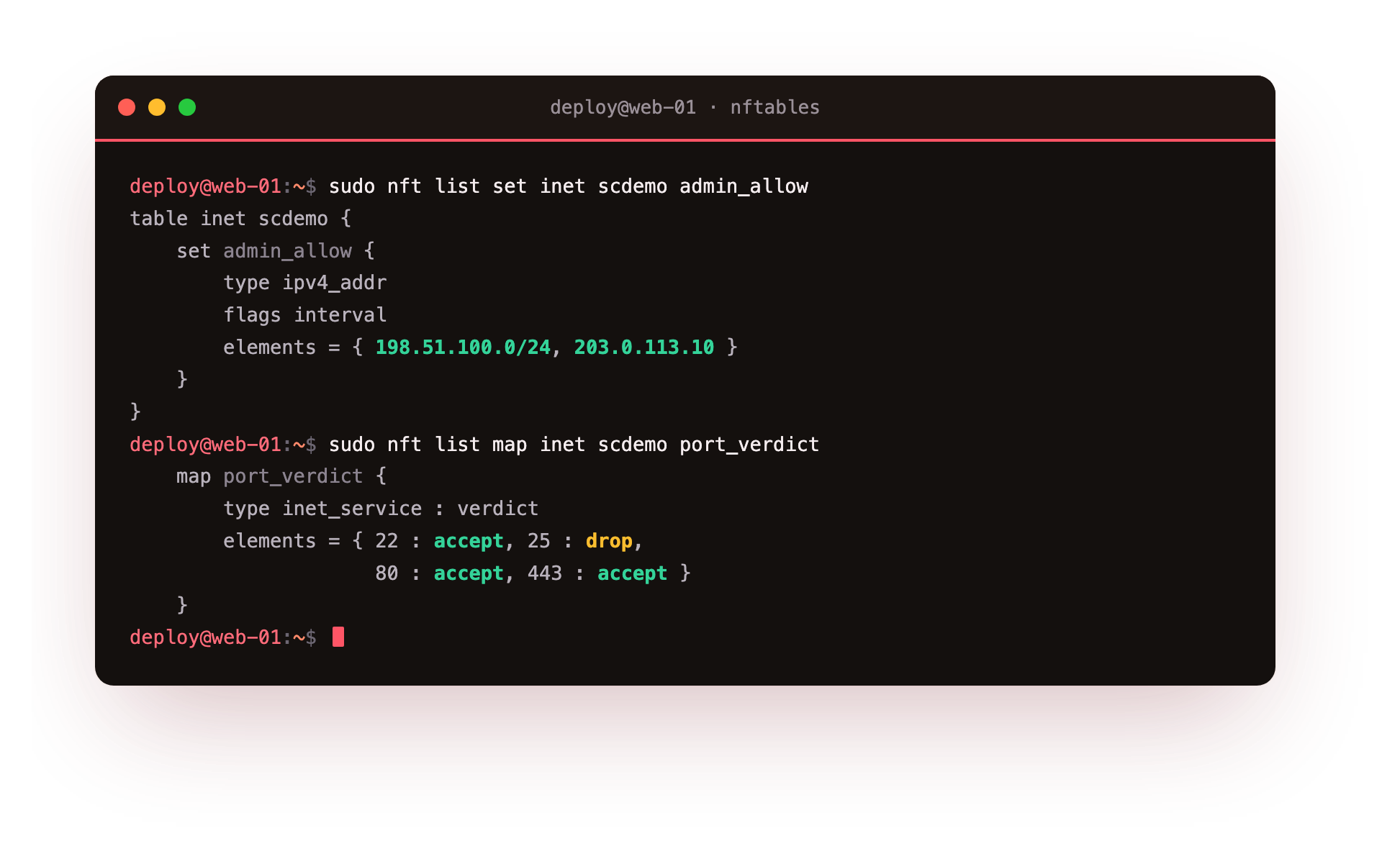
A rule such as ip saddr @admin_allow tcp dport 22 accept now trusts every address in the set for SSH. To onboard a new admin network you add one element to the set, and the rule keeps working unchanged.
A verdict map to route by port
A map pairs a key with a value. When the value is a verdict, you get a vmap, which reads a key from the packet and applies the matching verdict in one lookup. That turns a stack of per-port rules into a single line. The map below sends 22, 80 and 443 to accept and 25 to drop.
A rule of tcp dport vmap @port_verdict then decides each packet by its destination port. Listing the map shows the key-to-verdict pairs the kernel holds.
sudo nft list map inet scdemo port_verdict
Maps also handle address-to-verdict or address-to-nat lookups, so the same idea routes traffic by source network or rewrites a destination without a rule per case.
Rate limiting with limit, burst and counters
A limit rate clause lets a fixed number of packets pass per interval and, paired with a following drop rule, refuses the rest. A burst allows a short spike before the limit engages. Pairing each rule with a named counter makes the effect visible, because the counter records how many packets each path saw.
The demo allows three new connections per minute to a test port with a small burst, counts them as rl_pass, and counts everything over the limit as rl_drop. Firing eight quick requests, the first three are served and the rest are dropped. The counters confirm it.
sudo nft list counter inet scdemo rl_drop
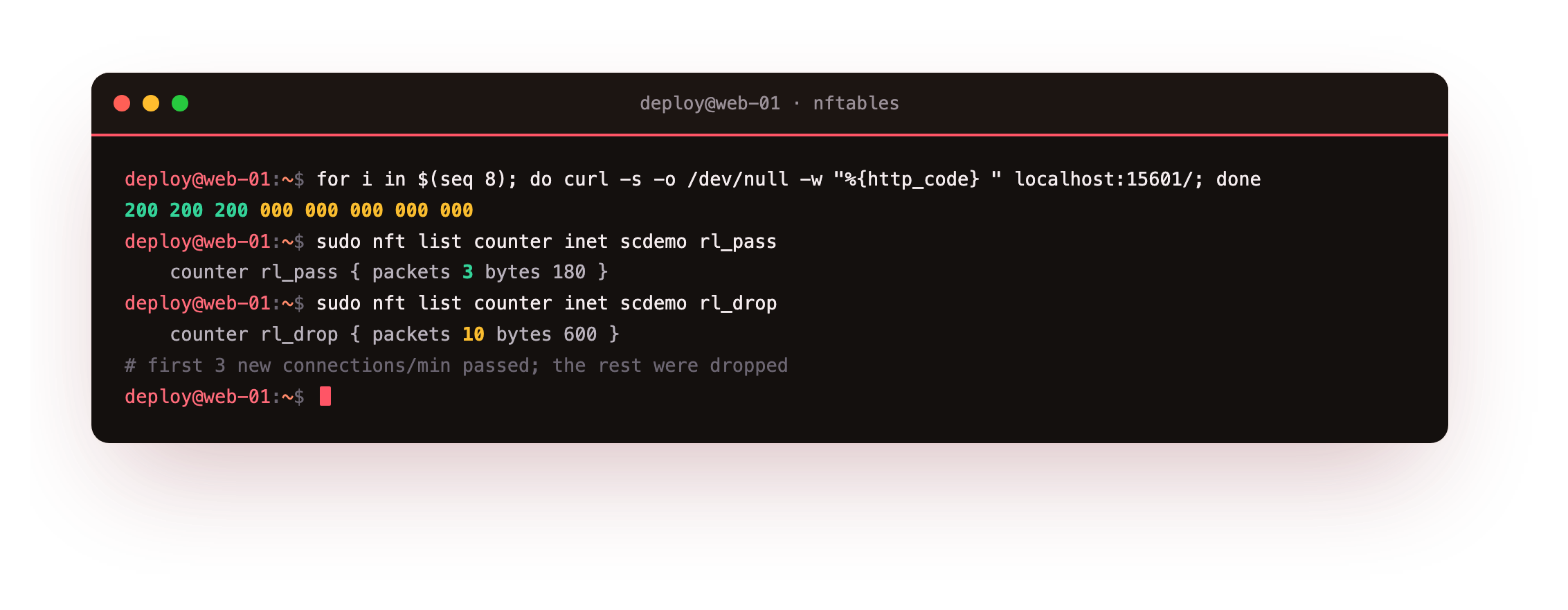
The rl_pass counter reads three packets and rl_drop reads the remainder, which is the rate limit doing its job on real traffic rather than in theory. The drop counter climbs higher than the number of requests, because a refused connection retransmits its opening packet a few times, and each retransmit is a fresh packet the drop rule counts.
After a burst, run sudo nft list counter inet scdemo rl_pass and rl_drop back to back. You should see the pass counter capped at the burst you allowed and the drop counter carrying the rest. If both read zero, the traffic never reached the rate-limited rule, so check the port and interface in the rule match the requests you sent.
Read the counters inline
Counters can also live inline on a rule, so a listing of the chain shows the traffic each rule carried without a separate lookup. That is the quickest way to answer whether a rule is matching anything at all.
sudo nft list chain inet scdemo input
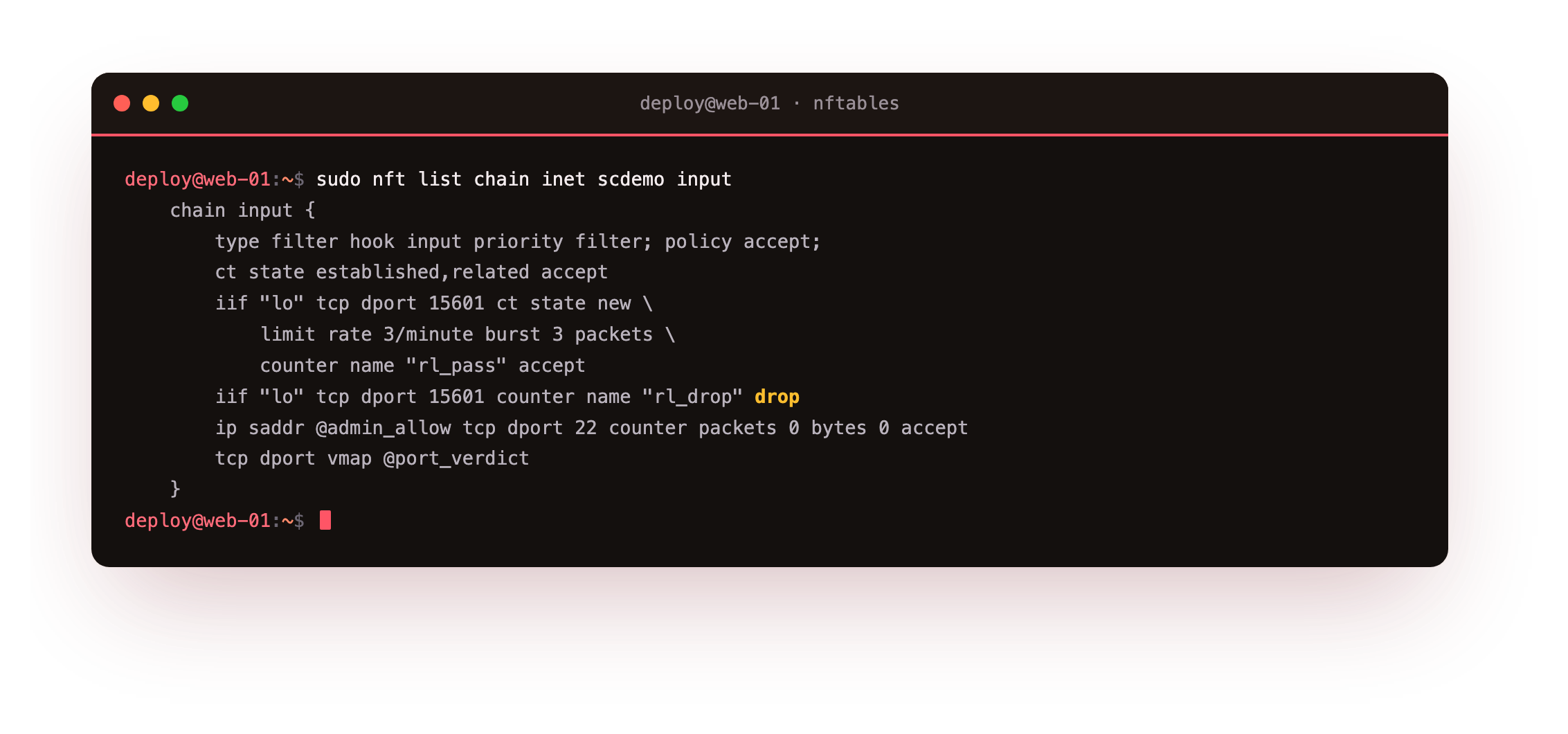
The chain prints each rule with its packet and byte totals beside it. A rule sitting at zero after real traffic is a sign it is in the wrong place or matching the wrong thing, which counters surface at a glance.
Going further: per-source fairness with meters
A single limit rate applies one shared budget to a whole rule, which is right when you want to cap a service overall. When you instead want to throttle each client on its own, you reach for a meter, which keeps a separate rate budget keyed on an address. A rule like tcp dport 22 meter sshflood { ip saddr limit rate 10/minute } gives every source its own allowance, so one noisy address cannot spend the budget everyone else shares.
The distinction matters most on a login port. A shared limit on ssh would let a single flooder use up the whole allowance and lock legitimate users out along with the attacker, which is the opposite of what you wanted. A meter isolates the misbehaving source and leaves the rest untouched, and because the map that backs it is created on demand, you can add per-source fairness to an existing rule without restructuring the chain.
Frequently asked questions
When should I use a set instead of listing values in a rule?
An inline list like tcp dport { 22, 80 } is fine when the values are fixed. Use a named set when the members change over time or are shared by several rules, because you then edit one object instead of every rule that repeats the list.
What is the difference between a map and a verdict map?
A plain map returns data, such as an address to rewrite to. A verdict map returns a verdict like accept, drop or a jump. A vmap rule uses the packet as the key and applies the matching verdict in a single lookup.
How is limit rate different from a meter?
limit rate applies one shared budget to a rule. A meter keeps a separate budget per key, such as per source address, so one noisy client is throttled without affecting others. Use a meter when you need per-source fairness.
Do counters slow the ruleset down?
The cost is a small increment per matched packet, which is negligible on a normal server. Counters are worth keeping on the rules you care about, because seeing real packet totals beats guessing whether a rule ever fires.
What you can do now
Your ruleset now scales without sprawling. A named set holds an allowlist you edit in one place, a verdict map routes traffic by port in a single rule, and limit rate with a burst caps a flood while a counter proved, on real traffic, that it did. The chain that started as a wall of one rule per case can now carry a growing policy and stay readable.
So far the ruleset only filters. The next chapter puts it to work at the edge: a redirect that bends a port to a local service, the masquerade rule a gateway needs, and a log statement that leaves a labelled line in the kernel log for every packet you refuse: NAT, port forwarding and logging.