nftables persistence, without stranding the box
nftables persistence is how a ruleset survives a reboot, and testing is how you make sure the ruleset that survives will not lock you out first. Everything you built in the earlier chapters lives in kernel memory and disappears the moment the box restarts, so this chapter makes it permanent, safely.
The two halves go together: you never persist a firewall you have not proven, and you never prove one without a way back. This chapter covers /etc/nftables.conf, the nftables.service, the nft -c -f dry-run, and the dead-man revert workflow, all on Ubuntu 24.04 with nftables v1.0.9.
- Rules loaded with
nftlive only in memory; a reboot clears them unless you persist the ruleset to a config file. /etc/nftables.confis a plainnft -fscript, andnftables.servicereplays it at boot once you enable the unit.nft -c -f filechecks a config for errors and applies nothing, so a typo is caught before it can strand you.- Arm a timed revert before any risky change, test in a second session, then persist only after the change proves safe.
The config file and the service
A ruleset applied with nft sits in kernel memory and disappears on reboot. To make it permanent you write it as a script, conventionally /etc/nftables.conf, that starts with flush ruleset and then defines your tables. It is the same syntax you load by hand, so nothing new to learn.
#!/usr/sbin/nft -f
flush ruleset
table inet scdemo {
  chain input {
    type filter hook input priority filter; policy drop;
    iif "lo" accept
    ct state established,related accept
    ct state invalid drop
    tcp dport { 22, 80, 443 } accept
    ip protocol icmp icmp type echo-request accept
  }
}
The nftables.service unit reads that file at boot. You turn it on with systemctl enable --now nftables. On this server the unit is present but left off, because enabling a drop policy that survives reboot is exactly the change you validate first.
systemctl is-enabled nftables
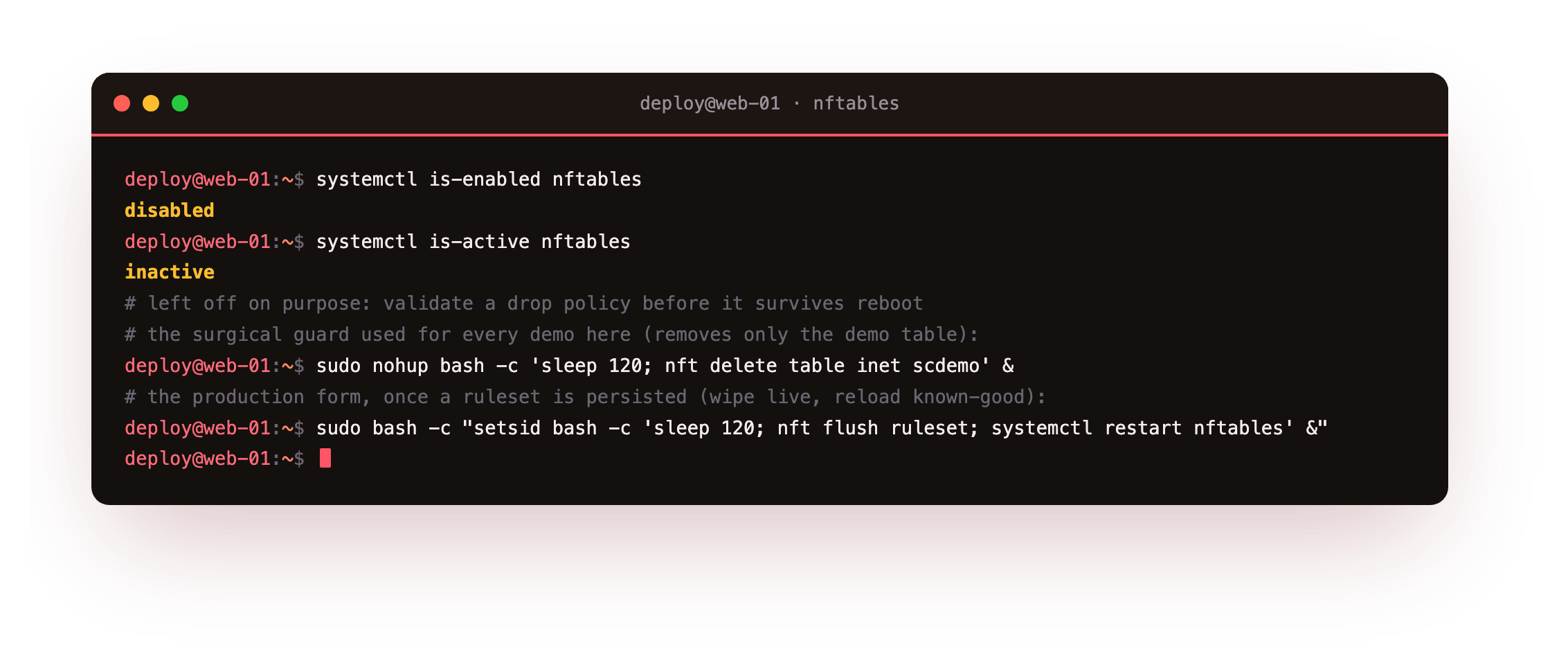
The unit reports disabled and inactive here on purpose. Enable it only after the config has passed a dry-run and a live test, so a reboot never brings up a firewall you have not proven.
A quick way to seed the file is to build your ruleset by hand, prove it, then capture the live state with nft list ruleset > /etc/nftables.conf. Because that output is already valid nft -f input, the saved file reloads exactly what you tested. Add the flush ruleset line at the top yourself, so a reload always starts from a clean slate rather than stacking new rules on whatever is already loaded.
Dry-run every config with nft -c -f
The -c flag makes nft check a file and apply nothing. It parses every line, resolves the ruleset, and reports the first error with its line and column, all without touching the running firewall. Run it after every edit, because a config that fails to parse can otherwise leave you with no rules or a half-loaded set at the worst moment.
sudo nft -c -f /etc/nftables.conf
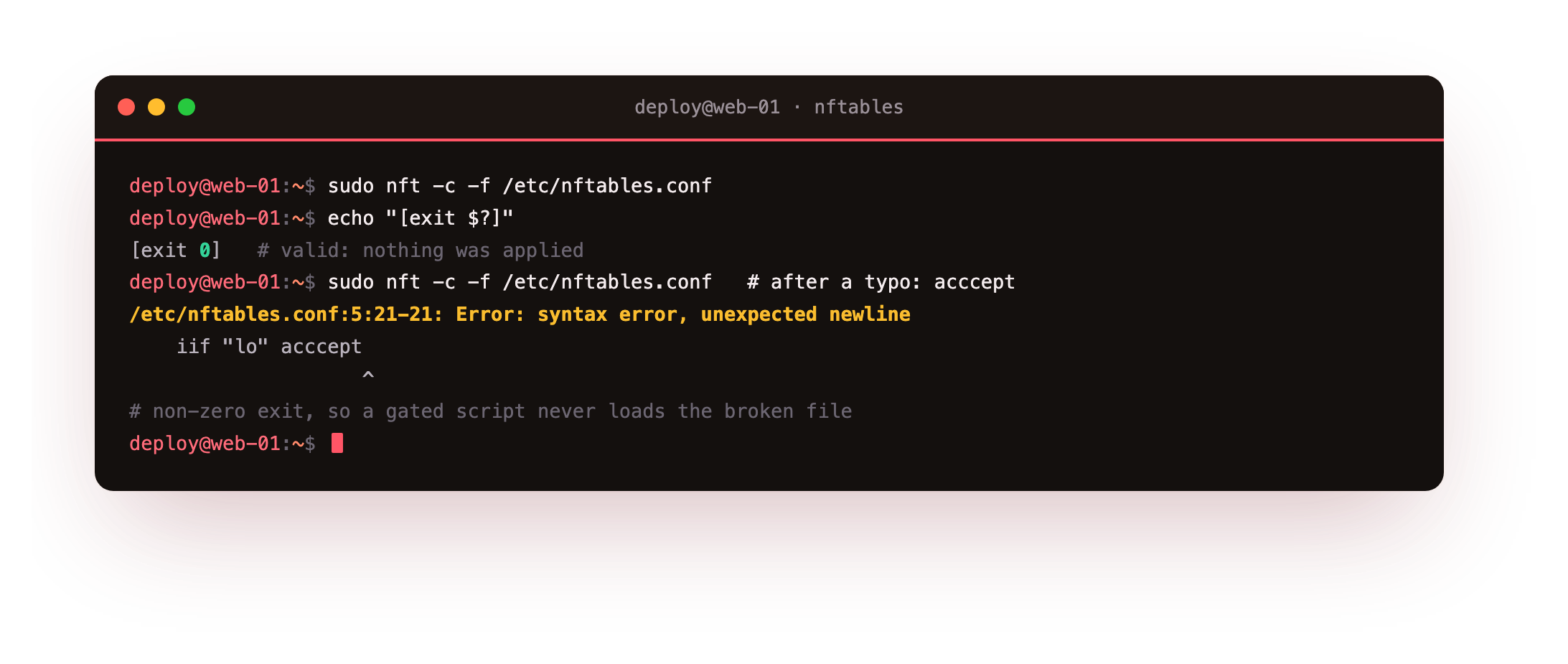
A clean file produces no output and a zero exit, which means it is safe to load for real. A typo produces a precise error instead. Misspelling a verdict as acccept, the check prints Error: syntax error, unexpected newline with the offending line marked, and the exit is non-zero, so a script gated on that exit never applies the broken file.
Run sudo nft -c -f /etc/nftables.conf; echo "exit $?". A valid file prints no rule output and exit 0, and nothing was applied. If you see a line-and-column error and a non-zero exit, fix that line before you ever load the file for real, because a config that fails to parse can leave you with no rules at the worst moment.
The dead-man revert workflow
Even a valid config can lock you out if it drops a port you needed. The guard against that is a timed revert armed before the change. You schedule a background job that undoes the change after a short delay, apply it, then open a second session to confirm you can still get in. If the new session works, you cancel the timer. If it does not, you wait, the timer fires, and access comes back.
The form of the revert depends on how much is at stake. While you learn, every rule in this series lived in the demo table, so the surgical guard removes only that table and leaves the system firewall alone.
sudo nohup bash -c 'sleep 120; nft delete table inet scdemo' &
Once you have persisted a full ruleset and enabled the service, the production form wipes the live rules and reloads the known-good config from disk instead.
sudo bash -c "setsid bash -c 'sleep 120; nft flush ruleset; systemctl restart nftables' &"
Either one buys the same two-minute window: apply, test in a fresh terminal, cancel the job on success. Only once a change has survived that window do you write it into /etc/nftables.conf and enable the service, so the ruleset that persists is one you have already proven from the outside.
Going further: seeding the config from a proven ruleset
You do not have to write /etc/nftables.conf by hand. The habit that avoids a whole class of typos is to build and prove your ruleset live, in the demo table under a revert, then capture the running state with nft list ruleset > /etc/nftables.conf. Because that output is already valid nft -f input, the saved file reloads exactly what you tested, with nothing lost in transcription.
Two small edits make the saved file safe to reload. Add a flush ruleset line at the very top, so a reload always starts from a clean slate rather than stacking new rules on whatever is already loaded, and rename the demo table to the one you actually want to keep. Run nft -c -f on the result one last time, load it under a revert, confirm a fresh login, and only then enable nftables.service so the proven ruleset comes back on every boot.
Frequently asked questions
Why do my nftables rules disappear after a reboot?
Rules loaded with nft live in kernel memory only. A reboot starts with an empty ruleset. To keep them, write the ruleset to /etc/nftables.conf and enable nftables.service, which replays the file at boot.
What does nft -c -f actually check?
It parses and resolves the whole file as if loading it, but applies nothing. Syntax errors, unknown keywords and undefined sets are all reported with a line and column. A zero exit means the file is safe to load for real.
How large should the dead-man revert delay be?
Long enough to test a fresh login without rushing, short enough that a lock-out is not a long outage. Two minutes suits most changes. For a slow change, re-arm the timer rather than setting one very long delay.
Should I edit nftables.conf directly on a live server?
Edit a copy, dry-run it with nft -c -f, and load it under a revert before you overwrite the live file. Only replace /etc/nftables.conf once the ruleset has passed a check and a live test from another session.
What you can do now
The ruleset you proved live now survives a reboot. It lives in /etc/nftables.conf, it passed a nft -c -f dry-run before it could strand you, and nftables.service replays it on every boot. The dead-man revert that guarded each change is the habit you keep: arm it, apply, confirm from a second session, cancel on success, and a wrong rule is never more than two minutes of downtime.
That closes the loop the series opened. Back in chapter one you watched an unlisted port time out while ssh and http answered; you have now built the whole thing that makes it true, from the safe base ruleset through sets, NAT and logging, to a config that reboots clean. Your slice exposes only what you allow, and you can prove it does. Run it on your own slice, arm the revert, and tighten the box knowing you have a way back.