What you will have at the end
By the end of this series your slice exposes only the ports you name and refuses the rest, enforced by an nftables ruleset that defaults to drop, throttles floods, routes by set and map, does its own NAT and logging, and reboots clean.
The thread running through every chapter is one promise: you tighten the box all the way down to a default-drop policy without ever cutting the SSH session you are working over, and you prove it by watching an unlisted port time out while ssh and http keep answering.
This first chapter is for an admin who has outgrown ufw and wants to write real firewall rules, and who is wary of the one mistake that loses a remote box: a drop rule that catches your own session. It shows you that end state on a live Ubuntu 24.04 slice first, then maps the small model you drive to get there.
- The series destination: only the ports you allow answer, everything else has its packet dropped, and your live SSH session never falls to the policy.
- Nothing to install here. nftables ships in the Ubuntu kernel and the
nftcommand is already on the box, so the from-zero step is reading what you expose today, not a package install. - A family (inet, ip, ip6, arp, bridge, netdev) sets which traffic a table can see;
inetcovers IPv4 and IPv6 at once. - A base chain attaches to a kernel
hookwith atype, apriorityand apolicy, and every object carries a numerichandleyou delete by.
- One Ubuntu 24.04 slice you reach over SSH, ideally one you can afford to lock yourself out of once while learning, because the whole point is to build a default-drop policy that does not do that.
- Nothing to add with apt. The nftables kernel subsystem and the
nftcommand are already present, so you spend this chapter reading and mapping, not installing. - The ability to open a second SSH session to the same box. That second terminal is the seatbelt for every later chapter, the thing that lets you test a drop rule and still get back in.
- Every rule in this series lives in a throwaway
table inet scdemoyou can remove in one line, so your experiments never touch the ufw, Docker or fail2ban tables the box already runs.
The end state, before any theory
This is where the whole series is headed, shown on one screen before a word of explanation. The slice below runs an input policy that defaults to drop, with only ssh and http on the allow list. From an isolated client you try two allowed ports, then one that is not.
nc -zv -w3 web-01 22
curl -sSI --max-time 4 http://web-01/
nc -zv -w3 web-01 9000
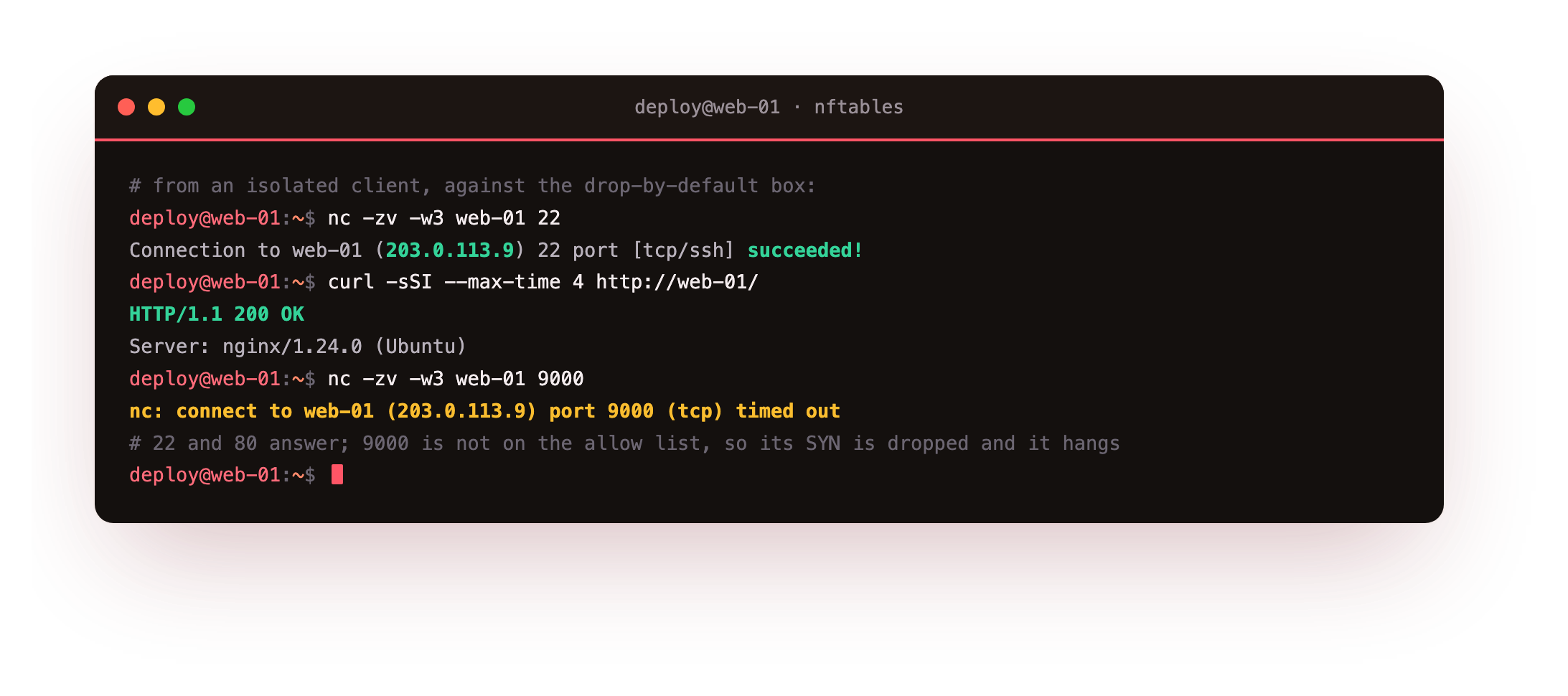
Port 22 connects and port 80 returns HTTP/1.1 200 OK, because both are named in the ruleset. Port 9000 is not, so the chain never accepts it and the default policy drops the packet. Notice how it fails: not a quick "connection refused", but a hang that ends in timed out. A closed port with no firewall answers a probe with a reset straight away; a dropped packet gets no answer at all, so the client waits and gives up. That silence is the default-drop policy working.
That is the destination in one line: only what you allow gets through, and the SSH session you built it over never dropped. Right now, before you start, your box looks nothing like this. Every port with a service answers, and there is no policy in front of them. The rest of the series puts one there, safely. This chapter maps the machine that enforces it.
From zero: nftables is already here
The from-zero step for nftables is not an install. nftables is the packet classification framework built into the Linux kernel, and Ubuntu 24.04 ships the single nft command (v1.0.9 on the slice here) that drives it, replacing the old split of iptables, ip6tables, arptables and ebtables. So you do not add a package. You start by reading what the box already enforces, then build your own rules alongside it.
Tables from different tools coexist without conflict, which is why you can add your own without disturbing anything. This slice already carries a f2b-table from fail2ban and several ip and ip6 tables that Docker and ufw manage. Listing the tables shows the full picture, and the inet scdemo table you are about to work in sits right alongside them.
sudo nft list tables
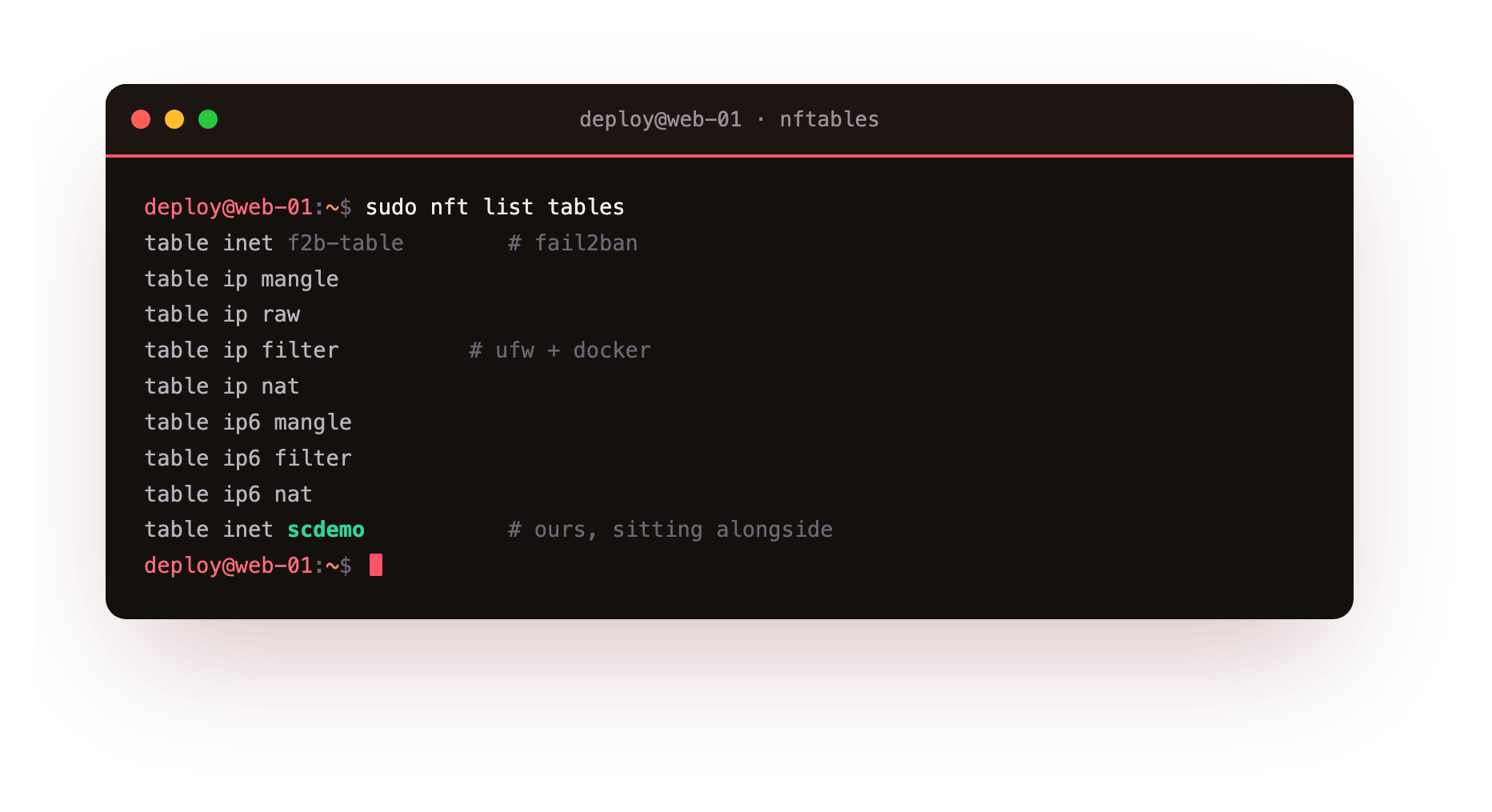
The output names each table by family. That separation is the point: your rules never share a chain with another tool's rules, so a throwaway demo table is safe to add and safe to delete. To read the complete firewall as one script, nft list ruleset prints every table at once, and its output is valid input to nft -f, so you can snapshot the live state and reload it later.
Families, tables and why inet wins
A table is a container for chains, sets and maps, and it belongs to one address family. The family decides the scope. The ip family sees IPv4 only, ip6 sees IPv6 only, and inet sees both. On a dual-stack slice the inet family saves you from writing every rule twice, so most modern rulesets live in a single table inet. Everything in this series does.
A chain holds rules, and a base chain is a chain that also attaches to a kernel hook, which is what puts it on the packet path. Declaring one needs four things: the type (filter, nat or route), the hook (input, output, forward, prerouting or postrouting), the priority that orders chains sharing a hook, and the policy, the verdict when no rule matches. Build a small table with one input base chain and read it back, and those four attributes come back exactly as declared.
sudo nft list table inet scdemo
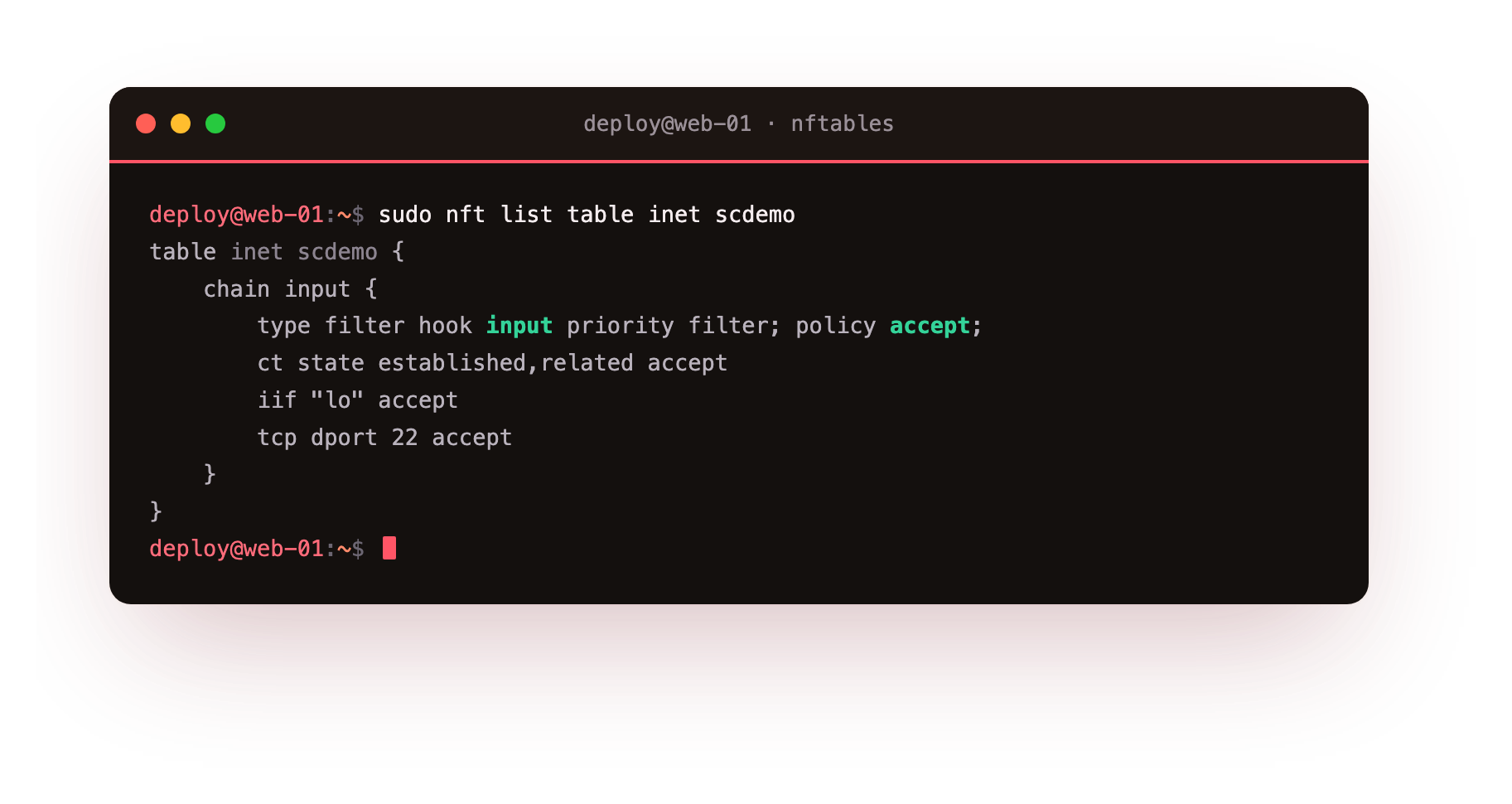
The listing shows type filter hook input priority filter; policy accept; followed by the rules in order. A regular chain, declared without those keywords, is just a jump target for other rules and never sees a packet on its own.
Run sudo nft list table inet scdemo and confirm the first line of the chain reads type filter hook input. If instead you get Error: No such file or directory, the demo table does not exist yet, which is expected until you create it in the next chapter. Nothing here has changed your live firewall.
Handles and the atomic load
Every table, chain and rule has a handle, a stable numeric id the kernel assigns. You need it to delete one rule out of many, because you delete by handle rather than by retyping the rule. The -a flag prints handles next to each object.
sudo nft -a list table inet scdemo
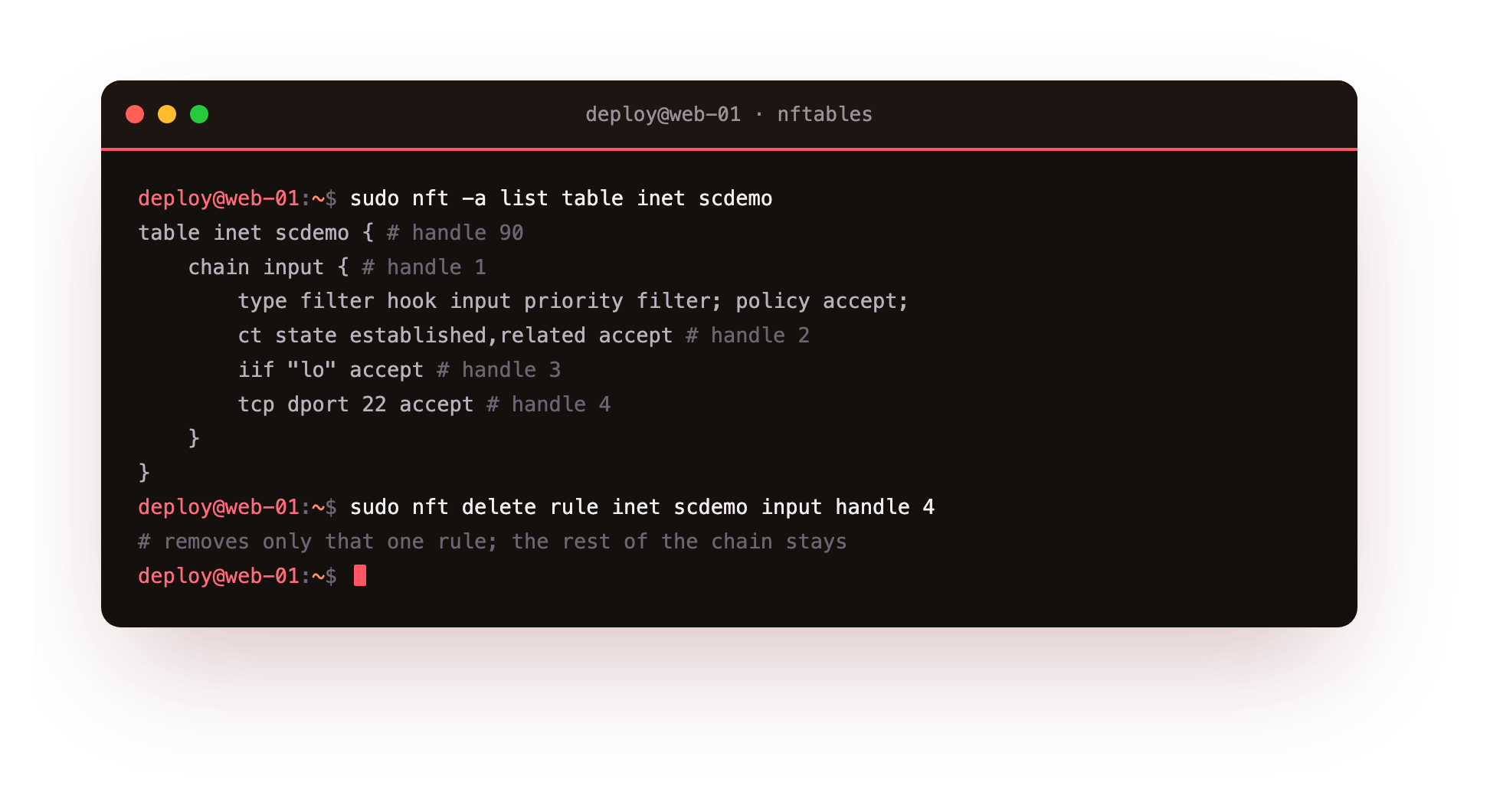
Now each line ends with # handle N, and nft delete rule inet scdemo input handle 4 removes exactly that rule while the rest of the chain stays put. The other half of safe editing is the atomic load: passing a file to nft -f applies every line in one transaction, so either the complete ruleset takes effect or, on any error, nothing changes and the previous ruleset stands. That is the property the whole series leans on, because it means a typo can never strand you with a half-built firewall.
Going further: how it supersedes iptables
iptables edited rules one command at a time against a fixed set of built-in chains. nftables gives you a small language instead: you define your own chains, group addresses into sets, pair keys with verdicts in maps, and load the whole thing atomically.
Ubuntu still ships an iptables command, but it is a thin shim that writes nftables rules underneath, which is why nft list ruleset shows tables named after ufw and Docker even though you never ran nft to make them. Learning the native nft syntax means you read and write what the kernel actually runs, rather than a translation of it.
That native view is also why the inet family matters more than it first appears. Under iptables a dual-stack box needed a parallel ip6tables ruleset kept in sync by hand, a common source of a firewall that was tight on IPv4 and wide open on IPv6. One table inet closes that gap, because a single rule covers both protocols and there is no second ruleset to forget.
Frequently asked questions
What is the difference between the inet and ip families?
The ip family only matches IPv4 traffic and ip6 only matches IPv6. The inet family matches both, so one rule covers a dual-stack server. Use inet unless you deliberately need a protocol-specific table.
Do I need to install anything to follow this series?
No. On Ubuntu 24.04 the nftables subsystem is in the kernel and the nft command is already on the box. The from-zero step is not an install; it is reading your current ruleset and then building your own rules in a separate inet table.
What does a base chain priority actually control?
When several chains attach to the same hook, priority sets the order they run in, lowest number first. It lets your filter chain run before or after another tool's chain on the same hook, which matters when both can drop a packet.
Why load rules with a file instead of one command at a time?
An nft -f load is atomic. The kernel validates the whole file, then swaps it in as one transaction. A single wrong line aborts the load with no change, so you never strand a server with a half-applied ruleset.
What you can do now
You have seen the destination, an unlisted port timing out while ssh and http answer, and you have the model that enforces it: a table in the inet family, a base chain attached to a hook with a type, priority and policy, rules that run in order with handles you can target one at a time, and the atomic nft -f load that makes every change safe to try.
Right now your box has none of that policy in front of it. The next chapter builds the first one from that wide-open start: a default-drop input chain, in the order that keeps your own session alive, applied under a revert you can trust. That is where you go from reading the machine to running it: a safe base ruleset with policy drop.