The MinIO S3 API: any SDK, from your app
This chapter connects your app to MinIO through the S3 API. Because MinIO speaks that API, any S3 SDK works against it unchanged, the same code you would write for Amazon.
- MinIO speaks the Amazon S3 API, so any S3 SDK or tool works against it unchanged.
- Point a standard S3 client at MinIO with two settings: endpoint and forcePathStyle.
- Give the app a scoped access key, never the root admin credentials from part one.
- Presigned PUT and GET URLs let the browser talk to storage directly, so your server never streams file bytes.
Here is the quiet superpower of running MinIO: you do not have to learn a MinIO API, because there isn't one worth learning. MinIO speaks the Amazon S3 API, faithfully, which means every S3 client library, every SDK, every tool that was ever written to talk to Amazon S3 works with your server unchanged.
The Python boto3 library, the AWS SDK for JavaScript, Go, Java, the aws command-line tool, backup tools like restic and rclone, they all speak S3, and they will all talk to your MinIO the moment you point them at its address and hand them credentials. Your storage inherits a decade of ecosystem for free.
This chapter shows what that means in practice on a live Ubuntu 24.04 server: how your app authenticates, the four lines of code that upload a file, and the presigned-URL pattern that turns object storage into a fast, scalable backbone for uploads and downloads without your server ever touching the file data.
Let's build.
Prerequisites
- MinIO running from part one and reachable at its S3 endpoint.
- An S3 SDK for your language installed; the examples use the AWS SDK v3 for JavaScript.
- A scoped access key and secret for the app, not the root credentials, created in the MinIO console or with mc admin user.
Why should your app use scoped credentials?
Your app should not connect with the root admin credentials from the first chapter, the same way your app should not connect to Postgres as the superuser. MinIO has its own users and access policies; you create an access key scoped to just the buckets your app needs and give the app those.
To your code, an S3 connection is four values: the endpoint, an access key, a secret key, and a region (MinIO accepts any region string, us-east-1 is the conventional default). The only difference from talking to real Amazon S3 is the endpoint: instead of the AWS default, you point at your own server.
// AWS SDK v3, pointed at your MinIO instead of Amazon
const s3 = new S3Client({
  endpoint: "http://127.0.0.1:9000",   // your MinIO, not AWS
  region: "us-east-1",
  credentials: { accessKeyId: "app-key", secretAccessKey: "app-secret" },
  forcePathStyle: true,                 // MinIO uses path-style URLs
});
That is the whole adaptation. endpoint and forcePathStyle are the two lines that redirect a standard S3 client at your server. Delete those two lines and the same code talks to Amazon. This is why "S3-compatible" is such a valuable phrase: it means your storage layer is portable, and you are never locked in to either your own server or a cloud provider.
Uploading from your app
With the client configured, storing a file is one command, the same PutObject every S3 tutorial uses:
await s3.send(new PutObjectCommand({
  Bucket: "uploads",
  Key: `user-${userId}/${filename}`,
  Body: fileBuffer,
  ContentType: "image/png",
}));
The Key is where thoughtful naming pays off: prefixing with user-${userId}/ keeps each user's files under their own path, which makes listing, access control, and cleanup straightforward later. Downloading is the mirror GetObjectCommand. For most apps, though, you do not want your server streaming file bytes at all, and that is where the presigned pattern from the last chapter becomes the real architecture.
The presigned pattern, from the app's side
Recall the problem: you want users to upload and download private files fast, without routing gigabytes through your web process. The solution is that your backend generates presigned URLs and lets the browser talk to storage directly.
For a download, your app checks that this user is allowed this file, then generates a short-lived presigned GET URL and returns it. The browser fetches the file straight from MinIO. To prove this works with nothing but the link, take a presigned URL and fetch it with plain curl, no credentials anywhere:
curl -s "http://127.0.0.1:9000/backups/report.txt?X-Amz-Signature=..."
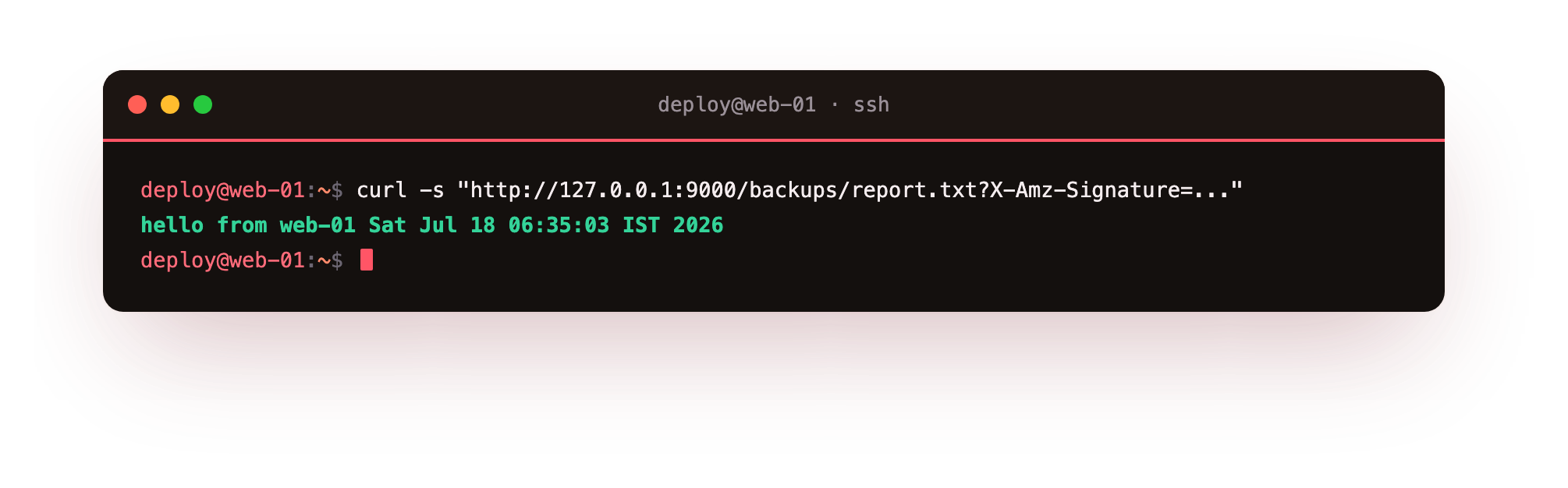
The file's contents come straight back. That request carried no access key and no secret, only the signed URL, and MinIO served it because the signature is valid and unexpired. That is a download that never touched your app server.
For an upload, the flow inverts and it is the pattern worth building into every app that takes file uploads. The browser asks your backend "I want to upload photo.png." Your backend generates a presigned PUT URL for that key and returns it.
The browser uploads the file directly to that URL, into your bucket, and your server never sees the bytes at all. It only issued a signed permission slip. This is how you handle large uploads without your web process becoming the bottleneck, and it is a few lines of SDK code, getSignedUrl with a PutObjectCommand, on the backend.
Keep the storage private, expose it through nginx
Through this chapter the endpoint has been 127.0.0.1:9000, reachable only from the server. In production your browser clients obviously need to reach MinIO to use those presigned URLs, so you expose the S3 port the same way you expose everything else: nginx in front, with TLS, proxying a public name like storage.yourdomain.com to MinIO on localhost.
The presigned URLs then use that public HTTPS address, your credentials still never leave the server, and the admin console on port 9090 stays firmly on localhost, reachable only over an SSH tunnel when you need it. Same reverse-proxy discipline, applied to storage.
Troubleshooting the S3 client
Requests fail with a DNS error or "bucket not found". The client is building virtual-hosted-style URLs like bucket.host. MinIO needs path-style, so set forcePathStyle: true in the Node SDK, or the equivalent flag in yours.
SignatureDoesNotMatch. The secret key is wrong, the region string does not match the one used to sign, or the server clock is skewed. MinIO accepts any region, but the client and the signature must use the same value; sync the server time with NTP.
A browser PUT to a presigned URL is blocked by CORS. The bucket has no CORS rule allowing the browser's origin. Add one with mc before wiring up direct browser uploads.
The presigned URL is unreachable from the browser. It points at 127.0.0.1. Generate it against the public nginx hostname you proxy MinIO on, not localhost.
Frequently asked questions
Which SDK do I use for MinIO?
Any S3 SDK: boto3 for Python, the AWS SDK for JavaScript, Go or Java, or the aws command-line tool. There is no separate MinIO SDK to learn.
What region should I set?
Any string; us-east-1 is the conventional default. MinIO does not place data by region, but the client and the request signature must use the same value or you get SignatureDoesNotMatch.
Why is forcePathStyle needed?
MinIO serves a bucket as a path, host/bucket, rather than as a subdomain, bucket.host. Path-style avoids per-bucket DNS entries and wildcard TLS certificates.
Is my code locked to MinIO?
No. Delete the endpoint and forcePathStyle lines and the same code talks to Amazon S3. S3-compatibility is exactly what keeps your storage layer portable.
What you have, and the last piece
Your application can now store and serve files through the standard S3 API, using any SDK, with scoped credentials, and hand out fast direct uploads and downloads through presigned URLs that never burden your server. Your storage layer is a first-class part of your app and, because it is S3-compatible, entirely portable.
There is one responsibility left, and it is the one that separates convenient storage from trustworthy storage: making sure an object you delete or overwrite by mistake is not gone forever, and that temporary junk cleans itself up. The final chapter turns on versioning and lifecycle rules, and shows how this same MinIO becomes a reliable target for the backups the next series depends on.