The backup everyone has and no one has tested
A PostgreSQL backup only counts as a backup once you have restored it into a clean database and confirmed the numbers match production. This chapter takes a real dump of a live database, then does the part almost everyone skips and restores it to prove the data is all there.
- A dump you have never restored is a hope with a timestamp, not a backup.
- pg_dump -Fc writes a compressed, selectively restorable custom-format dump.
- Restore into a fresh throwaway database and compare its row counts against production.
- A copy on the same disk as the database dies with it; ship one off the server to satisfy 3-2-1.
Ask any team if they back up their database and they will say yes. Ask them when they last restored one and watched the row counts come back correct, and the room goes quiet. This is the most common and most expensive gap in production infrastructure: a backup that has never been restored is not a backup. It is a hope with a timestamp.
I have watched it play out more than once. The nightly pg_dump had been running for a year. Green checkmarks every morning. Then the day came, someone ran a bad migration, and the restore failed, because the dump had been silently truncating for months after a disk filled up, or because nobody had the credentials, or because the restore needed an extension that was not installed. The backup existed. The recovery did not.
This chapter builds two kinds of backup on a live PostgreSQL 16 database on Ubuntu 24.04 LTS, and then does the only thing that turns a backup into a recovery: restores it into a clean database and checks the data is all there. If you take one habit from this whole guide, take this one.
Let's build.
Prerequisites
- PostgreSQL 16 on Ubuntu 24.04 LTS with a live database to back up (this guide uses a database named shopdb).
- Shell access as the postgres user (sudo -u postgres) to run pg_dump and pg_restore.
- Enough free disk for the dump plus a second throwaway database to restore into.
- Optional: an S3-compatible object store for the off-server copy, covered in the object-storage guide.
Two kinds of backup, and when each one saves you
PostgreSQL gives you two fundamentally different tools, and production wants both.
- A logical backup (
pg_dump) captures the contents: the SQL to recreate your tables and every row in them. It is portable across machines and even across PostgreSQL versions, it is small, and it is perfect for "restore this one database somewhere else." Its limit is time. You can only restore to the exact moment the dump was taken. - A physical backup plus WAL (
pg_basebackupand archived write-ahead logs) captures the files, and then every change after them. This is what lets you restore to 3:47 PM, one minute before the bad migration ran. It is bigger and more involved, and it is what stands between you and losing a full day of orders.
Start with the logical backup, because it is the one you will run every night.
The nightly dump
Use the custom format (-Fc). It is compressed, it lets you restore selectively, and it is the format you almost always want over a plain SQL file.
sudo -u postgres pg_dump -Fc -d shopdb -f /tmp/shopdb.dump
ls -lh /tmp/shopdb.dump
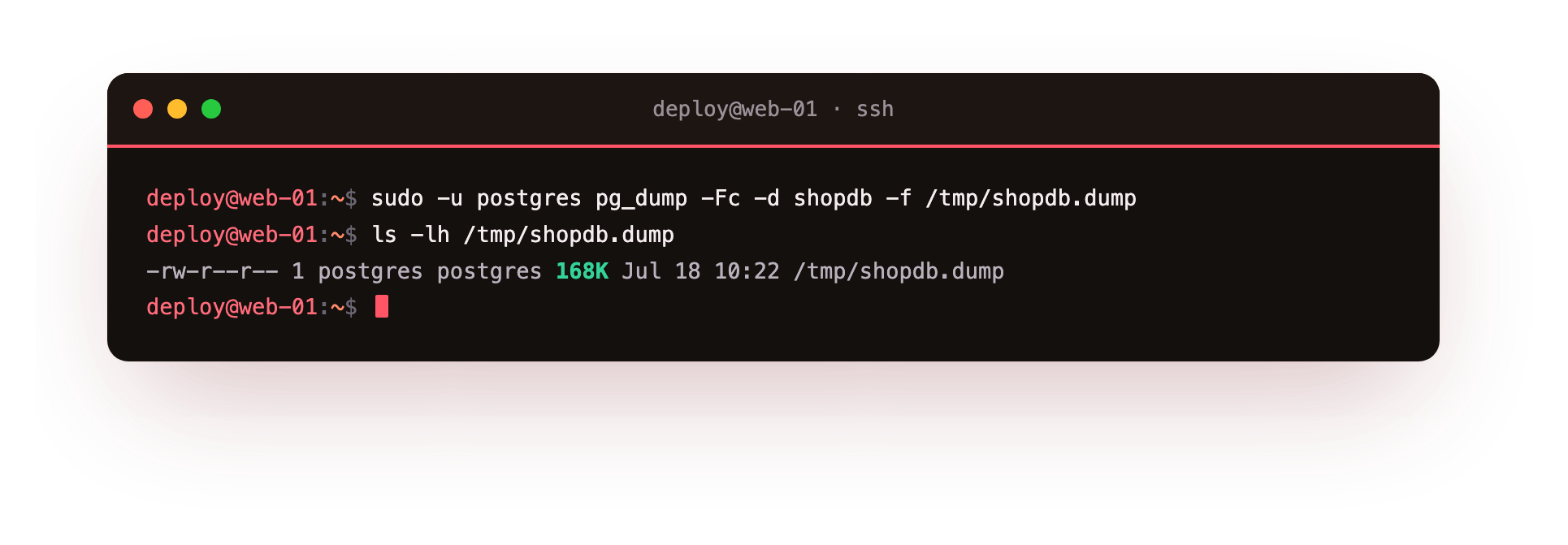
Twenty thousand orders and two thousand customers compress to 168 kilobytes. Real databases are bigger, but the shape holds: logical dumps are remarkably small, which is exactly why you can afford to keep many of them and ship them off the server.
You can look inside a dump without restoring it, which is a useful sanity check that it contains what you expect:
sudo -u postgres pg_restore -l /tmp/shopdb.dump | grep "TABLE DATA"
If your critical tables are not in that list, stop and find out why before you need them at 2 AM.
The PostgreSQL backup restore test that matters
Here is the part that separates teams who recover from teams who explain to customers why their data is gone. Restore the dump into a fresh, throwaway database and confirm the numbers match. Never restore a test over your live database. Make a new one:
sudo -u postgres psql -c "CREATE DATABASE shopdb_restore_test;"
sudo -u postgres pg_restore -d shopdb_restore_test --no-owner /tmp/shopdb.dump
sudo -u postgres psql -d shopdb_restore_test -c \
  "SELECT (SELECT count(*) FROM customers) AS customers, (SELECT count(*) FROM orders) AS orders;"
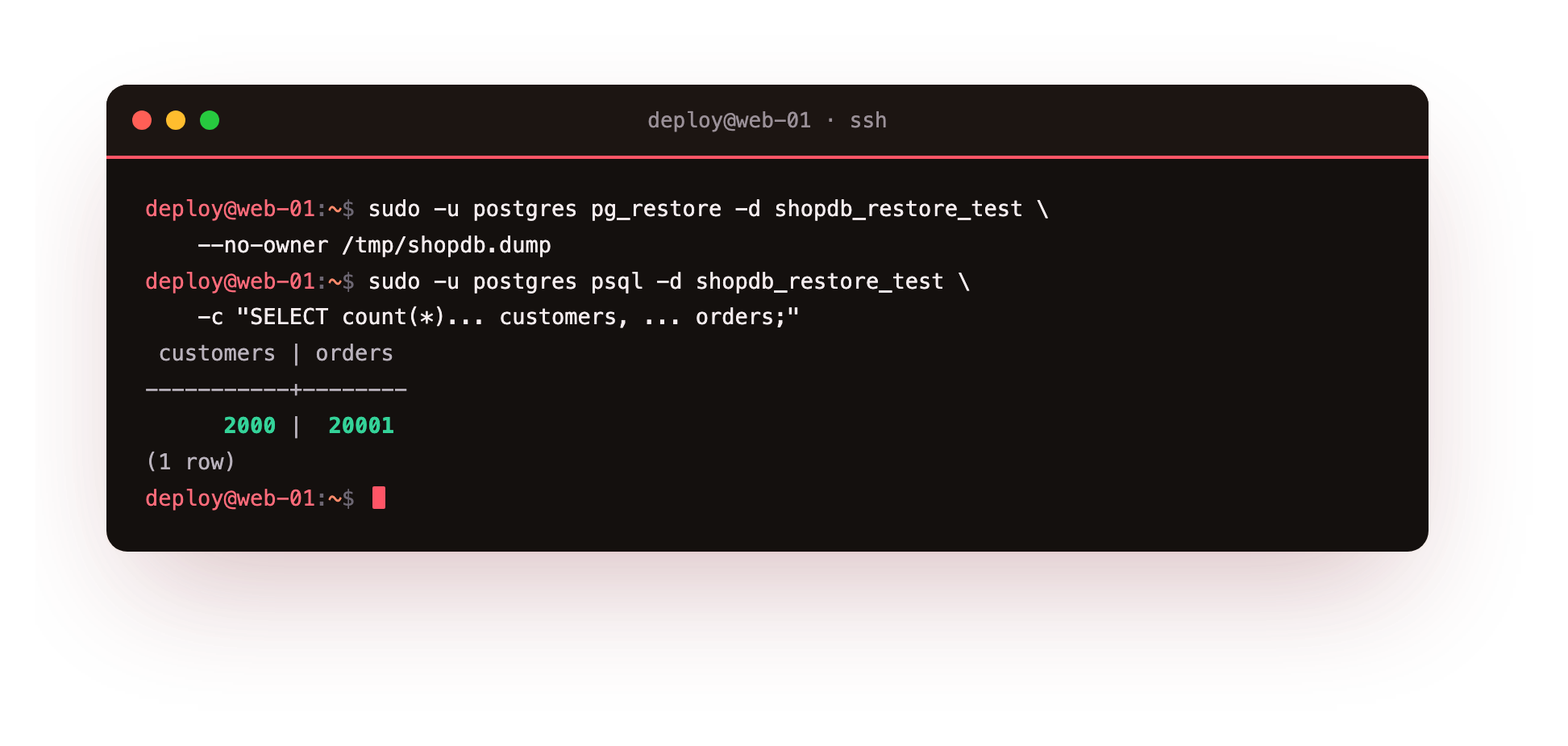
Two thousand customers and twenty thousand and one orders, exactly what the live database holds. That last +1 is real: it is the single order the previous chapter's app_user inserted while we were testing permissions. That is the point of restoring and counting. The backup is not a vibe, it is a number you can check against production, and here the numbers agree.
Drop the test database when you are done (DROP DATABASE shopdb_restore_test) and you have lost nothing but two minutes. Do this on a schedule, not just once. A restore that worked in January tells you nothing about the backup taken in July.
Making it automatic, and getting it off the server
A backup that lives on the same server as the database it protects is not protecting you from very much. If that disk dies, or that VPS is compromised, or someone fat-fingers a rm, both the database and its backup go together. The rule is old and it is called 3-2-1: three copies, two kinds of media, one of them somewhere else entirely. Following 3-2-1 is the backbone of any backup and disaster-recovery plan.
For a single VPS, the practical version is a small nightly script, run by a systemd timer or cron, that dumps, timestamps, prunes old copies, and pushes a copy to object storage:
#!/usr/bin/env bash
set -euo pipefail
STAMP=$(date +%F)
DIR=/var/backups/postgres
mkdir -p "$DIR"
pg_dump -Fc -d shopdb -f "$DIR/shopdb-$STAMP.dump"
# keep 14 days locally
find "$DIR" -name 'shopdb-*.dump' -mtime +14 -delete
# ship it off the box (S3-compatible object storage; see the object-storage guide)
# aws s3 cp "$DIR/shopdb-$STAMP.dump" s3://my-backups/postgres/
The off-server copy is the line that matters most and the one most people leave commented out. Ship it to object storage, another provider's box, anywhere that does not share a fate with your database server. On ServerCake this is what Object Storage is for, and it is a one-line addition to this script.
When is a daily dump not enough?
A nightly logical backup means that in the worst case you lose up to a day of data. For a hobby project that is fine. For anything with real orders flowing through it, a day of lost transactions is not acceptable, and this is where physical backups and point-in-time recovery come in.
The mechanism is: take one physical base backup, then continuously archive the write-ahead log (WAL), the stream of every change the database makes. With both, you can replay history and stop at any second you choose. The catch is that it is off by default. Check your server:
sudo -u postgres psql -c "SHOW wal_level;"
sudo -u postgres psql -c "SHOW archive_mode;"
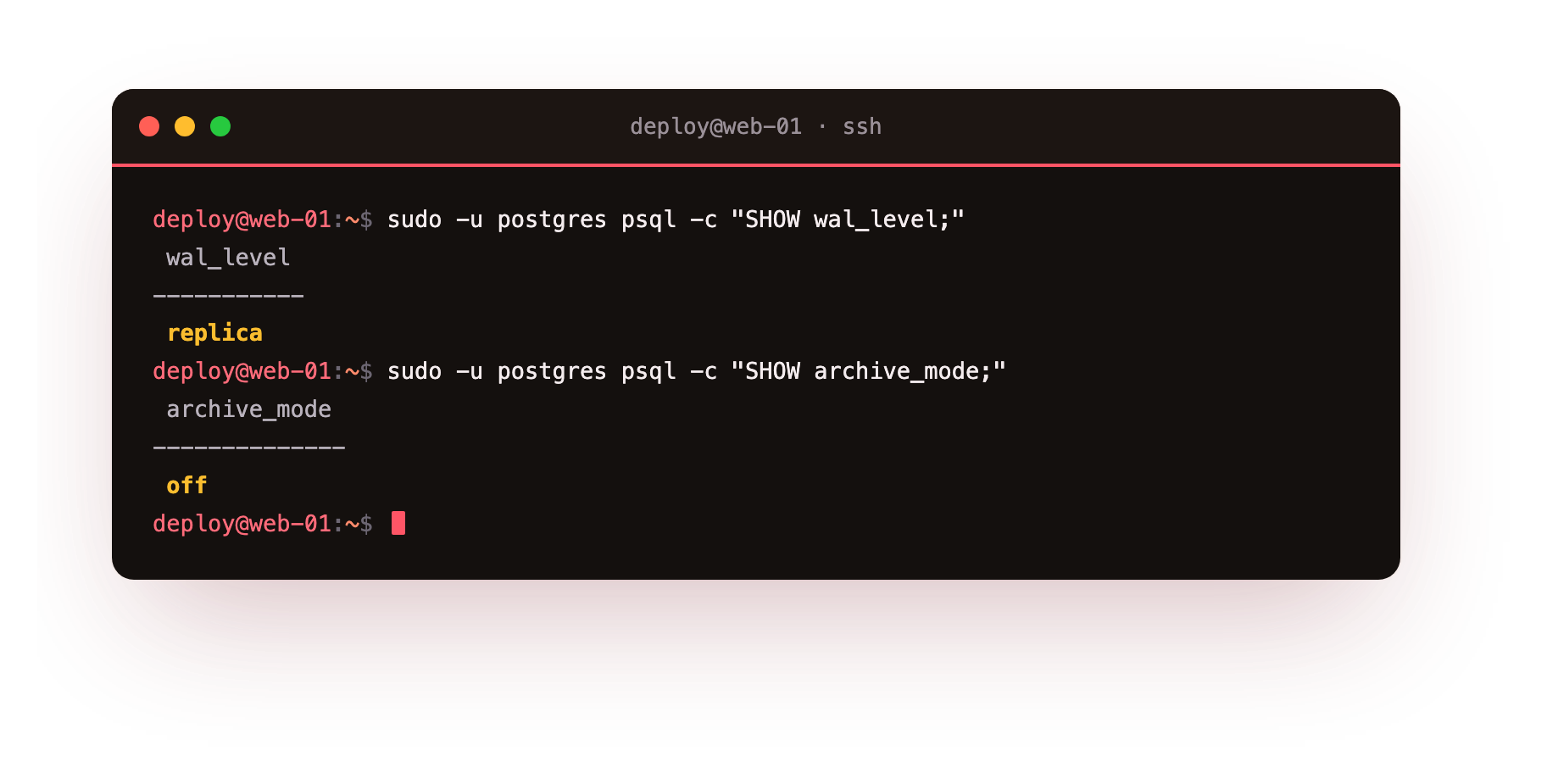
wal_level is replica, which is enough to stream changes to a replica but does not by itself archive them for recovery. archive_mode is off, which means nothing is being saved for point-in-time recovery. Turning this on is a deliberate step: set archive_mode = on and an archive_command that copies each WAL file somewhere safe (again, off the server), then take a pg_basebackup. From that point you can recover to any moment. Managed database services do this for you and hide the machinery, which is a large part of what you are paying them for.
For most single-VPS applications, the honest recommendation is: run the tested nightly dump today, because it is simple and it works, and add WAL archiving when losing a day of data becomes a real business risk rather than a theoretical one. Do not let the perfect point-in-time setup stop you from having the boring dump that already restores.
Troubleshooting pg_restore failures
pg_restore prints errors about a role that does not exist. The dump records object ownership. Restore with --no-owner, as this chapter does, so objects are owned by the restoring role, or create the missing role on the target first.
CREATE DATABASE fails with "database already exists." A previous test database was not dropped. Run DROP DATABASE shopdb_restore_test, then recreate it and restore again.
The restore stops on a missing extension. The source database used an extension, for example pgcrypto, that is not installed on the target. Install the extension package, or add CREATE EXTENSION to the target before restoring.
The dump file is suspiciously small. The dump ran out of disk or was interrupted. Check df -h, then run pg_restore -l on the file: a truncated dump lists far fewer TABLE DATA entries than production has tables.
Frequently asked questions
How often should I run the restore test, not just the backup?
On a schedule, not once. A restore that worked in January says nothing about the dump taken in July. A monthly restore into a throwaway database with a row-count check is a reasonable baseline for a single VPS.
What is the difference between pg_dump and pg_basebackup?
pg_dump writes the SQL and rows of one logical database and restores to the moment it ran. pg_basebackup copies the physical data files and, with archived WAL, lets you recover to any second in between.
Can I restore a custom-format dump into a newer PostgreSQL version?
Yes. Logical dumps are portable across versions and machines, which is a large part of why the custom format is worth using over copying data directories by hand.
Does a nightly dump give me point-in-time recovery?
No. A nightly dump can lose up to a day of data. Point-in-time recovery needs archive_mode set to on and continuous WAL archiving layered on top of a physical base backup.
What you have now
You have a backup you have actually restored, with row counts that match production, and a script to make it nightly and get it off the server. That already puts you ahead of most teams, who have a backup they have never opened. And you know the next step, WAL archiving for point-in-time recovery, and exactly when it is worth the effort.
The database is now safe from disaster. The next thing that takes it down is not disaster at all. It is success: too many connections at once. When your app gets busy and opens more connections than your small server can hold, PostgreSQL does not slow down gracefully, it falls over. The next chapter is about pooling, and why a 2 GB server dies at a connection count you would not expect.