The credential that owns everything
PostgreSQL roles with least privilege give each login only the powers its job actually needs, so a single leaked credential cannot read, reshape, or destroy the whole database. This chapter builds those roles on a live database and proves each boundary holds.
- One login for everything means one leaked credential owns everything; separate roles bound the blast radius.
- The application role reads and writes rows but is refused CREATE TABLE and DROP TABLE.
- REVOKE ALL ON SCHEMA public FROM PUBLIC closes the default door before you grant anything back.
- ALTER DEFAULT PRIVILEGES grants rights on tables that do not exist yet, so tomorrow's migration does not break the app.
Most PostgreSQL setups have one login. The application uses it, migrations use it, the late-night debugging session uses it, and it is usually the postgres superuser or something just as powerful. It works on day one. It is also the single worst decision you can make about your database, and you make it before you have written a line of real code.
Here is why it matters. The day a bug in your app leaks a database URL, or an npm dependency starts phoning home, or an SQL injection slips through, the attacker gets whatever that login can do. If that login can do everything, so can they: read every table, drop every table, create a new admin, turn your database into a crypto miner. The difference between a bad afternoon and a company-ending incident is almost never the breach itself. It is what the leaked credential was allowed to touch.
The fix is old and boring and it works: least privilege. Give each job the smallest set of powers it needs, and nothing more. Your application reads and writes rows. It never needs to create tables or drop them, so do not let it. This chapter builds that role model on a live PostgreSQL 16 database on Ubuntu 24.04 LTS and, more importantly, proves each limit actually holds.
Let's build.
Prerequisites
- A running PostgreSQL 16 install on Ubuntu 24.04 LTS, with shell access as the postgres superuser.
- A database with a few tables to grant on (this guide uses a database with orders and customers tables).
- Comfort running psql as the postgres user with sudo -u postgres psql.
- The three logins this chapter configures already created (app_user, migrator, readonly), or permission to CREATE ROLE them.
Who can log in right now?
Start by seeing what you already have. On a fresh install there is exactly one role that matters, postgres, and it is a superuser.
sudo -u postgres psql -c "SELECT rolname, rolsuper, rolcanlogin FROM pg_roles WHERE rolcanlogin AND rolname NOT LIKE 'pg_%' ORDER BY rolname;"
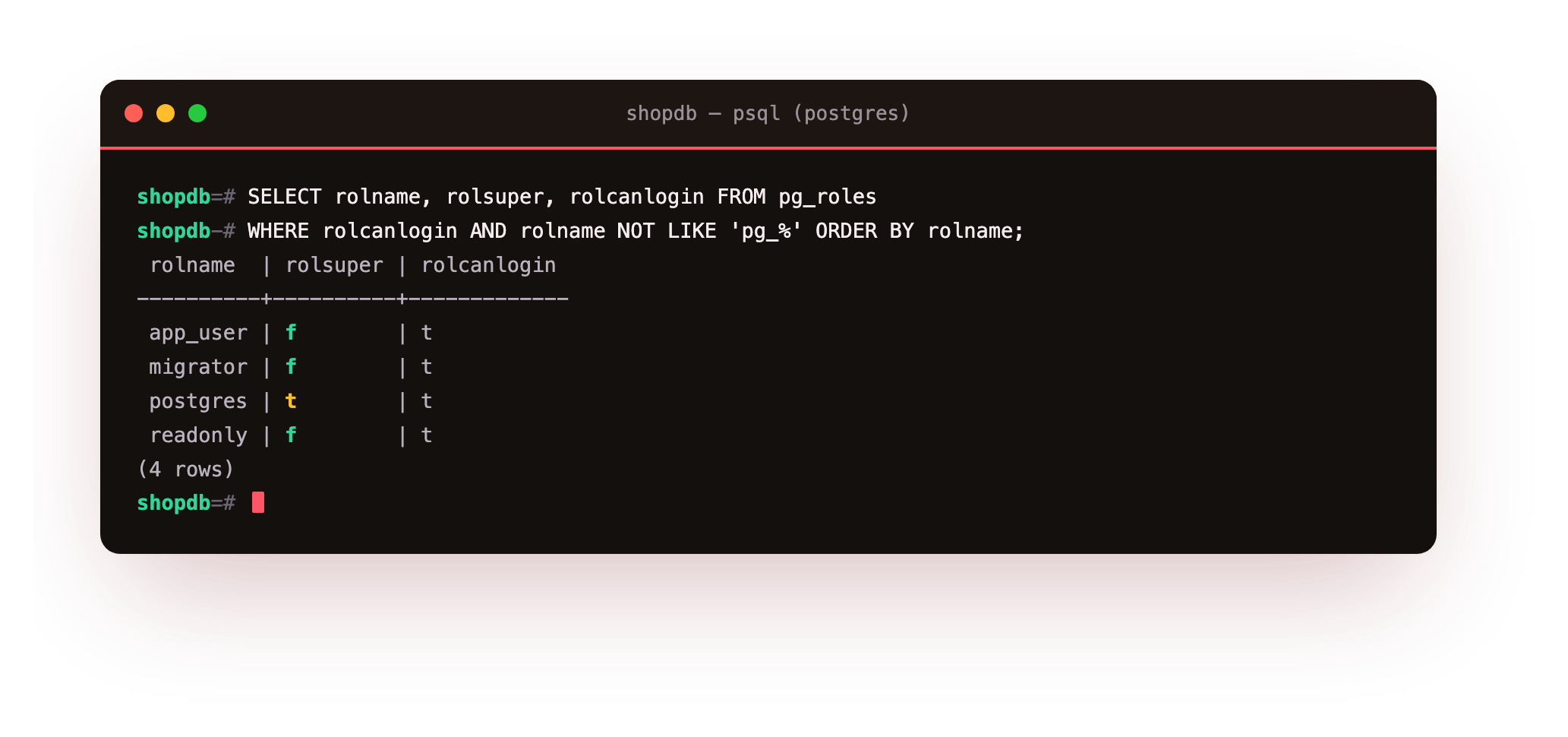
On the database we are building this guide against, four roles can log in, and only one of them is a superuser:
That is the shape you want: postgres is the superuser you use for administration and nothing else, and every other login is deliberately not a superuser. If your app connects as postgres, you have skipped this chapter. Let us fix that.
Three PostgreSQL roles, least privilege each
A production database usually needs exactly three kinds of login, and it is worth being strict about the boundaries between them:
- The application role (
app_user) reads and writes data all day. It must never change the schema. If your app cannot create or drop a table, then neither can a bug in your app. - The migration role (
migrator) owns the schema and is the only thing allowed to change it. Your deploy pipeline runs migrations as this role. Your app never uses it. - The read-only role (
readonly) can look but not touch. This is what your analytics tool, your dashboards, and your "let me just check something in production" session should use.
The single most important rule sits underneath all three: strip the defaults first. PostgreSQL historically let any role create objects in the public schema. Close that door before you open any others.
REVOKE ALL ON SCHEMA public FROM PUBLIC;
Then grant each role only what its job requires. The application gets data rights, not schema rights:
GRANT CONNECT ON DATABASE shopdb TO app_user;
GRANT USAGE ON SCHEMA public TO app_user;
GRANT SELECT, INSERT, UPDATE, DELETE ON ALL TABLES IN SCHEMA public TO app_user;
GRANT USAGE, SELECT ON ALL SEQUENCES IN SCHEMA public TO app_user;
There is a trap here that bites everyone once. Those grants apply to tables that exist now. The moment your migration role creates a new table next week, app_user has no rights on it and your app breaks with a permission error in production. The fix is ALTER DEFAULT PRIVILEGES, which grants rights on objects that do not exist yet:
ALTER DEFAULT PRIVILEGES IN SCHEMA public
  GRANT SELECT, INSERT, UPDATE, DELETE ON TABLES TO app_user;
ALTER DEFAULT PRIVILEGES IN SCHEMA public
  GRANT USAGE, SELECT ON SEQUENCES TO app_user;
The read-only role is the same idea with a smaller list, SELECT and nothing else. The migration role is the opposite: it gets CREATE on the schema so it can build and change tables, and it becomes the owner of what it creates.
GRANT USAGE ON SCHEMA public TO readonly;
GRANT SELECT ON ALL TABLES IN SCHEMA public TO readonly;
ALTER DEFAULT PRIVILEGES IN SCHEMA public GRANT SELECT ON TABLES TO readonly;

GRANT USAGE, CREATE ON SCHEMA public TO migrator;
Now prove it, because a rule you have not tested is a hope
This is the part almost every tutorial skips, and it is the only part that matters. Granting privileges is easy. Confirming that the limits actually stop the thing you are afraid of is the real work. You do not need three separate logins to test this. SET ROLE drops your current session down to another role's exact permissions, so you can check every boundary from one superuser session.
First, confirm the application role can do its actual job. Reading and writing data should just work:
SET ROLE app_user;
SELECT count(*) FROM orders;   -- returns 20000, fine
INSERT INTO orders (customer_id, product_id, qty) VALUES (1, 1, 1);   -- INSERT 0 1, fine
Now try the thing an attacker would try, the thing your app should never be able to do. Create a table. Drop a table.
CREATE TABLE secret_backdoor (id int);
DROP TABLE orders;
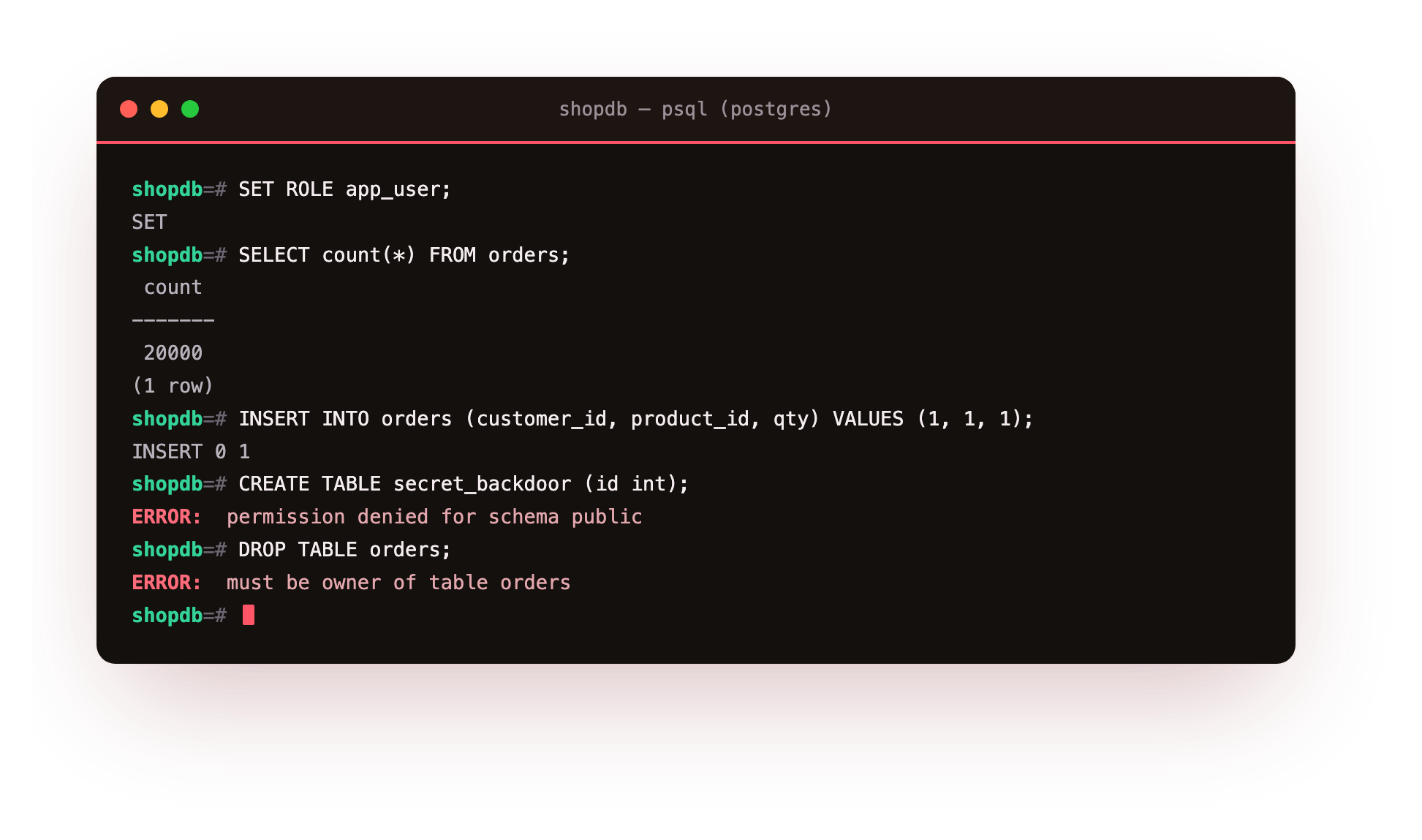
Both are refused, and this is exactly what success looks like:
permission denied for schema public and must be owner of table orders. A leaked app_user password is now a data problem, not a game-over problem. The attacker can read and change rows, which is bad, but they cannot rewrite your schema, install a backdoor, or destroy the database. You have turned a catastrophe into a contained incident.
Check the read-only role the same way. It should read, and it should be refused the moment it tries to write:
SET ROLE readonly;
SELECT count(*) FROM customers;   -- returns 2000, fine
INSERT INTO customers (email, full_name, city) VALUES ('[email protected]','X','Pune');
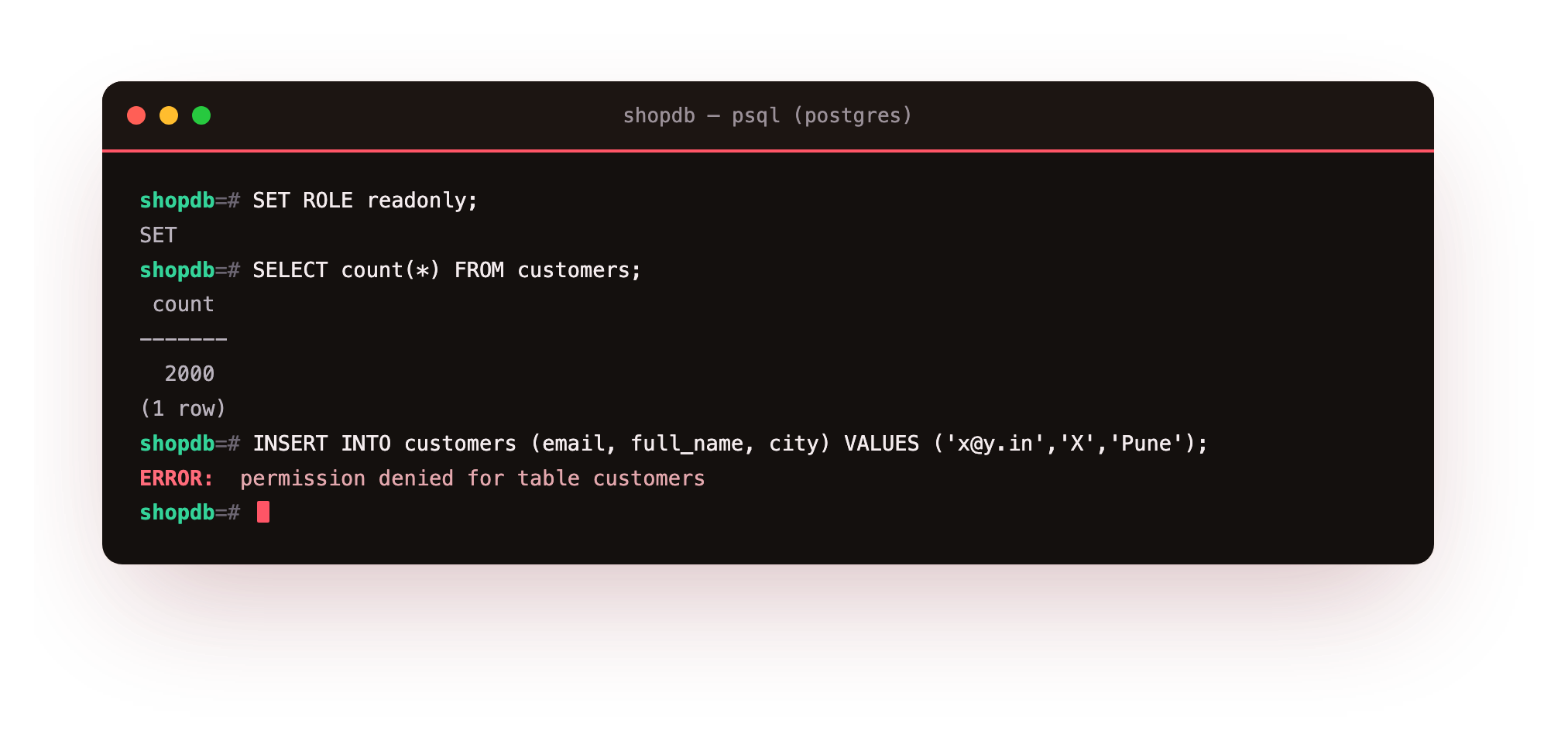
permission denied for table customers. Now your dashboards and your ad-hoc "quick look in production" sessions physically cannot corrupt data, no matter how careless the query. RESET ROLE puts you back to the superuser when you are done testing.
A note on passwords and how the app connects
Give each role a real password (ALTER ROLE app_user PASSWORD '...'), and make sure PostgreSQL stores it with SCRAM, which has been the default since version 14. You can confirm your server is using it, and this is worth doing once because an old config can silently fall back to the weaker md5:
sudo -u postgres psql -c "SHOW password_encryption;"
You want scram-sha-256. Your application then connects with the app_user credentials and only those. Nothing in your running application should ever hold the postgres password. Migrations, which do need schema rights, run as migrator from your deploy step, separately from the app, and ideally with a credential your running web servers never even see.
Troubleshooting role and privilege errors
The app fails with "permission denied for table" right after a deploy. A migration created a new table and app_user has no rights on it yet. Run the ALTER DEFAULT PRIVILEGES statements as the table's owner so future tables inherit the grants, and grant on the newly created table once to fix the current one.
psql reports role "app_user" does not exist. The grants in this chapter assume the logins already exist. Create them first with CREATE ROLE app_user LOGIN PASSWORD '...', then re-run the GRANT statements.
SHOW password_encryption returns md5. An upgraded server can keep the old default. Set password_encryption = scram-sha-256 in postgresql.conf, reload, then reset each role's password so it is re-hashed under SCRAM.
SET ROLE leaves you stuck acting as the wrong role. Run RESET ROLE, or reconnect, to return to your superuser session before testing the next boundary.
Frequently asked questions
Should my application ever connect as the postgres superuser?
No. The running application should connect only as app_user, which can read and write rows but cannot change the schema. Keep the postgres password out of the application entirely and use it only for administration.
What is the difference between a role and a user in PostgreSQL?
They are the same object. A user is simply a role created with the LOGIN attribute. PostgreSQL merged the two concepts years ago, so CREATE USER is shorthand for CREATE ROLE ... LOGIN.
Do I need three separate logins to test the limits?
No. SET ROLE drops your current superuser session to another role's exact permissions, so you can check every boundary from one session and use RESET ROLE to switch back.
Why revoke privileges on the public schema before granting anything?
Older PostgreSQL let any role create objects in the public schema by default. Revoking that removes an implicit privilege you never granted on purpose, so the rights you add afterwards are the only ones that exist.
What you have, and what is still exposed
You now have a database where the blast radius of a leaked credential is bounded by design. The app can move data but not reshape the database. Analytics can read but not write. Only your deploy pipeline, running as a specific role, can change the schema. That is the whole game of least privilege, and you have not just configured it, you have watched it refuse the exact operations you were worried about.
But privilege is only one door. A locked-down role still connects over the network, and if that database is listening on a public IP with a guessable password, least privilege buys you very little. Closing that network exposure is the job of server hardening, not the privilege model. The next chapter is about the thing that actually ends companies when it goes wrong and that no privilege model can save you from: backups, and the difference between having one and having one that restores.