Encrypt secrets at rest with sops
To encrypt secrets at rest means storing them as ciphertext that only a held key can open, so the encrypted file is safe to commit to a repository. This is the honest, low-cost path for a single slice: no server to run and no vault to operate, just two small tools installed from nothing.
This chapter starts from a bare box, installs age for the encryption and sops for the file handling on a live Ubuntu 24.04 server, then encrypts a demo secrets file and decrypts it back the way a deploy would.
ageinstalls from apt;sopsis a single binary from its release page. Neither runs a daemon.agegives you a keypair: a public recipient to encrypt to, and a private key to decrypt with.sopsencrypts the values in a YAML file and leaves the keys readable, so diffs stay useful.- Decryption needs the private key, so custody of that one file is the whole security model.
Two roles to keep straight: the recipient and the private key. You encrypt to a public recipient, which anyone may hold, and you decrypt with a private key, which only your servers and deploy tooling should. Install the tools first, then generate the pair.
From zero: install age and sops
On a fresh slice neither tool is present. age is packaged for Ubuntu, so apt installs it. sops is distributed as a single static binary from its GitHub releases, so you download it and drop it on the path. There is no service to enable and nothing listening on a port.
sudo apt install -y age
curl -sSLo sops https://github.com/getsops/sops/releases/download/v3.9.4/sops-v3.9.4.linux.amd64
sudo install -m 0755 sops /usr/local/bin/sops
sops --version
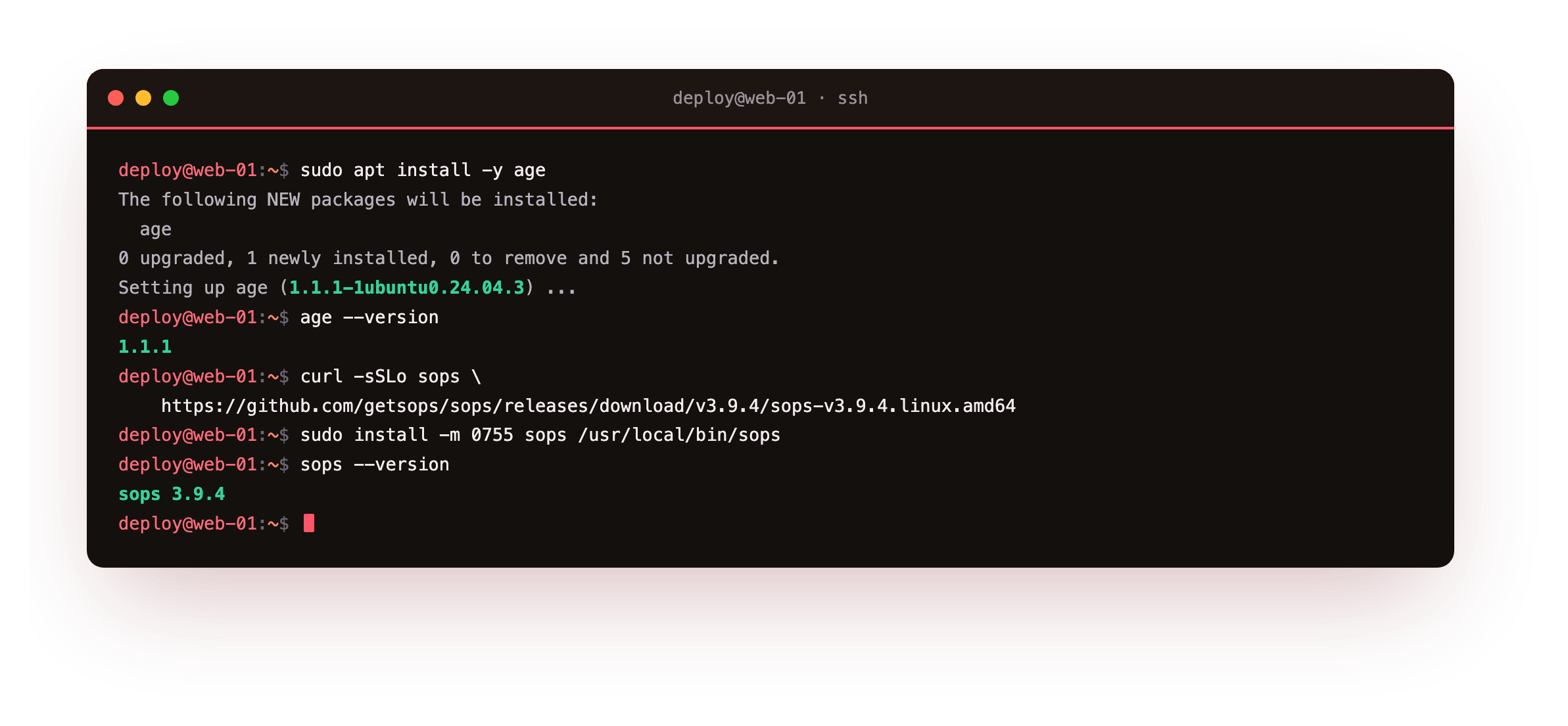
apt install age pulls in age and age-keygen at version 1.1.1. The curl fetches the pinned sops release, and install -m 0755 places it at /usr/local/bin/sops so every account can run it. The sops --version line confirms the binary works. Pinning the version, rather than grabbing latest, keeps the download reproducible and lets you check it against the project's published checksum before you trust it.
Generate an age key
age-keygen writes a keypair to a file: a private key line, and a comment holding the public recipient. The private key file is the sensitive one, so it stays off the repository and is readable only by its owner.
age-keygen -o ~/.config/sops/age/keys.txt
grep 'public key' ~/.config/sops/age/keys.txt
stat -c '%A %a %U:%G  %n' ~/.config/sops/age/keys.txt
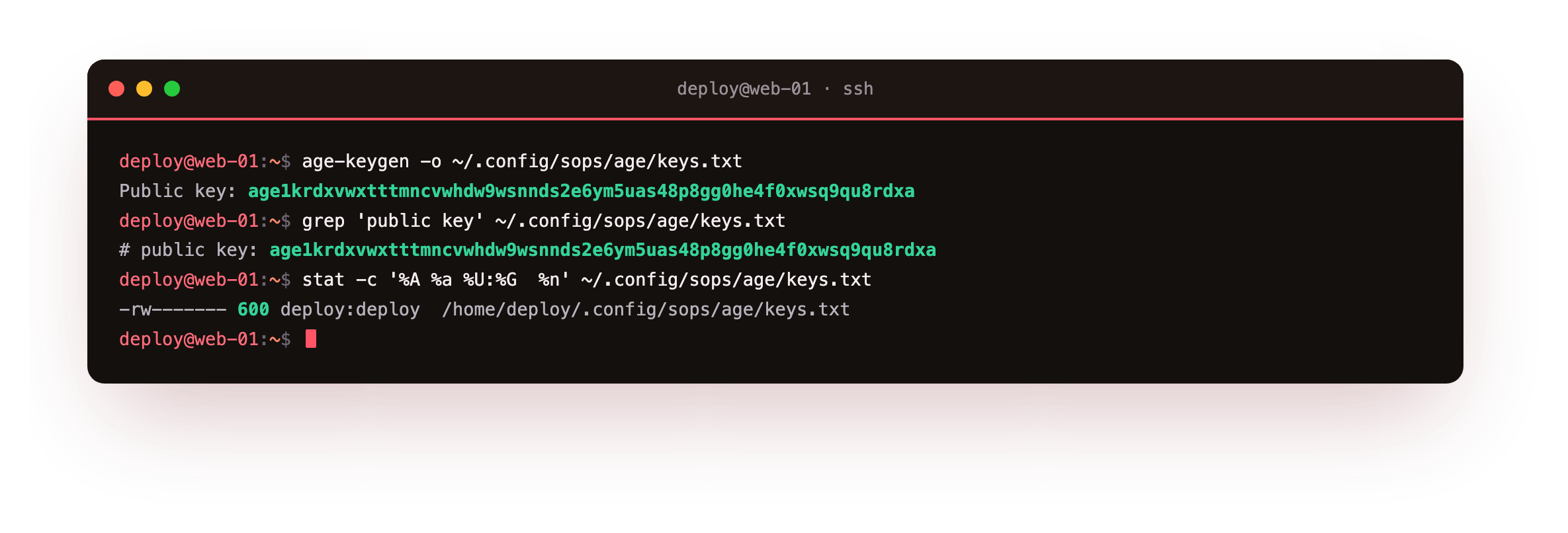
The tool prints the public recipient, an age1... string, and stores both halves in the key file at mode 600. Share the recipient freely; it only lets people encrypt to you. Guard the file, because it also contains the private key that decrypts everything. In a team, each machine or person can have its own key and be added as an extra recipient, so no single private key is a chokepoint.
Encrypt the values and commit the ciphertext
sops wraps age and understands structured files. Point it at a YAML file and a recipient, and it encrypts the values while leaving the keys in place. That matters for review: a diff of the encrypted file still shows which fields changed, without revealing any secret.
sops --encrypt --age "$RECIPIENT" --encrypted-regex '^(api_key|db_password|password)$' secrets.plain.yaml > secrets.enc.yaml
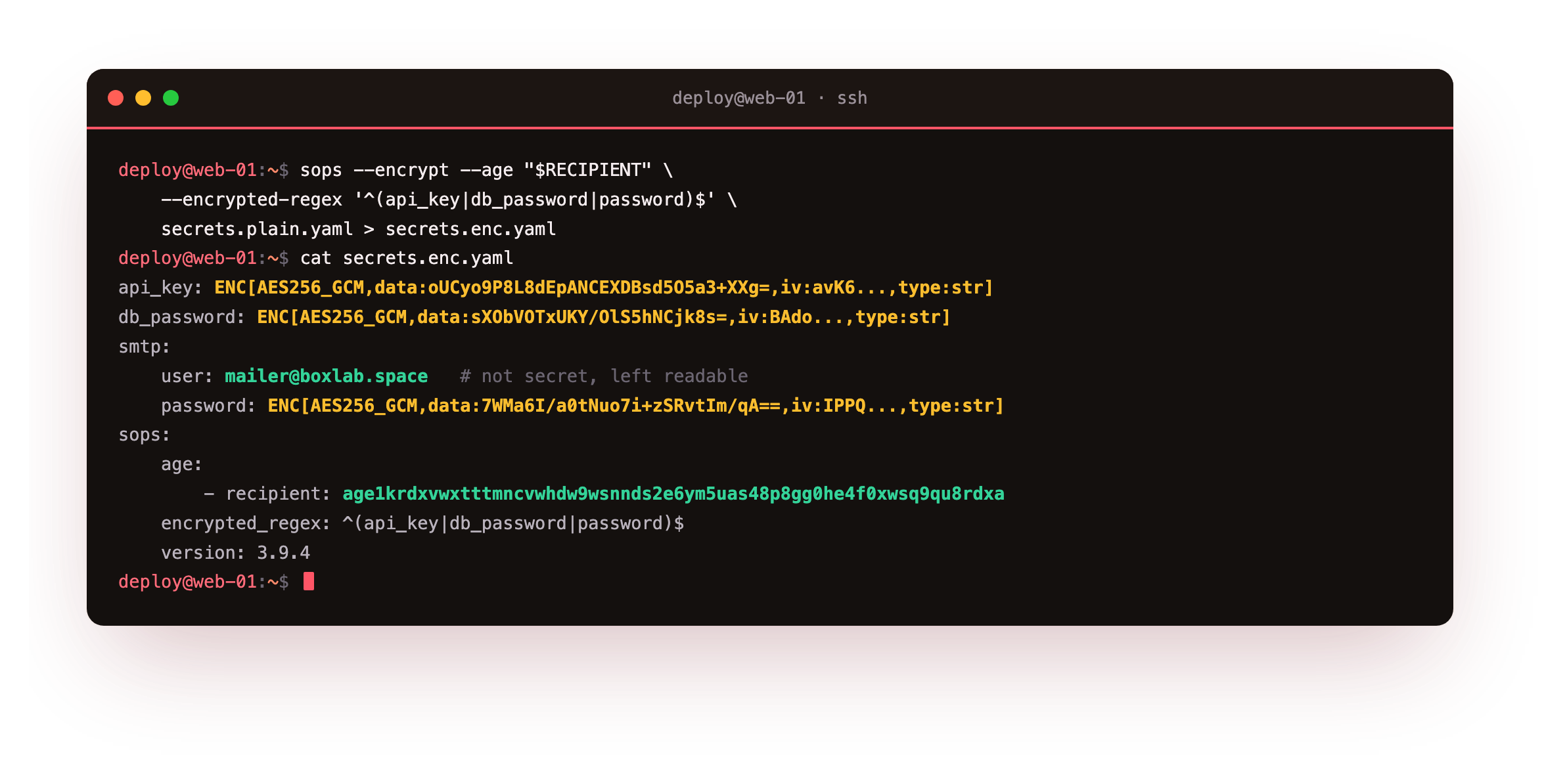
In the output each protected value becomes an ENC[AES256_GCM,...] blob while the field names stay readable. sops appends a metadata block recording the age recipient and a message authentication code, so tampering is detectable. The --encrypted-regex limits encryption to the fields that are actually secret, leaving a value like an SMTP username in the clear. This secrets.enc.yaml is the file you commit, and the plaintext original never leaves your machine.
The round-trip: decrypt at deploy time
Here is the payoff, the moment the whole file-hardening effort pays off. Committing ciphertext is only useful if a deploy can turn it back into values, and only your key can. On the server, decryption is one command that reads the private age key. Without the key, the same file is inert.
sops --decrypt secrets.enc.yaml
SOPS_AGE_KEY_FILE=/dev/null sops --decrypt secrets.enc.yaml
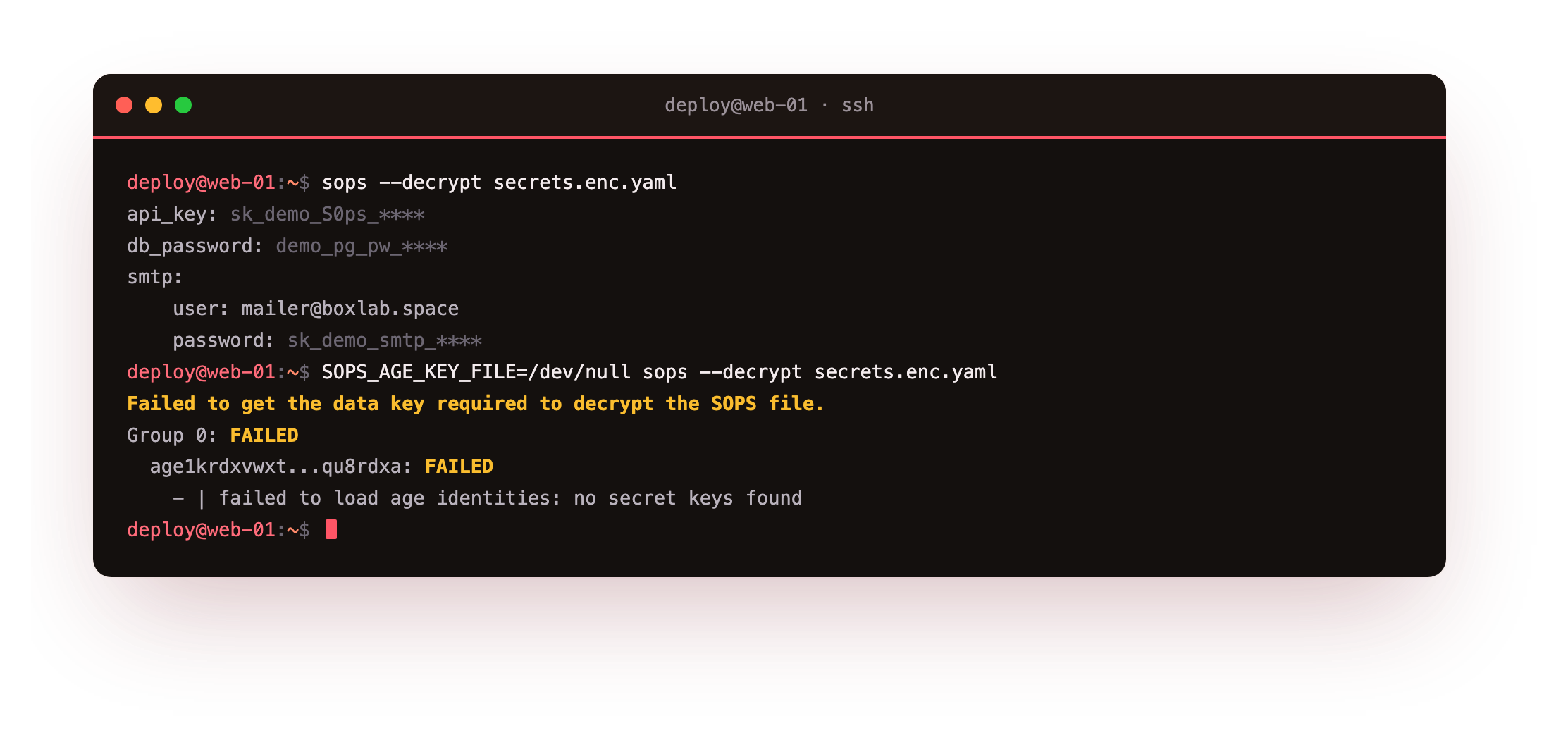
With the key present, sops returns the original values; the screenshot masks them because printing a live secret to a terminal is itself a leak. Point SOPS_AGE_KEY_FILE at a missing or wrong key and the decrypt fails cleanly: it reports that no key could recover the data and prints no plaintext. That failure is the property that makes the committed file safe to push. You have now completed the round-trip from the destination shot in chapter one: plaintext in, ciphertext committed, values back only for the key holder.
You should now see ENC[AES256_GCM,...] in secrets.enc.yaml and get your values back from sops --decrypt only when SOPS_AGE_KEY_FILE points at the real key. If the decrypt succeeds with the key set to /dev/null, sops found a key elsewhere: check that no keys.txt is sitting in ~/.config/sops/age/.
Going further: a .sops.yaml policy
Passing the recipient and the regex on every command gets tedious and easy to forget. A .sops.yaml file at the repository root fixes the rules once. A creation_rules block matches files by path, lists the age recipients and sets the encrypted-regex, so a plain sops --encrypt or an in-place sops edit applies them automatically.
That also makes the policy reviewable in the repository, and lets you point different paths at different keys, for example a staging key and a production key.
Custody of the private key stays the whole model: put it on the server at mode 600, owned by the deploy account, ideally on a tmpfs or delivered by your provisioning tool rather than committed anywhere. For India's DPDP Act, encryption at rest is a reasonable security safeguard for the personal data a key protects, and clean key custody is what you would show in an audit.
Frequently asked questions
Why age and sops instead of Vault or OpenBao?
A full secrets manager like Vault or OpenBao is powerful but adds a service to run, secure and back up. On a single slice, age plus sops gives you encryption at rest and safe-to-commit files with no daemon. Move to a managed store when you have many services or need dynamic, short-lived credentials.
Is it safe to commit the encrypted file?
Yes, that is the point. The values are AES-256-GCM ciphertext that only the private age key can open, and sops adds a MAC so tampering is caught. Keep the private key out of the repository and the committed file reveals nothing useful.
What happens if I lose the age private key?
You lose the ability to decrypt, so treat the key as critical. Add more than one recipient up front, for example one key per server plus a break-glass key held offline, so a single lost key does not lock you out of your own secrets.
Can sops encrypt only some fields?
Yes. The --encrypted-regex option restricts encryption to matching field names, leaving non-secret values readable. That keeps configuration reviewable in plain text while the sensitive fields become ENC[...] blobs.
What you can do now
Install age from apt and sops from its release page, generate an age key, encrypt your secrets file so the values become ENC[...] blobs, commit the ciphertext, and decrypt on the server with the private key at deploy time. Keep the private key at mode 600, off the repository, with a second recipient as backup.
Encryption at rest protects the file, but secrets still need a lifecycle. The final chapter rotates a demo secret so the old value stops working, audits who can read a secret, catches a committed one with gitleaks, and scrubs it from git history for good: secret rotation, auditing and git-history scrubbing.