How secret rotation works
Secret rotation is replacing a live credential with a new one and invalidating the old, so a leaked value stops working. Rotation is what turns a secret from a permanent liability into a time-limited one, and it is the routine that makes the earlier encryption worthwhile: even a perfectly stored key should not live forever.
This chapter runs the full lifecycle on a live Ubuntu 24.04 server: rotate a demo key so the old one is rejected, audit who can read a secret, then catch a committed secret with gitleaks and scrub it from git history with git-filter-repo, proving the old value is gone.
- Rotation issues a new secret and revokes the old, so an exposed value quickly becomes useless.
- Swap the key file atomically with
mv, so there is never a moment with a missing secret. - Auditing means reading the exact permissions and hunting the disk for loosely-permissioned secret files.
gitleaksfinds committed secrets andgit-filter-reporemoves them from every past commit.
Two events force a rotation: a scheduled interval, and a suspected leak. The mechanics are the same either way. Issue the new value, put it in place without downtime, then revoke the old so it no longer authenticates. The scanning and scrubbing tools come first, since a bare box has neither.
From zero: install gitleaks and git-filter-repo
Neither tool ships with Ubuntu. gitleaks is a single binary from its release page, and git-filter-repo is packaged for apt. Install both before you need them, because you will want them ready the moment a secret slips into a commit.
curl -sSLo gitleaks.tgz https://github.com/gitleaks/gitleaks/releases/download/v8.21.2/gitleaks_8.21.2_linux_x64.tar.gz
tar xzf gitleaks.tgz gitleaks && sudo install -m 0755 gitleaks /usr/local/bin/gitleaks
sudo apt install -y git-filter-repo
gitleaks version
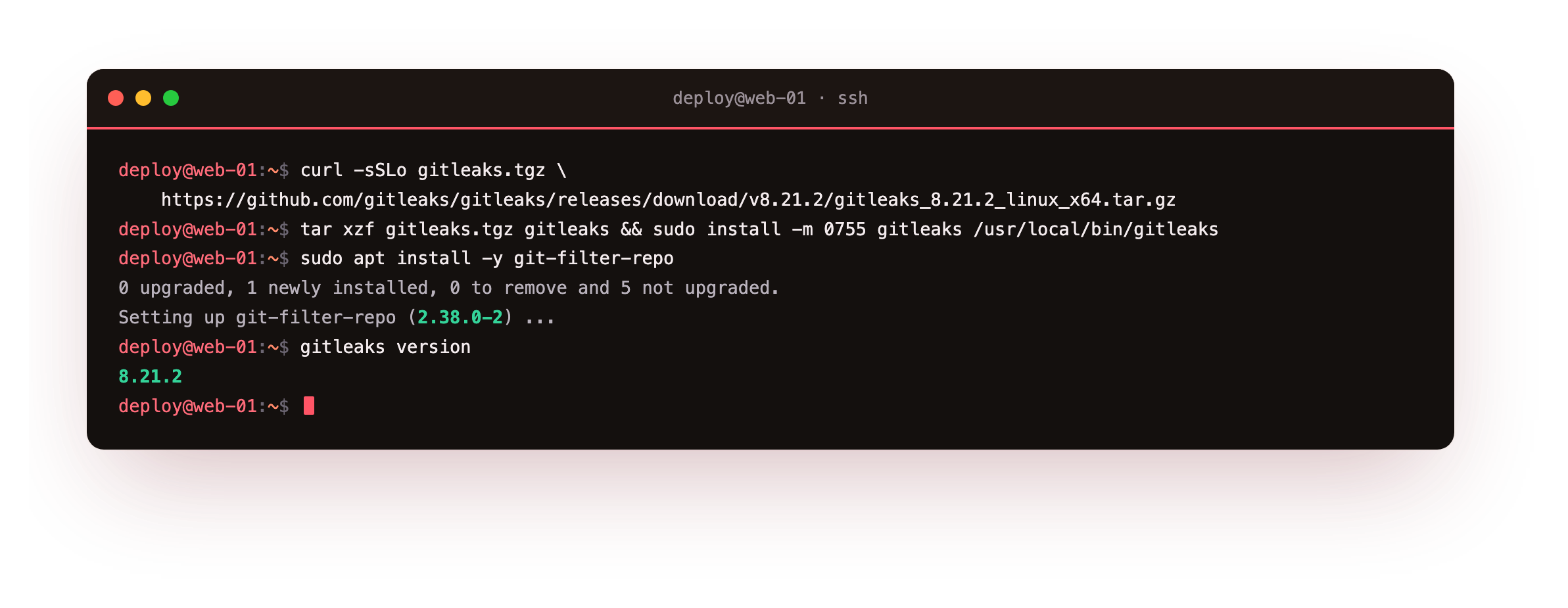
The curl and tar unpack the gitleaks binary, and install -m 0755 puts it on the path. apt install git-filter-repo pulls the history-rewriting tool. The gitleaks version line confirms the scanner runs. With both in place you can scan any repository and, if it is dirty, rewrite it.
Rotate a secret without downtime
The safe way to swap a key on disk is to write the new value to a temporary file and rename it over the old one. A rename is atomic on Linux, so a reader either sees the whole old file or the whole new file, never a truncated or empty one. Here a small local validator stands in for the provider, which revokes the old key server-side.
printf '%s\n' "$NEW_KEY" > current.key.new
mv current.key.new current.key
./provider-validate.sh current.key "$OLD_KEY"
./provider-validate.sh current.key "$NEW_KEY"
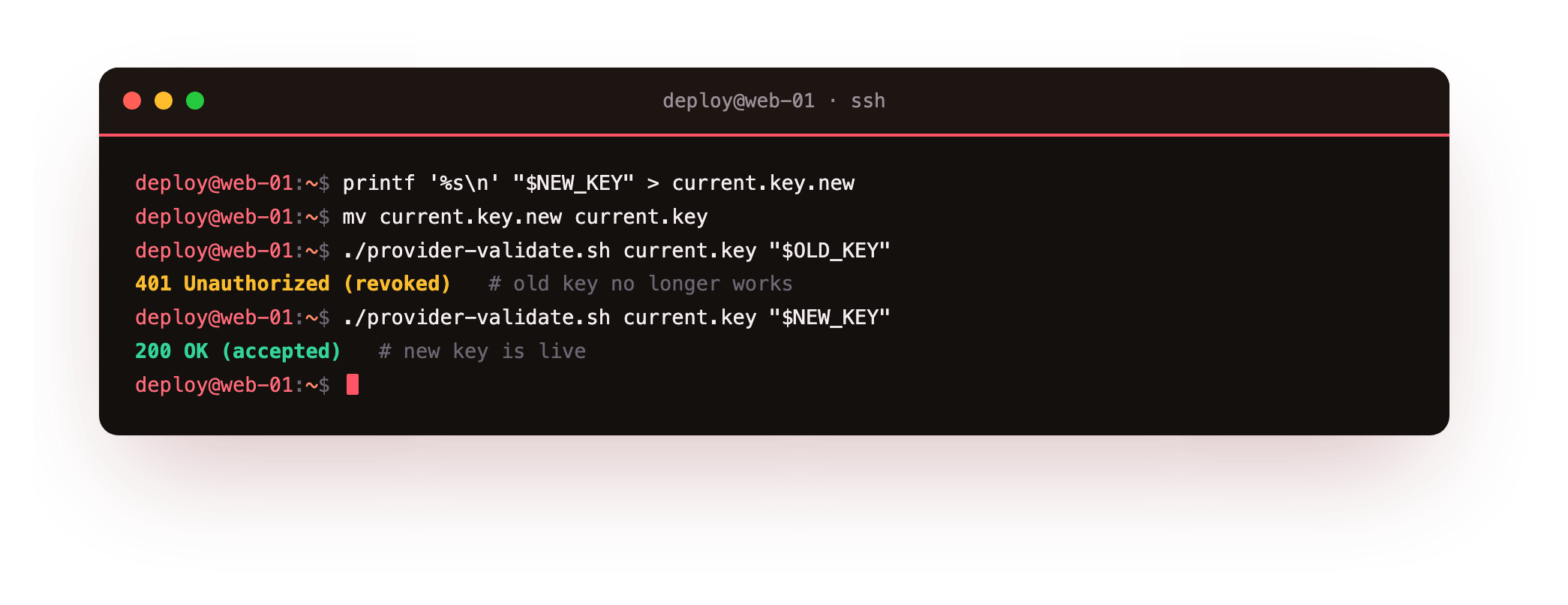
Before the swap the old key validates. After the atomic mv, the file holds the new key: the old value is now rejected with 401 Unauthorized, and the new value returns 200 OK. On a real provider you generate the new key in their console, deploy it, confirm the app is healthy, then delete the old key so its window of validity closes. Overlap the two briefly so a running request never fails mid-rotation.
Audit who can read a secret
Rotation assumes you know where secrets live and who can read them. Auditing confirms it. Read the exact mode and owner of each secret file, then sweep the filesystem for any secret file that is group or other readable, which is the loose permission chapter one warned about.
sudo stat -c '%A %a %U:%G  %n' /etc/appsvc/secrets.env
sudo find /etc /srv /home -maxdepth 4 -type f \( -name '*.env' -o -name '*.key' \) -perm /044
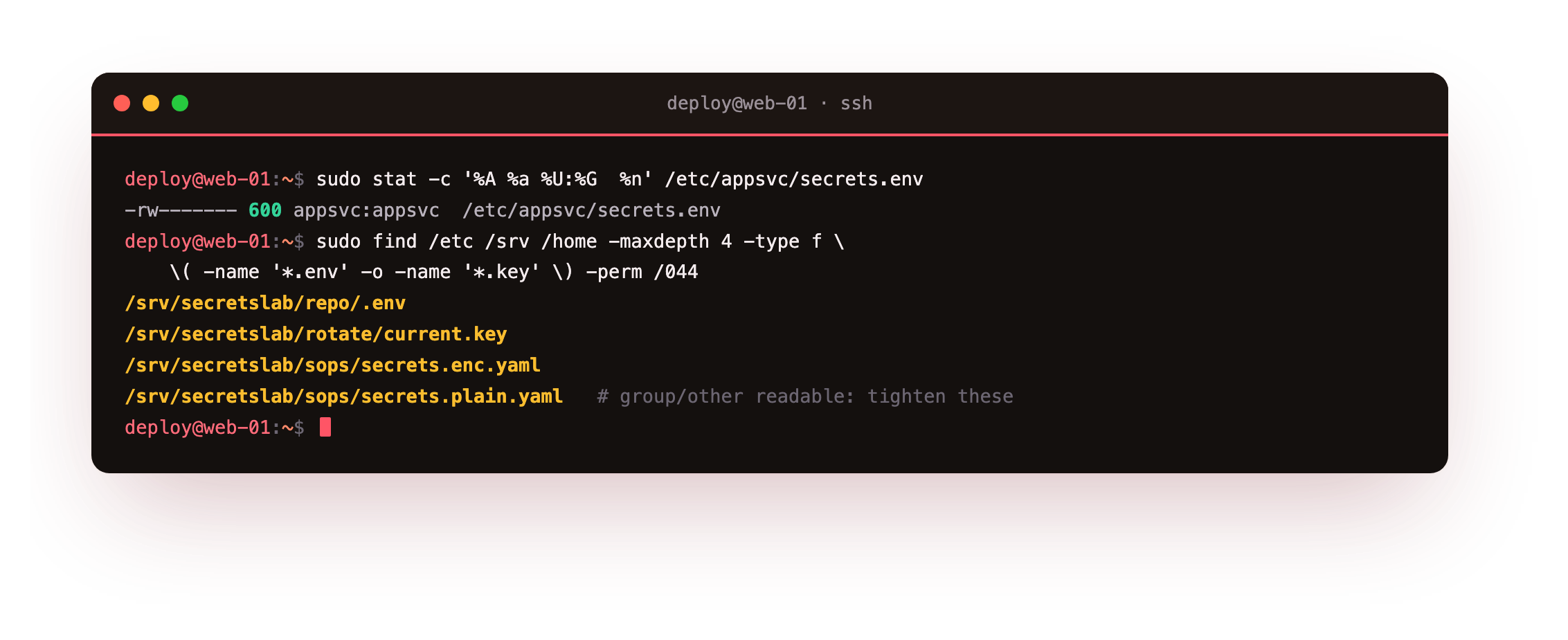
The stat line confirms the locked file is 600 and owned by its service account. The find uses -perm /044 to match any file readable by group or other, surfacing exactly the demo files left at loose modes. Run this sweep on a schedule and treat every hit as a finding: tighten the mode, or explain why the access is needed. Pair it with a review of who holds decrypt keys and who has sudo, since those are the accounts that can reach any secret.
Catch a committed secret, then prove it is gone
This is the moment that closes the loop the series opened with. When a secret does reach a commit, you find it, remove it from history, and confirm it is no longer there. gitleaks scans a repository against a ruleset and reports each match with its rule, file and commit.
gitleaks detect --source . --no-banner --redact
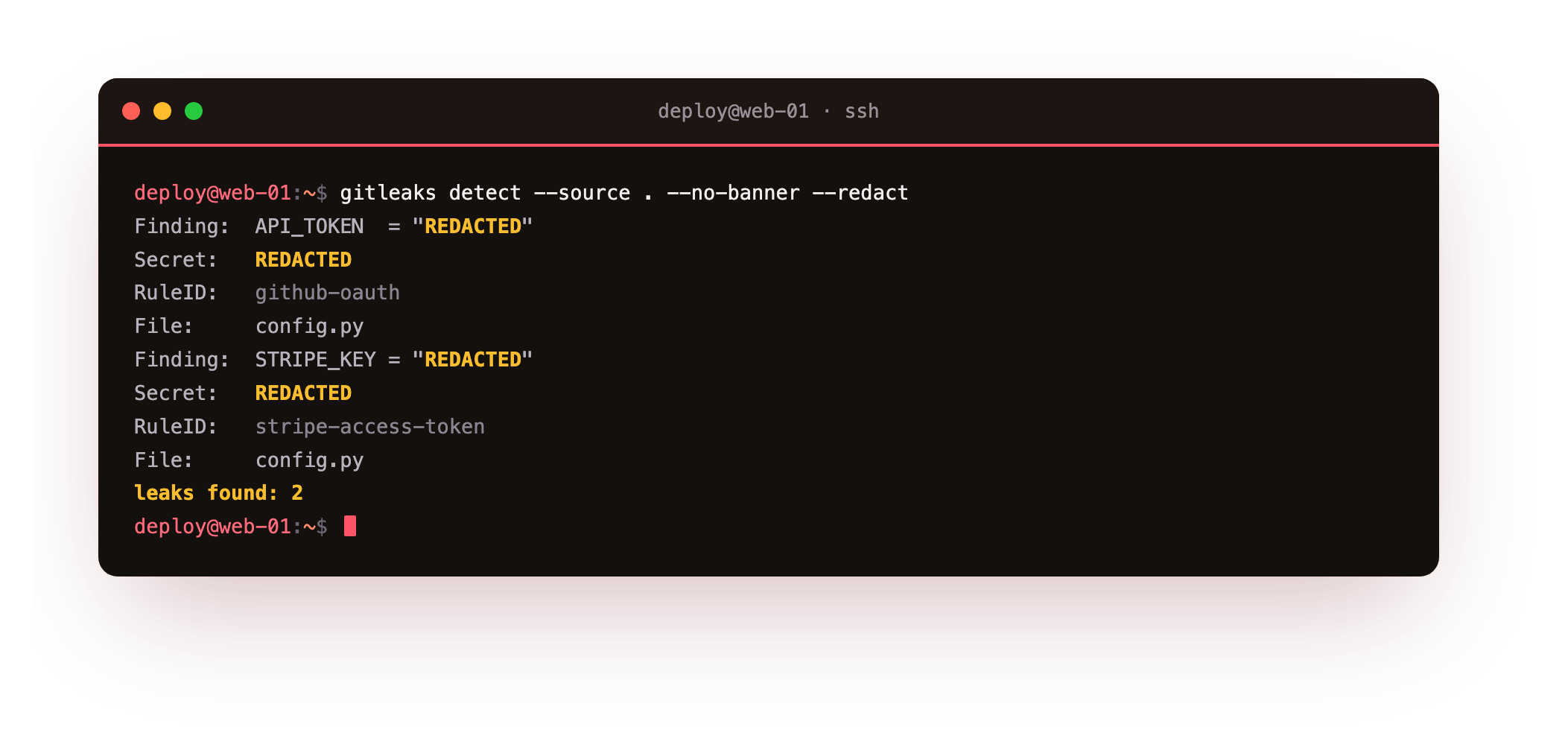
Run against a throwaway repo with a planted demo Stripe test key and a GitHub token, gitleaks reports two findings, stripe-access-token and github-oauth, and redacts the values in its output. Once found, the value is exposed and must be rotated, then removed from history. git-filter-repo rewrites every commit, replacing the secret with a marker, and a before-and-after count proves the result.
git log -p | grep -c sk_test_51DemoOnly
git filter-repo --force --replace-text expressions.txt
git log -p | grep -c sk_test_51DemoOnly
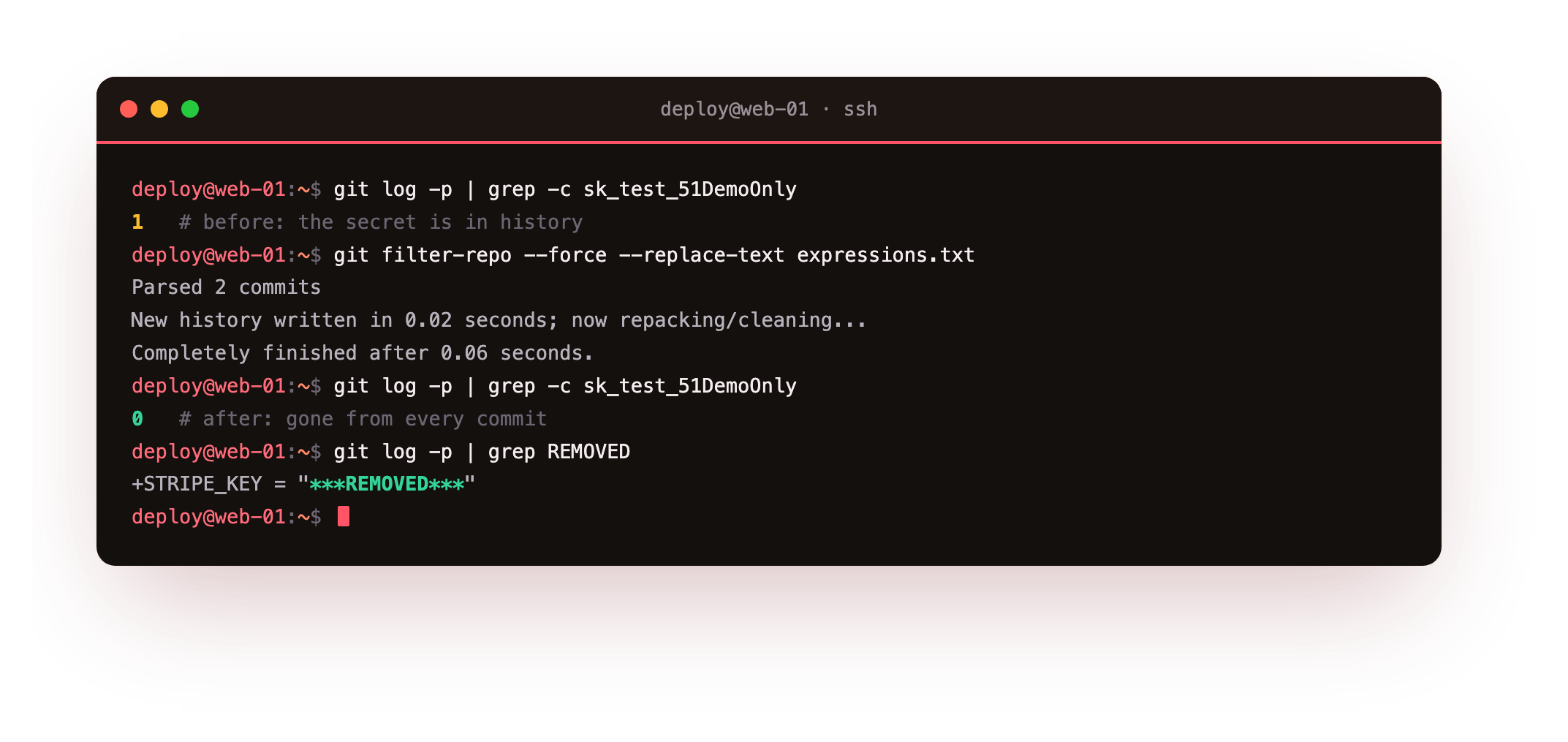
Before the rewrite the count is 1: the secret is in the commit that added it. After filter-repo rewrites history, the same search returns 0, and git log -p shows a ***REMOVED*** marker in its place. That drop from one to zero is the proof the founder wanted, that the old secret is not merely deleted going forward but scrubbed from every commit. Because filter-repo rewrites commit hashes, coordinate a force-push and have collaborators re-clone.
After the scrub, git log -p | grep -c sk_test_51DemoOnly should print 0 and git log --all --oneline should still list your commits with new hashes. If the count is still 1, the pattern in expressions.txt did not match the committed text exactly: copy the leaked string verbatim and re-run.
Going further: stop the leak at commit time
Scrubbing history is damage control, so the better outcome is that no secret reaches a commit at all. A pre-commit hook that runs gitleaks protect --staged refuses a commit whose staged changes contain a secret, catching the mistake before it is recorded. Run the same scan again in CI as a gate on every push, so a commit made without the hook is still stopped.
Prevention at commit time is cheaper than a history rewrite and a rotation after the fact. BFG Repo-Cleaner does the same scrubbing job with a simpler interface for large repositories, and is worth keeping in reach for a big cleanup. Either way, treat a hook plus a CI scan as the front line, and filter-repo as the tool you hope not to need.
Frequently asked questions
How often should I rotate secrets?
On a schedule that matches the risk, for example every 90 days for API keys, plus immediately on any suspected leak or staff change. What matters more than the exact interval is that rotation is a practised, low-friction routine rather than a rare emergency you improvise.
Does deleting a file in a new commit remove the secret from git?
No. The value stays in every earlier commit and in the reflog, reachable with git log -p. You need a history rewrite with git-filter-repo or BFG to remove it from all commits, and even then you must rotate, since anyone who cloned already has it.
Is gitleaks enough to catch every secret?
It catches known patterns and high-entropy strings, which covers most real leaks, but no scanner is complete. Run it in CI as a gate on every push, and combine it with the file-permission sweep and code review rather than relying on one tool.
What does DPDP expect around secret handling?
India's DPDP Act asks for reasonable security safeguards over personal data. Rotating credentials, least-privilege access, encryption at rest and an auditable record of who can read a secret are the kind of measures that demonstrate that duty of care if you are ever asked.
What you can do now
Put the lifecycle into practice: rotate keys on a schedule with an atomic file swap, sweep permissions with stat and find on a timer, gate every push with gitleaks, and keep git-filter-repo ready for the day a secret slips through. Rotate first, scrub second.
Across the series you have moved a secret from a loose plaintext file to an owned, locked, encrypted and rotatable credential, and you can prove a leaked one is gone. That is the difference between hoping a secret stays private and being able to show that it does.