What you will have at the end
This series is for the developer with plaintext secrets scattered across a slice and a laptop, the API keys and passwords sitting in .env files, one careless git push away from leaking into a public commit. That is the exact person this guide is written for.
By the end you stop that from happening: those secrets become encrypted-at-rest files that are safe to commit, your secret files have owner-only permissions, and when a key does slip out you can rotate it and prove the old one is gone from history. The single promise running through it is that you stop leaking and can show the old ones no longer work.
This first chapter shows you that end state on a live Ubuntu 24.04 slice, then reproduces the exact problem it solves: a plaintext secret leaking four different ways on the same box.
- The series destination: a secrets file committed as
ENC[AES256_GCM,...]ciphertext that opens with your key and stays shut without it. - A secret in plaintext leaks through four channels at once: file permissions, the process environment, logs and git history.
- A
.envat mode644is readable by every local account, including a compromised web server user. - Deleting a committed secret does not remove it, because
git log -pstill replays every past version.
- A slice you deploy real apps to, the kind that already has a
.envor two on disk, since the whole point is to lock down secrets you actually hold rather than invented ones. - A git repository you can experiment in. Later chapters plant a throwaway secret and scrub it, so use a scratch repo, never a repository you care about the history of.
- Nothing to install for this chapter. The leaks are shown with tools already on the box,
stat,chmod,gitand/proc. The encryption tools arrive in chapter three. - Every value in this series is a throwaway demo secret written as
sk_demo_..., created for the walkthrough and deleted after, so nothing shown grants access to anything.
See the destination first
Before any theory, here is where the series lands. This is a secrets file after chapter three has encrypted it: the file you would commit to your repository. It is ciphertext, it opens for the key you hold, and it refuses everyone else with no plaintext at all.
cat secrets.enc.yaml
sops --decrypt secrets.enc.yaml
SOPS_AGE_KEY_FILE=/dev/null sops --decrypt secrets.enc.yaml
![The series destination shown before any theory: a committed secrets.enc.yaml as ENC[AES256_GCM,...] ciphertext, decrypting to its values only when the age key is present, and failing with no plaintext when the key file is /dev/null](/media/servers-security/secrets-management-on-a-vps/sec1-00-destination.png)
The committed file is a set of ENC[AES256_GCM,...] blobs, so a push exposes nothing usable. With your age key present, sops --decrypt returns the real values at deploy time. Point it at a missing key and the same file is inert: it fails to find a data key and prints no secret. That is the destination in one line, a file safe to store in git that only your servers can open.
Right now you have none of this, because your secrets are plaintext on disk and probably in a commit already. The rest of this chapter shows exactly how much that leaks, so the encryption later feels earned rather than ceremonial.
Why plaintext secrets leak
Plaintext secrets are the API keys, database passwords and tokens you store as readable text, most often in a .env file next to the app. The trouble is that a plaintext secret has no single home. It copies into git history, into process memory, into log files and into every backup you take.
Locking one copy does nothing for the others, which is why the fix is a habit rather than a single command: own the secret with one account, lock it to that account, and keep it out of anything that gets committed or shipped.
Look first at how one plaintext file betrays you on disk.
A world-readable file is readable by everyone
The default umask on many setups writes a new file as mode 644: the owner can write it and every other account on the box can read it. For source code that is fine. For a secret it is a quiet disaster, because any process that gets a foothold as another user reads it straight off disk.
chmod 644 .env
stat -c '%A %a %U:%G  %n' .env
sudo -u www-data cat .env
chmod 600 .env
sudo -u www-data cat .env
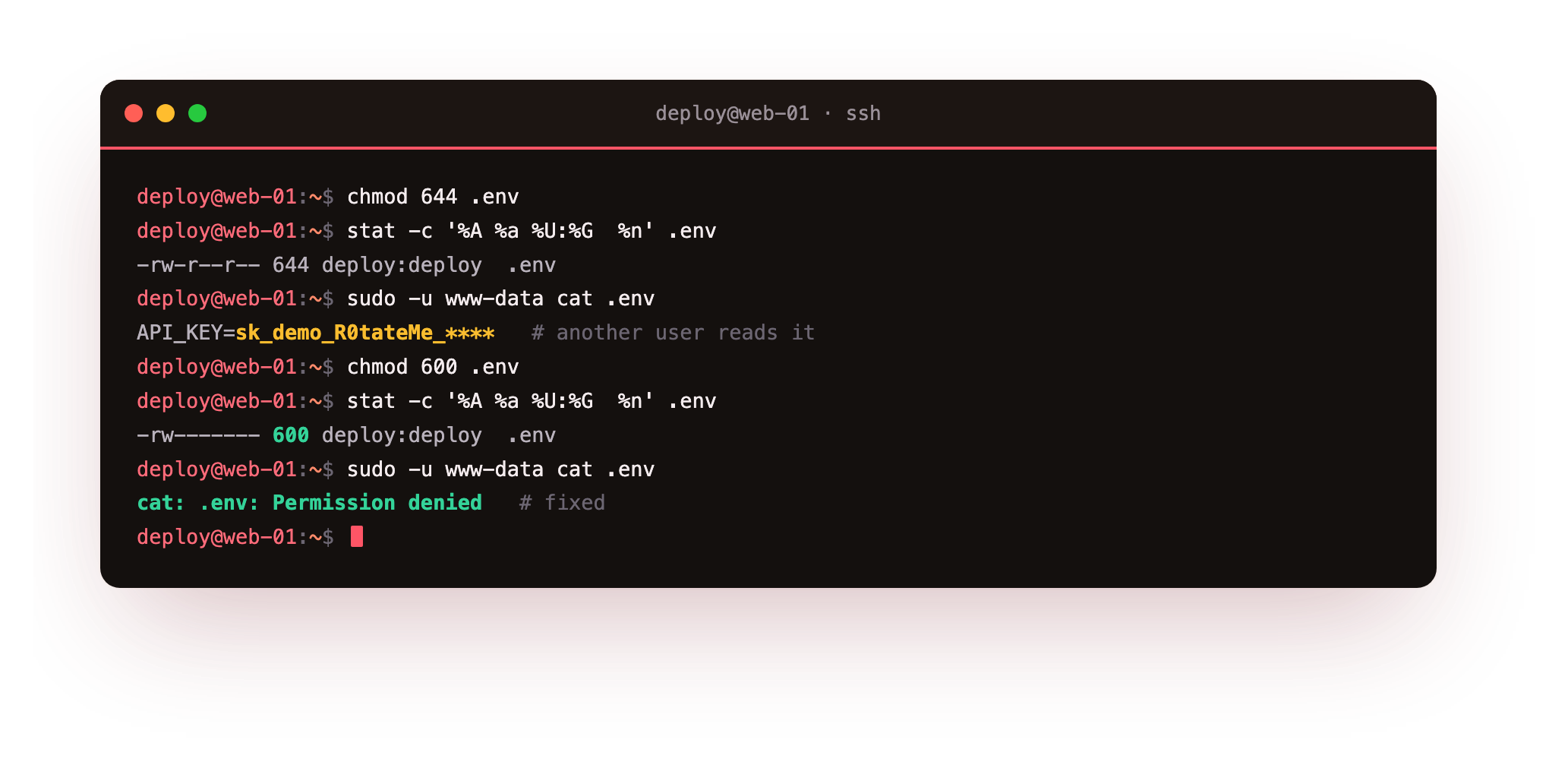
At 644 the web server account www-data reads the file with no resistance. Change the mode to 600 and the same read is refused with Permission denied, because only the owner can open it. That single bit of hygiene, owner-only read and write, is the floor every other technique in this series builds on.
Run stat -c '%a' .env and confirm it prints 600, then sudo -u www-data cat .env and confirm it is refused. If www-data still reads the file, the mode did not take: re-run chmod 600 .env and check the owner is your deploy account, not root.
Secrets escape the file at runtime
Locking the file is not enough, because a running process leaks the same secret two more ways. The classic pattern is passing a secret as an environment variable. Anyone who can read the process, or run as root, dumps its environment from /proc.
sudo tr '\0' '\n' < /proc/$PID/environ | grep API_KEY
grep -o 'api_key=[^ "&]*' access.log
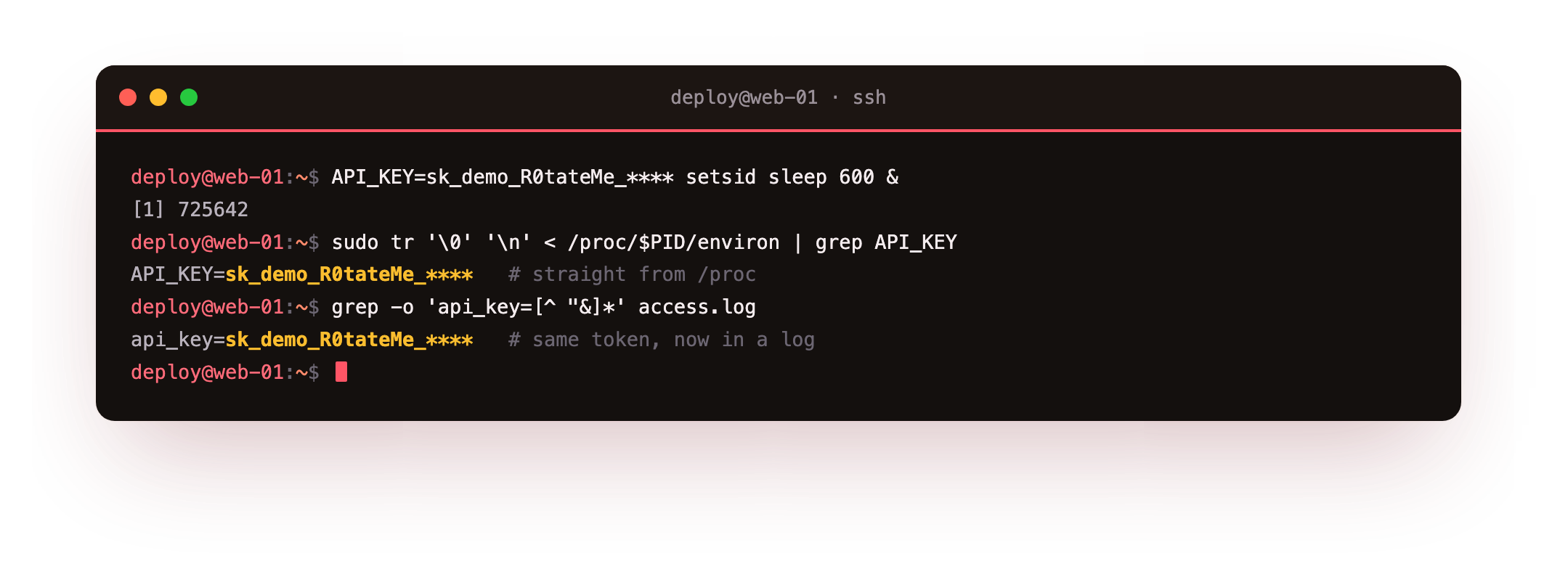
The first command reads the environment of a running process and prints the key in the clear. The second shows the other runtime leak: a token passed in a URL query string. Reverse proxies and app frameworks log the full request line, so a secret in a URL is copied verbatim into an access log that ships to your log host and your backups. Keep secrets out of URLs, and prefer files or a credential store over raw environment variables for anything sensitive.
Git history remembers what you deleted
The leak that catches the most teams is git. You commit a .env early, realise the mistake, add it to .gitignore and delete it. The working tree looks clean, so it feels solved. It is not. Every earlier commit still contains the file, and anyone who clones the repository walks the history to find it.
git rm --cached .env
git log -p -- .env
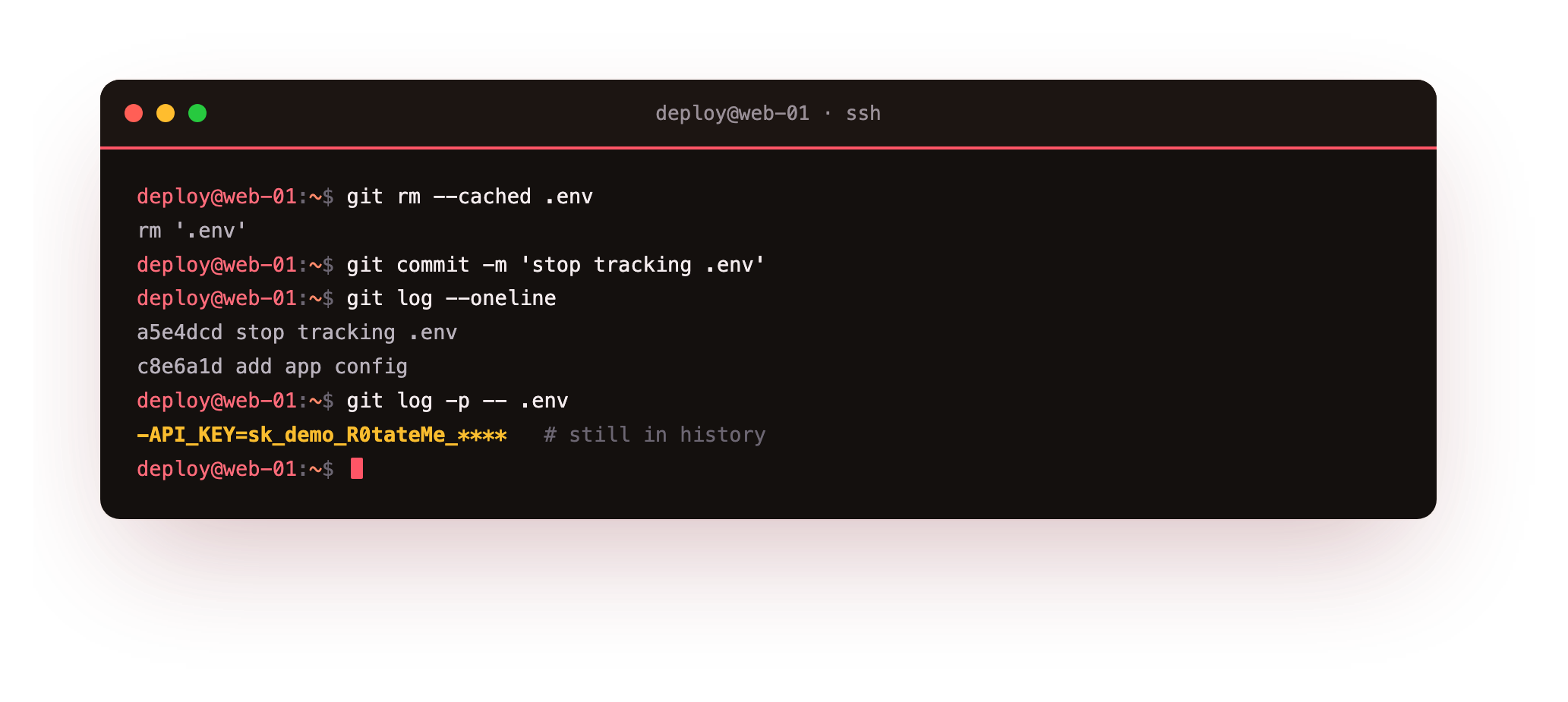
After git rm --cached the file stops being tracked going forward, yet git log -p still replays the diff that first added it, secret and all. A private repository does not save you here, because access lists change, forks happen and laptops get stolen. The rule is blunt: a secret that ever touched a commit must be treated as exposed and rotated. Chapter four scrubs it from history properly, and proves the old value is gone.
Backups keep a copy you forgot
The fourth channel is the quietest. Every backup that includes your application directory also copies the plaintext .env inside it. A backup is built to be durable and kept for months, so a secret that reached one snapshot now lives in every retained copy, often on a different host or in object storage you rarely think about.
That is why rotation matters even after you lock the file. Once a secret has been backed up in plaintext, tightening the live file does not reach the copies. Keep secrets out of the paths your backup job walks, or encrypt them at rest so the backup only ever holds the ciphertext you saw in the destination shot.
Going further: what actually belongs in a secret
Not everything in a config file is a secret. A secret is any value that grants access or proves identity: API keys, database and message-queue passwords, private TLS keys, SSH private keys, OAuth client secrets, webhook signing keys and session-encryption keys. These need owner-only permissions and, ideally, encryption at rest.
Ordinary configuration is different. A port number, a feature flag, a public hostname or a log level carries no access and can live in plain config, in the repository, without worry. Splitting the two cleanly is the first design decision: keep boring config in version control, and route every access-granting value through the file, credential and encryption patterns in the chapters that follow.
Frequently asked questions
Is an environment variable safer than a .env file?
Not on its own. An environment variable is visible in /proc/<pid>/environ to root and to the process owner, and child processes inherit it. A file at mode 600 owned by a dedicated account is easier to lock down and audit than a value scattered across a process tree.
My repository is private, so is a committed secret really a problem?
Yes. Private is an access setting, not a guarantee. Collaborators change, repositories get forked or mirrored, and a laptop with a clone can be lost. Treat any secret that reached a commit as exposed and rotate it, whatever the repository visibility.
What mode should a secret file have?
Use 600 for owner read and write with no group or other access, owned by the account that runs the service. When a small group needs read access, 640 with a dedicated group works. Never leave a secret at 644 or looser.
Are the keys in this guide real?
No. Every value is a throwaway demo secret generated for the walkthrough, shown as sk_demo_... and masked where a real workflow would mask it. They were created on a test server and removed afterwards, and none grant access to anything.
What you can do now
You have seen the destination, an encrypted file that is safe to commit and opens only for your key, and you have seen the problem it solves: a plaintext secret leaking through file mode, the process environment, a logged URL and git history. The fix you can apply today is chmod 600 and a dedicated owner on every secret file, plus a .gitignore entry before the first commit.
That closes the easy holes but not all of them. The next chapter builds file-based secrets properly, with a service account, systemd credentials that never enter the environment, and a tmpfs so runtime secrets never touch the disk: file-based secrets done right.