What a secure n8n looks like
To secure n8n on a VPS is to close the gap between "it works" and "it will not hurt me". A self-hosted n8n holds the keys to everything it automates: the API tokens, the database logins, the customer data flowing through each run. An instance left open, or a webhook anyone can call, is not a convenience, it is a way in.
This guide takes the working install from the self-host n8n on a VPS guide and hardens it, one control at a time, proving each one on a real box rather than trusting a setting.
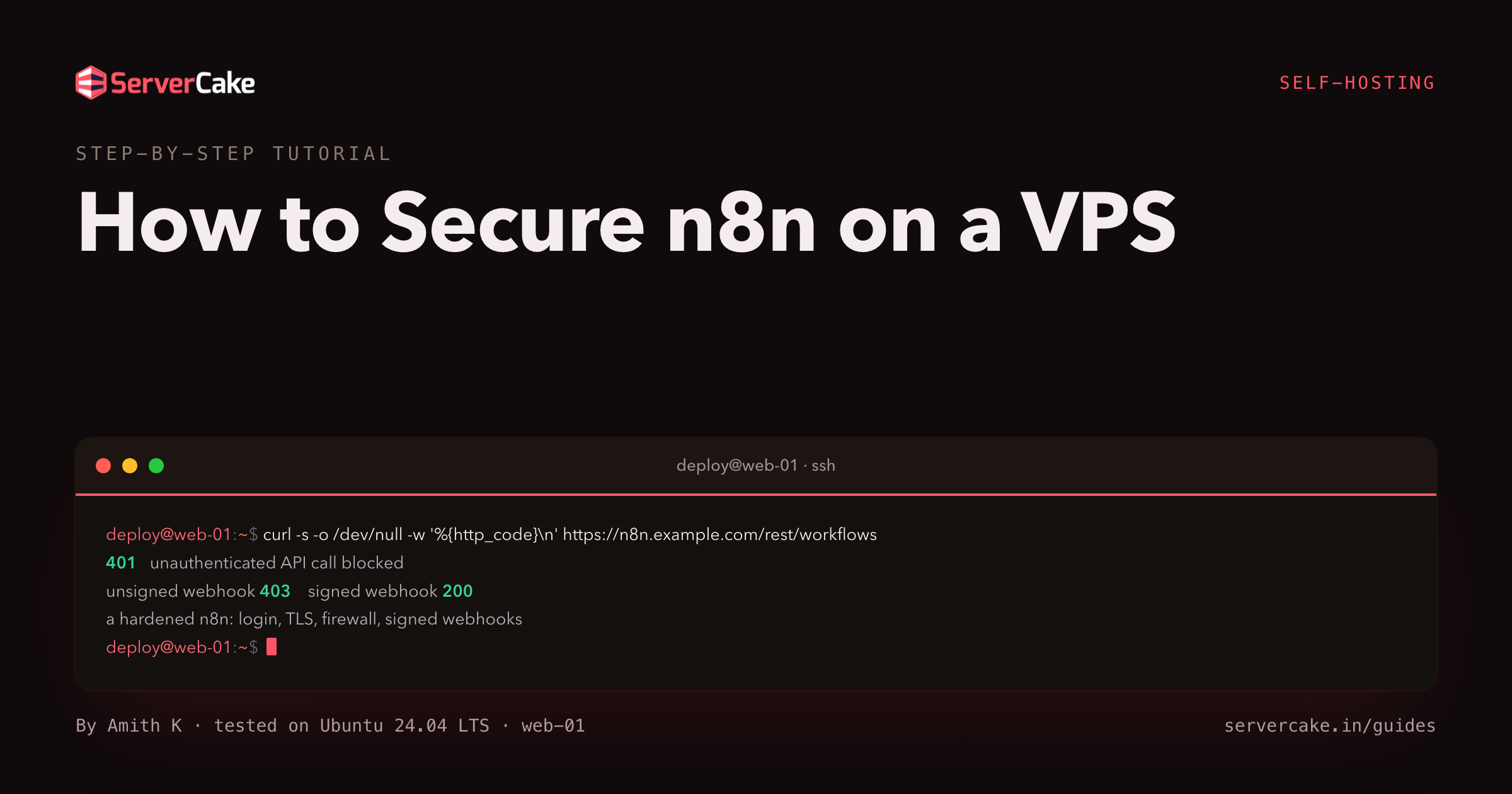
Here is the destination. Three requests against the hardened instance we built for this guide: an unauthenticated API call, a webhook without its shared secret, and the same webhook with it. The first two are turned away, the third runs.
# unauthenticated API call, no session
curl -s -o /dev/null -w 'rest:  %{http_code}\n' https://n8n.example.com/rest/workflows
# the webhook without the shared secret
curl -s -o /dev/null -w 'hook:  %{http_code}\n' \
     -X POST https://n8n.example.com/webhook/deploy-8f2c1e0b9d4a6c3f
# the webhook WITH the shared secret
curl -s -o /dev/null -w 'hook:  %{http_code}\n' -H 'X-Webhook-Token: <shared-secret>' \
     -X POST https://n8n.example.com/webhook/deploy-8f2c1e0b9d4a6c3f
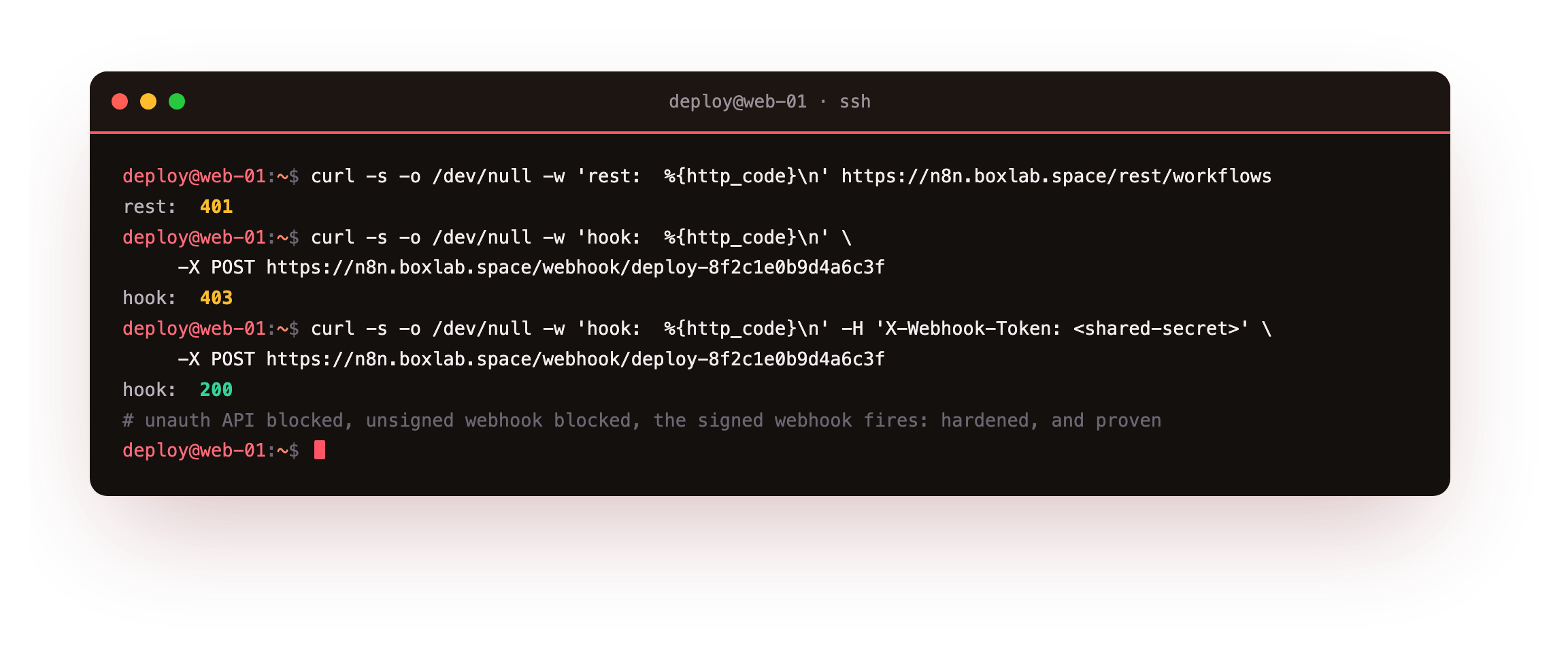
A 401, a 403, then a 200. That is the shape of the whole guide: nothing runs without proof it is allowed to. Every screenshot below is genuine, captured on that live instance.
- Putting the whole API behind the owner login, and proving an unauthenticated call is rejected.
- The encryption key, a locked
.env, and showing a stored credential is ciphertext at rest. - Keeping n8n bound to localhost behind a deny-by-default firewall, so only nginx faces the world.
- Real TLS with HSTS and the browser-hardening headers, verified with
curl -I. - Exposing webhooks safely: a hard-to-guess path, a verified secret, and an nginx rate limit.
Before you begin
This guide hardens an instance you already have, so it starts a step in rather than from a bare box.
- A running n8n from the install guide: the Docker Compose stack with a Postgres database and nginx serving it over HTTPS. Each control below adjusts that instance rather than rebuilding it.
- SSH into the slice as a sudo user, plus the folder that holds your
docker-compose.ymland its.env. - Your
N8N_ENCRYPTION_KEYfrom the install, and a note of which workflows use webhooks, since those are the one surface you deliberately leave reachable.
Work through the sections in order. Each ends with a check you can run, so you are never trusting that a control took effect, you are watching it.
Put the API behind a login
The first control is the one people assume they already have: authentication. n8n ships with user management on, which means the editor and its whole internal API sit behind the owner account you created at install. Confirm that, because a stray environment variable can turn it off. Ask the API for the workflow list with no session, then ask the public REST API without a key.
# the internal API the editor uses
curl -s https://n8n.example.com/rest/workflows
# the public REST API
curl -s https://n8n.example.com/api/v1/workflows
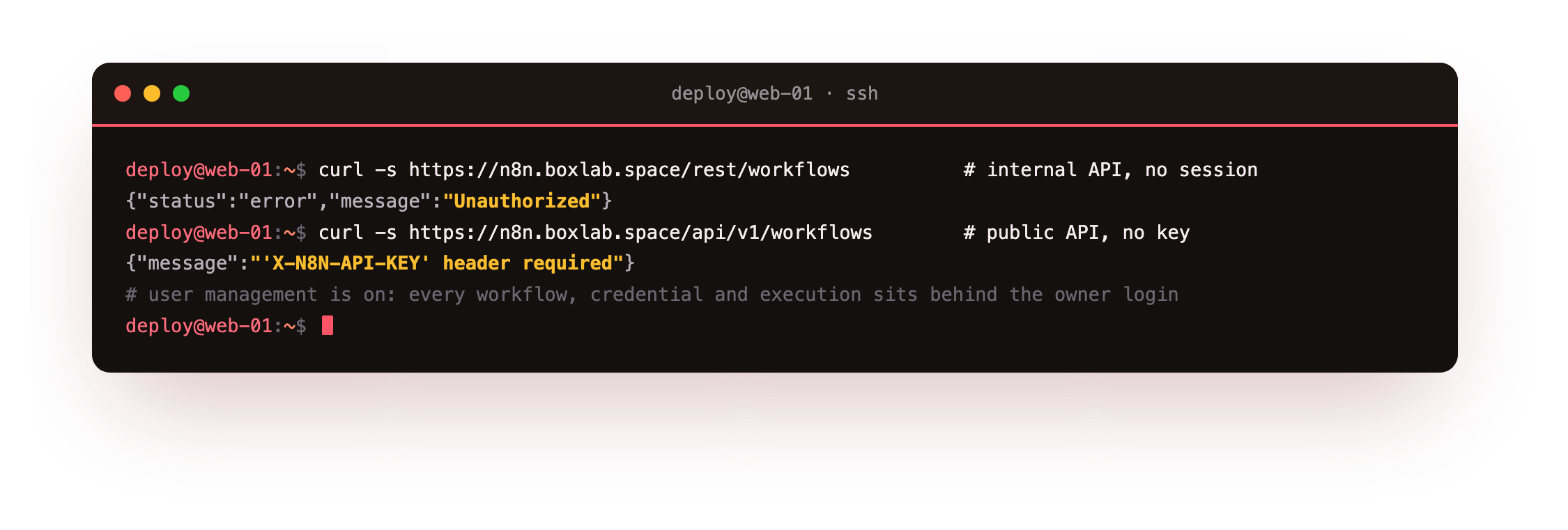
Both refuse. The internal endpoint returns Unauthorized, and the public API returns a demand for an X-N8N-API-KEY header. Nothing about your workflows, credentials or executions is readable without logging in first. If either returns data, user management is disabled: set N8N_USER_MANAGEMENT_DISABLED=false and recreate the container.
While you are in the environment, set three flags that harden the process itself, then read them back from inside the container so you know they landed.
sudo docker compose exec n8n \
     printenv N8N_SECURE_COOKIE N8N_BLOCK_ENV_ACCESS_IN_NODE N8N_DIAGNOSTICS_ENABLED
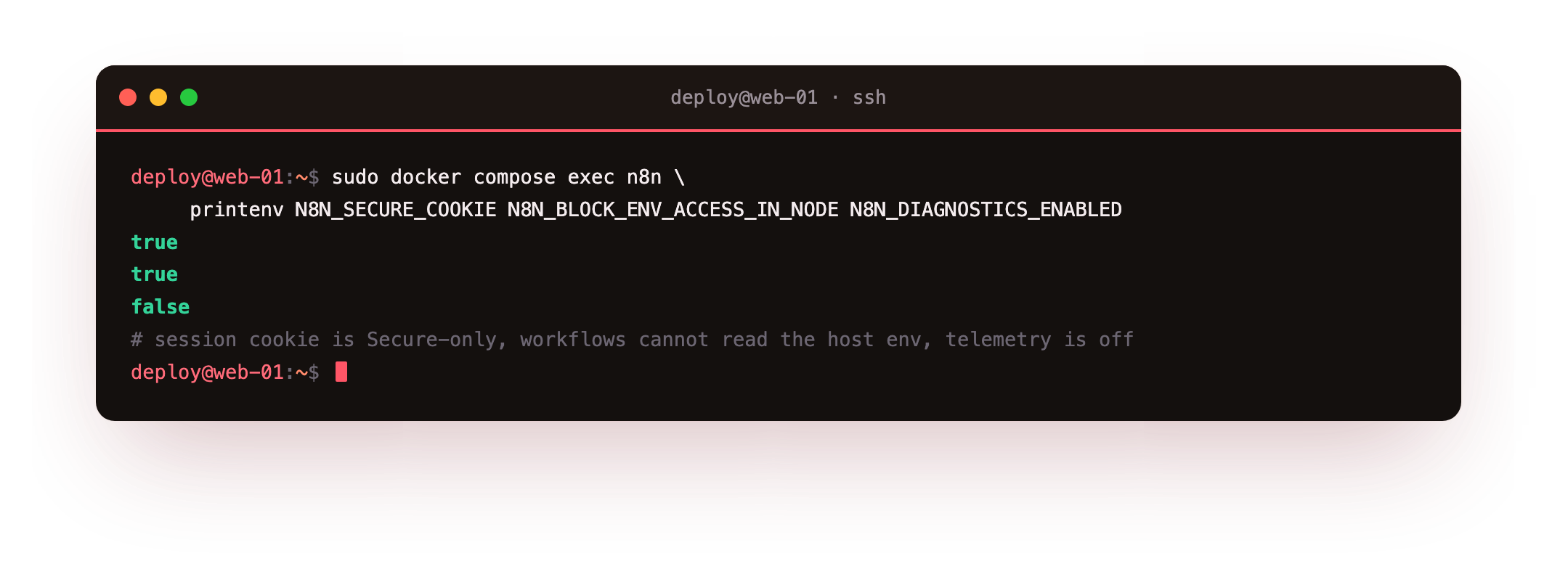
N8N_SECURE_COOKIE=true marks the session cookie Secure, so a browser only ever sends it over HTTPS. N8N_BLOCK_ENV_ACCESS_IN_NODE=true stops a workflow expression from reading the host environment, which is where your secrets live. N8N_DIAGNOSTICS_ENABLED=false turns off telemetry. Three lines, three smaller attack surfaces.
true, true, false. If the secure cookie is on but you reach the editor over plain HTTP, the login will appear to fail silently, because the browser withholds the Secure cookie. That is a sign HTTPS is not yet terminating in front of n8n, which the TLS section fixes.Encrypt the credentials your workflows carry
Every credential you store in n8n, an API key, a database password, a webhook secret, is encrypted with N8N_ENCRYPTION_KEY before it touches the database. That key is the difference between a stolen database dump being noise and being a breach, so it belongs in a .env that only its owner can read, never hard-coded into docker-compose.yml where it would land in git. Check the file mode, then look at what n8n actually wrote to the database for a real stored credential.
stat -c '%a %U' /opt/n8n/.env
sudo docker compose exec -T db psql -U n8n -d n8n -c \
     "select id, name, type, left(data,58) as data_ciphertext from credentials_entity;"
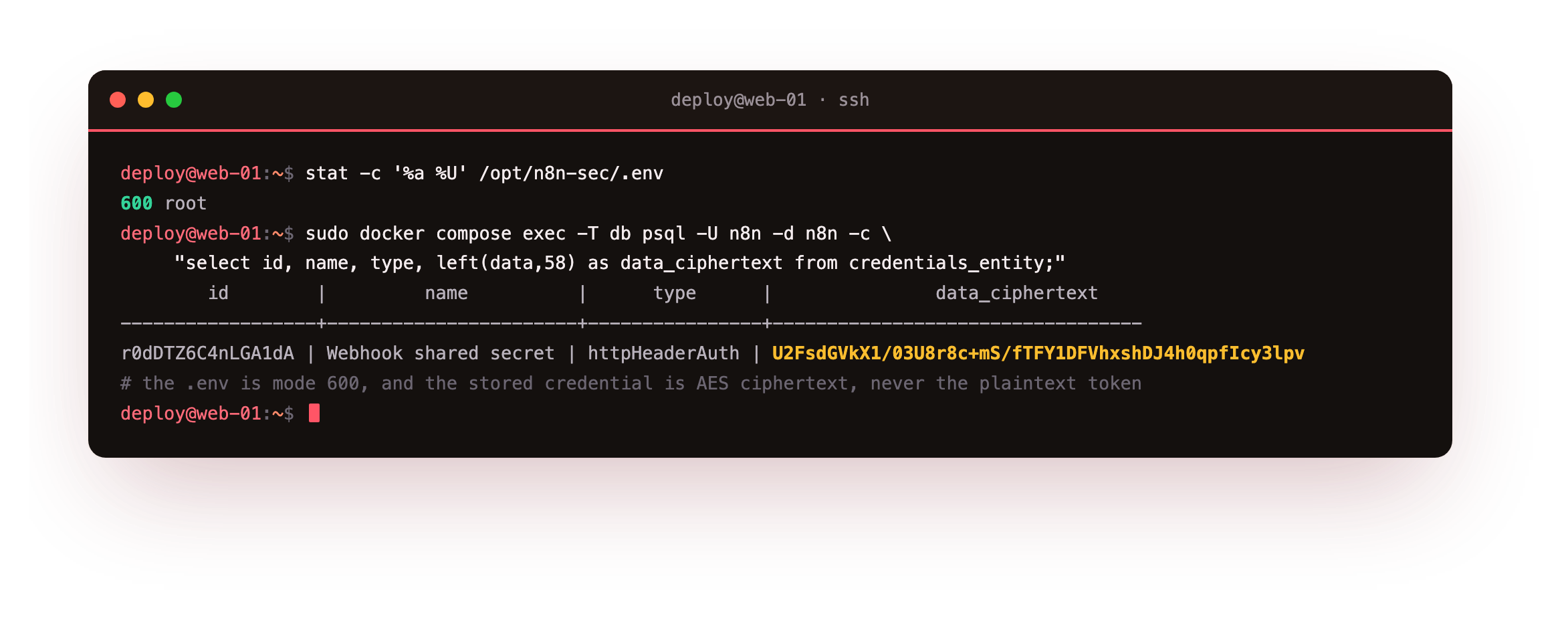
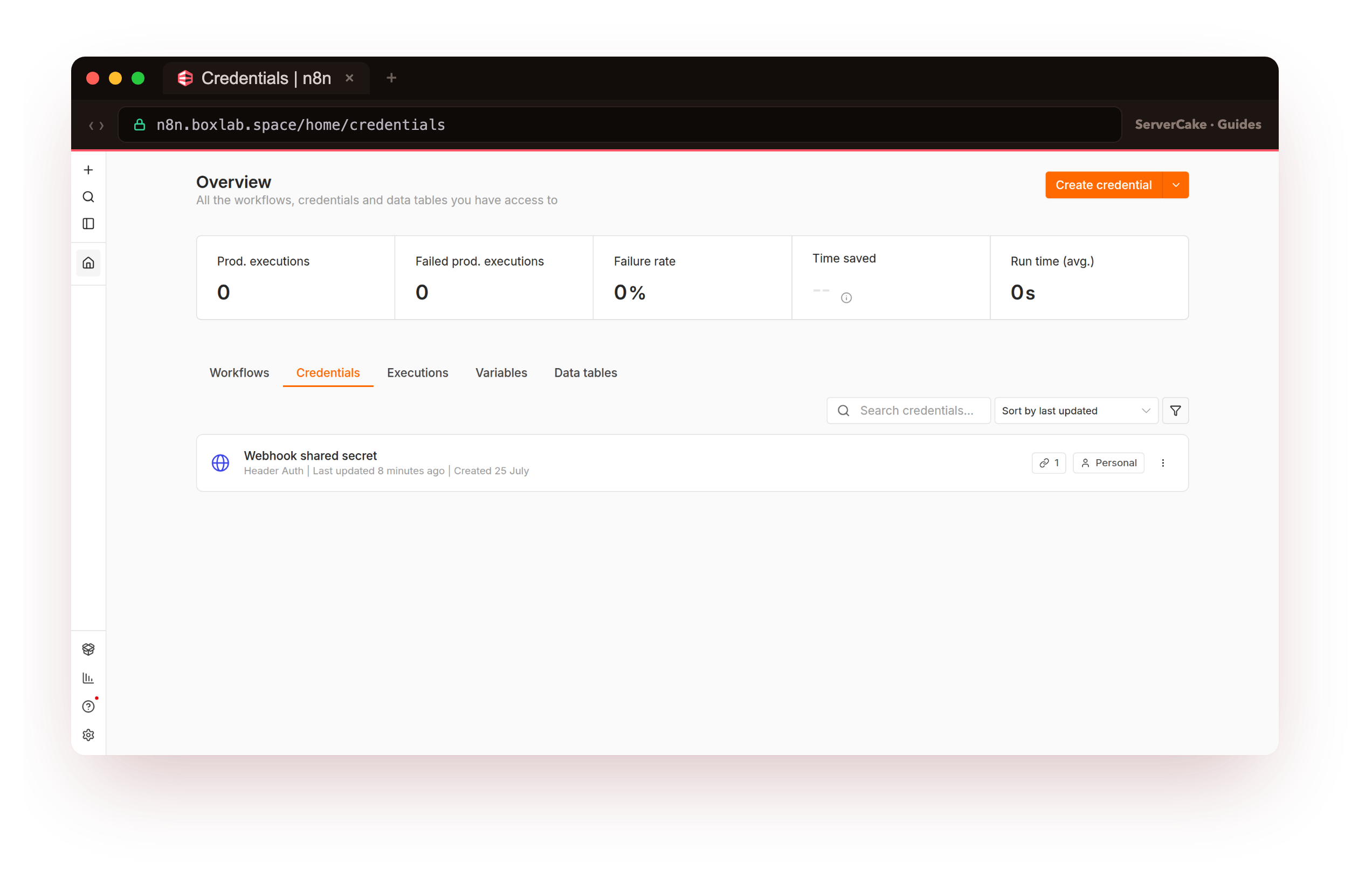
The .env is mode 600, readable only by root. The data column, which holds the credential we will use to sign webhooks later, is a block of AES ciphertext beginning U2FsdGVkX1, not the plaintext token. Search the whole blob for the real secret and it appears zero times. Anyone who reaches the database still cannot read the credential without the key that lives outside it.
Least privilege runs alongside this. The Postgres user is scoped to the one n8n database, not a superuser; the .env is 600; and with N8N_BLOCK_ENV_ACCESS_IN_NODE set, a workflow cannot read the key out of its own process. Back the key up the day you set it, and keep it apart from the database dump, because a dump restored under a different key leaves every credential unreadable.
Keep n8n on localhost and firewall the rest
n8n should have exactly one door to the internet, and it should be nginx. The container itself publishes only to loopback, so nothing outside the box can talk to the n8n process directly. A host firewall backs that up by denying inbound traffic that is not SSH or the web ports. Confirm both: what is actually listening, and what the firewall allows.
sudo ss -tlnp | grep -E ':5678|:443'
sudo ufw status verbose
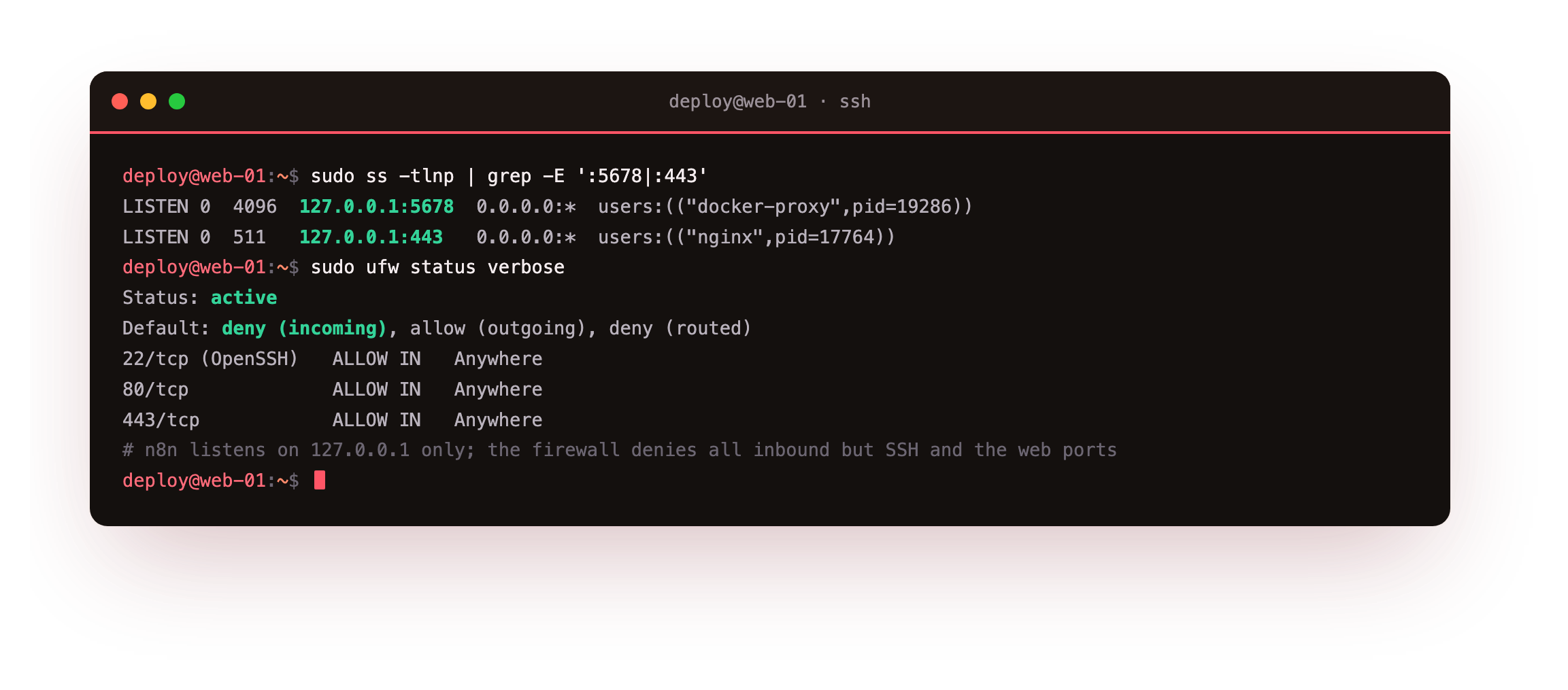
n8n listens on 127.0.0.1:5678 and nginx on 127.0.0.1:443, both loopback, so a port scan of the public IP finds neither. ufw is active with a default of deny (incoming), and it opens only SSH and the web ports. Even if someone learned the n8n port, there is no route to it: it is not on a public interface, and the firewall would drop the packet anyway. Two independent layers, each enough on its own.
0.0.0.0:5678 to "make it reachable". A container port bound to all interfaces bypasses nginx, your TLS, your headers and your rate limits in one line, and search engines and scanners will find it within minutes. Bind to 127.0.0.1 and let nginx be the only thing the world can reach.Real TLS and hardened headers
With n8n on loopback, nginx terminates HTTPS and adds the headers that tell a browser how to behave. The certificate is a real one, and the header block turns on HSTS, stops the page being framed, blocks content-type sniffing, trims the referrer, and denies the browser features n8n never uses.
# inside the server { } block for n8n.example.com
add_header Strict-Transport-Security "max-age=31536000; includeSubDomains" always;
add_header X-Frame-Options "SAMEORIGIN" always;
add_header X-Content-Type-Options "nosniff" always;
add_header Referrer-Policy "strict-origin-when-cross-origin" always;
add_header Permissions-Policy "geolocation=(), microphone=(), camera=()" always;
add_header Content-Security-Policy "frame-ancestors 'self'" always;
Reload nginx after nginx -t, then read the headers back over the wire so you are checking what a browser receives, not what the config says.
curl --http2 -sI https://n8n.example.com/
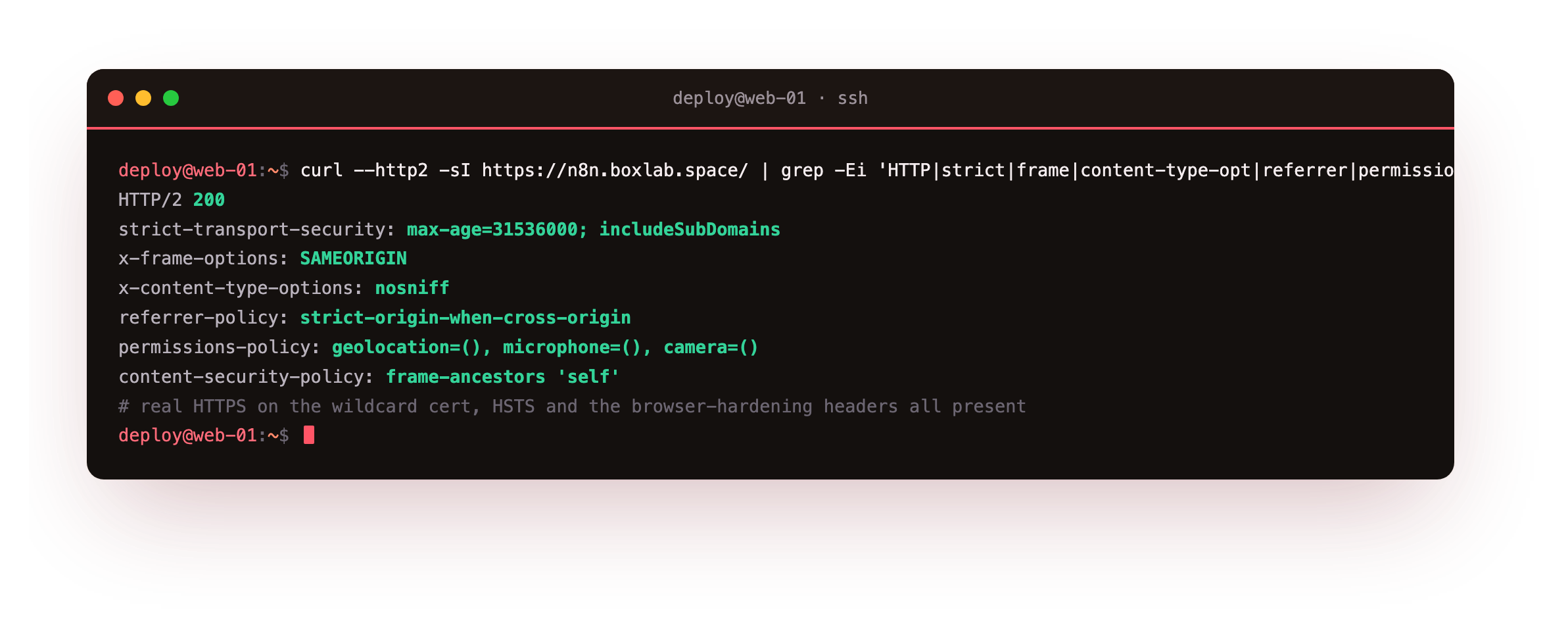
An HTTP/2 200 with strict-transport-security and the rest of the set present means the whole path works: a real certificate, HTTP/2, and a browser told to keep using HTTPS, refuse to be framed, and sniff nothing. The frame-ancestors 'self' policy is kept deliberately light so it hardens framing without breaking the editor, which is a single-page app.
Expose webhooks without exposing yourself
Webhooks are the one part of n8n you mean to leave reachable, which makes them the part worth the most care. The goal is a webhook that your systems can call and no one else can abuse. Three things get you there: a path that cannot be guessed, a secret that every caller must present, and a rate limit so the endpoint cannot be hammered.
Start with the path and the rate limit in nginx. Give the webhook prefix its own limit, so a flood of calls is throttled before it ever reaches n8n.
# /etc/nginx/conf.d/n8n-ratelimit.conf
limit_req_zone $binary_remote_addr zone=n8nhook:10m rate=2r/s;
location /webhook/ {
    limit_req zone=n8nhook burst=3 nodelay;
    limit_req_status 429;
    proxy_pass http://127.0.0.1:5678;
    proxy_set_header Host $host;
    proxy_set_header X-Forwarded-Proto $scheme;
}
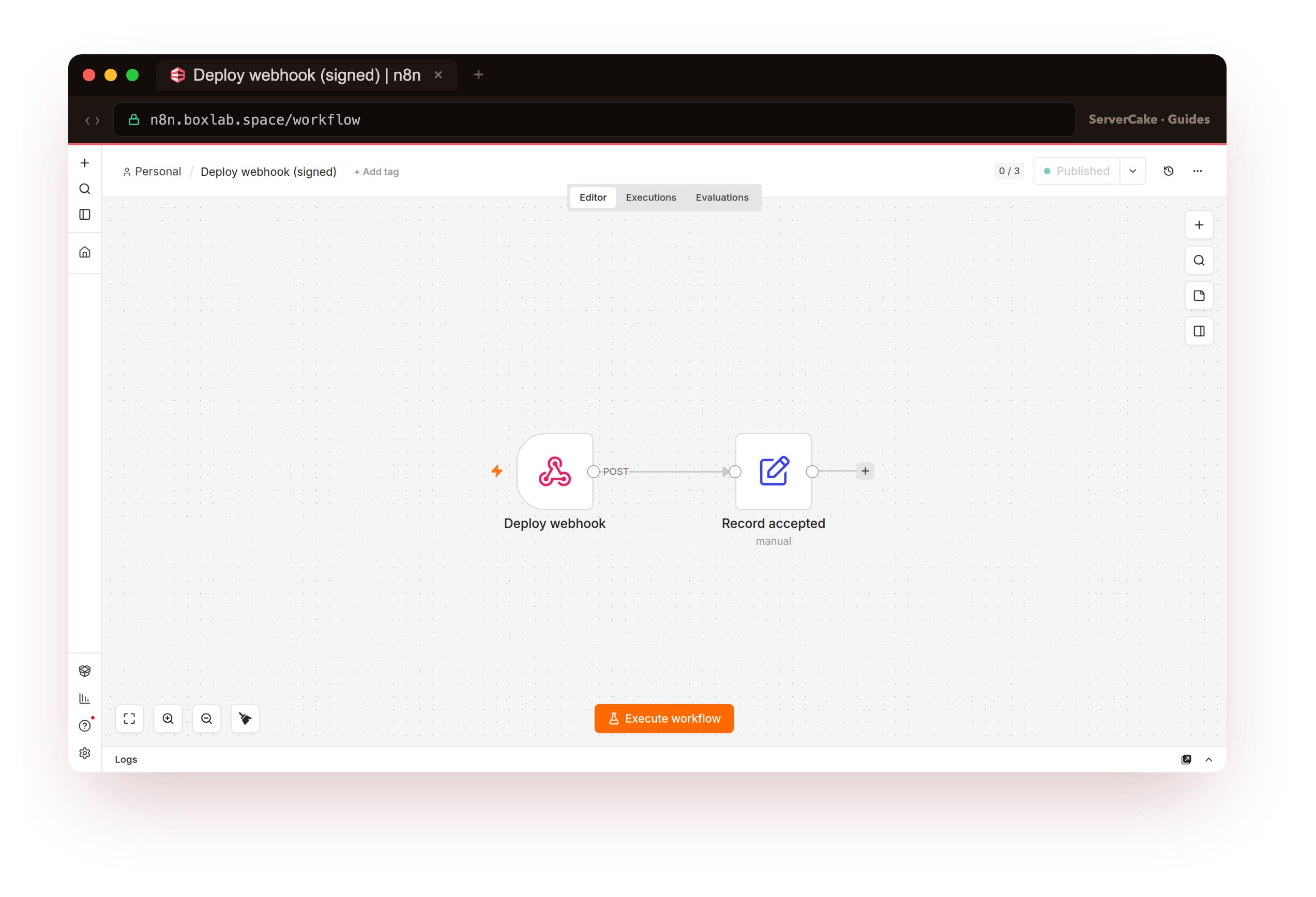
Now the secret. In the workflow, the Webhook node takes an authentication credential: set it to Header Auth and point it at the "Webhook shared secret" credential from earlier, an X-Webhook-Token header with a long random value. Give the node a path that is a random string, not /webhook/deploy, so the URL is itself hard to find. The workflow is the one below, a Webhook node into a Set node that shapes the accepted result.
The proof is two calls to the same URL. The first sends no token, the second sends the shared secret.
# no token vs the shared secret
curl -s -X POST https://n8n.example.com/webhook/deploy-8f2c1e0b9d4a6c3f \
     -H 'content-type: application/json' -d '{"event":"deploy"}'
# with the shared secret header
curl -s -X POST https://n8n.example.com/webhook/deploy-8f2c1e0b9d4a6c3f \
     -H 'X-Webhook-Token: <shared-secret>' -d '{"event":"deploy"}'
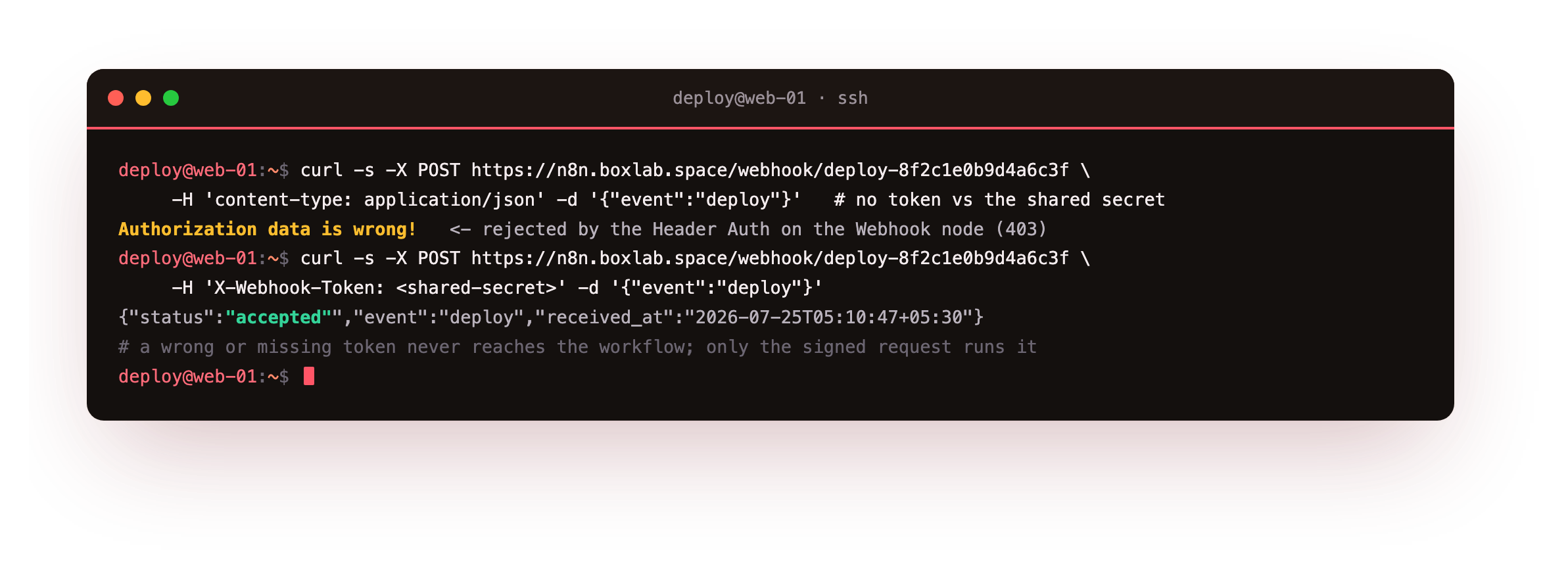
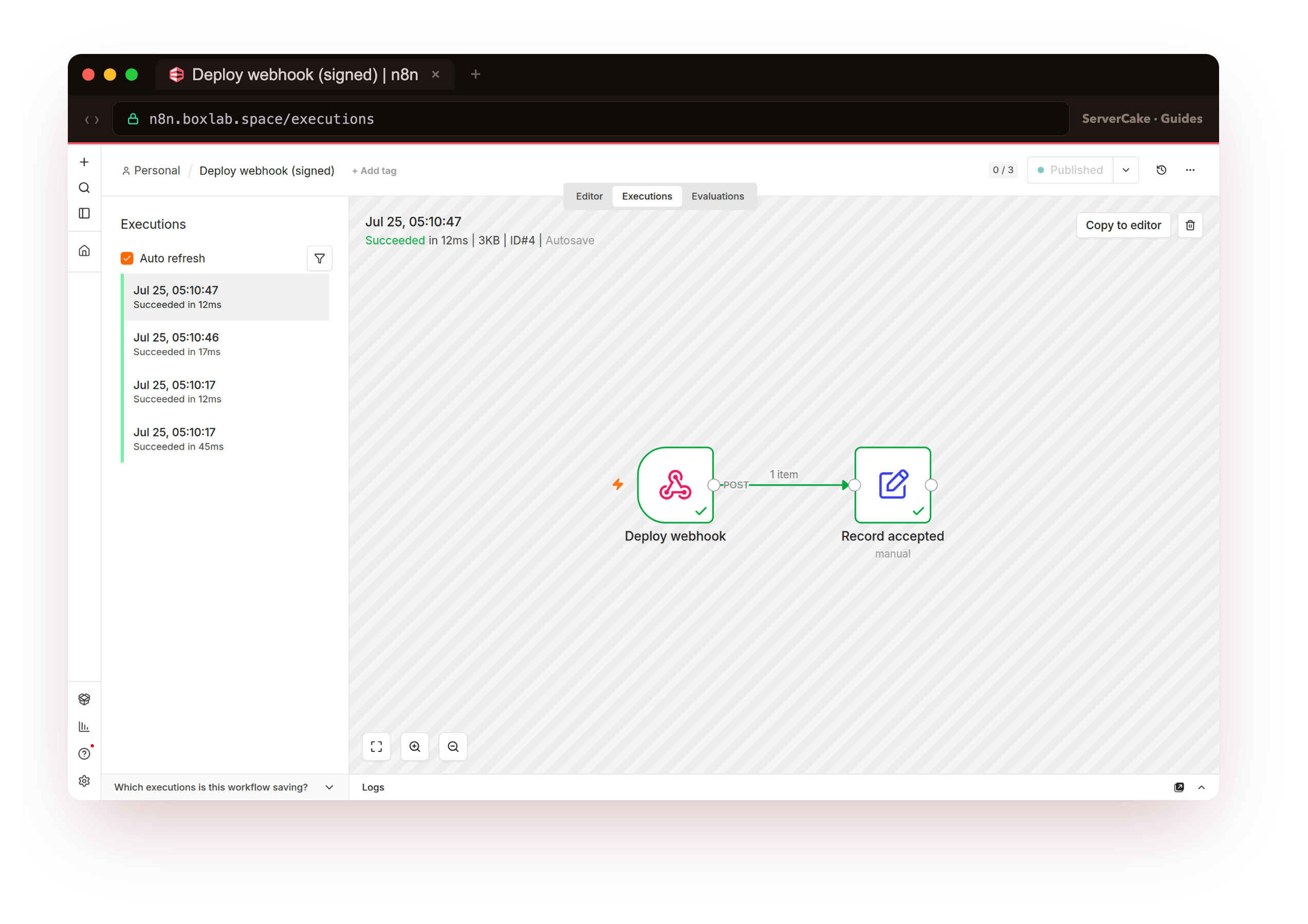
Without the token, n8n answers Authorization data is wrong! and returns 403 before the workflow runs at all: the Header Auth on the Webhook node rejects the caller. With the correct token, the workflow runs and responds {"status":"accepted",...}. A wrong or missing secret never reaches your logic, and it never becomes an execution.
Now the rate limit. Fire a burst of twenty requests at the endpoint and watch nginx cut it off.
for i in $(seq 1 20); do
  curl -s -o /dev/null -w '%{http_code} ' \
       -X POST https://n8n.example.com/webhook/deploy-8f2c1e0b9d4a6c3f -d '{}' &
done; wait; echo
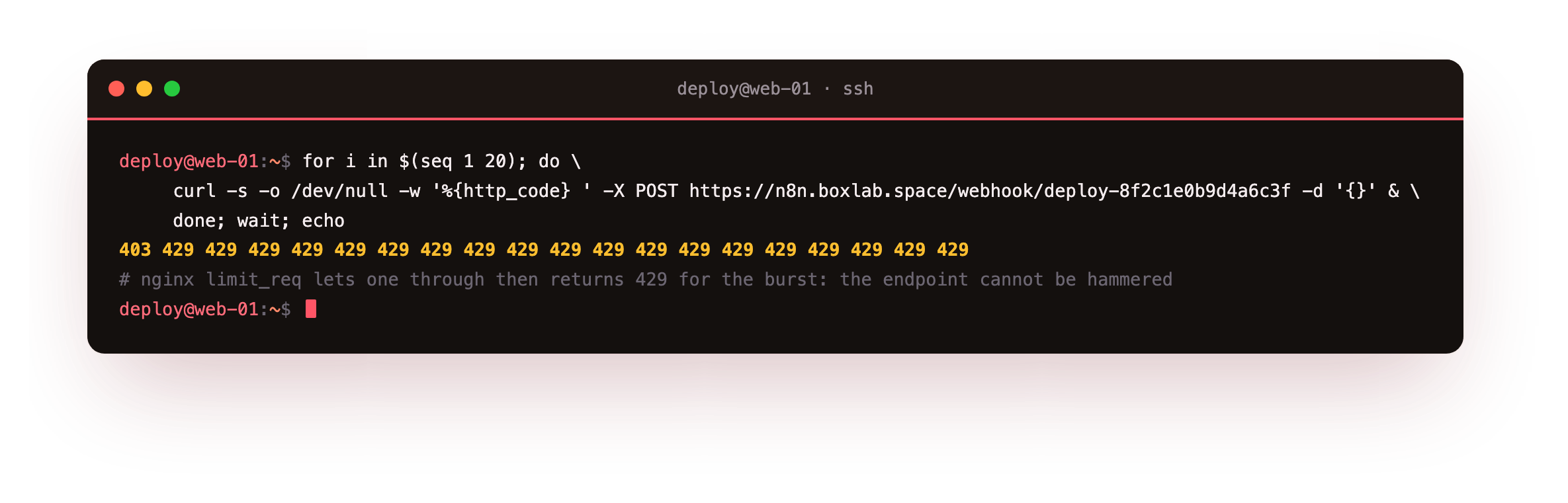
One request gets through and the rest come back 429. A caller cannot brute-force the token or drown the endpoint in traffic, because nginx throttles the flood before n8n spends any work on it. Only the calls that pass both the rate limit and the shared secret ever run.
Those accepted calls are real executions, and n8n records each one. Confirm the signed webhook is landing rows in the database.
sudo docker compose exec -T db psql -U n8n -d n8n -c \
     "select id, status, mode, finished from execution_entity order by id desc limit 4;"
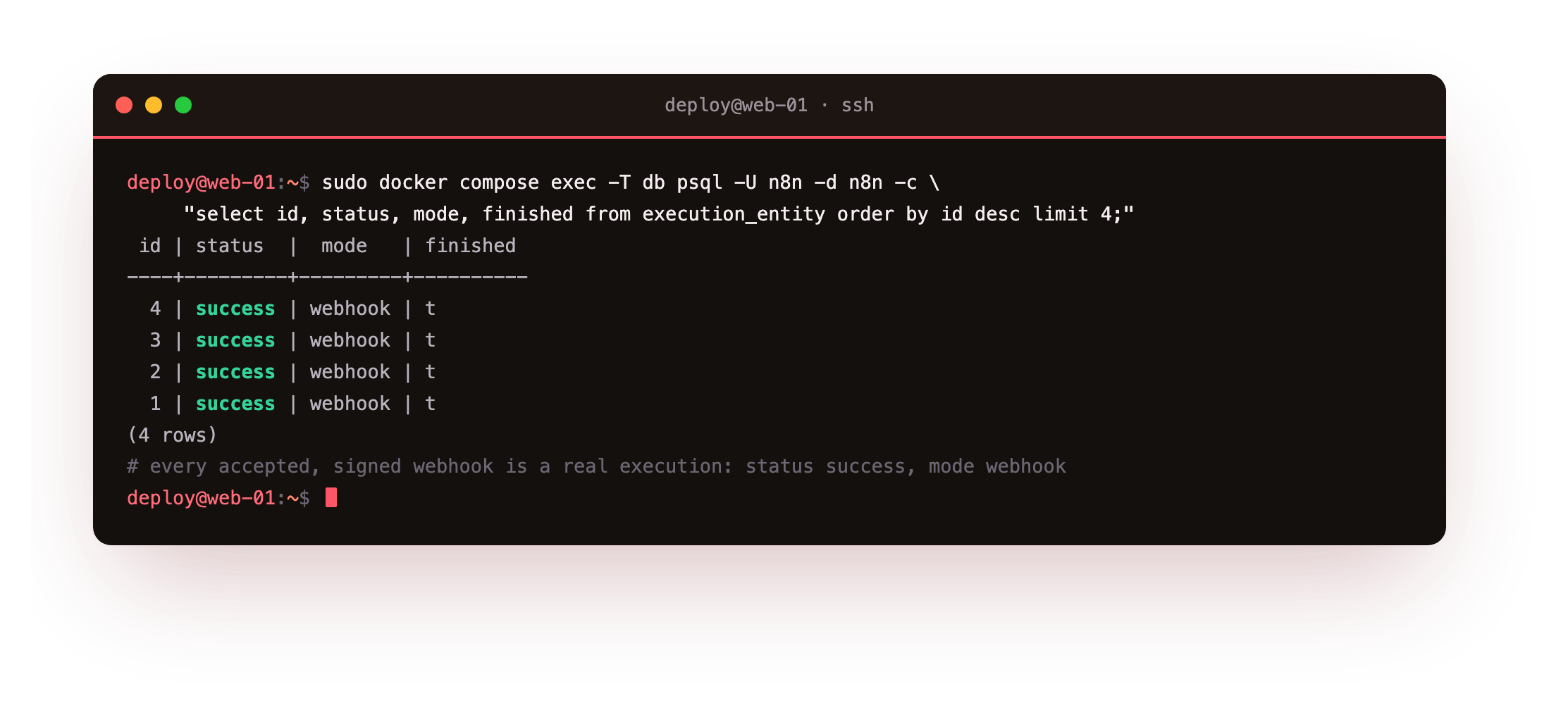
Every row is status success, mode webhook: proof that the requests which carried the secret ran end to end, and the ones that did not never appear. The Executions tab in the editor shows the same runs, each green.
403 and add no execution; the signed call should return 200 and one success row with mode webhook; and a burst should return a wall of 429. If the unsigned call runs the workflow, the Webhook node is not set to Header Auth, or it points at the wrong credential.Keep it safe: audit, updates and backups
Hardening is not a one-time job, so end with the habits that keep it hardened. n8n ships a security audit that reports on how the instance is configured, run it and read what it says about your settings.
sudo docker compose exec n8n n8n audit
sudo grep N8N_ENCRYPTION_KEY /opt/n8n/.env > n8n-key.txt
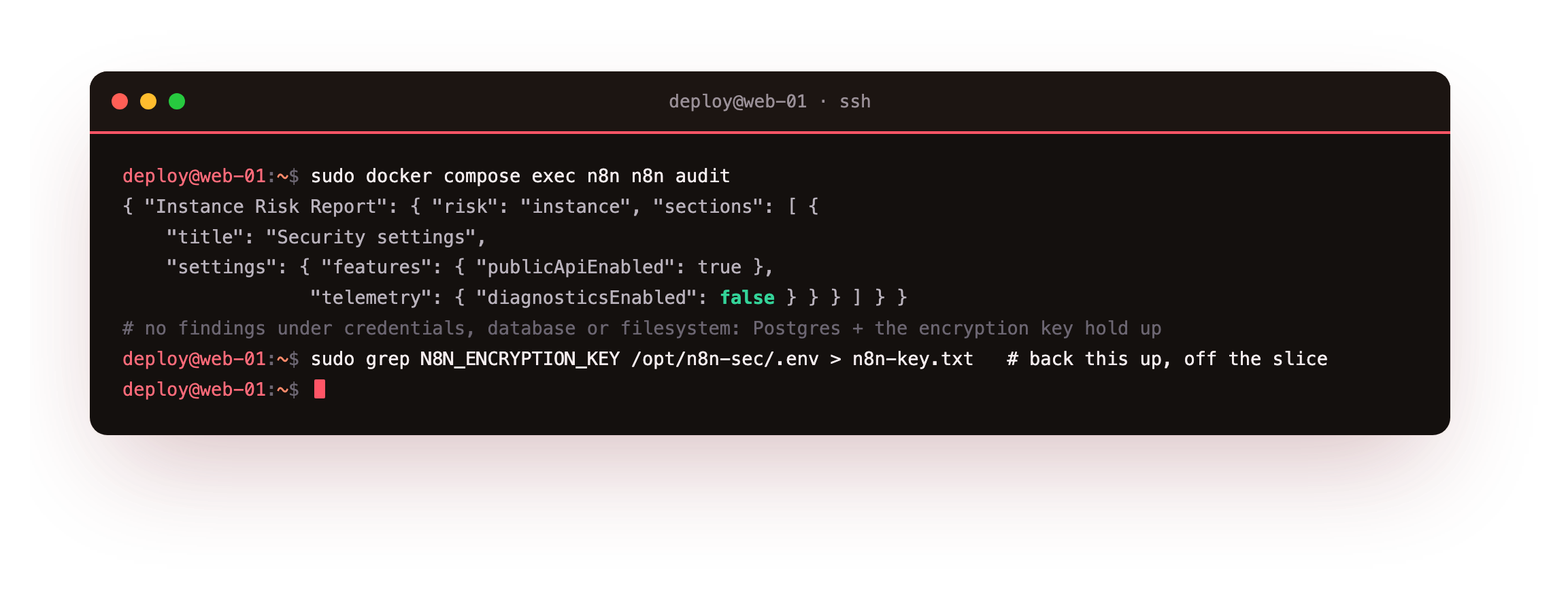
The audit reports the instance security settings, with telemetry off, and returns no findings under the credentials, database or filesystem categories, because the credentials are encrypted, the store is Postgres rather than a loose SQLite file, and the data directory is a named volume. The second line copies the encryption key out so you can put it somewhere safe: back it up beside your database dump, off the slice, because the two are useless apart.
Updating is a pull and a recreate, which is also how you take security fixes: docker compose pull then up -d replaces the image and leaves your volumes, so workflows and credentials ride through. Watch the release notes, keep the host patched, and rerun the audit after any change to your environment. That is a hardened n8n: the API behind a login, credentials encrypted at rest, the process on localhost behind a firewall and real TLS, and webhooks that answer only to callers who hold the secret.
Frequently asked questions
Is n8n's built-in user management enough to secure n8n on a VPS, or do I need a proxy layer too?
User management protects the editor and the API: no one reaches your workflows or credentials without the owner login, which the401 from /rest/workflows proves. What it does not cover is everything below the application: the transport, the network position, and the webhook surface. That is why this guide adds nginx for TLS and headers, binds n8n to localhost behind a firewall, and puts a rate limit and a shared secret on the webhook path. The login is one layer of several, not the whole defence.
How should I protect n8n webhooks that have to be public?
Give the webhook three defences at once. Use a path that is a long random string so the URL is hard to discover, set the Webhook node's authentication to Header Auth so every caller must present a shared secret, and put an nginx rate limit on the/webhook/ prefix so the endpoint cannot be flooded or brute-forced. A request that misses the secret gets a 403 and never becomes an execution, and a burst gets throttled with 429. If the sender supports it, an HMAC signature over the payload is a stronger secret than a static token, verified the same way in the workflow.
What actually happens if I lose or change N8N_ENCRYPTION_KEY?
Every credential you stored becomes unreadable. n8n encrypts each credential with that key before writing it to the database, so the workflows return after a restore but the connections inside them do not, and you rebuild every API key and login by hand. Pin the key in.env, keep it identical across restarts and any move to a new box, and back it up together with the database, since the dump is just ciphertext without it. Never generate a fresh key on a stack that already holds credentials.
Should I bind n8n to a public port to make webhooks reachable?
No. Bind n8n to127.0.0.1:5678 and let nginx be the only public listener. Webhooks are still reachable, because the request comes in on nginx's 443, passes the rate limit, and is proxied to n8n on loopback. Publishing the container on 0.0.0.0:5678 would skip nginx entirely, taking your TLS, security headers and rate limit out of the path, and it puts a bare n8n on the internet for scanners to find. The loopback binding plus the firewall is what keeps the surface to a single, controlled door.
Securing n8n means owning every layer it runs on: the login, the keys, the network, the certificate and the webhook. To put it into service on hardware that answers only to you, take a ServerCake slice, a clean Ubuntu 24.04 box hosted in India and billed in rupees with GST, and apply the controls above end to end.