Where does the value actually live?
Database hardening is the work of keeping your database reachable only to what should reach it, and unreadable to anyone who walks off with a copy. For PostgreSQL that means keeping the safe defaults, scoping roles, encrypting the data, and testing your backups.
- A fresh PostgreSQL 16 install on Ubuntu 24.04 already binds to localhost and hashes passwords with scram-sha-256, so the default is not the weak link.
- The one change that breaks thousands of databases is
listen_addresses = '*'with port 5432 opened; prefer localhost, an SSH tunnel, or a private network. - Give the app a role scoped to a single database with only the grants it needs, and never let it connect as the
postgressuperuser. - Encrypt in transit (TLS via
hostssl) and at rest (disk encryption), and treat a backup as real only when it is off-server, encrypted, and restore-tested.
An attacker does not want your server. They want what is inside it.
The server is a means. The database is the prize: your customers, their emails, their orders, their payment references. You can harden every other layer perfectly, and if the database is reachable with a weak password, none of it mattered.
The good news is that a modern PostgreSQL install starts in a sensible place. The bad news is that the single most common "let me just make it work" change throws all of that away in one line. This chapter is about keeping the default safety, and not trading it for convenience.
Prerequisites
- PostgreSQL 16 installed and running on Ubuntu 24.04 LTS.
sudoaccess, plus the ability to runpsqlas thepostgressystem user.- The hardening from Chapter 1 already in place, so the server around the database is not the easy way in.
Start by checking what you already have
Before changing anything, look at how your database is exposed. On a fresh PostgreSQL 16 install on Ubuntu 24.04 LTS:
sudo ss -tlnp | grep 5432
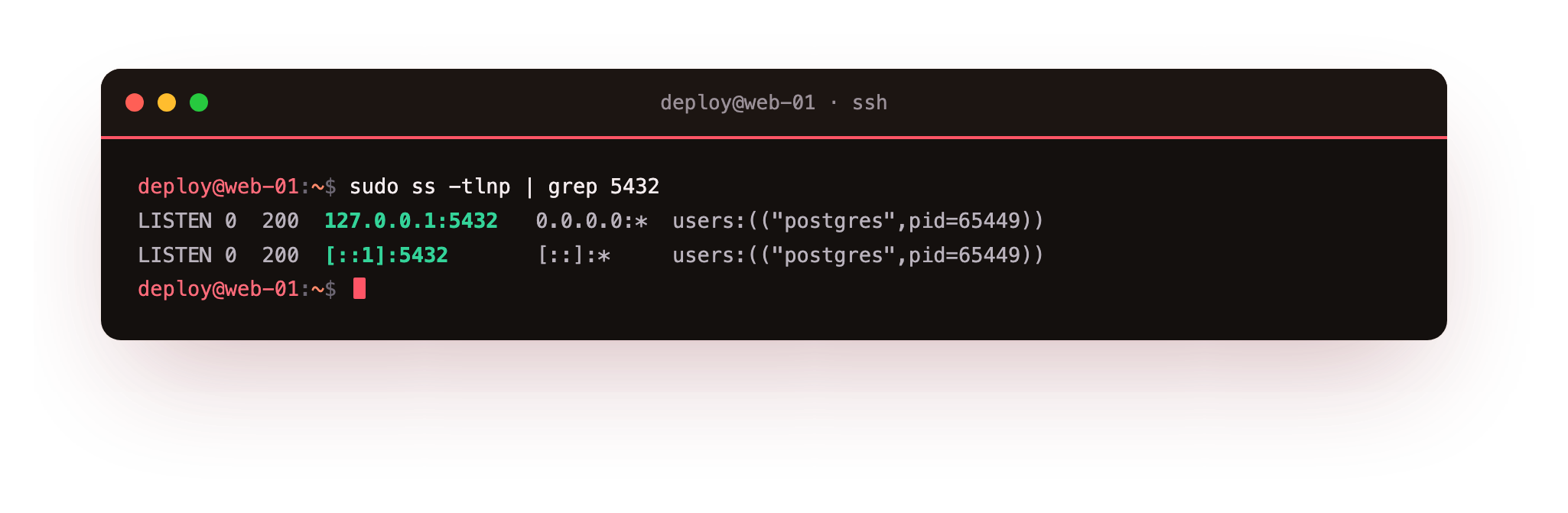
You will see it listening on 127.0.0.1 and ::1 only. That is the whole game: the database is bound to localhost, so nothing on the public internet can reach it at all. Confirm two more defaults:
sudo -u postgres psql -c "SHOW listen_addresses;"
sudo -u postgres psql -c "SHOW password_encryption;"
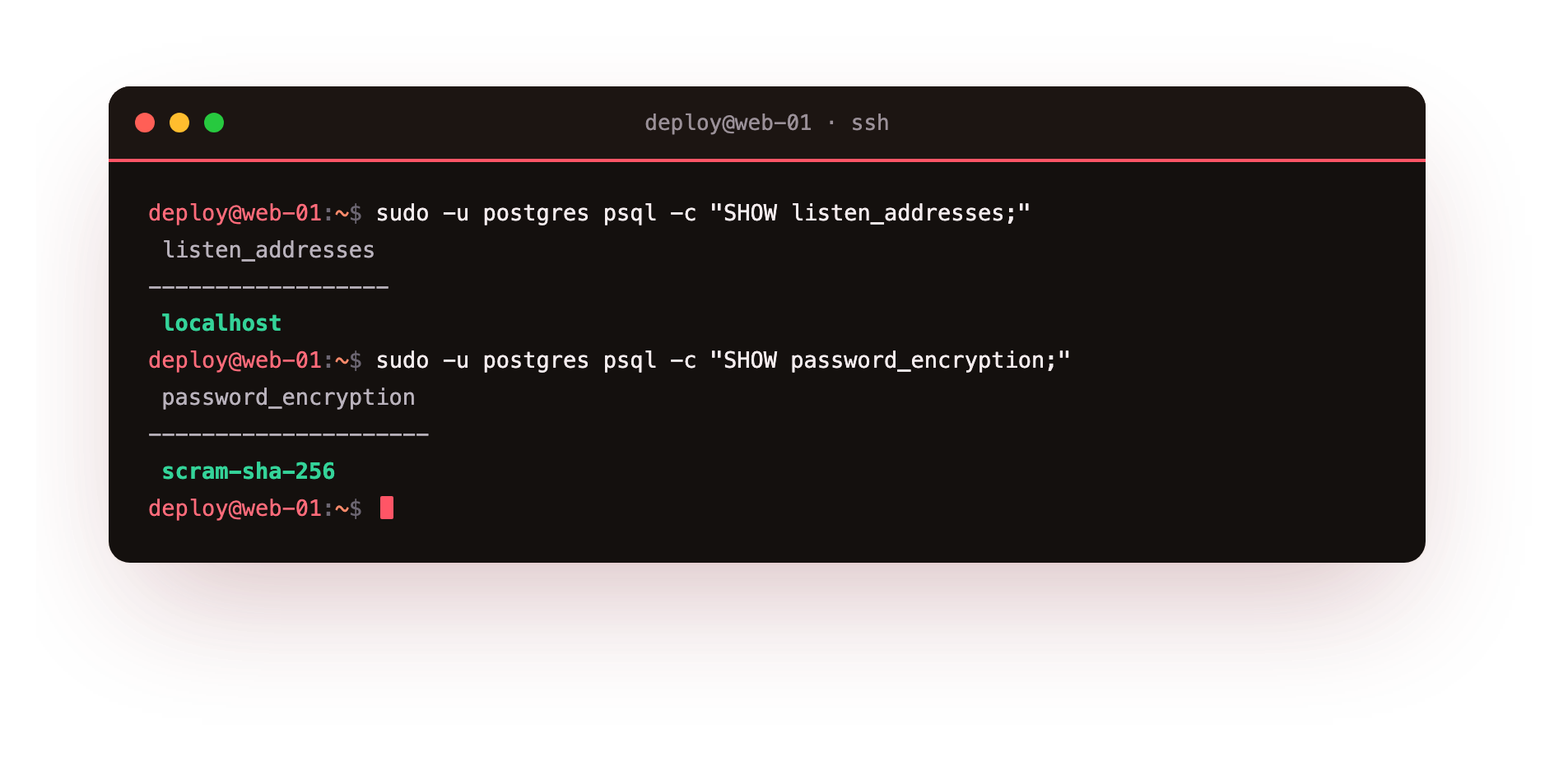
listen_addresses is localhost, and passwords are hashed with scram-sha-256, the modern, strong algorithm. Out of the box, PostgreSQL 16 is not the weak link. The question is whether you keep it that way.
The one change that undoes everything
Here is the scenario that breaks thousands of databases. Your app runs on a second server and needs to connect. You search for the fix, find listen_addresses = '*', set it, open port 5432 on the firewall, and it works. You move on.
You have now put your database, with all of it, directly on the public internet, where the same scanners from the first chapter will find it within minutes and start guessing passwords.
Do not do this. In order of preference:
- Keep it on localhost and run the app on the same server, or reach it over a private network your provider gives you, never the public internet.
- Tunnel over SSH if you need occasional remote access:
ssh -L 5432:localhost:5432 deploy@your-servergives you a local connection with no port exposed. - If you genuinely must expose it, never to
*. Bind to the specific private IP, restrictpg_hba.confto the exact client IP, require TLS, and firewall port 5432 to that one address. "Allow from anywhere" is never the answer for a database.
Never let your app log in as a superuser
By default the postgres role can do anything: read every database, drop every table, create new superusers. Your application does not need any of that. It needs to read and write its own tables, nothing more.
So give it exactly that. Create a dedicated role scoped to one database:
CREATE DATABASE shopdb;
CREATE ROLE app_user WITH LOGIN PASSWORD 'a-long-random-password';
GRANT CONNECT ON DATABASE shopdb TO app_user;
GRANT USAGE ON SCHEMA public TO app_user;
GRANT SELECT, INSERT, UPDATE, DELETE ON ALL TABLES IN SCHEMA public TO app_user;
Now confirm the separation is real:
sudo -u postgres psql -c "SELECT rolname, rolsuper FROM pg_roles WHERE rolname IN ('postgres','app_user');"
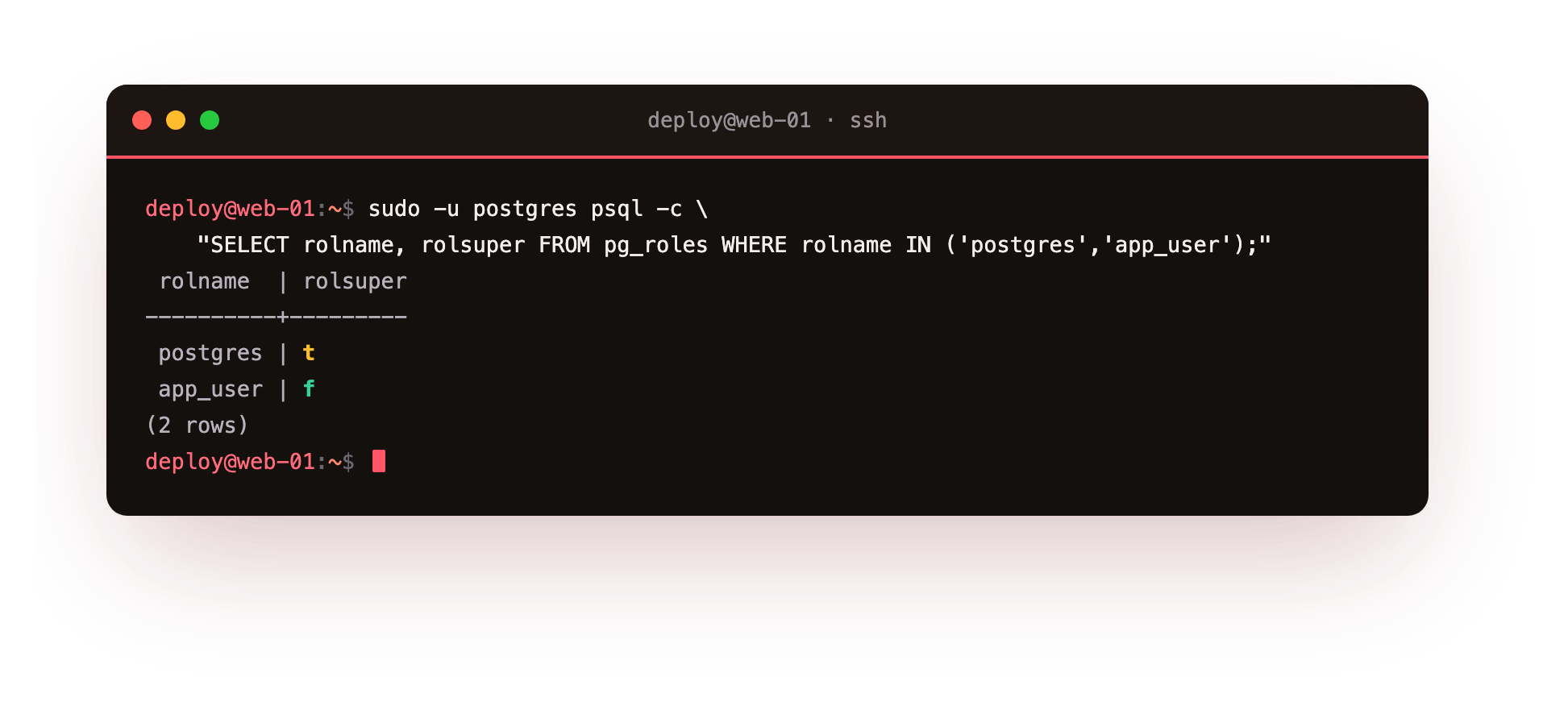
app_user shows rolsuper = f. This is the difference between a leaked app password being a bad day and being a catastrophe. If that credential ever escapes, the attacker gets the rows in one database, not the keys to the whole server. Least privilege is not paranoia, it is limiting the blast radius before the explosion.
Encrypt it, both ways
Data has two states, and each needs its own protection.
In transit: if any connection crosses a network, it must use TLS, so a password or a row of data cannot be read off the wire. PostgreSQL supports this directly (ssl = on with a certificate); require it in pg_hba.conf with the hostssl rule type rather than plain host.
At rest: if someone gets hold of the disk, a backup, or a stolen snapshot, encryption is what stops them reading it. Full-disk encryption (LUKS) on the data volume covers the whole server; managed platforms usually handle this transparently.
Limit the damage one bad query can do
Access control decides who can connect. The next question is what a connection can do once it is in, because a single runaway query, whether from a bug, a scraper, or an attacker who got in, can exhaust the server for everyone else.
Two settings put a ceiling on that. Cap how many connections any one role can hold, so a leaked credential cannot open a thousand connections and starve the database:
ALTER ROLE app_user CONNECTION LIMIT 20;
And set a statement timeout, so no single query can run forever and pin your CPU:
ALTER ROLE app_user SET statement_timeout = '30s';
Now a query that should take milliseconds but has been twisted into a table-scan of your entire database gets killed at thirty seconds instead of taking the server down with it. These are not exotic tuning knobs. They are the difference between one bad query being an annoyance and being an outage.
A backup you have never restored is not a backup
Most people back up their database. Far fewer have ever restored one. The night you actually need it is a terrible time to discover the dump was empty, or encrypted with a key you lost, or sitting world-readable in a public folder.
Three rules that separate a real backup from a comforting illusion:
- Off the server. A backup on the same machine dies with the machine. It has to live somewhere else.
- Encrypted, and not world-readable. A plaintext
pg_dumpin/tmpis a data breach waiting for anyone who gets a shell. - Tested. Restore it, on a schedule, to a throwaway server, and confirm the data is actually there. An untested backup is a hope, not a plan.
In practice, the encrypted part is one extra step, not a project. Pipe the dump straight into encryption so a readable copy never touches the disk at all:
pg_dump shopdb | gpg --symmetric --cipher-algo AES256 -o shopdb-$(date +%F).sql.gpg
The database contents go from PostgreSQL to an encrypted file in a single stream, with no plaintext dump sitting around in between. To restore, you decrypt and pipe back in, which is also the command you should be running on a schedule against a throwaway server to prove the backup is real:
gpg -d shopdb-2026-07-17.sql.gpg | psql shopdb_restore_test
The day you actually need this, you do not want it to be the first time you have ever run it.
Troubleshooting PostgreSQL access
The app cannot connect at all. Any TCP connection has to pass pg_hba.conf; a missing or too-narrow line there returns "no pg_hba.conf entry for host". Add a specific host (or hostssl) rule for the app's database, user, and source address, then reload with sudo systemctl reload postgresql. Peer authentication only works for local Unix-socket connections as a matching system user, not for a TCP client.
app_user can read existing tables but not new ones. GRANT ... ON ALL TABLES only covers tables that exist at that moment; tables created later inherit nothing. Set the future default once: ALTER DEFAULT PRIVILEGES IN SCHEMA public GRANT SELECT, INSERT, UPDATE, DELETE ON TABLES TO app_user;. On PostgreSQL 15 and later, the role that creates the tables also needs CREATE on the schema.
Changing listen_addresses did nothing. That setting is read only at startup, so a reload will not apply it; you need sudo systemctl restart postgresql. Confirm with SHOW listen_addresses; and, from outside, ss -tlnp | grep 5432. Remember the goal is usually the opposite: keep it on localhost unless you have a specific, restricted reason to expose it.
A remote client is refused even with the right password. If the rule is hostssl, the client must connect over TLS; a plain connection is rejected. Have the client enable SSL, or confirm ssl = on and the certificate paths are set in postgresql.conf. Requiring TLS is correct for any connection that crosses a network, so fix the client rather than downgrade the rule.
What database hardening still does not cover
Everything above protects the database from the outside. It does nothing about a query your own application sends.
If your code builds SQL by pasting user input into a string, an attacker can rewrite the query and walk straight out with the data, using your perfectly-scoped app_user, because the app was authorised to read those rows. That is SQL injection, and no database configuration prevents it. Only parameterised queries in the application do.
Which is the theme, again: each layer stops a category of attack, and none stops all of them. At ServerCake we run managed databases precisely because "is it patched, backed up, restore-tested, TLS-only, and least-privileged, this week" is a full-time question, not a one-time setup. A database is not a thing you secure once. It is a thing someone keeps secure, every day, or it slowly stops being secure at all. That daily part is what a managed database takes off your plate.
Key facts
- PostgreSQL 16 binds to localhost and uses scram-sha-256 by default, so a fresh install is not internet-exposed. Check with
ss -tlnp | grep 5432. - Setting
listen_addresses = '*'and opening port 5432 puts the database on the public internet. Prefer localhost, an SSH tunnel, or a private network. - Give the application a role scoped to one database with only the grants it needs. Never let it connect as the
postgressuperuser. - Encrypt in transit (TLS /
hostssl) and at rest (disk encryption). - A backup that is not off-server, encrypted, and restore-tested is not a backup.
Frequently asked questions
Is PostgreSQL safe to install and leave alone?
On defaults, yes: it is bound to localhost and not reachable from outside. It becomes unsafe the moment you expose it without the right restrictions. The danger is a change you make, not the default.
How should my app connect from another server, then?
A private network between the servers if your provider offers one, or an SSH tunnel. Avoid opening 5432 to the public internet; if you must, lock it to a single client IP with TLS required.
Does a scoped role really matter if my password is strong?
Yes. Strong passwords leak, through a committed .env, a compromised app server, or a log file. A scoped role means the damage stops at one database instead of the whole cluster. Defence in depth assumes the first defence fails.
MySQL instead of PostgreSQL?
The principles are identical: bind to localhost, use a scoped non-root user with GRANT on one database, require TLS for remote connections, and encrypt and test backups. Only the commands change.