A log retention and compliance policy
Log retention is the decision of how long to keep each kind of log and how to prove you kept it safely. It is where operations meets compliance: keep too little and you cannot investigate an incident, keep too much of the wrong data and you carry a liability under India's DPDP Act, which expects you to hold personal data only as long as you need it.
This is the last step in the arc. You can now find, structure, ship, query, and alert on your logs; this chapter makes them defensible to keep. It sets a log retention policy on a live Ubuntu 24.04 server, then covers the three habits that keep logs safe to hold: mask personal data, lock down file permissions, and make an audit trail hard to rewrite.
- Retention is a policy per log type: rotation count and age bound the file logs, and
MaxRetentionSecbounds the journal. - Mask personal data before it is written, so emails, phone numbers, and identifiers never land in a log at all.
- Log files should be mode 640 owned by a log group, never world-readable, since logs often contain sensitive detail.
- An append-only attribute makes a security log tamper-evident on the box, and shipping off-host keeps a copy an intruder cannot reach.
Under the DPDP Act a log holding personal data is personal data, so the same minimisation and retention limits apply to it. The cheapest way to stay inside those limits is to not log the sensitive field in the first place, which the masking section below does.
Set a retention policy
Two budgets need bounding. For the file logs, logrotate's rotate and maxage set how many copies and how old they may get; adding dateext names them by date for auditing. For the journal, MaxRetentionSec in a drop-in caps age directly.
/var/log/sc-log-demo/app.log {
    daily
    rotate 30
    maxage 30
    dateext
    compress
    missingok
    notifempty
}
This keeps thirty daily, date-stamped, compressed copies and drops anything older than thirty days. For the journal, printf '[Journal]\nMaxRetentionSec=30day\n' into a drop-in and a restart applies the same horizon. Pick the number from your obligation, not habit: a payment audit trail may need years, while a chatty request log rarely needs more than a few weeks.
Mask personal data before logging
The safest personal data in a log is the data that never reached it. A masking pass on the way in replaces emails, phone numbers, and identifiers with placeholders, so the log keeps its shape for debugging while holding nothing you must protect. Here a small sed script masks four common Indian identifiers.
cat /opt/sc-log-demo/request.log
sed -E -f /opt/sc-log-demo/mask.sed /opt/sc-log-demo/request.log
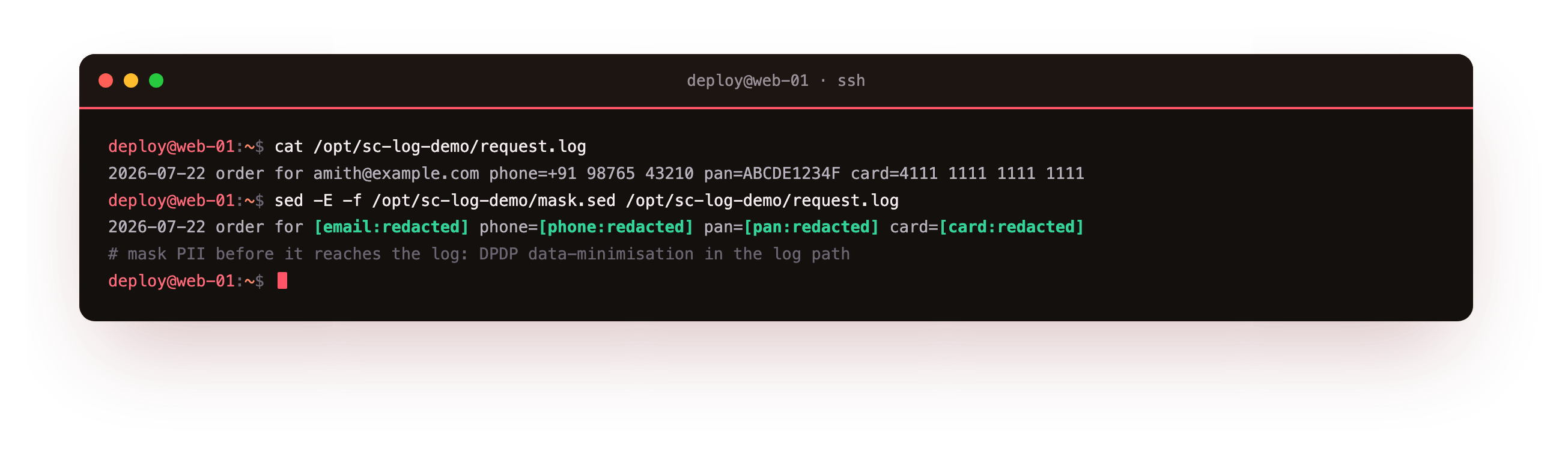
The raw line carries an email, a +91 phone number, a PAN, and a card number; the masked line replaces each with a redacted tag and keeps the rest. Do this in the application's log formatter for real traffic, so masking happens before the write, not after. Never log full card numbers or passwords at all, and treat tokens and one-time codes the same way.
The masked output should carry a redacted tag in place of the email, phone, PAN, and card, and nothing recognizable of the originals. If any identifier survives, a pattern in the mask is too narrow, so widen it and rerun before you trust the log to hold that field.
Lock down file permissions
A log the whole system can read is a data leak waiting to happen. The convention on Ubuntu is mode 640 owned by root or a service user, with the adm group for read access, matching how /var/log/syslog and /var/log/auth.log ship. Check the demo file against them.
stat -c '%A %a %U:%G' /var/log/sc-log-demo/app.log /var/log/syslog
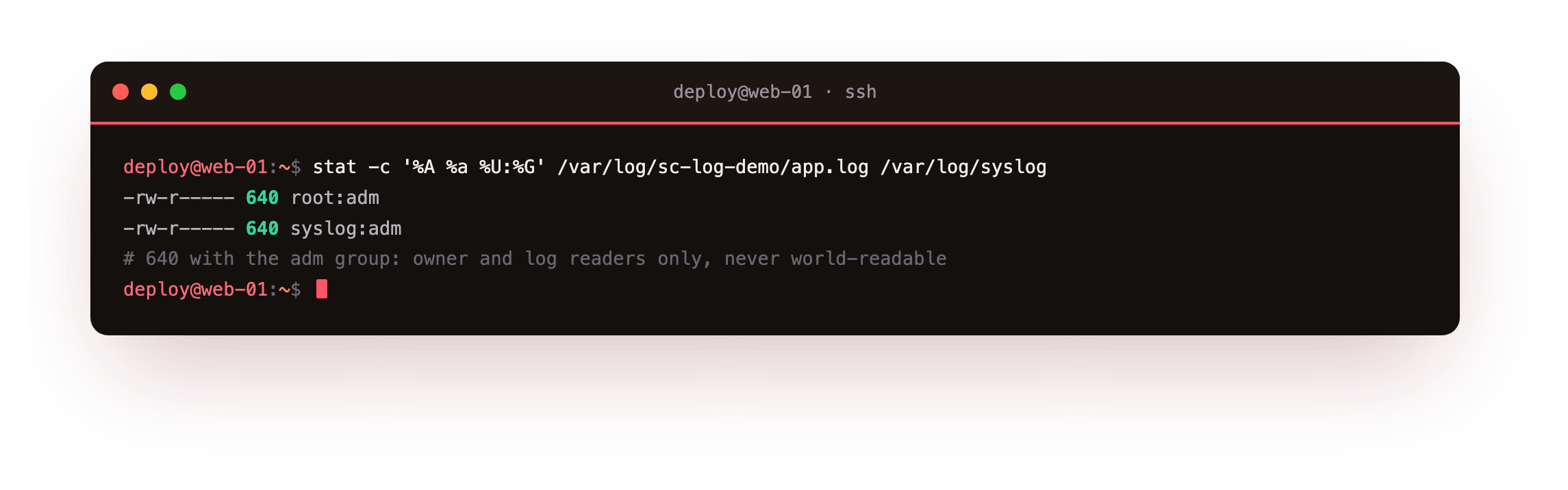
Both report 640 with the adm group, so only the owner and members of adm can read them and no other user can. logrotate's create 640 root adm keeps every rotated copy at the same mode, which matters because an old copy left world-readable leaks just as much as the live file. Set the mode once in the app and once in the rotate config, and every generation stays private.
Make the audit trail tamper-evident
For a security or audit log, you also want it hard to quietly alter. The append-only file attribute lets a process add lines but blocks any truncate or overwrite, even by root, until the attribute is removed. Set it, then test both operations.
sudo chattr +a /var/log/sc-log-demo/audit.log
lsattr /var/log/sc-log-demo/audit.log
echo "audit event" | sudo tee -a /var/log/sc-log-demo/audit.log
sudo sh -c ': > /var/log/sc-log-demo/audit.log'
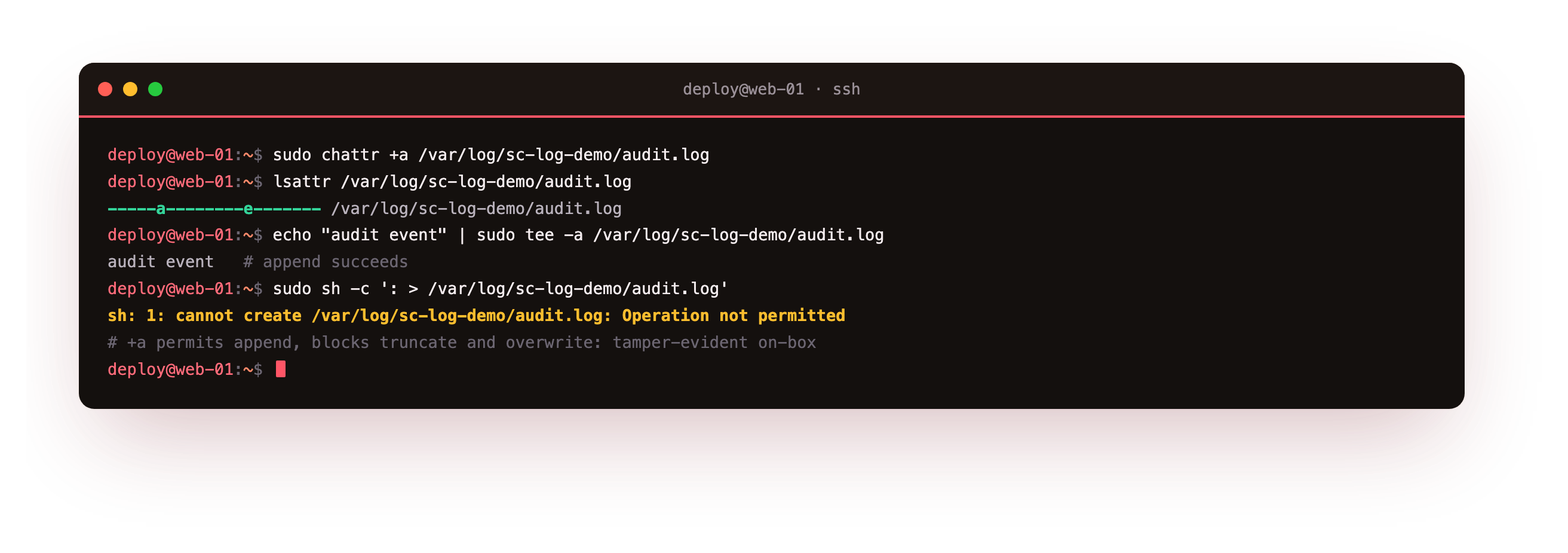
The lsattr output shows the a flag set. The append writes a line as normal, while the truncate is refused with operation not permitted. On its own this is on-box tamper-evidence, not a guarantee, since someone with root can clear the flag. Pair it with the central shipping from chapter three: a copy on another host is the record an intruder on this box cannot edit.
With the attribute set, an append should succeed and a truncate should be refused with operation not permitted. If the truncate goes through, the flag did not stick, so confirm lsattr shows the a and that you ran the truncate as the same user, not from a context that cleared it first.
Frequently asked questions
How long should I keep logs under the DPDP Act?
The Act does not fix a single number; it expects you to keep personal data only as long as the stated purpose needs, then delete it. In practice you set a retention period per log based on why you keep it, an operational debug log for weeks, an audit or security trail for as long as your policy or a sector rule requires, and enforce it with rotation and journal caps. The strongest position is to hold little personal data in logs at all, which masking helps you do.
Where should masking happen, in the app or in rsyslog?
Prefer the application's log formatter, because masking before the write means the sensitive value never touches disk. A rsyslog rule that rewrites messages is a useful backstop for logs you do not control, but it runs after the line already exists in the journal, so it is a second line of defence, not the first. Put the primary mask in code, keep a rsyslog rule for third-party output, and review both when fields change.
Is chattr +a enough to protect an audit log?
It raises the bar but does not stand alone. The append-only attribute stops accidental truncation and casual tampering, and it blocks overwrite even for root until the flag is cleared. A determined attacker with root can clear it, so treat it as tamper-evidence on the host, not a vault. The real protection is a copy elsewhere: ship the audit stream to a central collector or write-once storage, so the off-box record survives even if the local file is wiped.
Can I keep logs but drop the personal fields later?
You can, but doing it up front is safer and cheaper. Scrubbing personal data after it is written means finding it across live files, compressed rotations, the journal, and any central copy, which is error-prone. Masking at write time removes the field everywhere at once, so retention then applies to data that is already minimised. If you must keep a raw copy for a short investigation window, isolate it, restrict access, and delete it on a fixed timer.
What you have, and what comes next
You have a retention policy that bounds both the files and the journal, a masking pass that keeps personal data out of the log, permissions that keep every copy at 640, and an append-only audit file backed by an off-host copy. Together they make logs on Ubuntu 24.04 both useful for operations and defensible under the DPDP Act.
That closes the series. You have moved from scattered logs you could not search, through a persistent journal and rsyslog you can read, structured JSON and rotation, central shipping, and querying with alerts, to a retention and compliance policy you can put in front of an auditor. The destination from chapter one is now real on your own box: when something breaks at 2am, one query returns the line that says what happened, instead of a guess.