Shipping logs to a central collector
Shipping logs off the box is what turns per-server files into one searchable place. When a host dies you still have its logs, and you can query many machines at once instead of ssh-ing to each. You do not need a heavy stack to start: rsyslog is already on every Ubuntu server and can forward messages over TCP to a collector.
You now have logs that are persistent, structured, and rotated, but they still live only on the host that wrote them. This chapter takes the next step in the arc: it sets up a collector and a forwarder on one live Ubuntu 24.04 slice, ships a tagged line from the source, and reads it back from the central store to prove it travelled.
- rsyslog can act as both a shipper and a collector, so central logging needs no extra software to get going.
- The forwarder sends selected messages over TCP with a retry queue, so a brief network blip does not drop them.
- The collector listens on a port bound to a chosen address and writes received messages to a separate store.
- Binding the collector to loopback or a private address keeps the log port off the public internet.
To keep the demo verifiable on a single machine, the collector here listens on 127.0.0.1. In a real deployment the forwarder's target is a separate host, addressed by a private address or a documentation range such as 198.51.100.10, and the rest of the config is identical.
Configure the collector and the forwarder
One rsyslog drop-in does both jobs. It loads the TCP input module, listens on a loopback port under a dedicated ruleset that writes to a central file, and forwards the local0 facility to that same port. Binding the input to its own ruleset keeps received messages out of the default rules, so nothing loops.
module(load="imtcp")
input(type="imtcp" address="127.0.0.1" port="5514" ruleset="sc_central")

ruleset(name="sc_central") {
    action(type="omfile" file="/var/log/sc-log-central/received.log")
}

local0.* action(type="omfwd" target="127.0.0.1" port="5514" protocol="tcp"
                action.resumeRetryCount="10"
                queue.type="linkedList" queue.size="10000")
The omfwd action does the shipping. Its action.resumeRetryCount and in-memory queue mean that if the collector is briefly unreachable, rsyslog holds messages and retries rather than dropping them. In production you point target at the collector host and keep the same queue settings, which is what protects you from a flaky link.
Check the collector is listening
Validate the config before restarting, then confirm the port is open. rsyslog has a config test mode, and ss shows the listening socket. The collector should bind loopback only.
sudo rsyslogd -N1
sudo ss -tlnp | grep 5514
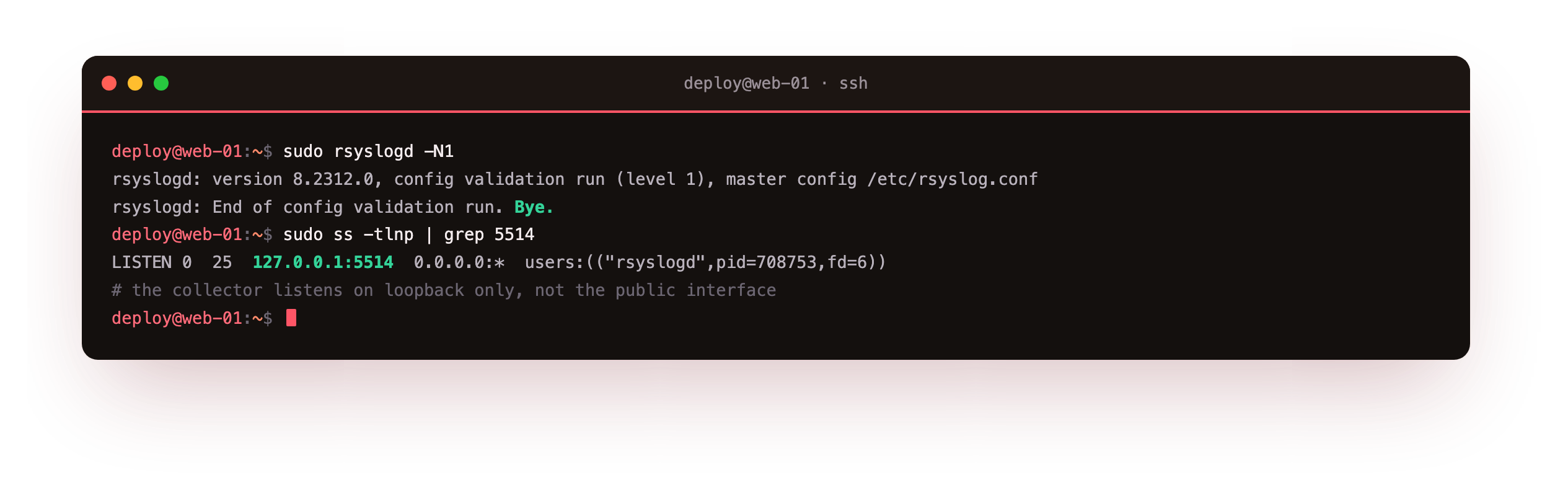
The test run reports the config valid and exits. The ss output shows rsyslog listening on 127.0.0.1:5514 and nothing on the public interface. That loopback bind matters: a syslog port open to the internet invites spoofed messages and floods, so a real collector sits on a private network or behind a firewall rule, never on the open address.
The ss line should show the listener bound to 127.0.0.1:5514 and nowhere else. If you see 0.0.0.0:5514 instead, the input is open to the whole network, so fix the address in the input directive before you send a single message to it.
Ship a line and read it back
Now prove the path end to end. Send a message on the local0 facility with a tag and an order id, wait a moment, then grep the central store for that id. If it arrives, the line travelled from the source, through the TCP forward, into the collector's ruleset, and onto disk.
logger -p local0.info -t shipdemo "central pipeline test order=SC-1042 status=shipped"
sudo grep "order=SC-1042" /var/log/sc-log-central/received.log
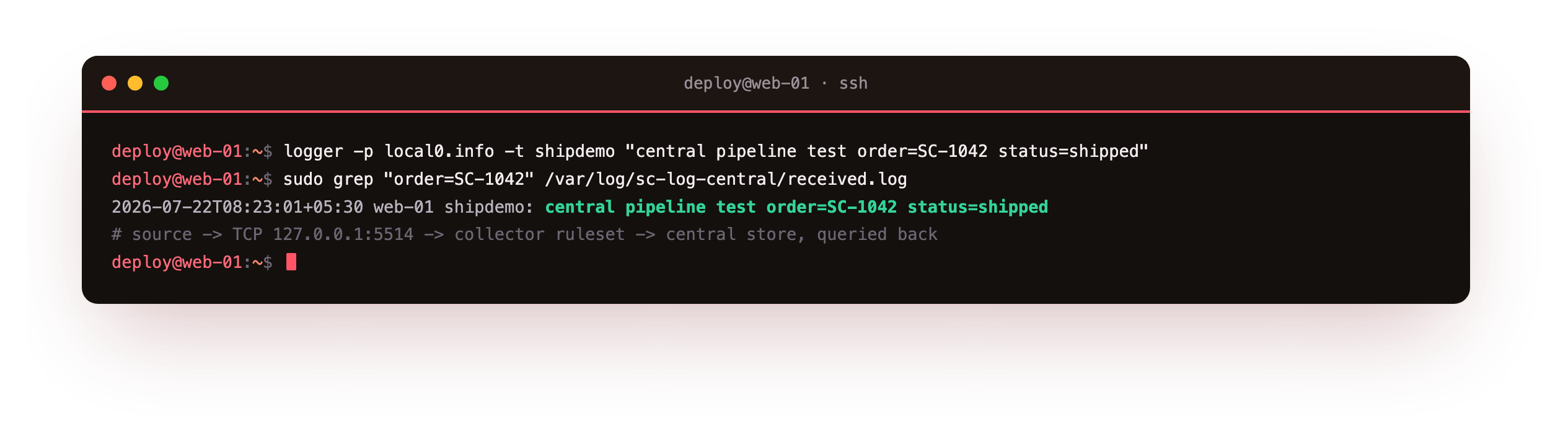
The grep returns the exact line from /var/log/sc-log-central/received.log, tagged shipdemo, with the host and the message intact. That single result is the proof, and it is the payoff of this chapter: a log written on the source is now readable from a central store that survives the source host dying. Point the forwarder at a second machine and the same test works across the network, which is central logging in one sentence.
The grep should return your order=SC-1042 line from received.log, tagged shipdemo. If it returns nothing, the message did not travel: recheck that the forwarder's target and the collector's port match, and that rsyslogd -N1 reported the config valid before the restart.
Frequently asked questions
Why forward over TCP instead of UDP?
Classic syslog used UDP, which is fire and forget: under load or a blip, messages vanish with no sign. TCP gives you a connection and, with rsyslog's queue and retry, delivery that survives a short outage. The cost is a little more overhead and a socket to manage. For logs you intend to rely on, especially anything touching security or audit, TCP with a retry queue is the sensible default. Add TLS on top when the link crosses an untrusted network.
Is running the collector on 127.0.0.1 realistic?
The loopback bind is a demo convenience so the whole path is verifiable on one machine. The config is the same for a real collector: change the forwarder's target to the collector's private address and open that port only to your hosts. Keep the collector off the public internet. What you tested here, the input ruleset, the file action, and the retry queue, is exactly what a two-host setup runs.
When should I reach for Loki or Vector instead?
rsyslog forwarding is a strong start and needs nothing new installed. You outgrow it when you want label-based search, dashboards, and long retention across many services, which is where a store like Loki with a shipper like Vector or promtail earns its keep. Those add a query language and a UI at the cost of more moving parts to run. Start with rsyslog, and move up when the query needs, not the fashion, call for it.
Will forwarding stop my logs from reaching /var/log/syslog?
No. The forward action sends a copy to the collector; it does not consume the message. On the source host the same line still flows through the default rules into /var/log/syslog and the journal as before. That is useful: you keep a local copy for quick debugging and ship a copy centrally for the long view. If you ever want the forward to be the only destination for a facility, you can stop further processing after it, but that is rarely what you want.
What you have, and what comes next
You stood up a central collector and a forwarder with one rsyslog drop-in on Ubuntu 24.04, confirmed the collector listens on loopback only, and shipped a tagged line that you then read back from the central store. That is the core of shipping logs: send over TCP with a retry queue, receive into a dedicated store, and query the result.
The next chapter puts that store to work. It runs real queries for errors by priority and by field, then builds a small alert that fires when errors cross a threshold and stays quiet when they do not.