Size a php-fpm pool for the box
A php-fpm pool is a named group of PHP workers with its own user, socket and sizing. The default install gives you one pool called www, tuned tiny so it starts anywhere. Running a real app means giving it a dedicated php-fpm pool: its own least-privilege user, its own socket, and a worker count matched to the memory on the server. This chapter builds that pool on Ubuntu 24.04 and reads its live status. The default www pool ships with room for only five workers.
- The process manager mode, pm, decides how workers are spawned: dynamic, static or ondemand.
- pm.max_children is a hard ceiling; size it from free memory divided by a real worker footprint.
- A dedicated pool runs as its own user, so a bug in one app cannot read another app's files.
- A pool status page reports active, idle and total workers, which is how you know the ceiling is right.
Each pool is one file under /etc/php/8.3/fpm/pool.d. The master php-fpm process reads them all at start and manages every pool from one service. You can run several apps on one box, each in its own pool, isolated by user and socket.
Prerequisites
- php-fpm installed and serving a page through nginx, as set up in part one.
- A system user for the app. This series uses a
copperpotaccount with no login shell. - Sudo access to edit pool files and restart the fpm service.
Three ways the process manager spawns workers
The pm directive picks one of three strategies. In dynamic mode fpm keeps a band of workers alive between a minimum and maximum spare count, growing under load and shrinking when quiet. In static mode it starts exactly pm.max_children workers and holds them, which trades memory for predictable latency. In ondemand mode it starts nothing until a request arrives, then idles workers out after a timeout, which suits rarely-hit apps.
Most web apps want dynamic. It keeps a few workers warm for the common case and scales toward the ceiling during a spike. Look at the shipped www pool to see the conservative default.
grep -E '^pm' /etc/php/8.3/fpm/pool.d/www.conf
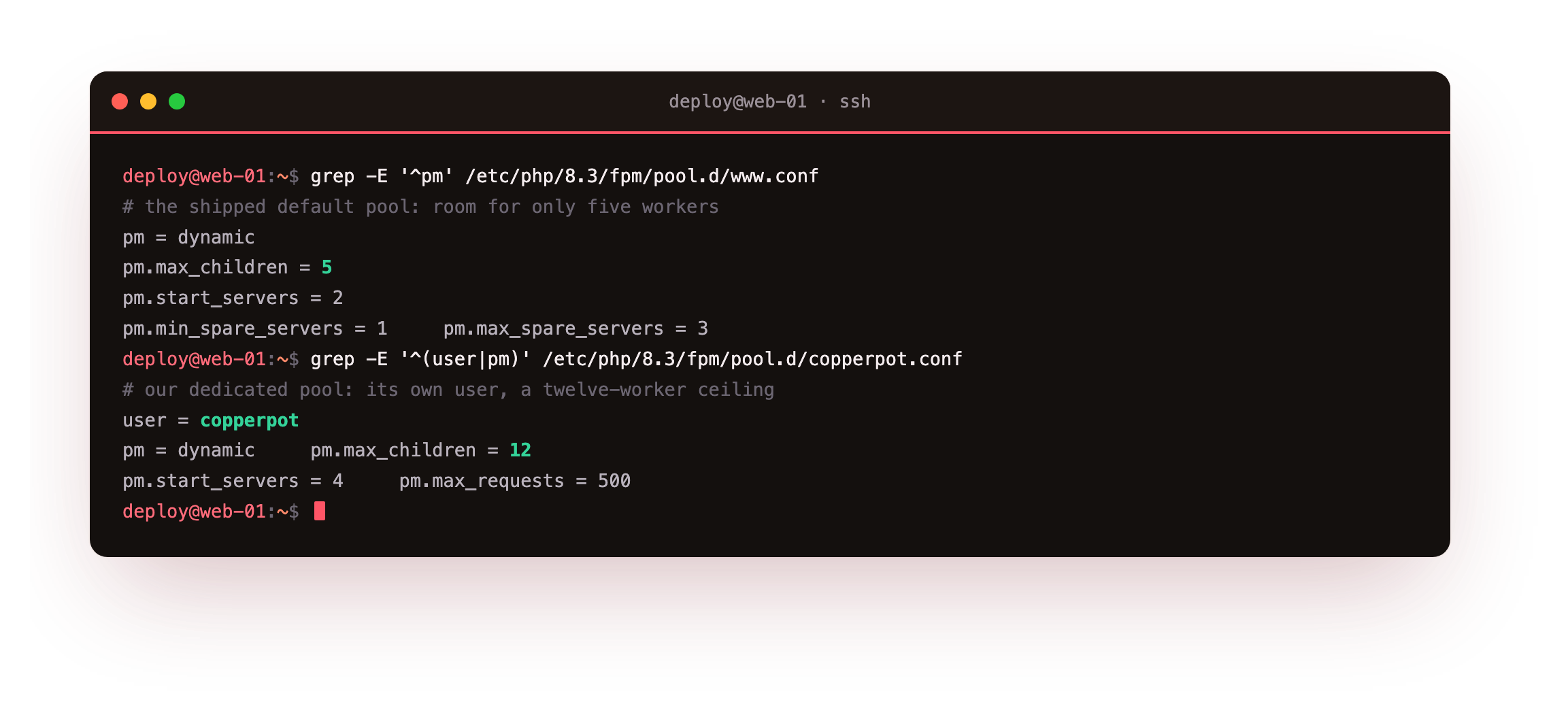
The default allows five children with two started at boot. That is fine for a first login, but a busy app queues requests once all five are in use. The fix is a pool sized to the actual memory on the machine.
Size max_children from memory
Pick the ceiling from a simple sum. Measure a real worker's resident memory, hold back what the OS, nginx and the database need, and divide. On this 2 GB box a warm worker sits near 30 to 40 MB. Reserving memory for everything else leaves roughly 420 MB for PHP, which is about twelve workers. Setting pm.max_children higher than memory allows is the classic mistake: under load the box swaps and every request slows at once.
Write a dedicated pool with that ceiling, a warm band of spares, and its own user and socket.
[copperpot]
user = copperpot
group = copperpot
listen = /run/php/copperpot.sock
listen.owner = www-data
listen.group = www-data
listen.mode = 0660

pm = dynamic
pm.max_children = 12
pm.start_servers = 4
pm.min_spare_servers = 2
pm.max_spare_servers = 6
pm.max_requests = 500

pm.status_path = /fpm-status
pm.max_requests recycles a worker after 500 requests, which caps any slow memory growth in an extension. The socket is owned by www-data so nginx can connect, while the workers run as copperpot. Restart the service to load the pool.
Workers run as the app user
Restart fpm and list the processes. The master stays as root because it binds the sockets and reads the config, then it drops each worker to the pool's user.
sudo systemctl restart php8.3-fpm
ps -eo pid,user,rss,cmd | grep php-fpm
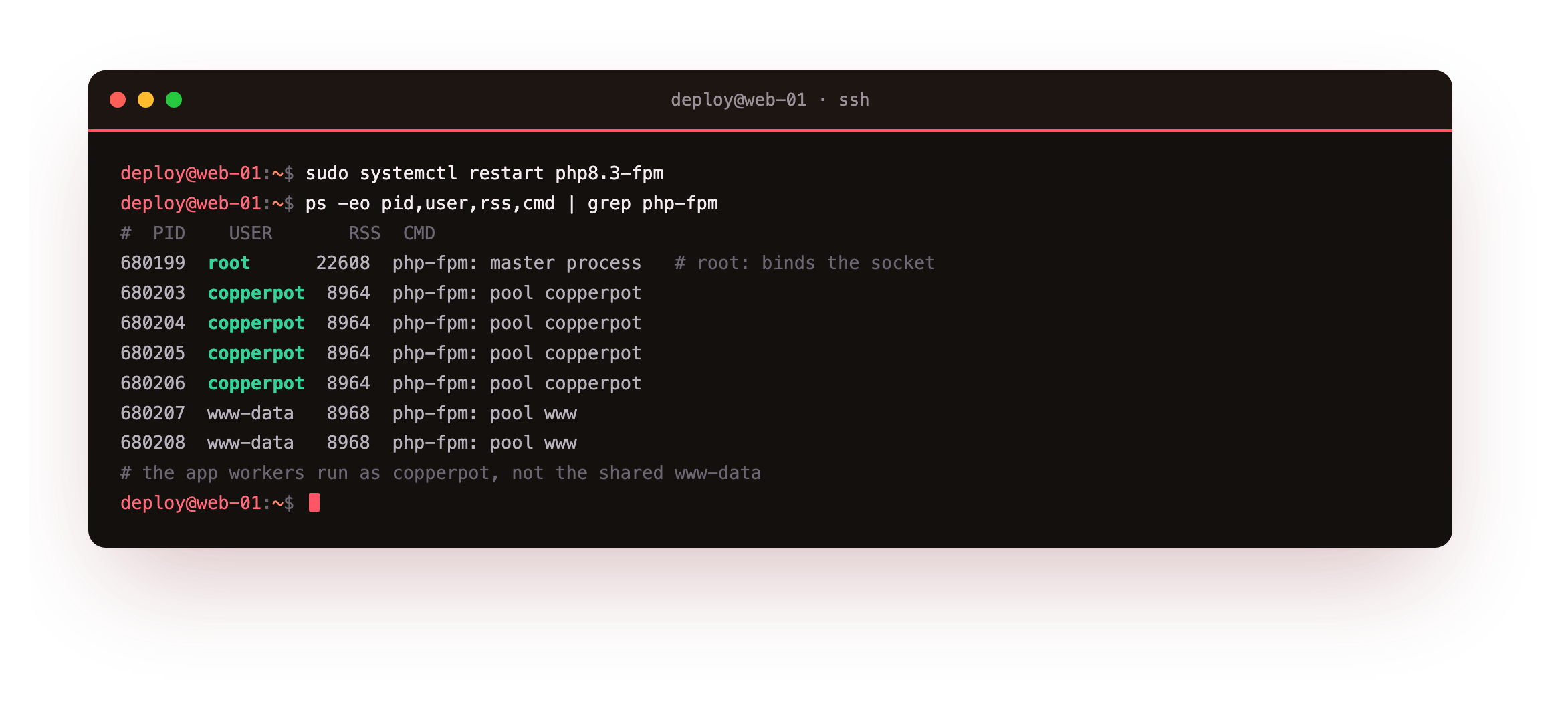
The master runs as root, four copperpot workers came up from pm.start_servers, and the old www pool still has its two. Because the app's workers run as copperpot, a file-read bug in the app cannot touch files owned by another user. That is the security payoff of one pool per app, and it costs nothing.
In the process list the workers labelled pool copperpot should show the copperpot user, never root or www-data. If they still read www-data, nginx is passing to the old socket, so point fastcgi_pass at /run/php/copperpot.sock and reload before moving on.
Read the pool status
The pm.status_path exposes fpm's own counters. Wire an nginx location for it, guarded to loopback so it is never public, then read it after warming a few requests. fpm reaches its status handler only when the passed SCRIPT_FILENAME resolves to a real file, so anchor it at the app's index.
curl -s http://127.0.0.1:8092/fpm-status
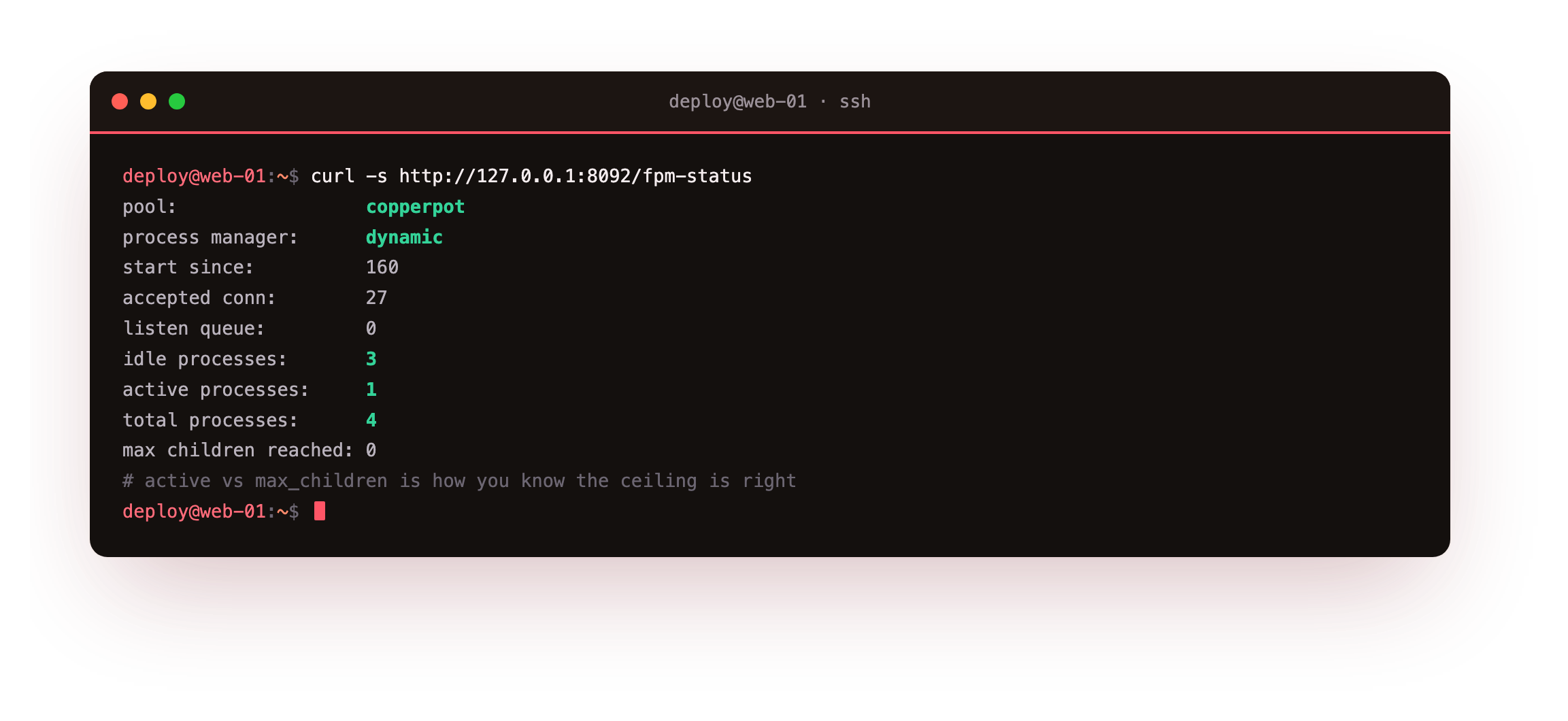
The page names the pool, confirms dynamic, and reports idle, active and total processes. Watch active processes under real traffic: if it sits at max_children with a listen queue building, the ceiling is too low for the load. If it never climbs, you have headroom. This counter, not a guess, is how you tune the pool.
The status page should name the pool copperpot and report a total processes count that matches your pm.start_servers when idle. If the request returns 404, the status location is not wired yet, so add the loopback-only /fpm-status location and reload nginx.
- A unix socket suits a single box: no port to expose, and access is a file permission on
/run/php. - A TCP listen like 127.0.0.1:9000 fits when nginx and fpm run on different hosts.
- Whichever you pick, keep the listener off the public interface so only nginx reaches it.
Frequently asked questions
How do I know if max_children is too low?
Read the status page under load. If active processes equals max_children and the listen queue is above zero, requests are waiting for a free worker. Raise the ceiling only if memory allows, because a ceiling above what the RAM holds makes the box swap and hurts every request. If active never nears the ceiling, the pool is sized fine or has spare room.
Static or dynamic for the process manager?
Dynamic suits most web apps: it keeps a few workers warm and scales toward the ceiling during a spike. Static starts every worker up front and holds the memory, which gives steady latency on a box dedicated to one busy app. Ondemand starts nothing until a request arrives, which fits a rarely-used admin tool. Pick dynamic first and only switch if a measurement pushes you.
Should every app get its own pool?
Yes, when the apps belong to different owners or trust levels. A separate pool means a separate user and socket, so one app cannot read another's files or secrets, and you can size and restart each independently. Two small apps from the same team can share a pool if that is simpler. The isolation is what earns the extra file, so use it where it buys you something.
What does pm.max_requests actually protect against?
It recycles a worker after a set number of requests, which reclaims memory that a leaky extension or long-lived process may hold. A value around 500 is a safe default: frequent enough to cap slow growth, rare enough that respawning costs nothing measurable. It is a seatbelt, not a fix. If a worker's memory climbs fast, find the leak rather than lowering this number to hide it.
What you have, and what comes next
You have a dedicated php-fpm pool running as its own user, a worker count sized to the memory on the box, and a status page that reports the pool live. The app is isolated and its capacity is a number you chose rather than a default you inherited.
Next you put a real multi-file app behind nginx on this pool, with a router and a database call, and lock down the FastCGI config so nginx never hands an arbitrary path to the runtime.