Enable and tune php opcache
Without a bytecode cache, php-fpm parses and compiles your PHP source on every single request. OPcache stores that compiled bytecode in shared memory so the work happens once, and every later request runs it straight from RAM. This chapter tunes php OPcache on Ubuntu 24.04, reads its hit counters through a status page, and measures a repeated request with the cache on and off. OPcache ships with php-fpm and is on by default, so the job is tuning it, not installing it.
- OPcache caches compiled bytecode in shared memory, so source is parsed once instead of per request.
- Size opcache.memory_consumption and opcache.max_accelerated_files to hold your whole codebase.
- opcache.validate_timestamps=0 skips the per-request file check, which is faster but needs a reload on deploy.
- The realpath cache saves repeated filesystem lookups, a smaller but real win alongside OPcache.
The default settings are conservative: 128 MB of cache, room for 10000 files, and a timestamp check on every request. For a real app you raise the memory, raise the file ceiling, and decide how the cache learns about new code.
Prerequisites
- The Copperpot app on the
copperpotpool from part three. - OPcache present, which the php-fpm install already provides.
- Sudo access to add a conf.d file and reload the fpm service.
Tune the cache with a drop-in
Do not edit the shipped 10-opcache.ini. Add a drop-in with a higher number so it loads last and wins. Give the cache enough memory to hold every compiled file, raise the file ceiling past the count in your app and its dependencies, and turn off the per-request timestamp check for production.
; /etc/php/8.3/fpm/conf.d/99-opcache-tuning.ini
opcache.enable=1
opcache.memory_consumption=192
opcache.interned_strings_buffer=16
opcache.max_accelerated_files=20000
opcache.validate_timestamps=0
opcache.revalidate_freq=0
While you are here, raise the realpath cache in the fpm php.ini. It caches the resolved paths of included files, which saves a stat call on every include. Then reload.
sudo sed -i 's|^;realpath_cache_size = 4096k|realpath_cache_size = 8192k|' /etc/php/8.3/fpm/php.ini
sudo systemctl restart php8.3-fpm
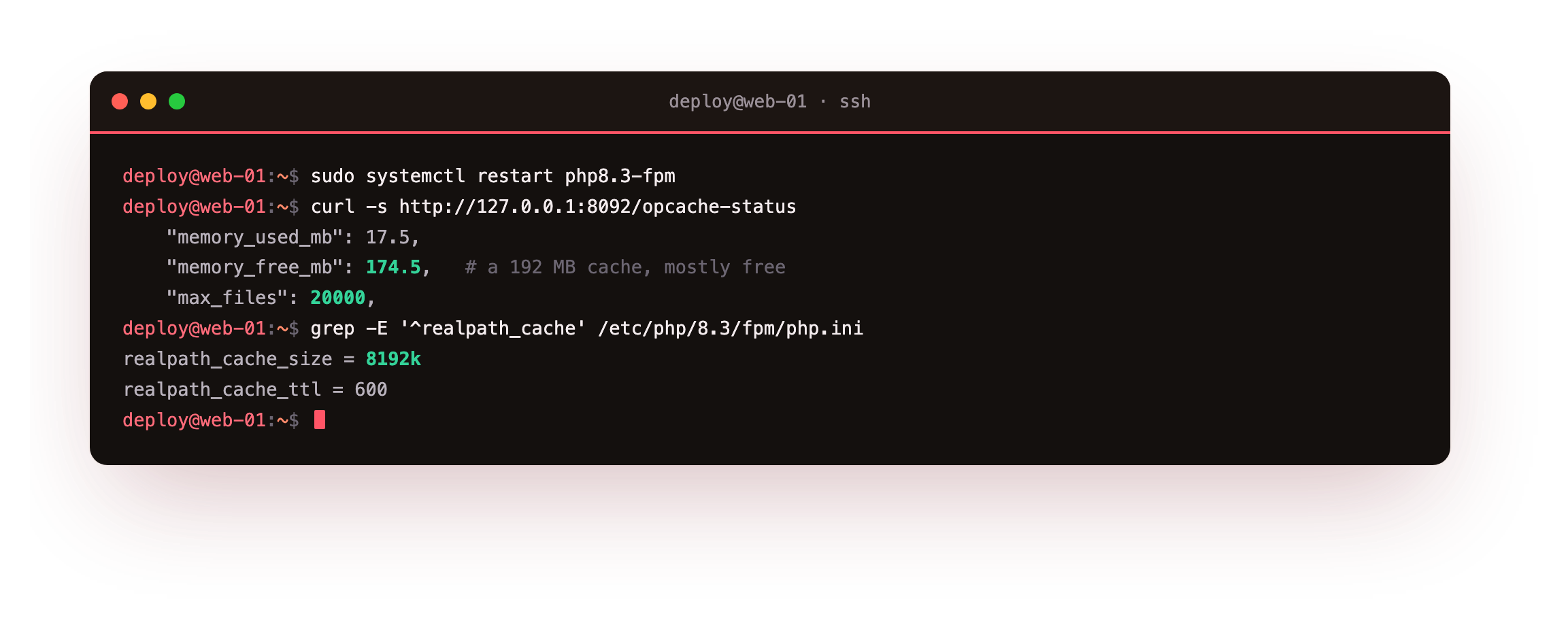
The status page confirms the cache came up with 192 MB and room for 20000 files, and the realpath cache now holds 8192k with a longer time to live. Those are the values the running pool reports, not the file defaults.
Read the hit counters
OPcache exposes its state through opcache_get_status(). A small script behind a loopback-only nginx location returns the numbers that matter: memory used, scripts cached, hits and misses. Read it right after a restart, then again after some traffic.
curl -s http://127.0.0.1:8092/opcache-status
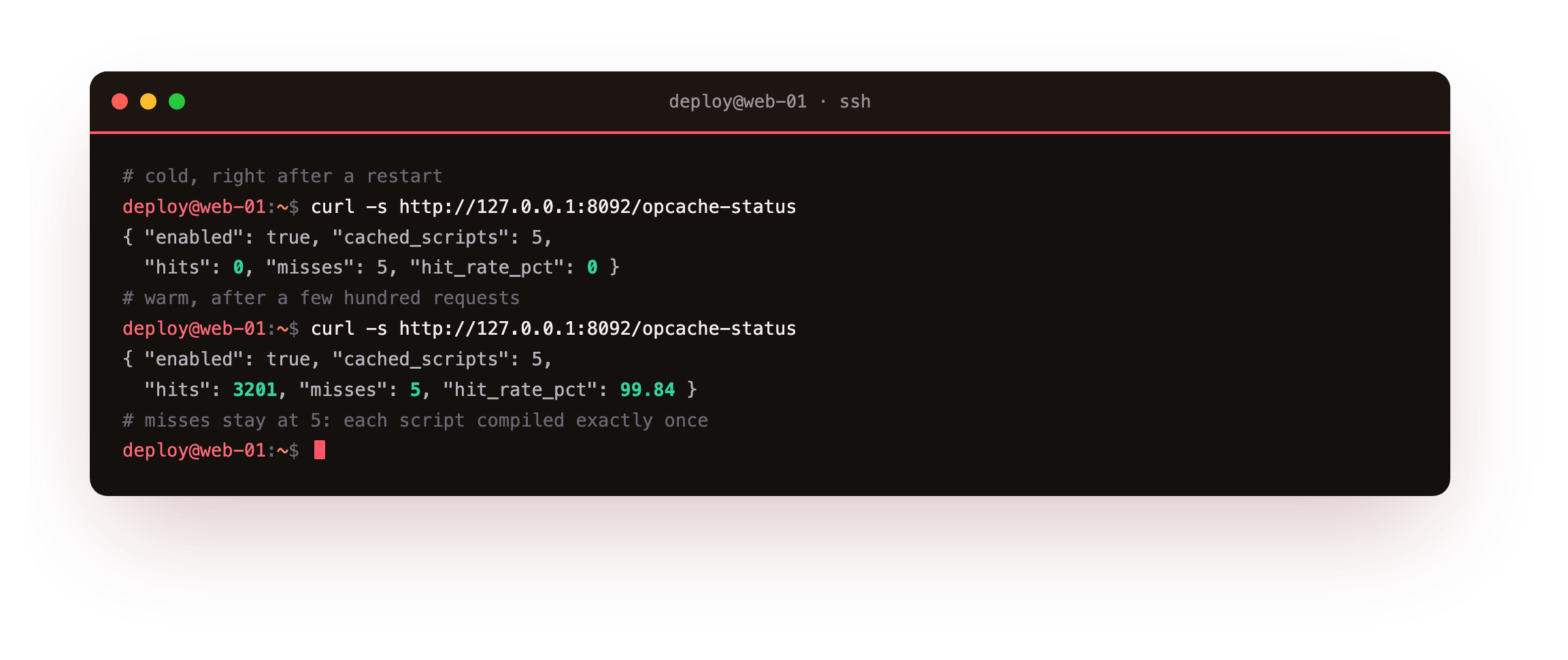
Cold, the cache holds five scripts with zero hits and five misses, one miss per file as each is compiled the first time. After a few hundred requests the same five scripts show thousands of hits and still five misses, a hit rate above 99 percent. The misses never climb because the code is compiled once and reused. That flat miss count is the signal that OPcache is doing its job.
After warming the app the status page should show hits in the thousands while misses stays at the small cold number. If misses keep climbing alongside hits, the cache is too small and OPcache is evicting scripts, so raise opcache.memory_consumption and opcache.max_accelerated_files and restart the pool.
Measure a repeated request
On a five-file app the compile savings hide behind network time, so the effect is easier to see on a larger codebase. Point an endpoint at a library of a few thousand functions, then time the same request with the cache on and then off.
time (for i in $(seq 1 300); do curl -s -o /dev/null http://127.0.0.1:8092/bench; done)
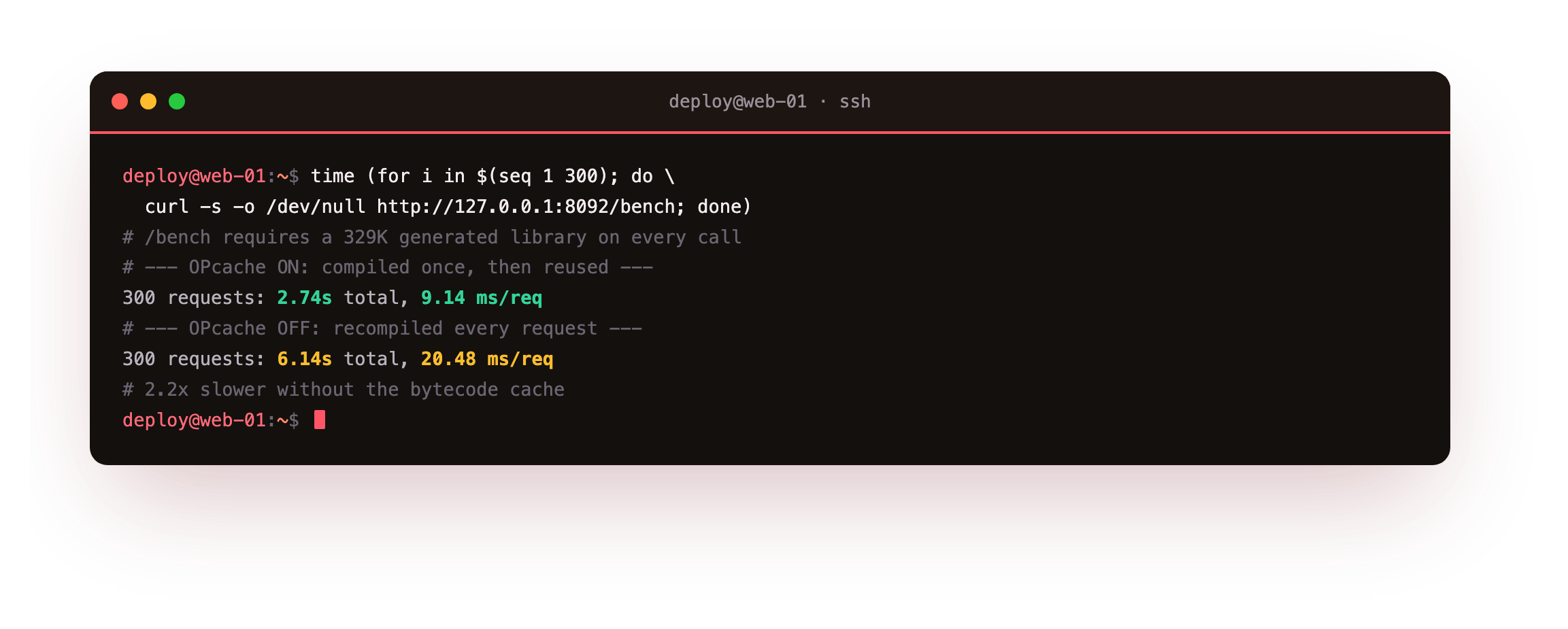
With OPcache on, the 300 requests average about 9 ms each: the library is compiled once and every later request runs the cached bytecode. With OPcache off, the same requests average about 20 ms, because php-fpm recompiles the whole library on every hit. That is the cost OPcache removes, and it grows with the size of the codebase.
Going further: interned strings and the shared buffer
PHP holds every string literal in memory, and without interning the same string appears many times across a request. The opcache.interned_strings_buffer reserves shared memory where OPcache keeps one copy of each string and points every use at it. Sixteen megabytes suits a medium app.
A large framework with many class and method names benefits from more. The buffer is carved out of the total opcache.memory_consumption, so raising one may mean raising the other. The status page reports interned string memory next to the script cache, so you size the buffer from a number rather than a guess.
- Off, OPcache never checks file times, so it will not notice edited code on its own.
- Your deploy must reload php-fpm, which clears the cache and picks up the new files.
- Leave it on during development so edits show up without a reload every time.
Frequently asked questions
How much memory should opcache use?
Enough to hold every compiled file with headroom. Read the status page after warming the app: if cached_scripts is near max_accelerated_files, or free memory is low, raise both. A framework app can need 128 to 256 MB. Oversizing wastes a little RAM; undersizing makes OPcache evict and recompile, which shows up as a climbing miss count and lost speed.
Why did my code change not take effect?
With validate_timestamps=0, OPcache serves the bytecode it already compiled and never re-reads the file. That is faster but means an edit is invisible until php-fpm reloads. Run systemctl reload php8.3-fpm as the last step of every deploy, which clears the cache cleanly. During development, set validate_timestamps back on so edits appear without a reload.
Is OPcache JIT worth turning on?
For most web apps, no. The big win is the bytecode cache, which this chapter covers, and JIT adds little on top of typical request-response code that spends its time in I/O. JIT helps compute-heavy work like image processing or math loops. Measure your own workload before enabling it, because the default of jit=off is the right starting point for a normal app.
What does the realpath cache actually save?
It caches the resolved absolute path of files you include, so PHP skips the filesystem lookups that turn a relative include into a real path. On an app with many includes those stat calls add up. Raising realpath_cache_size and its time to live keeps more of them cached. It is a smaller win than OPcache but costs almost nothing to set, so it belongs in the same pass.
What you have, and what comes next
You have OPcache tuned with a drop-in, a status page that shows the cache holding your code with a near-perfect hit rate, and a measurement that puts a number on the saving. The runtime now compiles once and serves from memory.
Next you harden the runtime: hide the version, disable dangerous functions, fence the app into its own directory, and send errors to a log instead of the response.