The php-fpm security baseline
A default php-fpm install runs your code with more power than a web app needs. It can shell out to the system, read any file the worker user can reach, and print a stack trace straight to a visitor. Tightening those is the php-fpm security baseline, and most of it is a few lines in the pool config.
This chapter hardens the Copperpot pool on Ubuntu 24.04: it hides the version, disables dangerous functions, fences the app into its own directory, and sends errors to a log. Every refusal below was produced on a live server.
- expose_php off removes the X-Powered-By header, so the exact PHP version is not advertised.
- disable_functions strips shell and process functions the app has no reason to call.
- open_basedir fences file access to the app's own directories, so a bug cannot read /etc/passwd.
- display_errors off with log_errors on keeps stack traces out of the response and inside a log.
Ubuntu's fpm php.ini already ships with a few of these set: expose_php is off, display_errors is off, and log_errors is on. The work is confirming those and adding the per-app controls that no default can choose for you.
Prerequisites
- The Copperpot app on its dedicated
copperpotpool from the earlier parts. - Sudo access to edit the pool config and the fpm php.ini.
- A log directory the pool user can write, such as
/var/log/copperpot.
Hide the version
expose_php controls whether PHP announces itself in an X-Powered-By header. Advertising the exact build hands a scanner a version to match against known issues. To see the difference, turn it on, read the header, then turn it off.
curl -s -D - -o /dev/null http://127.0.0.1:8092/
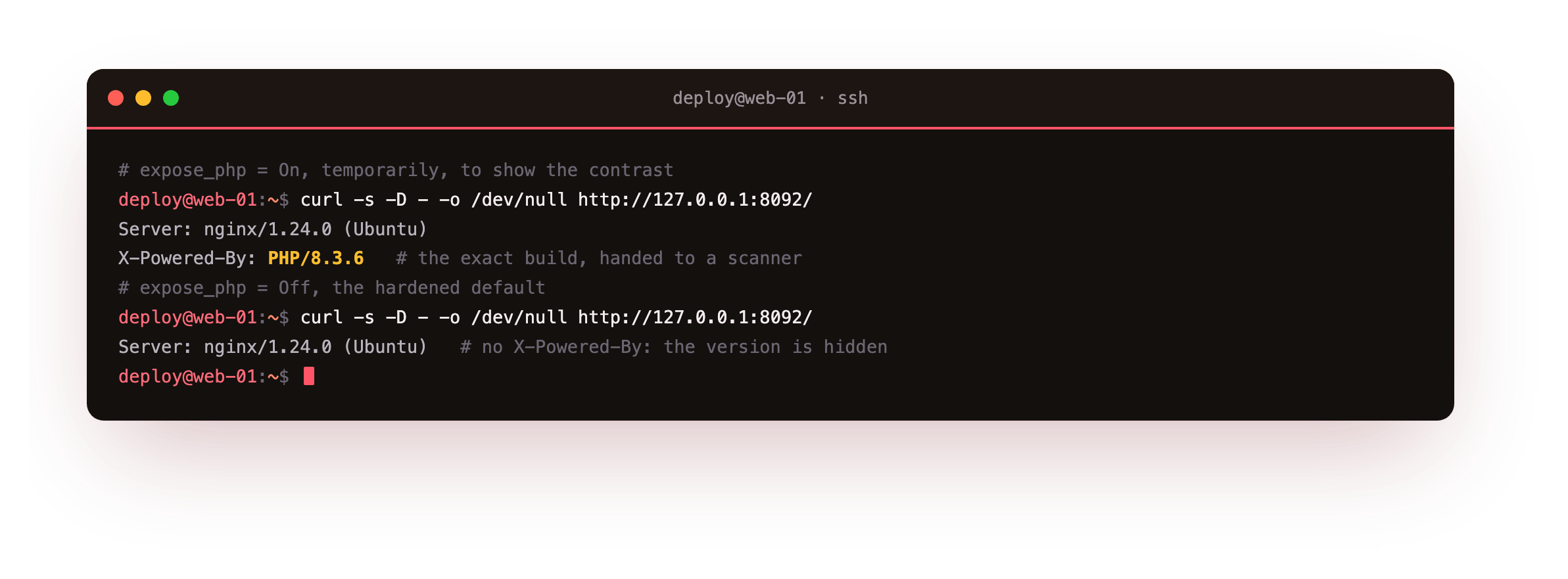
With expose_php on, the response carries X-Powered-By: PHP/8.3.6. With it off, that line is gone and only the nginx Server header remains, which you can trim separately with server_tokens off. Ubuntu sets expose_php = Off by default; the lesson is to confirm it rather than assume it.
Disable the sharp tools and fence the app
Two settings do the heavy lifting, and both belong in the pool config so they apply to this app only. disable_functions removes functions the app never calls: the ones that run shell commands or spawn processes. open_basedir limits every file operation to a list of directories, so a path traversal cannot escape the app.
php_admin_value[disable_functions] = exec,passthru,shell_exec,system,proc_open,popen,proc_nice,pcntl_exec
php_admin_value[open_basedir] = /srv/copperpot:/tmp
php_admin_flag[display_errors] = off
php_admin_flag[log_errors] = on
php_admin_value[error_log] = /var/log/copperpot/php-error.log
php_admin_value[upload_max_filesize] = 4M
php_admin_value[post_max_size] = 6M
The upload and post limits cap how much a request can send, which keeps a single POST from filling memory or disk. Restart the pool, then run a probe that tries the two things the app should never be allowed to do.
curl -s http://127.0.0.1:8092/security-probe
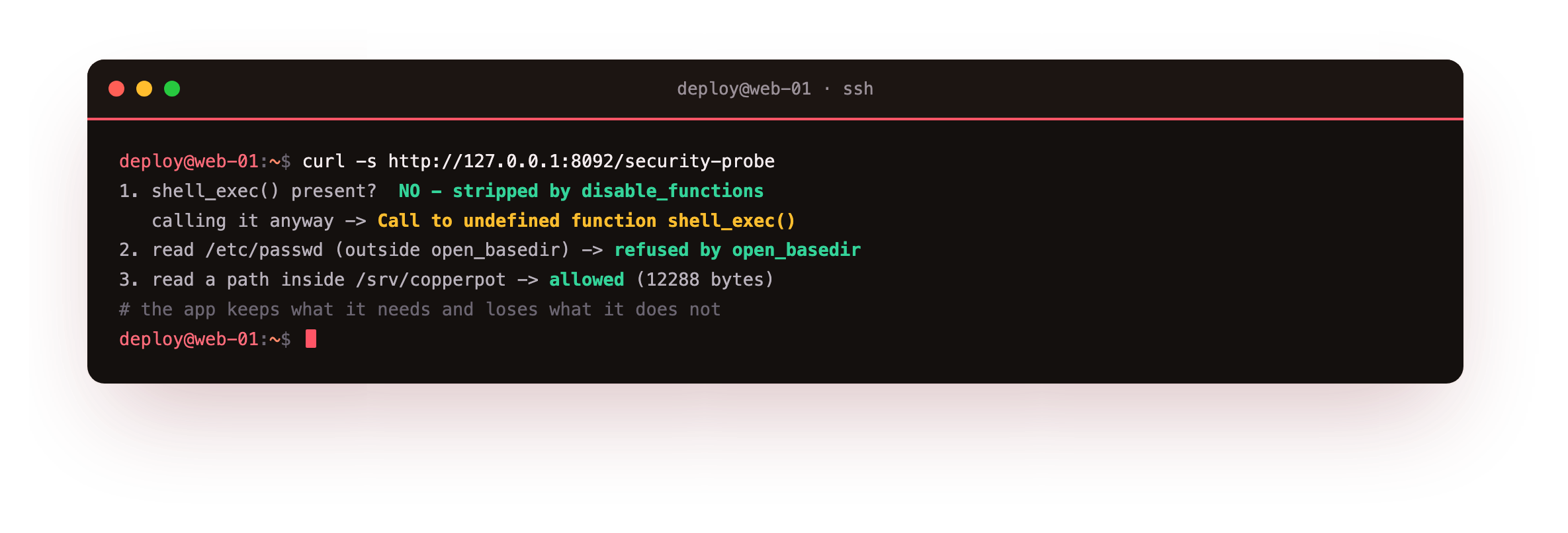
The probe reports that shell_exec() is gone, and calling it anyway raises "Call to undefined function", because a disabled function no longer exists in PHP 8. Reading /etc/passwd is refused by open_basedir, while a read inside /srv/copperpot still works. The app keeps the access it needs and loses the access it does not.
The probe should show shell_exec undefined and the read of /etc/passwd refused, while a read inside the app directory still succeeds. If a banned function still runs, the pool did not reload, so restart php-fpm and confirm the settings sit in the pool file as php_admin_value, which app code cannot override.
Keep errors in the log, not the response
A stack trace in the response tells an attacker your file paths and stack. With display_errors off and log_errors on, the visitor gets a clean page while the detail lands in the log. Trigger an error and watch where it goes.
curl -s http://127.0.0.1:8092/err-demo
sudo tail -n 2 /var/log/copperpot/php-error.log
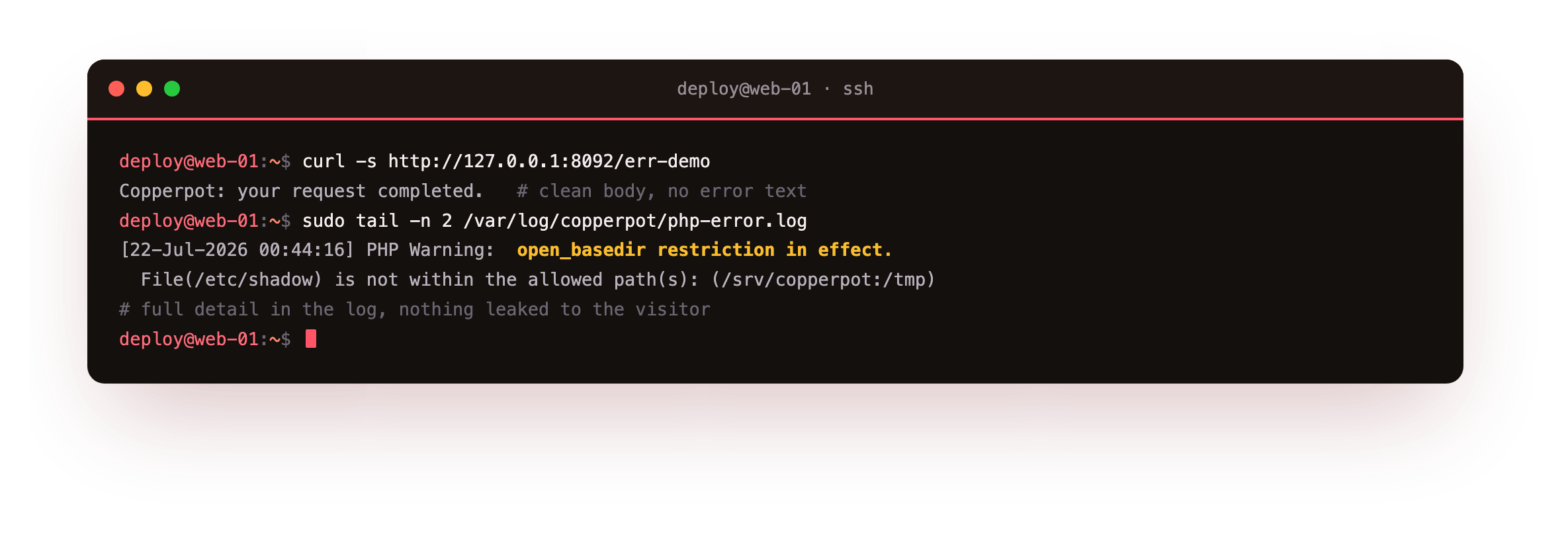
The client sees only the normal response body, with no error text. The pool's log records the full warning, naming the open_basedir refusal and the file and line. That is the shape you want: enough detail to debug in the log, nothing leaked to the person making the request.
The curl response should carry no stack trace or file path, while tail on the pool error log shows the full warning. If the error text appears in the response body, display_errors is still on for this pool, so set it off with log_errors on and restart php-fpm.
Going further: run as a non-root user, with TLS in front
Two more things complete the baseline. First, the workers already run as the copperpot user from the pool setup, so the app never executes as root; the master stays root only to bind sockets and read config. Keep it that way and never set a pool's user back to root. Second, put TLS in front at nginx, so traffic to the app is encrypted before it reaches the fpm socket.
server {
    listen 443 ssl;
    server_name copperpot.example.com;
    # certificate lines, then the same location blocks that proxy to fpm
}
The certificate handling, renewal and cipher choice are a topic of their own. The TLS and Certificates series covers issuing and renewing a certificate for a server like this one.
Frequently asked questions
Which functions should I put in disable_functions?
Start with the ones that run commands or spawn processes: exec, passthru, shell_exec, system, proc_open, popen and their relatives. A typical web app never needs them, so removing them shrinks what a code-execution bug can do. Test after each change, because a rare app does shell out on purpose. If it does, that call is worth replacing with a native function rather than keeping the whole family enabled.
Does open_basedir replace file permissions?
No, it works alongside them. File permissions are the kernel's control over what the worker user can touch. open_basedir is PHP's own fence, applied before it opens a file, which stops a path traversal inside the app from reaching outside its directories even where permissions might allow it. Use both: least-privilege ownership on disk, and open_basedir scoped to the app's paths.
Why set these in the pool and not php.ini?
Because the pool config scopes them to one app. Values set with php_admin_value in a pool cannot be overridden by application code, and they apply only to that pool's workers. Two apps on one box can then have different disable_functions and open_basedir lists. Settings in php.ini apply to every pool, which is fine for a shared baseline like expose_php but too broad for per-app fencing.
Is hiding the version real security?
On its own, no, and you should still patch on time. It is one layer: it removes an easy signal that lets a scanner target a known issue by exact build. Combined with disabled functions, a fenced filesystem and errors kept out of responses, it is part of reducing what an attacker learns and can do. Treat it as cheap hygiene, not a substitute for keeping the runtime up to date.
What you have, and where the series leaves you
You have a php-fpm pool that hides its version, refuses shell and process calls, cannot read outside the app, logs errors instead of printing them, and runs as a non-root user behind TLS. That is a runtime you can put in front of real traffic.
Across the series you installed php-fpm, sized a dedicated pool, put a real app behind nginx with a safe FastCGI config, tuned OPcache, and hardened the runtime. The LEMP box is now yours to run with confidence.