What you will build
By the end of this series your PHP site runs the way a fast, safe site should: nginx out front, php-fpm behind it running your code, a dedicated worker pool sized to the box, OPcache compiling once and serving from memory, and the classic security holes closed. This opening chapter shows that finished shape first, installs php-fpm on a bare Ubuntu 24.04 slice from nothing, and gets a real PHP page executing behind nginx that you can see for yourself.
- The series goal: your PHP app served by php-fpm behind nginx, on a pool you sized, with OPcache on and the runtime hardened.
- A fresh slice has no PHP at all, so
apt install php-fpm php-cliis the honest first step before anything else. - nginx does not run PHP; it hands a
.phprequest across a FastCGI socket to php-fpm, which executes it and returns the output. - Read the version back and curl the running page, so a dynamic 200 proves the code executed rather than a hopeful package name.
- A newly provisioned Ubuntu 24.04 slice you reach over SSH, with an account cleared for sudo.
- nginx already installed and answering on the box, since php-fpm sits behind it and never faces the network alone.
- The PHP codebase you plan to serve, WordPress, Laravel or your own, or the small app built across these chapters, and about half an hour.
- Working knowledge of curl at the shell, because the proof at each step is whatever it prints back.
See the destination first
Before a single package lands, look at where this ends up. The command below asks the finished stack whether it is healthy, and the answer travels the exact path a real request uses: in through nginx, across a FastCGI socket, into a php-fpm worker that runs the code, and back.
curl -si http://127.0.0.1:8092/health
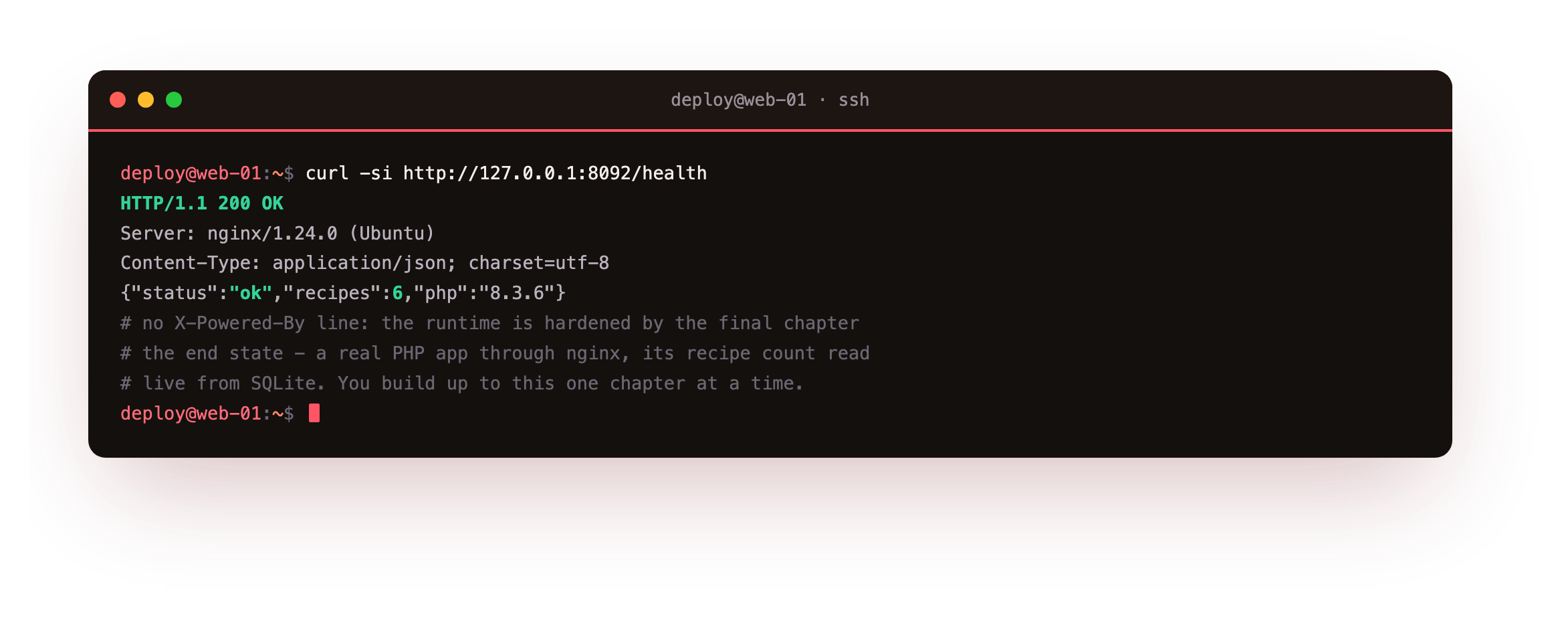
The HTTP/1.1 200 OK with Server: nginx says the request reached a php-fpm worker through the proxy, not by hitting the runtime directly. The JSON body is computed on the spot: an ok status, a recipe count read live from a database, and the PHP version that ran it. No X-Powered-By line rides along, because the runtime is already hardened in the final chapter. Five chapters assemble this response, and every one of them begins at the empty box in front of you.
Who this is for
You have a PHP site that runs on a shared host or a laptop, and you want it on a server you actually understand: quicker than the sleepy default stack, and locked down rather than left at its factory settings. Being a systems engineer is not required. Every command is written out, and a checkpoint after each one tells you what a correct result looks like before you go on.
What the whole thing needs is a machine with a public address that stays up, because a site has to answer while you are asleep. A slice is that always-on address, and the next section brings PHP up on one from a clean install.
Install php-fpm from a bare slice
On a fresh slice there is no PHP binary of any kind yet. Two packages fix that: the php-fpm metapackage pulls in the FastCGI Process Manager that serves web requests, and php-cli gives you the terminal binary for version checks and scripts. Add php-sqlite3 in the same command, because the app built later reads a small database.
sudo apt install -y php-fpm php-cli php-sqlite3
php -v
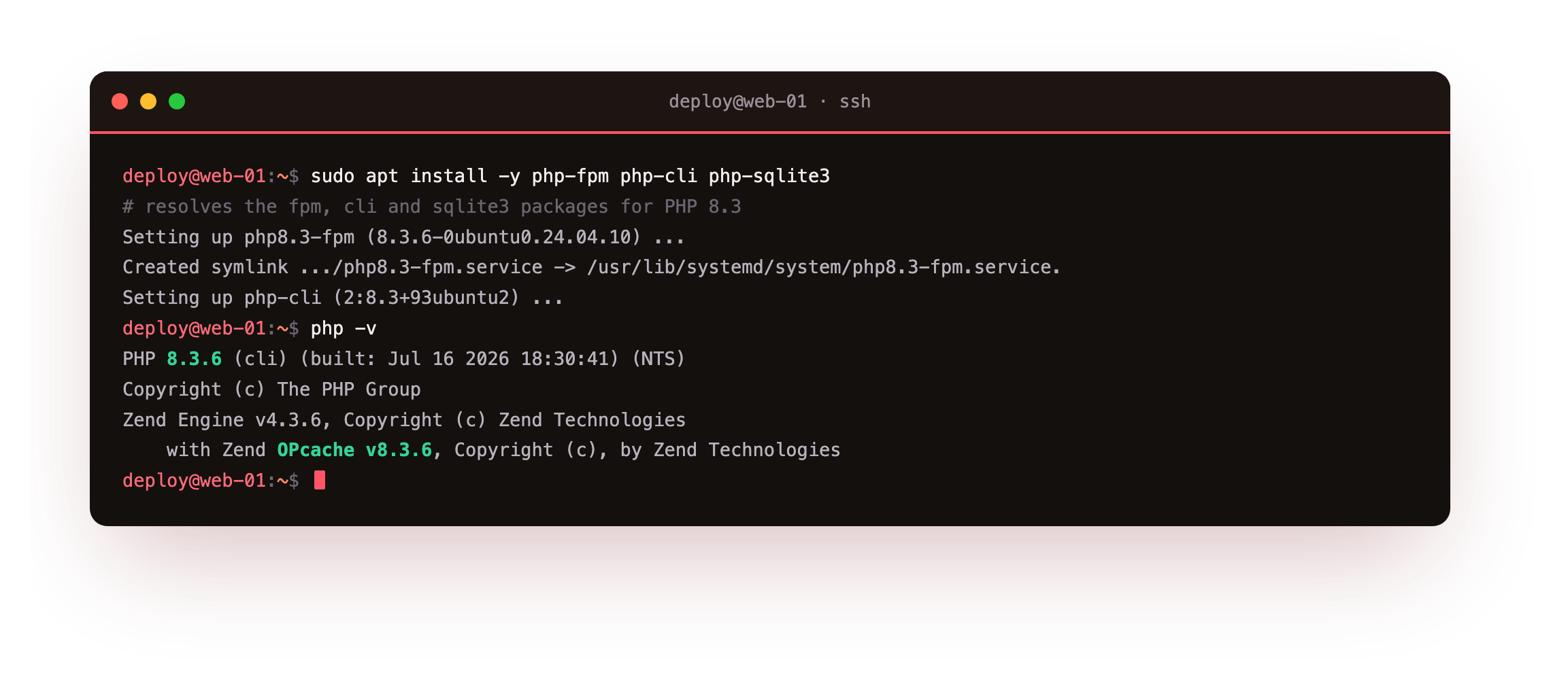
On Ubuntu 24.04 all three resolve to the 8.3 line, and reading php -v back, rather than trusting the package name, confirms the exact build that will run your code. This slice reports PHP 8.3.6 with the Zend OPcache extension already loaded, which matters in chapter four. Because the distribution pins the version, the same command yields the same build on every box you install it on.
php -v should print PHP 8.3.6 (or a newer 8.3 patch) and name Zend OPcache on its last line. If php is not found, the install did not finish, so run the apt command again before continuing.
The fpm service and its socket
Installing php-fpm registers a systemd service and starts it. That service runs a master process which manages a pool of PHP workers, and it exposes the pool on a unix socket so nginx has something to connect to. Look at the service, then at the socket it created.
systemctl status php8.3-fpm
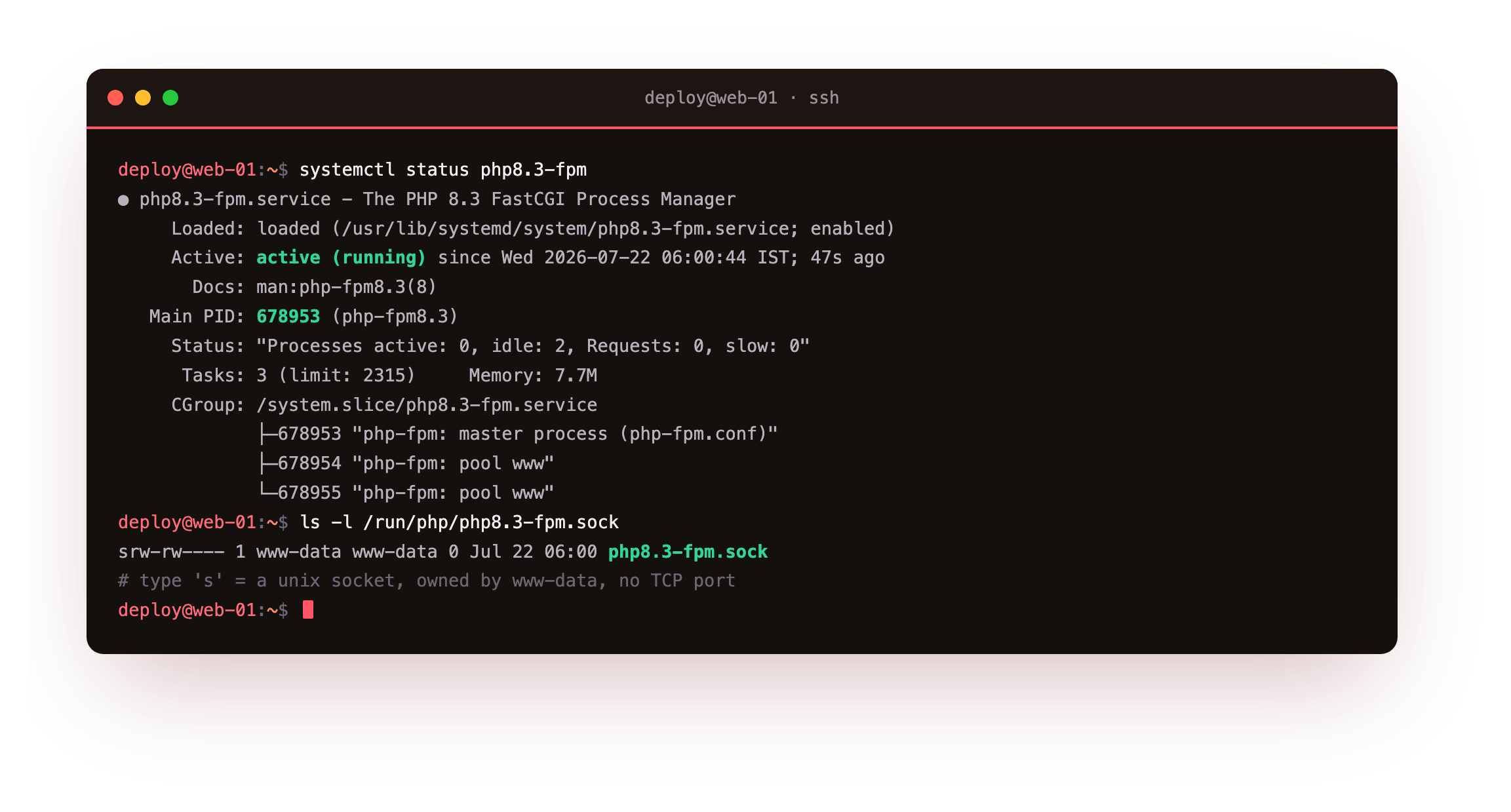
The service reads active (running). The master process owns the pool, and two pool www workers sit idle waiting for their first request. The default pool listens on /run/php/php8.3-fpm.sock, a socket file owned by www-data, so any process in that group may connect to it. A socket under /run is a file on disk, not a network port, so nothing is exposed on an interface and access is a plain filesystem permission.
The service should read active (running), and ls /run/php/ should list php8.3-fpm.sock. If the socket file is missing, start the service with sudo systemctl start php8.3-fpm and check again before wiring nginx to it.
Point nginx at the fpm socket and run a real page
Now connect the two. Add a small nginx server block that serves a document root and passes any .php request to the fpm socket. Ubuntu ships snippets/fastcgi-php.conf, which sets the FastCGI parameters correctly and guards them, so the one line you add is the fastcgi_pass that names the socket. This demo listens on loopback port 8092 so it never disturbs the default site.
server {
    listen 127.0.0.1:8092;
    server_name copperpot.example.com;
    root /srv/copperpot/public;
    index index.php;

    location / {
        try_files $uri $uri/ /index.php?$query_string;
    }
    location ~ \.php$ {
        include snippets/fastcgi-php.conf;
        fastcgi_pass unix:/run/php/php8.3-fpm.sock;
    }
}
Drop an index.php in the document root that prints the running PHP version, the render time, and a counter that climbs on each hit, so the output is unmistakably computed. Test the config, reload nginx, and put a request to it through the proxy.
sudo nginx -t && sudo systemctl reload nginx
curl -i http://127.0.0.1:8092/
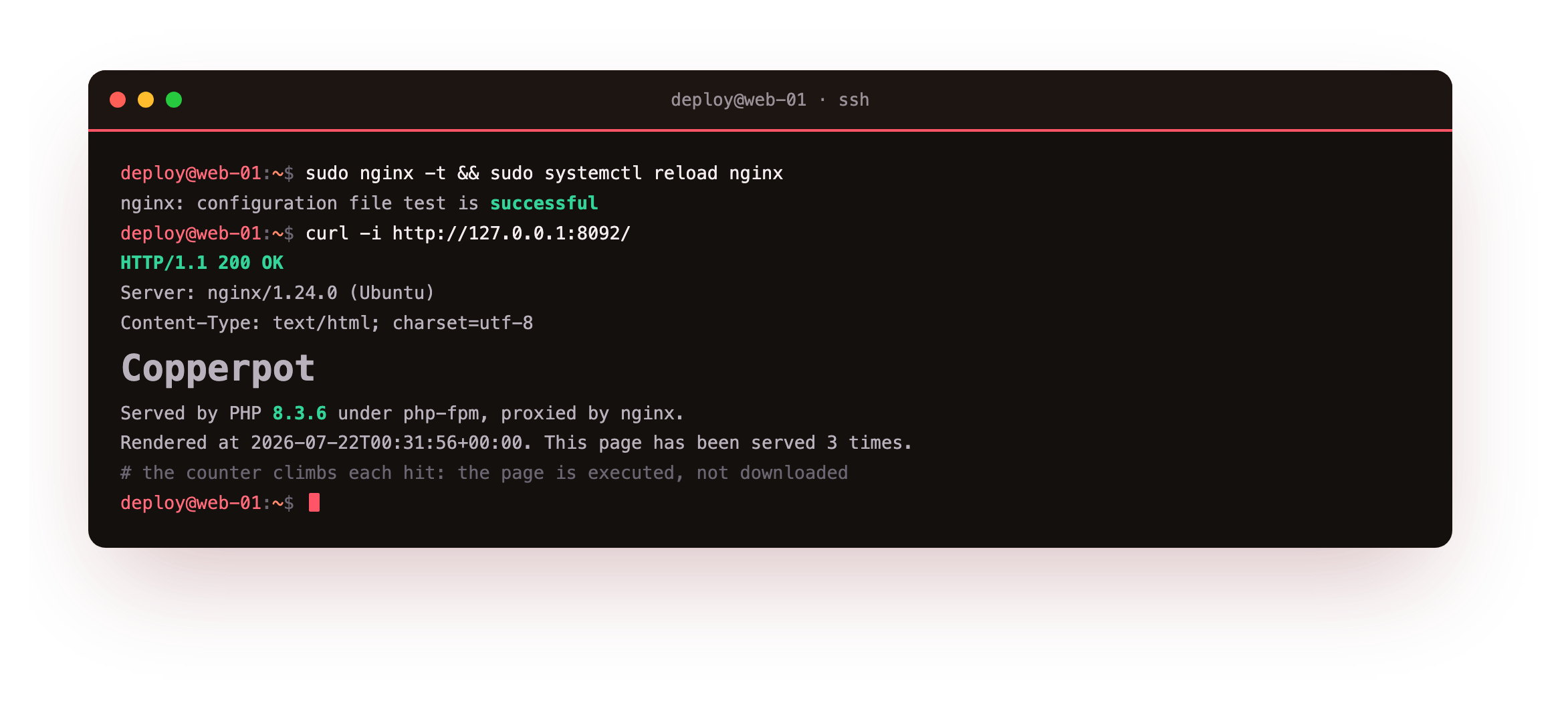
Here is the payoff. The request returns 200 OK with Server: nginx/1.24.0, and the body carries live values: the PHP version, a fresh timestamp, and a hit counter that increments every time you ask. That climbing counter is proof the page executed on the runtime. Had nginx served the file as a download instead, you would see raw <?php source in the response, which is the classic symptom of a missing or wrong fastcgi_pass. This is a working LEMP runtime, executing your code and reaching you through nginx.
A dynamic 200 through port 8092, with a counter that goes up each time you rerun the curl, is the from-zero milestone of this chapter: PHP you installed, executing behind nginx on a slice you brought up from nothing. In chapter three the same runtime serves a full app that you load live in a browser.
Going further: what LEMP means and why the split matters
The name LEMP is Linux, nginx (the E stands for the way it is said), MySQL or MariaDB, and PHP. This series is about the P and how it joins the E; the database layer has guides of its own.
Holding the two web roles apart is what makes the stack fast. nginx is the web server: it terminates the connection, serves static assets straight from disk, applies headers, and decides which requests are dynamic. php-fpm is the application runtime: it keeps a pool of workers warm, runs your code, and returns the result over the socket. Neither does the other's job.
That division is why a LEMP box holds up under load. A static file never wakes a PHP worker, and the workers are a fixed, sized pool rather than one fresh thread per connection. The socket is the seam between them: nginx opens it, writes a FastCGI request, and reads the response back.
Keeping the runtime on a socket under /run, never on a public port, means the only way a request reaches your code is through nginx, which is exactly the boundary you want. The next chapter sizes that pool on purpose instead of leaving it at the tiny default.
Frequently asked questions
Do I need a package called nginx-php or a PHP module for nginx?
No. nginx has no PHP module the way old Apache setups shipped mod_php. nginx and php-fpm are separate services that speak FastCGI to each other. You install nginx, install php-fpm, and join them with a single fastcgi_pass line aimed at the fpm socket. That separation is the whole idea of the LEMP design, and it is why either side can be reloaded or tuned without disturbing the other.
Why did my browser download the .php file instead of running it?
That happens when the request never reached php-fpm, so nginx treated the script as a static asset and sent its bytes. The usual causes are a missing location ~ \.php$ block or a fastcgi_pass pointing at a socket path that does not exist. Run ls /run/php to read the real socket name, confirm the service is active, correct the path, and reload nginx before trying the request again.
Is php-cli the same thing as the fpm workers?
They are separate binaries built from one PHP version. php-cli runs scripts from the terminal and reads its own ini under /etc/php/8.3/cli. The fpm workers serve web traffic and read the ini under /etc/php/8.3/fpm. A value you change for the command line does not touch the web runtime, so anything that affects served pages belongs in the fpm ini, not the cli one.
Should the fpm pool listen on a TCP port instead of a socket?
On a single box the unix socket is the natural pick: there is no port to expose by mistake, and access is a file permission you control. A TCP listener like 127.0.0.1:9000 earns its keep when nginx and php-fpm run on separate hosts, or when a tool insists on a host and port. Both keep the runtime off the public interface, which is the part that matters for safety.
What you have, and what comes next
You brought up a bare Ubuntu 24.04 slice, installed php-fpm and php-cli from nothing, confirmed the build with php -v, found the fpm service and its socket, pointed an nginx server block at that socket, and watched a real page execute and return a dynamic 200. You also saw the destination the series builds toward, that same runtime answering a health check through nginx.
The default pool it runs on is tuned tiny so it starts anywhere, which a busy site outgrows fast. The next chapter leaves that default behind and sizes a dedicated php-fpm pool: its own least-privilege user, its own socket, and a worker count matched to the memory on the box.