The layer between your app and two databases
PostgreSQL connection routing is the job of sending each query to the right server: writes to the primary, reads to the standby, over pooled connections that a busy app can reuse. This chapter puts PgBouncer in front of a primary and standby on a live Ubuntu 24.04 server and proves each pool lands on the server you expect.
- PgBouncer sits between the app and PostgreSQL, so hundreds of client connections ride on a handful of backend ones.
- A second logical database in PgBouncer can point at the standby, giving you a read pool and a write pool on one port.
- Transaction pooling assigns a backend only for the length of a transaction, which packs many clients onto few connections.
- The app decides which pool to use, so a read-write split is a routing choice, not database magic.
PostgreSQL runs one process per connection, so a few hundred idle connections waste real memory. A pooler solves that by keeping a small set of backend connections and handing them to clients as needed. With a primary and a standby, the pooler also becomes the natural place to split traffic: point one pool at the primary for writes and another at the standby for reads, and the app just chooses a database name.
Prerequisites
- The streaming primary on 5432 and standby on 5433 from the earlier chapters, on Ubuntu 24.04 LTS.
- PgBouncer installed and listening on 127.0.0.1:6432 with an auth file for the app roles.
- An
app_userrole for writes and areadonlyrole for reads, present on both clusters. - Sudo and psql access, plus the PgBouncer admin console reachable as an admin user.
PostgreSQL connection routing with a pooler
The trick is two logical databases in PgBouncer that point at different clusters. The [databases] section maps a name the app connects to onto a real host and port.
[databases]
shopdb    = host=127.0.0.1 port=5432 dbname=shopdb
shopdb_ro = host=127.0.0.1 port=5433 dbname=shopdb
Reload PgBouncer and both names are live on the one port, 6432. Now prove where each lands by asking each connection whether it is on a primary or a standby, and which backend port answered.
psql "host=127.0.0.1 port=6432 dbname=shopdb user=app_user" \
  -c "SELECT pg_is_in_recovery(), inet_server_port();"
psql "host=127.0.0.1 port=6432 dbname=shopdb_ro user=readonly" \
  -c "SELECT pg_is_in_recovery(), inet_server_port();"
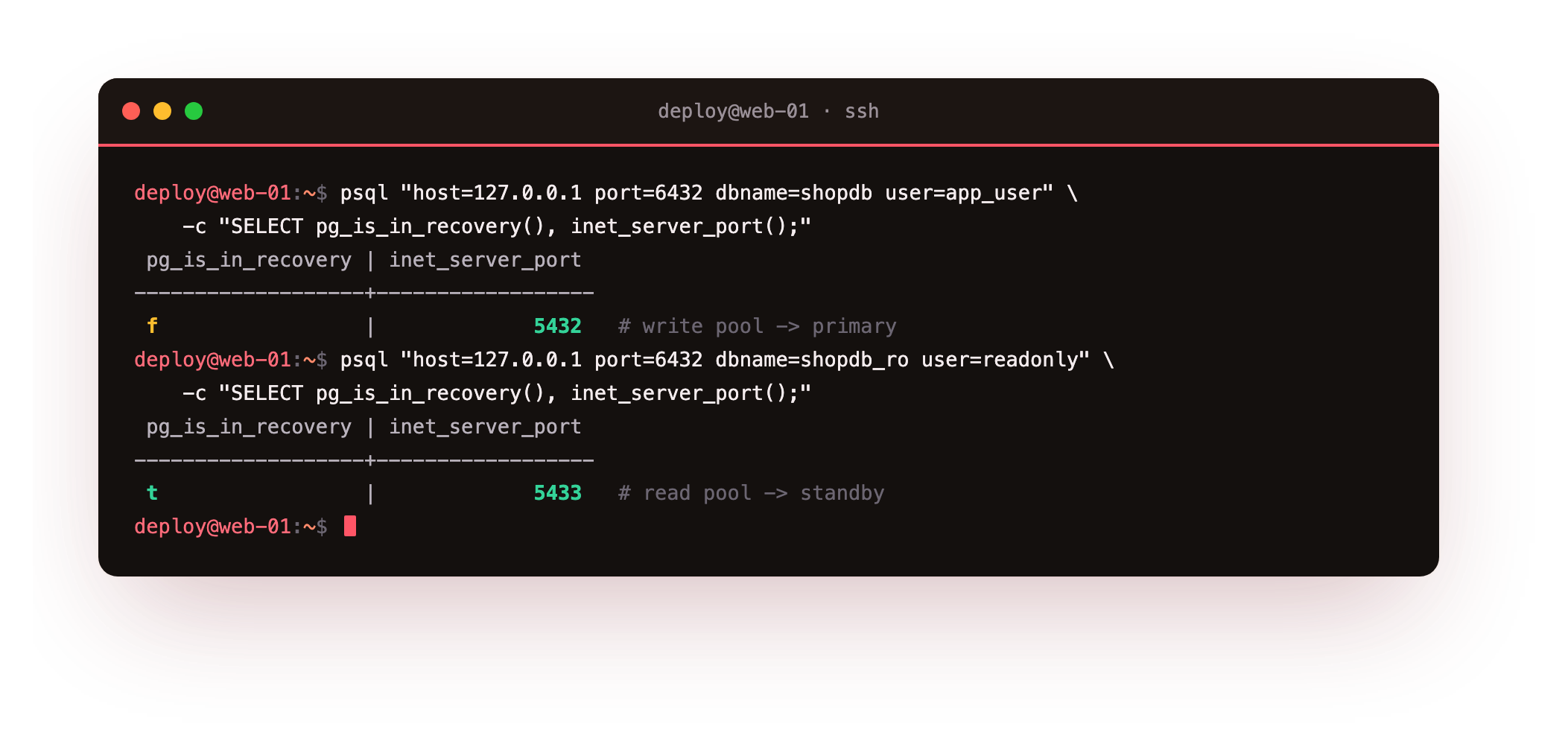
The write pool answers f on backend port 5432, the primary. The read pool answers t on backend port 5433, the standby. Same client port, two destinations. Your app writes through shopdb and reads through shopdb_ro, and neither connection knows or cares that a pooler sits in the middle.
Through port 6432 the write pool should report f on backend 5432 and the read pool t on backend 5433. If both answer the same backend, the two [databases] lines point at one port, so fix the port and reload PgBouncer before you route real traffic.
Read the pool from the admin console
PgBouncer exposes its own state through a pseudo-database called pgbouncer. Connect to it as an admin user and ask what it is doing.
psql "host=127.0.0.1 port=6432 dbname=pgbouncer user=app_user" -c "SHOW POOLS;"
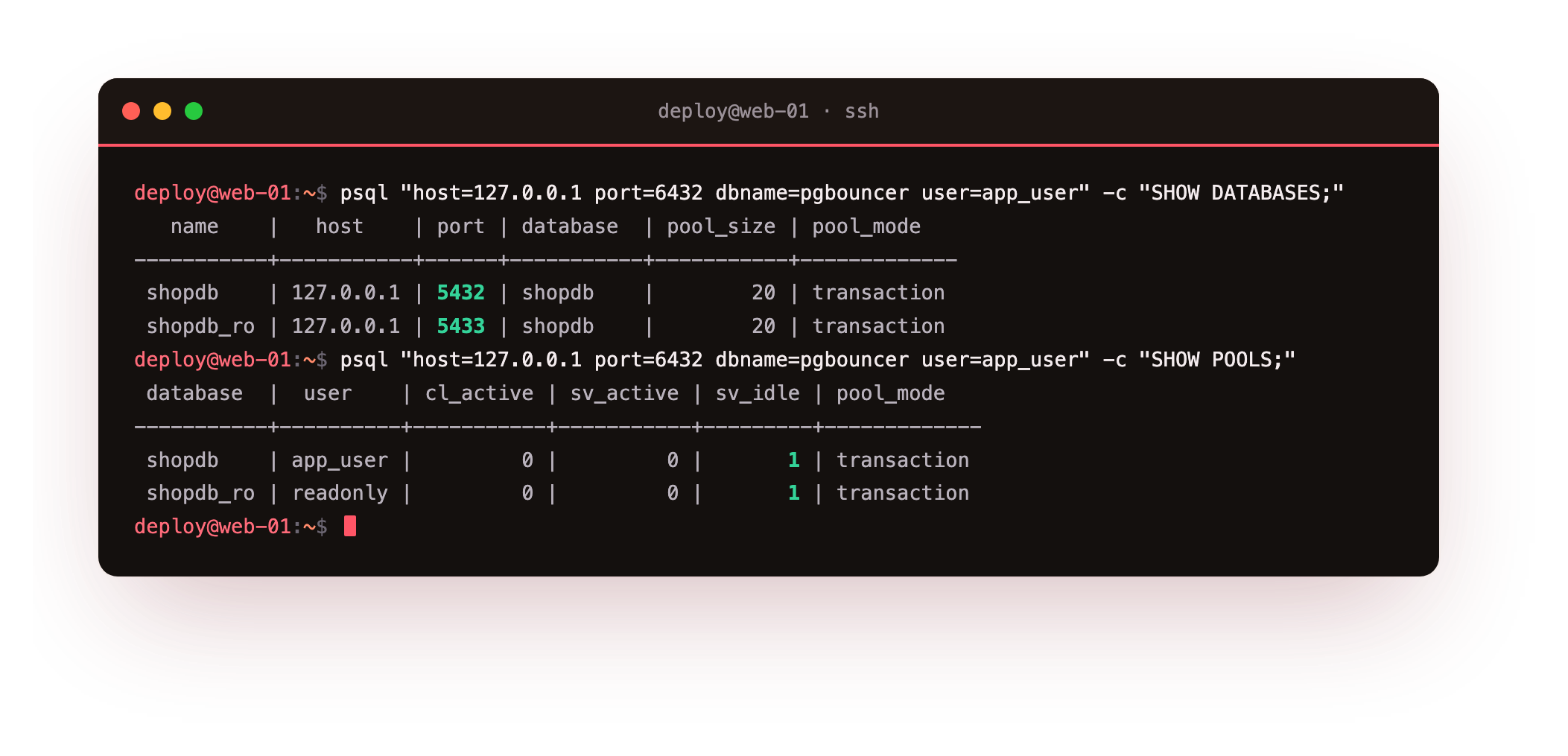
SHOW DATABASES lists both logical databases and the backend each points at, 5432 and 5433. SHOW POOLS shows one pool per database, both in transaction mode, each with a single idle server connection ready. That single sv_idle connection is the whole point: many clients, one backend link per pool. The counts hold steady because transaction pooling hands the backend back the instant each transaction ends.
Prove the reuse with pool stats
Numbers make it concrete. Run a burst of queries through each pool, then read the counters.
psql "host=127.0.0.1 port=6432 dbname=pgbouncer user=app_user" -c "SHOW STATS;"
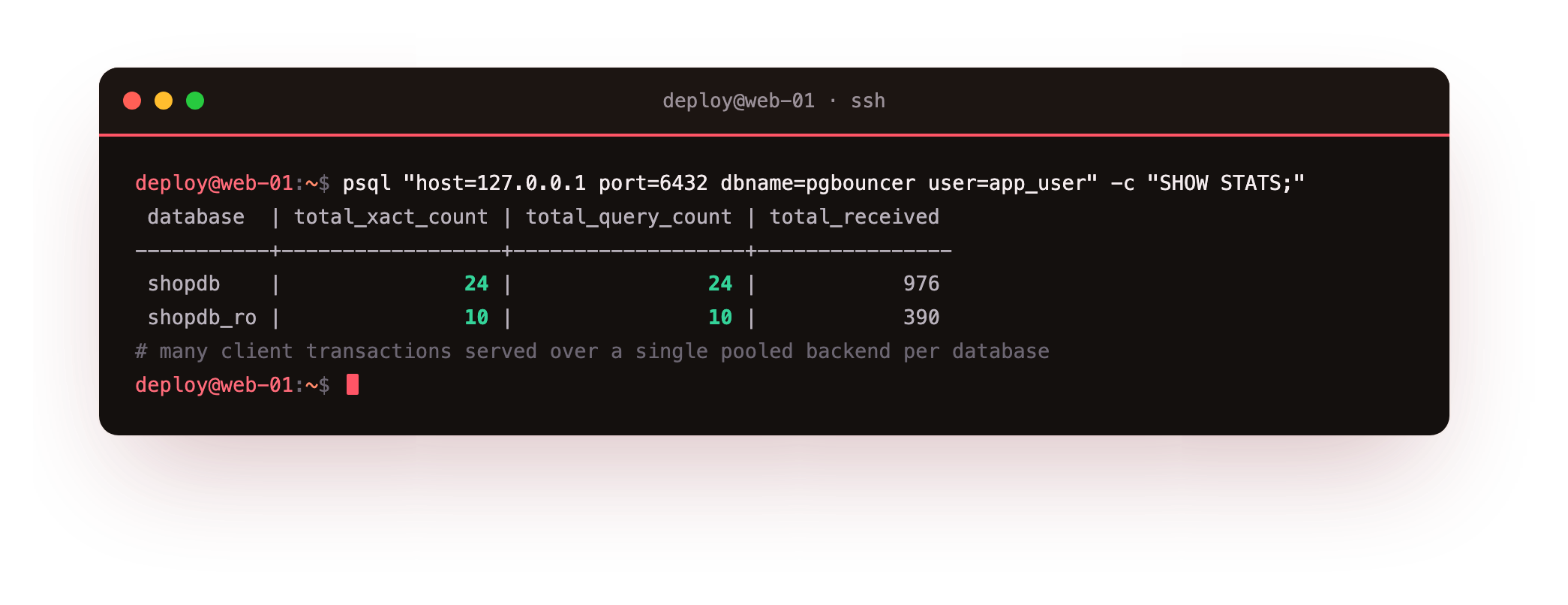
SHOW STATS reports the query and transaction counts per logical database: 24 on the write pool, 10 on the read pool in this run, all served over one pooled backend connection each. That is dozens of client transactions carried on a single backend link, which is exactly the memory saving a pooler exists for. On a small VPS this is the difference between surviving a traffic spike and running out of connections.
Going further: a VIP so failover is invisible
Routing solves reads and writes, but not the address change when the primary fails over. Today the write pool names 5432 by host and port. In production you point that write pool at a virtual IP that floats between servers, moved by keepalived or your failover tool to whichever node is currently the primary. When a promotion happens, the VIP moves, the pool reconnects, and the app never learns a new address. The pooler routes, the VIP follows the primary, and failover becomes a blip instead of an outage.
Troubleshooting routing
A pool authenticates but every query is read-only. The write pool is pointed at the standby by mistake. Check the [databases] line and confirm the primary's port, then reload PgBouncer.
Clients wait and never get a backend. The pool size is too small for the load, or backends are stuck in long transactions. Raise default_pool_size carefully, and make sure the app commits promptly so transaction pooling can recycle connections.
A prepared-statement error appears after moving to transaction pooling. Transaction mode does not keep server-side state between transactions. Use protocol-level prepared statements supported by recent PgBouncer, or disable server-side prepares in the client.
Frequently asked questions
Does PgBouncer decide reads versus writes on its own?
No. PgBouncer routes by the database name the client connects to, not by inspecting the query. The read-write split is the app choosing the read pool or the write pool. Tools that parse SQL to route exist, but the simple and predictable approach is app-chosen pools.
What does transaction pooling actually change?
A backend connection is assigned only for the duration of a transaction, then returned to the pool, so many short client transactions share a few backends. It packs connections tightly but drops features that rely on session state, such as session-level prepared statements.
How does a client find the primary after failover?
Point the write pool at a virtual IP that your failover tool moves to the current primary. When a standby is promoted, the VIP follows it, the pool reconnects to the same address, and the application does not need any config change.
Can I run PgBouncer on the app server or the database server?
Either works. On the app server it cuts connection setup across the network; on the database server it centralizes limits. Many setups run one near the app for pooling and rely on a VIP in front of the databases for failover.
What you have, and what comes next
You have PgBouncer routing writes to the primary and reads to the standby on one port, with pool stats proving many client transactions ride on a single backend each. You also have the concept that makes failover invisible to clients: a VIP the primary role follows.
Replication protects you from a dead server, but not from a bad statement or a dropped table, which a standby copies faithfully within a second. The last chapter is the safety net that catches human error: base backups, WAL archiving, and rewinding the clock to a moment before the mistake. See Backups and Point-in-Time Recovery.