The safety dial most people never touch
PostgreSQL synchronous replication lets you trade a little commit latency for a hard promise: a transaction is not confirmed to the client until the standby also has it. This chapter creates a replication slot so the primary holds WAL for the standby, then flips a single commit from asynchronous to synchronous and watches the difference on a live server.
- A physical replication slot makes the primary retain WAL a standby still needs, so it can resume after a brief disconnect.
- The slot's restart_lsn is the oldest position the standby still requires, and it advances as the standby confirms progress.
- synchronous_standby_names names the standby the primary will wait for before confirming a commit.
- A synchronous commit blocks until the standby answers, so if the standby is gone the write waits.
Asynchronous replication is the default because it is fast: the primary confirms your write the moment it is durable locally, and the standby catches up a beat later. The risk is a narrow window. If the primary dies in that beat, a confirmed transaction may not have reached the standby yet. Synchronous replication closes that window, at the cost of waiting for the standby on every commit.
Prerequisites
- The primary and standby pair from the first chapter of this series, streaming on an Ubuntu 24.04 LTS host.
- The standby cloned with a slot named
standby_slot, as thepg_basebackup -Sstep created. - Sudo and psql access to both the primary on 5432 and the standby on 5433.
- A willingness to stop the standby briefly to see a synchronous commit wait.
A slot so the primary holds WAL for the standby
Without a slot, the primary recycles old WAL on its own schedule. If a standby falls behind or drops off, the segment it needs can be gone, and it has to be rebuilt. A slot fixes that by recording how far the standby has consumed, so the primary keeps everything newer. Read the slot the clone created.
sudo -u postgres psql -p 5432 -x -c "SELECT slot_name, slot_type, active, \
  restart_lsn, wal_status FROM pg_replication_slots;"
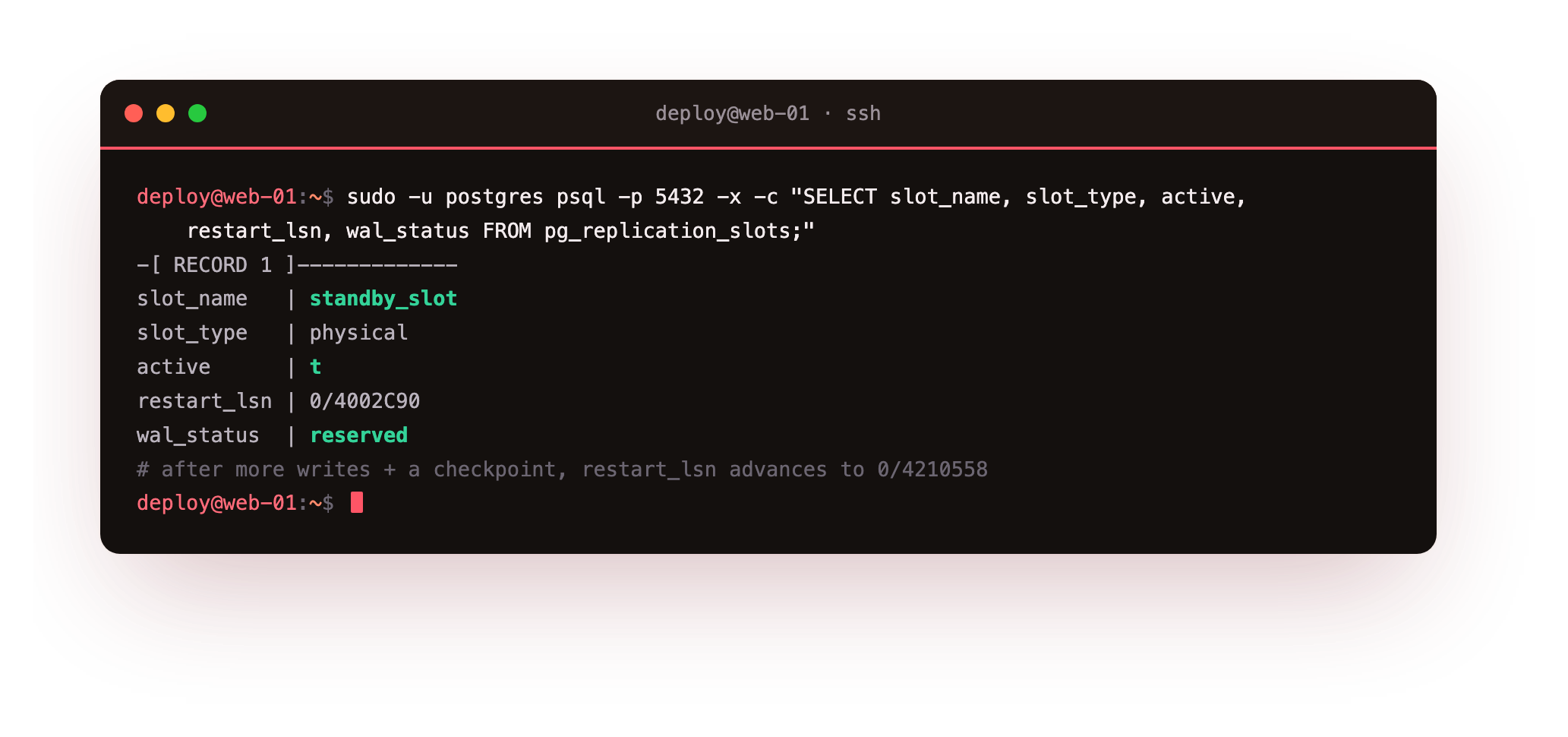
The slot is physical, active is t, and wal_status is reserved, meaning the primary is holding WAL for it. The restart_lsn is the oldest log position the standby still needs. Generate more writes on the primary and run a checkpoint, and restart_lsn moves forward, here from 0/4002C90 to 0/4210558. That advance is the standby telling the primary it is safe to release the older WAL.
PostgreSQL synchronous replication, on demand
By default the standby is asynchronous. To make a commit wait for it, name the standby in synchronous_standby_names and reload. The name is the standby's application_name, which is standby here.
sudo -u postgres psql -p 5432 \
  -c "ALTER SYSTEM SET synchronous_standby_names = 'standby';"
sudo -u postgres psql -p 5432 -c "SELECT pg_reload_conf();"
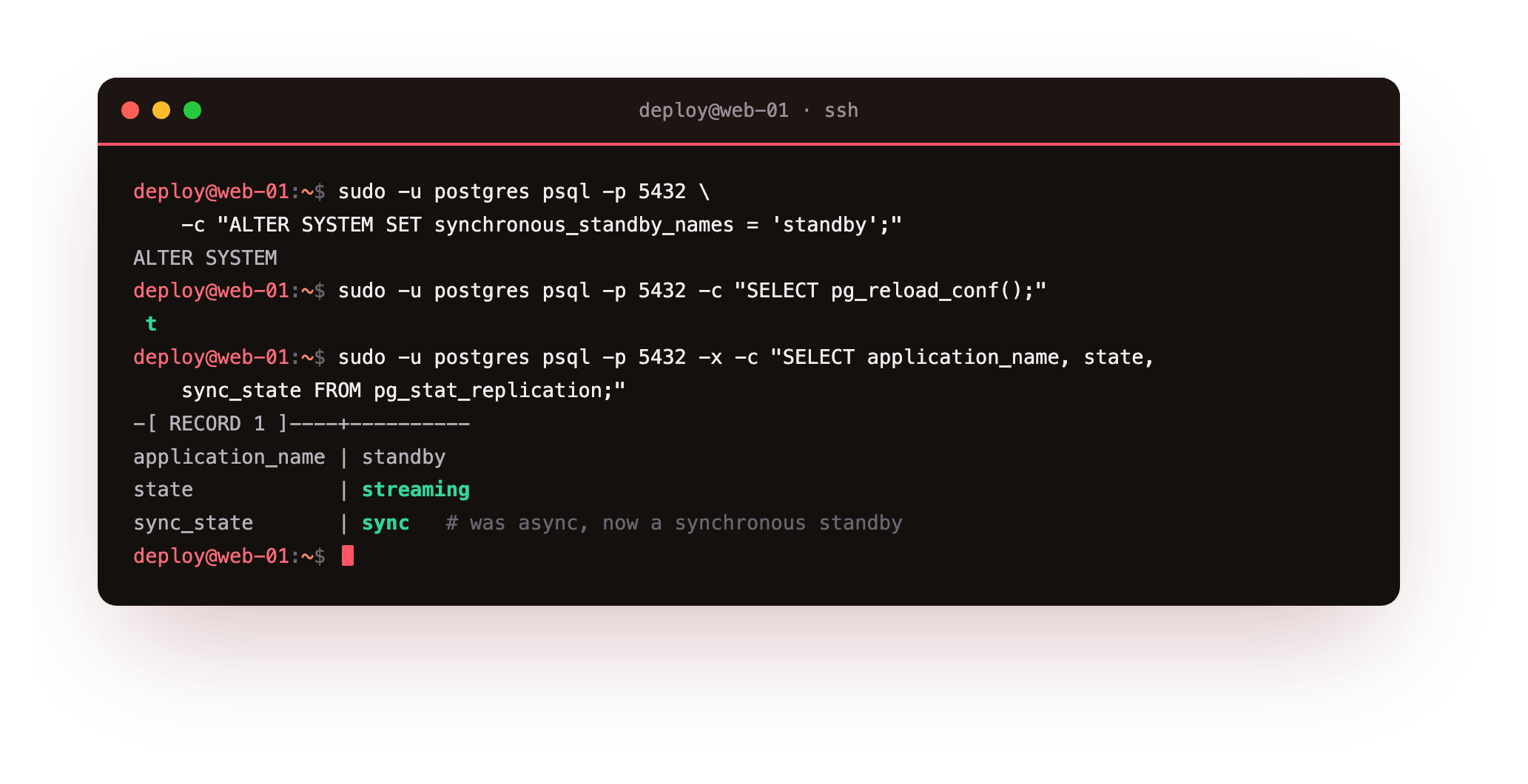
Read pg_stat_replication again and sync_state has changed from async to sync. From this moment, any commit governed by synchronous_commit = on waits for the standby to confirm it has the WAL before the client is told the write succeeded. The default level, on, waits for the standby to flush WAL to disk. Stronger levels wait for it to be applied; weaker ones do not wait at all.
Watch a synchronous commit wait
The guarantee is only real if the commit actually blocks when the standby cannot answer. Prove it. Stop the standby, then run an insert on the primary and watch it hang, because the sync standby it is waiting for is gone.
sudo pg_ctlcluster 16 standby stop
sudo -u postgres psql -p 5432 -d shopdb -c "INSERT INTO customers (email, \
  full_name, city) VALUES ('[email protected]','Sync Demo','Pune');"
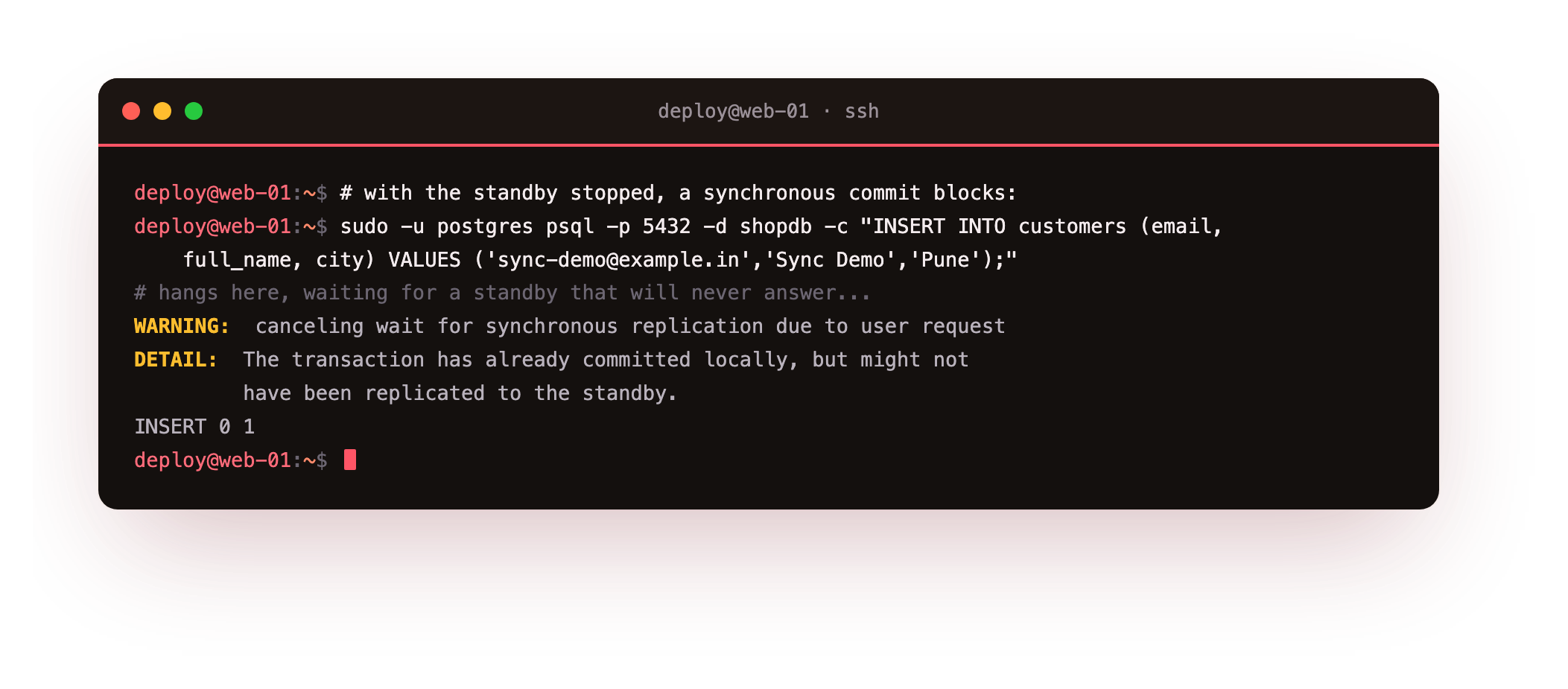
The insert stops and waits. Cancel the wait and PostgreSQL prints exactly what happened: canceling wait for synchronous replication, with the detail that the transaction has committed locally but might not be on the standby. That warning is the whole lesson. A single synchronous standby is a single point of failure for writes, so if it dies, commits stall. Start the standby again and the held transaction streams across as the standby reconnects.
synchronous_standby_names means writes stop if that standby is down. For real synchronous durability without that fragility, run at least two standbys and require a quorum, for example ANY 1 (s1, s2), so any one can be lost without blocking commits.
With the standby stopped, the insert on 5432 should hang until you cancel it; start the standby again and the same commit returns at once. If it never blocks, sync_state is still async, so recheck that the name in synchronous_standby_names matches the standby's application_name exactly.
Going further: when to reach for synchronous commit
Most workloads should stay asynchronous. It is faster, and a well-monitored standby that trails by milliseconds is fine for reads and for failover. Turn on synchronous commit when losing even one confirmed transaction is unacceptable, such as a payment ledger, and only when you have enough standbys that waiting for one does not put your writes at the mercy of a single machine. You can even set it per transaction, keeping most writes fast and making the few that matter wait.
Troubleshooting slots and sync
sync_state stays async after the reload. The name in synchronous_standby_names does not match the standby's application_name. Check the standby's primary_conninfo and set application_name there to the exact name you listed.
restart_lsn never advances and disk fills. A slot whose standby is gone pins WAL forever, and the primary's disk grows without bound. Drop an obsolete slot with pg_drop_replication_slot, and set max_slot_wal_keep_size so a stuck slot cannot fill the disk.
Commits hang with no obvious reason. A synchronous standby is down or unreachable. Confirm the standby is streaming in pg_stat_replication, or temporarily clear synchronous_standby_names to unblock writes while you fix it.
Frequently asked questions
Does synchronous replication mean zero data loss?
It means a confirmed commit is on at least one standby before the client hears success, so a primary failure cannot lose an acknowledged transaction. It does not protect against a bad statement or the loss of both nodes at once, so backups still matter.
What is the difference between the synchronous_commit levels?
The setting controls how far a commit waits: off does not wait even locally, local waits for the primary's own disk, on waits for the standby to flush WAL, and remote_apply waits for the standby to apply it so a read there sees the row.
Why does my disk fill up after adding a slot?
A slot makes the primary keep every WAL segment the standby has not consumed. If the standby stops, that WAL piles up with nowhere to go. Set max_slot_wal_keep_size so an abandoned slot is capped rather than filling the disk.
Can I make only some transactions synchronous?
Yes. synchronous_commit can be set per session or per transaction, so you keep most writes fast and asynchronous and make only the few that must not be lost wait for the standby. That is often the right balance.
What you have, and what comes next
You have a replication slot holding WAL for the standby with a restart_lsn you watched advance, and you have seen a synchronous commit block when its standby was gone. You understand the dial now, and why most servers leave it on the fast setting.
A standby is only useful in a crisis if you can turn it into a primary. The next chapter is failover: promoting the standby, watching the timeline change, and dealing with the old primary so you never end up with two of them: Failover and Promotion.