What you will build
By the end of this series your single database is no longer a single point of failure: PostgreSQL streaming replication keeps a live standby on a second box, ready to take over, with synchronous durability, failover, connection routing, and point-in-time backups layered on top. This first chapter takes a bare Ubuntu 24.04 slice, installs PostgreSQL, builds a primary and a standby, and shows you the payoff up front so every later step has a destination you can see.
- The series destination: a row you write on the primary is already present on a second machine, and that second machine can be promoted the moment the primary dies.
- On a fresh slice nothing is installed.
apt install postgresqlis the real first step, and it gives you a primary cluster on 5432 for free. - A standby is cloned from the primary with
pg_basebackup, so it starts life as a byte-for-byte physical copy and then follows every change. - The standby stays in recovery and refuses writes, which is exactly what makes it safe to read from and trustworthy to promote.
- A slice on Ubuntu 24.04 LTS you reach over SSH as a sudo user, with no PostgreSQL running on it so far.
- Enough free space under
/var/lib/postgresqlfor a whole second copy of the data directory, since a standby is a full clone. - Comfort reading a psql query and the row it returns, because every check in this series is you reading state back.
- Around half an hour, and the habit of proving each step on the standby instead of trusting that the primary sent it.
See the destination first
Here is where this series is heading, in one screen. An application writes a customer row to the primary on port 5432. Without any second write, that same row is already readable on a standby that lives on another machine, listening on 5433, sitting in recovery as a read-only copy. That is the whole point: your data is on two boxes, so losing one does not lose the data.
# the end state: a primary on 5432, plus a live standby holding a copy
sudo -u postgres psql -p 5432 -d shopdb -c "INSERT INTO customers (email, \
  full_name, city) VALUES ('[email protected]','Safe Copy','Chennai');"
sudo -u postgres psql -p 5433 -tAc "SELECT pg_is_in_recovery();"
sudo -u postgres psql -p 5433 -d shopdb -c "SELECT id, email, city FROM \
  customers WHERE email='[email protected]';"
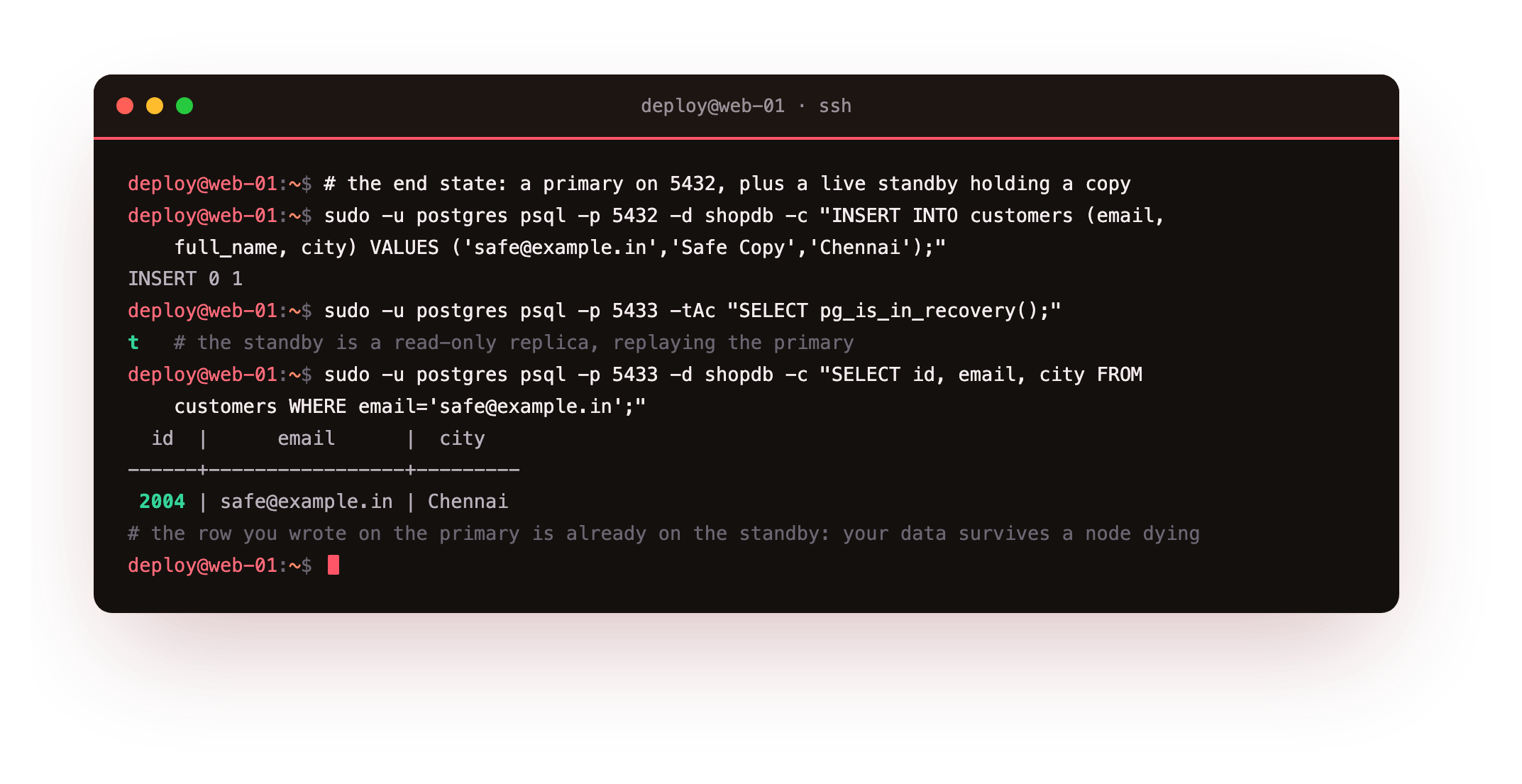
The insert returns INSERT 0 1 on the primary. The standby answers t to pg_is_in_recovery(), meaning it is a read-only replica replaying the primary. And the row, id 2004, comes straight back when you read it on the standby, though no write ever touched that machine. When the primary dies, you promote this standby and your application keeps its data.
None of this exists yet. Your slice has no PostgreSQL on it, no shopdb, no standby, no second copy of anything. The rest of this chapter starts that from an empty box, and the later chapters add the durability dial, the failover, the routing, and the backups behind it. This first one gets a primary and a standby streaming.
Install PostgreSQL from a bare slice
On a fresh Ubuntu 24.04 slice the database is not there yet. One apt command installs it, the from-zero step a lot of replication guides skip straight past on their way to the interesting part. Install the server, then create a second, empty cluster for the standby to clone into.
sudo apt update
sudo apt install -y postgresql
sudo pg_lsclusters
sudo pg_createcluster 16 standby -p 5433
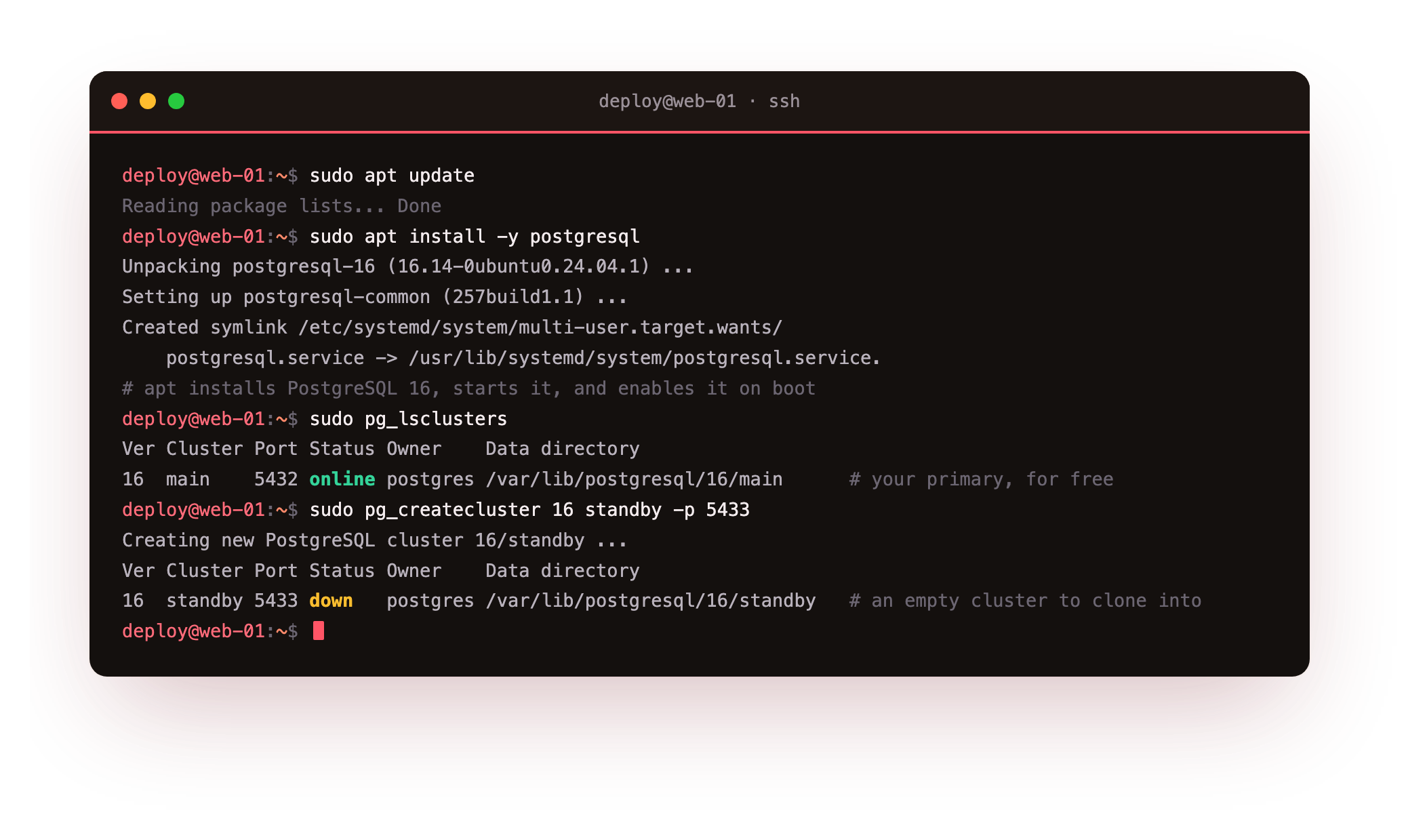
apt pulls in PostgreSQL 16.14, the version Ubuntu 24.04 ships, and wires it up as a systemd service that starts now and comes back after a reboot. That install hands you a main cluster on port 5432 already running: that is your primary, for free. Then pg_createcluster 16 standby -p 5433 makes a second cluster on 5433, initialised but down, an empty shell you will overwrite with a copy of the primary in a moment.
Run sudo pg_lsclusters. You should see two rows: 16 main 5432 online and 16 standby 5433 down. If the standby line is missing, rerun pg_createcluster 16 standby -p 5433 and read its output for a port clash.
Give the primary a replication role and rule
The primary already writes a write-ahead log, so the first job is a login the standby can connect with and a line in pg_hba.conf that lets it in. Create a role with the REPLICATION attribute and nothing more, then allow it on the loopback address.
CREATE ROLE replicator WITH REPLICATION LOGIN PASSWORD 'a-strong-password';
# in /etc/postgresql/16/main/pg_hba.conf
host    replication     replicator      127.0.0.1/32            scram-sha-256
Reload the primary so the rule takes effect. On a real pair of servers that 127.0.0.1/32 becomes the standby's private address. The default wal_level of replica already carries enough detail to stream, so there is nothing else to switch on here.
Clone the standby with pg_basebackup
The standby cluster is empty. It needs the primary's data as a physical copy, taken with pg_basebackup, which also writes the recovery settings that point the copy back at the primary. Stop the standby, wipe its data directory, and base-backup the primary into it.
sudo pg_ctlcluster 16 standby stop
sudo -u postgres pg_basebackup -h 127.0.0.1 -p 5432 -U replicator \
  -D /var/lib/postgresql/16/standby -R -X stream -C -S standby_slot
sudo pg_ctlcluster 16 standby start
The -R flag writes a standby.signal file and the primary_conninfo line, so the copy boots straight into recovery instead of coming up as a second independent database. The -C -S standby_slot pair creates a replication slot on the primary at the same time, which the next chapter puts to work. Now confirm both clusters are up and check which one is the standby.
sudo pg_lsclusters
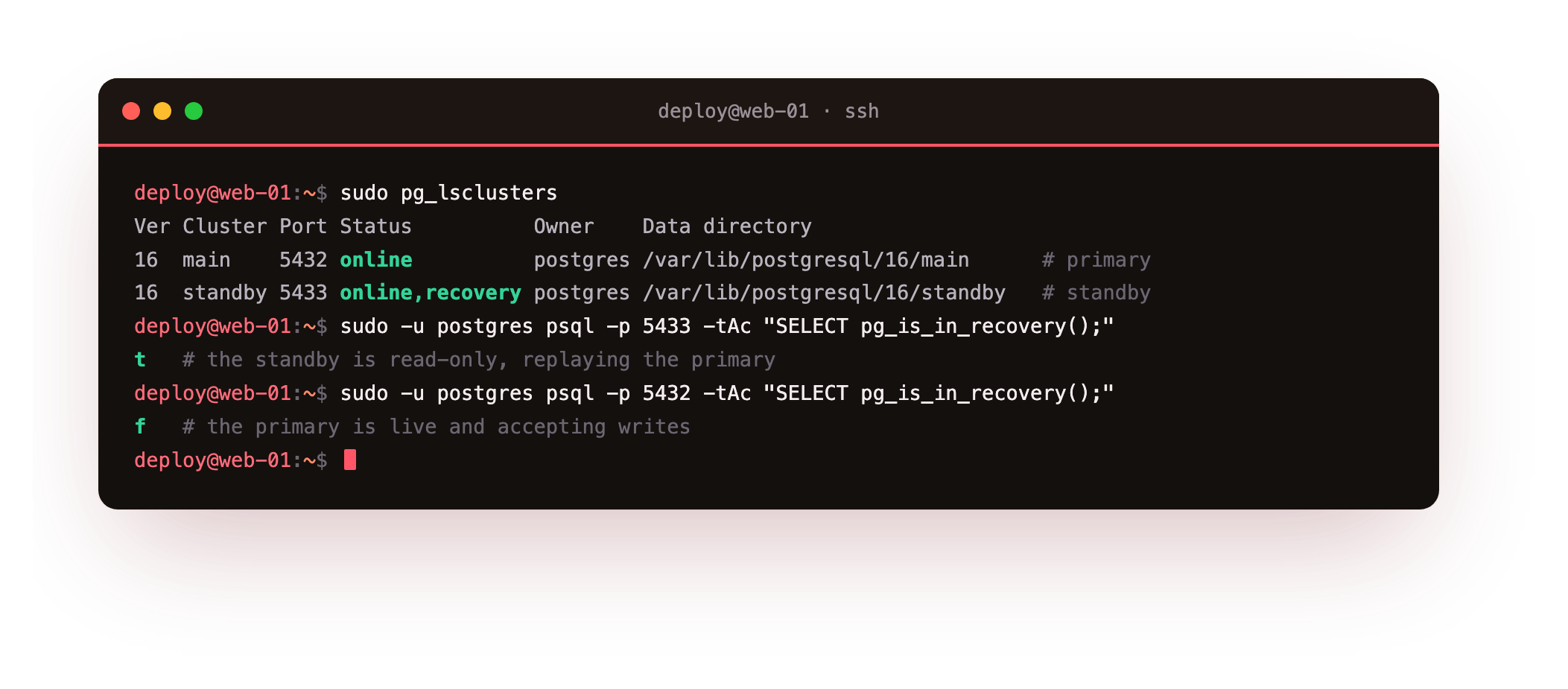
Both clusters report online, and the standby shows online,recovery. Ask each one SELECT pg_is_in_recovery() and it returns t on the standby at 5433 and f on the primary at 5432. Two clusters, two roles, one host, and in production the only thing that differs is the address.
Prove a write crosses to the standby
Status output is a claim. The honest test is to write a row on the primary and read it back on the standby, with no write ever sent to the standby. This is the moment the standby earns its name.
sudo -u postgres psql -p 5432 -d shopdb -c "INSERT INTO customers (email, \
  full_name, city) VALUES ('[email protected]','Streaming Test','Chennai');"
sudo -u postgres psql -p 5433 -d shopdb -c "SELECT id, email, city FROM \
  customers WHERE email='[email protected]';"
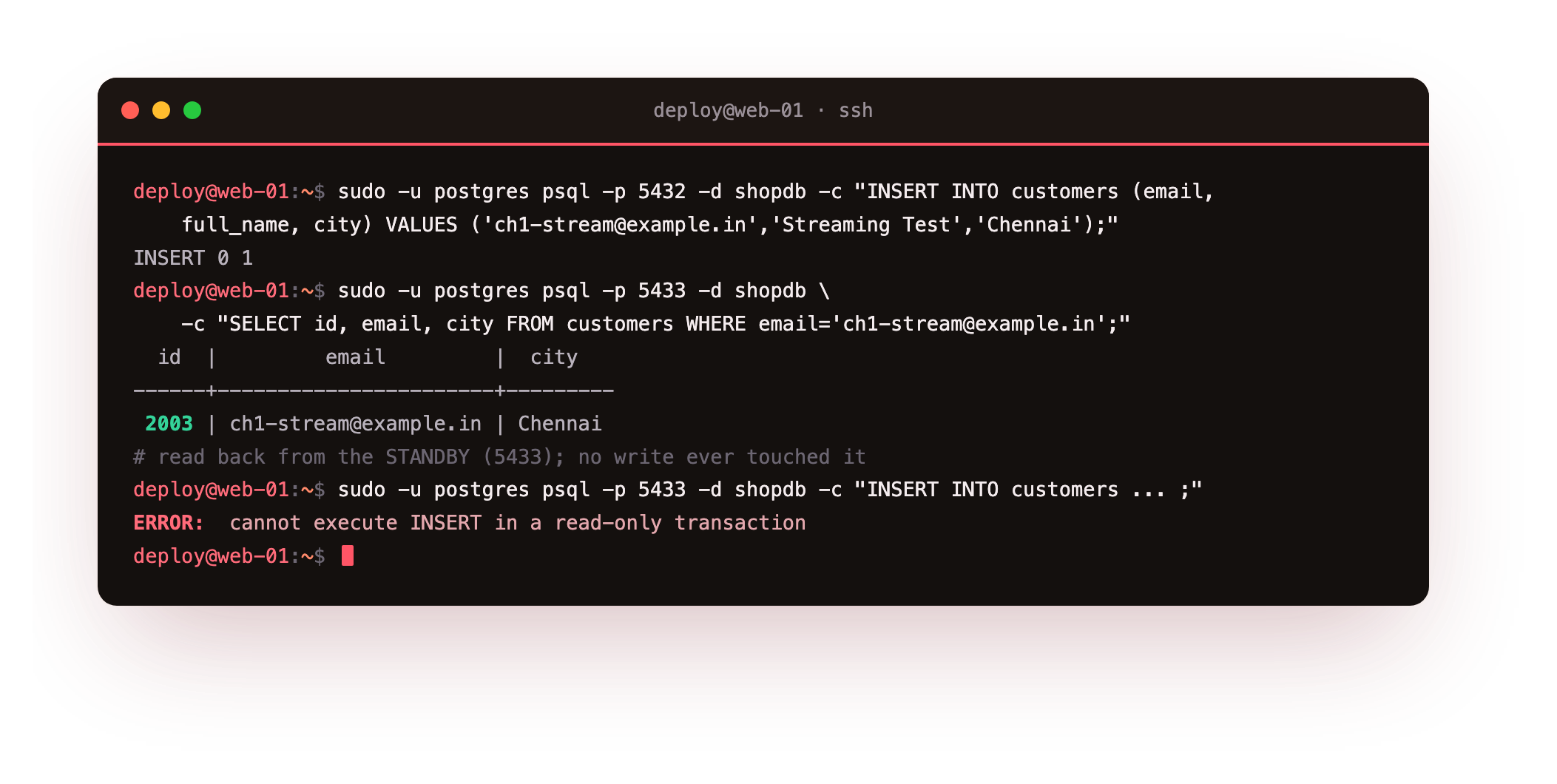
The row inserted on the primary, id 2003, appears on the standby moments later. Try to insert directly on the standby and it refuses with cannot execute INSERT in a read-only transaction. That refusal is the point: the standby is a faithful copy, not a second writable database, so the two can never disagree about what the data is.
The row you wrote on 5432 should read back from 5433 within a second, and a direct write on 5433 must be refused as read-only. If the row never appears, the receiver is not connected: check the standby's log under /var/log/postgresql and the pg_hba.conf replication line before moving on.
Going further: how PostgreSQL streaming replication works under the hood
You have proof it works; now here is why. The primary runs a WAL sender process and the standby runs a WAL receiver that pulls the log and replays it as it arrives. You watch that link from the primary side.
sudo -u postgres psql -p 5432 -x -c "SELECT application_name, client_addr, \
  state, sync_state, sent_lsn, replay_lsn FROM pg_stat_replication;"
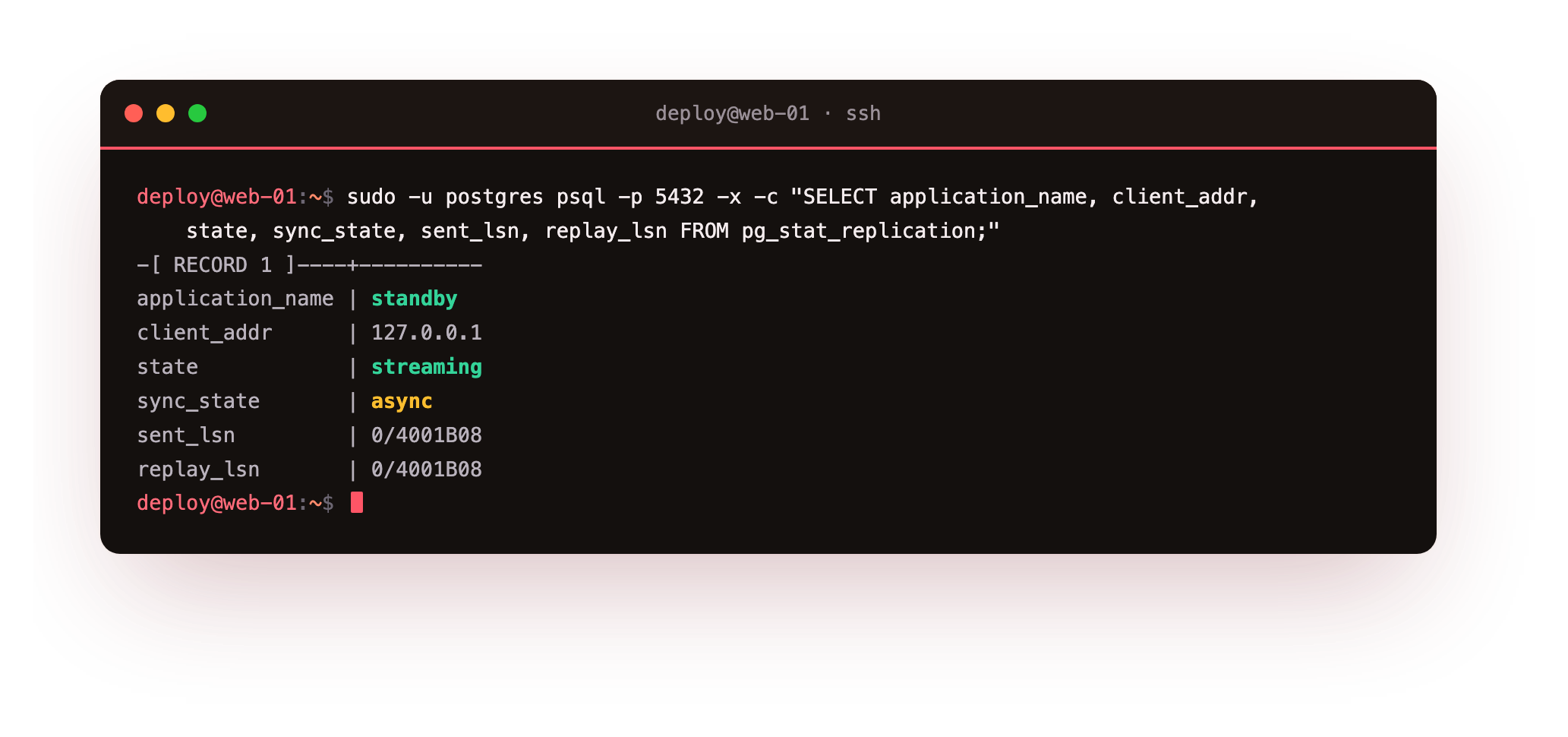
The row shows a state of streaming and a sync_state of async, the default. The sent_lsn and replay_lsn are two positions in the write-ahead log: what the primary has sent, and what the standby has replayed. Here they are equal, so the standby is fully caught up. When they drift apart under load, the gap between them is your replication lag, measured in bytes of WAL rather than guessed at. This is the raw signal every monitoring and failover tool reads to decide whether a standby is healthy enough to promote.
Troubleshooting a standby that will not stream
The standby will not start after pg_basebackup. The data directory was not empty, or its owner is not postgres. Remove its contents as root, then let pg_basebackup -D refill it so ownership and permissions are correct.
pg_stat_replication is empty on the primary. The WAL receiver never connected. Read the standby's log under /var/log/postgresql, then check the pg_hba.conf replication line, the replicator password, and that the primary is reachable on 5432.
replay_lsn keeps falling behind sent_lsn. The standby cannot apply WAL as fast as the primary makes it, usually a slow disk or one long transaction. Give the standby hardware at least equal to the primary.
Frequently asked questions
Is a streaming standby the same as a backup?
No. A standby copies every change within about a second, including a mistaken delete, so it cannot protect you from a bad statement. It protects you from a dead server. A restore and a replica guard against different failures, so you want both, not one standing in for the other. The last chapter builds the restore side.
Why run two clusters on one server here?
Only to keep the lesson on one learning box. In production the standby sits on a separate server with its own disk and address. The role, the pg_hba rule, and the pg_basebackup command are identical; you swap 127.0.0.1 for the primary's private address.
What does asynchronous replication mean for my reads?
The primary confirms a write without waiting for the standby, so the standby can trail by a fraction of a second under load. A read sent to the standby right after a write may not see it yet. For reads that must be current, send them to the primary, or use the synchronous mode the next chapter covers.
Do I need a replication slot to stream?
Not strictly, but it helps. A slot makes the primary keep the WAL a standby still needs, so a standby that drops off briefly can resume instead of falling too far behind. The clone above created one with -S standby_slot, and the next chapter watches it work.
What you have, and what comes next
You have PostgreSQL 16 on a slice you started from nothing, a primary streaming its WAL to a live standby, both log positions matching, and a real row proven to cross from one to the other on its own. You have also seen the destination: your data sitting safely on a second box, ready to be promoted.
Right now the standby trails the primary and the primary never waits for it. Sometimes that is exactly wrong, and sometimes the standby needs a guarantee that its WAL is being held for it. The next chapter is about replication slots and the choice between asynchronous and synchronous commit: Synchronous Replication and Slots.