The moment the standby has to take over
A PostgreSQL failover is the moment you promote a standby into a live primary, usually because the old primary has died or needs to come down. This chapter promotes the standby on a live Ubuntu 24.04 server, watches its timeline change, and then handles the part people forget: the old primary is now diverged and cannot simply rejoin.
- Promotion turns a read-only standby into a writable primary and bumps the timeline, here from 1 to 2.
- After promotion the old primary is diverged history, not a standby, so it cannot follow the new one as is.
- Two writable primaries at once is split brain, and one of them must be fenced before it accepts more writes.
- pg_rewind rewinds the old primary to the divergence point so it can stream from the new primary again.
Failover sounds simple: the standby is already a copy, so make it the primary. The trap is what happens to the old server. The moment the standby is promoted, the two nodes have separate futures. If the old primary comes back thinking it is still in charge, you have two databases taking writes that will never agree. Handling that is most of the real work.
Prerequisites
- The streaming primary and standby from the earlier chapters, on an Ubuntu 24.04 LTS host.
- The old primary configured with
wal_log_hints = onor data checksums, whichpg_rewindrequires. - A replication login the rewound node can use to stream back from the new primary.
- Sudo and psql access to both clusters, and a clear head about which node is which.
PostgreSQL failover: promoting the standby
Promotion is one command. It tells the standby to stop replaying and open for writes. Run it, then ask the new primary what it now is.
sudo pg_ctlcluster 16 standby promote
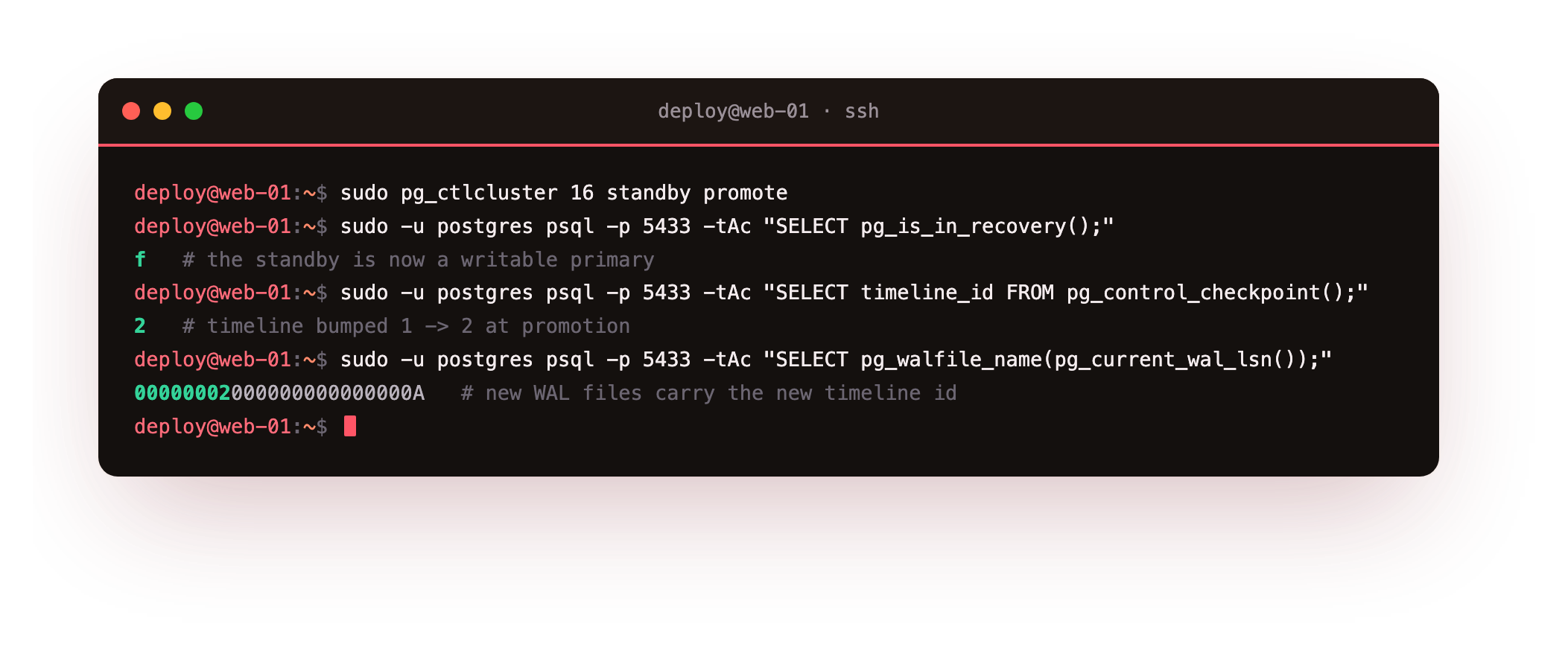
Three checks confirm the failover. pg_is_in_recovery() flips from t to f, so the node is now a primary. timeline_id bumps from 1 to 2, because a promotion starts a new branch of history. And the next WAL filename begins 00000002, carrying that new timeline. The standby is now a real primary, and it accepts writes for the first time in its life. This is the moment the whole series exists for: the primary is gone, and your data kept going on the second box.
After the promote, pg_is_in_recovery() on 5433 should read f and the next WAL filename should begin 00000002. If it still reads t, the promotion did not take: read the standby's log for a promotion signal, then run pg_ctlcluster 16 standby promote again.
What breaks: the old primary has diverged
Here is the danger. If the old primary is still running, it does not know a promotion happened. It still reports pg_is_in_recovery() as f and still takes writes.
sudo -u postgres psql -p 5432 -d shopdb -c "INSERT INTO customers (email, \
  full_name, city) VALUES ('[email protected]','Split Brain','Ghost');"
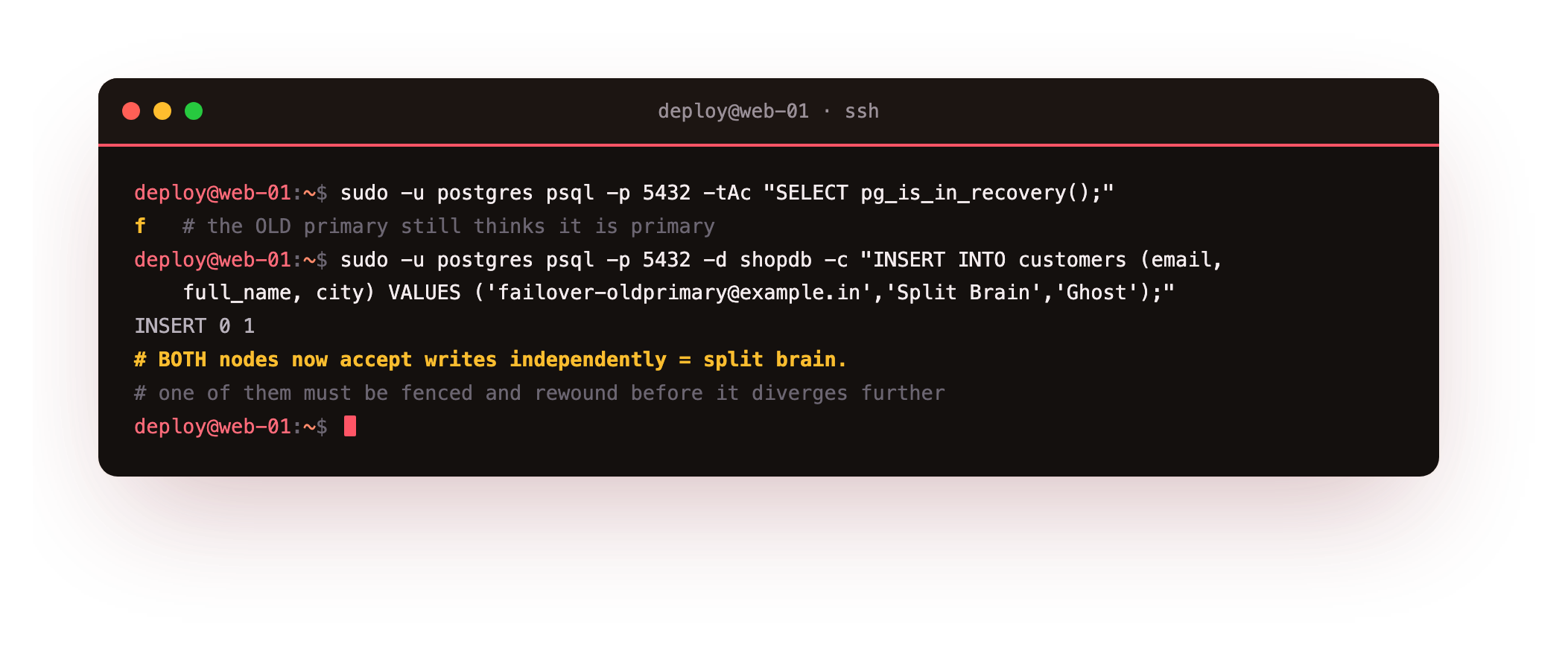
That insert succeeds on the old primary at the same time the new primary is taking its own writes. Now two nodes each hold rows the other has never seen, on two different timelines. This is split brain, and it is the failure that turns a clean failover into a data-loss incident. The write above is a ghost: it lives only on a node you are about to rewind away.
Rewind the old primary with pg_rewind
The old primary cannot just point at the new one, because its history has branched. pg_rewind fixes that by rewinding it back to the last point the two shared, so it can then replay forward from the new primary. Fence it first by stopping it, then rewind.
sudo pg_ctlcluster 16 main stop
sudo -u postgres pg_rewind --target-pgdata=/var/lib/postgresql/16/main \
  --source-server="host=127.0.0.1 port=5433 user=replicator dbname=postgres" -P
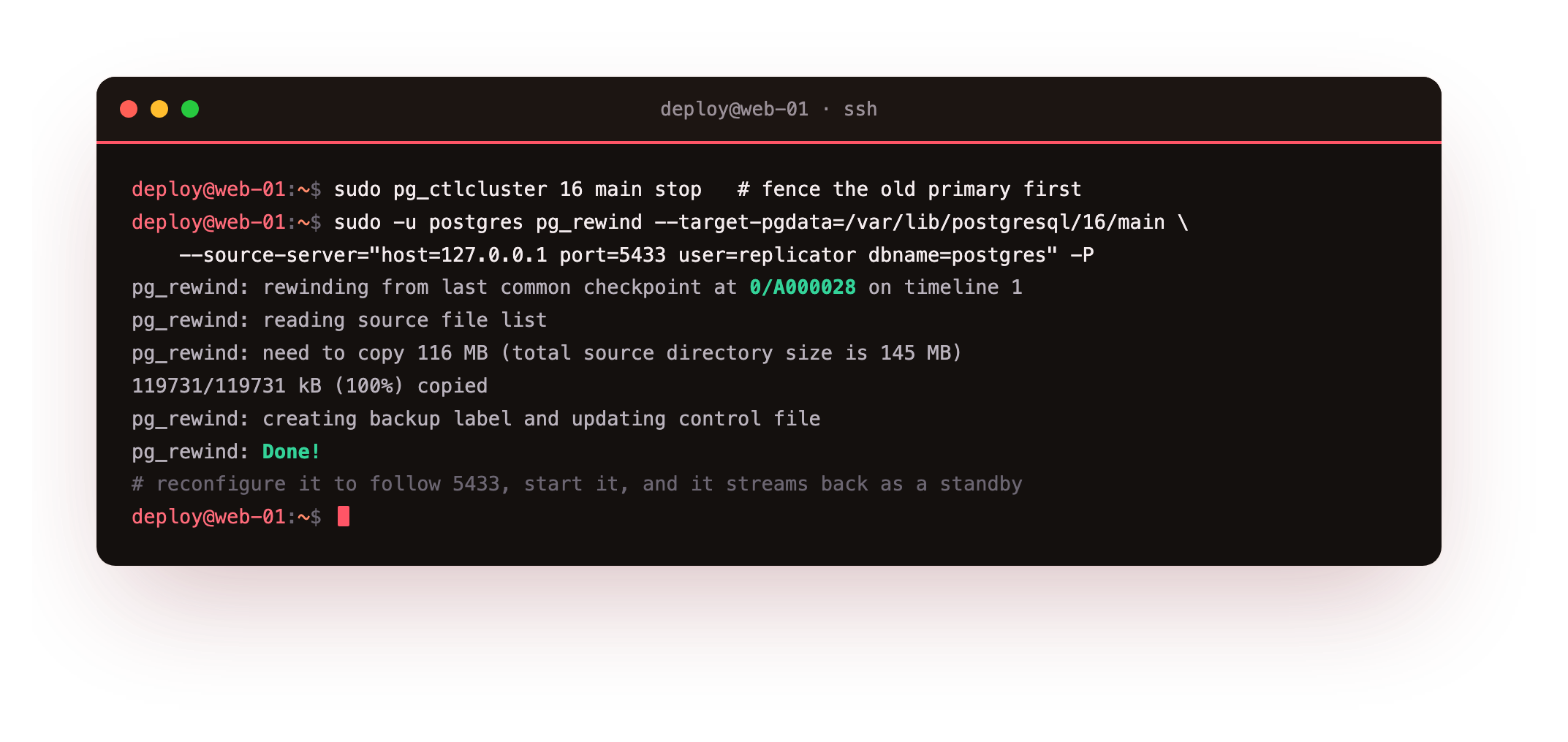
pg_rewind reports rewinding from the last common checkpoint on timeline 1 and copies the blocks that differ, here about 116 MB. After it finishes, add a primary_conninfo pointing at the new primary and a standby.signal, then start the node. It comes up in recovery, streams from the new primary, and the split-brain ghost row is gone while the new primary's rows are present. The old primary is now a healthy standby of the server that replaced it.
Going further: automating failover and fencing
Doing this by hand is fine for learning and for a planned switchover. For unattended failover you want a tool that watches the primary, promotes a standby when it is truly gone, and fences the old node so it cannot come back as a second primary. Patroni and repmgr are the common choices, and both lean on the same primitives you just used: promotion, timeline awareness, and pg_rewind. The next chapter covers the piece that makes failover invisible to your app, which is where clients connect.
Troubleshooting a promotion
pg_rewind refuses with a message about checksums or hints. The old primary was initialized without data checksums and without wal_log_hints = on. One of those must be set before divergence, so turn on wal_log_hints, restart, and it will work next time.
The rewound node will not stream. Its primary_conninfo is wrong or the new primary's pg_hba.conf does not allow the replication login from this address. Read the node's log, then fix the connection string and the rule on the new primary.
Both nodes think they are primary. You skipped fencing. Stop one immediately, decide which node is authoritative, and rewind the other onto it before either takes more writes.
Frequently asked questions
What actually changes when a standby is promoted?
The node stops recovery, becomes writable, and starts a new timeline so its future WAL is distinct from the old primary's. Existing connections to it as a read replica now see a read-write server, and any other standbys must be pointed at it.
Why can't the old primary just reconnect as a standby?
Because after promotion the two servers have diverged onto separate timelines, and the old primary may hold writes the new one never saw. It has to be rewound to the branch point first, or fully rebuilt, before it can follow the new primary.
Is pg_rewind faster than a fresh pg_basebackup?
Usually, because it copies only the blocks that differ since the divergence rather than the whole database. On a large database that saves a lot of time and network, which is why it is the standard way to reattach an old primary.
Do I need a tool like Patroni for failover?
Not to understand it, and not for a planned switchover you run by hand. For automatic failover under load you do, because a tool decides when the primary is really gone and fences the old node so you never end up with two primaries.
What you have, and what comes next
You have promoted a standby into a primary, watched the timeline move to 2, and rewound the old primary so it follows the new one instead of fighting it. You have also seen split brain up close, which is the failure this whole dance exists to prevent.
A promoted standby is only useful if your application finds it. Right now clients still point at the old address. The next chapter puts a pooler in front so connections are routed and reused, and so a failover does not mean editing every app config: Connection Routing with PgBouncer.