What redis caching actually has to get right
In chapter one you saw a repeat read served from memory instead of the database. That is caching, and redis caching is really three problems, not one: how you fill the cache, how you let entries expire, and what happens when memory runs out. Get them right and the cache saves your database from repeated work. Get them wrong and you serve stale data or the process is killed for using too much memory.
This chapter runs all three on a live Ubuntu 24.04 server, each ending at a command that shows the behaviour rather than assuming it.
- Cache-aside means the application checks Redis first, falls back to the database on a miss, and writes the result back, so the cache fills itself on demand.
- Every cached entry should carry a TTL with SET and EX, because a cache without expiry drifts out of sync with the source of truth.
- Set maxmemory and a maxmemory-policy so Redis evicts under pressure instead of failing writes or being killed by the kernel.
- The allkeys-lru policy drops the least recently used keys first, which is the sensible default for a pure cache.
A cache is a bet that reading something again is cheaper than computing it again. The bet pays off only if the cached copy is fresh enough to trust and small enough to fit. Those two constraints, freshness and size, are what TTL and eviction control, and they are the parts people skip.
We will start with the read path, add expiry, then deliberately overfill the cache and watch Redis hold the line. Nothing here needs an application. redis-cli stands in for the client so you can see each step.
Let's build.
Prerequisites
- Redis 7.0.15 answering on an Ubuntu 24.04 LTS box, as installed in part one.
- redis-cli available on the box.
- A rough sense of your working set size, since that decides the memory cap later.
Cache-aside: check, miss, fill
Cache-aside is the pattern behind most caches. The application asks Redis for a key. On a hit it uses the value. On a miss it reads the real store, then writes the value into Redis so the next read is a hit. Redis holds nothing the application did not put there.
redis-cli GET product:5573
redis-cli SET product:5573 "{\"name\":\"Filter Coffee 500g\",\"price\":349}"
redis-cli GET product:5573
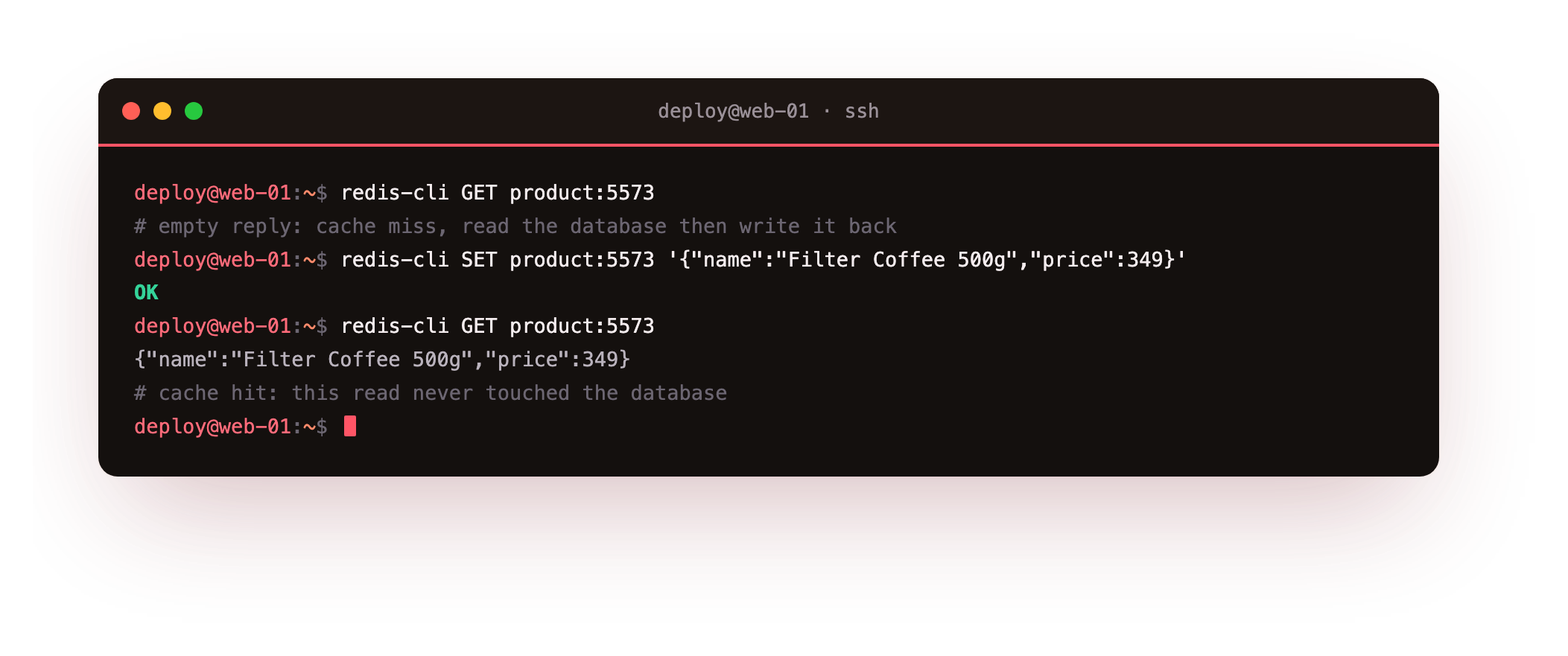
The first GET returns nothing, an empty reply, which is the miss. In a real app that is your cue to query the database. The SET writes the value that query returned, and the second GET is a hit that never touches the database. That is the whole loop, and it is why cache-aside is also called lazy loading.
That second hit is the payoff the whole series is pointed at. The request that cost a database query a moment ago now returns from memory, and under real traffic that is the difference between a database straining and one barely touched. Everything else in this chapter, the TTL and the eviction, exists to keep that hit both fresh and affordable.
Run the two GET product:5573 commands with the SET between them. The first should print an empty line and the second should print the JSON. If the first already returns a value, a copy is left from an earlier run, so redis-cli DEL product:5573 and try again to see a clean miss.
Give every entry a TTL
A cached value that never expires becomes a lie the moment the source changes. The fix is a time to live: tell Redis to forget the key after some seconds. You set it in the same command with EX, and you read the remaining life with TTL.
redis-cli SET session:token:ax92 "user:1042" EX 60
redis-cli TTL session:token:ax92
redis-cli SET product:5573 "{\"name\":\"Filter Coffee 500g\",\"price\":349}" EX 300
redis-cli TTL product:5573
redis-cli PERSIST product:5573
redis-cli TTL product:5573
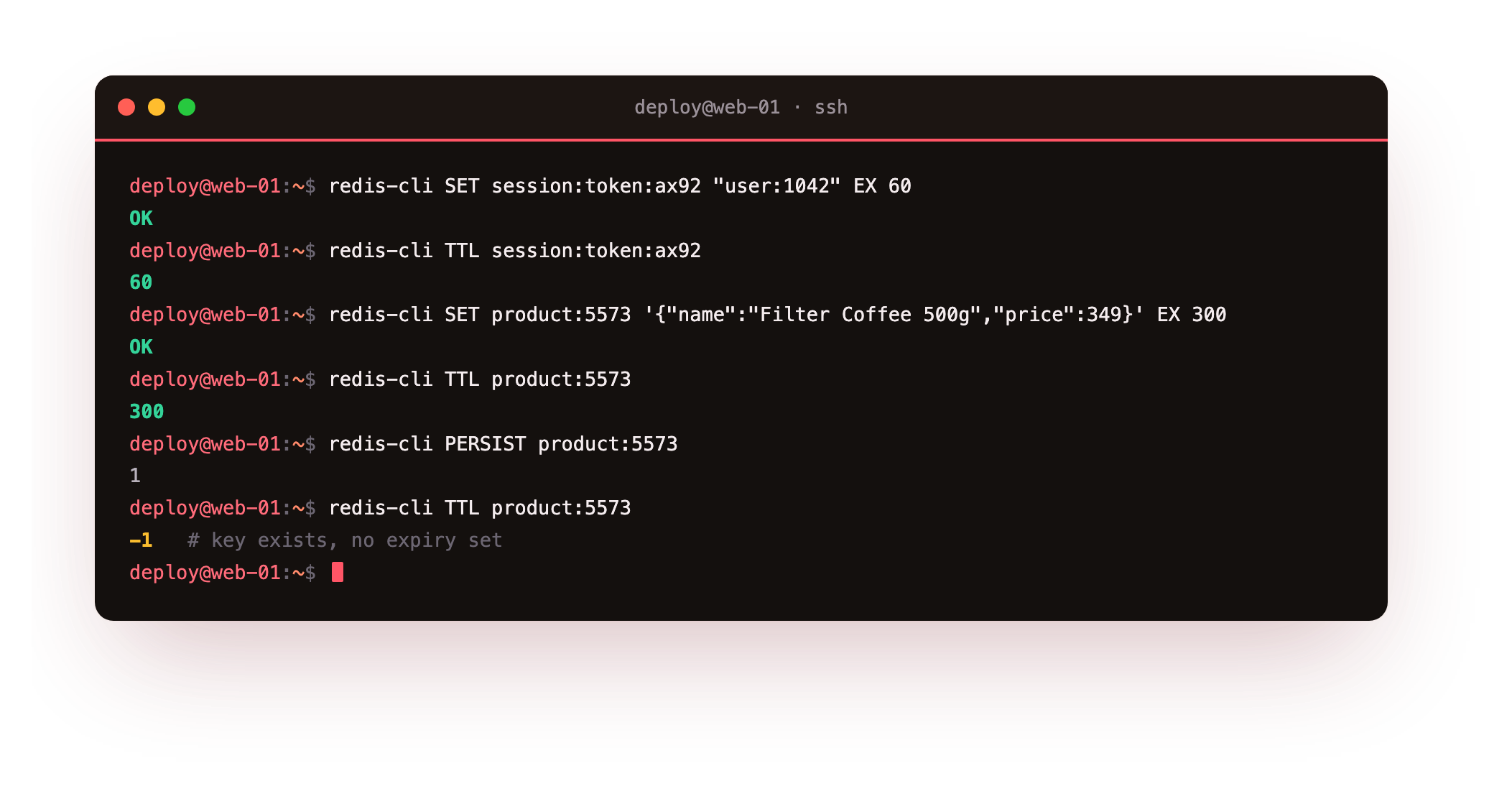
The token key is given sixty seconds and TTL confirms it. The product cache is given three hundred. PERSIST then strips the expiry, and TTL reports minus one, meaning the key exists with no expiry set. A minus two, for contrast, would mean the key is gone. Pick a TTL from how stale you can bear the data to be: a price might tolerate five minutes, a stock count far less.
Eviction: hold the line under memory pressure
Left uncapped, a cache grows until the machine has no memory left and the kernel kills the process. The right posture for a cache is the opposite: set a memory ceiling and tell Redis to throw out old entries to stay under it. Two settings do this.
redis-cli CONFIG SET maxmemory 8mb
redis-cli CONFIG SET maxmemory-policy allkeys-lru
redis-cli CONFIG GET maxmemory
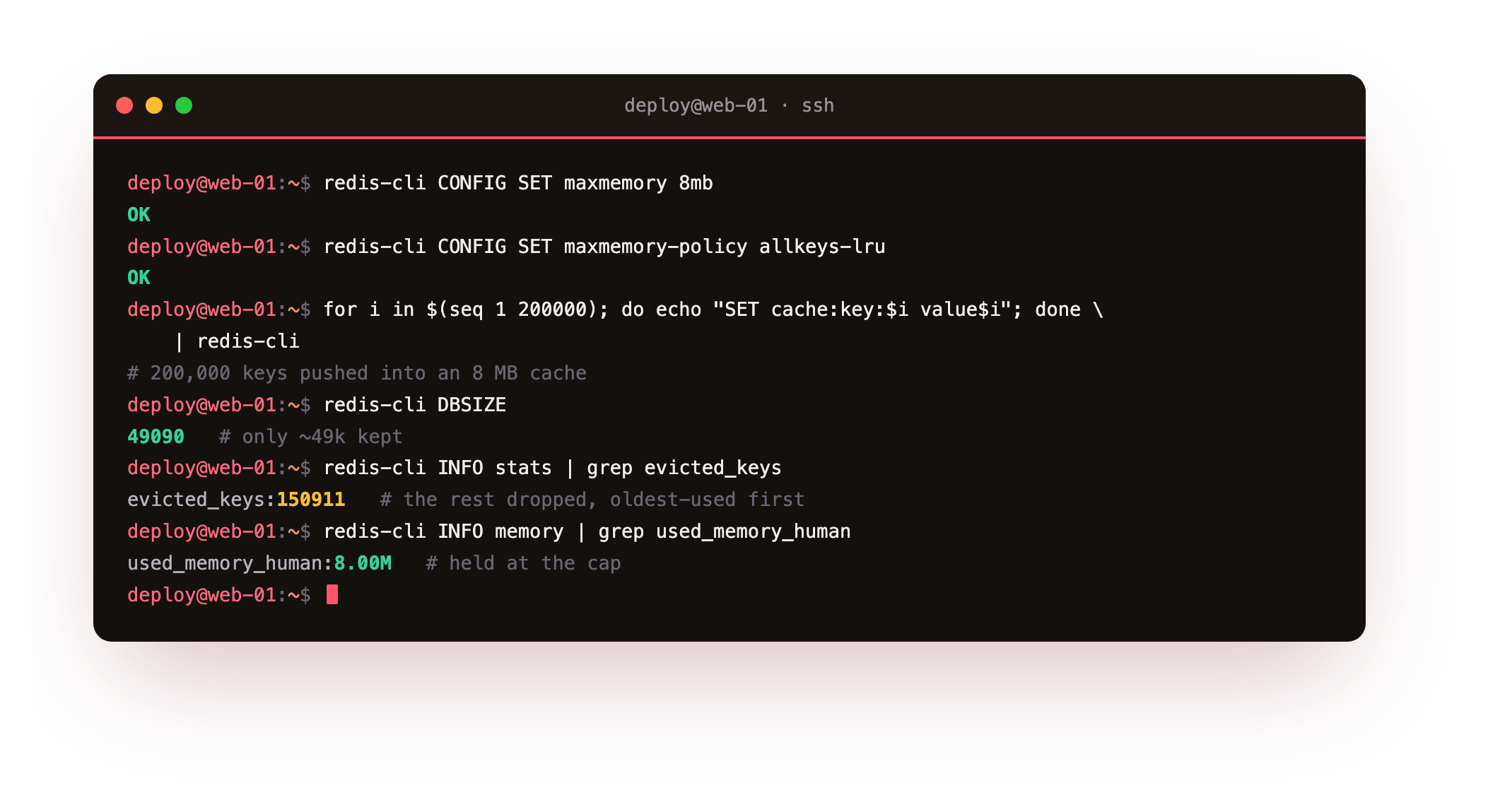
The maxmemory cap is the ceiling, here a deliberately tiny eight megabytes so the demo evicts quickly. The maxmemory-policy decides what to drop when the ceiling is hit. allkeys-lru removes the least recently used keys across the whole keyspace, which is what you want for a cache where every key is disposable.
Now overfill it on purpose. We push two hundred thousand keys into an eight megabyte cache and then read the counters.
for i in $(seq 1 200000); do echo "SET cache:key:$i value$i"; done | redis-cli
redis-cli DBSIZE
redis-cli INFO stats
DBSIZE reports about forty nine thousand keys, not two hundred thousand, and INFO stats shows evicted_keys at roughly one hundred fifty thousand. Redis kept memory at the eight megabyte cap and quietly discarded the rest, oldest-used first. A production cap is far larger, but the behaviour is identical: the cache stays within its budget instead of taking the server down.
Choosing an eviction policy
- allkeys-lru: evict least recently used across all keys. The default choice for a pure cache.
- allkeys-lfu: evict least frequently used, better when a small set of keys is hot.
- volatile-ttl: only evict keys that have a TTL, dropping the soonest to expire first.
- noeviction: reject writes when full. Correct when Redis holds data you cannot lose, not a cache.
The split that matters is allkeys versus volatile. An allkeys policy can evict anything, which is right when the whole dataset is a cache. A volatile policy only touches keys you marked with a TTL, which protects keys you meant to keep.
Going further: how Redis picks a key to evict
The LRU in allkeys-lru is not a true least-recently-used order, because tracking exact access order for millions of keys would cost memory Redis would rather spend on your data. Instead it samples. When it needs to free space, Redis looks at a small random handful of keys, maxmemory-samples of them, defaulting to five, and evicts the least recently used one from that sample.
redis-cli CONFIG GET maxmemory-samples
Five samples already approximate real LRU closely; raising the number makes the choice more accurate and costs a little more CPU per eviction. The allkeys-lfu policy works the same way but scores by access frequency instead of recency, which is why it holds on to a small hot set better than LRU when your traffic is skewed. For most caches the default sampling is fine, and this is a knob to reach for only when eviction is measurably picking the wrong keys.
Frequently asked questions
What is the difference between cache-aside and write-through?
Cache-aside fills the cache only on a read miss, so the application owns both the database read and the cache write. Write-through updates the cache at the same time as the database on every write. Cache-aside is simpler and the common default, while write-through keeps the cache warmer at the cost of writing to Redis on every change.
How do I pick a good TTL for redis caching?
Start from how stale the data may be before it causes a problem, then set the TTL a little under that. Rarely changing reference data can live for hours, while anything tied to money or stock wants seconds to a minute. Add a small random jitter so many keys do not expire on the same tick and cause a stampede.
What happens when Redis hits maxmemory with noeviction?
With the noeviction policy, once memory is full Redis refuses any command that would use more memory and returns an out-of-memory error to the client, while reads still work. That is the right behaviour when the data is a source of truth you cannot drop, and the wrong behaviour for a cache, where you want it to evict and keep serving.
Does setting maxmemory require a restart?
No. Both maxmemory and maxmemory-policy can be changed at runtime with CONFIG SET, as we did here, and take effect immediately. To make the setting survive a restart, add it to the config file or run CONFIG REWRITE, which the persistence chapter demonstrates.
What you have, and what comes next
You now have the three moving parts of a cache working on a real server: cache-aside fills Redis on demand, a TTL keeps entries from going stale, and a memory cap with an LRU policy stops the cache from ever exhausting the box. Each was shown with a counter, not asserted.
Caching treats data as disposable, and that raises the opposite question: what about the data you cannot lose? The next chapter turns to persistence. We will trigger an RDB snapshot, enable the append-only file, and prove the dataset survives a full restart, so Redis can hold data that matters and not just a copy of it.