What you will build
By the end of this series your slow app is quicker and cheaper to run because Redis sits in front of your database as a cache, holds your sessions, throttles abuse and moves work off the request path. This first chapter takes a bare Ubuntu 24.04 slice, installs Redis, shows you the speed-up up front, then teaches the redis data types every later chapter builds on.
- The series destination: a repeat request that used to hit the database is answered from Redis in a fraction of a millisecond, so the same page is faster and the database does less work.
- On a fresh slice nothing is installed. `apt install redis-server` is the real first step, and it starts the service and enables it on boot.
- Redis stores a value as a string, hash, list, set, or sorted set, and the structure you pick decides which operations are cheap.
- redis-cli answers ping with PONG and INFO server reports the exact version and port, so you verify the running server rather than trust the package.
- A slice running Ubuntu 24.04 that you reach over SSH as a sudo user, with no Redis on it yet.
- An app somewhere that reads the same data from a database over and over, since that repeated read is what a cache removes.
- Enough shell to run apt and to read a line of redis-cli output, which is all the verification here asks of you.
- About twenty minutes, and a habit of checking each result against the terminal rather than trusting it.
See the destination first
The screen below is the payoff the whole series builds toward. An application asks Redis for a product, misses, reads its database once, and writes the answer back. Every request after that is a cache hit, served from memory without the database running the query at all. That single change is why the app gets faster.
redis-cli GET product:5573
redis-cli SET product:5573 '{"name":"Filter Coffee 500g","price":349}' EX 300
redis-cli GET product:5573
redis-cli --latency
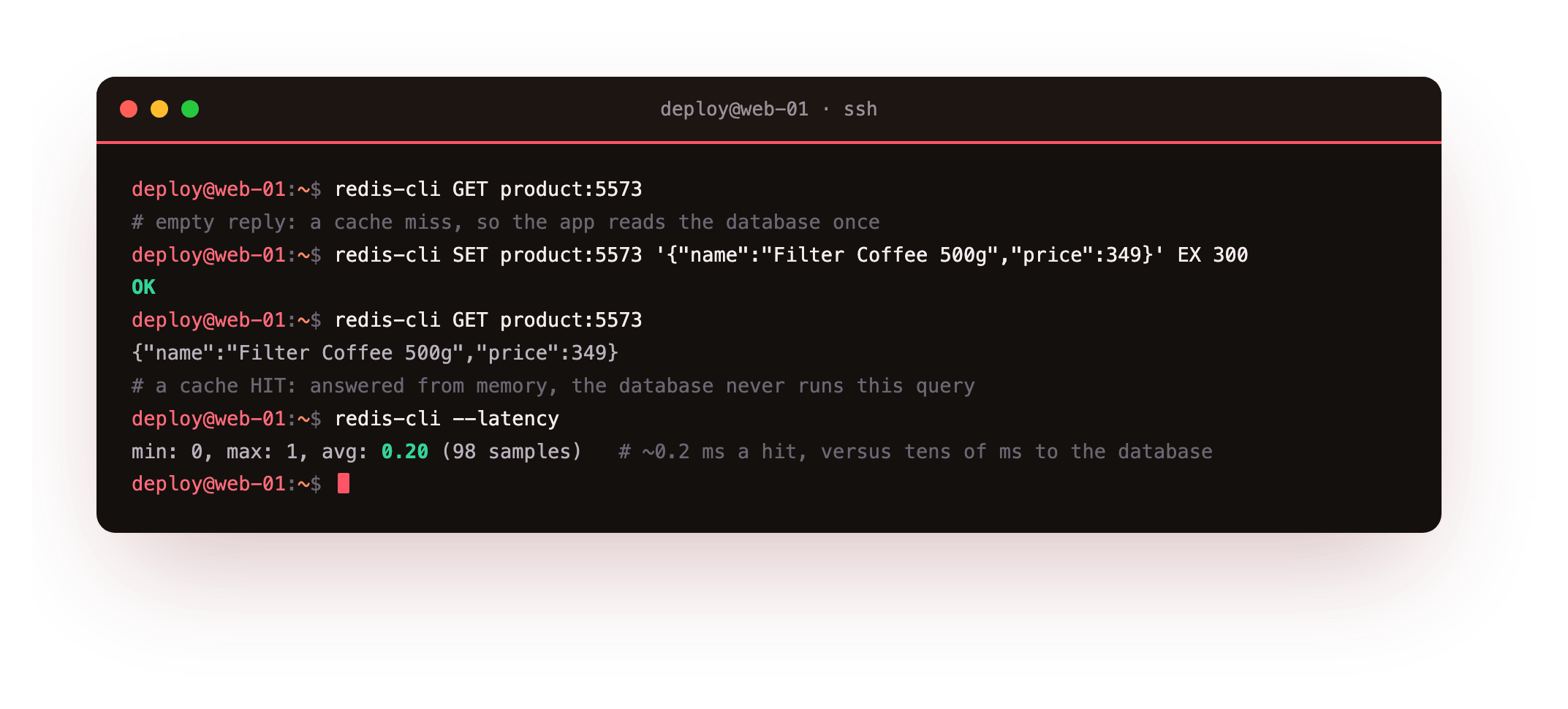
The first GET comes back empty, a cache miss, so the app falls through to the database once and caches what it found. The second GET returns the value straight from memory, and the database is never touched. The --latency line is the point of the whole series in one number: a hit is served in about a fifth of a millisecond, against the tens of milliseconds a database round trip costs. Repeat that saving across every popular page and the app is quicker for users and cheaper to run under load.
You do not have any of this yet. There is no slice with Redis on it, no product:5573, no cache. The rest of this chapter starts that from an empty box, and the later chapters add the TTL, the eviction, the sessions, the rate limiter and the queue behind it. This first one gets Redis running and teaches the structures the rest is built from.
Install Redis from a bare slice
On a fresh Ubuntu 24.04 slice Redis is not there yet. A single apt command installs it, and that from-zero step is the one most Redis tutorials leave out. Update the package lists, then install the server and its command line client together.
sudo apt update
sudo apt install -y redis-server redis-tools
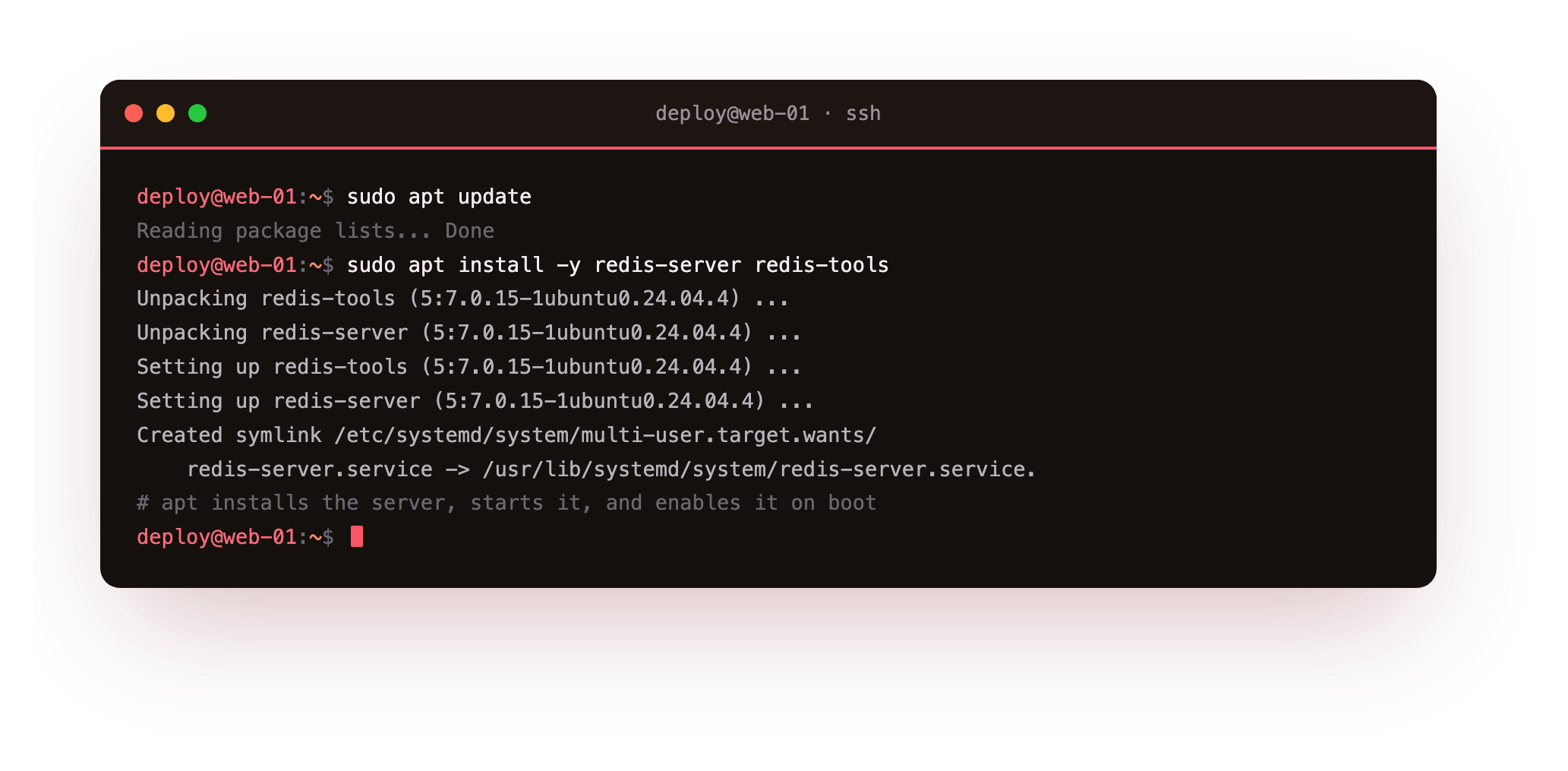
apt pulls in Redis 7.0.15, the version Ubuntu 24.04 ships, and wires it up as a systemd service. The install does two useful things without being asked: it starts the server, and it creates the boot symlink so Redis comes back up on its own after a reboot. It also binds to loopback with protected-mode on, so nothing off the box can reach it yet.
Run systemctl is-active redis-server. It should print active. If it prints failed, read systemctl status redis-server; on a very small box the usual cause is another process already holding port 6379.
Confirm Redis is answering
Reading the version back from inside Redis, not just from the package, tells you the running server is the one you think it is. Ask the client to ping the server, then ask the server to describe itself.
redis-server --version
redis-cli ping
redis-cli INFO server
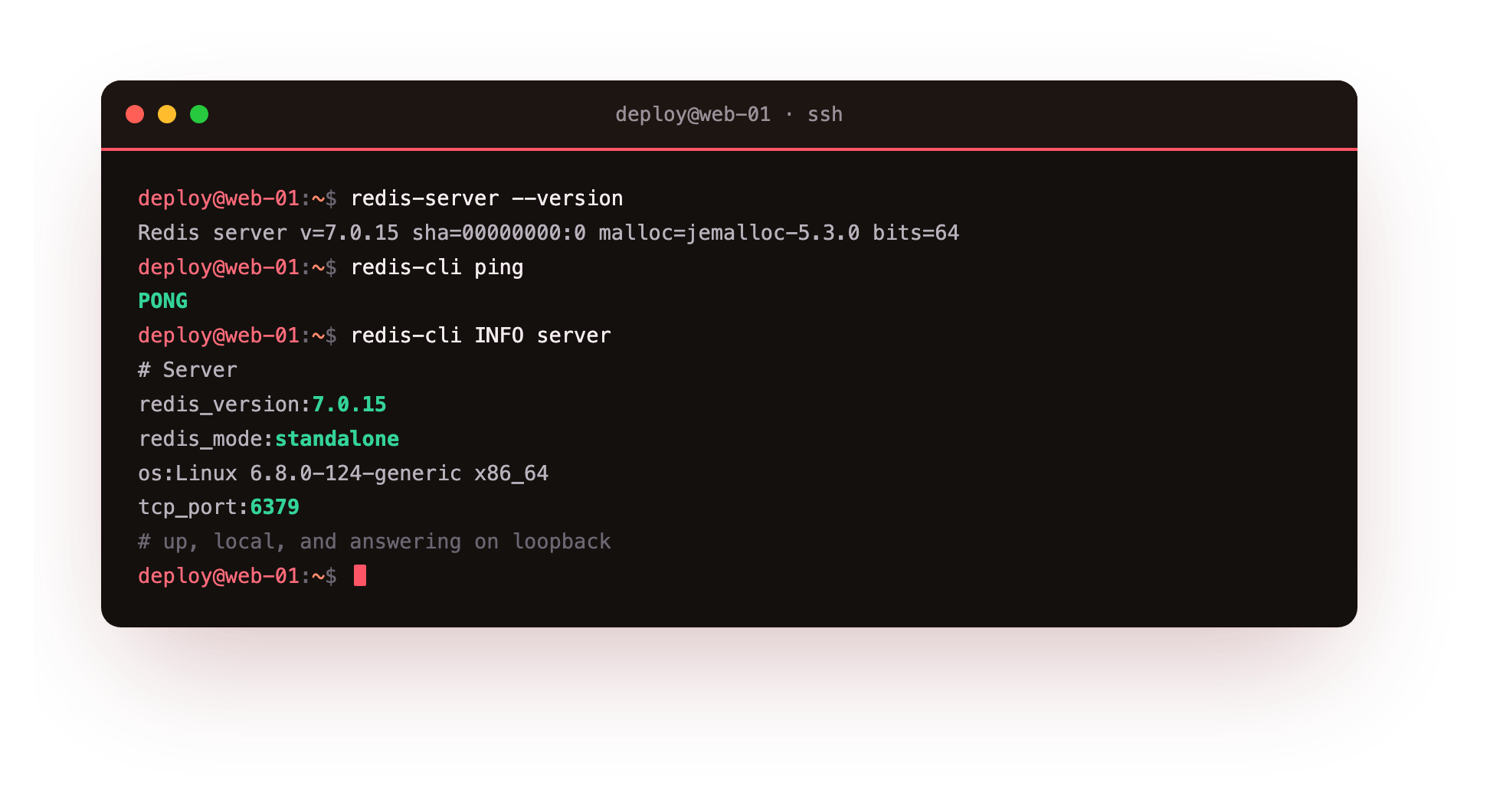
On this server that reports Redis 7.0.15. The ping returns PONG, and INFO server shows redis_mode:standalone on tcp_port:6379. The server is up, local, and answering. Now the part that decides everything else you build: the data model.
The redis data types your app will use
Redis is fast because it keeps everything in memory, and it is useful because it gives you data structures rather than just a place to dump bytes. Five of them carry almost every job in this series: strings, hashes, lists, sets, and sorted sets. Each maps to a real task, and the cost of Redis is that you choose the structure up front, because the structure is the design.
You now have a Redis you can talk to. The next three sections write into it with real commands, so keep the terminal open and run each one; every claim below is meant to be checked against the reply, not taken on trust.
Strings and counters
A string is the plainest value: a key holds one blob, which can be text, JSON, or a number. Set one and read it back, then use the fact that Redis can treat a numeric string as an integer.
redis-cli SET user:1042:name "Asha Menon"
redis-cli GET user:1042:name
redis-cli SET page:views 0
redis-cli INCR page:views
redis-cli INCR page:views
INCR is atomic, so two clients incrementing the same counter never lose a count. That single property is why Redis is the usual home for view counts, rate counters, and ID generators. The colon in user:1042:name is only a naming convention, not a namespace, but it keeps keys readable.
Hashes hold an object under one key
When a value has several fields, a user with a name, a city, and a plan, you could store three string keys. A hash is better: one key, named fields, and you can read or write a single field without touching the rest.
redis-cli HSET user:1042 name "Asha Menon" city "Kochi" plan "pro"
redis-cli HGET user:1042 city
redis-cli HGETALL user:1042
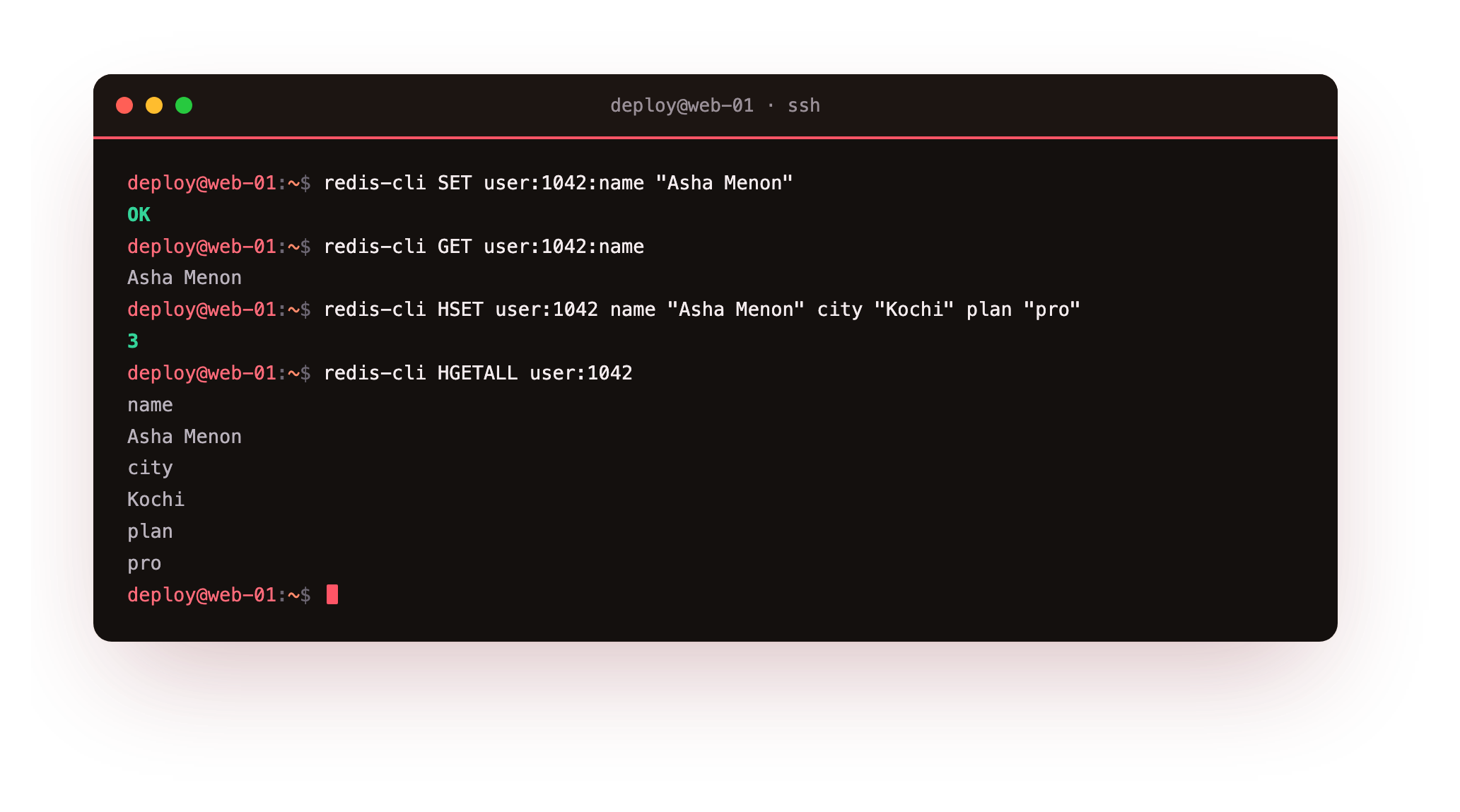
HSET reports how many new fields it added, HGET pulls one field, and HGETALL returns every field and value as pairs. A session, which chapter four builds, is exactly this: an object under one key, with an expiry attached.
Lists, sets, and sorted sets
The last three structures each earn their place. A list is an ordered sequence you push to and pop from, which is the backbone of the simple queue in chapter five. A set holds unique members with no order and rejects duplicates. A sorted set is a set where every member carries a score, and Redis keeps it ordered by that score.
redis-cli LPUSH jobs "email:welcome" "email:receipt" "thumbnail:9931"
redis-cli LRANGE jobs 0 -1
redis-cli SADD article:88:tags redis cache database redis
redis-cli SMEMBERS article:88:tags
redis-cli ZADD leaderboard 4200 "team:north" 5100 "team:south" 3800 "team:east"
redis-cli ZREVRANGE leaderboard 0 -1 WITHSCORES
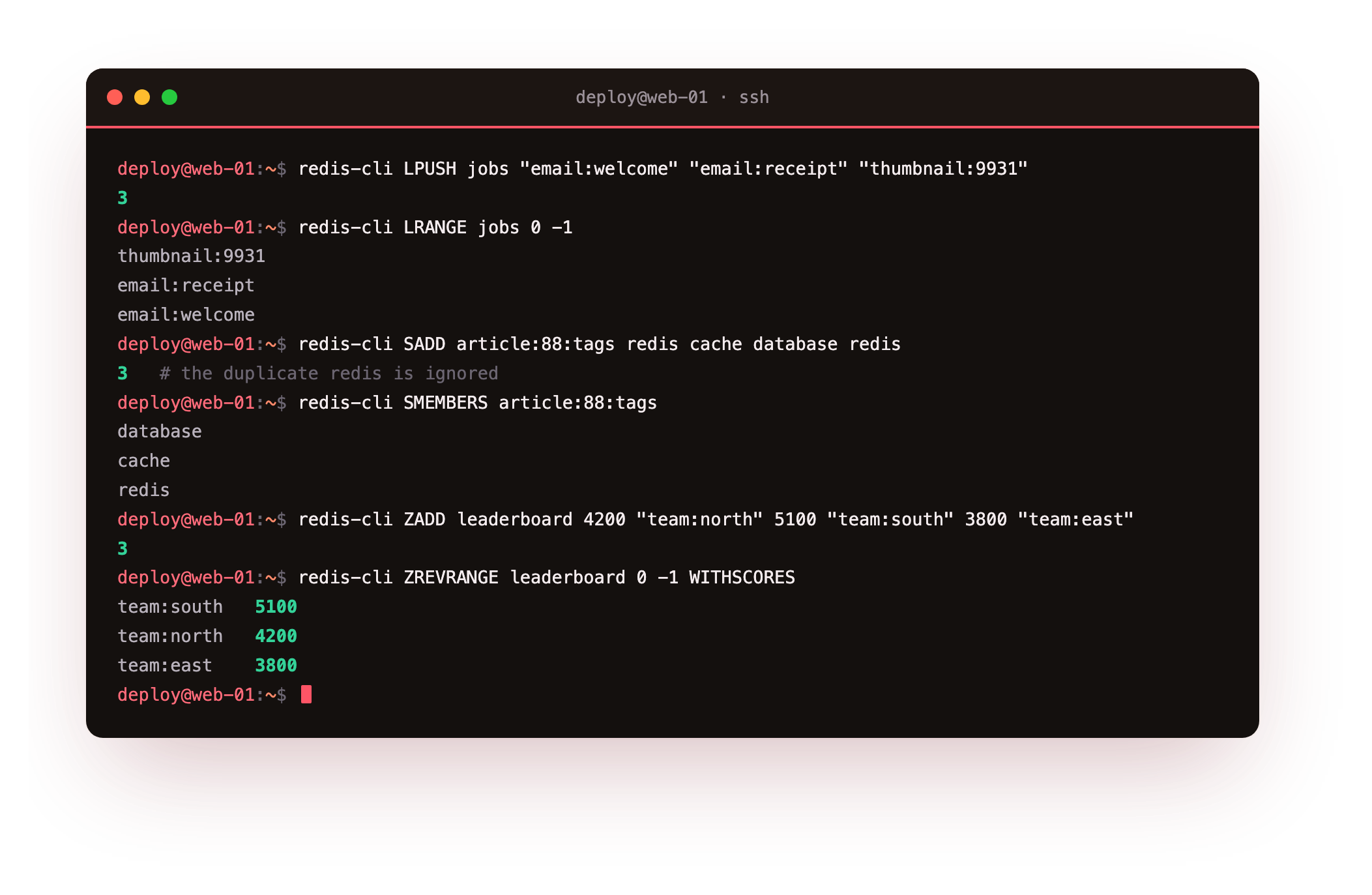
Three things stand out. LRANGE returns the jobs in reverse of how a left push stacked them, so the first item pushed sits at the far end, ready to pop. The set stores redis once even though we added it twice, because a set holds unique members. And the sorted set returns the teams ordered by score, highest first with ZREVRANGE, which is a live leaderboard with no sort step.
Which structure for which job
- Cache a rendered value or a counter: string.
- Store an object such as a user or session: hash.
- A queue of work to process in order: list.
- Membership or de-duplication, such as tags or seen-IDs: set.
- A ranking or a score-ordered queue: sorted set.
Pick the structure by the operation you need to be cheap. If you often need "give me the top ten by score", a sorted set makes that free. If you had stored scores in strings, you would fetch and sort them yourself every time.
Going further: how Redis stores these structures
You do not have to take the five types on faith. Redis picks a compact internal encoding for small collections and switches to a general one as they grow, and you can watch it happen. OBJECT ENCODING reports which representation a key is using right now.
redis-cli OBJECT ENCODING leaderboard
redis-cli OBJECT ENCODING jobs
A small sorted set reports listpack, a flat, memory-cheap layout, and grows into skiplist once it passes a threshold; a short list is a listpack too and becomes a quicklist when it gets long. This is why a handful of small hashes or sorted sets cost far less memory than the same data in separate string keys, and it is worth knowing when you size a box. The thresholds are tunable in the config, but the defaults are sensible and you rarely touch them.
Frequently asked questions
What is the difference between Redis and a database like PostgreSQL?
Redis keeps its dataset in memory and offers data structures rather than tables and SQL, which makes single-key operations very quick but limits it to data that fits in RAM. A relational database is the durable source of truth on disk. In most systems they sit together, with Redis caching and coordinating in front of the database.
Are the redis data types the whole list?
These five are the core you use daily. Redis also ships streams, which chapter five covers, plus bitmaps, HyperLogLog, and geospatial indexes that are specialised variants built on the same ideas. Learn the five structures here and the rest read as extensions of them.
Do I need a password right after installing Redis?
On Ubuntu 24.04 the default install binds to 127.0.0.1 with protected-mode on, so only local clients can reach it and the exposure is small on a single box. The moment you widen the bind address or add a replica you must set a password and firewall the port, which the security chapter at the end of this series does step by step.
How much faster is a Redis cache hit than a database read?
On this server a cache hit measured an average latency near a fifth of a millisecond, while a database query that crosses the network and touches disk usually costs single-digit to tens of milliseconds. The exact gap depends on your query and hardware, but the shape holds: a memory read served locally is far cheaper than a round trip to a relational database, which is the saving the caching chapter turns into a faster app.
What you have, and what comes next
You have Redis 7.0.15 running on a slice you started from nothing, answering on loopback, and you can reach for the right structure by the job in front of you: strings and counters, hashes for objects, lists for queues, sets for membership, sorted sets for rankings. You have also seen the destination: a repeat read served from memory in a fraction of a millisecond instead of from the database.
That cache hit is the next thing you build for real. The next chapter puts the most common job to work: caching is a string or a hash with an expiry and a discipline for filling and refreshing it, and it is where Redis earns its keep in front of a slower store. We will build the cache-aside pattern, attach a TTL, and watch Redis evict keys under a memory cap.