The redis security controls that stand between you and a bad day
Every chapter so far assumed the only clients were trusted ones on the same box. This final chapter removes that assumption, because redis security has a bad reputation for one reason: an unauthenticated Redis reachable from the internet is a well-known way to lose a server. The defaults on Ubuntu 24.04 are safe, but the moment you widen access you own the exposure.
This chapter runs five controls on a live server, require a password, stay on loopback, rename dangerous commands, encrypt with TLS, and firewall the port, and proves each one bites.
- requirepass forces AUTH, so a client with no password is refused with NOAUTH before it can run any command.
- bind 127.0.0.1 with protected-mode on is why a default Redis is not reachable from the network until you deliberately open it.
- rename-command disables or hides commands like FLUSHALL and CONFIG, so a leaked connection cannot wipe or reconfigure the server.
- The Ubuntu package is built with TLS, so a tls-port with certificates encrypts the wire and refuses plaintext clients.
Every control here answers a specific way people get burned. No password plus a public bind is the classic breach. A working connection with FLUSHALL available is one typo or one injection from an empty database. Plaintext on an untrusted network leaks whatever the app stores. We close each in turn and check the result rather than trusting the setting.
The order matters: set the password and confirm the network posture first, then rename commands, then add TLS, and finally the firewall as the outer layer. Each step ends at a command that shows it working.
Let's build.
Prerequisites
- Redis 7.0.15 installed on Ubuntu 24.04 LTS, following part one of the series.
- sudo access to edit /etc/redis/redis.conf and restart the service.
- openssl, which Ubuntu 24.04 ships, to generate the TLS certificates.
Require a password, and confirm the network posture
Start by reading where Redis listens, then require authentication. On this install the server already binds to loopback with protected-mode on, which is the safe default. Adding a password means even a local client must authenticate.
redis-cli CONFIG GET bind
redis-cli CONFIG GET protected-mode
bind reads 127.0.0.1 -::1 and protected-mode reads yes. That pair is why a fresh Redis is not an open door: it answers only on the local interfaces, and protected-mode refuses outside connections that arrive without a password. Now set one.
redis-cli CONFIG SET requirepass "R3dis-Str0ng-Pass"
redis-cli PING
redis-cli -a "R3dis-Str0ng-Pass" PING
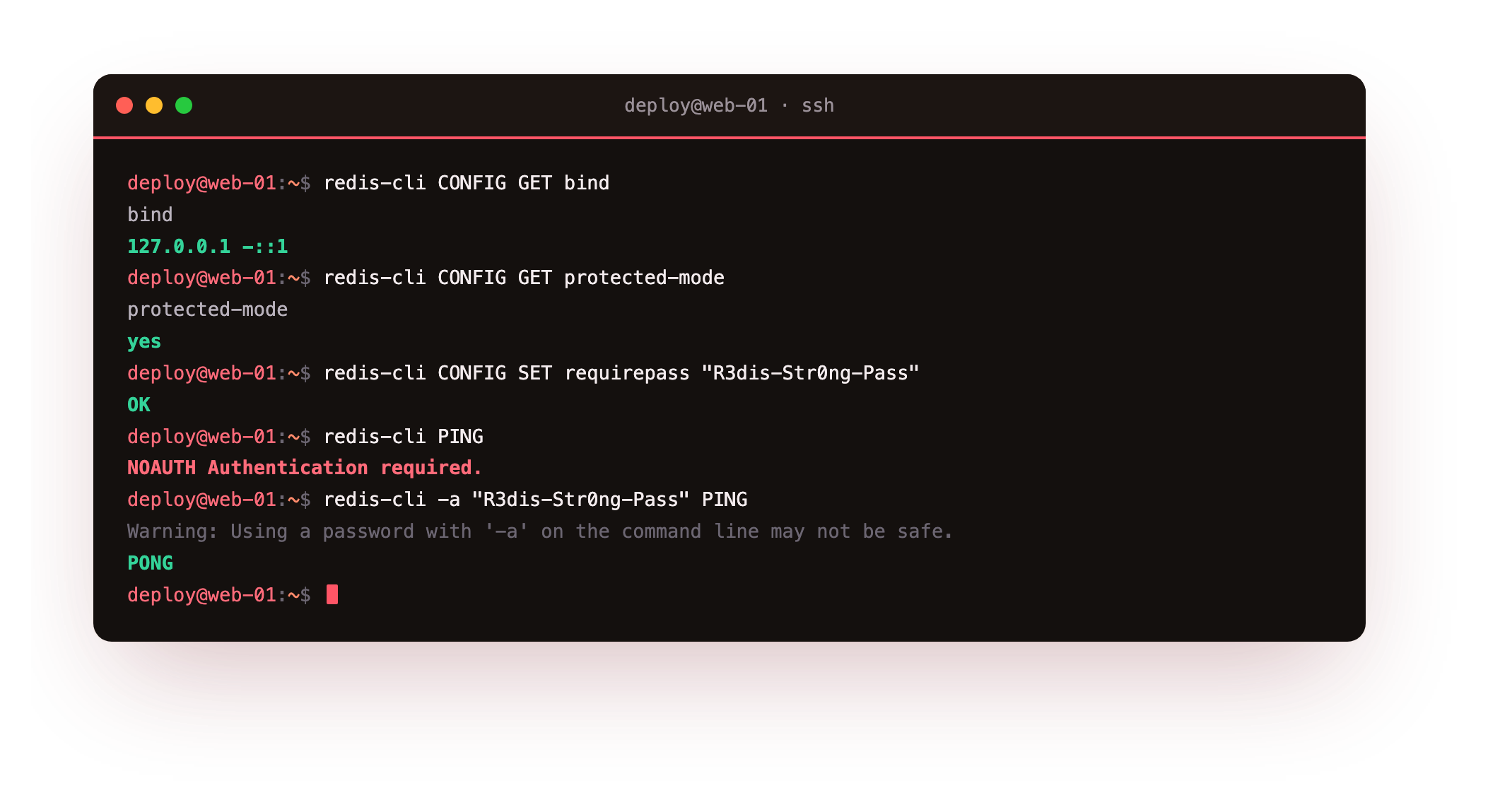
The plain PING now returns NOAUTH Authentication required, and the same PING with the password returns PONG. That refusal is the control working. Set requirepass in redis.conf so it survives a restart, use a long random value, and for finer control the ACL system in Redis 6 and later can grant each user only the commands and keys it needs.
After setting requirepass, a bare redis-cli PING must return NOAUTH Authentication required and only the -a form should return PONG. If the bare ping still answers, the setting did not take, so re-run the CONFIG SET requirepass and confirm you are on the same instance.
Rename the commands that can wipe or reconfigure
Authentication decides who connects. It does not stop an authenticated but compromised client, through a leaked password or an injection flaw, from running something destructive. rename-command removes that reach by disabling a command or hiding it behind a secret name. Add these lines to the config and restart.
rename-command FLUSHALL ""
rename-command CONFIG "CONFIG_b9f42a"
Renaming FLUSHALL to an empty string disables it outright. Renaming CONFIG to an unguessable name means only your tooling, which knows the new name, can change settings, while an attacker who runs plain CONFIG gets nothing. Restart the service, then try both.
redis-cli FLUSHALL
redis-cli CONFIG GET maxmemory
redis-cli CONFIG_b9f42a GET maxmemory
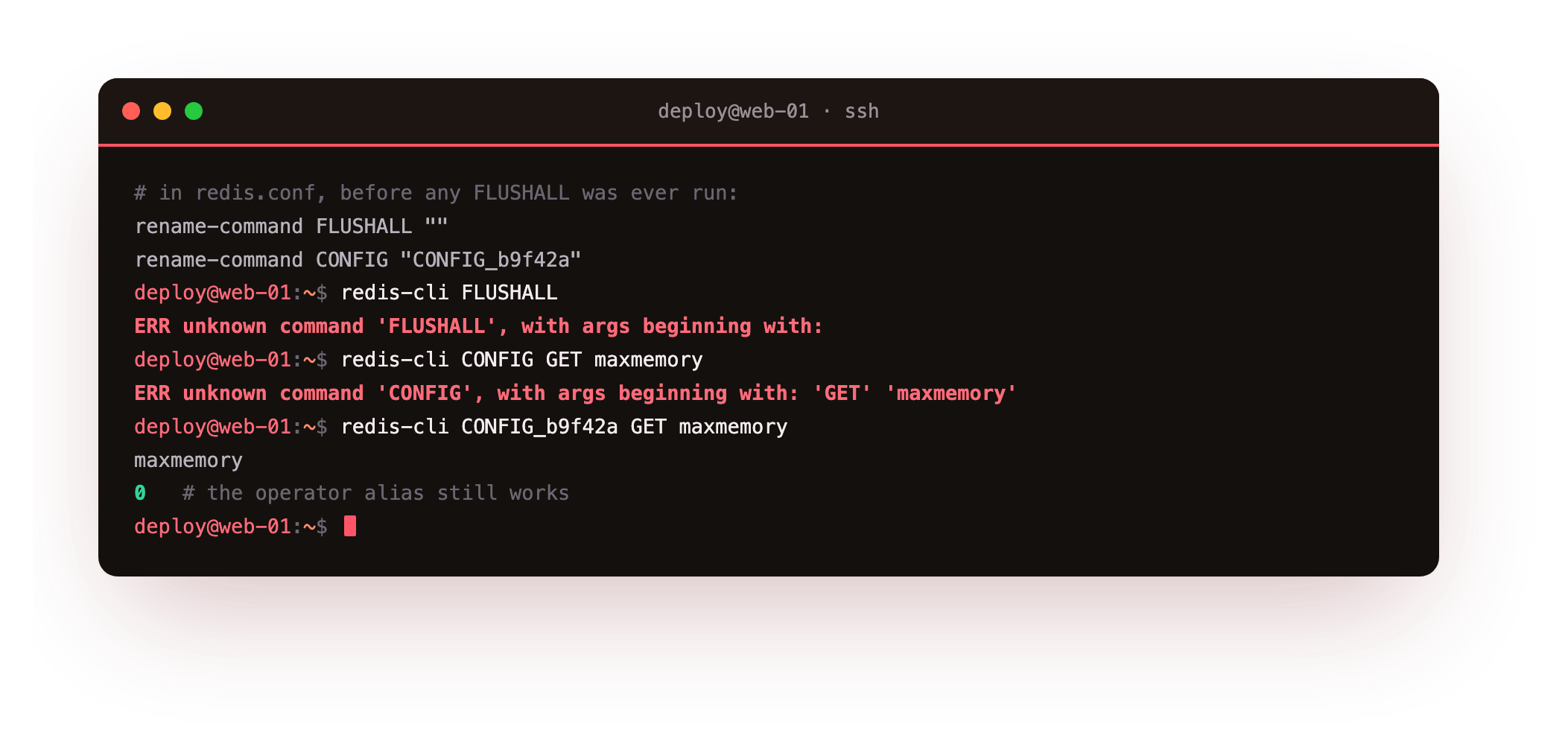
FLUSHALL comes back ERR unknown command, and so does plain CONFIG. The renamed CONFIG_b9f42a still reads the setting for you. A leaked connection can no longer empty the database or rewrite the config, because the commands to do so are gone or hidden.
Encrypt the connection with TLS
On one box where every client is local this matters less, but the moment a connection crosses hosts, to an app server or a replica, plaintext exposes everything on the wire. The Ubuntu package is compiled with TLS, so you generate certificates with openssl, point a tls-port at them, and connect over it.
tls-port 6380
tls-cert-file /etc/redis/tls/redis.crt
tls-key-file  /etc/redis/tls/redis.key
tls-ca-cert-file /etc/redis/tls/ca.crt
With those set and the service restarted, the client connects over TLS using its own copy of the CA. A plaintext client aimed at the same port gets nothing.
redis-cli --tls -p 6380 --cert redis.crt --key redis.key --cacert ca.crt PING
redis-cli -p 6380 PING
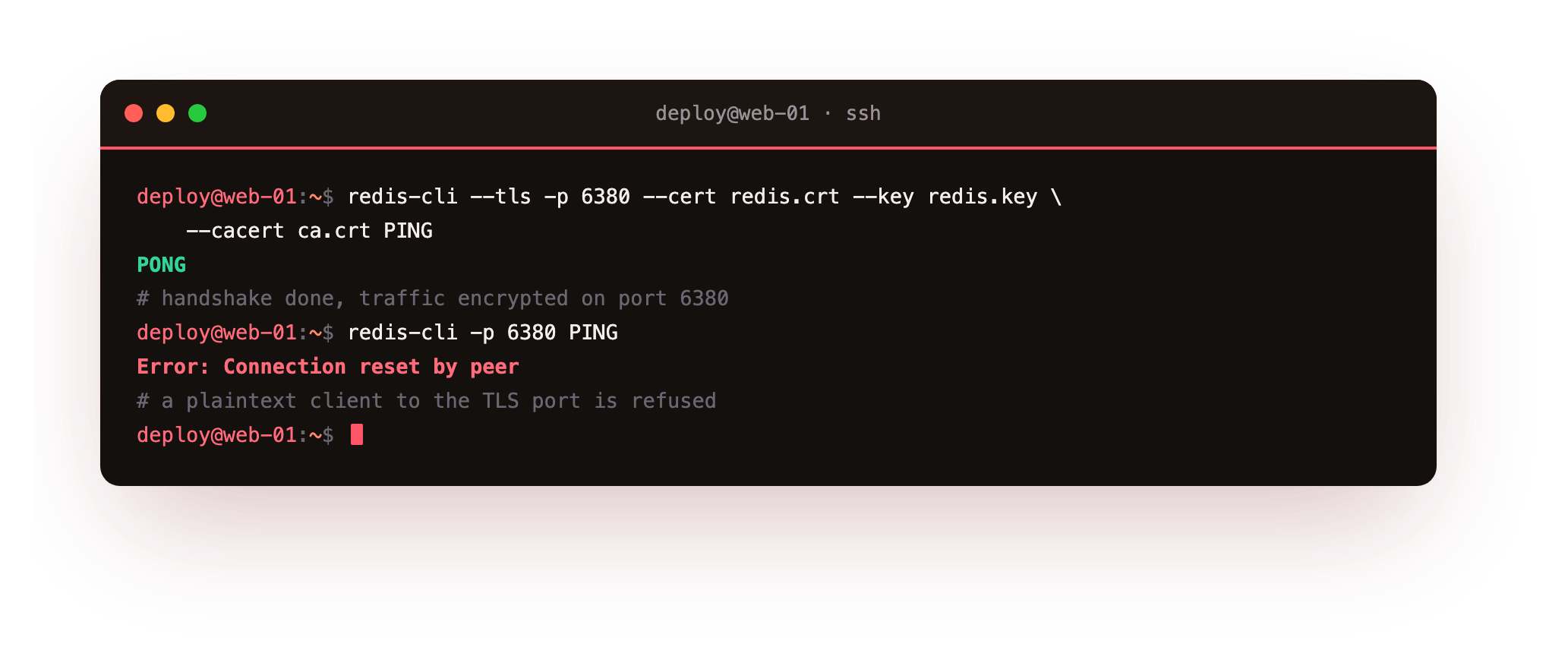
The TLS PING returns PONG, the handshake done and the traffic encrypted. The plaintext PING to the TLS port has its connection reset, because the server speaks only TLS there. A self-signed CA is fine within your own infrastructure as long as the clients verify it; across the public internet, issue certificates from a CA the clients already trust.
Bind to loopback and firewall the port
The last layer is the network itself. Confirm the listener is on loopback, then deny the port at the firewall as defense in depth, so the port stays closed even if a future edit widens the bind by mistake.
sudo ss -tlnp | grep 6379
sudo ufw deny 6379/tcp
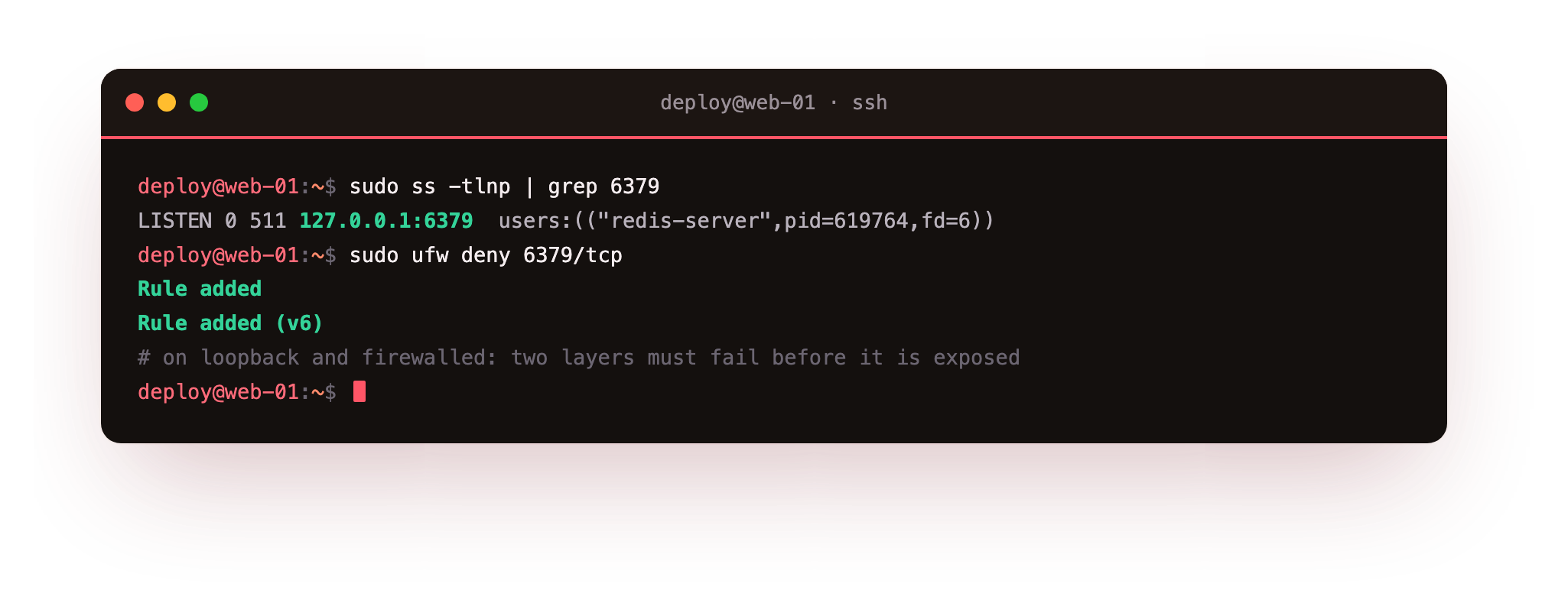
ss shows Redis listening only on 127.0.0.1:6379, so nothing off the box can reach it. The ufw deny rule prints Rule added for IPv4 and IPv6. Now two independent things must both fail before Redis is exposed: the bind would have to widen and the firewall rule would have to be removed. That is the point of layering them.
Going further: per-user access with ACLs
requirepass is one shared password with full power behind it. When several services share one Redis, that is too blunt: your cache writer has no business running FLUSHALL or reading your session keys. The ACL system, in Redis 6 and later, replaces the single password with named users, each limited to the commands and key patterns it needs.
redis-cli ACL SETUSER cachewriter on ">c4ch3-pass" ~cache:* +get +set +ttl
redis-cli ACL LIST
This creates a cachewriter user that can run only GET, SET and TTL, and only on keys matching cache:*. A leak of its password cannot touch a session key or wipe the database, because those commands and keys are outside its grant. ACL WHOAMI shows who you are connected as, and ACL GETUSER prints one user's full rule set. Start with requirepass for a single app, and reach for ACLs the moment more than one service, or more than one level of trust, shares the instance.
Frequently asked questions
Is a default Redis on Ubuntu safe without any hardening?
On a single box, yes, because Ubuntu 24.04 binds Redis to 127.0.0.1 with protected-mode on, so only local processes can reach it. It becomes unsafe the moment you change the bind address, add a replica, or expose the port, at which point a password, TLS, and a firewall rule stop being optional.
Should I use requirepass or the Redis ACL system?
requirepass is the quick, single-password option and is enough for a lone application. The ACL system, available since Redis 6, lets you define multiple users each limited to specific commands and key patterns, which is stronger for redis security when several services share one instance. You can start with requirepass and move to ACLs as access grows.
Does renaming commands break my application?
Only if your application uses the renamed command under its old name. Disabling FLUSHALL and FLUSHDB is usually safe because apps rarely call them, while renaming CONFIG or DEBUG needs your tooling updated to the new name. Review which administrative commands your stack actually uses before you rename them.
Do I need TLS if Redis only listens on 127.0.0.1?
On a single host where every client is local, loopback traffic never leaves the machine, so the encryption gain is small. TLS becomes important the moment a connection crosses hosts to an app server or a replica. Setting it up on a loopback tls-port first, as here, means the pattern is ready before you widen the bind.
The series, end to end
You now have a Redis on Ubuntu 24.04 that you understand structure by structure, use as a cache with expiry and eviction, can make durable with RDB and AOF, drive as a session store and rate limiter, and use to move work through pub/sub, queues, and Streams, all secured behind a password, renamed commands, TLS, and a firewall. Every step was proven on a live server with a command, not accepted on trust.
There is no next chapter, because the Redis layer is complete. The host underneath it deserves the same care. For the operating system, our SSH, firewall, and account guide at /guides/linux-server-hardening covers the ground below Redis with the same run-it-and-verify approach. Harden the box, and the Redis you just secured has solid ground to stand on.