Keep it running across reboots
A tunnel that works today is not yet one you can rely on. To keep it running you make it come back after a reboot, add a device or two safely, and understand the routing choices for later.
This chapter enables the systemd unit so the VPN survives a restart, layers on a preshared key, adds your phone as a second peer in the hub-and-spoke pattern, and closes with a deep dive under the hood: full-tunnel routing, NAT and DNS on Ubuntu 24.04. The result is a personal VPN you leave on and forget.
wg-quick@wg0under systemd brings the tunnel back after every reboot.- A
PresharedKeymixes in a symmetric secret for an extra layer on the handshake. - Each new device is one
wg setline and its own/32: the hub-and-spoke pattern. - Full-tunnel routing sends all traffic through the slice and needs a masquerade rule.
Make the tunnel survive a reboot
You brought the interface up by hand, but for a VPN you leave running it needs to start on boot. The package ships a systemd template, [email protected], where the part after the @ is the interface name. Enable it for wg0 and start it now in one command.
sudo systemctl enable --now wg-quick@wg0
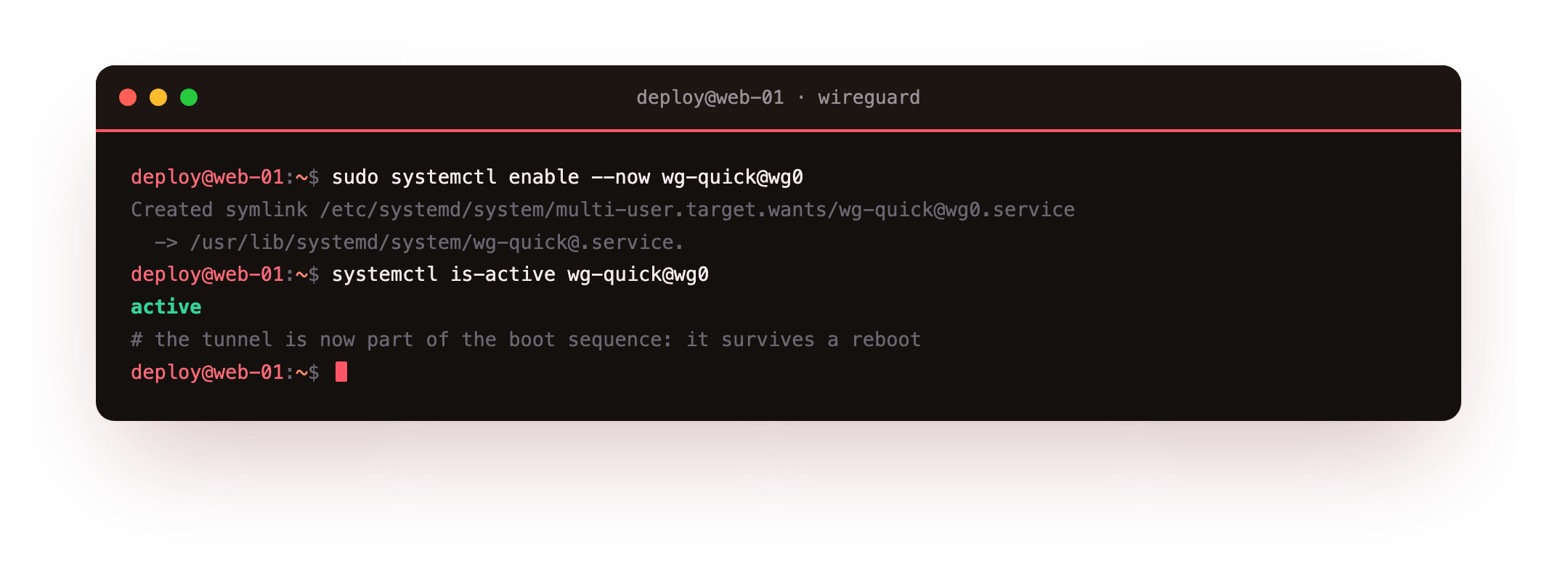
The unit is a oneshot with RemainAfterExit=yes, so systemd treats the tunnel as active for its whole life and runs wg-quick down on shutdown. From now on the tunnel is part of the boot sequence like any other service.
Run systemctl is-active wg-quick@wg0 and you should see active. Reboot the slice and reconnect a client: the handshake returns on its own, with nothing to start by hand.
Add a preshared key
WireGuard's public-key handshake stands on its own, but a PresharedKey adds a symmetric secret shared by two peers and mixed into the handshake. It is a hedge: even a future weakness in the public-key exchange still faces this extra layer. Generate one and attach it to a peer.
wg genpsk | sudo tee /etc/wireguard/laptop.psk
sudo wg set wg0 peer rcktfd2JnVcCxSWPowDvP7UI9EF45EXThqJ0rpYMyRs= preshared-key /etc/wireguard/laptop.psk
Add the same secret to the matching client config under its [Peer] block, then confirm it took on the server.
sudo wg show wg0
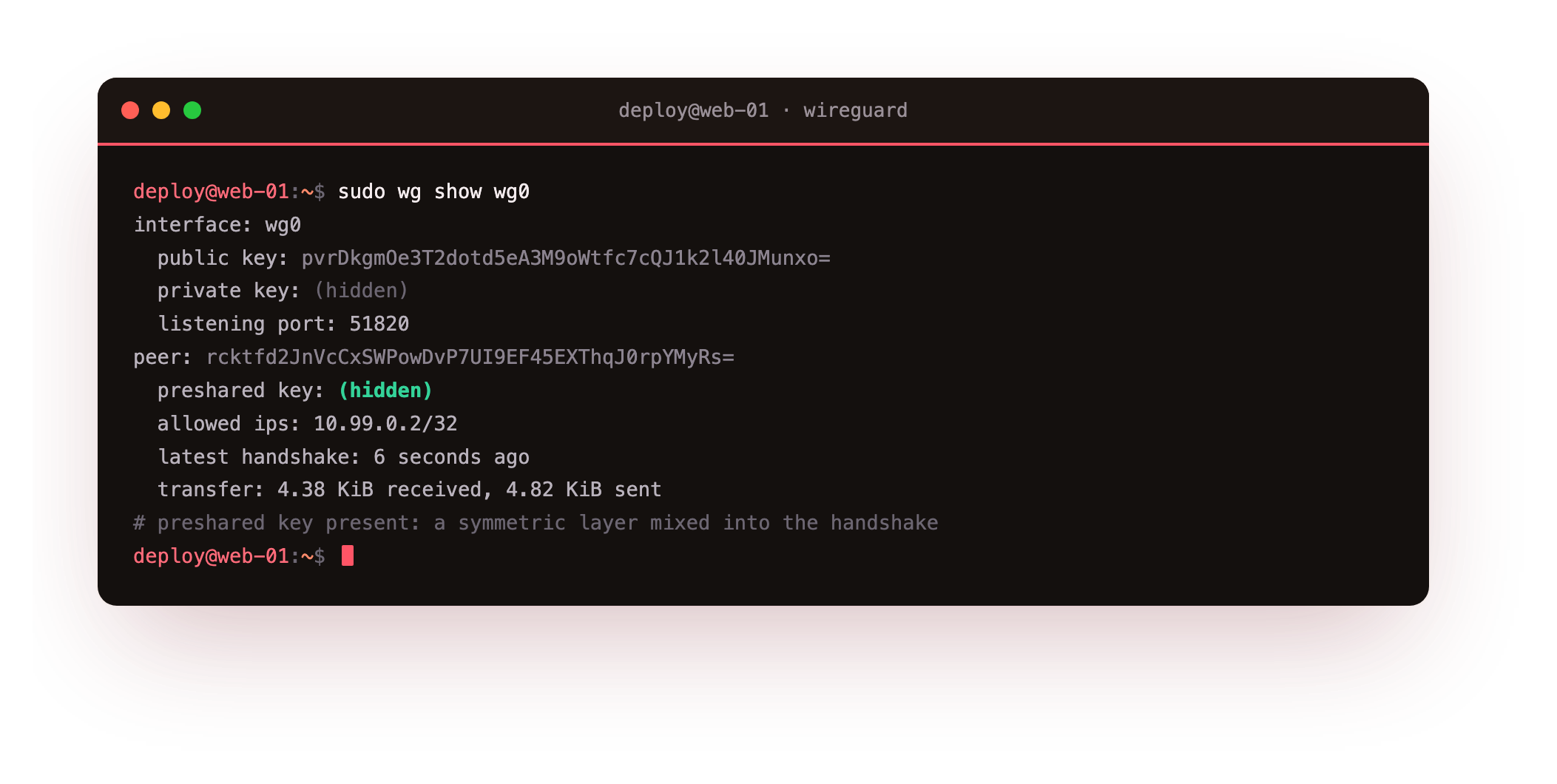
The peer now carries a preshared key: (hidden) line, and the value is never printed back. Keys should also rotate: generate a fresh keypair with wg genkey | wg pubkey, apply the new public key on both ends with wg set, and do it on a schedule or right after a device is lost.
Add more devices: the hub-and-spoke pattern
Growing the VPN is cheap. Each device gets its own keypair and its own address, and you register it with one line on the server. This is hub-and-spoke: the slice is the hub every device dials, and no two devices need to know each other's keys.
sudo wg set wg0 peer UIoYdw35eEBudb6vPtipfjXlWYEafMgyseC0kWyrix8= allowed-ips 10.99.0.3/32
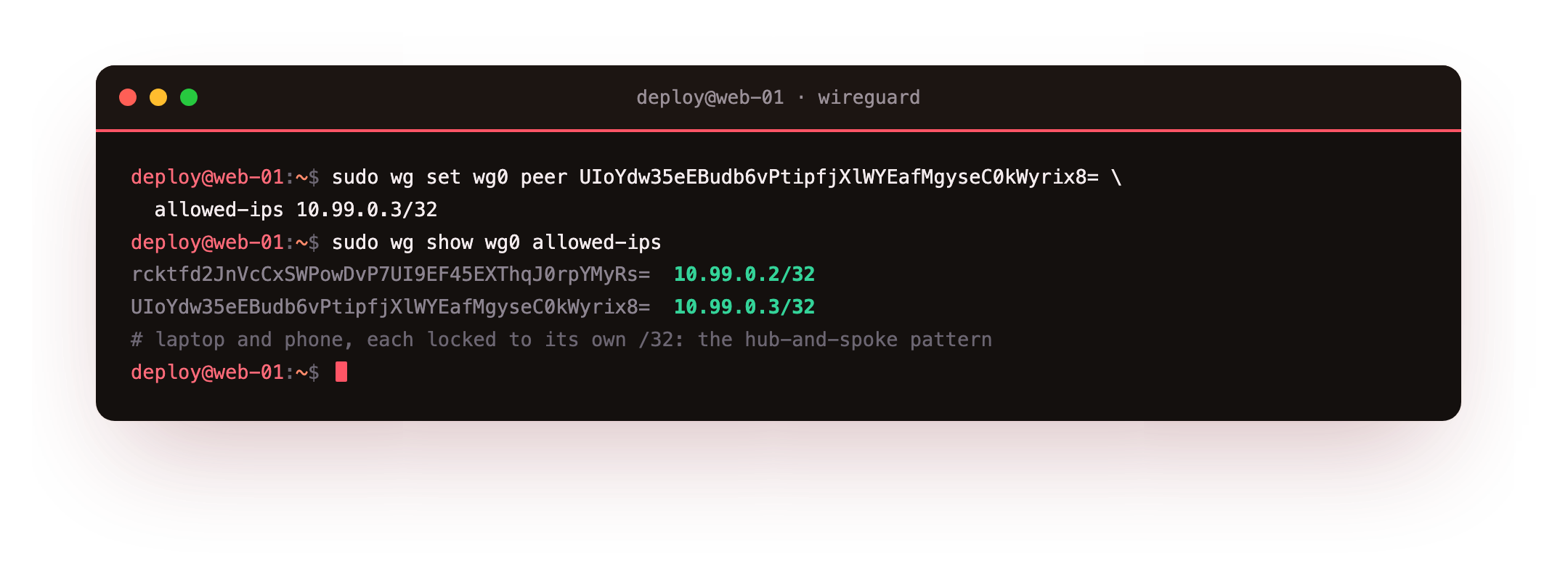
Each peer is locked to a single /32, so the server routes only that address to it and accepts only that source. Keep every AllowedIPs as narrow as the device needs, since that entry is both the route and the inbound filter, and a wide range hands a stolen key far more reach than it should have.
sudo wg show wg0 allowed-ips should list every device, each on its own /32: the laptop on 10.99.0.2/32, the phone on 10.99.0.3/32. Adding a tablet later is one more line with the next free address.
Going further: full-tunnel routing
So far the clients are split-tunnel: only tunnel-subnet traffic uses WireGuard. To send everything through the slice, widen a client's AllowedIPs to 0.0.0.0/0 and let a default route point into wg0. That suits a hostile network or a policy that all traffic must egress from one place. Read the routing table back.
ip route show
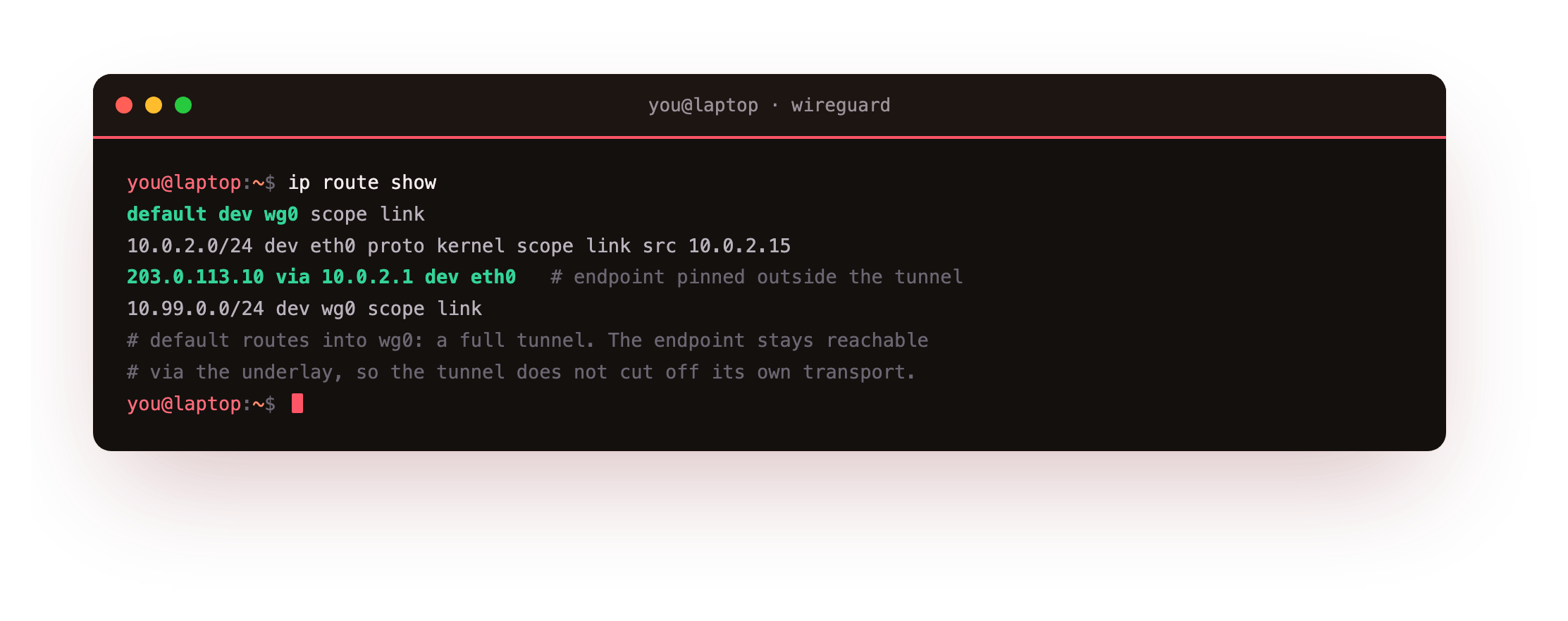
The default dev wg0 line means every packet with no more specific route now enters the tunnel. The connected route for the underlay stays in place and is more specific, so the server's endpoint is still reached directly rather than looping back into the tunnel. That balance, everything through wg0 but the endpoint reached outside it, is what stops a full tunnel from cutting off its own transport.
Masquerade so the internet replies to the slice
A full-tunnel client sends packets carrying its private tunnel source. The wider internet has no route back to 10.99.0.0/24, so the slice must masquerade: rewrite the source of tunnel traffic to its own public address as it leaves. Add the rule, enable forwarding, and read it back.
sudo nft list table inet nat
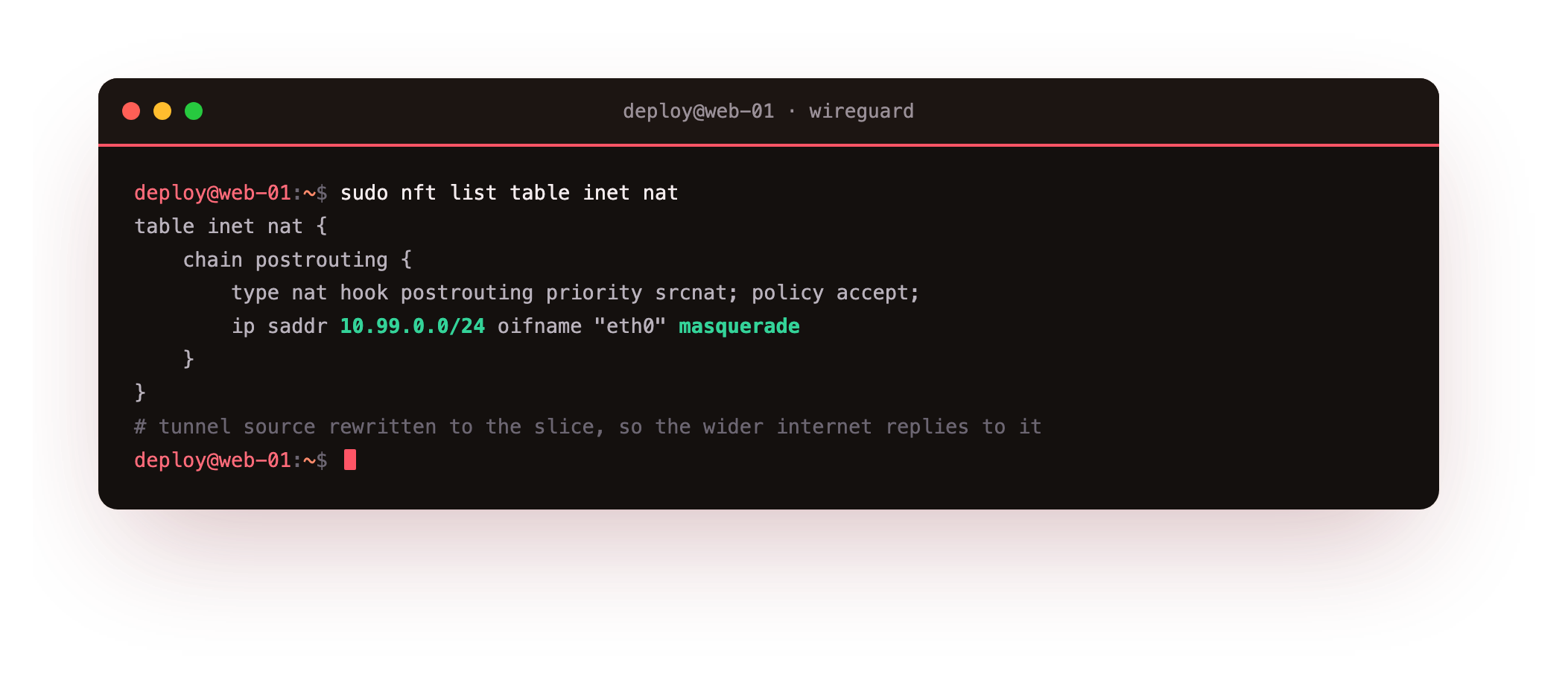
The postrouting chain matches ip saddr 10.99.0.0/24 leaving the public interface and applies masquerade. You also set net.ipv4.ip_forward=1 with sysctl, or the slice receives the client's packets and never passes them on. This is the same source NAT a home router does for a LAN, applied to the tunnel subnet, and it is what makes a full tunnel actually reach the outside.
DNS and cryptokey routing under the hood
Two details finish the picture. On a full tunnel, routing traffic does not change which resolver a client asks, so its DNS lookups can leak out the local link and reveal the sites it visits. Setting DNS = 10.99.0.1 in the client [Interface] points lookups at a resolver reached through the tunnel. wg-quick applies that on up and restores the previous resolver on down, because it changes name resolution, a userspace concern, at the same moment it changes routing.
Under all of this sits cryptokey routing. There is no routing protocol between peers and no session to establish. WireGuard keeps a table of public keys to AllowedIPs; an outbound packet is encrypted to the peer that owns its destination, and a decrypted packet is dropped unless its source falls in that peer's range. The key is the identity and the peer list is the routing table, which is why the whole VPN is a few short config files and nothing more.
Frequently asked questions
How do I start a WireGuard tunnel at boot?
Enable the systemd template unit for your interface: systemctl enable --now wg-quick@wg0 reads /etc/wireguard/wg0.conf, brings the tunnel up now, and starts it on every boot. The unit is a oneshot with RemainAfterExit=yes, so systemd reports it active for the life of the tunnel and runs wg-quick down on shutdown.
Is a preshared key necessary?
It is optional and additive. WireGuard's normal handshake is secure without it, but a PresharedKey mixes in a symmetric secret so that even a future weakness in the public-key exchange leaves this layer intact. It costs one shared secret per peer pair and no measurable performance. For a high-value tunnel it is a cheap hedge worth adding.
How many devices can I add to one server?
As many as your tunnel subnet holds. A /24 like 10.99.0.0/24 gives 254 usable addresses, and each device is one wg set line with the next free /32. The server is the hub every device dials, so you never configure device-to-device pairs. For a personal fleet of laptops, phones and a tablet, one /24 is far more than enough.
Why keep AllowedIPs as narrow as possible?
Because AllowedIPs is both the routing rule and the inbound filter for a peer. A wide range on a client means a stolen key can source-spoof or reach far more of your network than that device ever should. A single /32 per roaming client limits a compromise to that one address. Widen it only for a peer that genuinely represents a subnet, such as a site gateway.
Recap
You now have a WireGuard VPN that keeps itself running. The wg-quick@wg0 systemd unit brings it back after a reboot, a preshared key adds a symmetric layer you confirm as preshared key: (hidden), and each device is one wg set line on its own /32 in the hub-and-spoke pattern. The deep dive covered full-tunnel routing, the masquerade that makes it reach the internet, DNS through the tunnel, and the cryptokey routing that ties it together.
That closes the series. You installed WireGuard from zero, connected your laptop and phone, reached a private service the public internet cannot see, and made the whole thing durable, all on a single slice.
A personal VPN is only useful if it is always there. An always-on slice keeps the tunnel up and your private services reachable. Launch a slice and run your own WireGuard VPN that survives reboots and grows with every device you add.