Serve PHP with Caddy and php-fpm
A static site is files; a PHP site is code that runs per request. This chapter serves PHP with Caddy by wiring the php_fastcgi directive to php-fpm on Ubuntu 24.04, then watches a real page execute and return over HTTPS. Where an nginx setup needs a location block, a FastCGI snippet and a socket path to join the two, Caddy folds all of that into one directive, and the automatic certificate from the earlier chapters means the dynamic page is served over TLS with nothing extra to set up.
- Caddy does not run PHP itself; it hands a request to php-fpm over FastCGI, and php-fpm executes the code.
- The php_fastcgi directive points at the fpm socket and sets up the index routing, path splitting and file check for you.
- A unix socket under /run keeps the runtime off any network port, so only Caddy reaches it.
- A value the page computes on each request, like a timestamp, proves the code ran rather than being downloaded.
- The running Caddy service from the previous chapters, still issuing certificates and serving over HTTPS.
- A short PHP file to serve, here an
index.phpunder/srv/tidepool-phpthat reports a tide status as JSON. - Sudo rights to install the php-fpm package and to reload the Caddy service after editing the site.
- A moment to compare the result against the nginx FastCGI setup, if you have wired one before, to feel the difference.
Install php-fpm and find its socket
Caddy speaks FastCGI, but it needs a FastCGI server to speak to, and that is php-fpm. A fresh slice has no PHP, so install the fpm package; on Ubuntu it pulls the 8.3 runtime and the command-line binary with it.
sudo apt install -y php-fpm
php -v
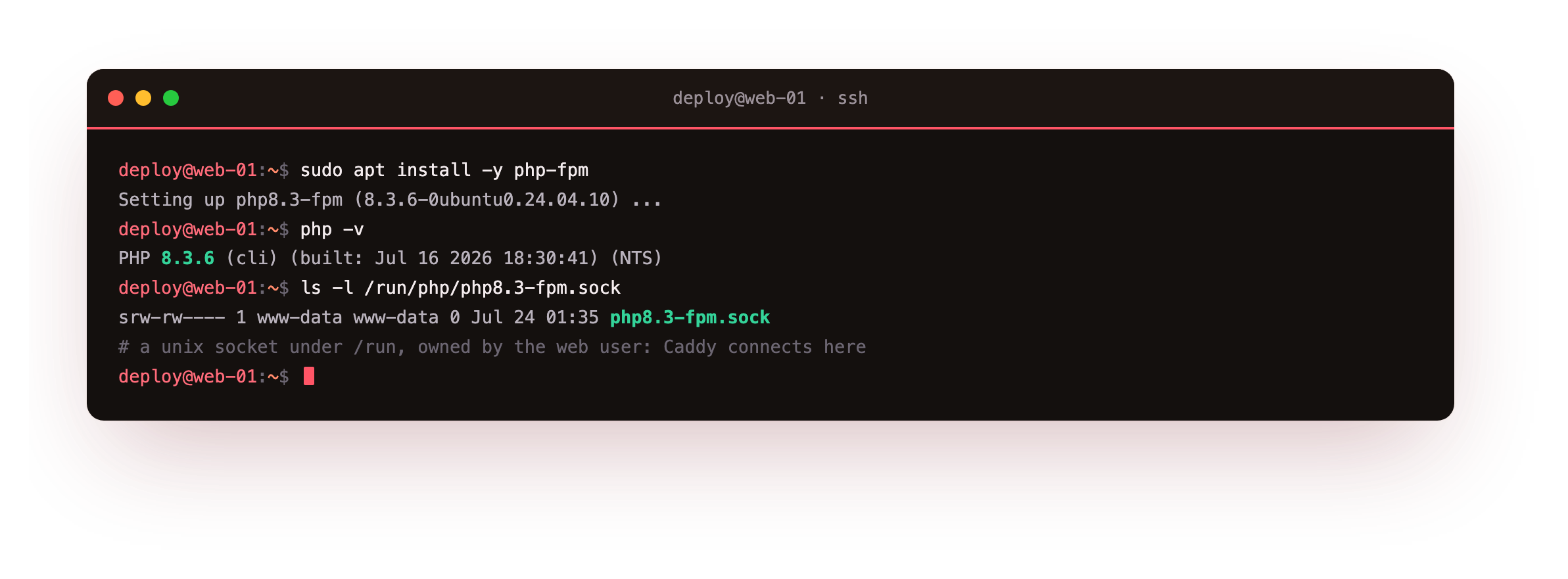
Reading php -v back confirms the build, here PHP 8.3.6. Installing php-fpm also starts a systemd service that manages a pool of PHP workers and exposes them on a unix socket. That socket, a file under /run/php owned by the web user, is what Caddy connects to. A socket on disk rather than a TCP port means nothing is published on an interface, and access is a plain filesystem permission.
php -v should print an 8.3 line, and ls /run/php should list a php8.3-fpm.sock file. If the socket is missing, the fpm service did not start, so bring it up with sudo systemctl start php8.3-fpm and confirm the file exists before pointing Caddy at it.
The fpm service manages a pool of worker processes that stay warm between requests, so PHP is not started fresh each time a page loads. That pool is where the runtime's own tuning lives, its size, its user and its recycling, and it is the same pool whether Caddy or another web server sits in front. For this chapter the shipped default pool is enough, because the point here is the wiring rather than the tuning.
Serve a PHP page with Caddy and php-fpm
The page for this chapter is deliberately small: an index.php that reads the current tide phase from the clock and answers as JSON, so there is nothing but the runtime to look at. Serving it is one directive. Point root at the code and add php_fastcgi with the socket path.
app.tidepool.example.com {
    root * /srv/tidepool-php
    php_fastcgi unix//run/php/php8.3-fpm.sock
    file_server
}
That block is the entire integration. php_fastcgi sends PHP requests to the fpm socket and, on its own, routes a clean URL to index.php, splits the path so fpm gets the right script, and checks the file exists before passing it. file_server serves any static assets that sit alongside the code. Reload Caddy and call the page over HTTPS.
curl -s https://app.tidepool.example.com:8443/
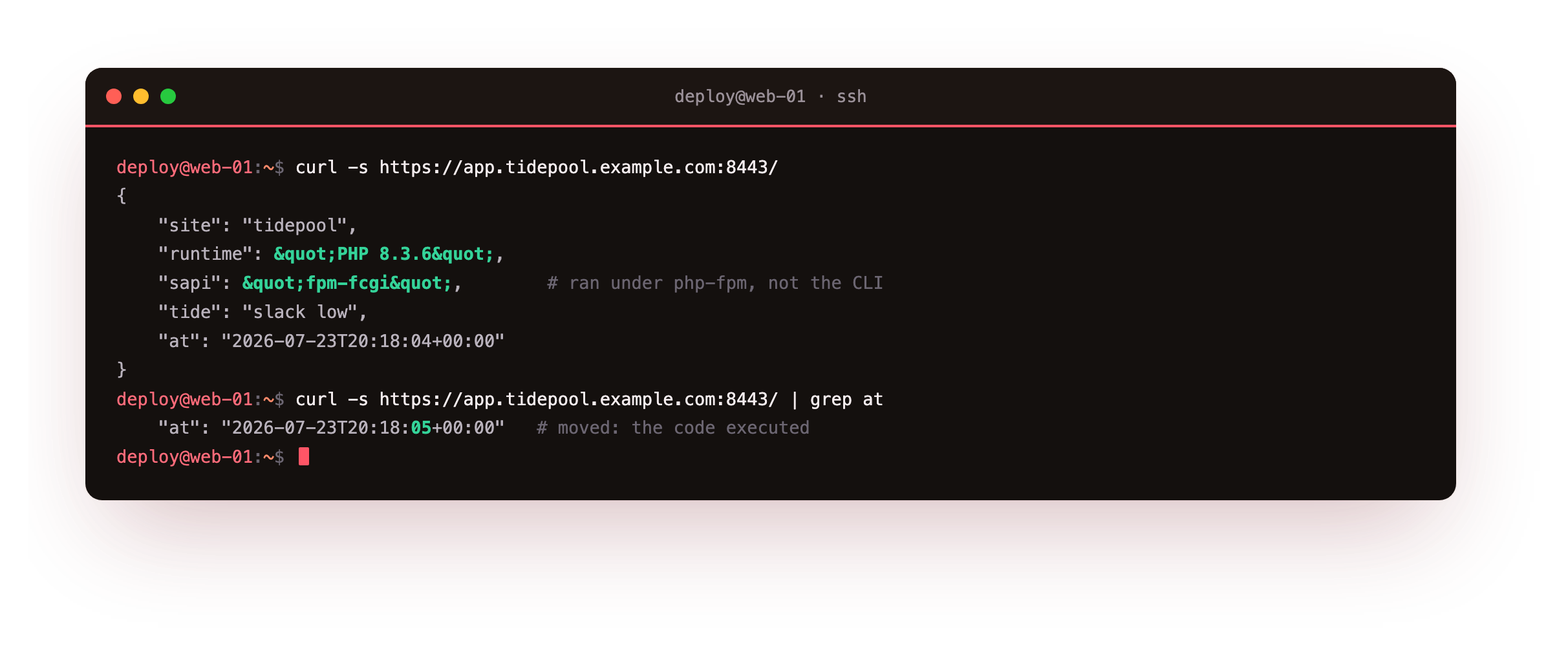
The response is JSON the code built this request: the runtime reports PHP 8.3.6, the server API reads fpm-fcgi which confirms it ran under php-fpm and not the command line, and a timestamp shows the moment it executed. Call it again and the timestamp moves, which is the proof the page ran rather than being served as a file. Had the wiring been wrong, you would see the raw <?php source come back instead, the classic sign a request never reached fpm.
The response should be computed JSON with the server API reading fpm-fcgi, and the timestamp should change between two calls. If the browser downloads the PHP file or shows its source, the request is not reaching fpm, so confirm the socket path in php_fastcgi matches the file under /run/php and reload.
One directive, the whole FastCGI pipeline
The single php_fastcgi line hides a set of handlers, and it is worth seeing what it stands for. Adapt the config and look at how the directive expands for the PHP site.
sudo caddy adapt --config /etc/caddy/Caddyfile
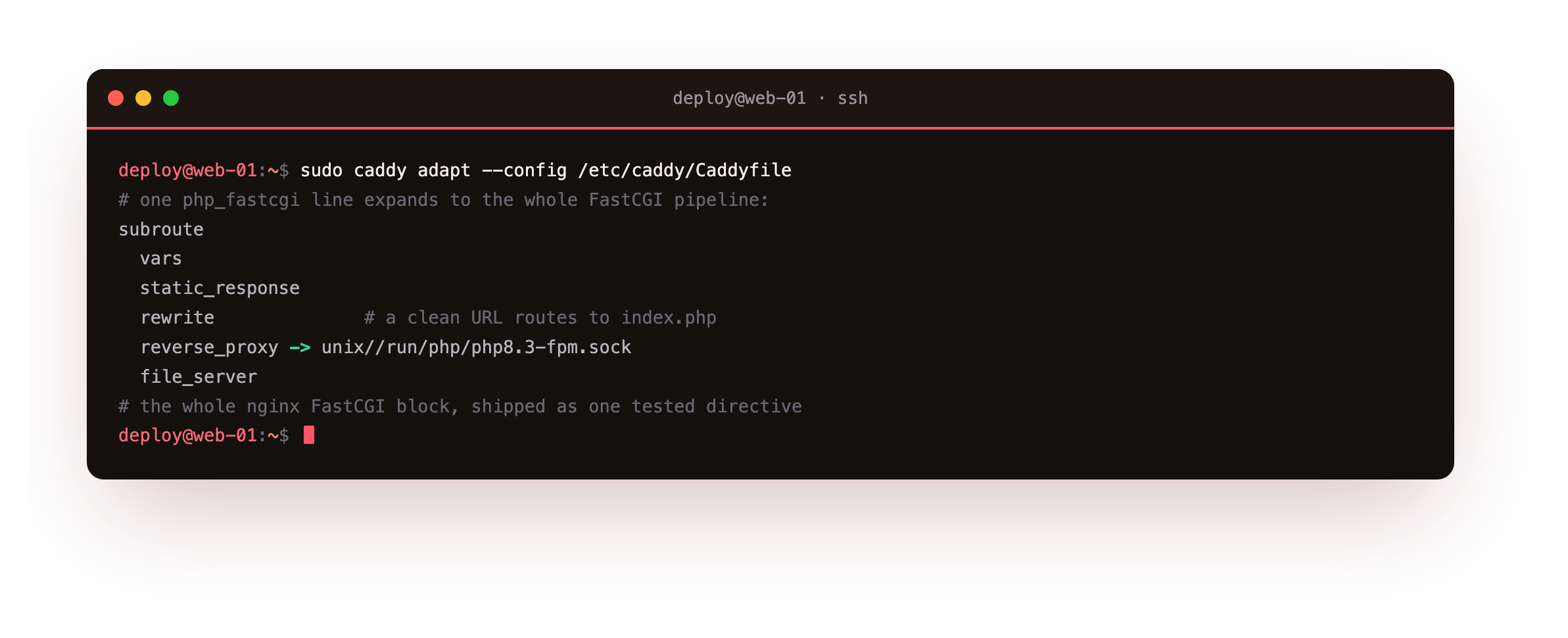
The one line becomes a subroute: a rewrite that routes a directory or clean URL to index.php, a path split so fpm receives the script name and the trailing path separately, a reverse proxy to the fpm socket carrying the FastCGI transport, and the file server behind it for static files.
In an nginx config each of those is a line you write and can get subtly wrong; the path-splitting mistake in particular has been the root of real security holes. Caddy ships that whole pipeline as one tested directive, which is fewer lines to author and fewer to get wrong.
Going further: front controllers and the runtime boundary
The demo is one file, but the same directive serves a full framework. A Laravel or WordPress site is a front controller plus a tree of code, and php_fastcgi already does the front-controller routing that those expect, sending unknown paths to index.php. Keep the code out of harm's way by pointing root at only the public directory and leaving the application and any database files one level up, so the web has no path to them at all.
The runtime tuning, the fpm pool sizing, the worker count, OPcache, the per-app user, lives on the php-fpm side and is the same work regardless of which web server sits in front. Caddy's job ends at the socket; what happens past it is the runtime's, and that clean split is why either side can be changed without disturbing the other.
Frequently asked questions
Do I need a PHP module for Caddy the way old Apache had mod_php?
No. Caddy has no in-process PHP module, and it does not need one. It talks to php-fpm over FastCGI, the same model nginx uses, so you install php-fpm as a separate service and join it with the php_fastcgi directive. That separation lets you reload or tune either side on its own, and it is why the integration is one config line rather than a compiled extension.
Should php-fpm listen on a socket or a TCP port?
On a single box the unix socket is the natural pick, and it is what the fpm package sets up by default. There is no port to expose by accident, and access is a file permission Caddy holds. A TCP listener like 127.0.0.1:9000 earns its place when the runtime runs on a different host from Caddy, or when a tool insists on a host and port. Both keep the runtime off the public interface, which is the part that matters.
Why does the server API read fpm-fcgi and does it matter?
It is how PHP reports which server interface ran the request. Seeing fpm-fcgi confirms the page executed inside a php-fpm worker over FastCGI, not from the command line and not as a downloaded file. It matters because settings differ between the fpm and cli interfaces, so a value you change for one does not affect the other. When you tune the runtime for the web, edit the fpm configuration, and this field is your confirmation the web path is the one you are on.
Can Caddy serve more than one PHP application on the same box?
Yes. Give each application its own site block with its own root and its own php_fastcgi socket, and run a separate fpm pool per application so each has its own user and worker budget. Caddy routes by hostname, so two sites on one server stay isolated. The runtime isolation between pools is a php-fpm concern; Caddy simply points each site at the right socket.
What you have, and what comes next
You installed php-fpm, found its socket, wired it to Caddy with a single php_fastcgi directive, and watched a dynamic PHP page execute and return over HTTPS with a timestamp that proves the code ran. You also saw that one directive stand in for the whole FastCGI pipeline an nginx config spells out by hand.
The site now serves static files, proxies an app, and runs PHP, all over automatic HTTPS. The final chapter takes this to production: security headers, structured logging, rate limiting, systemd hardening, and a graceful reload that swaps config with no downtime.