Put a Caddy reverse proxy in front of an app
Most real sites are not files on disk; they are an application listening on a local port. A Caddy reverse proxy is the front door for that app: it terminates TLS, forwards the request, sets the headers the app needs to know who called, and can spread traffic across more than one copy. This chapter proxies a small tide-reading API on Ubuntu 24.04, adds the forwarded headers, passes a websocket straight through, and load balances two backends with a health check that drops a bad one.
- The reverse_proxy directive names one or more backends and does the rest, keeping HTTPS in front while the app speaks plain HTTP behind.
- Caddy sets the X-Forwarded-For, X-Forwarded-Proto and X-Forwarded-Host headers so the backend sees the real client and scheme.
- A websocket upgrade is proxied with no extra config, because Caddy carries the connection upgrade through by default.
- Listing two backends turns on load balancing, and an active health check takes an unhealthy one out of rotation on its own.
- The running Caddy service and its site block from the earlier chapters, still serving over HTTPS.
- An application, or in this walkthrough two small instances, listening on local ports the proxy can reach.
- The backends bound to loopback only, so nothing but Caddy can talk to them and the public path always crosses the proxy.
- A second terminal is handy for watching a backend stop and rejoin while requests keep flowing.
Configure a Caddy reverse proxy
Behind the proxy in this walkthrough are two identical instances of a tide API, one calling itself blue and the other green, each answering on a loopback port. Putting Caddy in front of them is a single directive with the upstream address.
api.tidepool.example.com {
    reverse_proxy 127.0.0.1:9001
}
That is the whole thing for one backend: HTTPS on the front from the automatic certificate, plain HTTP to the app behind, and the request passed through. Caddy also rewrites the hop-by-hop details and adds the forwarding headers an app relies on, so the backend can tell the difference between a direct hit and one that came through a proxy. Reload and read what the app receives.
curl -s https://api.tidepool.example.com:8443/tides/today
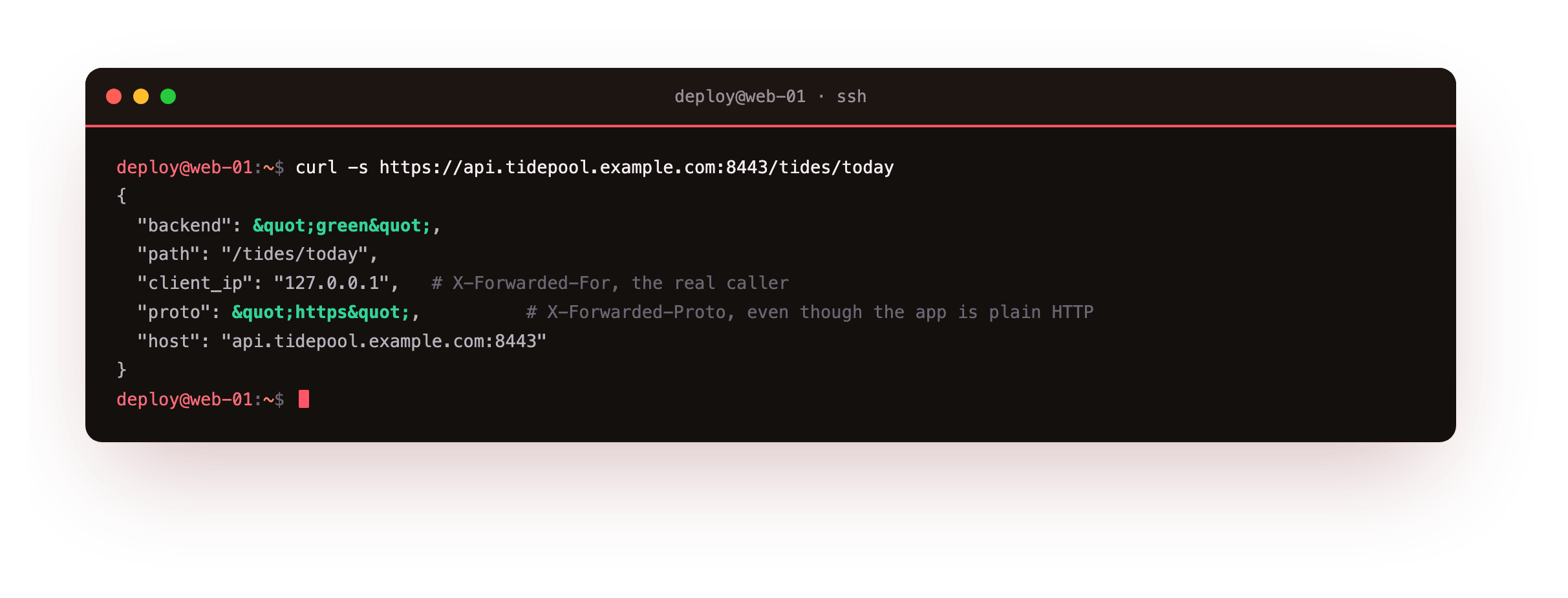
The backend echoes the headers Caddy set. X-Forwarded-For carries the client's address, X-Forwarded-Proto reads https even though the app itself was reached over plain HTTP, and X-Forwarded-Host holds the public hostname. An app that builds absolute URLs or logs client addresses needs these to be correct, and Caddy sets them without being asked.
The proxied response should show proto as https and a client address in the forwarded field. If the app instead sees http or the proxy's own loopback as the client, it is reading the wrong header, so point its trusted-proxy setting at Caddy so it honours X-Forwarded-For and X-Forwarded-Proto.
Proxy a websocket without special config
Real-time features ride on websockets, and a proxy that mishandles the upgrade breaks them. Caddy carries the upgrade through by default, so a websocket needs no directive of its own. The tide API accepts an upgrade on /live; ask for one and read the response.
curl -si --http1.1 -H "Connection: Upgrade" -H "Upgrade: websocket" \
  -H "Sec-WebSocket-Key: x3JJHMbDL1EzLkh9GBhXDw==" \
  -H "Sec-WebSocket-Version: 13" \
  https://api.tidepool.example.com:8443/live
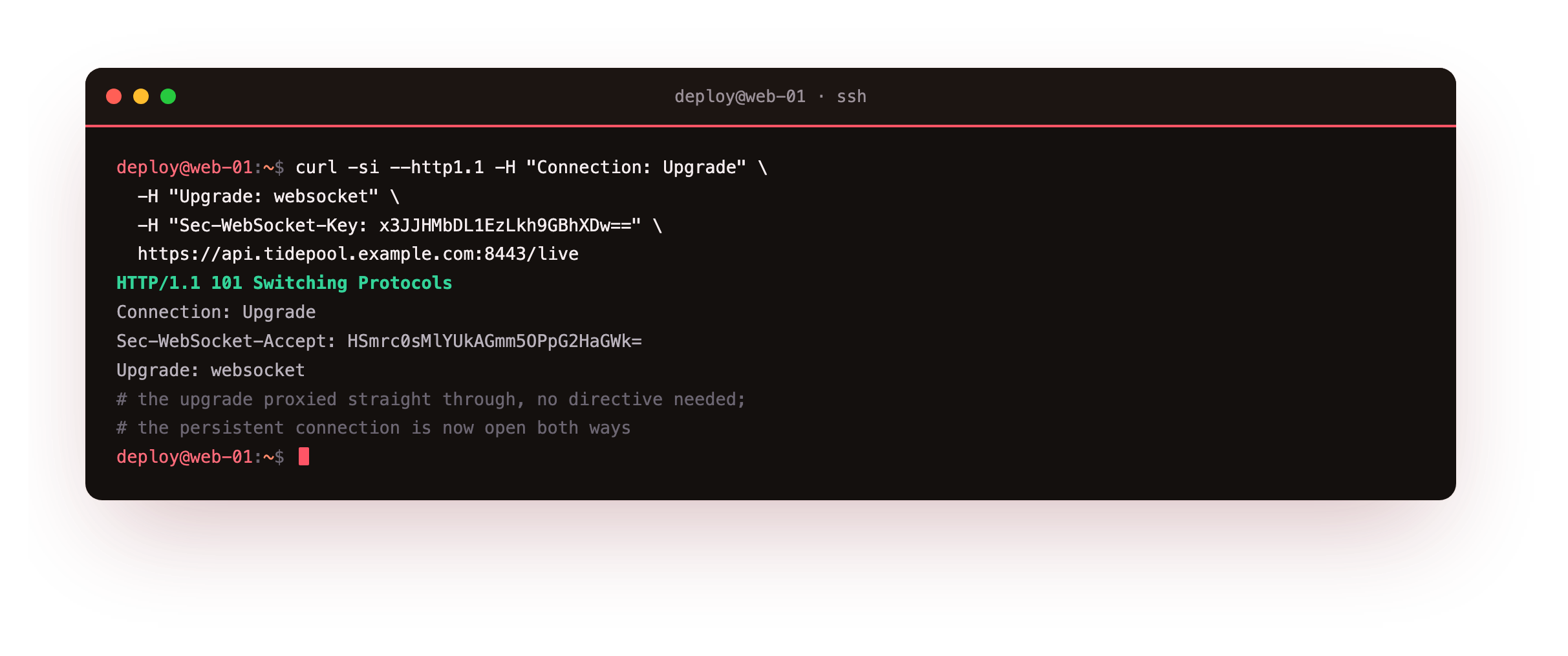
The reply is 101 Switching Protocols, with Upgrade: websocket and the computed Sec-WebSocket-Accept handed back from the backend through Caddy untouched. That 101 is the handshake completing across the proxy, which means the persistent connection is open and frames flow both ways. The request goes over HTTP/1.1 here because the classic upgrade header belongs to that version; a browser's websocket client does the same negotiation automatically.
Load balance across two backends
One line scales from a single backend to several. List more than one address and Caddy balances across them, which lets you run two copies of the app and take one down for a deploy without an outage. Add a policy so the spread is predictable, and a health check so a sick backend is skipped.
api.tidepool.example.com {
    reverse_proxy 127.0.0.1:9001 127.0.0.1:9002 {
        lb_policy round_robin
        health_uri /healthz
        health_interval 5s
    }
}
With round_robin the requests alternate evenly between the two. Reload and send a handful to watch the backend name flip each time.
for i in $(seq 1 6); do curl -s https://api.tidepool.example.com:8443/tides; done
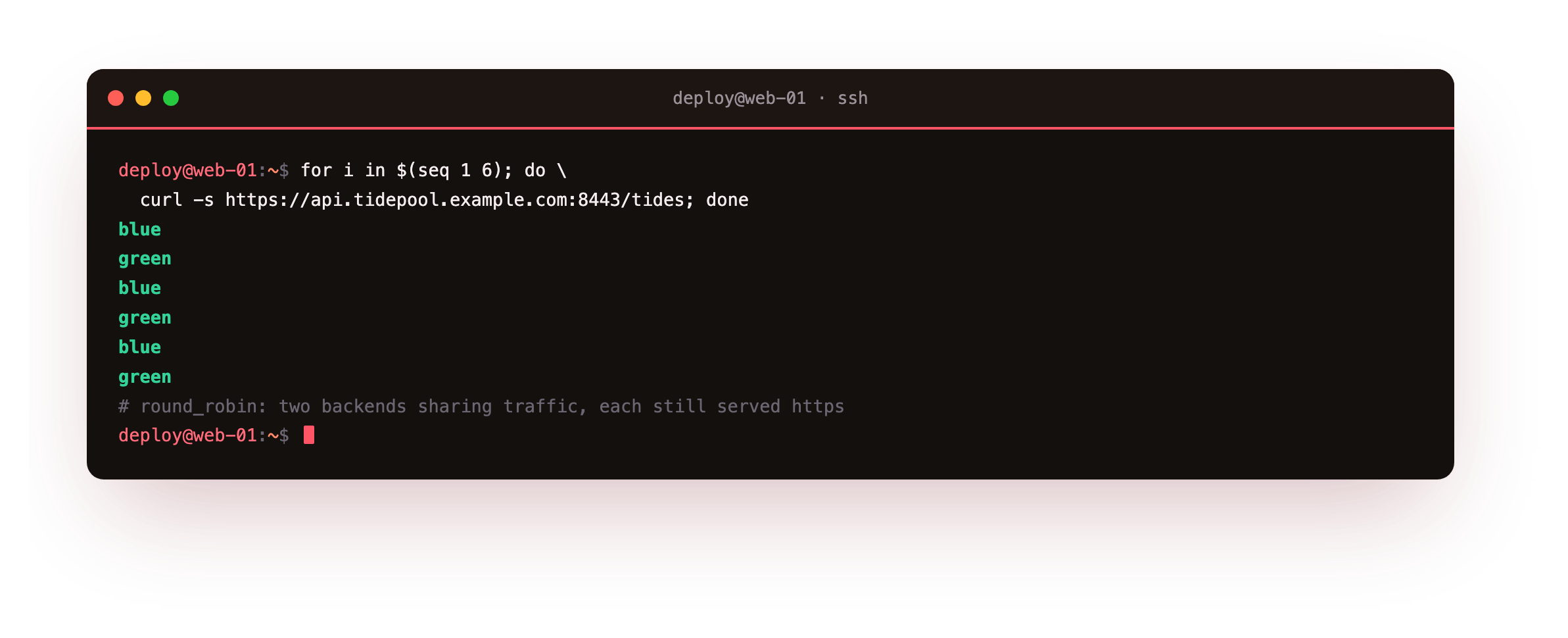
The responses come back blue, green, blue, green, in step, each still marked https. That even split is the load balancer at work: two instances sharing the traffic, both fronted by the same certificate and hostname. Change round_robin to least_conn and Caddy instead sends each request to the backend with the fewest active connections, which suits uneven request times.
Six requests should name both backends in a steady alternation. If every response names the same one, the second address is unreachable or failing its health check, so confirm the instance is listening on its loopback port and that /healthz returns a 2xx before expecting it to take traffic.
Watch a health check pull a bad backend
The health check earns its keep when a backend dies. Every few seconds Caddy asks each upstream for /healthz; a backend that stops answering is dropped from rotation until it recovers. Stop one instance and watch the traffic move.
sudo systemctl stop tide-blue
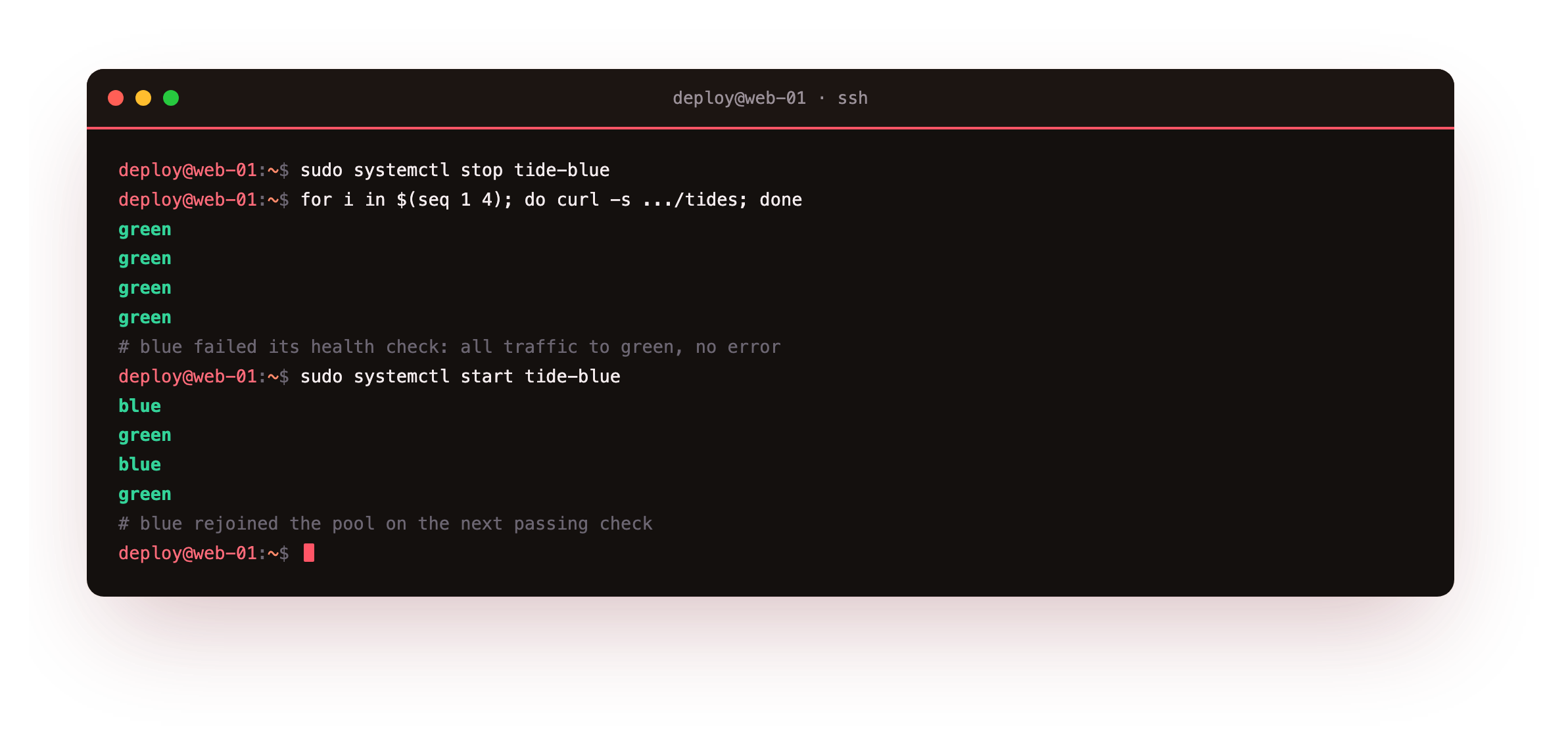
Within one health interval the blue backend fails its check and Caddy stops routing to it, so every request now names green and no visitor sees an error. Start blue again and the next check passes, the instance rejoins the pool, and the responses return to alternating. That is a rolling deploy in miniature: take one copy down, let it recover, and the proxy shifts load without you touching it.
Going further: buffering, retries and streaming
The proxy has knobs for the harder cases. By default Caddy streams the request and response rather than buffering them, which is right for large uploads and downloads and for server-sent events, though a slow backend can be shielded with a buffer if needed. A lb_try_duration lets a request wait briefly for a free backend instead of failing at once during a spike.
Header manipulation with header_up and header_down rewrites what the backend sees and what the client gets, useful when an app expects a particular host header or you want to strip a backend's own server banner. Each is one line inside the proxy block, added only when a real need appears.
Frequently asked questions
Does my app need to know it is behind a proxy?
Only enough to trust the forwarded headers. Caddy sets X-Forwarded-For, X-Forwarded-Proto and X-Forwarded-Host correctly, but many frameworks ignore them until you mark the proxy as trusted, otherwise they would let any client spoof those values. Point the app's trusted-proxy setting at the proxy address and it will read the real client and scheme. Beyond that the app serves plain HTTP on its port and needs no other change.
Which load balancing policy should I start with?
Round robin is the sensible default: it spreads requests evenly and is easy to reason about. Move to least connections when request times vary a lot, so a backend stuck on a slow request stops receiving new ones. There are also hashing policies that pin a client to a backend when you need sticky sessions. Begin with round robin, measure, and switch only if the traffic pattern asks for it.
What is the difference between active and passive health checks?
An active check, the one used here, has Caddy poll a health path on a timer regardless of traffic, so a backend is marked down before a real request hits it. A passive check instead watches live requests and pulls a backend after a set number of failures. They combine well: the active check catches an idle backend that died quietly, and the passive one reacts fast to errors under load. Start with the active check on a cheap health route.
Can Caddy proxy to a backend over HTTPS or a unix socket?
Yes to both. Give the upstream an https:// scheme and Caddy speaks TLS to the backend, with options to verify or skip its certificate for an internal service. For a backend on the same box, a unix socket address avoids the network stack entirely and keeps the app off any port, which is exactly how the next chapter connects Caddy to php-fpm. The proxy directive treats a socket upstream the same as a host and port.
What you have, and what comes next
You put Caddy in front of an application, saw the forwarded headers it sets so the backend knows the real client and scheme, passed a websocket through with no special config, balanced two backends round robin, and watched a health check drop a dead one and welcome it back. HTTPS stayed on the front the entire time.
The backends here were a stand-in app. The next chapter connects Caddy to a real language runtime, wiring php-fpm behind the proxy with a single directive so a dynamic PHP page executes and returns over HTTPS.