Take a Caddy site to production
Automatic HTTPS gets a site online; a production site needs more. Taking Caddy to production means the response carries the security headers a browser expects, the access log is structured so you can query it, abusive clients meet a rate limit, the service runs sandboxed under systemd, and a config change reloads with no dropped connection. This chapter adds each of those to the Tidepool site on Ubuntu 24.04, so what you built across the series is something you can leave running.
- The header directive sets response headers like HSTS and nosniff, and can remove the server banner, in a few lines per site.
- Structured JSON logs make the access log queryable, and a sandboxed service needs a log directory it is allowed to write.
- Rate limiting lives in a plugin, so it needs a Caddy binary with that module built in rather than the stock package.
- A graceful reload swaps the config inside the running process, so the service keeps the same lifetime and drops nothing.
- The Caddy service from the series serving the Tidepool site over HTTPS, with the earlier sites still in the Caddyfile.
- Sudo rights to edit the Caddyfile, add a systemd drop-in, and reload the service.
- For the rate-limiting section, a Caddy build that includes the rate-limit module, since the packaged binary does not ship it.
- A willingness to read a security score and chip away at it, rather than expecting one flag to harden everything.
Add security headers
A browser makes safer choices when the response tells it to. The header directive sets these once for the site. Turn on strict transport security so browsers refuse to downgrade to plain HTTP, forbid content-type sniffing, deny framing, and trim the referrer, then remove the server banner so the response advertises nothing.
tidepool.example.com {
    root * /srv/tidepool
    file_server

    header {
        Strict-Transport-Security "max-age=31536000; includeSubDomains; preload"
        X-Content-Type-Options "nosniff"
        X-Frame-Options "DENY"
        Referrer-Policy "strict-origin-when-cross-origin"
        -Server
    }
}
The minus in front of Server deletes that header rather than setting it. Reload and read the response.
curl -sI https://tidepool.example.com:8443/
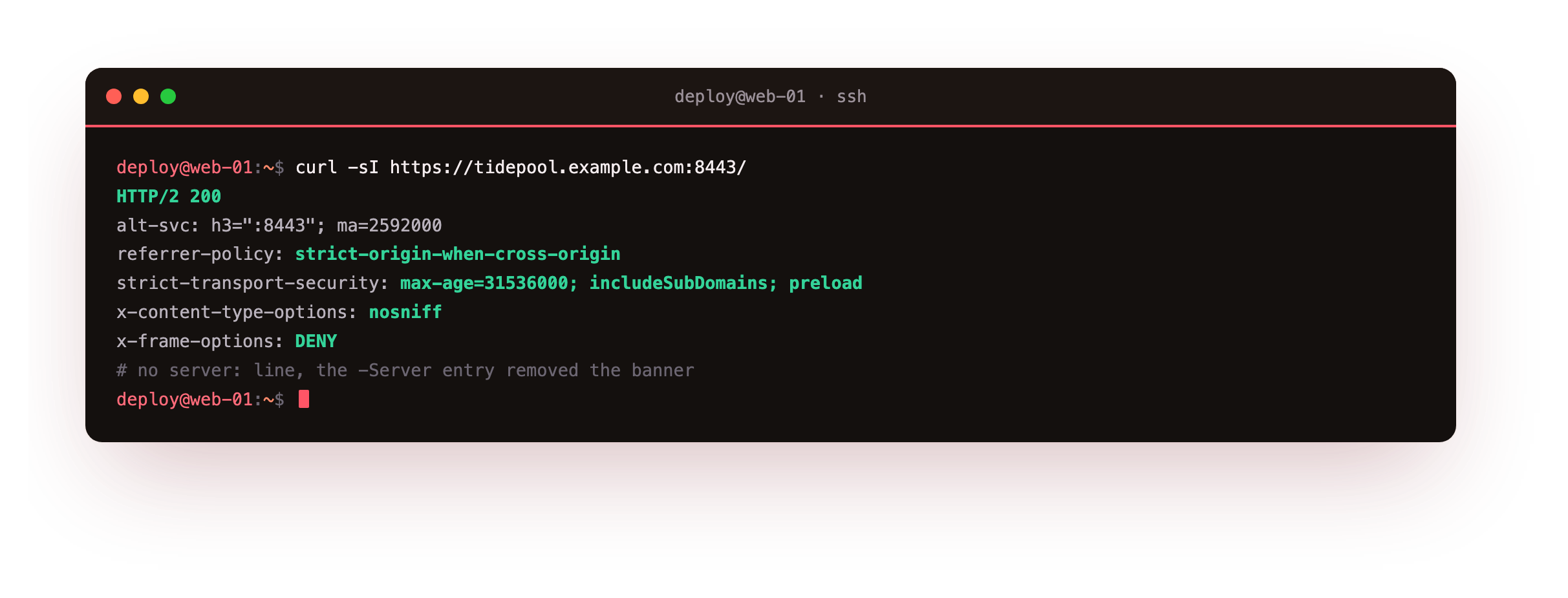
The response now carries the four security headers, and the Server line is gone, so a scanner learns nothing about the software from the banner. The strict transport header is the one to get right first, because it takes downgrade attacks off the table for a year at a time.
The response headers should include strict-transport-security, x-content-type-options and x-frame-options, with no server line. If the server banner is still there, the -Server entry is misplaced or the site did not reload, so confirm it sits inside the header block and reload again.
Turn on structured logging
The default log is human-readable text, which is fine to watch but awkward to query. Switch the site to JSON and each request becomes a structured record you can filter with a tool. A sandboxed service cannot write just anywhere, so give it a directory it owns.
    log {
        output file /var/log/caddy/tidepool.log
        format json
    }
Create the log directory as the caddy user, or let systemd manage it, then reload and make a request. Read the last line back.
sudo tail -n 1 /var/log/caddy/tidepool.log
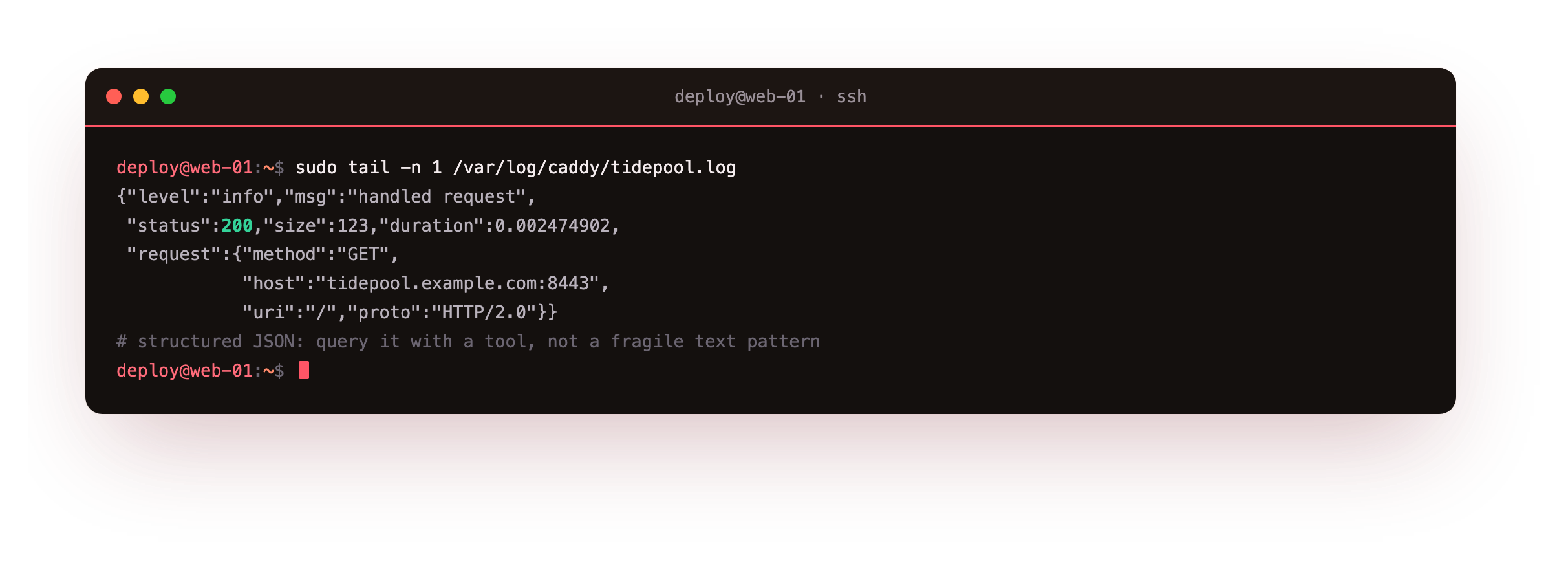
Each line is a JSON object: the status, the response size, the request duration in seconds, and a nested request record with the method, host, URI and protocol. Because it is JSON, a query like counting the 5xx responses in the last hour is one pipe into a tool that understands the format, rather than a fragile text pattern. The record shows the request came over HTTP/2 and returned quickly, the kind of detail that turns a vague slowdown report into a number.
A request should append one JSON line to the log with a numeric status and a nested request object. If the reload fails complaining it cannot open the log file, the service is not allowed to write that path, so create the directory owned by the caddy user, or add LogsDirectory=caddy to the unit, and reload.
Add rate limiting
A public endpoint needs a ceiling so one client cannot flood it. Rate limiting is not in the stock Caddy binary; it is a community module, so you run a build with it compiled in, either from xcaddy or the official download page that assembles a binary with the module for you. With that build, the directive defines a zone: a key to bucket clients by, and how many events are allowed in a window.
    rate_limit {
        zone tides {
            key {remote_host}
            events 5
            window 10s
        }
    }
This allows five requests per client address every ten seconds. Send eight in a burst and watch the ceiling bite.
for i in $(seq 1 8); do curl -s -o /dev/null -w "%{http_code}\n" \
  https://api.tidepool.example.com:9443/tides; done
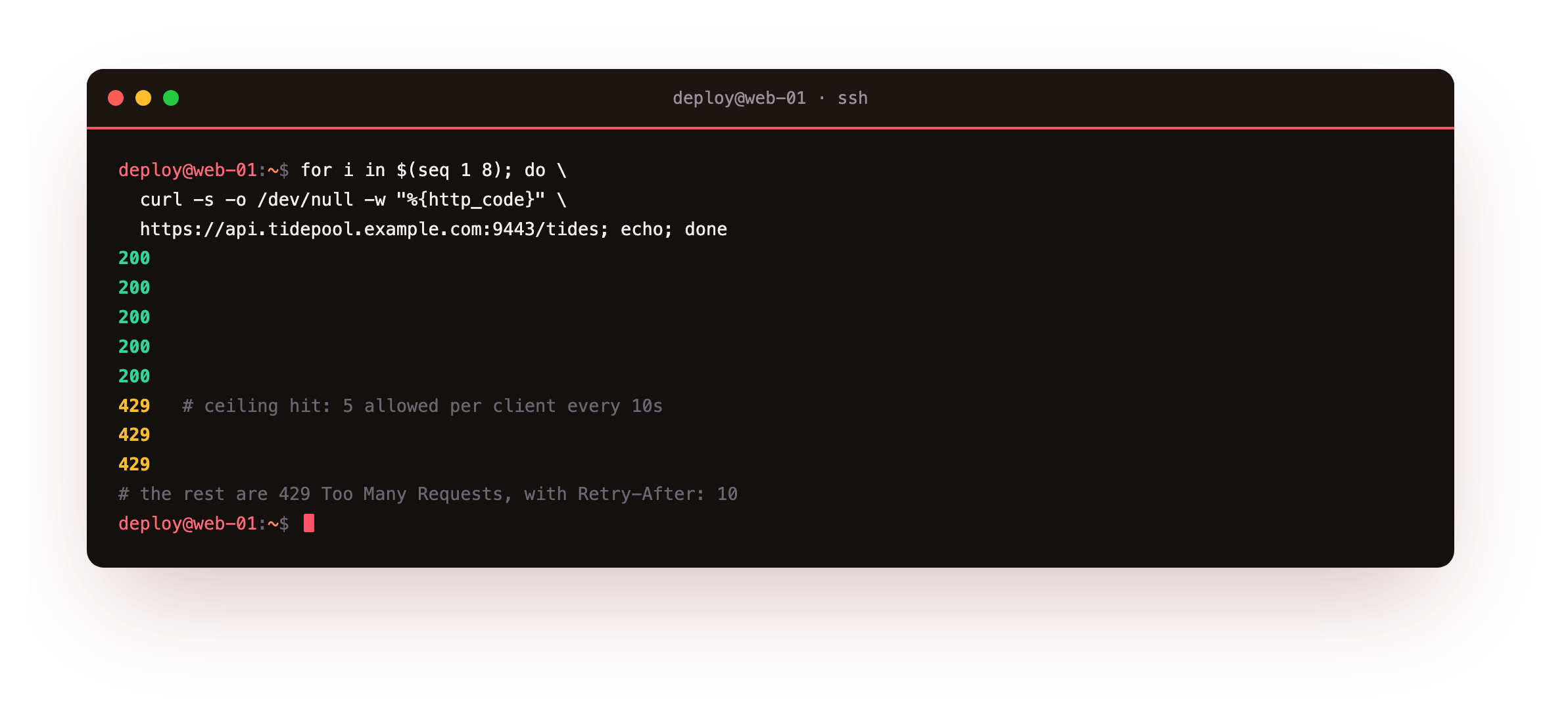
The first five return 200, and the rest return 429 Too Many Requests with a Retry-After header telling the client how long to wait. The limit is per key, so keying on the client address throttles a single abuser without touching everyone else, while keying on something coarser would protect a fragile backend as a whole. This is the one feature in the series that needs a non-stock binary, which is the tradeoff of Caddy's single-binary design.
Harden the systemd service
The packaged unit runs Caddy as a non-root user, which is a good start, but systemd can measure how exposed it still is and tighten it further. Read the score, then add a drop-in that turns on the sandbox options a web server does not need to give up.
systemd-analyze security caddy.service
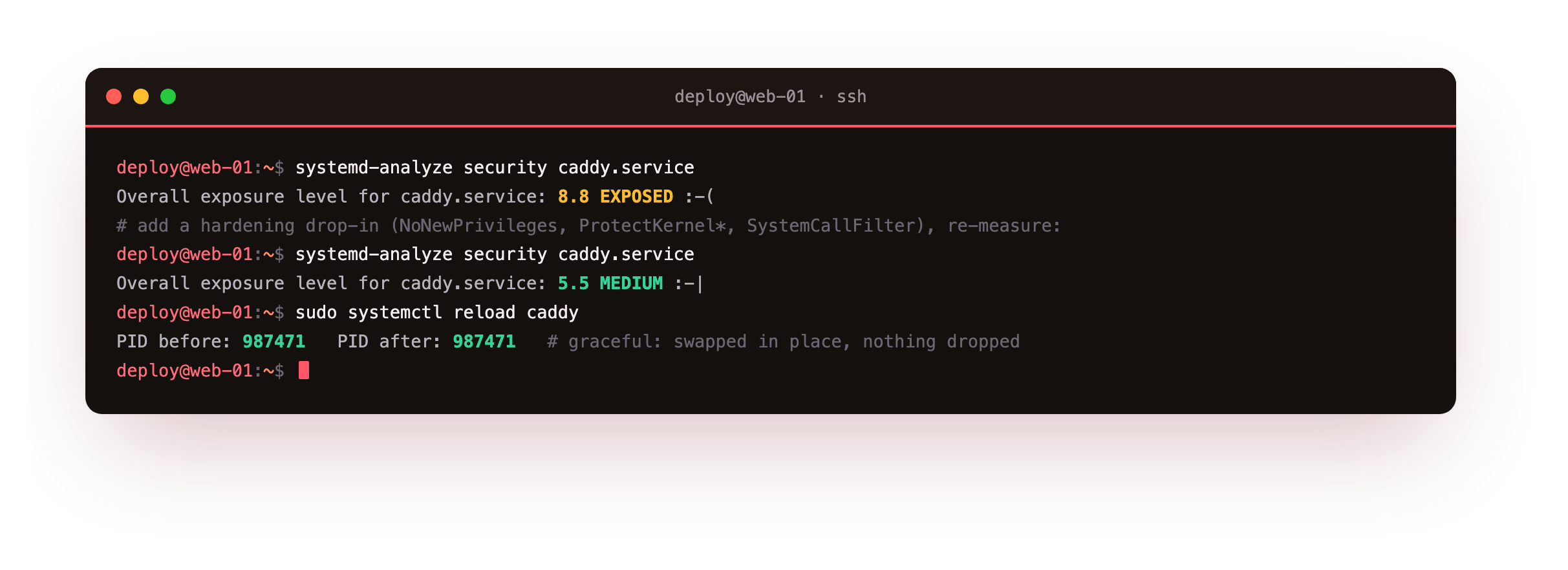
The stock unit scores as exposed, because it leaves most sandbox controls off. A drop-in that blocks new privileges, hides the home directories, protects the kernel tunables and modules, and filters system calls to the service set moves the score down into the medium band, and the service keeps serving through the restart. None of these options cost a working web server anything, since Caddy needs only to bind its ports and read its config. Keep the capability to bind low ports and drop the rest.
Reload without downtime
The last production habit is changing config safely. Caddy reloads by loading the new config into the running process and swapping it in atomically, so the process keeps its lifetime and no connection is dropped. Validate first, then reload, and confirm the process is the same one.
sudo caddy validate --config /etc/caddy/Caddyfile
sudo systemctl reload caddy
The reload runs caddy reload under the hood, which sends the new config to the running server over its admin API. The process identifier does not change, which is the proof it was an in-place swap rather than a stop and start. Validating first means a typo is caught before it reaches the running server, so a bad edit never takes the site down. That is the whole point of keeping it running: config changes are routine, not an outage.
Going further: metrics, and access control
Two more directives round out a production site. Caddy can expose Prometheus metrics on the admin endpoint, so request rates, durations and certificate ages feed a dashboard rather than living only in the logs. For endpoints that should not be public, basic_auth guards a path with a hashed password, and a matcher can limit that to an admin route while the rest of the site stays open. Both are a few lines, added when a real need appears, and neither disturbs the automatic HTTPS underneath.
Frequently asked questions
Is enabling HSTS safe to do straight away?
Enable it once you are sure the site will stay on HTTPS, because the header tells browsers to refuse plain HTTP for the whole max-age you set. With Caddy that is a safe bet, since it serves HTTPS by default and redirects HTTP up to it. Start without the preload flag while you confirm every subdomain is covered, then add preload if you intend to submit the domain to the browser preload list, which is harder to undo.
How do I get a Caddy build with a plugin like rate limiting?
Two ways. The download page on the Caddy site assembles a binary with the modules you tick, so you fetch a ready build with no toolchain. Or install xcaddy and build locally, naming each plugin, which suits a repeatable pipeline. Either produces a single binary you drop in place of the stock one. Because everything is compiled in, there is no separate module to load at runtime and no version skew to manage.
Why did logging to /var/log fail until I changed the service?
The service runs as the unprivileged caddy user, so it can only write where that user is allowed. A log directory owned by root will refuse its writes. The clean fix is to create the directory owned by caddy, or add LogsDirectory=caddy to the unit so systemd creates and owns it for the service and keeps it writable across restarts. Once the path is writable by the service user, the JSON log appears.
Does a graceful reload lose in-flight requests or connections?
No. Caddy loads the new config alongside the old, then swaps handlers atomically, letting existing requests finish under the config they started on. The listening sockets stay open, so nothing is dropped and the process identifier is unchanged. That is why validating and reloading is a routine operation you can run during traffic, rather than a restart you schedule for a quiet window.
What you have, and where the series leaves you
You added security headers and removed the server banner, switched the access log to structured JSON, put a rate limit on a public endpoint with a plugin build, hardened the systemd service until its exposure score dropped, and reloaded config with the process untouched and no connection lost. That is a Caddy site ready for real traffic.
Across the series you installed Caddy from a bare slice, watched it obtain a certificate on its own, proxied an app with load balancing and websockets, served PHP over FastCGI, and hardened it for production, all over HTTPS that was simply on the whole way through. The site is yours to run.