Scale a node.js cluster across CPU cores
A single Node.js process runs your JavaScript on one CPU core, so a two-core server leaves half its capacity idle. The node.js cluster module fixes that: a primary process forks one worker per core, all workers share the same listening port, and the kernel spreads incoming connections across them. This chapter runs the app as a cluster on a live two-core server, shows the worker processes, and proves that different workers answer different requests. Every command ran on a real box.
- Node runs your code on a single thread, so one process saturates one core and no more.
- The node.js cluster module forks a worker per core, and all workers listen on the same port through the shared primary.
- The kernel and Node's round-robin scheduler hand each new connection to a worker, so requests spread across cores.
- A worker that dies can be replaced by the primary, so a crash takes out one core's worth of capacity, not the whole app.
The catch people miss is that Node's single thread is about your JavaScript, not the machine. I/O is already asynchronous and parallel underneath, so many apps are fine on one core. But when CPU work in your handlers is the bottleneck, one process cannot use a second core no matter how fast the box is. Clustering is how you reach the rest of the hardware.
The cluster module
The pattern is small. The primary process forks workers, and each worker runs the same server. os.availableParallelism() reports how many cores the app may use, which is the natural worker count.
const cluster = require('node:cluster');
const os = require('node:os');

if (cluster.isPrimary) {
  const workers = os.availableParallelism();
  for (let i = 0; i < workers; i++) cluster.fork();
  cluster.on('exit', (worker) => cluster.fork()); // replace a dead worker
} else {
  buildApp().listen(PORT, HOST);
}
The primary does not serve requests itself. It forks workers, then watches them. The exit handler forks a replacement when a worker dies, so the pool stays at full strength. Each worker calls listen on the same port, and cluster shares that one socket between them.
Start the cluster and see the workers
Run the app with clustering turned on, then look at the process table. You should see a primary and one worker per core, each worker's parent being the primary.
CLUSTER=1 node server.js
ps -eo pid,ppid,rss,cmd | grep server.js
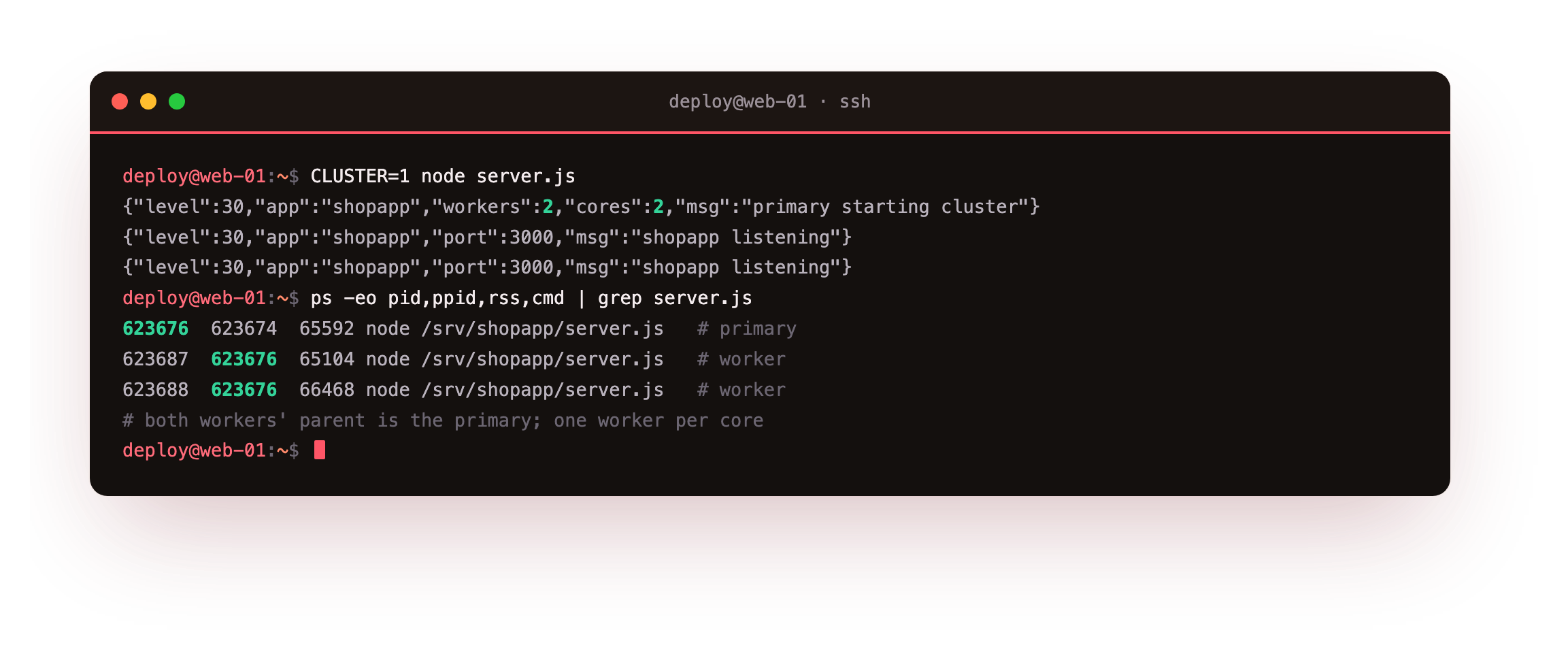
The boot log shows the primary reporting workers:2, cores:2, then two workers each logging that they are listening. The process tree confirms it: primary 623676 with two children, 623687 and 623688, both pointing back to it as their parent. Two workers, two cores, one shared port.
The process tree should show one primary with one worker child per core, so a two-core slice gives a primary plus two workers. Fewer workers than cores means capacity is still idle, so confirm the primary forked before moving on.
Prove requests hit different workers
Two processes are listening, but is traffic actually spread across them? Each response carries the worker's PID, so a short loop of requests answers the question directly.
for i in $(seq 1 8); do curl -s http://127.0.0.1:3000/api/status | grep -o '"pid":[0-9]*'; done
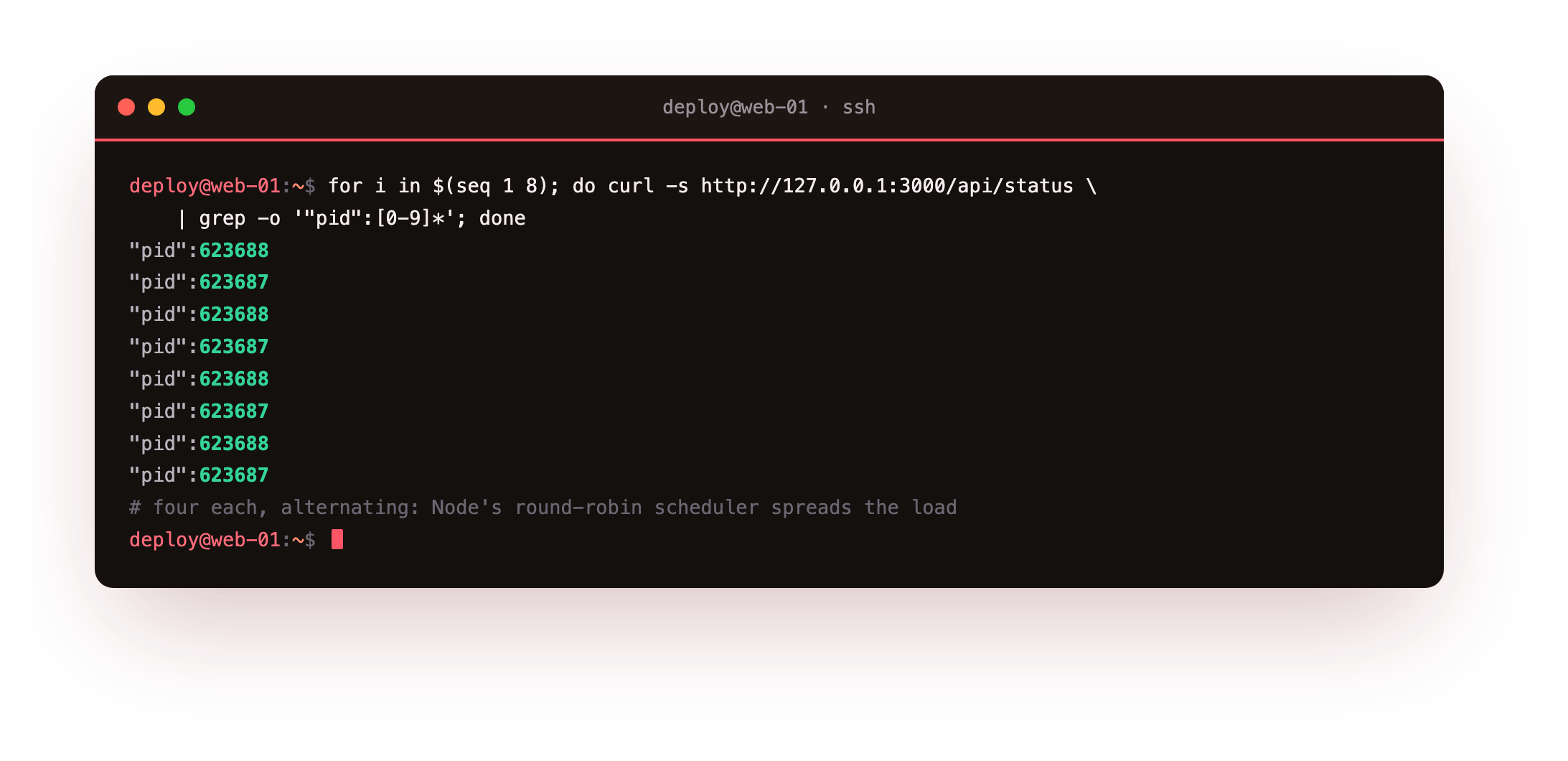
Eight requests split evenly, four served by 623687 and four by 623688, alternating one after the other. That is Node's round-robin scheduler at work: on Linux the primary accepts connections and hands them to workers in turn, so no single worker takes the whole load while the others sit idle. Your two cores are now both doing web work.
Across the eight requests you should see more than one worker PID answering. If every response carries the same PID, the traffic is landing on one worker, so check that clustering is enabled before you conclude both cores are busy.
Cluster, or several systemd instances
- The cluster module keeps one unit and one port, with the primary managing workers in-process.
- Several systemd instances run one process per port and let nginx balance across them, which the next chapter uses for zero-downtime reloads.
- Both use every core. The instance approach restarts workers independently; the cluster approach shares a socket.
Neither is the single right answer. The cluster module is the least moving parts when one unit is enough. Running separate instances behind nginx costs an upstream block but lets you restart one worker at a time without dropping a request, which is exactly what production reloads need. Chapter five builds that second model.
Frequently asked questions
How many workers should I run?
Start with one worker per core, which is what os.availableParallelism reports. More workers than cores means they compete for the same CPUs and add context-switching without adding throughput. If each request also waits on a database or an external API, a small amount of oversubscription can help, but measure it rather than guessing. On a two-core box, two workers is the sensible default.
Do workers share memory?
No. Each worker is a separate process with its own heap, so an in-memory cache or a counter in one worker is invisible to the others. That is why shared state belongs in something outside the process, such as Redis or the database. It also means a memory leak is contained to one worker, and replacing that worker reclaims the memory.
What happens when a worker crashes?
Only that worker's in-flight requests fail, and the other workers keep serving. The primary's exit handler forks a replacement, so the pool returns to full strength within moments. This is why clustering adds resilience as well as throughput: a fatal error takes out one core's share of capacity, not the entire service.
Is clustering the same as scaling across servers?
No. Clustering uses every core on one machine. Scaling across servers puts copies of the app on several machines behind a load balancer, which also survives one machine failing. They stack: cluster within a box to use its cores, then run that box in a pool for redundancy. This series stays on a single VPS, so clustering is the tool here.
What you have, and what comes next
The app now runs as a cluster, one worker per core, with the kernel spreading requests across them. Both CPUs are serving traffic, a dead worker is replaced automatically, and you can see which worker answered each request.
Clustering shares one socket, which makes a clean rolling restart awkward. The next chapter takes the other route: two independent instances behind nginx, a graceful shutdown on SIGTERM, and a reload that restarts them one at a time while every request keeps returning 200.