Deploy with a graceful shutdown, no dropped requests
A deploy should not drop a single request. The way you get there is a graceful shutdown: when the app receives SIGTERM, it stops accepting new connections, lets the in-flight ones finish, and only then exits. Pair that with two instances behind nginx and restart them one at a time, and traffic never sees the gap. This chapter builds that on a live Ubuntu 24.04 server, then hammers the load balancer with requests through a full rolling restart and watches every one return 200.
- A graceful shutdown handles SIGTERM by calling server.close, which stops new connections and drains in-flight requests before exit.
- systemd sends SIGTERM on restart and stop, so the same handler covers deploys and manual restarts.
- Run two instances on two ports behind an nginx upstream, and restart them one at a time so one is always up.
- nginx retries the next instance when one refuses a connection, so a request in the restart window still gets a 200.
The default is not graceful. Without a handler, SIGTERM kills the process immediately, so any request being served at that instant fails. On a busy app a restart then means a burst of errors every deploy. The fix is a few lines in the app and one upstream block in nginx, and the payoff is deploys nobody notices.
Handle SIGTERM in the app
When systemd stops or restarts the service, it sends SIGTERM first. Catch it, stop the listener, and finish what is in flight. Keep a hard timeout so a stuck connection cannot block the exit forever.
function shutdown(signal) {
  log.info({ signal }, 'draining, stop accepting new connections');
  server.close(() => { log.info('drained cleanly, exiting'); process.exit(0); });
  setTimeout(() => process.exit(1), 10000).unref(); // hard cap if a connection hangs
}
process.on('SIGTERM', () => shutdown('SIGTERM'));
server.close tells the HTTP server to stop taking new connections and to call back once the open ones drain. The unref'd timer is the safety net: if a slow request never finishes, the process still exits after ten seconds rather than hanging and forcing a kill.
Run two instances behind nginx
One process cannot restart without a gap. Two can, if nginx balances across them. A systemd template unit runs the same app on a port named by the instance, and an upstream block lists both.
sudo systemctl enable --now shopapp@3010 shopapp@3011
systemctl is-active shopapp@3010 shopapp@3011
sudo ss -tlnp | grep node
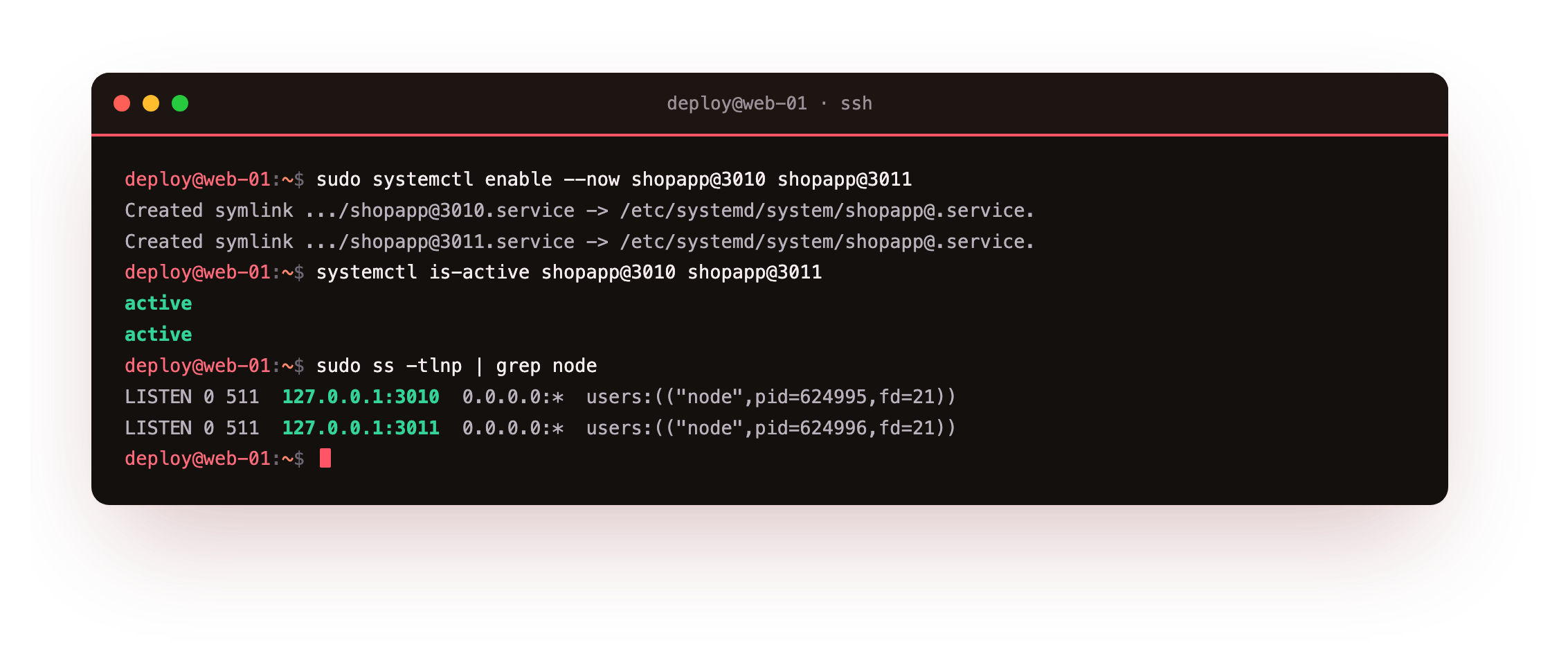
Both instances report active, one listening on 127.0.0.1:3010 and the other on 3011. The nginx side is an upstream pool that marks an instance down quickly if it stops answering:
Both instances should read active, one on 3010 and one on 3011. If only one is listening, the rolling restart has nothing to fall back to, so bring the second instance up before you rely on a gap-free deploy.
upstream shopapp_pool {
    server 127.0.0.1:3010 max_fails=1 fail_timeout=2s;
    server 127.0.0.1:3011 max_fails=1 fail_timeout=2s;
}
proxy_next_upstream error timeout in the location tells nginx to retry the other instance when one refuses a connection, which is what makes the restart window invisible.
Watch the graceful drain
Restart one instance and read its journal. The SIGTERM handler leaves a trail: it starts draining, then exits cleanly once the in-flight requests are done.
sudo systemctl restart shopapp@3010
journalctl -u shopapp@3010 -n 6 -o cat
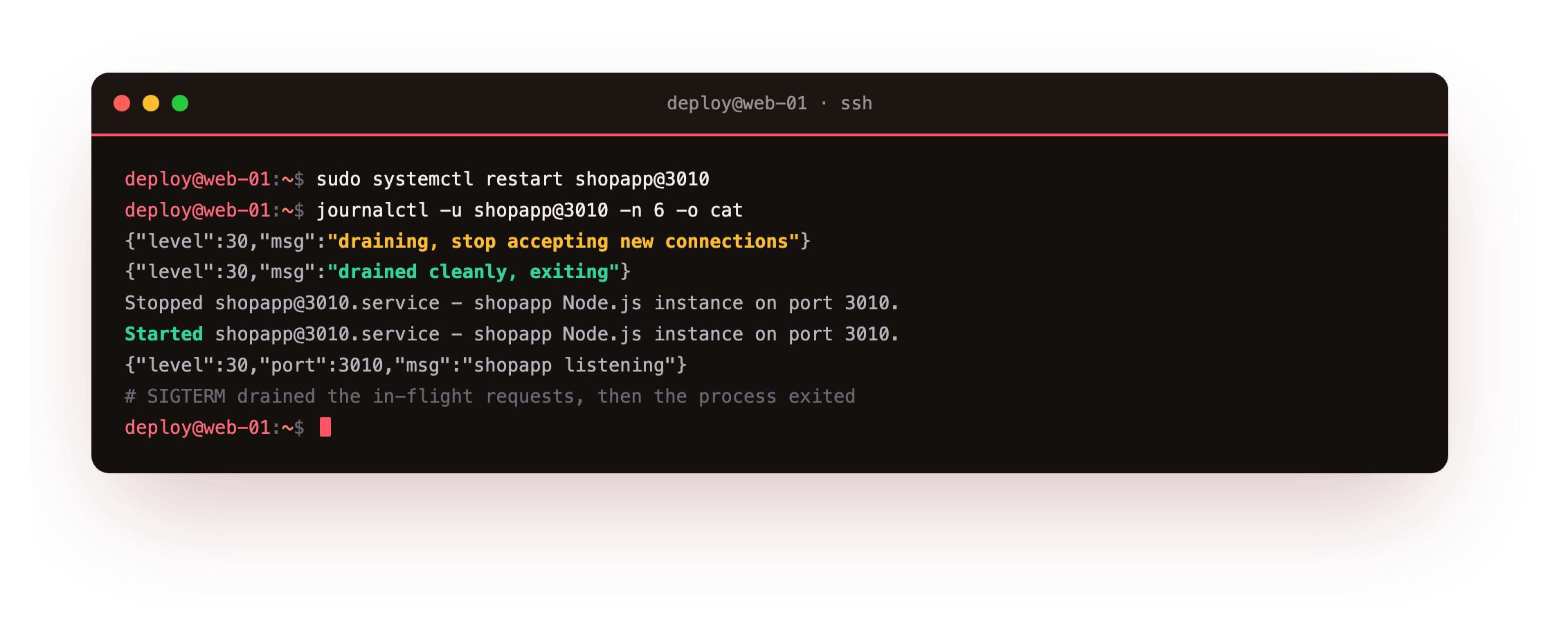
The log reads draining, stop accepting new connections, then drained cleanly, exiting, then the fresh process logs that it is listening again. systemd sent SIGTERM, the app drained instead of dying mid-request, and the restart completed in about a second. That is one instance handled correctly.
Prove zero downtime under load
The real test is traffic during the restart. Send a steady stream of requests at the load balancer, restart both instances one at a time while it runs, and count the response codes.
for i in $(seq 1 160); do
    curl -s -o /dev/null -w '%{http_code}\n' http://127.0.0.1:8091/api/status
    sleep 0.1
done | sort | uniq -c

# meanwhile, restart the instances one at a time:
sudo systemctl restart shopapp@3010
sudo systemctl restart shopapp@3011
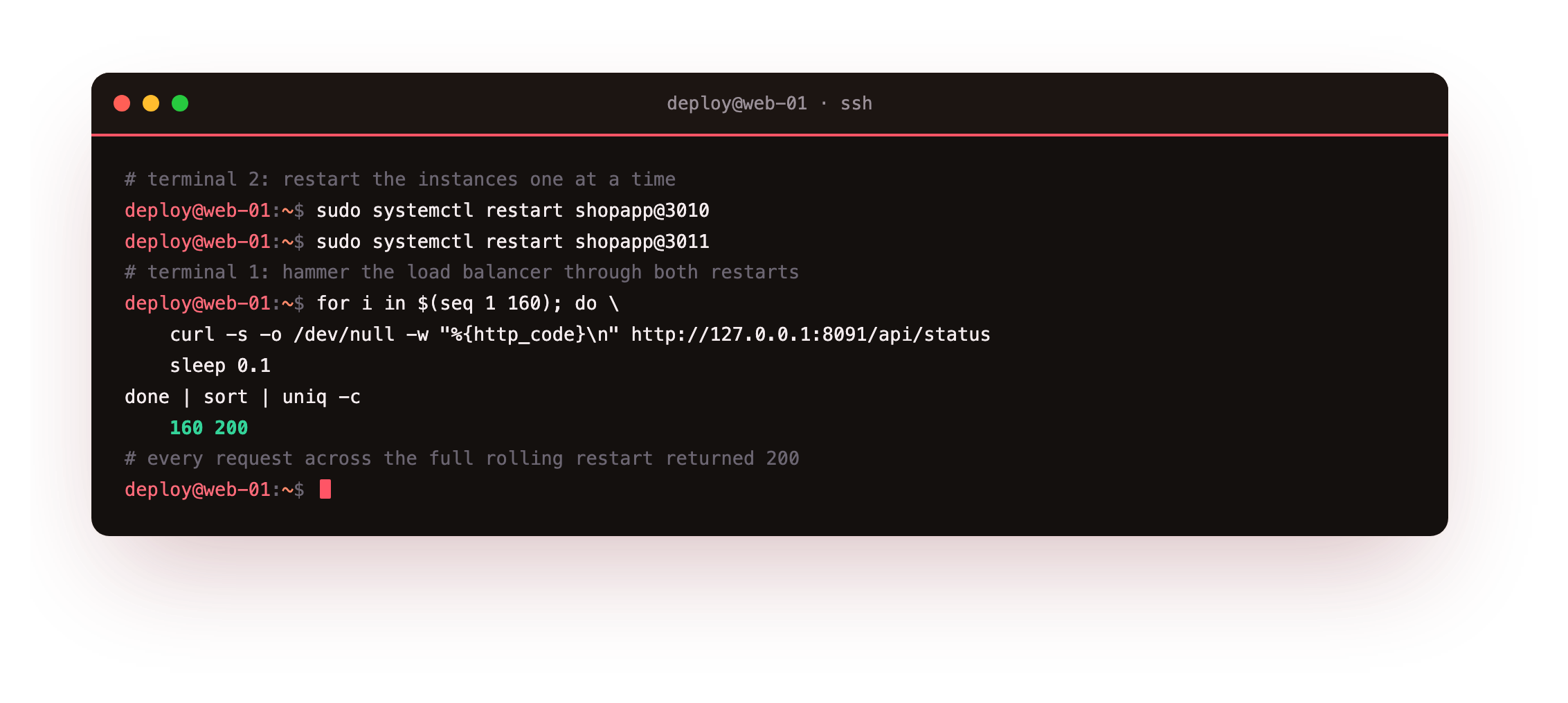
Across 160 requests spanning both restarts, every response was 200. Not one error. While 3010 was cycling, nginx sent traffic to 3011, and the reverse while 3011 cycled, because at least one instance was always up and draining gracefully. That is a zero-downtime reload with parts you already run: systemd, an app that respects SIGTERM, and one nginx upstream.
Every one of the 160 responses should read 200. A single non-200 means both instances were down at the same moment, so slow the sequence and let each instance come back before restarting the next.
Why one at a time matters
- Restart one instance at a time so the pool never drops below one healthy backend.
- Give each instance a moment to come back before touching the next one.
- A graceful shutdown means the instance being restarted drains its own in-flight work rather than dropping it.
Restart both at once and you have a gap where nothing is listening, which is the outage you were trying to avoid. The whole technique is sequencing: always keep one backend serving while the other cycles.
Frequently asked questions
Why not just use systemctl reload?
reload sends a signal for the app to re-read its config without restarting, which suits nginx but not a Node app that has no reload concept of its own. To pick up new code, a Node process must restart. So the goal is not to avoid restarting, it is to restart without dropping requests, which the two-instance rolling approach delivers.
Does the cluster module give me the same thing?
Clustering uses every core, but its workers share one listening socket managed by a single primary, so restarting to load new code cycles the whole app at once. Separate systemd instances behind nginx can be restarted independently, which is what makes a rolling, zero-downtime deploy straightforward. The two techniques solve different problems and can be combined.
What if a request takes longer than the drain timeout?
The hard timeout forces an exit so a single stuck connection cannot block a deploy forever, which means a very long request could still be cut. Set the timeout above your slowest normal request, and for genuinely long jobs move the work to a background queue rather than holding an HTTP connection open. Most web requests finish in well under the ten-second cap used here.
How does nginx know an instance is down during a restart?
When an instance stops listening, a connection to it is refused, and nginx treats that as a failure. With proxy_next_upstream set for connection errors, it immediately retries the next instance in the pool, so the client still gets an answer. The max_fails and fail_timeout settings then keep it from hammering the instance that is briefly down.
What you have, and what comes next
Deploys are now safe. The app drains on SIGTERM, two instances sit behind nginx, and a rolling restart moved 160 requests through a full cycle with zero errors. You can ship new code any time without watching the error graph.
The last piece is knowing the app is healthy without waiting for a user to complain. The final chapter adds a health check endpoint, structured JSON logs in journald, and process metrics so nginx and your monitoring can both see inside the running service.