Run gunicorn under systemd as a real service
The gunicorn systemd unit is what turns your app from a command you babysit into a service the machine owns. Right now the app from chapter one dies when your shell closes and never comes back after a reboot. This chapter writes a gunicorn systemd service that starts on boot, restarts if the process is killed, and streams its logs to journald. Every command ran on a live Ubuntu 24.04 server, and the restart you will see was a real crash and recovery.
- A systemd unit runs gunicorn as a dedicated service user, from the virtualenv binary, with a fixed working directory.
- Restart=on-failure brings the service back automatically after a crash, with a short delay so it does not spin.
- Killing the master process proves the recovery: systemd starts a fresh process with a new PID on its own.
- journald captures gunicorn's stdout and stderr, so you read the boot and crash history with journalctl.
A service unit is a small text file that tells systemd what to run, who to run it as, and what to do when it exits. Once it exists, systemctl and journalctl manage the app the same way they manage nginx or ssh. That uniformity is the point.
Prerequisites
- The virtualenv and Flask app from part one, at
/srv/flaskapp. - A dedicated service user, created below, that owns nothing it does not need.
- Root or sudo access to write a unit under
/etc/systemd/system.
Create a service user
Run the app as a locked-down system user, never as root and never as your login account. A system user with no login shell can own the app directory and run the process, and nothing more.
sudo useradd --system --home /srv/flaskapp --shell /usr/sbin/nologin flaskuser
sudo chown -R flaskuser:flaskuser /srv/flaskapp
If the process is ever exploited, it is confined to what flaskuser can touch. That is a smaller blast radius than a root service, and it costs one command.
Write the systemd unit
Create /etc/systemd/system/flaskapp.service. The unit names the service user, the working directory, and the exact gunicorn binary inside the virtualenv. It reads worker count and the bind address from the environment, and restarts on failure.
[Unit]
Description=Marginalia Flask app (gunicorn)
After=network.target

[Service]
User=flaskuser
Group=flaskuser
WorkingDirectory=/srv/flaskapp
Environment=BIND=127.0.0.1:8000
Environment=WEB_CONCURRENCY=2
ExecStart=/srv/flaskapp/venv/bin/gunicorn --config /srv/flaskapp/gunicorn.conf.py app:app
Restart=on-failure
RestartSec=2

[Install]
WantedBy=multi-user.target
The ExecStart line points at venv/bin/gunicorn, so systemd runs the virtualenv's gunicorn without any shell activation. A tiny gunicorn.conf.py reads BIND and WEB_CONCURRENCY from the environment, which keeps the unit clean and the values in one place.
Enable it and read the status
Reload systemd so it picks up the new file, then enable and start the service in one step. enable --now both starts it and marks it to run on every boot.
sudo systemctl daemon-reload
sudo systemctl enable --now flaskapp
systemctl status flaskapp
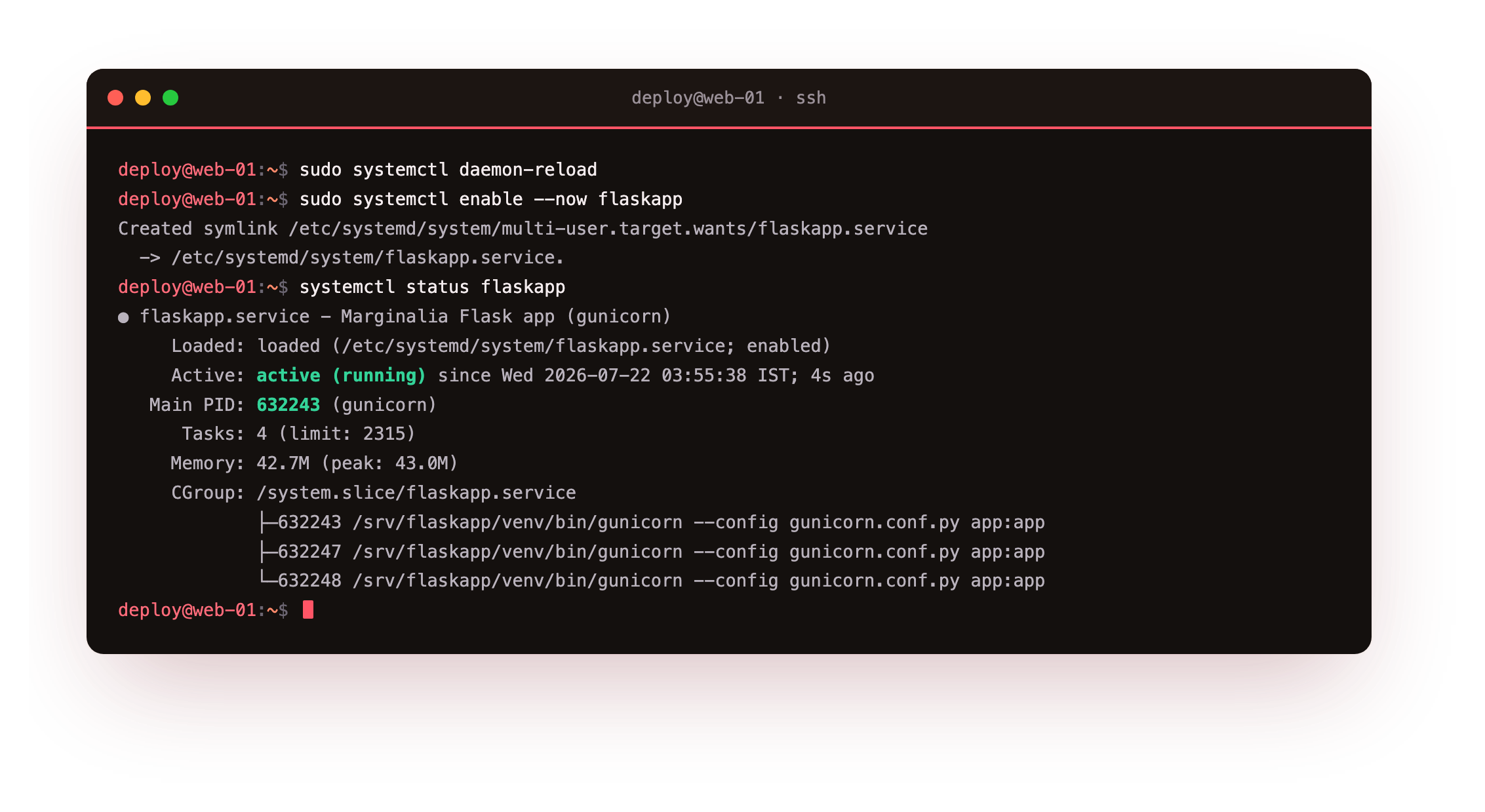
The status shows the service active (running), the master gunicorn PID, and its memory use. enable created the symlink that starts it at boot, so a reboot no longer loses the app. This is now a managed service.
Prove the restart with a hard kill
A service that claims to self-heal should be tested, not trusted. Read the master PID, then kill it with signal 9, which a process cannot catch or ignore. It is the worst case a crash can be.
systemctl show -p MainPID --value flaskapp
sudo kill -9 $(systemctl show -p MainPID --value flaskapp)
systemctl show -p MainPID --value flaskapp
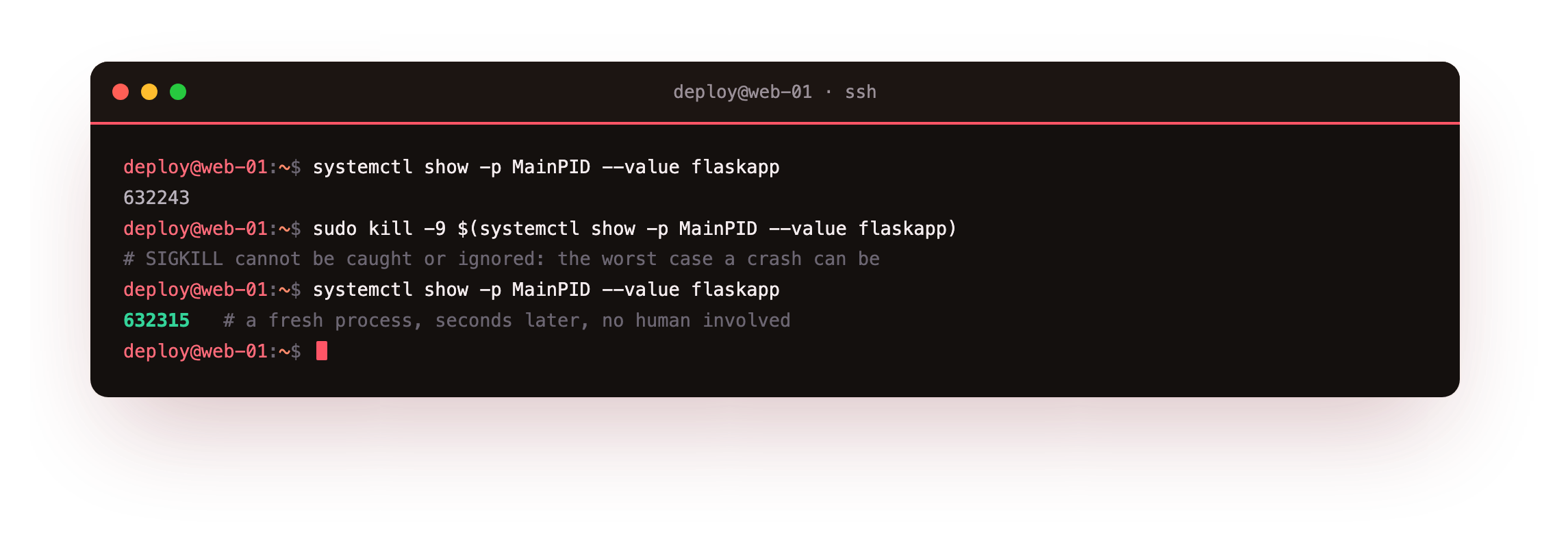
Seconds later the PID is different. No human restarted anything. systemd saw the master exit abnormally, waited the two seconds set by RestartSec, and started a fresh gunicorn. The new master then booted its workers again.
Read the journal
Everything gunicorn writes to stdout and stderr lands in journald under the unit name. That is where you read the crash and the recovery as a single timeline.
journalctl -u flaskapp -n 12 -o short-iso
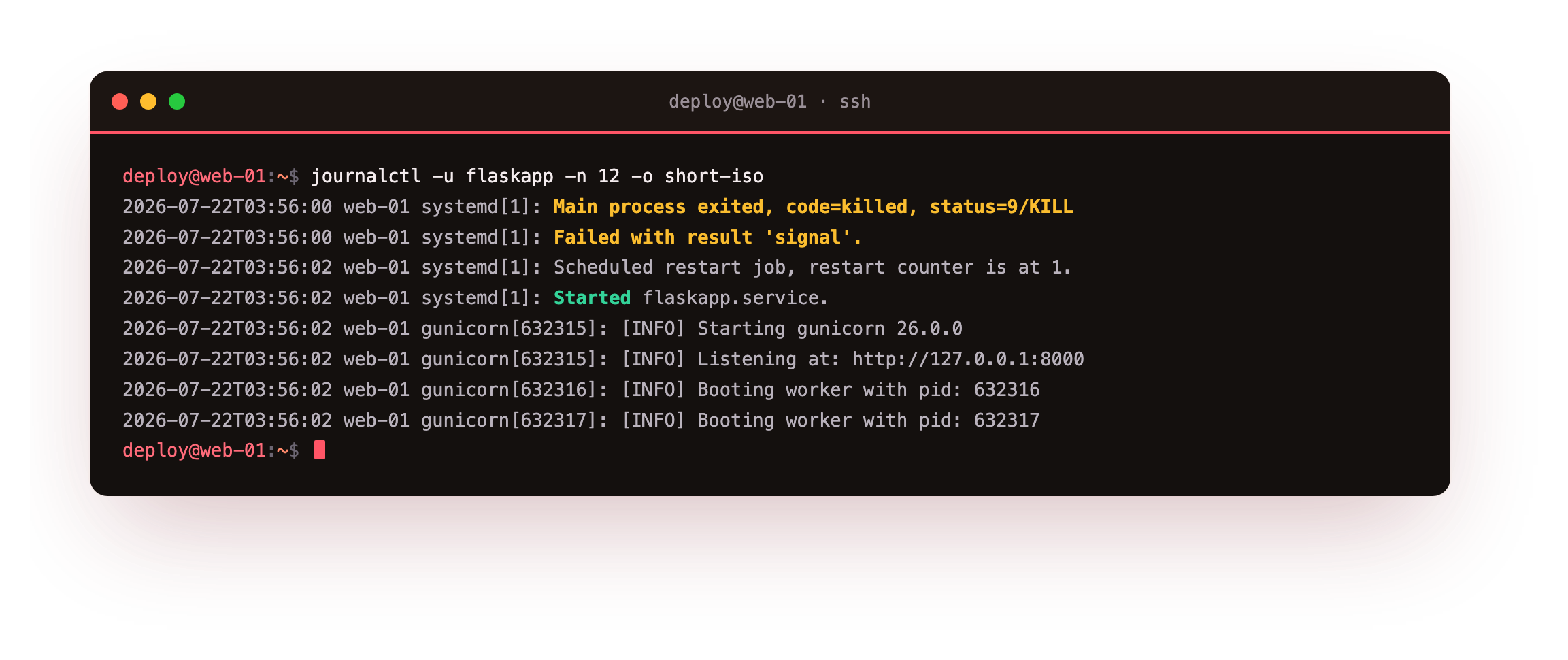
The journal records the process exiting with status=9/KILL, the failure result, the scheduled restart with the counter at one, and gunicorn starting again with a new PID. No separate log file to rotate, and no guesswork about what happened.
systemctl is-active flaskapp should read active, and the PID from systemctl show -p MainPID --value flaskapp should differ from the one you killed. If the service reads failed, run journalctl -u flaskapp -n 20 to read the reason before you continue.
on-failurerestarts after a crash or a non-zero exit, which is what you want.- It does not restart after a clean stop you asked for, so
systemctl stopstays stopped. RestartSecadds a small delay so a failing service does not restart in a tight loop.
Frequently asked questions
Why point ExecStart at venv/bin/gunicorn instead of activating the venv?
A virtualenv's activate script only edits shell variables, and systemd does not run a shell. The binary at venv/bin/gunicorn already has the right interpreter and path baked into its shebang, so calling it directly runs inside the environment with no activation step. This is the standard way to run a virtualenv app under systemd, and it removes a whole class of path problems.
What does WantedBy=multi-user.target actually do?
It is what makes enable meaningful. When you enable the unit, systemd links it under the multi-user target, the normal state a server boots into. On the next boot, reaching that target starts your service. Without a WantedBy line, enable has nothing to hook into and the service would not come up automatically.
Should I use a systemd socket or a Type=notify unit?
For most apps the simple Type=simple unit here is enough, and gunicorn works well with it. Socket activation and Type=notify add readiness signalling and can hand gunicorn a pre-opened socket, which helps for zero-gap restarts. They are worth learning later. Start with the plain unit, get the service and its logs working, then add those refinements if you measure a need.
Where did my print statements go?
Under systemd there is no attached terminal, so stdout and stderr are redirected to journald. Anything gunicorn or your app writes shows up in journalctl -u flaskapp, not on a screen. Make sure Python does not buffer it away by relying on gunicorn's logging, which flushes, rather than bare prints. A later chapter turns these into structured JSON log lines.
What you have, and what comes next
You have gunicorn running as a systemd service under a locked-down user, starting on boot and recovering from a hard kill on its own, with its whole history in journald.
The app still listens on a loopback TCP port. The next chapter puts nginx in front and moves gunicorn onto a unix socket, so the public connection terminates at nginx and the app leaves the TCP stack entirely.