SSH agent forwarding, the one forward that bites
Chapter four forwarded ports, which is safe. SSH agent forwarding is the forward to think twice about. It lets a server you log into borrow the keys held by the agent on your laptop, so you can hop onward to a third machine without copying any private key to the middle host.
It is convenient, and it is the feature most worth understanding before you switch it on, because a compromised middle host can quietly use your keys while the socket is live. This chapter demonstrates the reuse and the exposure on Ubuntu 24.04, then shows the safer pattern.
ssh-agentholds your unlocked keys in memory, andssh-add -llists what it currently holds.-AorForwardAgent yesexposes that agent to the server you connect to, for onward hops.- The forwarded agent appears as a socket on the middle host, and anyone who can read it can use your keys.
ProxyJumpreaches the same third host without exposing the agent, which makes it the safer default.
- An
ssh-agentrunning on your laptop with your demo key loaded, since forwarding an empty agent shows nothing;ssh-add -lshould list it. - The isolated demo sshd on port 2222 to act as the middle host, so you can inspect the forwarded socket without exposing a real bastion.
- A willingness to treat this chapter as a warning, not a recipe: you turn forwarding on to see the exposure, then learn when not to use it at all.
The agent never hands over the private key itself. It answers signing challenges on the key's behalf, so forwarding exposes the ability to sign, not the key material. That distinction matters, but the practical effect while the socket exists is the same: whoever reaches the socket can authenticate as you to anywhere your keys are trusted.
Loading and forwarding the agent
Start with a loaded agent. ssh-add -l prints the fingerprint of each key it holds, which is how you confirm the right key is available before you rely on it. Then connect with forwarding switched on. -A on the command line, or ForwardAgent yes in a Host block, tells SSH to expose the agent to the far end.
ssh -A -p 2222 sshdemo@web-01
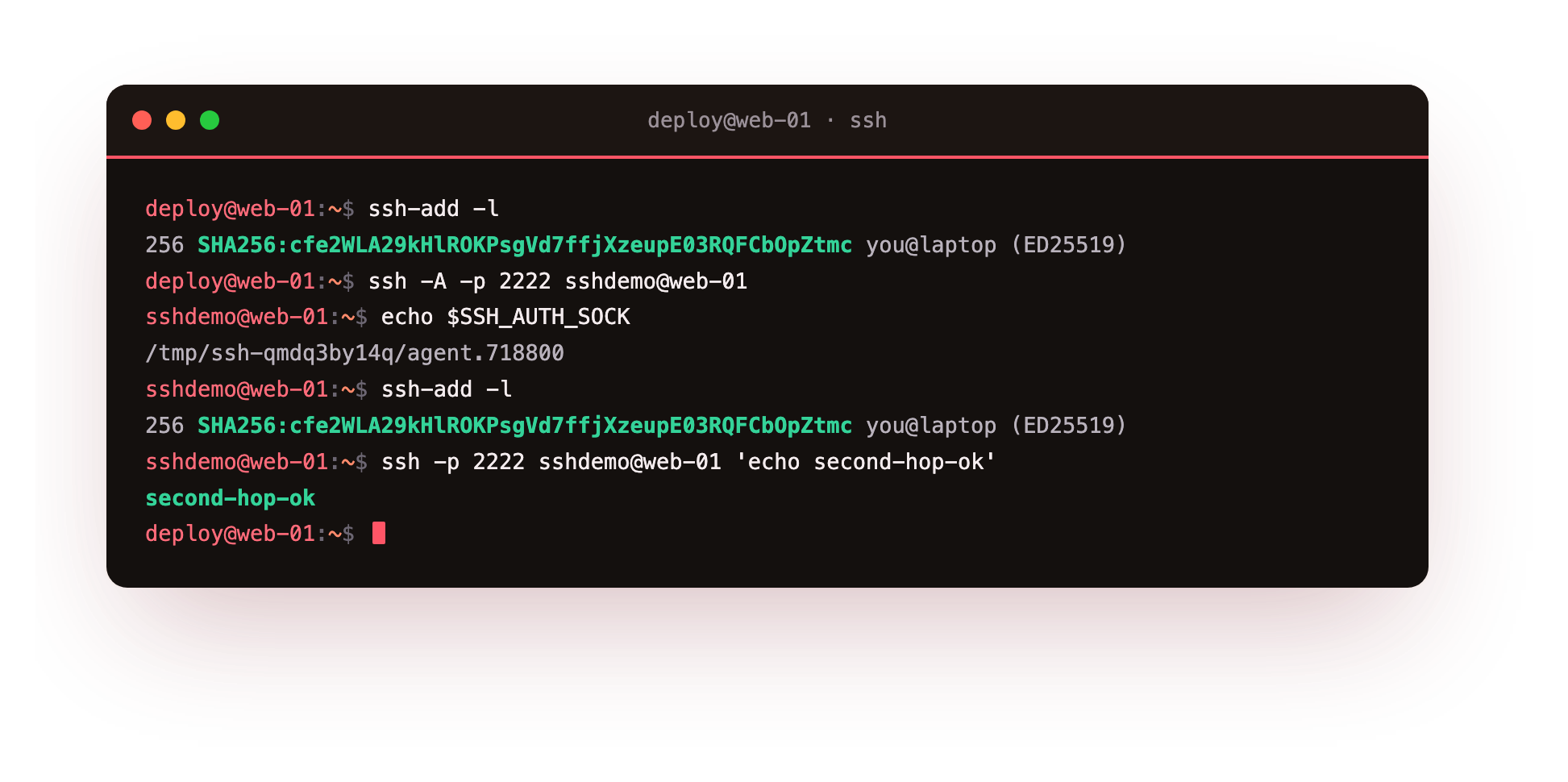
From inside that session the environment carries an SSH_AUTH_SOCK pointing at a forwarded socket, and ssh-add -l run there lists the same keys as on your laptop. That is agent reuse in action. From the forwarded session you can run a second ssh to a further host, and it authenticates using the laptop's key through the forwarded socket, printing its result without any key file ever being present on the middle machine. One loaded key, several hops, nothing copied.
Inside the forwarded session, run echo "$SSH_AUTH_SOCK" and confirm it prints a path under /tmp, then ssh-add -l and confirm it lists your laptop's key. Seeing your key from a machine you never copied it to is the feature working, and also exactly the exposure the next section is about.
Why the forwarded socket is a risk
The convenience has a sharp edge. The forwarded agent is a unix socket sitting on the intermediate host for the life of your session. Inspect it and you see who owns it and what its permissions are.
ls -l "$SSH_AUTH_SOCK"
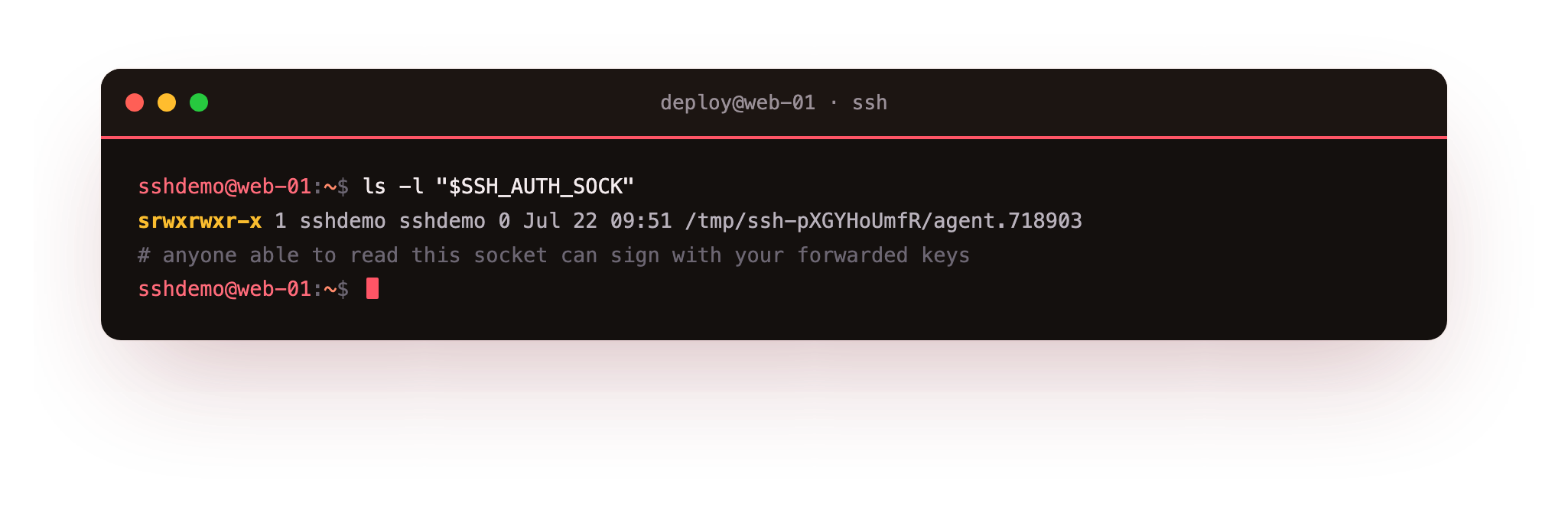
It is owned by your session user, but the crucial point is that root on that host, or any process that can reach the socket, can call your agent and sign as you. If the middle host is compromised, an attacker uses the open socket to log into every server your keys unlock, for as long as you stay connected. You never see it happen, because to those servers the signatures are genuinely yours.
That is the hijack: not a stolen key, but a borrowed agent. The blast radius is every system that trusts the forwarded keys, which is often your entire fleet. Forwarding to a trusted first hop you control is one thing; forwarding to a shared bastion or a box you do not fully trust hands that box a skeleton key for as long as you are logged in.
ProxyJump is the safer answer
Most people reach for agent forwarding to solve one problem: getting to a private host through a bastion. ProxyJump, the same keyword from chapter two, solves that problem without exposing the agent at all. It tunnels the real session through the bastion, and your authentication to the final host happens end to end, so the bastion never sees a usable agent socket.
The rule of thumb is short. Use ProxyJump to reach a host behind a jump box, which is the common case and leaks nothing. Reserve agent forwarding for a first hop you genuinely trust and control. When in doubt, do not forward the agent.
Going further: making forwarding safer when you must
Sometimes a workflow genuinely needs the agent on a far host, such as pushing to a git remote from a build box. If you must forward, tighten it. Add keys with ssh-add -c so every signature needs your explicit confirmation, which turns a silent hijack into a prompt you would notice. Add ssh-add -t so loaded keys expire after a set time, shrinking the window an exposed socket is useful.
Scope it as narrowly as possible. Set ForwardAgent no as your default and switch it on per host in the config only where needed, rather than passing -A out of habit. Forward only to hosts you administer, and never to a shared or public bastion where other people hold root, because on that box the socket is theirs to use the moment you connect.
Frequently asked questions
How is agent forwarding different from copying a key to the server?
Copying a private key leaves it on the server at rest, a lasting exposure. Forwarding leaves no key on disk but exposes the live agent socket while you are connected. Neither is ideal on an untrusted host, and ProxyJump avoids both.
Can I make agent forwarding safer if I must use it?
Yes. Add keys with ssh-add -c so every signature needs your confirmation, and ssh-add -t so they expire. Forward only to hosts you control, and never to a shared or public bastion where others hold root.
Does ProxyJump ever need agent forwarding?
No. ProxyJump authenticates you to the bastion and the final host separately over one tunnelled session, so the jump box never handles your agent. That is exactly why it is the recommended way to reach a host behind a bastion.
How do I check whether forwarding is on?
From inside a session, print $SSH_AUTH_SOCK: if it is set and ssh-add -l lists keys, the agent is forwarded. Turn it off by removing -A and setting ForwardAgent no in your config for hosts that do not need it.
What you can do now
You loaded a key, forwarded it with -A, watched a second hop authenticate through the forwarded socket without copying anything, then inspected that socket and saw why root on the middle host can sign as you. The takeaway is a habit: reach a host behind a bastion with ProxyJump, which leaks nothing, and forward the agent only to a first hop you trust and control.
That covers reaching and using servers over SSH. The last piece is moving data across the same connection safely, which rests on one check most people skip. The final chapter transfers files three ways and verifies the host key that every transfer trusts: file transfer and SSH host keys.