Diagnosing inode exhaustion and file limits on Linux
The triage playbook finds the resource that is slow, but some storage faults are not about speed at all, and inode exhaustion is the one that confuses everyone: df -h reports gigabytes free, yet every write fails with "No space left on device".
A filesystem tracks files with inodes, and it can run out of inodes long before it runs out of bytes. This chapter reproduces that on a live Ubuntu 24.04 server, then covers finding big directories with du, spotting deleted files still holding space with lsof, and the file descriptor limits that quietly stall a busy service.
df -hshows byte usage anddf -ishows inode usage. A filesystem is full when either hits 100 percent.- Inode exhaustion comes from many tiny files, such as unrotated sessions or mail queues, and free bytes will not save you.
lsof +L1finds deleted files still held open, which keep using disk until the process closes or restarts.- The
ulimit -nopen-file cap stalls a service that leaks descriptors, and the error is "Too many open files".
Two of these problems, exhausted inodes and a held-open deleted file, present as a full disk that df -h cannot explain. Knowing they exist turns a baffling incident into a two-command diagnosis.
When df -h lies: inode exhaustion
On the real root filesystem, df -h and df -i both looked healthy: about 19 percent of bytes used and only 4 percent of inodes. To see exhaustion, I built a tiny filesystem on a loop device with very few inodes, which is bounded and easy to remove.
df -h /
df -i /
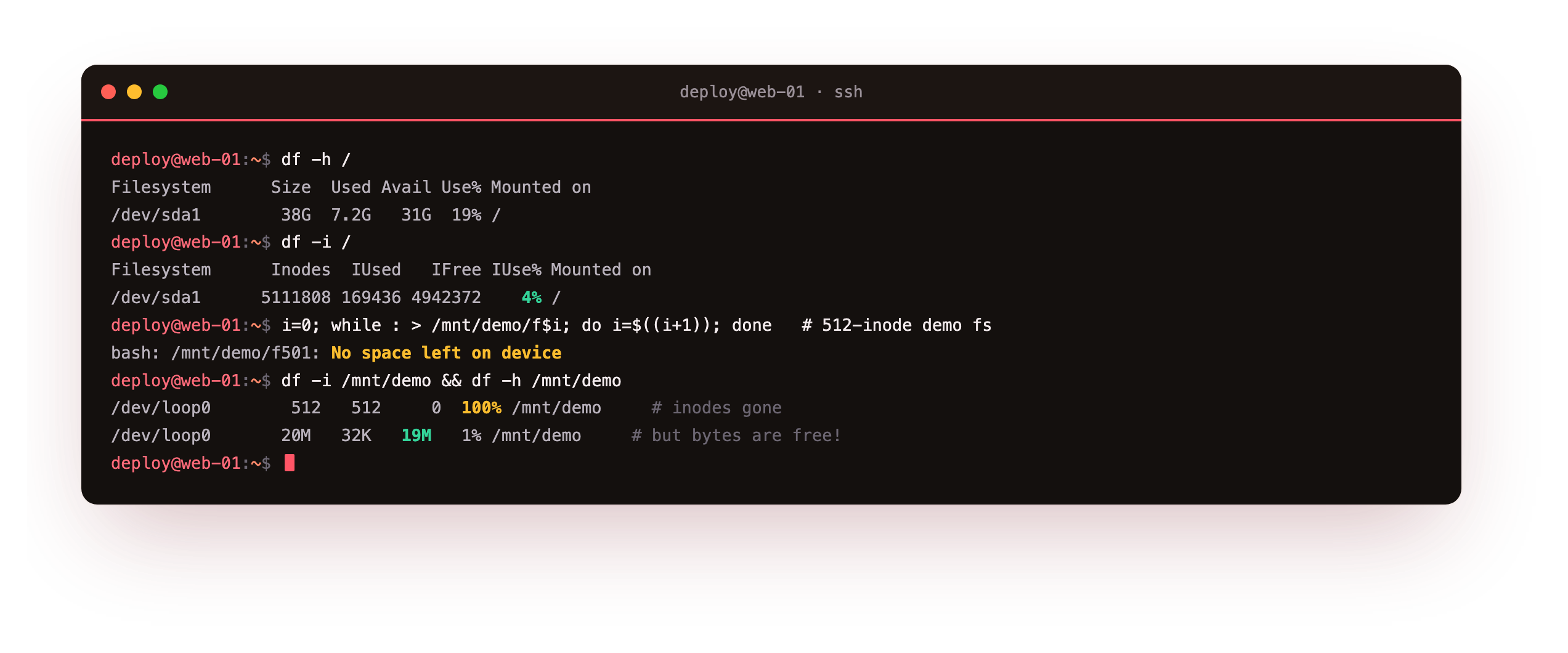
The root disk had 5111808 inodes with 4% used. On the small demo filesystem, formatted with only 512 inodes, I created empty files until it stopped. The failure was No space left on device after 501 files, even though df -h on that mount still showed 19M of 20M free. df -i explained it: IFree was 0 and IUse% was 100. The disk was not out of space, it was out of inodes.
In production this happens when a directory fills with tiny files, such as PHP sessions, a mail spool, or a cache that never prunes. The fix is deleting the small files, and the tool to find where they cluster is du.
Run df -h / and df -i / side by side. Both an Use% and an IUse% near 100 mean a full filesystem, but for different reasons. If bytes are free while inodes are exhausted, you are in the case above, and no amount of freeing space by size will help until you delete the tiny files themselves.
Finding what is using the space with du
du sums the space used by a directory tree. Pointed at /var with a depth limit and sorted, it ranks the heaviest subdirectories.
sudo du -h --max-depth=1 /var | sort -rh | head
On this server it reported /var at 4.0G, with /var/lib at 2.3G, /var/cache at 982M, and /var/log at 247M. That is the pattern to learn: start at a broad directory, take the biggest child, and descend into it with the same command. Within a few steps you land on the actual offender, whether that is a runaway log, an unpruned cache, or a package's data. For inode trouble specifically, count files instead of bytes with a find command, since du measures size and a million empty files barely register in bytes.
Deleted but not gone: lsof
Here is the second disk-full mystery. If a process has a file open and you delete it, the name disappears but the data stays on disk until the process closes the descriptor. df counts that space as used, and you cannot find the file by name. lsof finds it.
( exec 7>/tmp/held.log; echo "leaked data" >&7; sleep 20 ) &
rm -f /tmp/held.log
sudo lsof -nP +L1
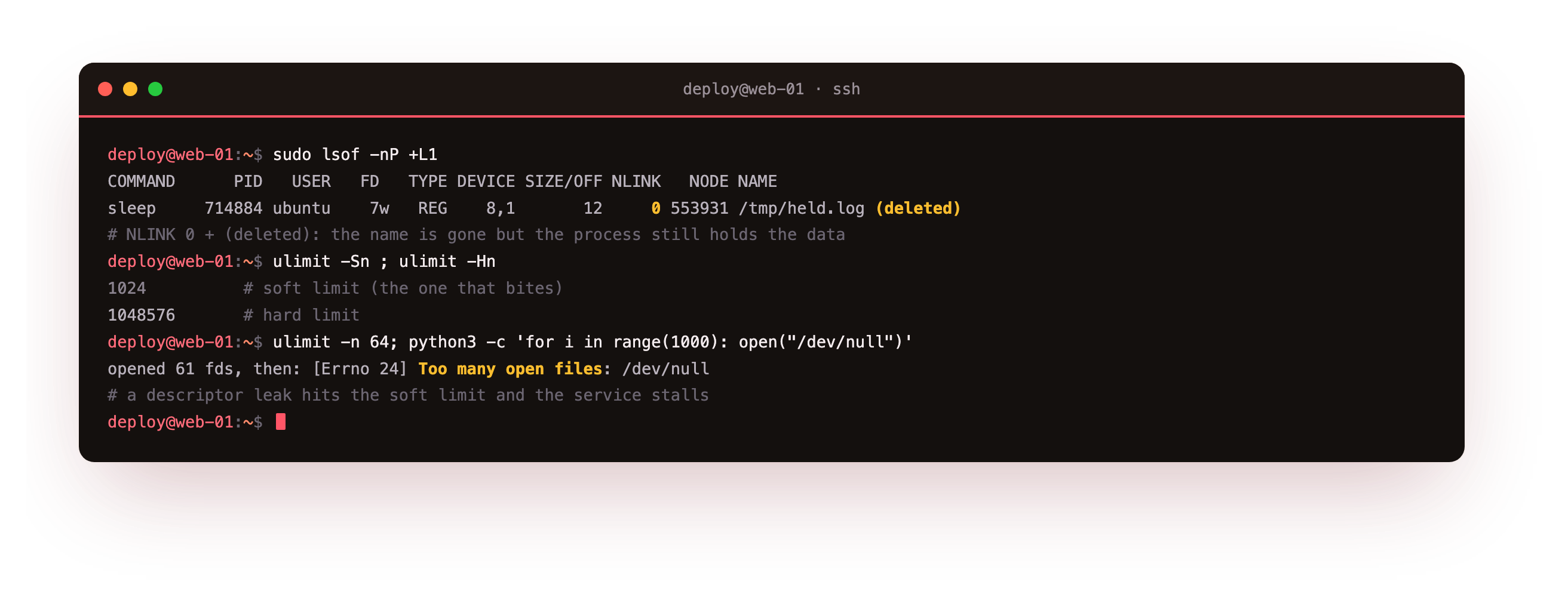
After deleting the still-open file, lsof +L1, which lists open files with a link count below one, showed sleep holding /tmp/held.log (deleted) on descriptor 7, with a link count of 0. The kernel keeps the data alive for that process. You can confirm it under /proc/PID/fd, where the descriptor still points at the deleted path. The cure is to restart or signal the process holding it. This is the usual answer when a log was deleted to free space but df never dropped: the logging process still holds the old file open.
The limit that stalls a service: ulimit
The last problem is not about space at all. Every process has a cap on open file descriptors, and a service that leaks them grinds to a halt when it hits the ceiling. Read the limits with ulimit.
ulimit -Sn
ulimit -Hn
The soft limit here was 1024 and the hard limit 1048576. The soft limit is the one that bites, and a process can raise its own up to the hard cap. To see the failure, I lowered the limit and opened descriptors until it broke.
bash -c 'ulimit -n 64; python3 -c "fds=[open(\"/dev/null\") for _ in range(1000)]"'
It opened 61 descriptors, then failed with Too many open files, the count reflecting the few descriptors already used. That error in a service log means a descriptor leak or a limit set too low for the workload. Check a running process with ls /proc/PID/fd | wc -l against its limit in /proc/PID/limits. The fix is raising the limit through the systemd unit's LimitNOFILE, or finding the leak so descriptors get closed.
Frequently asked questions
My disk says it is full but df -h shows free space. Why?
Two causes. First, inode exhaustion: the filesystem ran out of inodes from too many small files, which df -i reveals as 100 percent inode use while bytes are free. Second, a deleted file still held open by a process, whose space df counts but which has no name, found with lsof +L1. Check df -i first, then lsof. One of the two explains almost every "full disk with free space" report.
How do I find a directory with millions of tiny files?
du measures size, so tiny files barely show up in it. Count files instead. Run find /path -xdev -type f | wc -l on suspect directories, or use find /path -xdev -printf '%h\n' | sort | uniq -c | sort -rn to rank directories by file count. Session stores, mail queues, and cache trees are the usual sources. Once you find the cluster, delete or archive the old files and add rotation so it does not refill.
Why does deleting a big log not free space?
Because a process still has the log open. Deleting a file only removes its name. The data stays on disk until every process holding the descriptor closes it, so df shows no change. Find the holder with lsof +L1 or lsof /path, then restart or signal it, and the space returns. The clean habit is to rotate logs with a tool that signals the writer to reopen, rather than deleting a live log by hand.
How do I raise the open-file limit for a service?
For a systemd service, set LimitNOFILE in the unit or a drop-in and reload, which is cleaner than editing /etc/security/limits.conf for daemons. Confirm the running value by reading /proc/PID/limits. Before you raise it, check whether the service is genuinely busy or leaking descriptors, since a leak will exhaust any limit eventually. Count open descriptors with ls /proc/PID/fd | wc -l over time to tell steady use from a slow leak.
What you have, and what comes next
You can now explain the full disk that has free space, in both its forms: inodes exhausted by tiny files, shown by df -i at 100 percent, and a deleted file still held open, found with lsof +L1. You can rank space with du, count files where du is blind, and read and reason about the open-file limit that stalls a leaking service with a "Too many open files" error.
That closes this series. Across seven chapters you built a method: the USE lens, CPU and memory and disk and network each read with the right tool, a sixty-second triage playbook, and the storage limits that hide behind a full disk. Run these on your own Ubuntu 24.04 server and you will read it, rather than guess at it.