Nginx caching: two caches, two different jobs
Your site is fast on the wire now. Caching makes it faster still by doing the work less often. Nginx caches in two places, and they solve different problems. Browser caching tells the visitor's browser to keep static files so it never asks again. Proxy caching keeps a copy of your app's responses on the server so your application does not have to generate the same page for every visitor. This chapter turns on both and proves each one is working.
- expires and Cache-Control tell the browser how long to keep a static file, turning repeat visits into zero requests.
- proxy_cache stores your app's responses on the server, so a page generated once is served from cache to everyone else until it expires.
- Add X-Cache-Status $upstream_cache_status and you can see MISS on the first request and HIT on the second, which is how you prove the cache works.
- Cache aggressively for versioned assets and never for logged-in or personalised responses; the danger of proxy caching is serving one user's private page to another.
Caching is the highest-leverage performance tool there is, because the work you never do is the work that costs nothing. A visitor who already has your CSS in their browser does not download it again. An app response that Nginx has cached does not touch your database again. Both are free once configured, and both are easy to get subtly wrong, so we will turn them on and then verify them rather than trust them.
Browser caching for static files
When a browser loads your page it fetches the HTML, then the CSS, the JavaScript, the fonts and images. Those static files rarely change, so making the browser re-download them on every visit is pure waste. expires fixes that with one line:
location /static/ {
    alias /var/www/app/static/;
    expires 30d;
    add_header Cache-Control "public";
}
expires 30d tells Nginx to send headers that say "keep this for thirty days." Confirm it on a real file:
curl -I https://your-domain/static/app.css
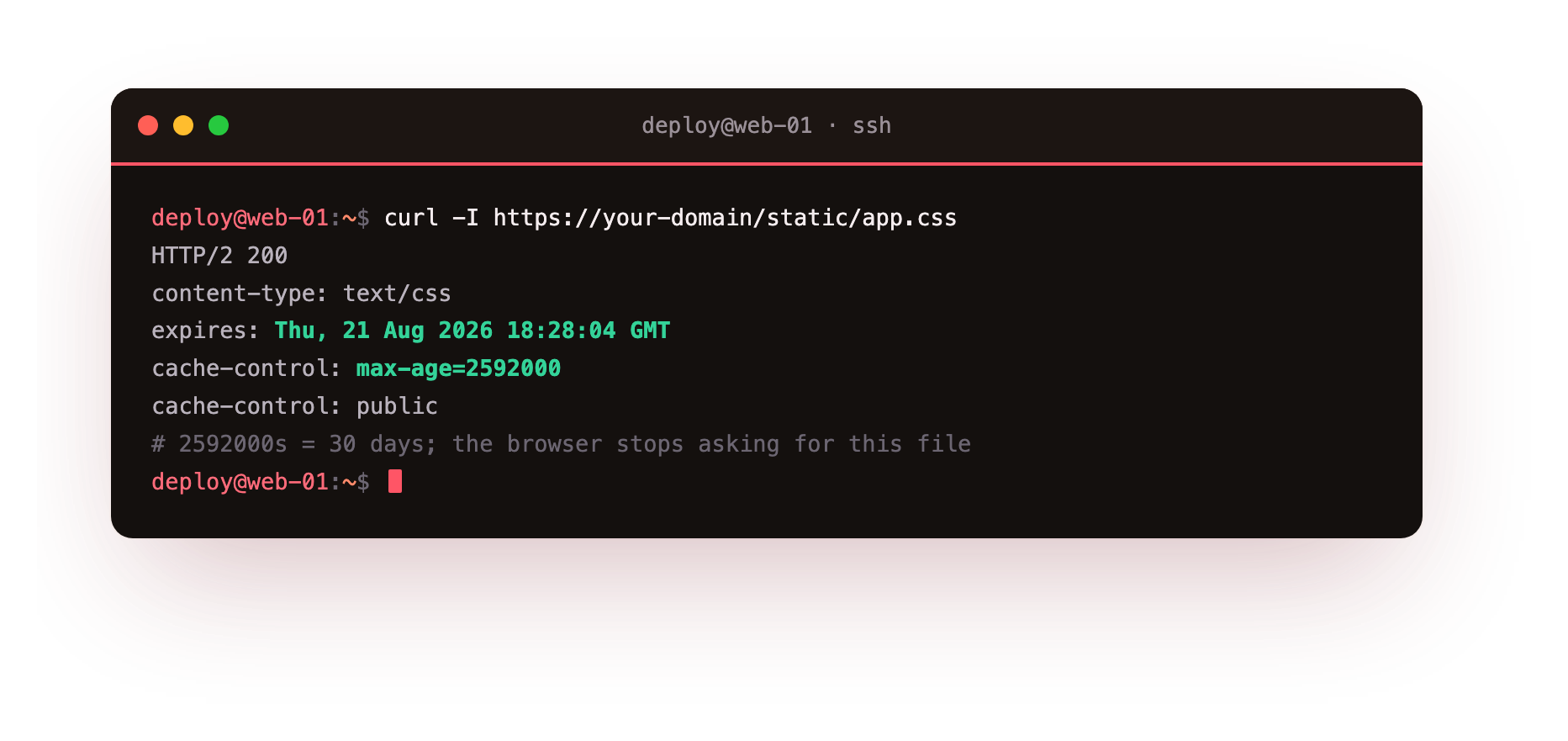
The response carries an Expires header thirty days in the future and Cache-Control: max-age=2592000, which is thirty days in seconds. From now on the browser serves that file from its own disk and does not ask your server at all until the time is up.
A static file should now come back with an Expires header in the future and a max-age. Reload the page in a browser and the network panel should mark those assets as served from cache, with no request to your server.
There is one catch worth understanding, because it is the reason people fear long cache times. If you cache app.css for thirty days and then change it, visitors keep the old version for up to thirty days. The professional answer is versioned filenames: your build tool names the file app.a1b2c3.css, and when the content changes the name changes, so the browser fetches the new name immediately while still caching each version forever. Cache aggressively, but only when the URL changes with the content.
Proxy caching for your app
Browser caching helps repeat visitors. Proxy caching helps everyone, including first-time visitors, by caching your application's responses on the server. If a hundred people load the same article, your app should generate it once and Nginx should serve the other ninety-nine copies from memory.
Set it up with a cache zone and a proxy_cache on the location:
proxy_cache_path /var/cache/nginx levels=1:2 keys_zone=app:10m max_size=1g;

server {
    location / {
        proxy_pass http://127.0.0.1:3000;
        proxy_cache app;
        proxy_cache_valid 200 10m;
        add_header X-Cache-Status $upstream_cache_status;
    }
}
proxy_cache_path declares where cached responses live and names a shared memory zone, app, that tracks the keys. proxy_cache app turns caching on for this location. proxy_cache_valid 200 10m says cache successful responses for ten minutes. The last line is the one that makes caching visible: X-Cache-Status reports whether each response came from the cache or the app.
Now prove it. Request the same URL twice:
curl -I https://your-domain/
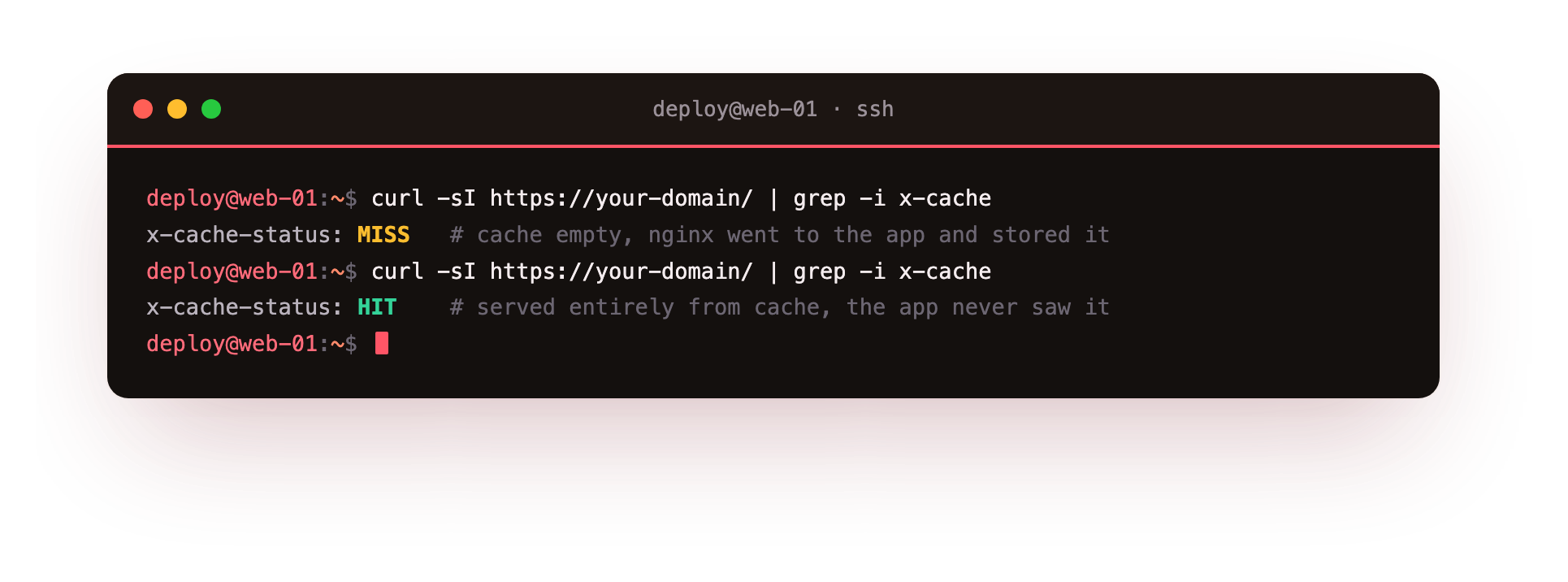
The first request shows X-Cache-Status: MISS: the cache was empty, so nginx went to your app and stored the result. The second request shows HIT: it was served entirely from cache, your app never saw it. That MISS then HIT is the whole proof that proxy caching is working, and it is the first thing to check when you are not sure whether a response is cached.
Two requests to the same public URL should read MISS then HIT. If both read MISS, the response is not being stored, usually because it carries a Set-Cookie or a Cache-Control: no-store that nginx is correctly honouring.
The rule that keeps you out of trouble
Proxy caching has one genuine danger, and it is worth stating bluntly: if you cache a response that was meant for one specific user, Nginx will serve that same private page to the next person. Cache a logged-in dashboard once and every visitor sees the first user's account.
So the rule is simple. Cache public, identical-for-everyone responses: your marketing pages, blog posts, product listings, public API results. Never cache anything personalised or authenticated. In practice you exclude the risky paths and honour the app's own instructions:
proxy_cache_bypass $cookie_session;
proxy_no_cache     $cookie_session;
These two lines tell Nginx to skip the cache entirely when a session cookie is present, so logged-in requests always go straight to the app. Combined with your app sending Cache-Control: no-store on private responses, which Nginx respects, you get the speed of caching on public pages with no risk of leaking private ones. When in doubt, do not cache it. A cache miss is slow; a cache leak is a security incident.
Going further: purging when you must
Sometimes you change a page and cannot wait for the cache to expire. The open-source Nginx does not include active purge, but you have two clean options. The simplest is a short proxy_cache_valid so stale content self-corrects quickly, which is enough for most content.
When you need instant invalidation, the common pattern is to key the cache so a content change produces a new key, the same versioning idea as static files, so the old cached copy is simply never requested again. Reach for a purge module only when you genuinely need to evict a specific live URL on demand.
Frequently asked questions
How do I prove that proxy caching is actually working?
Add add_header X-Cache-Status $upstream_cache_status and request the same URL twice. The first response reads MISS while Nginx fills the cache, and the second reads HIT, served entirely from cache without ever touching your app.
Is it safe to cache a logged-in page?
No. If you cache a response meant for one user, Nginx will serve that same private page to the next visitor. Use proxy_cache_bypass and proxy_no_cache on the session cookie so authenticated requests always go straight to the app.
How do I avoid serving a stale CSS file after a deploy?
Give the file a versioned name like app.a1b2c3.css so the URL changes whenever the content does. The browser fetches the new name at once, while still caching each version for as long as you like.
Can open-source Nginx purge a single cached URL on demand?
Not without a third-party purge module. The built-in options are a short proxy_cache_valid so content self-corrects, or keying the cache so a content change produces a new key and the old copy is never requested again.
Recap and what is next
You can make repeat visitors re-download nothing with browser caching, serve your app's public pages from cache so your application does the work once instead of once per visitor, and prove both are working by reading the cache headers rather than guessing. You know the one rule that keeps proxy caching safe: public yes, private never. Your server is now fast and doing far less work.
Speed is only half of production, though. Next we keep the server standing under abuse, with rate limiting, so one flood cannot undo everything you just built.
Browser and proxy caching turn a busy site into a quiet one. Launch a slice, put nginx in front of your app, and watch your backend do a fraction of the work.