Why your app should never face the internet directly
Last chapter you served a static site. Now the site is a running app, and a reverse proxy puts it online safely. A reverse proxy sits in front of your application, accepts every request, and forwards it to the app running quietly on a local port. Nginx handles TLS, buffering, timeouts, and abuse, and your app just answers requests on localhost. This chapter puts nginx in front of your app and passes the headers it needs to know who it is really talking to.
- proxy_pass forwards a request to your app on a local port, so the app binds to 127.0.0.1 and is never exposed to the internet directly.
- Without proxy_set_header, your app sees every request as coming from 127.0.0.1 over http, which breaks client IPs, rate limits, and HTTPS detection.
- X-Forwarded-For, X-Real-IP, and X-Forwarded-Proto are the three headers that tell the app the real client IP and whether the original request was secure.
- WebSockets need two extra headers (Upgrade and Connection) or the connection silently fails to upgrade.
Almost no application should listen on port 80 itself. Your Node, Python, Go, or Rails app is good at your business logic and bad at being a hardened front door: it does not do TLS well, it buffers poorly, it has no rate limiting, and a slow client can tie up a worker it needs for real work.
Nginx is built to be that front door. So the standard shape of a production app is simple: the app binds to 127.0.0.1:3000, invisible to the internet, and Nginx on port 80 and 443 forwards to it. This is a reverse proxy, and it is the single most common thing Nginx does.
The smallest working reverse proxy
Say your app is listening on 127.0.0.1:3000. The Nginx config to put it online is three lines:
server {
    listen 80;
    location / {
        proxy_pass http://127.0.0.1:3000;
    }
}
nginx -t, reload, and every request to the server now lands on your app. That works, and it is also where most tutorials stop, which is exactly where the trouble starts. Because with only proxy_pass, your app has been lied to about who is calling it.
Load the site in a browser and you should see your app respond, not the default page. If you get a 502 Bad Gateway, nginx reached the port but nothing answered, so confirm your app is actually listening on 127.0.0.1:3000.
The headers your app cannot live without
When Nginx forwards a request, the connection to your app comes from Nginx itself, on localhost. So without help, your app sees every visitor as 127.0.0.1, every request as plain http, and the Host as whatever Nginx passes by default. That quietly breaks a lot: your logs show one IP for everyone, rate limiting by client IP is useless, and any code that checks "is this request secure" thinks it never is.
The fix is to forward the real information as headers:
location / {
    proxy_pass http://127.0.0.1:3000;
    proxy_set_header Host              $host;
    proxy_set_header X-Real-IP         $remote_addr;
    proxy_set_header X-Forwarded-For   $proxy_add_x_forwarded_for;
    proxy_set_header X-Forwarded-Proto $scheme;
}
Each line hands the app a fact it otherwise loses. Host passes the original hostname, so an app serving multiple domains knows which one was asked for. X-Real-IP is the client's address. X-Forwarded-For is the same idea but as a list, appending each proxy in the chain, which matters when a CDN sits in front of Nginx. X-Forwarded-Proto carries http or https, so the app knows whether the original request was encrypted even though the hop from Nginx to the app is plain.
You do not have to take this on faith. Point Nginx at a tiny app that simply prints the headers it received, and look:
curl -H "Host: myapp.test" localhost
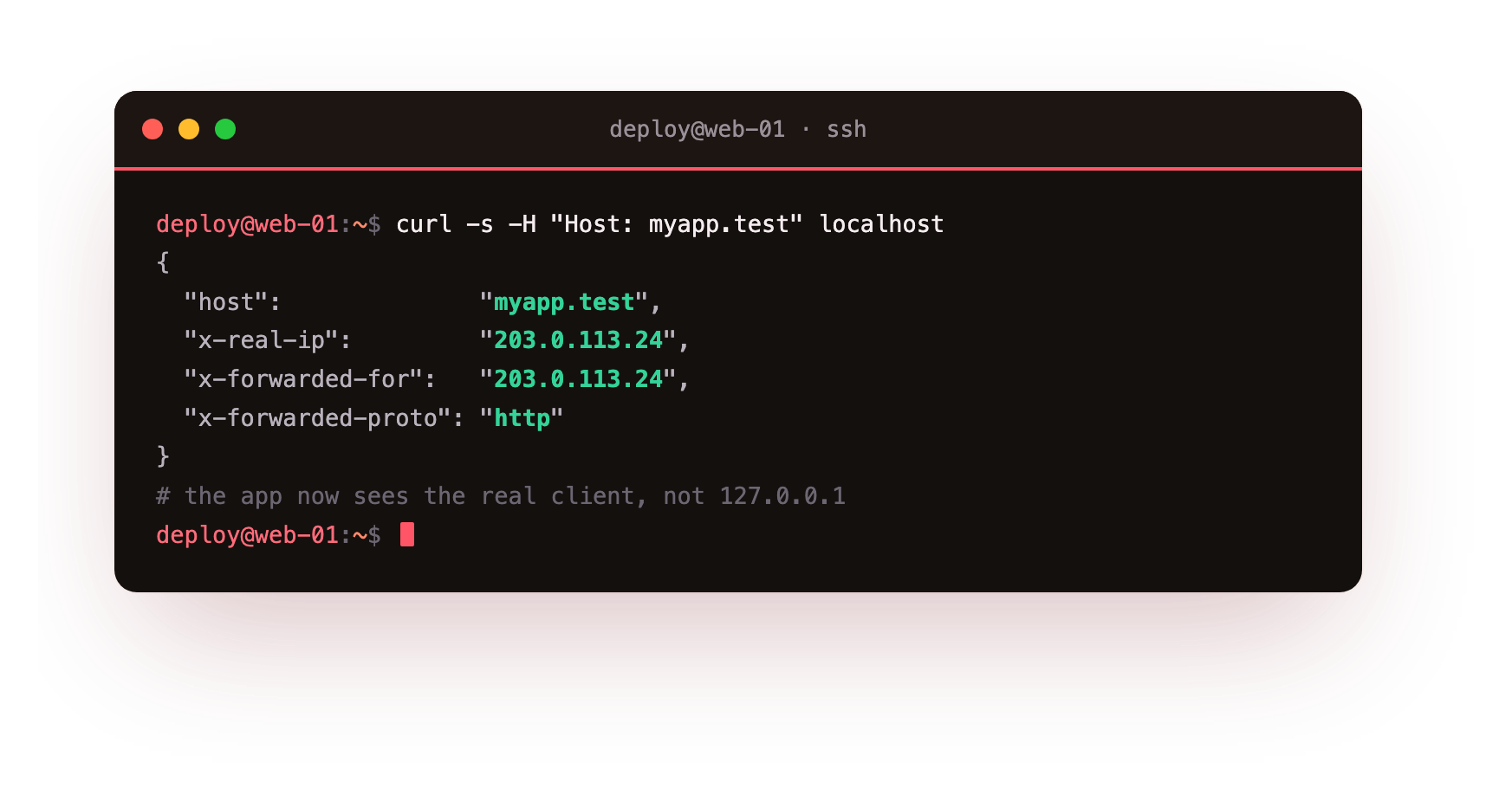
The app reports back the Host you sent, the client address as X-Real-IP, the forwarded-for chain, and the protocol. That is nginx handing your application the truth about each request. One caution worth stating plainly: these headers are trivially spoofable by a direct client, so your app should trust X-Forwarded-For only from proxies you control, and your framework almost certainly has a "trusted proxies" setting for exactly this. Set it.
Your app's logs should now show real visitor IPs instead of 127.0.0.1, and any "is this request secure" check should read the request as HTTPS. If logs still show localhost, the forwarding headers are not set on the location that proxies to your app.
WebSockets, the silent failure
If your app uses WebSockets, live chat, notifications, a dev server with hot reload, the basic proxy will connect and then mysteriously fail to upgrade. WebSockets start as an HTTP request that asks to switch protocols, and Nginx does not forward that switch unless you tell it to:
location / {
    proxy_pass http://127.0.0.1:3000;
    proxy_http_version 1.1;
    proxy_set_header Upgrade    $http_upgrade;
    proxy_set_header Connection "upgrade";
    # plus the forwarding headers from above
}
proxy_http_version 1.1 and the Upgrade and Connection headers are what let the handshake through. Miss them and the page loads but the live features never connect, with no obvious error. This is one of the most-searched Nginx problems, and those three lines are the whole answer.
Going further: timeouts and buffering
Two more settings separate a demo proxy from a production one. First, timeouts. If your app has a slow endpoint, a report, an export, Nginx will cut the connection at its default of 60 seconds and hand the user a 504. Raise it only where needed:
proxy_read_timeout 300s;
Second, buffering. By default Nginx buffers the app's response before sending it to the client, which is usually what you want: it frees your app's worker the moment it finishes, even if the client is on slow mobile. But for streaming responses, server-sent events or a live log, buffering makes the stream arrive in a lump at the end. Turn it off for those routes with proxy_buffering off;, and leave it on everywhere else.
Frequently asked questions
Why does my app see every visitor as 127.0.0.1?
Because Nginx is the one connecting to your app, on localhost, so without forwarded headers that is the only address it sees. Set proxy_set_header for X-Real-IP and X-Forwarded-For, and the app can log and rate limit against the true client instead.
My WebSocket loads the page but never connects. What is wrong?
The upgrade handshake is not being forwarded. Add proxy_http_version 1.1 plus the Upgrade and Connection headers to the location, and the switch from a plain HTTP request to a WebSocket goes through cleanly.
Should my app trust the X-Forwarded-For header?
Only when it arrives from a proxy you control, because a direct client can forge it. Configure your framework's trusted-proxy setting so it reads the header from Nginx and ignores a spoofed one sent from the public internet.
When should I turn proxy_buffering off?
Leave it on for normal responses, since buffering frees your app's worker as soon as it finishes writing. Turn it off only on streaming routes like server-sent events or a live log, where buffering would hold the whole stream until the end.
Recap and what is next
You can put nginx in front of any application, keep the app safely on localhost, and hand it the real client IP, hostname, and protocol so its logging, rate limiting, and HTTPS detection all work. You can carry WebSockets through, and tune timeouts and buffering for slow and streaming endpoints. Your app is now live behind the proxy.
The connection is still plain http, though. Putting a TLS certificate in front is its own subject, and our TLS and Certificates series walks through Let's Encrypt end to end. With that in place, the next thing to add is speed, starting with HTTP/2 and compression, the first piece of the fast, hardened response you saw in chapter one.
A reverse proxy needs a public box in front of your app, and a slice is exactly that. Launch a slice, run your app on localhost, and let nginx be its front door.