What socket activation solves
A service that only runs when something actually connects to it costs nothing while it waits, and socket activation makes that the default rather than a special case. systemd itself holds the listening socket and starts the service on the first connection, handing the open socket straight over so nothing is dropped.
This gives you lazy start-up and cleaner boot ordering, and this final chapter proves the lazy start on a live server, then covers the other loose end from the whole series: services that belong to a user rather than the machine.
- A
.socketunit makes systemd hold the listening port and start the service on demand, on the first connection. - The service stays inactive until someone connects, so a rarely-used service costs nothing while idle.
systemctl --usermanages per-user services under a user's own session, with no root involved.loginctl enable-lingerkeeps a user's services running after they log out.
How socket activation works
You write two units with the same name. The .socket unit declares what to listen on with ListenStream=, and systemd opens that socket at boot. The matching .service unit is not started yet. When a client connects, systemd starts the service and passes it the already-open socket, so nothing is dropped in the handoff. You enable the socket, not the service.
This inverts the usual order. The port is ready the instant systemd is up, even before the service behind it has started, which removes a whole class of start-ordering races. A client that connects early simply waits the moment it takes the service to spin up, rather than getting a connection refused.
Proving the lazy start
This series ships an echo service wired to a socket on a local port. First, look at the state before anyone connects.
systemctl status sc-demo-echo.socket
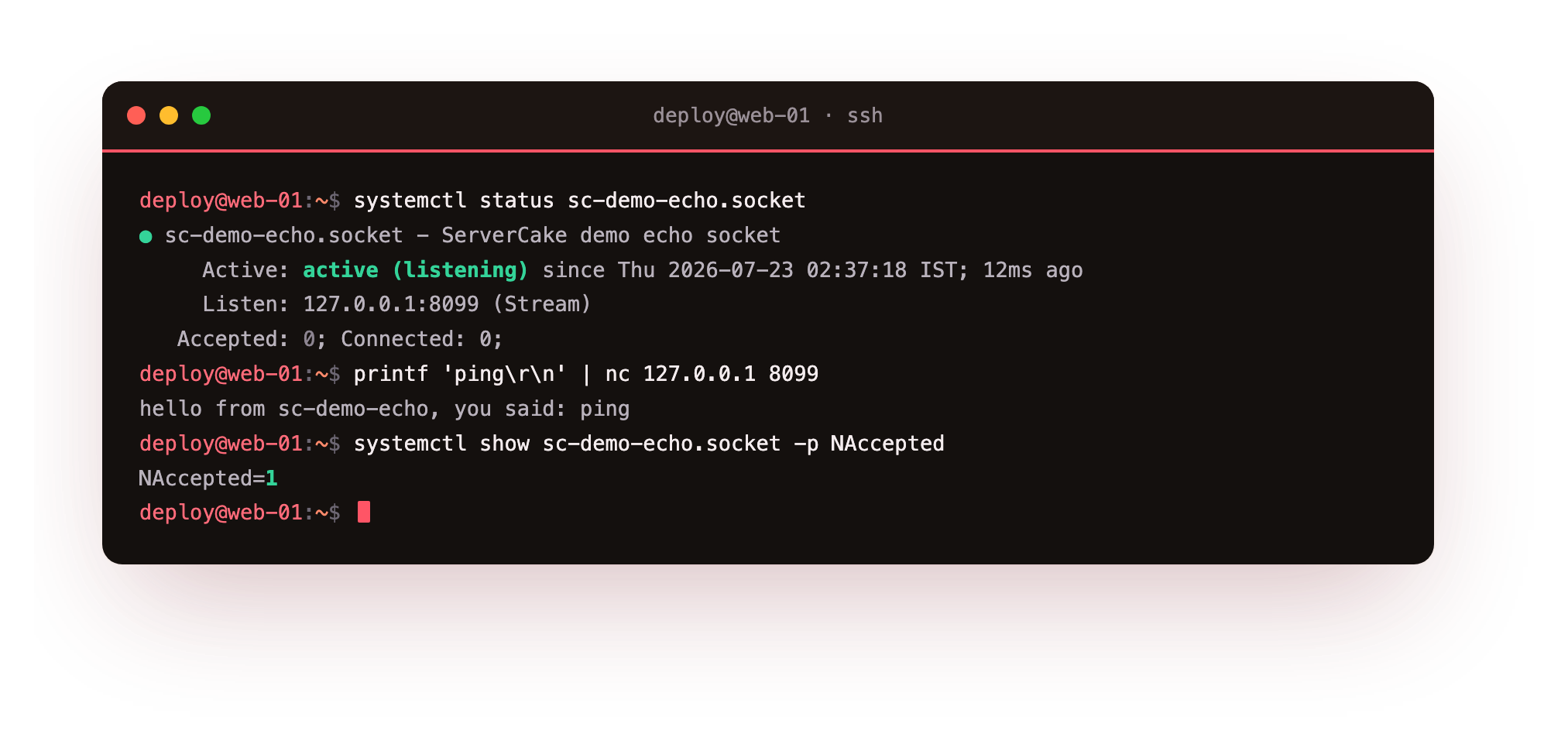
The socket is active (listening) on 127.0.0.1:8099, yet no service instance is running and the Accepted counter reads zero. systemd is holding the port on the service's behalf. Now make a single connection and watch what happens.
printf 'ping\r\n' | nc 127.0.0.1 8099
The connection returns the echo reply, and behind it systemd started a service instance to handle the request. The socket's NAccepted counter ticks up to one, and the journal records the on-demand start. The service ran only because a client arrived, which is the whole idea: a rarely-used service can sit unstarted, out of memory, costing nothing until it is needed. This socket uses Accept=yes, so each connection gets its own short-lived instance; a long-running daemon would use Accept=no and handle connections itself.
Read the socket's Accepted line before and after your connection: it should go from 0 to 1. That single tick is proof the service was not running until you connected, which is the payoff socket activation exists to give you.
What a socket can listen on
ListenStream= is not limited to a TCP port. Point it at a filesystem path and the socket becomes a unix domain socket, which is how a database or an application server accepts local connections without opening a network port at all. ListenDatagram= gives you a UDP socket for the same activation trick, and ListenFIFO= covers named pipes.
Two more options matter in practice. A unix socket takes SocketMode= and SocketUser=, so you control exactly which accounts may connect, which is tighter than a TCP port that anything on the host can reach. This is why socket units, not just services, are worth learning: they decide the front door before the service behind it even starts.
Services that run per user
Not everything belongs to root. systemctl --user runs a second systemd instance inside a login session, managing services that a normal user owns. The unit files live under ~/.config/systemd/user, and the commands mirror the system ones without sudo.
systemctl --user status sc-demo-user.service
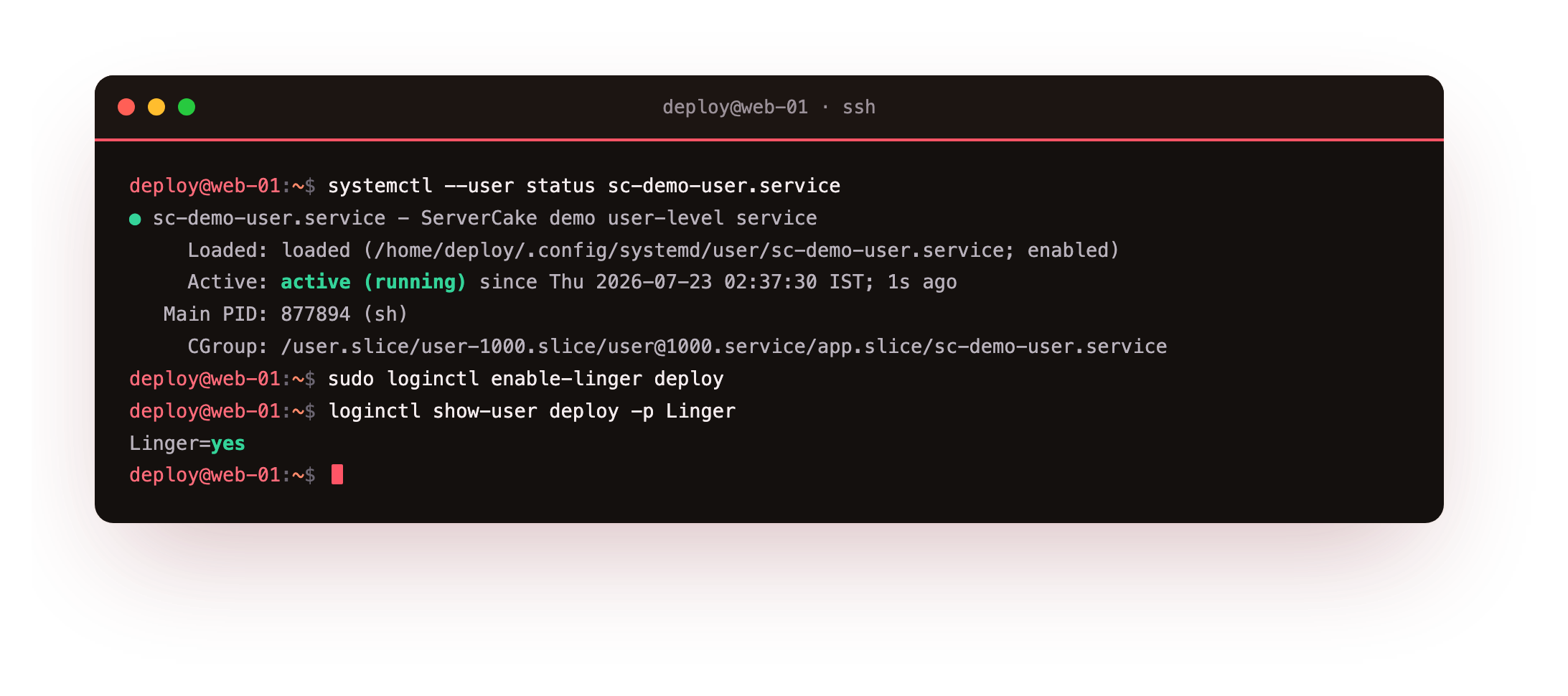
The service runs as the user, inside that user's own slice of the cgroup tree, with no root involved. This is the right home for a personal agent, a language runtime's background helper, or anything scoped to one account, and it keeps user workloads out of the system manager and out of each other's way.
Keeping user services alive with linger
A user manager normally starts when the user logs in and stops when they log out, which means a user service dies at logout. That is wrong for anything meant to keep running, like a per-user worker on a server nobody sits at. loginctl enable-linger deploy fixes it: systemd starts the user's manager at boot and keeps it running with no active session, so the user's enabled services run around the clock.
loginctl show-user deploy -p Linger reports the state, and a file under /var/lib/systemd/linger makes it persistent. Turn it off again with disable-linger. Linger is what lets a non-root account run a genuine background service without ever borrowing root's system manager.
Going further: choosing user or system
Reach for a user service when the work belongs to one account and needs no root: a personal automation, a developer's local database, or a per-user queue worker all fit, and running them under systemctl --user keeps them isolated and easy to reason about. Use a system service when the job is the machine's, needs privileges, or must start regardless of who is logged in. The two managers coexist happily; the only question is whose work it is.
Frequently asked questions
Does socket activation add latency to the first request?
Only the one-time cost of starting the service, paid by the first connection. Every later request hits the already-running service. For a rarely-used service, that trade is worth the memory saved while idle.
What is the difference between Accept=yes and Accept=no?
Accept=yes spawns a fresh service instance per connection, good for simple per-connection handlers. Accept=no starts one service that accepts all connections itself, which is how most real daemons use socket activation.
Why does my user service stop when I log out?
The user manager shuts down with your last session. Run loginctl enable-linger <user> so systemd keeps the manager running at boot, and the user's enabled services stay up after logout.
Do user services need sudo?
No, and that is the point. systemctl --user manages services owned by your account with no root, and the units live under ~/.config/systemd/user. Use a system service only when the job needs privileges.
What you can do now
You can start a service only when it is needed with a .socket unit, which you proved by watching the echo socket's Accepted counter tick from zero to one on the first connection. You can run services under systemctl --user with no root, and keep them alive past logout with loginctl enable-linger. You now know when a job belongs to a user and when it belongs to the machine.
That closes the deep dive. You started with a bare script babysat in a terminal, and across these chapters you turned it into a service that restarts itself, logs where you can find it, runs on a schedule, is sandboxed so a bug cannot escape it, is capped so it cannot starve the box, and now starts on demand or runs per user. Anything you run can be a service like that, on a slice of your own.