From "it runs" to a systemd service that behaves
In chapter one your worker became a service that survives a crash. That was one key doing the work; a systemd service that starts in the right order, recovers cleanly, and reports its state honestly takes a few more. This chapter writes those keys onto a service, then breaks it on purpose so you can watch systemd bring it back and count the retries. Get them right once and you stop thinking about the process at all.
Type=tells systemd how to decide the service is up: simple, exec, forking, oneshot, or notify.Restart=on-failurewith aRestartSec=pause recovers a crashed process without spinning the CPU.ExecStartPre=runs a check before the main process; a non-zero exit aborts the start.After=orders a unit, whileRequires=andWants=pull dependencies in. The two ideas are separate.
Choosing the right Type
The Type= key answers one question: when should systemd consider the service started? Pick the wrong value and ordering turns unreliable, because units that wait on this one start too early or too late.
simpleis the default. systemd treats the service as up the moment it forks theExecStartprocess, which fits a program that stays in the foreground, like the worker from chapter one.execis like simple but waits until the binary has actually been executed, so a bad command path fails at start time instead of silently.forkingsuits an old-style daemon that backgrounds itself; pair it withPIDFile=so systemd can follow the real process.oneshotruns a command to completion and exits, which is how setup tasks and the timers in chapter four do their work.notifywaits for the program to send a readiness signal oversd_notify, the most accurate option when the software supports it.
The restart policy, watched live
A server process will eventually die, and Restart= decides what happens next. Restart=on-failure brings the service back when it exits non-zero or is killed, while leaving a clean systemctl stop alone. RestartSec= sets the pause before each retry so a crash-on-start does not pin a core.
To see it work, this series ships a second service that fails two seconds after it starts. With Restart=on-failure and RestartSec=1, systemd keeps reviving it, and a status caught mid-cycle shows the recovery in progress.
systemctl status sc-demo-flaky.service
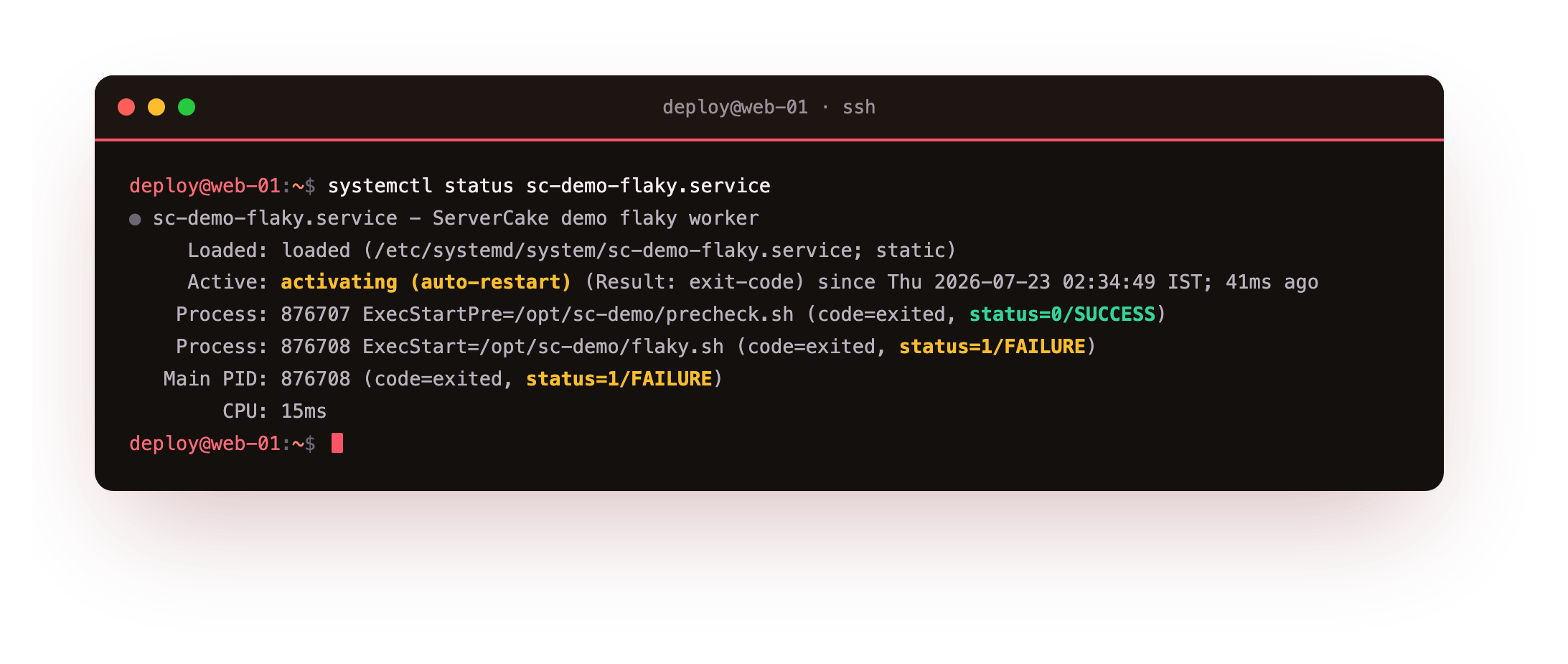
The Active line reads activating (auto-restart), and the process lines show the last run exited with status 1. Notice the ExecStartPre line above it: the pre-check ran and passed before the attempt. The journal tells the same story as a sequence rather than a snapshot.
journalctl -u sc-demo-flaky.service -n 8 -o cat
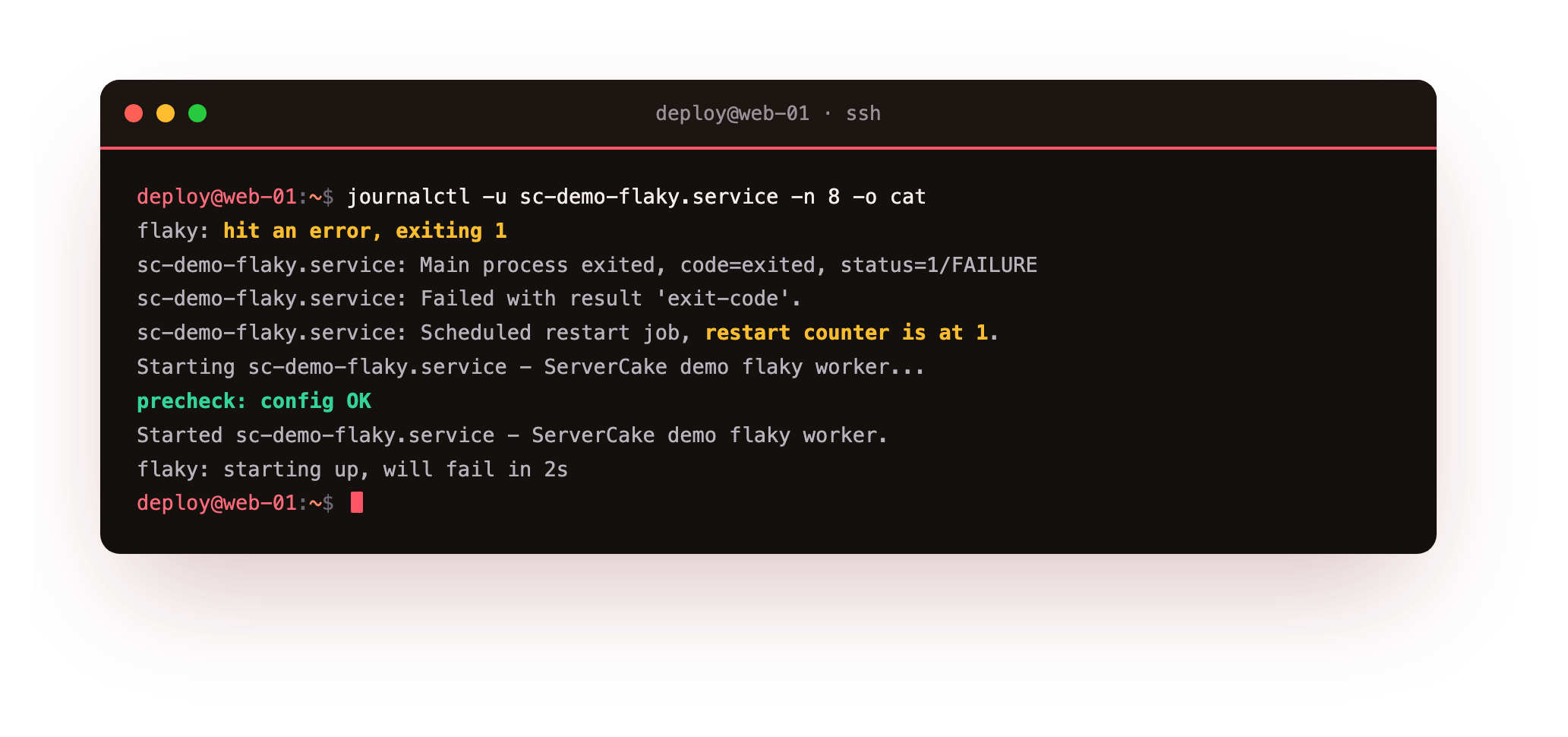
You can read the whole loop: the worker starts, hits its error and exits 1, systemd records the failure, schedules a restart with the counter climbing, and the pre-check prints again on the next attempt. A healthy restart policy turns a transient fault into a one-second blip instead of an outage.
Watch the restart counter in the journal climb across a few attempts. If your service instead lands in failed and stays there, it hit the start limit: too many failures too fast. Clear it with systemctl reset-failed sc-demo-flaky.service, then fix the cause. That limit is a safety net, not a bug.
Running work before and after the main process
Real services need setup. ExecStartPre= runs before ExecStart, and if it exits non-zero the service never starts, which makes it the right place to validate config or wait for a file. ExecStartPost= runs after the main process is up, useful for registering with a load balancer. You can list several of each and they run in order.
One rule saves confusion: a Type=simple service counts as started the moment ExecStart forks, so ExecStartPost may run before the program is truly ready. When readiness matters to the units that depend on it, use Type=notify and let the program say when it is up.
Configuration and a clean reload
Most services read settings from the environment. EnvironmentFile= points at a file of KEY=value lines, which keeps secrets and tunables out of the unit and out of your shell history. Environment= sets one variable inline for the odd case. Storing config in a file the unit reads means a change is one edit and a restart away.
Some programs can reload their config without dropping connections. ExecReload= names the command that does it, often a signal like kill -HUP $MAINPID, and systemctl reload sc-demo-web.service then runs it. A reload rereads config in place while a restart stops and starts the process, so prefer reload when the software supports it, because it avoids the brief outage a restart causes.
Going further: dependencies versus ordering
This trips up almost everyone, so it is worth stating plainly. Dependency and ordering are two separate ideas, and mixing them up is the reason a service starts before the thing it needs.
Requires=is a hard dependency. If the required unit fails to start, this unit fails too, and if the required unit stops, this one stops.Wants=is a soft dependency. systemd tries to start the wanted unit, but this one carries on even if that fails.BindsTo=is stricter thanRequires=: if the bound unit stops for any reason, including a device going away, this unit stops with it.After=andBefore=only set order. They say nothing about whether the other unit is pulled in at all.
The worker unit from chapter one pairs Wants=network-online.target with After=network-online.target. Together they mean bring the network up, and do not start me until it is ready. Drop the After and the service might start before the network exists; drop the Wants and nothing guarantees the network target is pulled in. You almost always want the pair.
Frequently asked questions
Which Restart value should I use for a web service?
Restart=on-failure is the safe default. It recovers crashes and non-zero exits but respects a deliberate stop. Add RestartSec= so repeated failures pause instead of spinning. Reach for Restart=always only when you want the service back even after a clean exit.
Why does my service start before its dependency is ready?
You probably set a dependency without ordering. Requires= or Wants= pulls a unit in but does not wait for it. Add After= to make this unit start afterwards. Dependency and ordering are deliberately independent.
My service refuses to restart. What happened?
It hit the start limit after too many rapid failures. Clear it with systemctl reset-failed name.service, then fix the underlying cause. You can widen the window with StartLimitIntervalSec and StartLimitBurst in the [Unit] section.
When is Type=notify worth the effort?
When other units depend on this one being genuinely ready, not just launched. If the program supports sd_notify, Type=notify makes ordering exact instead of hopeful, which matters for a database other services connect to at boot.
What you can do now
You can write a service that behaves: pick a Type= that matches how the program starts, set Restart=on-failure with a RestartSec= pause, gate the start on an ExecStartPre= check, and order the unit after its dependencies without confusing ordering for a dependency. You watched the flaky service recover in systemctl status and read the restart cycle in the journal, counter and all.
That journal was doing a lot of quiet work in this chapter. Every start, failure, and restart landed in it under the service name, which is why you could read the recovery at all. The next chapter makes the journal a tool you drive on purpose: filtering by unit, priority, and time, and keeping it from filling the disk: journald and journalctl in depth.