What systemd resource control gives you
One runaway process should never take the whole server down, and systemd resource control is how you stop it. Every service runs inside a cgroup, the kernel's mechanism for accounting and capping CPU, memory, and I/O. On Ubuntu 24.04 this is cgroups v2, and systemd exposes it through a handful of unit keys. This chapter caps a service two ways and proves each limit with real numbers, including a memory hog that dies against its own ceiling while the server does not so much as blink.
- Every service lives in a cgroup, so its CPU, memory, and I/O are already accounted for.
MemoryMax=is a hard cap: cross it and the cgroup out-of-memory killer stops the service, not the machine.CPUQuota=throttles a service to a fraction of one core over time.systemctl set-propertyapplies a limit live;systemd-cgtopshows usage per cgroup.
The two ways to set a limit
You can bake limits into the unit file under [Service], or apply them to a running service with systemctl set-property. The unit-file form is the one to commit; the set-property form writes a drop-in and takes effect immediately, which is handy for tightening a service that is misbehaving right now.
sudo systemctl set-property sc-demo-hog.service MemoryMax=50M
Whichever way you set it, systemctl show sc-demo-hog.service -p MemoryMax confirms the value in bytes, and the limit is enforced by the kernel on the cgroup rather than by the process choosing to behave. That distinction is the whole point of resource control.
Capping memory, and proving the kill
MemoryMax= is the hard ceiling. A service that tries to allocate past it cannot, and if it insists, the cgroup out-of-memory killer terminates it without touching the rest of the machine. There is a softer sibling, MemoryHigh=, which throttles a service by reclaiming its memory under pressure before it reaches the hard cap. Use MemoryHigh= to slow a leaker down and MemoryMax= as the wall behind it.
To prove the wall, this series ships a service that allocates ten megabytes a second forever. Capped at fifty megabytes, it does not last long.
systemctl status sc-demo-hog.service
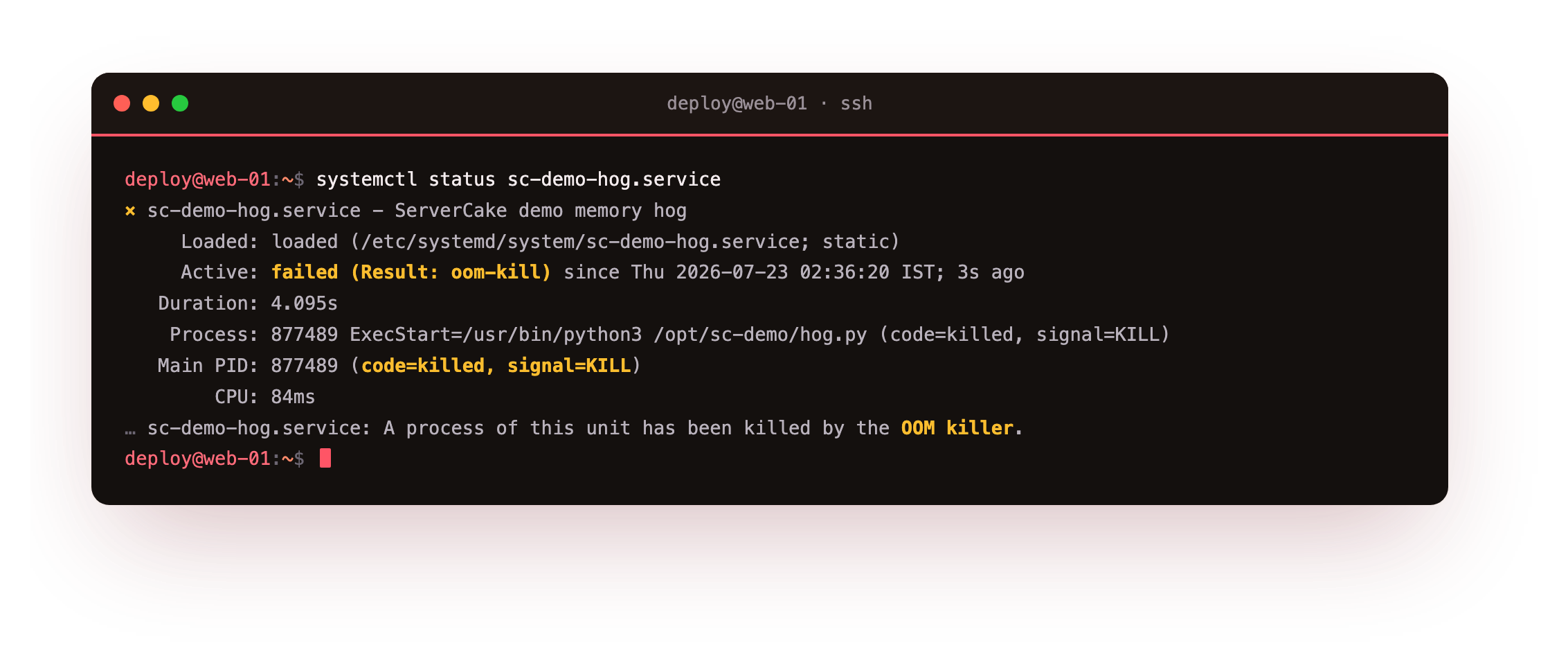
The status shows failed with the result oom-kill, and the journal notes that a process of the unit was killed by the OOM killer, terminated by signal 9 after allocating past its cap. The service died; the server did not notice. That is the guarantee you want around anything that processes untrusted or unpredictable input: it can crash itself against its own cap and nothing else suffers.
After the hog dies, run a quick check on the box itself: it should still be responsive, and systemctl status on your other services should read active. The kill was scoped to the one cgroup that overran its cap. If the whole machine had stuttered instead, that is the exact failure MemoryMax= exists to prevent.
Throttling CPU with real numbers
CPUQuota= limits how much CPU time a service may use, expressed as a percentage of one core. CPUQuota=20% means the service gets at most one fifth of a single core's time, no matter how hard it spins. The series includes a service that runs a busy loop with nothing to do but burn CPU, capped at twenty percent.
systemctl show sc-demo-burn.service -p CPUQuotaPerSecUSec
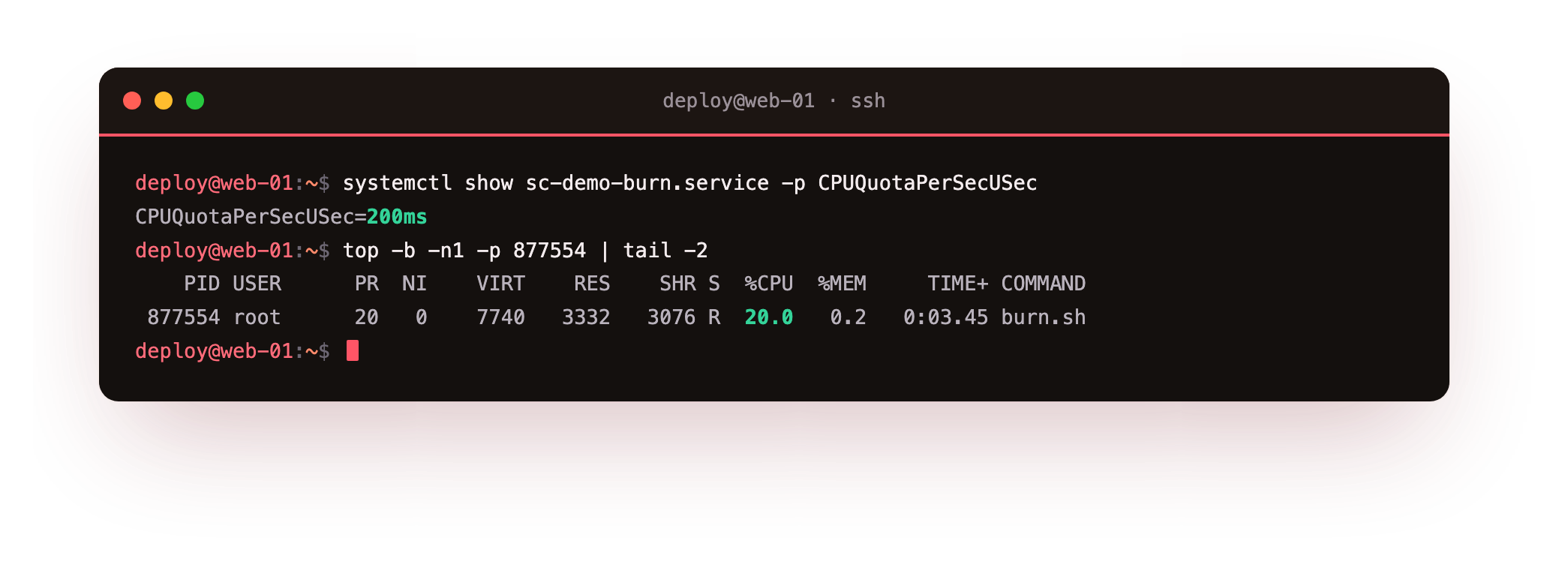
The property reads 200ms, meaning two hundred milliseconds of CPU are allowed per second, which is the twenty percent cap. Watching it live, top reports the busy loop pinned at twenty percent of one core rather than a whole one. The loop wants a full core; the quota hands it a fifth and no more. CPUWeight= is the companion for contention, setting relative shares when several services compete, while CPUQuota= sets a firm ceiling.
Watching usage and bounding a group
Static limits are half the job; you also want to see where the resources go. systemd-cgtop is top for cgroups, listing each slice and service with its live CPU percentage, memory, and I/O. It makes the hierarchy visible: services sit under system.slice, user sessions under user.slice, and the totals roll up. When a server feels slow, systemd-cgtop points at the responsible cgroup faster than scanning a flat process list, because it groups the cost the same way systemd groups the work.
You can also cap a group of services at once with a slice. A .slice unit is a cgroup you name, and services that set Slice=myapp.slice share its limits. Put MemoryMax= on the slice and the whole group is bounded together, which is how you fence a set of related workers so they cannot collectively starve the box even when no single one misbehaves. Round out the toolkit with TasksMax= to cap the process and thread count and IOWeight= to bias disk bandwidth between competing services.
Going further: which OOM killer fires
It helps to know which killer fires when memory runs low. Without a cgroup limit, memory pressure triggers the system-wide out-of-memory killer, which picks a victim across the whole machine and sometimes chooses the wrong one. With MemoryMax= set, the kernel enforces the limit inside that one cgroup, so the service that overran its cap is the process that dies.
That containment is the real benefit: a memory bug in one service becomes a restart of that service, not a lottery that might take out your database. Set MemoryMax= on anything whose appetite you do not fully trust.
Frequently asked questions
What is the difference between MemoryMax and MemoryHigh?
MemoryHigh= is a soft limit that throttles by reclaiming memory under pressure. MemoryMax= is a hard limit that triggers a cgroup OOM kill when crossed. Use High to slow a leak and Max as the hard stop.
Can CPUQuota go above 100%?
Yes, on a multi-core box. CPUQuota=200% allows up to two full cores of CPU time. The percentage is relative to a single core, so values above 100% span multiple cores.
Do I need to enable cgroups v2 on Ubuntu 24.04?
No. Ubuntu 24.04 boots with the unified cgroups v2 hierarchy by default, so MemoryMax=, CPUQuota=, and the rest work out of the box.
Does set-property survive a reboot?
Yes. systemctl set-property writes a persistent drop-in by default. Pass --runtime if you want the limit to apply only until the next reboot.
What you can do now
You can cap a service through its cgroup, enforced by the kernel rather than trust: MemoryMax= as the hard memory wall that the demo hog hit and died against while the box carried on, MemoryHigh= to throttle ahead of it, and CPUQuota= to hold a busy loop at a fraction of a core. You can watch usage with systemd-cgtop and bound a whole group of workers with a slice.
Every service so far has started at boot or on command and stayed resident. Some services need not run at all until someone connects, and some belong to a single user rather than the machine. The last chapter starts a service on demand with socket activation and runs services per user that survive logout: socket activation and user services.