Set Docker resource limits and a restart policy
Docker resource limits cap the memory and CPU a container may use, and a restart policy brings a crashed container back on its own. This chapter applies both to the running stack on Ubuntu 24.04 LTS: a memory and CPU cap you can watch docker stats enforce, and a restart policy that recovers a container when its process dies. Every figure below came off the live server.
- A memory cap stops one container starving the host, and
docker statsshows the limit next to live usage. --memoryand--cpusondocker run, ormem_limitandcpusin Compose, set the same caps.restart: unless-stoppedmakes Docker restart a container whose process exits unexpectedly.- An intentional
docker stopis not restarted, because the restart policy is for crashes, not for stops you asked for.
An unbounded container is a risk on a shared host. A memory leak in one service can push the whole machine into swap or trigger the kernel's out-of-memory killer, taking down neighbours that did nothing wrong. A limit turns that failure into a local one: the greedy container is capped, and the rest keep running.
Prerequisites
- A Docker 29.1.3 install on Ubuntu 24.04 LTS, with the Compose plugin and a sudo user.
- The app and Redis stack from the previous chapter.
Set the limits
Add caps to each service. In Compose they read as mem_limit and cpus; the same numbers on a bare docker run are --memory 256m and --cpus 0.75.
services:
  app:
    mem_limit: 256m
    cpus: 0.75
    restart: unless-stopped
  redis:
    mem_limit: 128m
    restart: unless-stopped
Recreate the stack with docker compose up -d so the new caps take effect. The cpus: 0.75 means the container may use three quarters of one core at most; the memory line is a hard ceiling the kernel enforces.
Watch the limits with docker stats
docker stats reports live usage against each container's limit. Take a single snapshot.
docker stats --no-stream --format "table {{.Name}}\t{{.MemUsage}}\t{{.CPUPerc}}\t{{.MemPerc}}"
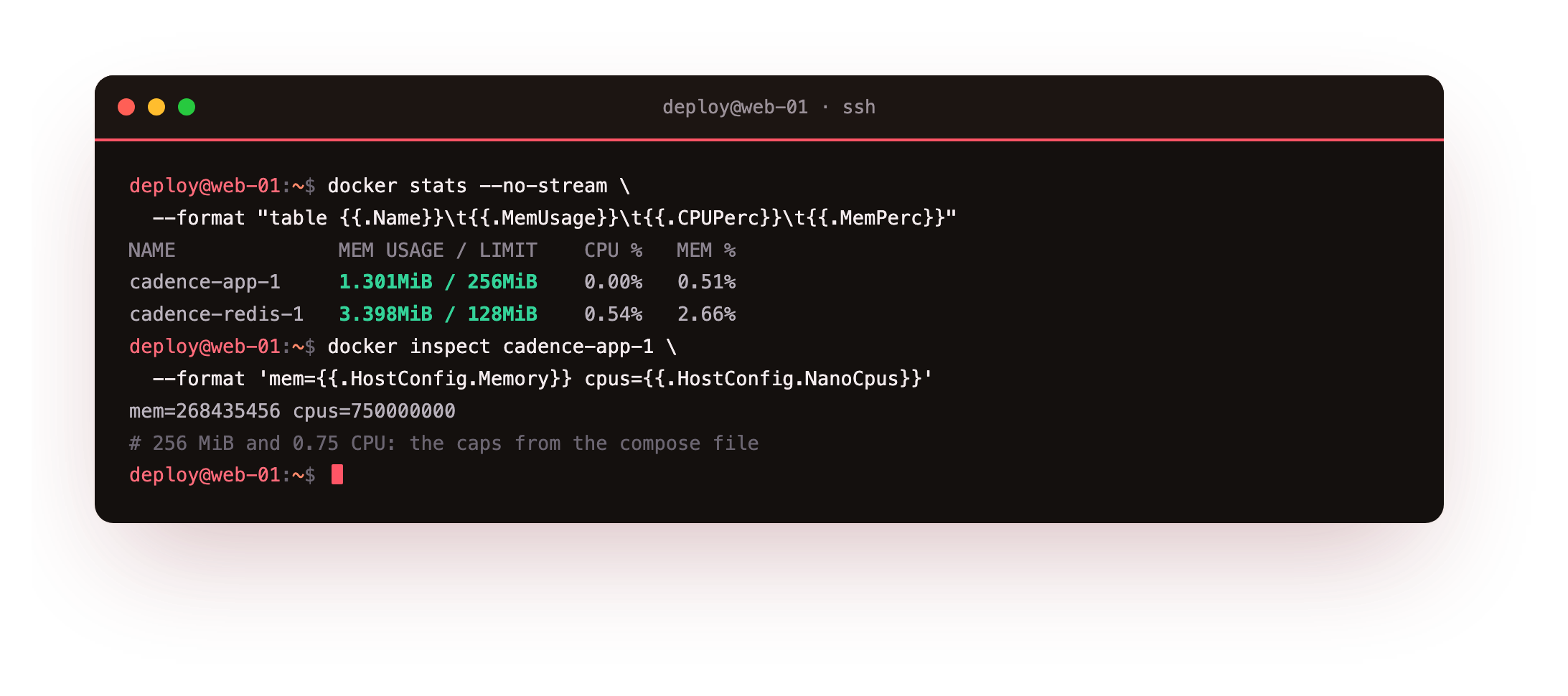
The output pairs usage with the ceiling: the app shows its memory against a 256 MiB limit and Redis against 128 MiB. Idle here, both sit far below their caps, which is what headroom should look like.
The value of the limit is not the steady state; it is the ceiling the container cannot cross even under load, so a leak is contained rather than fatal to the host. You can confirm the cap that was applied with docker inspect, which reports the memory bytes and the CPU quota Docker set on the container.
docker stats --no-stream should show each container's usage against the limit you set, the app against 256 MiB and Redis against 128 MiB. If a container shows no limit, the recreate did not pick up the change, so run docker compose up -d again so Compose applies the new caps.
Restart on crash, not on a stop you asked for
A restart policy decides what happens when a container's main process exits. Set restart: unless-stopped and watch it work by running a container that crashes on purpose.
docker run -d --name worker --restart unless-stopped alpine:3.20 \
  sh -c 'echo worker started; sleep 5; exit 1'
docker inspect worker --format '{{.RestartCount}}'
docker stop worker
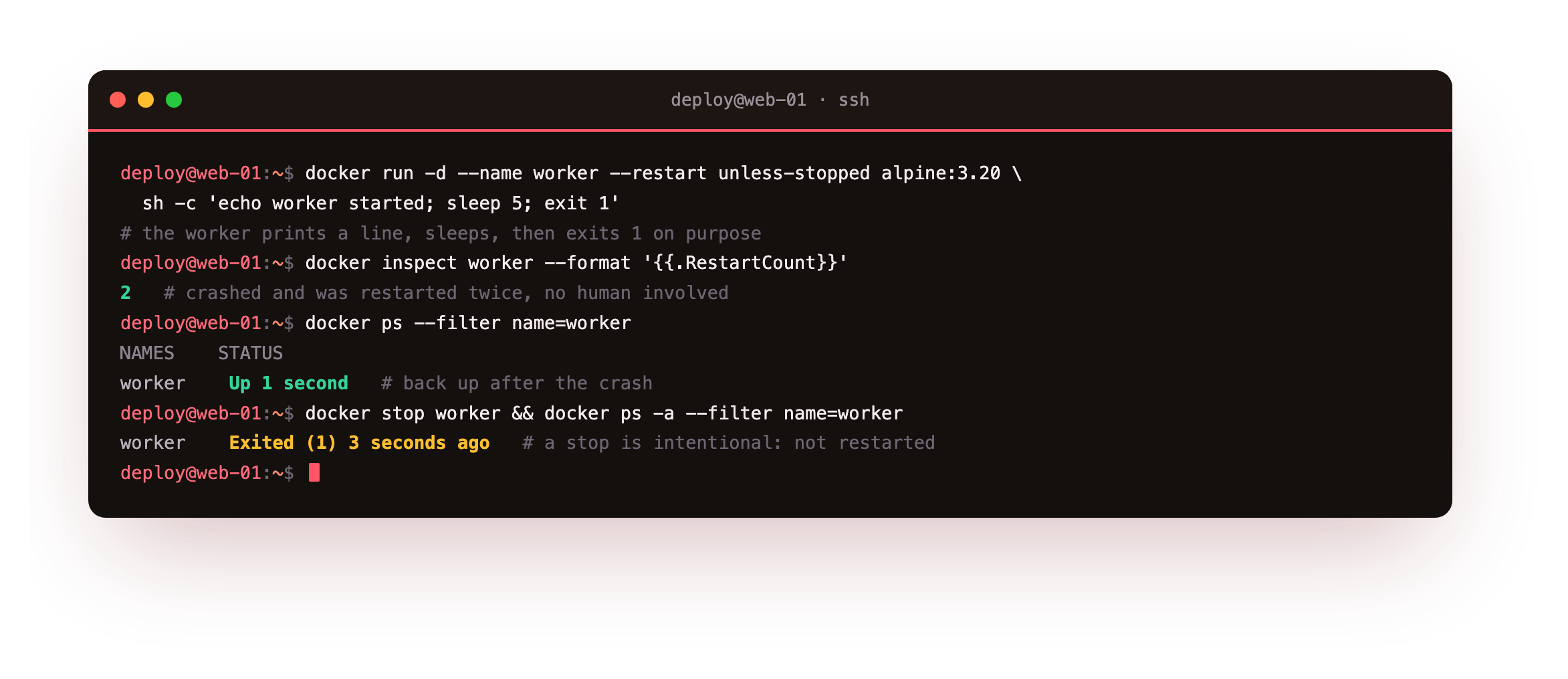
The worker prints a line, sleeps, then exits with a failure code. Docker sees the unexpected exit and starts it again, and the restart counter climbs each time. Within seconds docker ps shows the container up once more, with no human involved. This is the real production case: a process hits a bug, dies, and comes back while you sleep.
- An unexpected exit, like the crash above, is restarted under
unless-stopped. - A
docker stopordocker killis treated as intentional and is not restarted. - That is the point of the
unless-stoppedname: it recovers from failure but respects a stop you chose.
Run docker stop worker and it stays down, because you asked for it. Remove the demo container with docker rm -f worker when you are finished.
docker inspect worker --format '{{.RestartCount}}' should climb each time the process crashes, and docker ps should show the worker back up on its own within seconds. After a manual docker stop, it should stay down: that is unless-stopped behaving correctly.
Going further: size the limits from what you measure
A limit is only useful if the number is right. Set it too low and the kernel kills a healthy service; set it too high and it stops protecting the host. The honest way to pick a value is to watch docker stats under real load for a while, note the steady memory use and its peaks, then leave clear headroom above the peak. This idle app needs only a small cap, but a real workload wants a number drawn from its own measurements.
You can also change a cap without recreating the container. Running docker update --memory 512m cadence-app-1 raises the memory limit on a container that is already running, which helps when you find a service needs more room than you first gave it.
Frequently asked questions
What happens when a container hits its memory limit?
The kernel's out-of-memory killer stops the process inside the container rather than letting it consume host memory. With a restart policy in place, Docker then restarts the container. The cap keeps one service's leak from dragging down the whole host, which is the reason to set it.
Does docker kill trigger the restart policy?
No. Modern Docker treats docker stop and docker kill as intentional, so unless-stopped does not restart them. The policy exists to recover from a process that crashed on its own. To see it fire, let the container's own process exit with a failure, as the worker above does.
What is the difference between the restart policies?
no never restarts. on-failure restarts only on a non-zero exit, with an optional retry cap. always restarts even after a manual stop once the daemon restarts. unless-stopped restarts on failure but honours a stop you issued, which is the sensible default for a long-running service.
Should I set CPU limits as well as memory?
Memory is the one that turns fatal, so cap it first. A CPU limit with --cpus is useful to keep a busy service from monopolising cores on a shared host, but a container over its CPU share is throttled, not killed, so the failure mode is gentler than hitting the memory ceiling.
What you have, and what comes next
You capped the memory and CPU of each service, watched docker stats show usage against those limits, and proved a restart policy brings a crashed container back while leaving an intentional stop alone. The stack now contains a leak and recovers from a crash.
When it does crash, you will want to know why. The next chapter reads container logs, sets up log rotation so they cannot fill the disk, and uses docker stats and docker inspect to see inside a running container.