Keep data with Docker volumes, connect with a network
Docker volumes hold data outside a container so it survives the container being removed, and a user-defined network lets containers reach each other by name. This chapter proves both on Ubuntu 24.04 LTS: a named volume keeps a Redis counter across a full down and up, and a user-defined network resolves service names where the default bridge cannot. Every value below is what the live server reported.
- A named volume lives outside any container, so
docker compose downremoves the containers but keeps the data. docker compose down -vis the version that also deletes volumes, which is why the flag is separate and deliberate.- On a user-defined network, containers resolve each other by name through Docker's embedded DNS.
- The default bridge does not give name resolution, which is why Compose always creates a private network for your stack.
A container's own filesystem is disposable by design, which is a feature until it holds the one thing you cannot lose. The answer is not to make the container permanent. It is to keep the data somewhere the container's life cannot touch, and mount it back in. That place is a volume.
Prerequisites
- An Ubuntu 24.04 LTS host running Docker 29.1.3 with the Compose plugin available.
- The app and Redis stack from the Compose chapter, already running.
Prove the named volume survives
The Redis service mounts the named volume redisdata at /data, where it writes its append-only file. The app increments a counter in Redis on every page view. Read the counter, tear the whole stack down, confirm the volume is still there, bring it back, and read again.
docker exec cadence-redis-1 redis-cli GET cadence:hits
docker compose down
docker volume ls
docker compose up -d
docker exec cadence-redis-1 redis-cli GET cadence:hits
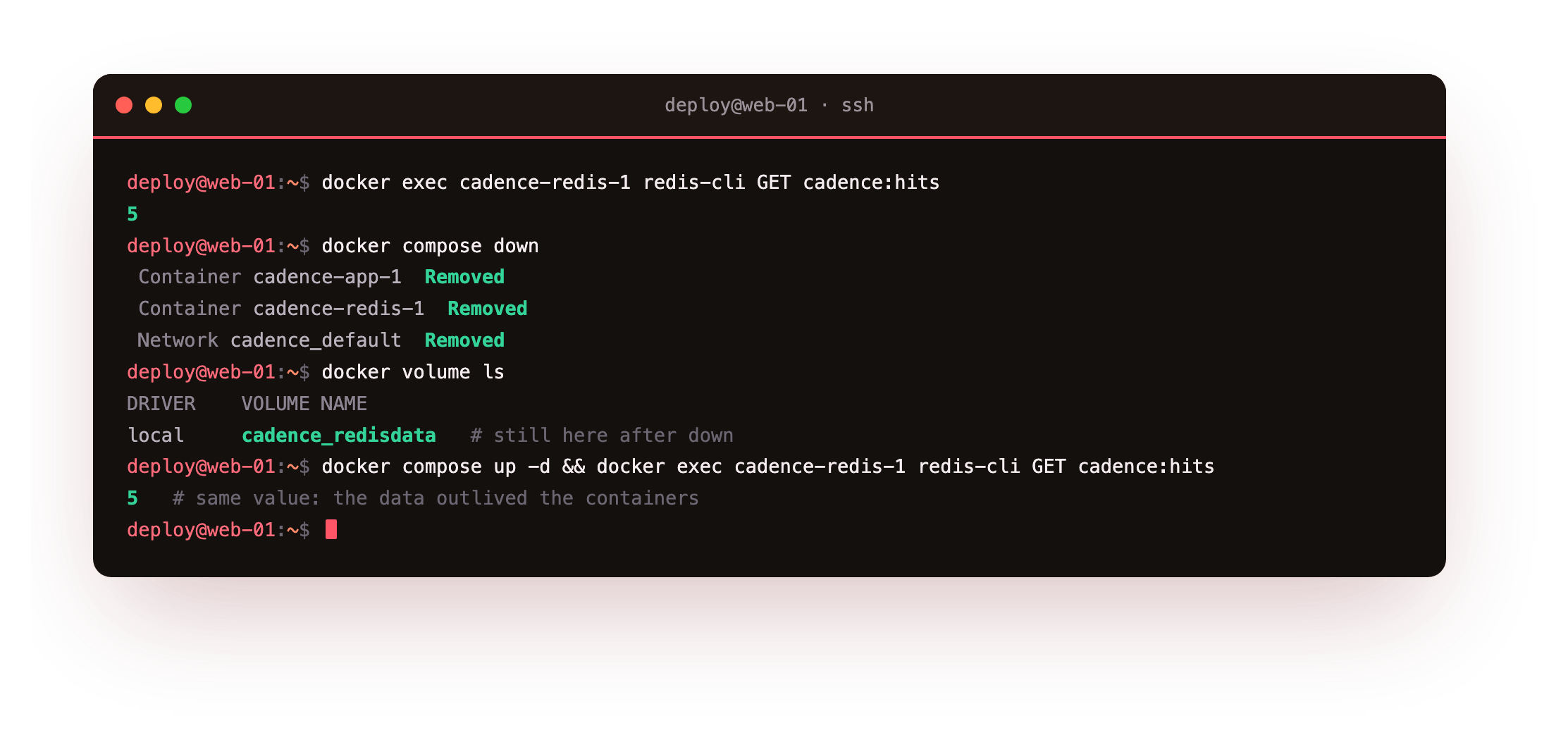
Before the teardown the counter reads 5. docker compose down stops and removes both containers and the network, and prints each removal. Yet docker volume ls still lists cadence_redisdata, because a plain down never touches volumes. After up recreates the stack, the counter still reads 5. The data outlived the containers that produced it, which is the whole point of a volume.
The counter should read the same value before the down and after the next up, and docker volume ls should still list cadence_redisdata in between. If the value reset to zero, the volume was removed, so check you ran a plain down and not down -v.
docker compose downremoves containers and the network, and keeps every named volume.docker compose down -vadditionally deletes the volumes, so the counter would reset to zero.- The
-vis deliberate and separate precisely so a routine restart can never wipe your database.
Why the default bridge is not enough
Containers on Docker's default bridge network can talk by IP but not by name, which makes them brittle, since an IP changes when a container is recreated. See it fail, then see a user-defined network fix it.
docker run -d --name box-a alpine:3.20 sleep 300
docker run -d --name box-b alpine:3.20 sleep 300
docker exec box-a ping -c 1 box-b
docker network create appnet
docker run -d --name svc-a --network appnet alpine:3.20 sleep 300
docker run -d --name svc-b --network appnet alpine:3.20 sleep 300
docker exec svc-a ping -c 2 svc-b
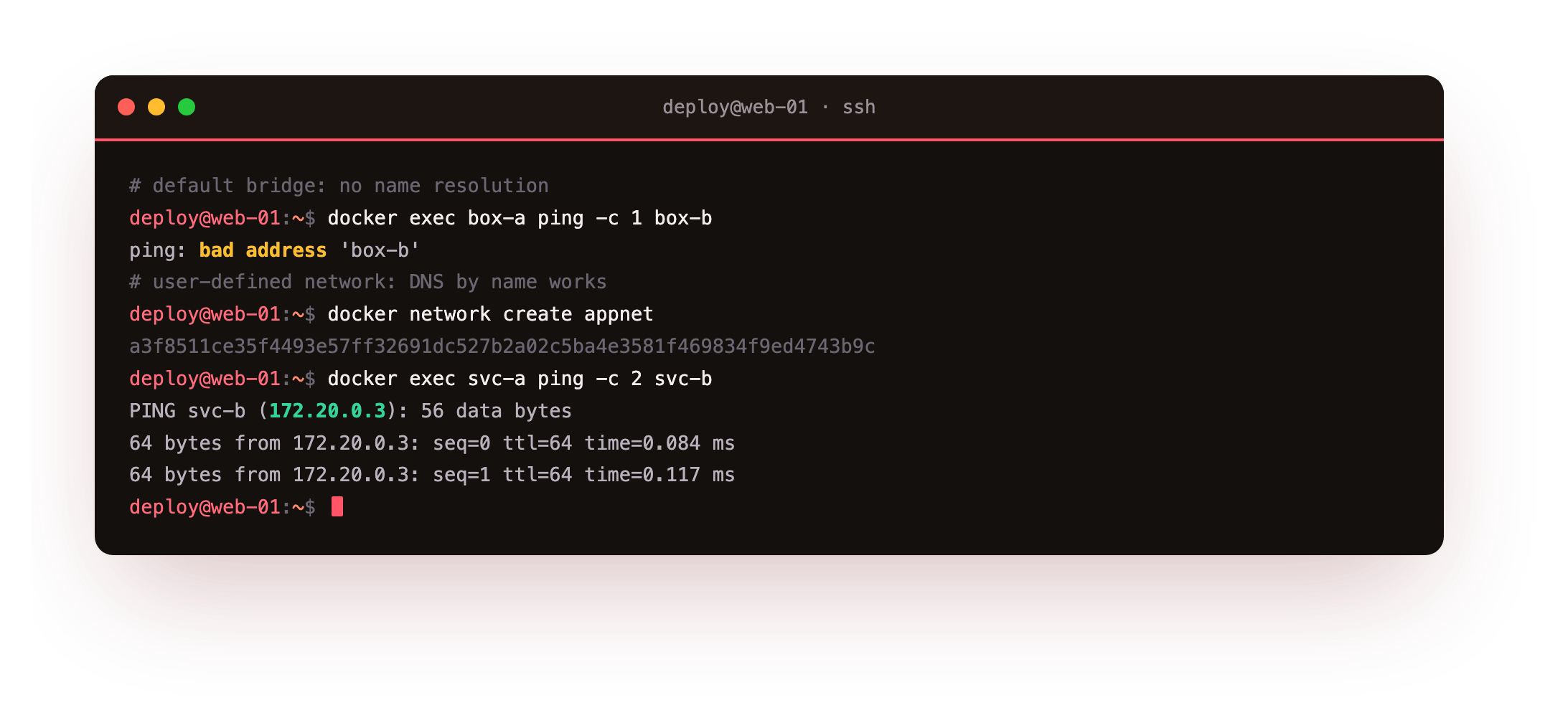
On the default bridge, box-a cannot resolve box-b: the ping returns bad address. After docker network create appnet and running two containers on it, svc-a pings svc-b by name and gets replies. The only difference is the network. A user-defined network runs Docker's embedded DNS, so a container name resolves to its current address automatically.
What Compose did for you
This is exactly why the previous chapter's app reached Redis as redis:6379 with no IP anywhere. Compose creates a user-defined network for the stack and attaches both services to it, so name resolution just works. You get the same result by hand with docker network create and --network, which is worth knowing when you run containers outside Compose. Clean up the demo containers and the network with docker rm -f and docker network rm when you are done.
On the default bridge, ping by container name should fail with bad address; on a network you made with docker network create, the same ping should get replies. If it fails on your own network too, confirm both containers were started with --network appnet and not left on the default bridge.
Going further: back up what a volume holds
A volume keeps data safe from a container's life, but not from a disk failure, so it still needs a backup. The pattern is a short throwaway container that mounts the volume and the current directory, then archives one into the other.
Running docker run --rm -v cadence_redisdata:/data -v $(pwd):/backup alpine tar czf /backup/redis.tar.gz -C /data . writes a compressed copy of the volume to the host. Restoring reverses it, extracting the archive back into a fresh volume before the stack starts. Because the data lives outside the container, this runs without touching the app at all.
Frequently asked questions
What is the difference between a named volume and a bind mount?
A named volume is managed by Docker under /var/lib/docker/volumes and is the right default for application data like a database. A bind mount maps a specific host path into the container, which suits configuration files and local development. For a datastore, a named volume keeps ownership and lifecycle in Docker's hands.
Does docker compose down delete my data?
No. A plain docker compose down removes containers and the network but keeps named volumes, so your data survives. Only docker compose down -v deletes the volumes as well. The flag is separate so an ordinary teardown cannot wipe a database by accident.
Why can't containers on the default bridge use names?
The default bridge deliberately omits the embedded DNS that resolves container names, for backward compatibility. Any network you create with docker network create, and every network Compose makes for a stack, includes that DNS, so services resolve each other by name on it.
Where does a named volume actually live?
Under /var/lib/docker/volumes on the host, in a directory Docker manages. You inspect one with docker volume inspect and back it up by archiving that data or by running a short container that mounts the volume and writes a tar to a bind mount.
What you have, and what comes next
You proved a named volume keeps its data across a full teardown, saw why the -v flag is the deliberate way to delete it, and watched a user-defined network give the name resolution the default bridge withholds. Data now outlives containers, and services find each other by name.
The stack runs, but nothing yet stops one container from eating all the memory or a crash from taking the service down for good. The next chapter adds resource limits and a restart policy, and proves both on the running stack.